
Terraform feat Terragrunt Presentation by Wyatt Zacharias 2019
Terraform (feat. Terragrunt) Presentation by Wyatt Zacharias 2019 Except where otherwise noted this work is licensed under the Creative Commons Attribution-Share. Alike 4. 0 International License. To view a copy of this license, visit http: //creativecommons. org/licenses/bysa/4. 0/.
What is Terraform • Terraform is an open source infrastructure as code tool. • Maintained by Hashi. Corp, written in GO. • Uses HCL (Hashi. Corp Configuration Language). • Is platform agnostic, capable deploying to many different providers.
Infrastructure As Code • Part of the “Dev. Ops” paradigm of infrastructure management. • Treats infrastructure as if it’s application code. • All infrastructure changes are committed to revision control (Git, SVN, etc). • Infrastructure is “self-documenting” as all details are contained in the source code.
What is Terragrunt • Terragrunt is a wrapper for the Terraform executable. • Fills in functionality gaps of the vanilla Terraform tool. • Maintained by Gruntworks, written in GO • Virtually transparent after initial configuration.

Folder Structure • Recommended practice from Gruntworks is to use a two tree folder structure. • “Live” folder contains all input data and represents actively deployed state. • “Modules” folders contains resource deployment code that will use “Live” variables.
Providers • Providers abstract each unique platforms’ functionality into common calls for Terraform to perform. • Providers define how API calls to each platform are made, and what resources can be managed on each platform. • Providers are maintained independently of the Terraform core application.
HCL Syntax • HCL uses stanzas or blocks to define resources and their variables. • Blocks use key value pairs to define input data for a resource. • Data types include bool, number, string, list, map • Interpolation syntax uses “${…}” to escape string sequences.
HCL Resource Blocks • Terraform has four primary blocks that are used. Each is declared by its type. • Resource blocks define a resource that will be created. • Variable blocks define an input variable for a module. • Output blocks define outputs of resource properties to use by other modules. • Data blocks define remote data lookups to query properties of existing resources.
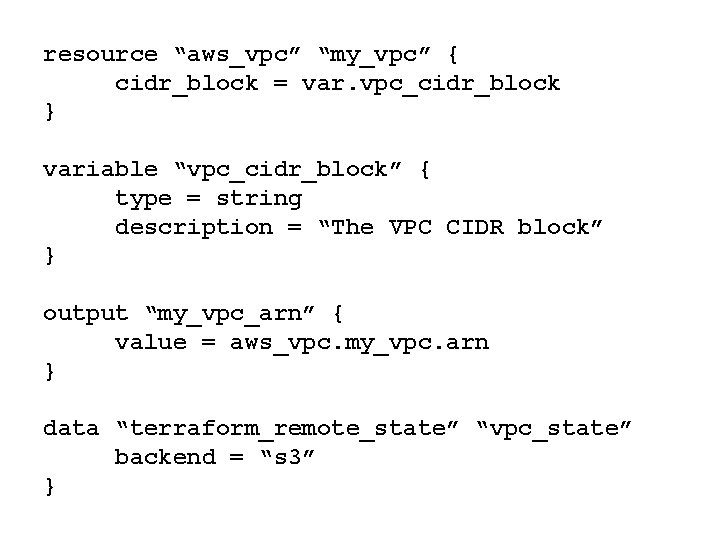
resource “aws_vpc” “my_vpc” { cidr_block = var. vpc_cidr_block } variable “vpc_cidr_block” { type = string description = “The VPC CIDR block” } output “my_vpc_arn” { value = aws_vpc. my_vpc. arn } data “terraform_remote_state” “vpc_state” backend = “s 3” }
- Slides: 9