
Term and Document Clustering Manual thesaurus generation Automatic
- Slides: 30
Term and Document Clustering • Manual thesaurus generation • Automatic thesaurus generation • Term clustering techniques: – Cliques, connected components, stars, strings – Clustering by refinement – One-pass clustering • Automatic document clustering • Hierarchies of clusters
Introduction • Our information database can be viewed as a set of documents indexed by a set of terms • This view lends itself to two types of clustering: – Clustering of terms(statistical thesaurus) – Clustering of documents • Both types of clustering are applied in the search process: – Term Clustering allows expanding searches with terms that are similar to terms mentioned by the query (increasing recall) – documents clustering allows expanding answers, by including documents that are similar to documents retrieved by a query (increasing recall).
Introduction (cont. ) • Both kinds of clustering reflect ancient concepts: – Term clusters correspond to thesaurus • thesaurus: a “dictionary”that provides for each word, not its definition, but its synonyms and antonyms – Document clusters correspond to the traditional arrangement of books in libraries by their subject • Electronic document clustering allows documents to belong to more than one cluster, whereas physical clustering is “one-dimensional”.
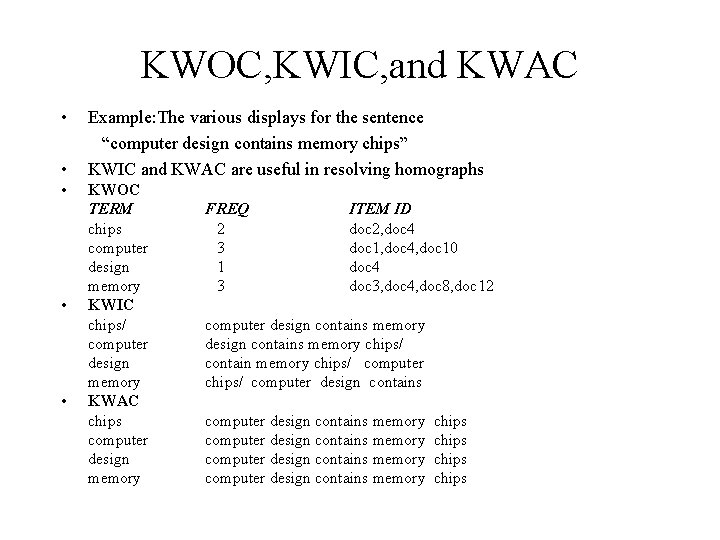
Manual Thesaurus Generation • The first step is to determine the domain of clustering This helps reduce ambiguities caused by homographs. • An important decision in the selection of words to be included; for example, avoiding words with high frequency of occurrence(and hence little information value) • The thesaurus creator uses dictionaries and various indexes that are compiled from the document collection: – KWOC(Key Word Out of Context), also called concordance – KWIC(Key Word In Context) – KWAC(Key Word And Context) • The terms selected are clustered based on word relationships, and the strength of these relationships, using the judgment of the human creator
KWOC, KWIC, and KWAC • • • Example: The various displays for the sentence “computer design contains memory chips” KWIC and KWAC are useful in resolving homographs KWOC TERM chips computer design memory KWIC chips/ computer design memory KWAC chips computer design memory FREQ 2 3 1 3 ITEM ID doc 2, doc 4 doc 1, doc 4, doc 10 doc 4 doc 3, doc 4, doc 8, doc 12 computer design contains memory chips/ contain memory chips/ computer design contains memory computer design contains memory chips
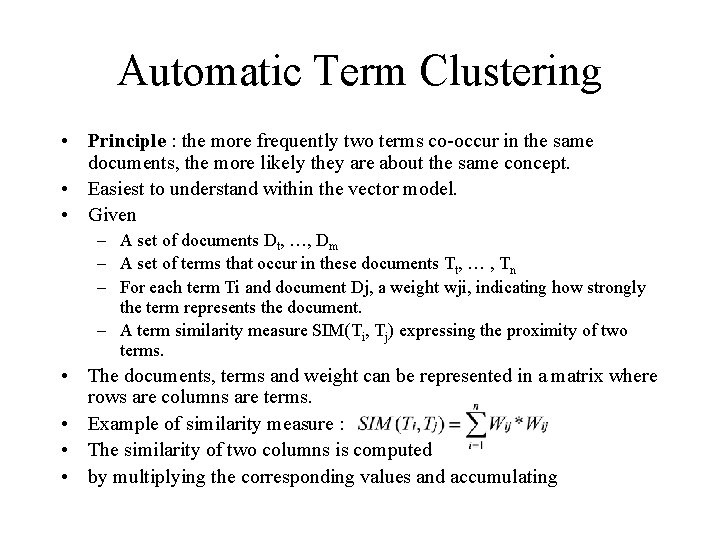
Automatic Term Clustering • Principle : the more frequently two terms co-occur in the same documents, the more likely they are about the same concept. • Easiest to understand within the vector model. • Given – A set of documents Dt, …, Dm – A set of terms that occur in these documents Tt, … , Tn – For each term Ti and document Dj, a weight wji, indicating how strongly the term represents the document. – A term similarity measure SIM(Ti, Tj) expressing the proximity of two terms. • The documents, terms and weight can be represented in a matrix where rows are columns are terms. • Example of similarity measure : • The similarity of two columns is computed • by multiplying the corresponding values and accumulating
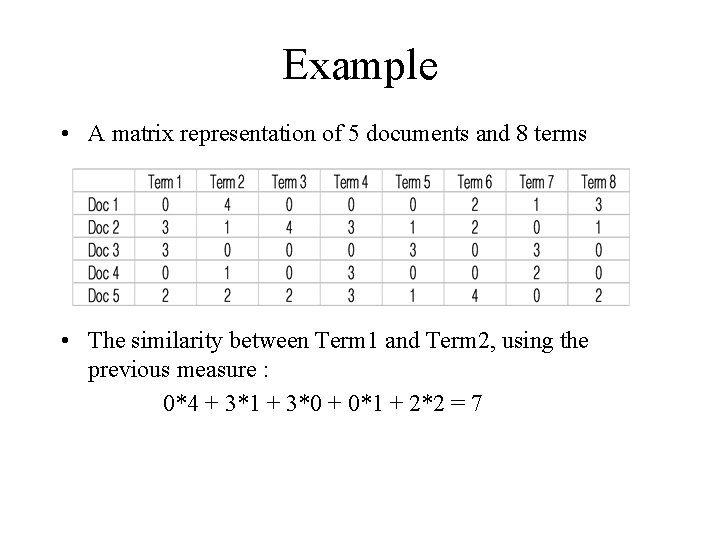
Example • A matrix representation of 5 documents and 8 terms • The similarity between Term 1 and Term 2, using the previous measure : 0*4 + 3*1 + 3*0 + 0*1 + 2*2 = 7
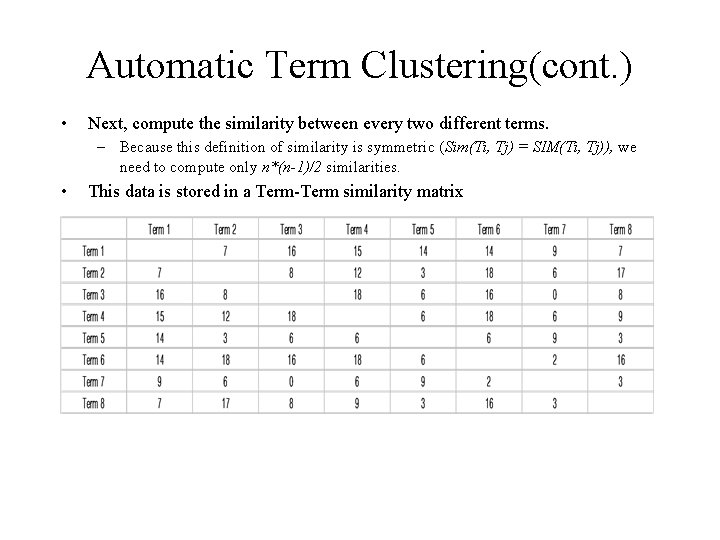
Automatic Term Clustering(cont. ) • Next, compute the similarity between every two different terms. – Because this definition of similarity is symmetric (Sim(Ti, Tj) = SIM(Ti, Tj)), we need to compute only n*(n-1)/2 similarities. • This data is stored in a Term-Term similarity matrix
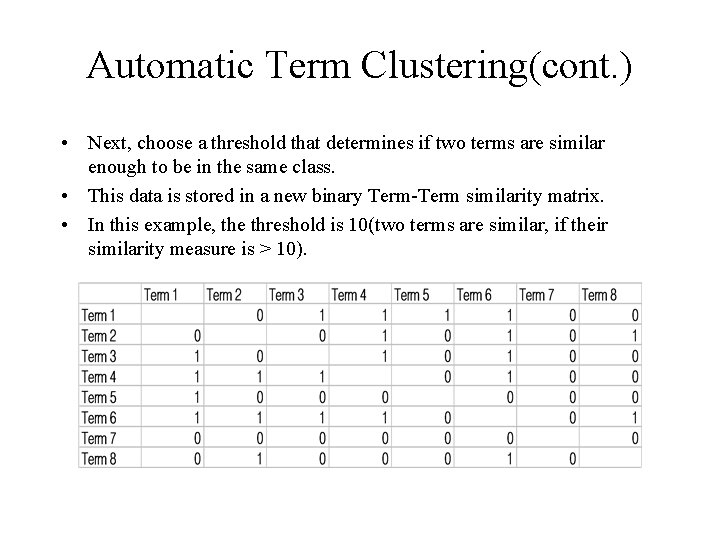
Automatic Term Clustering(cont. ) • Next, choose a threshold that determines if two terms are similar enough to be in the same class. • This data is stored in a new binary Term-Term similarity matrix. • In this example, the threshold is 10(two terms are similar, if their similarity measure is > 10).
Automatic Term Clustering(cont. ) • Finally, assign the terms to clusters. • Common algorithms : 4 Cliques 4 Connected components 4 Stars 4 Strings
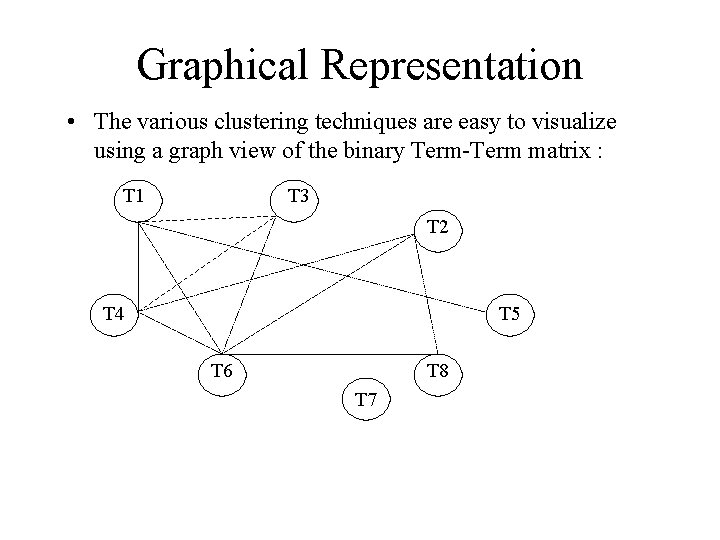
Graphical Representation • The various clustering techniques are easy to visualize using a graph view of the binary Term-Term matrix : T 1 T 3 T 2 T 4 T 5 T 6 T 8 T 7
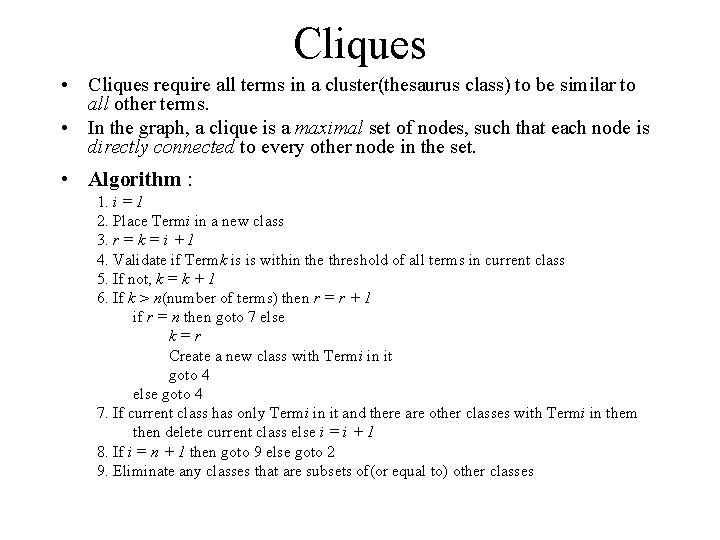
Cliques • Cliques require all terms in a cluster(thesaurus class) to be similar to all other terms. • In the graph, a clique is a maximal set of nodes, such that each node is directly connected to every other node in the set. • Algorithm : 1. i = 1 2. Place Termi in a new class 3. r = k = i + 1 4. Validate if Termk is is within the threshold of all terms in current class 5. If not, k = k + 1 6. If k > n(number of terms) then r = r + 1 if r = n then goto 7 else k=r Create a new class with Termi in it goto 4 else goto 4 7. If current class has only Termi in it and there are other classes with Termi in them then delete current class else i = i + 1 8. If i = n + 1 then goto 9 else goto 2 9. Eliminate any classes that are subsets of(or equal to) other classes
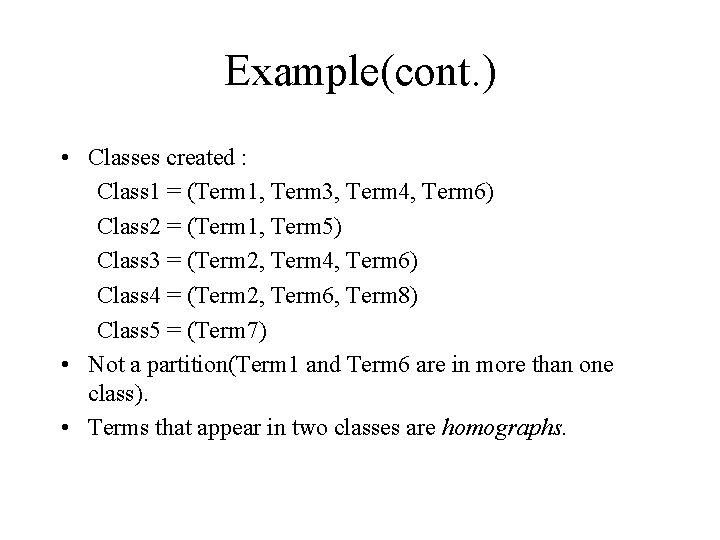
Example(cont. ) • Classes created : Class 1 = (Term 1, Term 3, Term 4, Term 6) Class 2 = (Term 1, Term 5) Class 3 = (Term 2, Term 4, Term 6) Class 4 = (Term 2, Term 6, Term 8) Class 5 = (Term 7) • Not a partition(Term 1 and Term 6 are in more than one class). • Terms that appear in two classes are homographs.
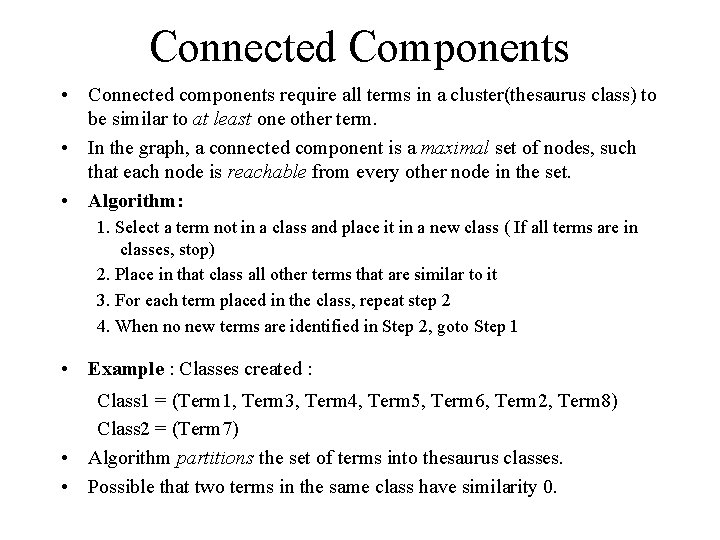
Connected Components • Connected components require all terms in a cluster(thesaurus class) to be similar to at least one other term. • In the graph, a connected component is a maximal set of nodes, such that each node is reachable from every other node in the set. • Algorithm: 1. Select a term not in a class and place it in a new class ( If all terms are in classes, stop) 2. Place in that class all other terms that are similar to it 3. For each term placed in the class, repeat step 2 4. When no new terms are identified in Step 2, goto Step 1 • Example : Classes created : Class 1 = (Term 1, Term 3, Term 4, Term 5, Term 6, Term 2, Term 8) Class 2 = (Term 7) • Algorithm partitions the set of terms into thesaurus classes. • Possible that two terms in the same class have similarity 0.
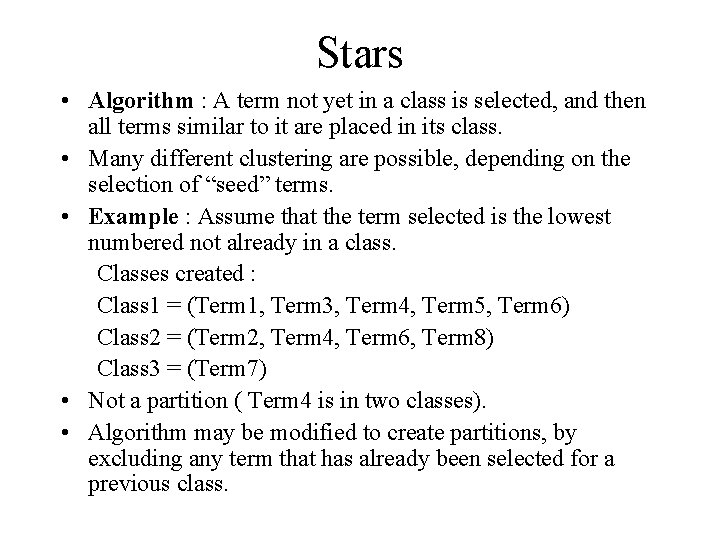
Stars • Algorithm : A term not yet in a class is selected, and then all terms similar to it are placed in its class. • Many different clustering are possible, depending on the selection of “seed” terms. • Example : Assume that the term selected is the lowest numbered not already in a class. Classes created : Class 1 = (Term 1, Term 3, Term 4, Term 5, Term 6) Class 2 = (Term 2, Term 4, Term 6, Term 8) Class 3 = (Term 7) • Not a partition ( Term 4 is in two classes). • Algorithm may be modified to create partitions, by excluding any term that has already been selected for a previous class.
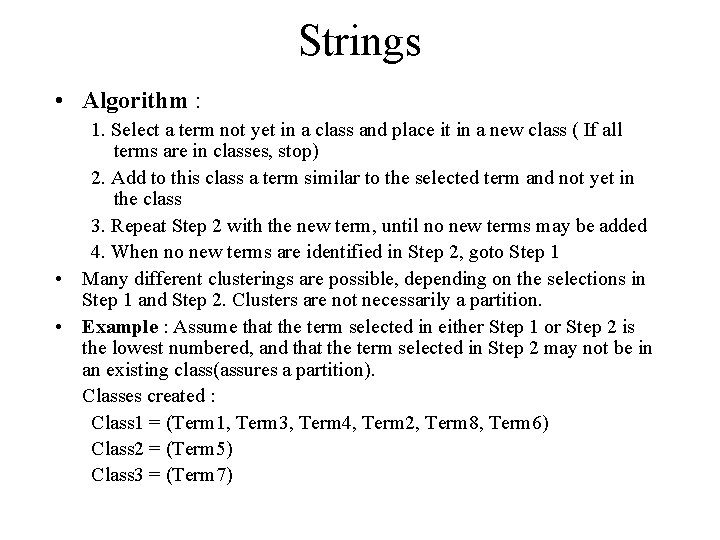
Strings • Algorithm : 1. Select a term not yet in a class and place it in a new class ( If all terms are in classes, stop) 2. Add to this class a term similar to the selected term and not yet in the class 3. Repeat Step 2 with the new term, until no new terms may be added 4. When no new terms are identified in Step 2, goto Step 1 • Many different clusterings are possible, depending on the selections in Step 1 and Step 2. Clusters are not necessarily a partition. • Example : Assume that the term selected in either Step 1 or Step 2 is the lowest numbered, and that the term selected in Step 2 may not be in an existing class(assures a partition). Classes created : Class 1 = (Term 1, Term 3, Term 4, Term 2, Term 8, Term 6) Class 2 = (Term 5) Class 3 = (Term 7)
Summary • The clique technique – Produces classes with the strongest relationship among terms. – Classes are strongly associated with concepts. Produces more classes. – Provides highest precision when used for query term expansion. –Most costly to compute.
Summary(cont) • The connected component technique – Produces classes with the weakest relationship among terms – Classes are not strongly associated with concepts. – Produces the fewest number of classes. – Maximizes recall when used for query term expansion, but can hurt precision. – Least costly to compute. • Other techniques lie between these two extremes.
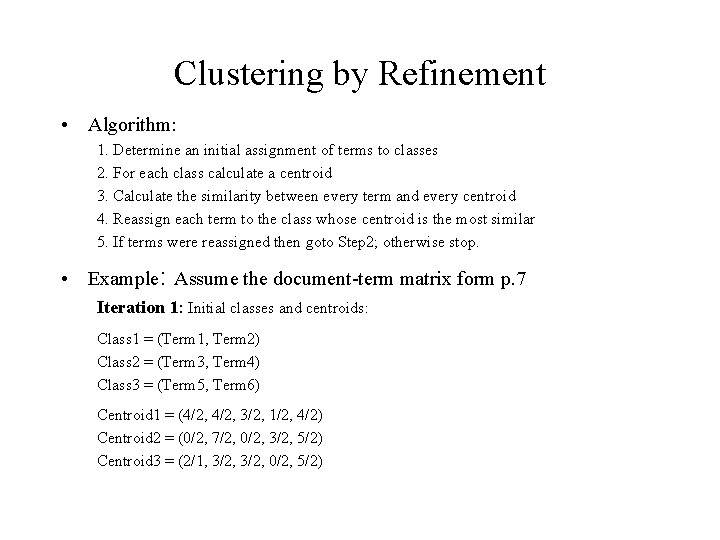
Clustering by Refinement • Algorithm: 1. Determine an initial assignment of terms to classes 2. For each class calculate a centroid 3. Calculate the similarity between every term and every centroid 4. Reassign each term to the class whose centroid is the most similar 5. If terms were reassigned then goto Step 2; otherwise stop. • Example: Assume the document-term matrix form p. 7 Iteration 1: Initial classes and centroids: Class 1 = (Term 1, Term 2) Class 2 = (Term 3, Term 4) Class 3 = (Term 5, Term 6) Centroid 1 = (4/2, 3/2, 1/2, 4/2) Centroid 2 = (0/2, 7/2, 0/2, 3/2, 5/2) Centroid 3 = (2/1, 3/2, 0/2, 5/2)
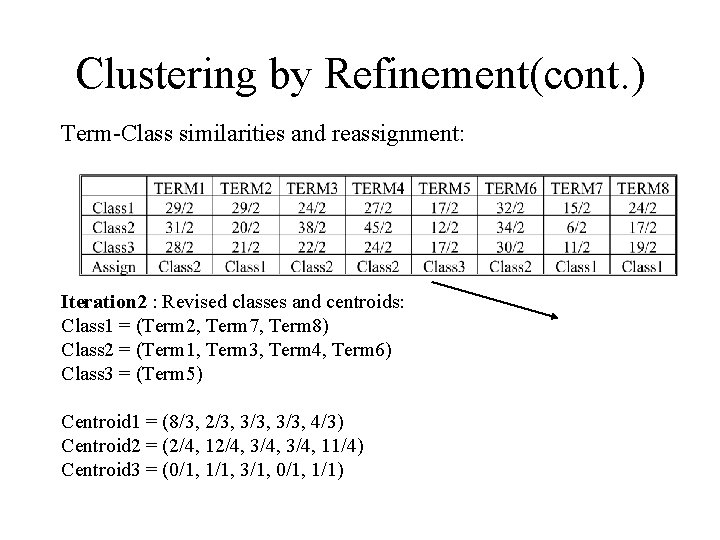
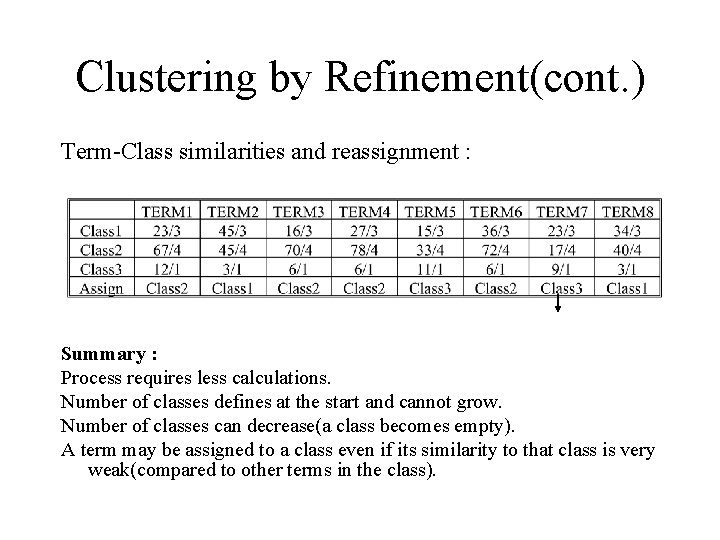
Clustering by Refinement(cont. ) Term-Class similarities and reassignment: Iteration 2 : Revised classes and centroids: Class 1 = (Term 2, Term 7, Term 8) Class 2 = (Term 1, Term 3, Term 4, Term 6) Class 3 = (Term 5) Centroid 1 = (8/3, 2/3, 3/3, 4/3) Centroid 2 = (2/4, 12/4, 3/4, 11/4) Centroid 3 = (0/1, 1/1, 3/1, 0/1, 1/1)
Clustering by Refinement(cont. ) Term-Class similarities and reassignment : Summary : Process requires less calculations. Number of classes defines at the start and cannot grow. Number of classes can decrease(a class becomes empty). A term may be assigned to a class even if its similarity to that class is very weak(compared to other terms in the class).
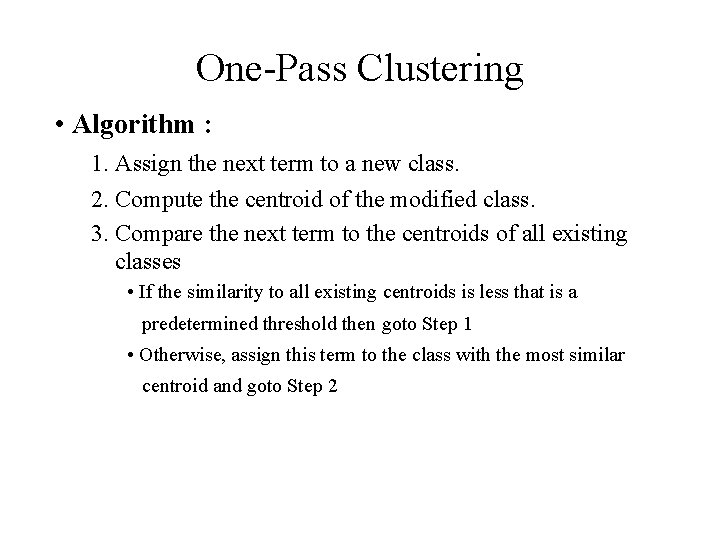
One-Pass Clustering • Algorithm : 1. Assign the next term to a new class. 2. Compute the centroid of the modified class. 3. Compare the next term to the centroids of all existing classes • If the similarity to all existing centroids is less that is a predetermined threshold then goto Step 1 • Otherwise, assign this term to the class with the most similar centroid and goto Step 2
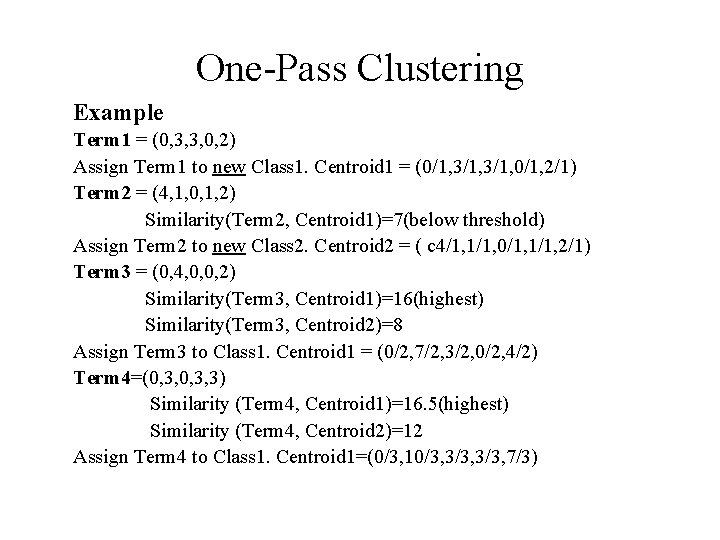
One-Pass Clustering Example Term 1 = (0, 3, 3, 0, 2) Assign Term 1 to new Class 1. Centroid 1 = (0/1, 3/1, 0/1, 2/1) Term 2 = (4, 1, 0, 1, 2) Similarity(Term 2, Centroid 1)=7(below threshold) Assign Term 2 to new Class 2. Centroid 2 = ( c 4/1, 1/1, 0/1, 1/1, 2/1) Term 3 = (0, 4, 0, 0, 2) Similarity(Term 3, Centroid 1)=16(highest) Similarity(Term 3, Centroid 2)=8 Assign Term 3 to Class 1. Centroid 1 = (0/2, 7/2, 3/2, 0/2, 4/2) Term 4=(0, 3, 3) Similarity (Term 4, Centroid 1)=16. 5(highest) Similarity (Term 4, Centroid 2)=12 Assign Term 4 to Class 1. Centroid 1=(0/3, 10/3, 3/3, 7/3)
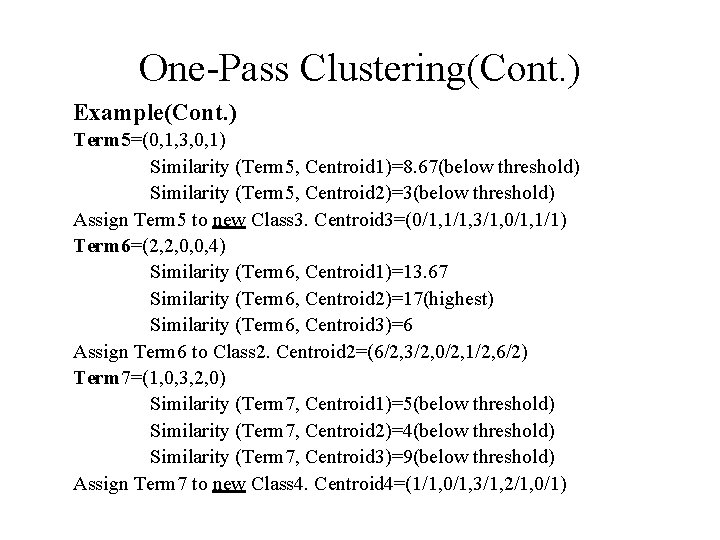
One-Pass Clustering(Cont. ) Example(Cont. ) Term 5=(0, 1, 3, 0, 1) Similarity (Term 5, Centroid 1)=8. 67(below threshold) Similarity (Term 5, Centroid 2)=3(below threshold) Assign Term 5 to new Class 3. Centroid 3=(0/1, 1/1, 3/1, 0/1, 1/1) Term 6=(2, 2, 0, 0, 4) Similarity (Term 6, Centroid 1)=13. 67 Similarity (Term 6, Centroid 2)=17(highest) Similarity (Term 6, Centroid 3)=6 Assign Term 6 to Class 2. Centroid 2=(6/2, 3/2, 0/2, 1/2, 6/2) Term 7=(1, 0, 3, 2, 0) Similarity (Term 7, Centroid 1)=5(below threshold) Similarity (Term 7, Centroid 2)=4(below threshold) Similarity (Term 7, Centroid 3)=9(below threshold) Assign Term 7 to new Class 4. Centroid 4=(1/1, 0/1, 3/1, 2/1, 0/1)
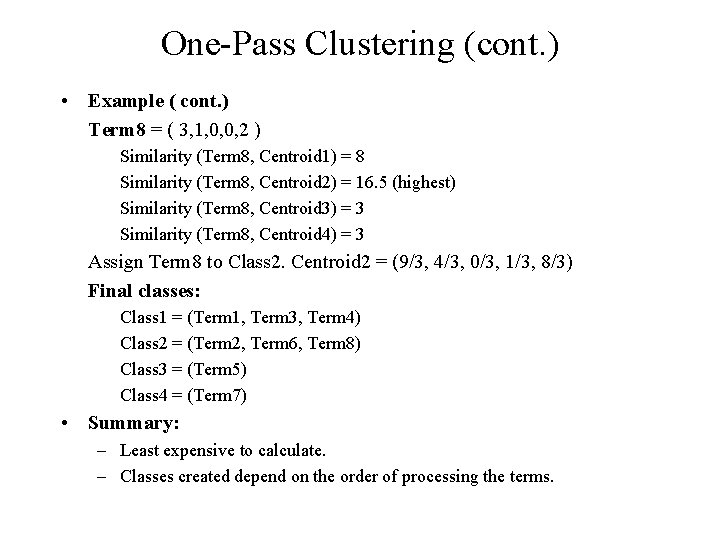
One-Pass Clustering (cont. ) • Example ( cont. ) Term 8 = ( 3, 1, 0, 0, 2 ) Similarity (Term 8, Centroid 1) = 8 Similarity (Term 8, Centroid 2) = 16. 5 (highest) Similarity (Term 8, Centroid 3) = 3 Similarity (Term 8, Centroid 4) = 3 Assign Term 8 to Class 2. Centroid 2 = (9/3, 4/3, 0/3, 1/3, 8/3) Final classes: Class 1 = (Term 1, Term 3, Term 4) Class 2 = (Term 2, Term 6, Term 8) Class 3 = (Term 5) Class 4 = (Term 7) • Summary: – Least expensive to calculate. – Classes created depend on the order of processing the terms.
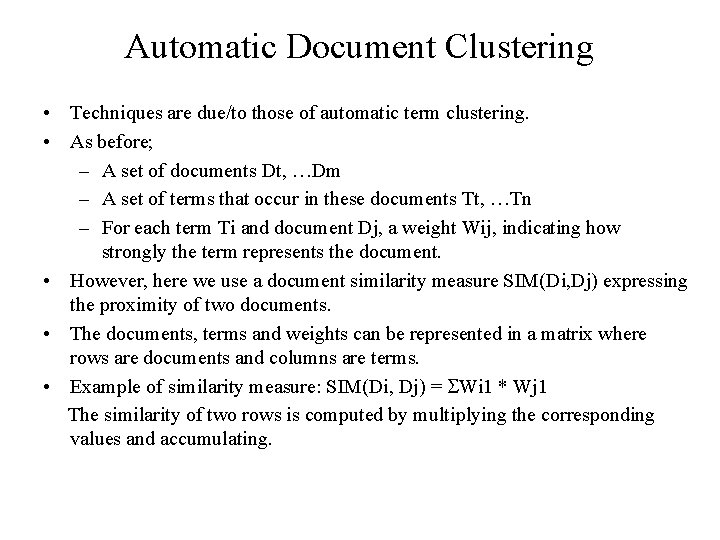
Automatic Document Clustering • Techniques are due/to those of automatic term clustering. • As before; – A set of documents Dt, …Dm – A set of terms that occur in these documents Tt, …Tn – For each term Ti and document Dj, a weight Wij, indicating how strongly the term represents the document. • However, here we use a document similarity measure SIM(Di, Dj) expressing the proximity of two documents. • The documents, terms and weights can be represented in a matrix where rows are documents and columns are terms. • Example of similarity measure: SIM(Di, Dj) = Wi 1 * Wj 1 The similarity of two rows is computed by multiplying the corresponding values and accumulating.
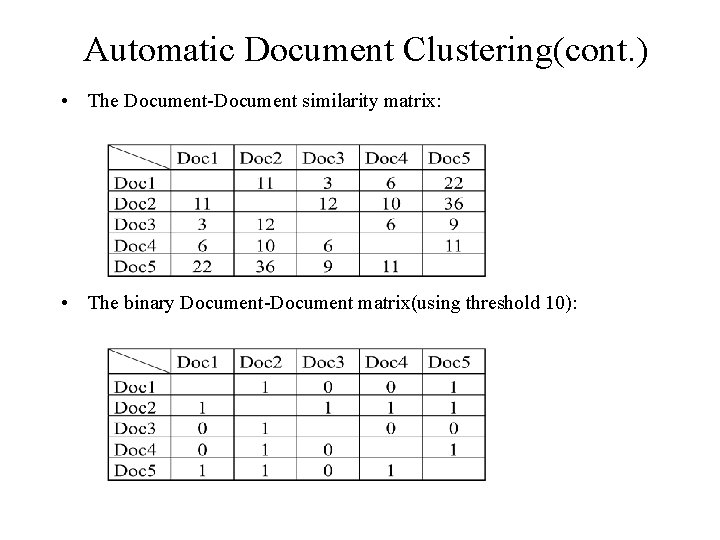
Automatic Document Clustering(cont. ) • The Document-Document similarity matrix: • The binary Document-Document matrix(using threshold 10):
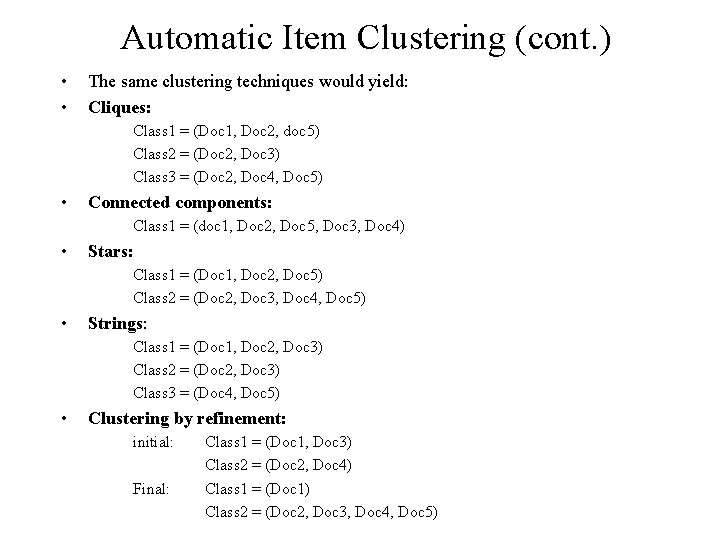
Automatic Item Clustering (cont. ) • • The same clustering techniques would yield: Cliques: Class 1 = (Doc 1, Doc 2, doc 5) Class 2 = (Doc 2, Doc 3) Class 3 = (Doc 2, Doc 4, Doc 5) • Connected components: Class 1 = (doc 1, Doc 2, Doc 5, Doc 3, Doc 4) • Stars: Class 1 = (Doc 1, Doc 2, Doc 5) Class 2 = (Doc 2, Doc 3, Doc 4, Doc 5) • Strings: Class 1 = (Doc 1, Doc 2, Doc 3) Class 2 = (Doc 2, Doc 3) Class 3 = (Doc 4, Doc 5) • Clustering by refinement: initial: Final: Class 1 = (Doc 1, Doc 3) Class 2 = (Doc 2, Doc 4) Class 1 = (Doc 1) Class 2 = (Doc 2, Doc 3, Doc 4, Doc 5)
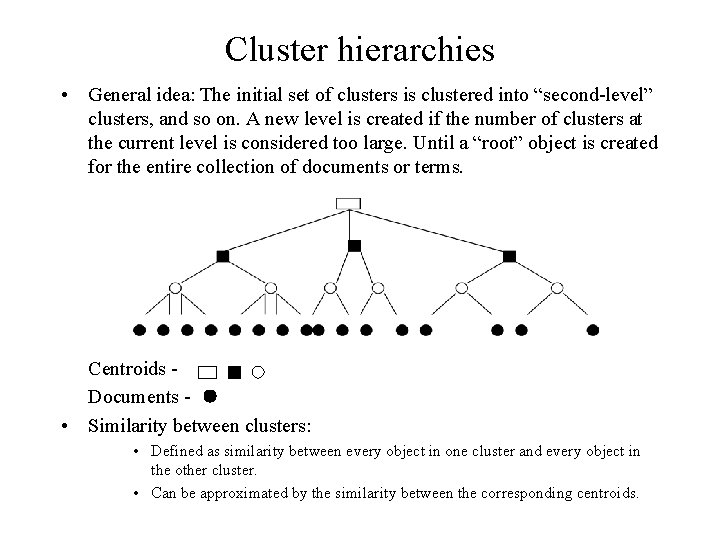
Cluster hierarchies • General idea: The initial set of clusters is clustered into “second-level” clusters, and so on. A new level is created if the number of clusters at the current level is considered too large. Until a “root” object is created for the entire collection of documents or terms. Centroids Documents • Similarity between clusters: • Defined as similarity between every object in one cluster and every object in the other cluster. • Can be approximated by the similarity between the corresponding centroids.
Cluster hierarchies(cont. ) • Benefits: – Reduces search overhead by performing top-down searches, where at each level only the centroids of clusters are compared with the search object. – Having found an object of interest, users can expand the search, to see other objects in the containing cluster (this holds for nonhierarchical clustering as well). – Can be used to provide a compact visual representation of the information space. • Practicality: – More useful for creation document hierarchies than for creation term hierarchies. – Automatic creation of term hierarchies(hierarchical statistical thesauri 0 introduces too many errors.