
Telecommunications and Networking Network Topologies Copyright Texas Education
- Slides: 32
Telecommunications and Networking Network Topologies Copyright © Texas Education Agency, 2013. All rights reserved. 1
What is Topology? l Physical or logical map of devices on a network l l Physical refers to where each device is physically located and how they are connected to each other Logical refers to how data is transmitted from one node to another on the network Copyright © Texas Education Agency, 2013. All rights reserved. 2
Topology l l When the word topology is used by itself, we typically mean the physical topology Four major topology designs l l Bus Ring Star Mesh Copyright © Texas Education Agency, 2013. All rights reserved. 3
Not this… BUS Copyright © Texas Education Agency, 2013. All rights reserved. 4
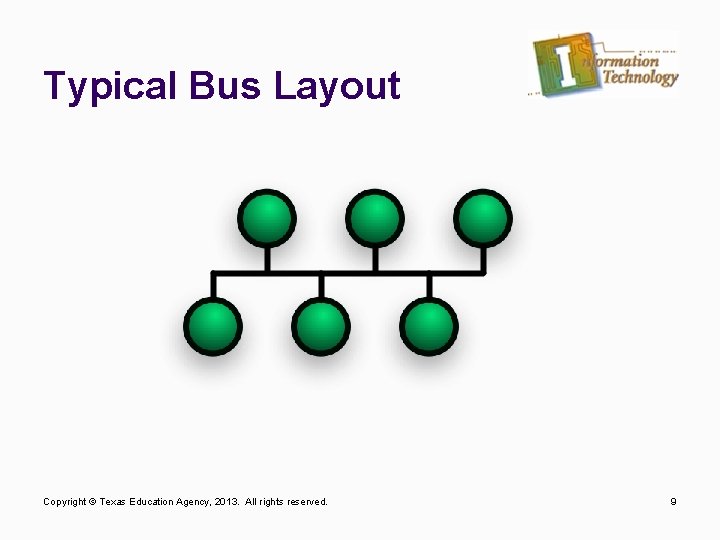
Bus Topology l l Single cable that connects all nodes on a network Each node is connected to a common cable Uses least amount of cable compared to other topologies Often used as a backbone to link other topologies Copyright © Texas Education Agency, 2013. All rights reserved. 5
Bus Topology Cont’d. l Requires a terminator at one end a grounded resistor at the other l l If terminator is missing, you experience signal bounce Supports only one channel for communication Copyright © Texas Education Agency, 2013. All rights reserved. 6
Bus Topology Cont’d. l Pros l l l Inexpensive Simple to set up Cons l l No fault tolerance Not scalable Not practical for more than 10 workstations Difficult to troubleshoot l l Single point of failure 5 -3 -3 rule Copyright © Texas Education Agency, 2013. All rights reserved. 7
Use a Bus if… l l l Expense is a major issue A temporary network is required until the primary network is completed and you must have communications You want to install a backbone to connect two networks Copyright © Texas Education Agency, 2013. All rights reserved. 8
Typical Bus Layout Copyright © Texas Education Agency, 2013. All rights reserved. 9
Not this… RING Copyright © Texas Education Agency, 2013. All rights reserved. 10
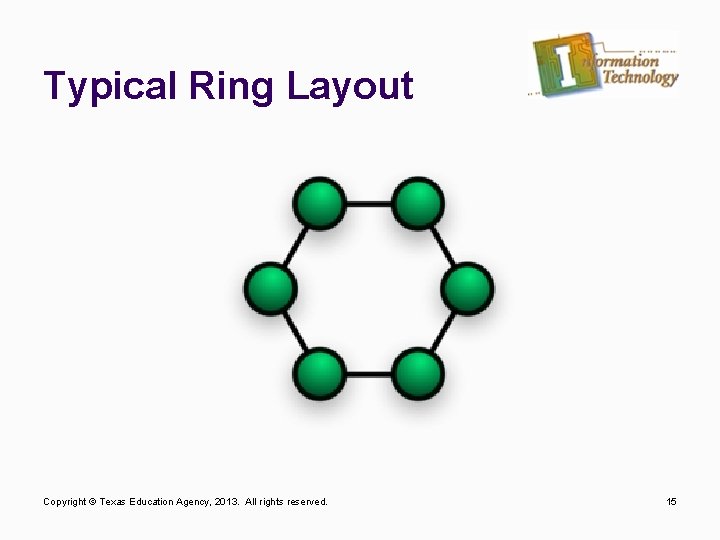
Ring Topology l Network forms a circle l l l Data is (typically) transmitted clockwise l l l Unidirectional Each workstation acts as a repeater l l First node connects to second node Last node connects to first node Active topology Typically Uses TP or Fiber cabling No fault tolerance Copyright © Texas Education Agency, 2013. All rights reserved. 11
Ring Topology Cont’d. l Pros l l Organized in terms of data transmission Design is simple No need for server/central device Each node has equal access to resources Copyright © Texas Education Agency, 2013. All rights reserved. 12
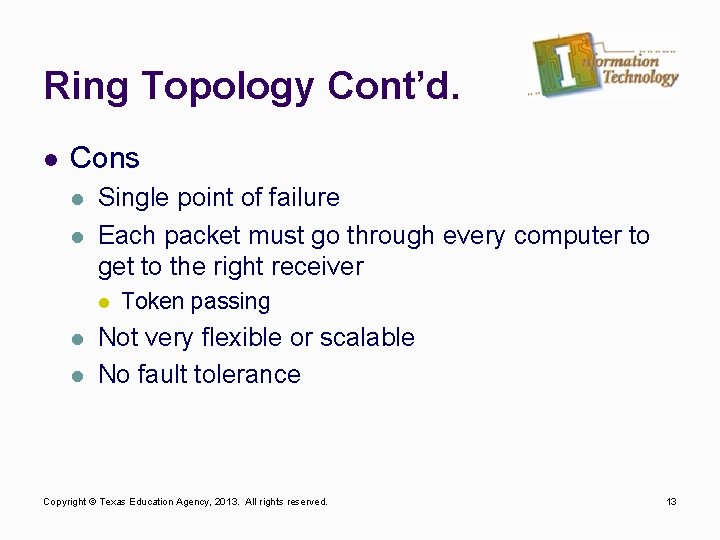
Ring Topology Cont’d. l Cons l l Single point of failure Each packet must go through every computer to get to the right receiver l l l Token passing Not very flexible or scalable No fault tolerance Copyright © Texas Education Agency, 2013. All rights reserved. 13
Use a Ring if… l You have a small network that will not expand l l 10 nodes or less You do not require a central device to manage network Copyright © Texas Education Agency, 2013. All rights reserved. 14
Typical Ring Layout Copyright © Texas Education Agency, 2013. All rights reserved. 15
Not this… STAR Copyright © Texas Education Agency, 2013. All rights reserved. 16
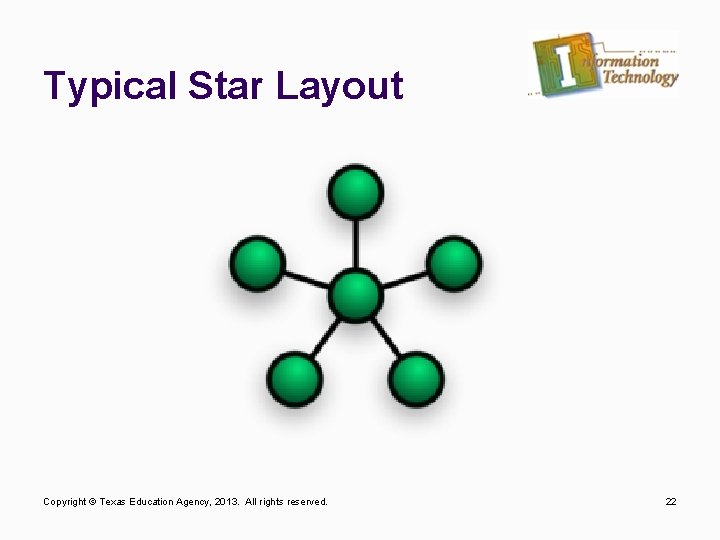
Star Topology l Every node is connected to a central device l l l Single cable only connects two devices; node to central device Typically built with TP or fiber Supports maximum of 1024 addressable nodes per segment l l More users = slower performance Uses switches to subdivide segments Copyright © Texas Education Agency, 2013. All rights reserved. 17
Star Topology Cont’d. l More fault tolerant than Bus or Ring l l Cable problem will only affect the two devices it connects Failure in central device will affect entire network l l l Single point of failure Single workstation problem will only affect that workstation Flexible and easily scalable Copyright © Texas Education Agency, 2013. All rights reserved. 18
Use Star if… l l You need fault tolerance You need maximum scalability You need/want central network management You need/want easy troubleshooting Copyright © Texas Education Agency, 2013. All rights reserved. 19
Star Topology Cont’d. l Pros l l Better performance than Bus/Ring Somewhat fault tolerant Easily scalable Centralized control Copyright © Texas Education Agency, 2013. All rights reserved. 20
Star Topology Cont’d. l Cons l l Single point of failure (central device) Cost of equipment/installation More cable required than Bus or Ring Performance and number of nodes supported dependent on central device Copyright © Texas Education Agency, 2013. All rights reserved. 21
Typical Star Layout Copyright © Texas Education Agency, 2013. All rights reserved. 22
Not this… MESH Copyright © Texas Education Agency, 2013. All rights reserved. 23
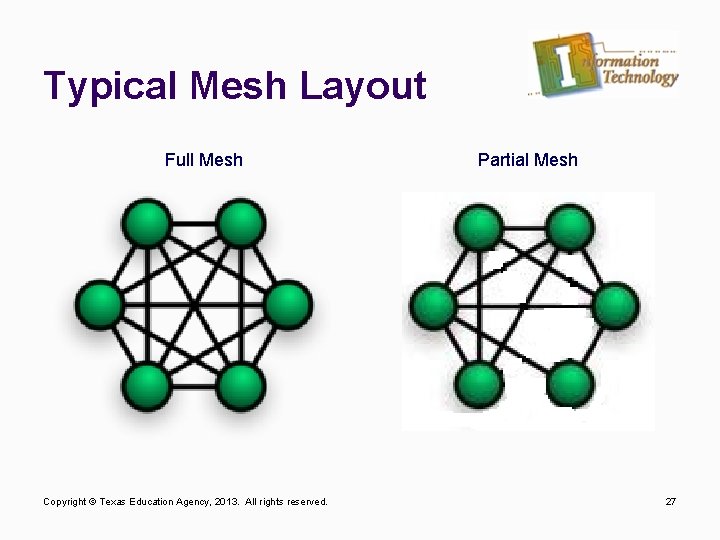
Mesh Topology l l Each device is connected to every other device on the network Extremely fault tolerant l l l Highest fault tolerance of all topologies Easy to troubleshoot problems Not easily scalable Copyright © Texas Education Agency, 2013. All rights reserved. 24
Mesh Topology Cont’d. l l l If a data pathway becomes overloaded or breaks, the network can re-route the data over a different pathway Central device is optional EXPENSIVE Copyright © Texas Education Agency, 2013. All rights reserved. 25
Use Mesh if… l l Constant network connectivity is critical to your business/environment You have large-scale data transmission l Video surveillance Copyright © Texas Education Agency, 2013. All rights reserved. 26
Typical Mesh Layout Full Mesh Copyright © Texas Education Agency, 2013. All rights reserved. Partial Mesh 27
Summary l l l Logical topology represents how the data is transmitted around the network Physical topology represents the physical layout of the network Four major types of networks l l Bus Ring Star Mesh Copyright © Texas Education Agency, 2013. All rights reserved. 28
Summary Cont’d. l Bus l l l Forms a line Easy to build Inexpensive Not fault tolerant Single cable connects all nodes Single point of failure Copyright © Texas Education Agency, 2013. All rights reserved. 29
Summary Cont’d. l Ring l l l Forms a circle Easy to build Inexpensive Not fault tolerant Single cable connects all nodes Single point of failure Copyright © Texas Education Agency, 2013. All rights reserved. 30
Summary Cont’d. l Star l l l All nodes connect to a central device More fault tolerant than Bus or Ring Easily scalable Easy to troubleshoot Expensive Single point of failure Copyright © Texas Education Agency, 2013. All rights reserved. 31
Summary Cont’d. l Mesh l l l l Every device is connected to every other device Extremely fault tolerant Easy to troubleshoot problems Large-scale data transmission Extremely expensive Not easily scalable Difficult to install Copyright © Texas Education Agency, 2013. All rights reserved. 32