
TED 105 Communicating Technical Designs Sketching and Shape
- Slides: 57
TED 105: Communicating Technical Designs • Sketching and Shape Description – Straight Lines – Circles and Arcs – Proportions – Generating Technical Designs
Purpose • The main purpose of sketching is to convey ideas. Engineers have to use sketches to brainstorm ideas, as well as, to show others what they are working on or what should be designed. Sketches are also used to document measurements from the field before they are produced as solid models on the computer.
Freehand Sketching • Most original designs are first expressed on medium as a freehand sketch. • Used for: – Amplifying and clarifying – Recording verbal explanations
Technical Sketching • Engineers’ view: ability to render serviceable sketches greater value than skill to create instrument drawings • Freehand sketch should not mean crude and sloppy • Freehand sketch should be made with care and attention to proportion, clarity, and line widths.
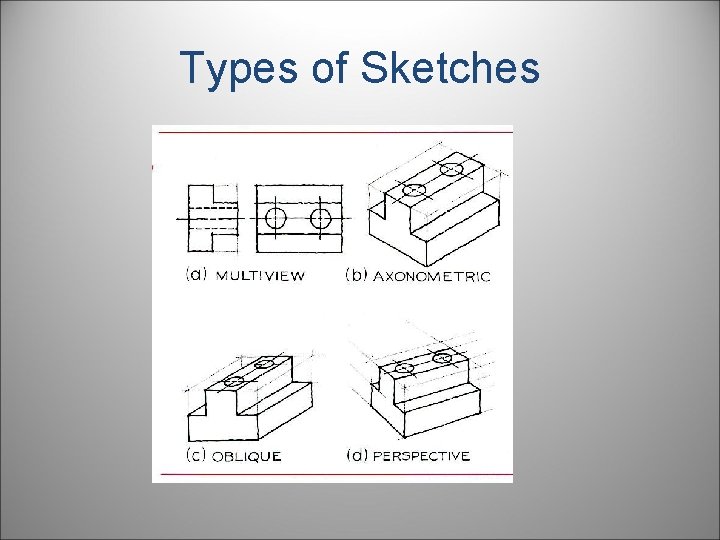
Types of Sketches
Scale • Typically not made to any scale. • Correct proportions are needed. • Size of sketch: – Optional – Determined by: • Complexity of object • Size of paper • Small objects may be enlarged to show details clearly.
Do you want to be a good sketcher?
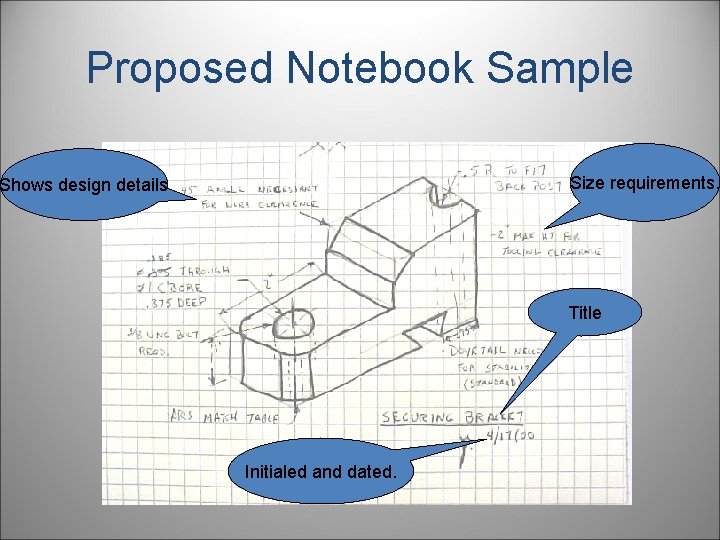
Purpose • Proper documentation in a notebook is essential. When proper documentation is made, ideas are not lost and projects can be duplicated. The sketch on the next slide is a sample from a notebook where a sketch was made and notes as well as dimensions have been documented.
Proposed Notebook Sample Size requirements. Shows design details Title Initialed and dated.
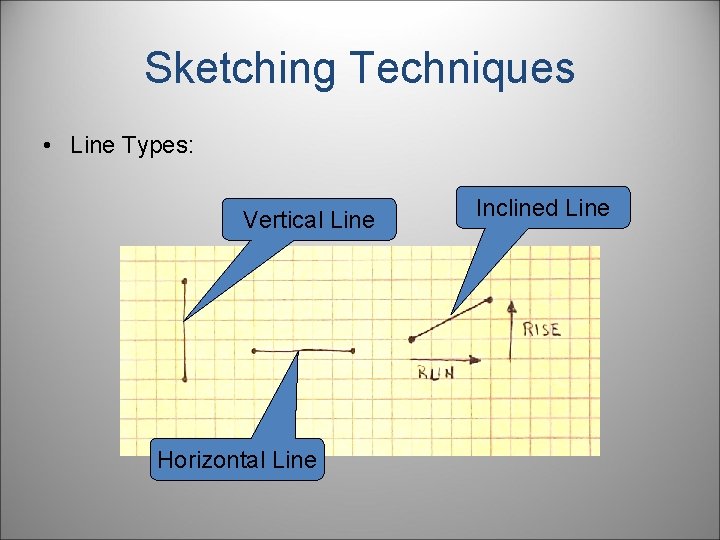
Sketching Techniques • Line Types: Vertical Line Horizontal Line Inclined Line
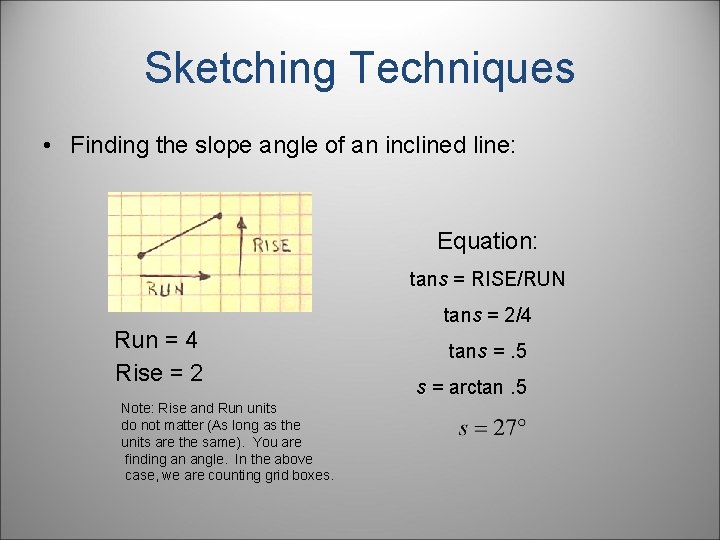
Sketching Techniques • Finding the slope angle of an inclined line: Equation: tans = RISE/RUN Run = 4 Rise = 2 Note: Rise and Run units do not matter (As long as the units are the same). You are finding an angle. In the above case, we are counting grid boxes. tans = 2/4 tans =. 5 s = arctan. 5
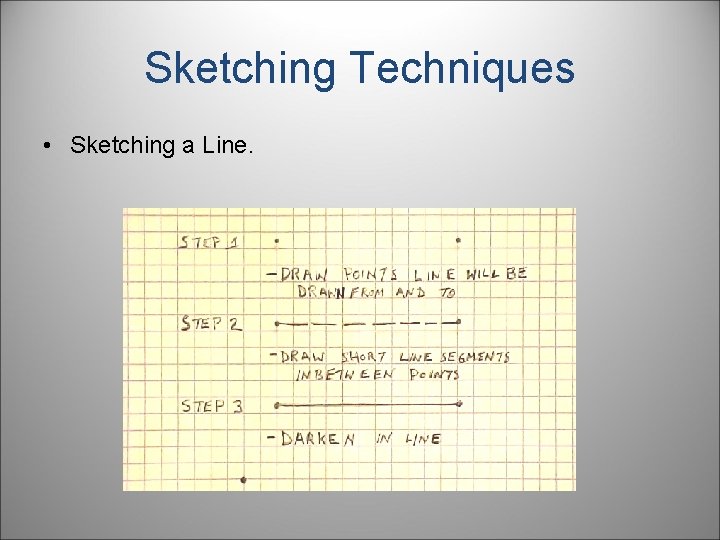
Sketching Techniques • Sketching a Line.
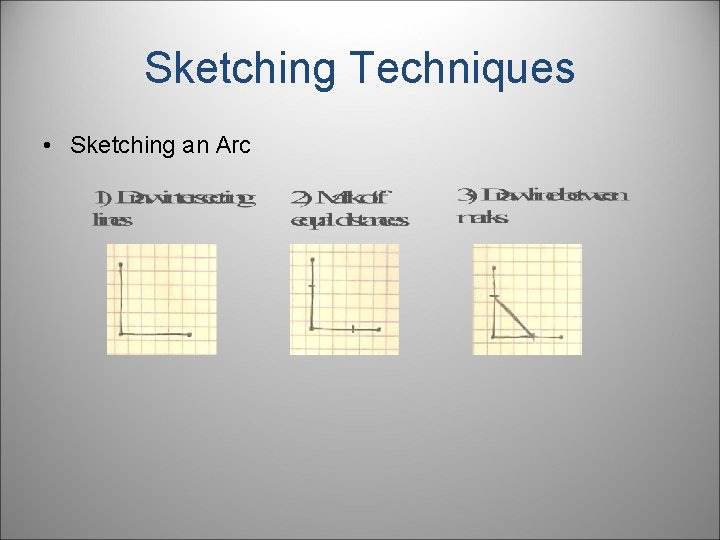
Sketching Techniques • Sketching an Arc
Sketching Techniques • Sketching an Arc
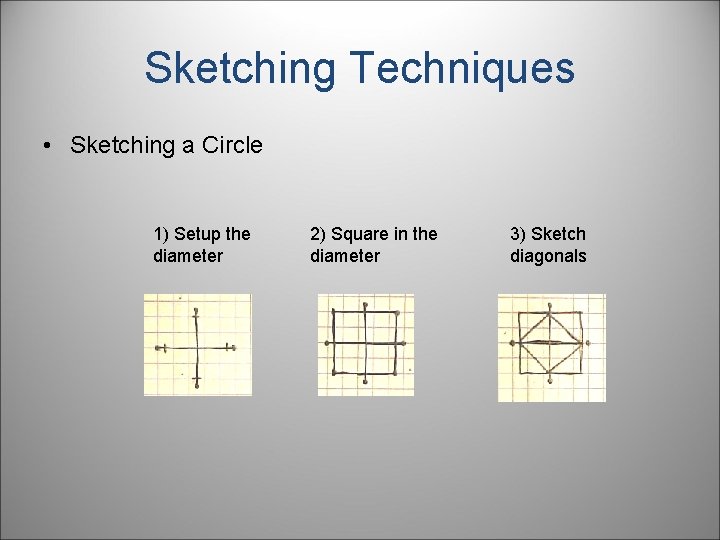
Sketching Techniques • Sketching a Circle 1) Setup the diameter 2) Square in the diameter 3) Sketch diagonals
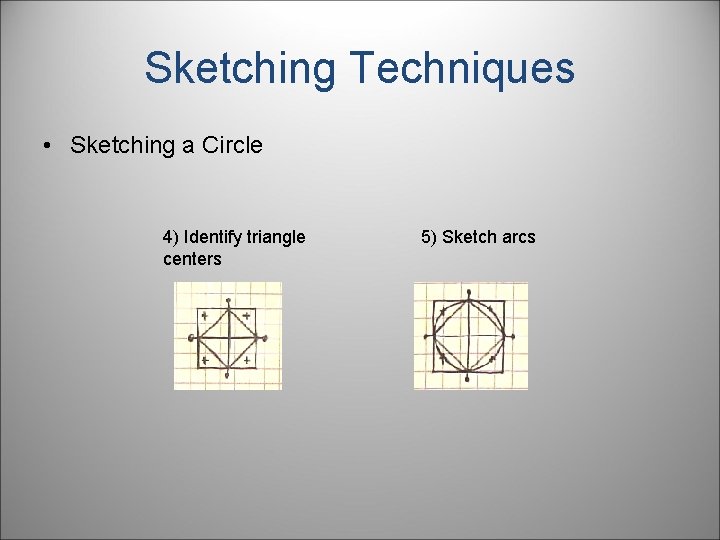
Sketching Techniques • Sketching a Circle 4) Identify triangle centers 5) Sketch arcs
Size and Proportion • Although you have learned to draw lines and arcs, you can not communicate properly until you understand how to sketch with the correct size and proportion. Without proper size and proportion your sketch will not look right. • Size: Length, width, height, distance. How big is the object you are sketching? • Proportion: If two objects are five feet apart in real life, then those two objects must appear to be five feet apart in your sketch.
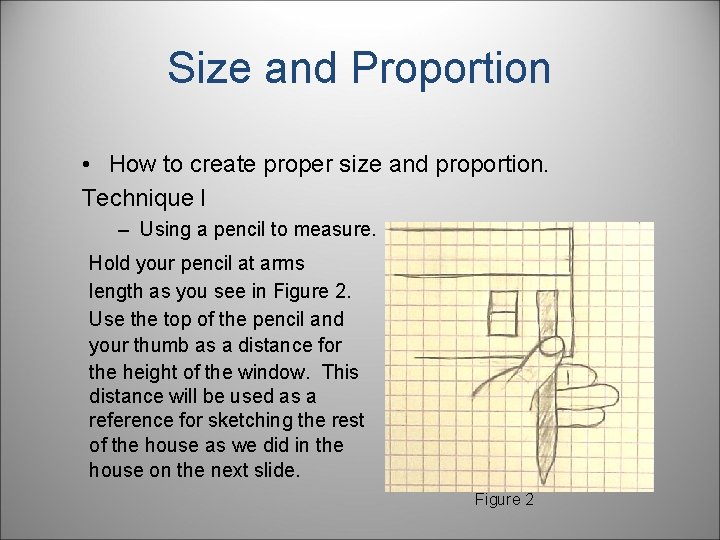
Size and Proportion • How to create proper size and proportion. Technique I – Using a pencil to measure. Hold your pencil at arms length as you see in Figure 2. Use the top of the pencil and your thumb as a distance for the height of the window. This distance will be used as a reference for sketching the rest of the house as we did in the house on the next slide. Figure 2
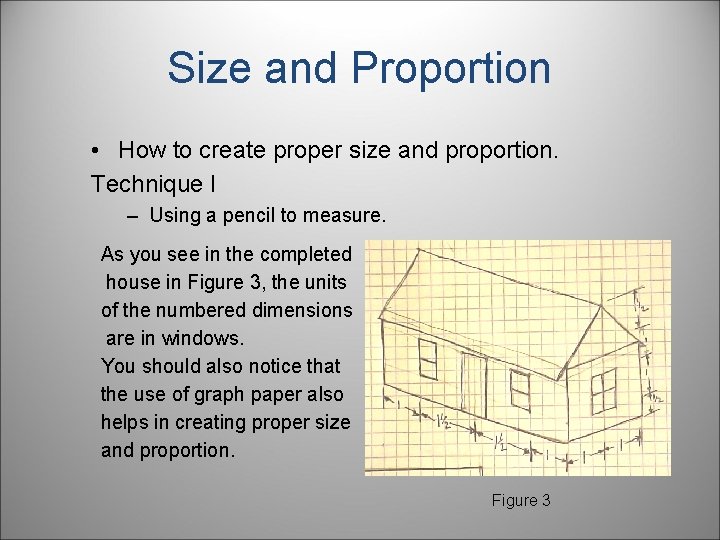
Size and Proportion • How to create proper size and proportion. Technique I – Using a pencil to measure. As you see in the completed house in Figure 3, the units of the numbered dimensions are in windows. You should also notice that the use of graph paper also helps in creating proper size and proportion. Figure 3
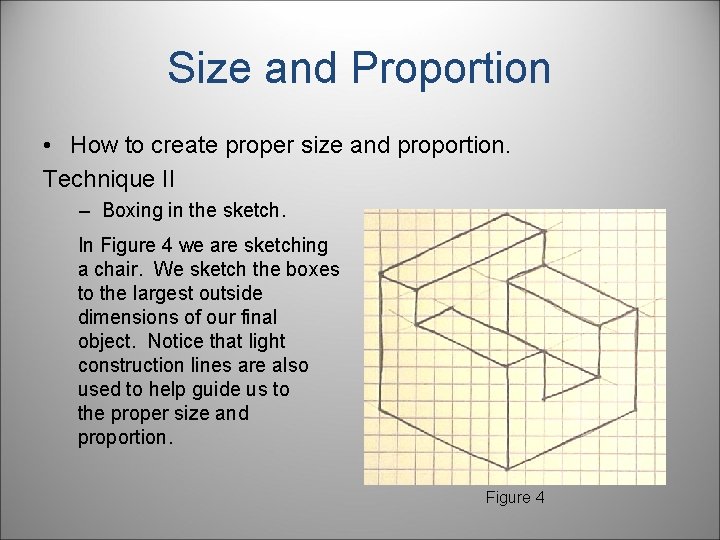
Size and Proportion • How to create proper size and proportion. Technique II – Boxing in the sketch. In Figure 4 we are sketching a chair. We sketch the boxes to the largest outside dimensions of our final object. Notice that light construction lines are also used to help guide us to the proper size and proportion. Figure 4
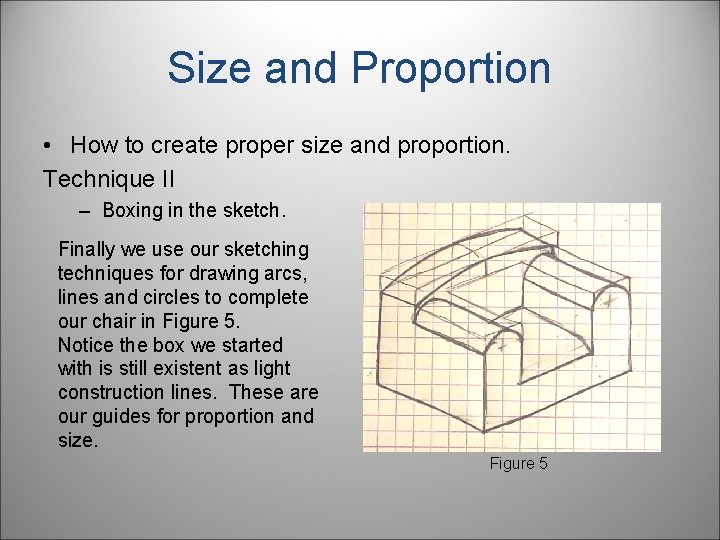
Size and Proportion • How to create proper size and proportion. Technique II – Boxing in the sketch. Finally we use our sketching techniques for drawing arcs, lines and circles to complete our chair in Figure 5. Notice the box we started with is still existent as light construction lines. These are our guides for proportion and size. Figure 5
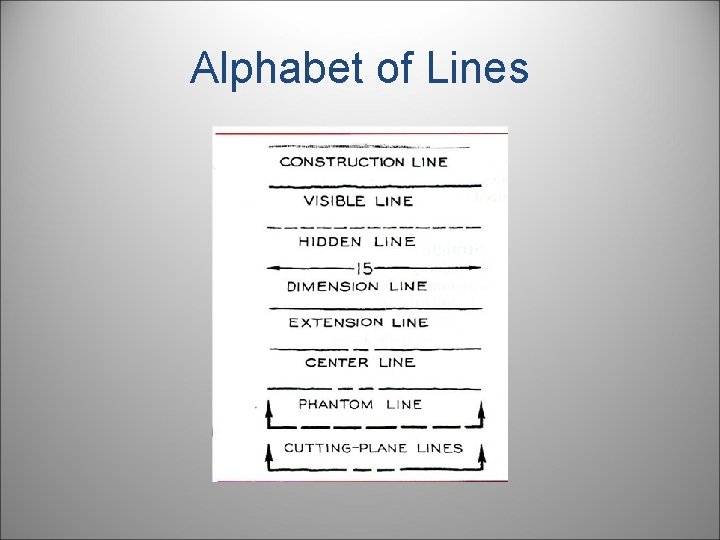
Alphabet of Lines
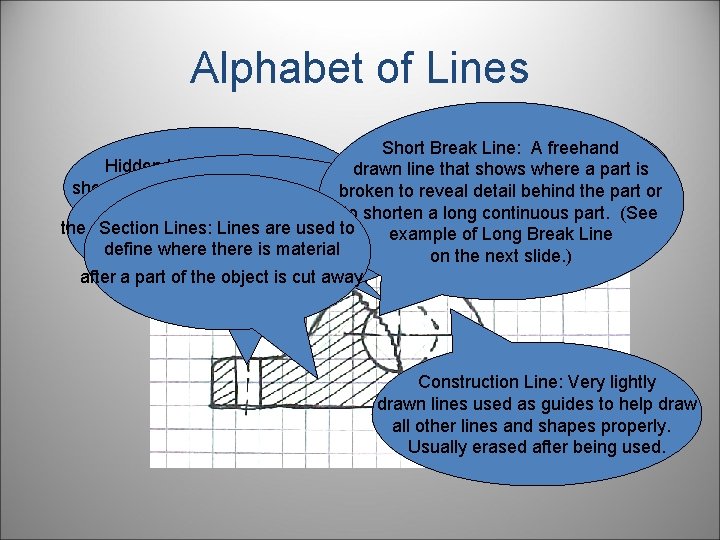
Alphabet of Lines Short Break Line: A freehand Object Line: Thick lines Hidden Line: Lines used to drawn line that shows where a part is about. 6 mm(. 032 in) that show interior detail that is not visible broken to reveal detail behind the part or the visible edges of an object. Center Line: Lines that define from the outside of the part. to shorten a long continuous part. (See Section Lines: Lines are used to the center of arcs, circles, or symmetrical parts. example of Long Break Line define where there is material They are half as thick as an object line. on the next slide. ) after a part of the object is cut away. Construction Line: Very lightly drawn lines used as guides to help draw all other lines and shapes properly. Usually erased after being used.
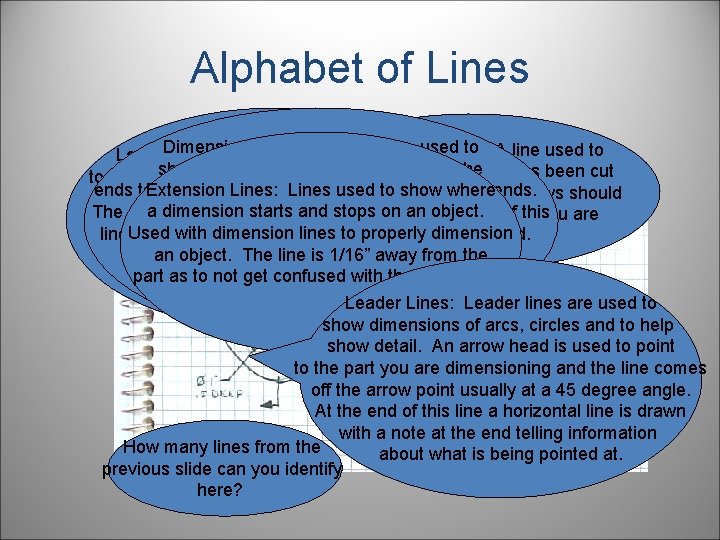
Alphabet of Lines Dimension Lines: Lines that are used to Cutting Plane Line: A line used to Long Break Lines: Break lines are used show distance. Arrows are drawn on the designate where a part has been cut to either show detail or as in this case they can Extension Lines: Lines used to show where ends to show where the dimension line starts and ends. away to see detail. The arrows should be used to shorten very long objects that a dimension starts and stops on an object. The actual distance is usually located in the middle of this point in the direction that you are do not change in detail. Notice that this part Used with dimension lines to properly dimension line to let you know the distance being communicated. looking at the cutout. is 12” long however we have shortened an object. The line is 1/16” away from the Dimension lines are used in conjunction the drawing with break lines to use part as to not get confused with the object lines with extension lines to properly our space more efficiently. dimension objects. Leader Lines: Leader lines are used to show dimensions of arcs, circles and to help show detail. An arrow head is used to point to the part you are dimensioning and the line comes off the arrow point usually at a 45 degree angle. At the end of this line a horizontal line is drawn with a note at the end telling information How many lines from the about what is being pointed at. previous slide can you identify here?
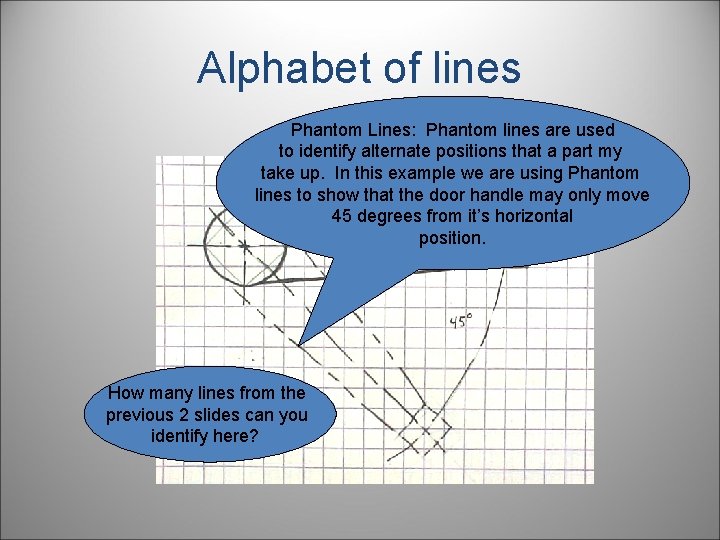
Alphabet of lines Phantom Lines: Phantom lines are used to identify alternate positions that a part my take up. In this example we are using Phantom lines to show that the door handle may only move 45 degrees from it’s horizontal position. How many lines from the previous 2 slides can you identify here?
PROJECTIONS • Pictorial • Isometric • Oblique • Caviler • Cabinet • Perspective • Orothographic
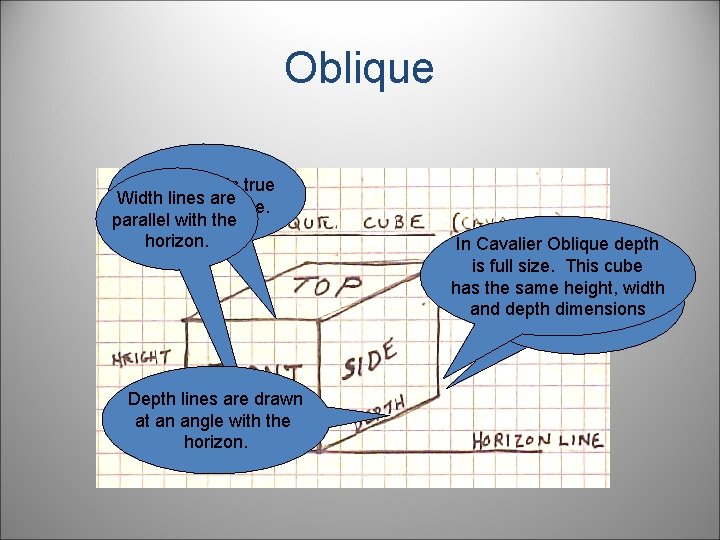
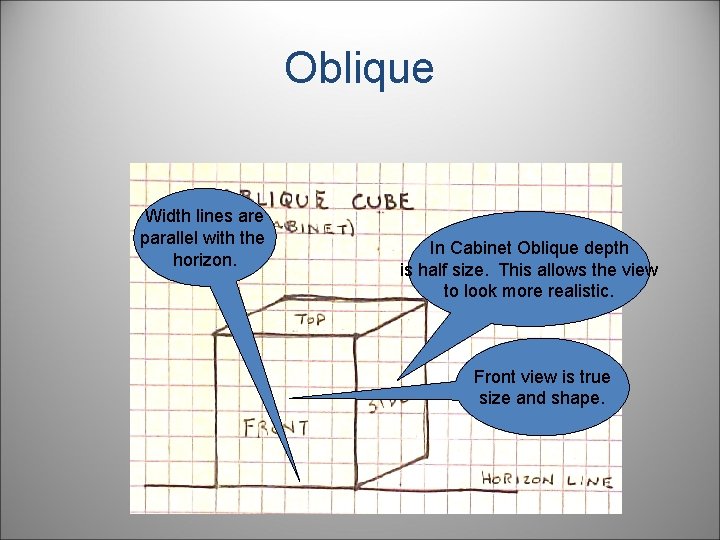
Pictorial • Pictorial sketches are sketches that show height, width, and depth all in one view. There are three common types: – Isometric – Oblique – Perspective
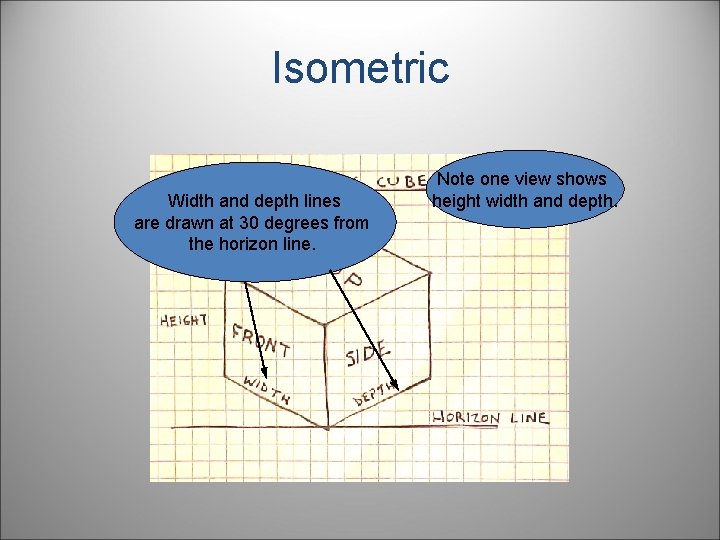
Isometric Width and depth lines are drawn at 30 degrees from the horizon line. Note one view shows height width and depth.
Oblique Front view is true Width lines are size and shape. parallel with the horizon. Depth lines are drawn at an angle with the horizon. In Cavalier Oblique depth is full size. This cube Depth in an oblique has the same height, width Easiest of the pictorials pictorial is and depth dimensions to draw. distorted.
Oblique Width lines are parallel with the horizon. In Cabinet Oblique depth is half size. This allows the view to look more realistic. Front view is true size and shape.
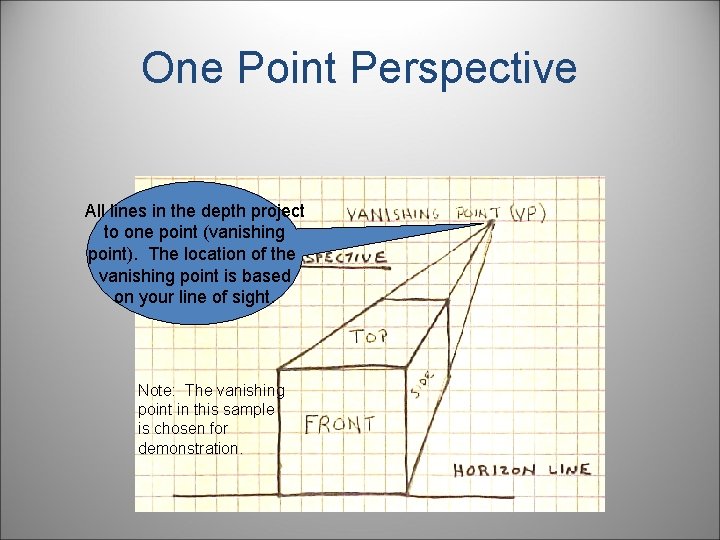
Perspective • Perspective is a way to draw that shows a view of the object in the most realistic way. Vanishing points are used to guide the lines in the object to the horizon line or the horizontal line you see at your line of sight. We will discuss one and two point perspective.
One Point Perspective All lines in the depth project to one point (vanishing point). The location of the vanishing point is based on your line of sight. Note: The vanishing point in this sample is chosen for demonstration.
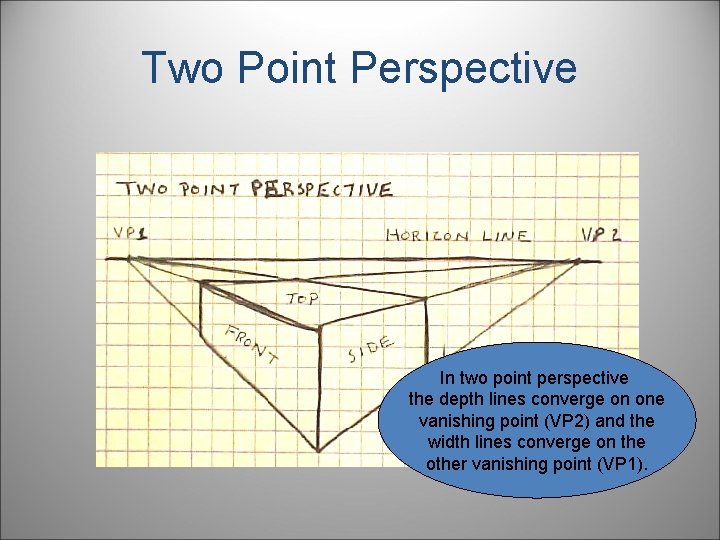
Two Point Perspective In two point perspective the depth lines converge on one vanishing point (VP 2) and the width lines converge on the other vanishing point (VP 1).
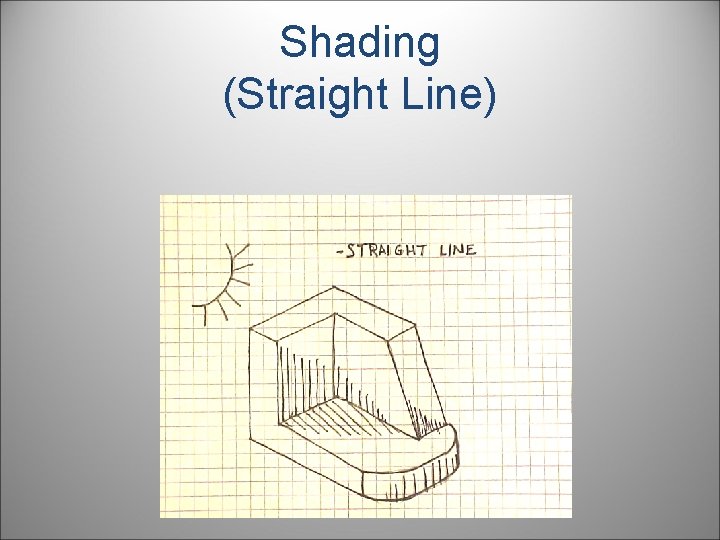
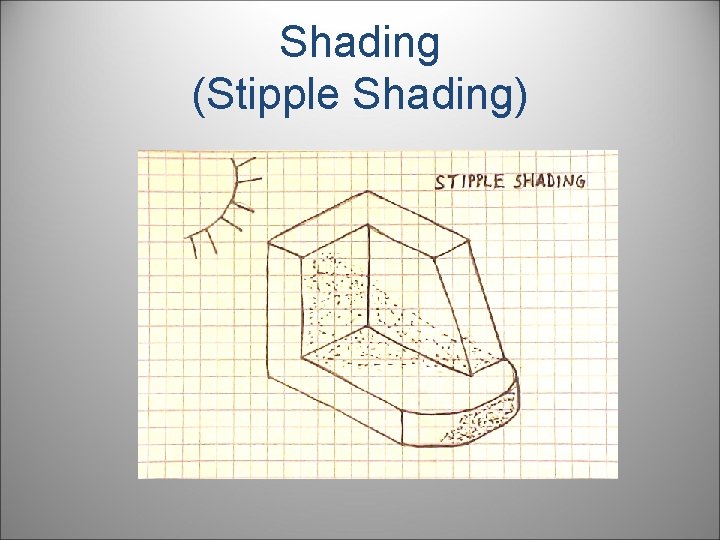
Shading • Shading allows us to create a more realistic image by showing how light reflects on the object. We use shading in engineering graphics to show features not easily seen otherwise. There are two main types of shading: – Straight Line – Stippling
Shading (Straight Line)
Shading (Stipple Shading)
Orthographic (Multiview Drawings) • Pictorial sketches are great for engineers to explain ideas and communicate what the final part will look like to the customer. Unfortunately, pictorial drawings have some disadvantages. Foreshortened views and distorted features do not allow for accurate prototyping. Many times, for parts to be accurately depicted, you need straight on views of each surface.
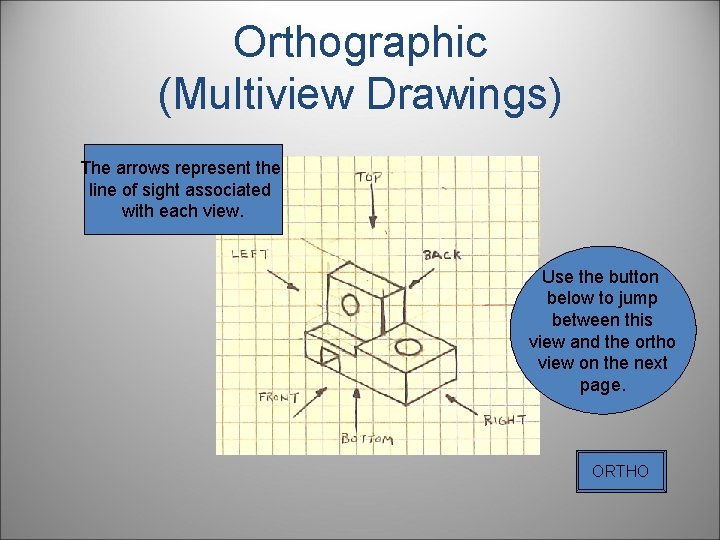
Orthographic (Multiview Drawings) • In order to obtain these straight line views we have a type of drawing called Orthographic Projection also known as Multiview drawings. Orthographic projection is a way to project a view based on a line of sight that is perpendicular to that view. There are six of these views to any object as shown in the next slide.
Orthographic (Multiview Drawings) The arrows represent the line of sight associated with each view. Use the button below to jump between this view and the ortho view on the next page. ORTHO
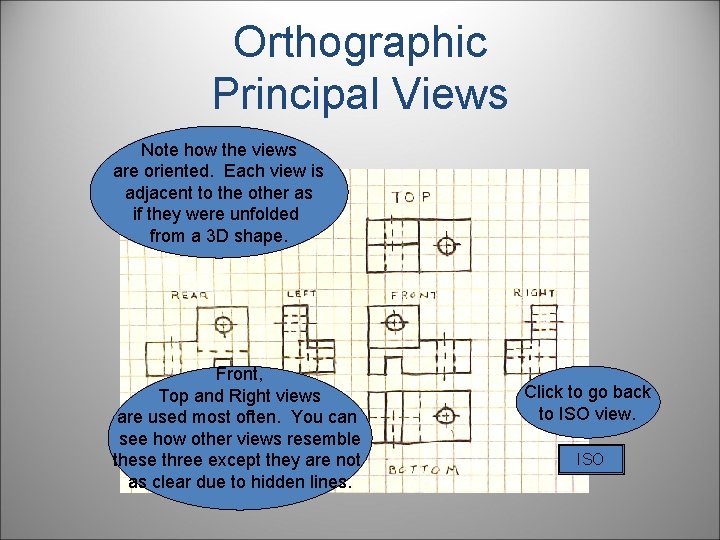
Orthographic Principal Views Note how the views are oriented. Each view is adjacent to the other as if they were unfolded from a 3 D shape. Front, Top and Right views are used most often. You can see how other views resemble these three except they are not as clear due to hidden lines. Click to go back to ISO view. ISO
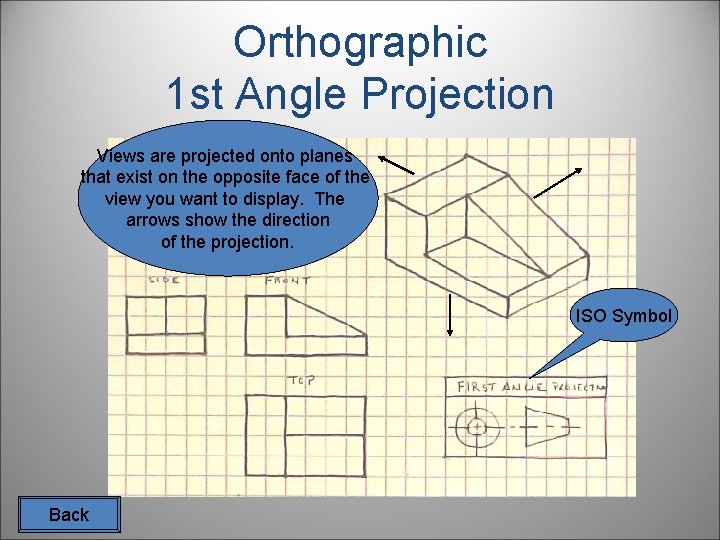
Orthographic Angle of Projection • The example you have just seen is shown in the third angle of projection. This is the standard in the United States and Canada. The rest of the world draws in the first angle of projection. The following slides will show the views are derived and what they look like.
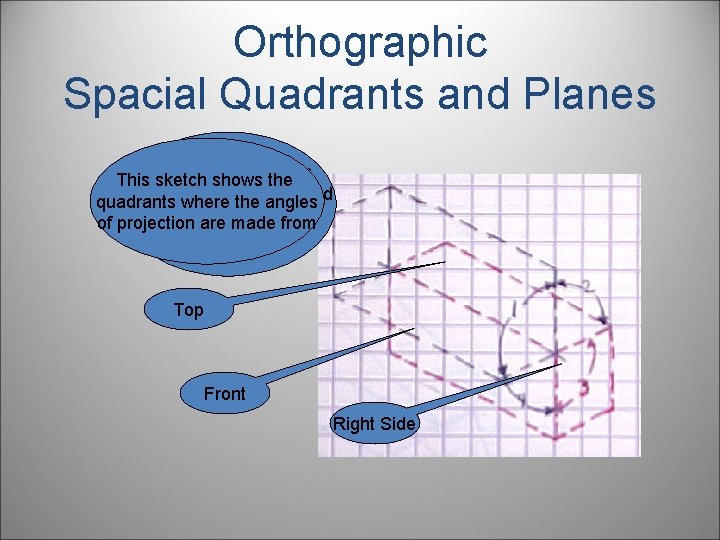
Orthographic Spacial Quadrants and Planes In 3 rd angle projection, This sketch shows the projection planes used quadrants where the angles to create views are of projection are made from as shown in red. Top Front Right Side
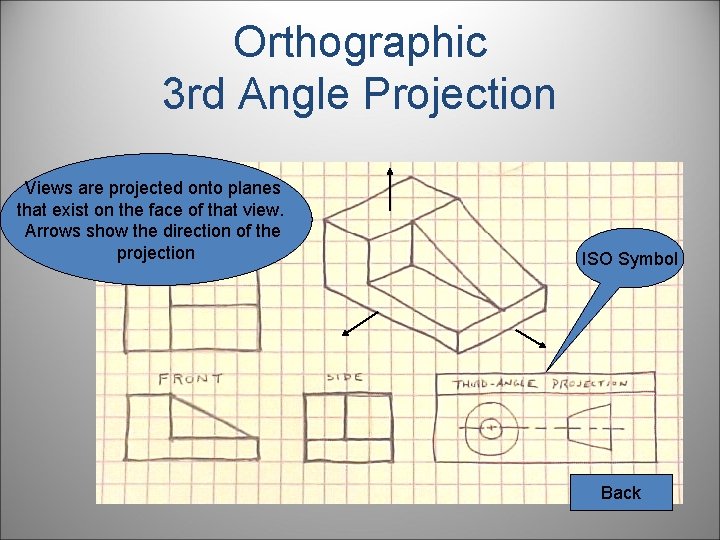
Orthographic 3 rd Angle Projection Views are projected onto planes that exist on the face of that view. Arrows show the direction of the projection ISO Symbol Back
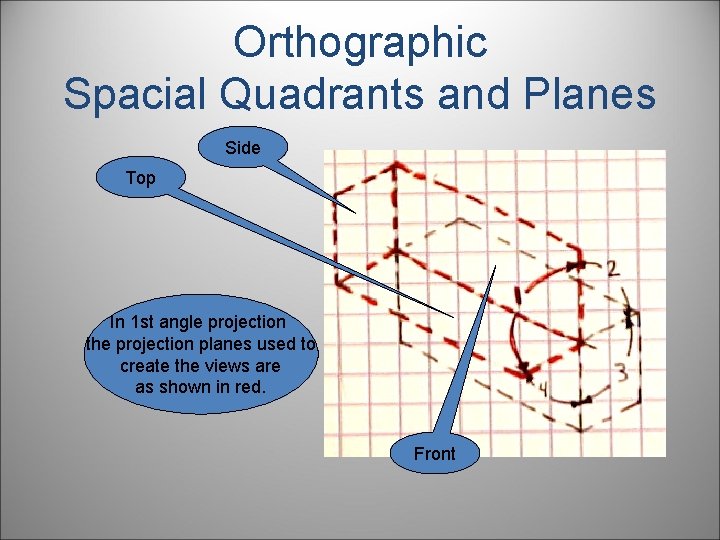
Orthographic Spacial Quadrants and Planes Side Top In 1 st angle projection the projection planes used to create the views are as shown in red. Front
Orthographic 1 st Angle Projection Views are projected onto planes that exist on the opposite face of the view you want to display. The arrows show the direction of the projection. ISO Symbol Back
Orthographic View Selection • Finding the best view of a part can be difficult. Two or more sides may look like the best solution for a front view. On the next slide is a list of characteristics that you should use in choosing your views.
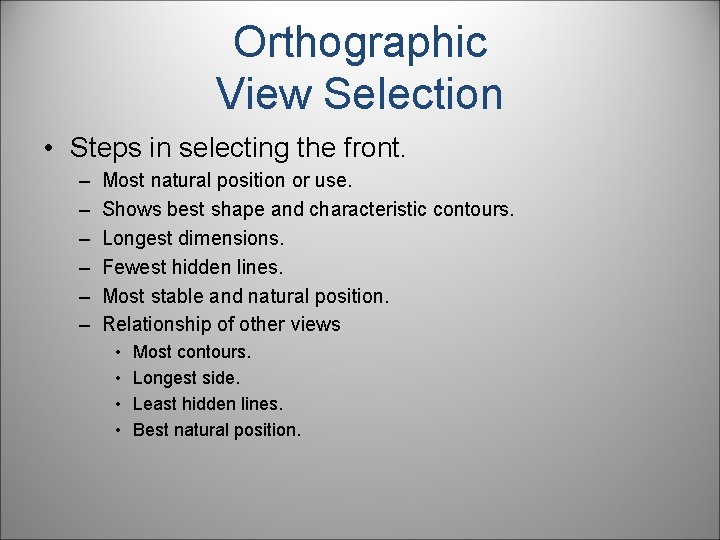
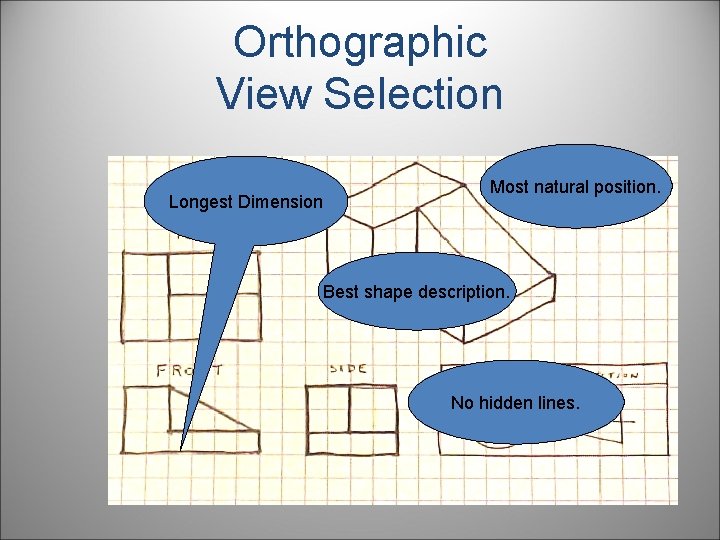
Orthographic View Selection • Steps in selecting the front. – – – Most natural position or use. Shows best shape and characteristic contours. Longest dimensions. Fewest hidden lines. Most stable and natural position. Relationship of other views • • Most contours. Longest side. Least hidden lines. Best natural position.
Orthographic View Selection Longest Dimension Most natural position. Best shape description. No hidden lines.
Orthographic View Selection Numbers • Another decision on view selection you need to make is how many views. You usually do not need more than three but you may only need one or two. The following slides will show when to make a decision between one, and two view drawings.
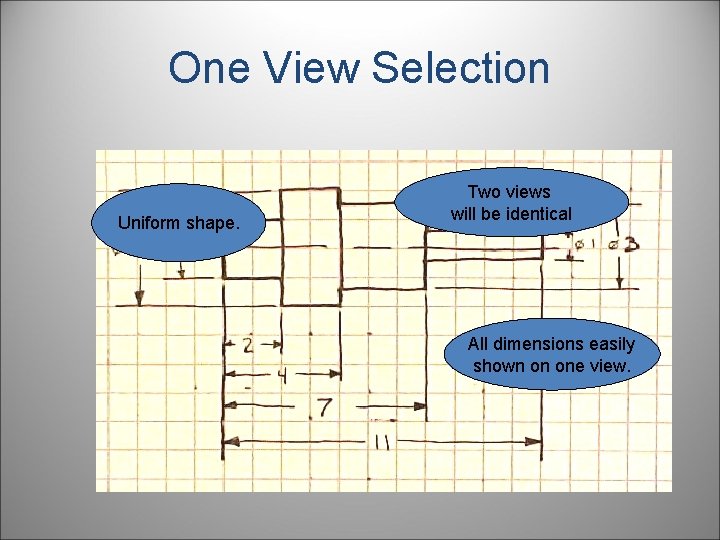
One View Selection Uniform shape. Two views will be identical All dimensions easily shown on one view.
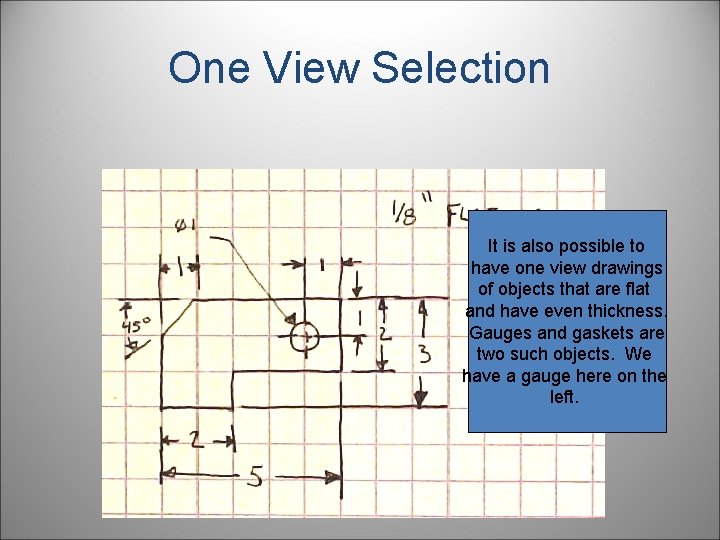
One View Selection It is also possible to have one view drawings of objects that are flat and have even thickness. Gauges and gaskets are two such objects. We have a gauge here on the left.
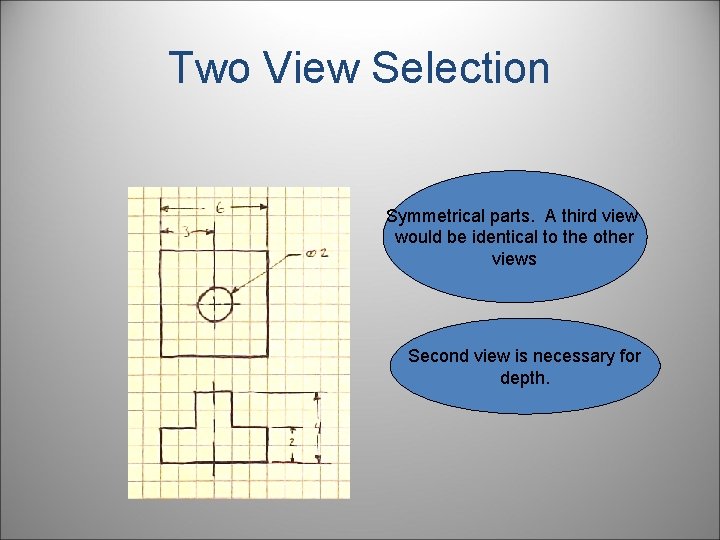
Two View Selection Symmetrical parts. A third view would be identical to the other views Second view is necessary for depth.
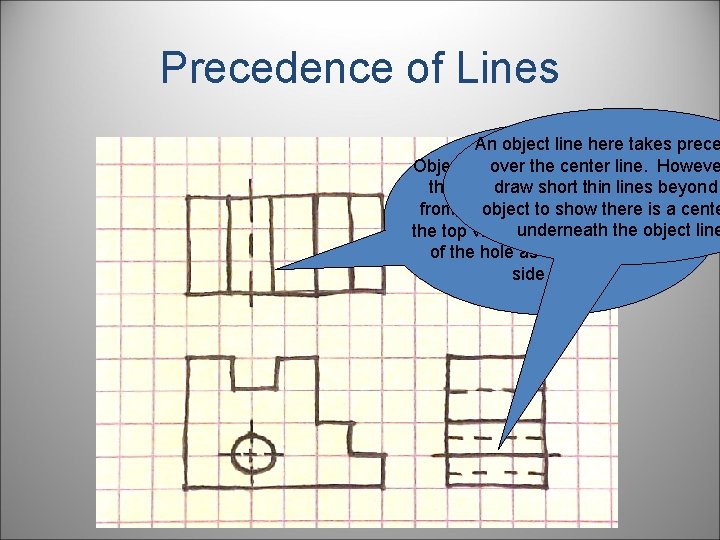
Precedence of Lines • In multiple view drawings, many times different line types will take up the same space, therefore, we have line precedence. The following is an explanation of which lines exist over others. – Object lines over hidden and center. – Hidden over center. – Cutting plane lines over center lines. • The following slide will show an example.
Precedence of Lines An object line here takes prece over the center line. Howeve Object lines took precedence over draw short thin lines beyond the hidden lines you would see object to show there is a cente from the hole. The center line in underneath the object line the top view would show the depth of the hole as well as the right side view.
References • Project Lead the Way. www. myteacherpages. com/webpages/IED/files/Sketchi ng. ppt • Madsen, David A. , Shumaker, Terence M. , Stark, Catherine, Turpin, J. Lee, Engineering Drawing and Design Second Edition, Delmar Publishers, 1996, ISBN 0 -8273 -6720 -1. • Brown, David, You Can Draw, North Light Books, Cincinnati, Ohio, 1986, ISBN 0 -89134 -216 -8. • Olivo, Dr. C. Thomas, Olivo, Thomas P. , Basic Blueprint Reading and Sketching Sixth Edition, Delmar Publishers Inc. , 1993, ISBN 0 -8273 -5740 -0.
References • Johnson, Cindy M. , Lockhart, Shawna D. , Engineering Design Communication, Prentice Hall, 2000, ISBN 0 -201 -33151 -9. • Spencer, Henry Cecil, Dygdon, John Thomas, Novak, James E; Basic Technical Drawing 6 th Edition; Glencoe Mc. Graw Hill; New York, 1995, ISBN 0 -02685660 -3.
Do you want to be a good sketcher? First Slide