
Technology in Action Chapter 13 Behind the Scenes
Technology in Action Chapter 13 Behind the Scenes: The Internet: How It Works Copyright © 2010 Pearson Education, Inc. Publishing as Prentice Hall 1
Management of the Internet • Who owns the Internet? – – – No one Individuals Universities Government agencies Private companies Committees • Who manages the Internet? – Nonprofit organizations – User groups – Committees Copyright © 2010 Pearson Education, Inc. Publishing as Prentice Hall • Who pays for the Internet? – – – U. S. taxpayers Businesses Universities Other countries Users (by paying our ISP) 2
Connecting to the Internet • Internet backbone—Very High Speed Lines – Collection of large national and international networks – Verizon, AT&T, Sprint Nextel, Qwest • T lines—initially used for backbone ISP connection – Carried digital data over twisted pair wires • Optical carrier line (OC)—today’s most common backbone ISP connection – High-speed, fiber-optic communications lines designed to provide high throughput Copyright © 2010 Pearson Education, Inc. Publishing as Prentice Hall 3
Connecting to the Internet • In the past – Points of connection between ISPs – Once known as network access points (NAPs) – Designed to move large amount of data among networks • Now – Private sector companies make up the Internet system – Exchange data via Internet exchange points (IXPs) – Typical IXP is made up of one or more network switches Copyright © 2010 Pearson Education, Inc. Publishing as Prentice Hall 4

Points of Presence (POP) • Bank of modems where individual users connect to an ISP Copyright © 2010 Pearson Education, Inc. Publishing as Prentice Hall 5

The Network Model of the Internet • Internet communications follow the client/server network model • Clients request services • Servers respond to requests Copyright © 2010 Pearson Education, Inc. Publishing as Prentice Hall 6
The Network Model of the Internet • Types of server Usage – Web servers • Host Web pages – Commerce servers • Enable the purchase of goods and services over the Internet – File servers • Provide remote storage space for files that users can download Copyright © 2010 Pearson Education, Inc. Publishing as Prentice Hall 7
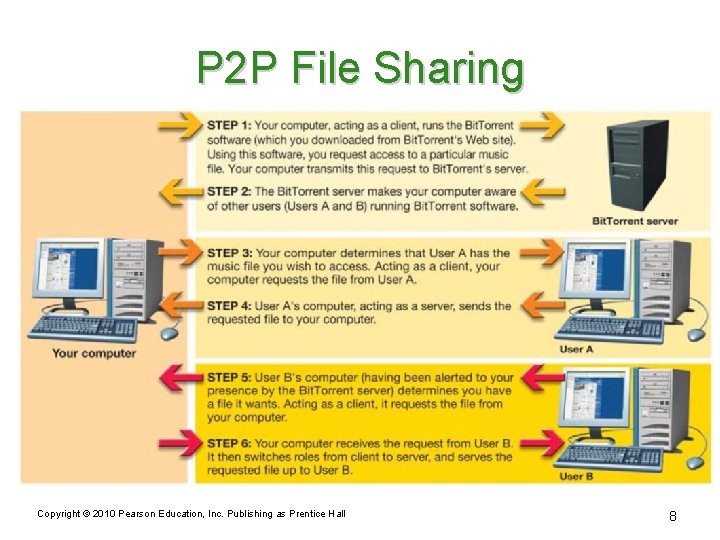
P 2 P File Sharing Copyright © 2010 Pearson Education, Inc. Publishing as Prentice Hall 8

Data Transmission and Protocols • Computer protocols are rules for electronic information exchange • Open system protocols – Any computer can communicate with other computers using the same protocols Copyright © 2010 Pearson Education, Inc. Publishing as Prentice Hall 9
Circuit Switching • Dedicated connection between two points • Remains active until the transmission is terminated • Used in telephone communications • Inefficient for computers Copyright © 2010 Pearson Education, Inc. Publishing as Prentice Hall 10
Packet Switching • Data is broken into small units called packets. Length variable. • Packets are sent over various routes to their destination. • Packets are reassembled by the receiving computer. • Packets contain – Destination/source addresses, length – Reassembling instructions – Data Copyright © 2010 Pearson Education, Inc. Publishing as Prentice Hall 11
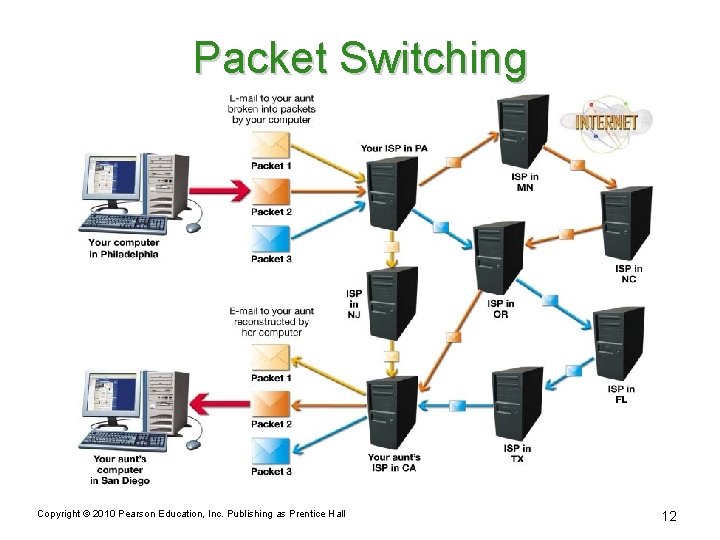
Packet Switching Copyright © 2010 Pearson Education, Inc. Publishing as Prentice Hall 12
TCP/IP • Transmission Control Protocol (TCP) – Prepares data for transmission – Provides error checking – Enables resending lost data • Internet Protocol (IP) – Responsible for sending data from one computer to another Copyright © 2010 Pearson Education, Inc. Publishing as Prentice Hall 13

IP Addresses • Unique number that identifies devices connected to the Internet • Typical IP address (IPv 4) – 197. 24. 72. 157 = 4, 294, 967, 296 addresses – (IPv 6) 16 bit ^ 4 = 1 ^ 19 • Static address – Address never changes • Dynamic address – Temporary address—for large campuses Copyright © 2010 Pearson Education, Inc. Publishing as Prentice Hall 14
Having Enough IP Addresses • IPv 4 addressing scheme didn’t foresee explosive growth • CIDR (Classless Inter-Domain Routing) – Allows a single IP address to represent several unique addresses – Uses a network prefix (slash and number) – Identifies how many bits in the IP address are unique identifiers Copyright © 2010 Pearson Education, Inc. Publishing as Prentice Hall 15

Having Enough IP Addresses • Internet Protocol version 6 (IPv 6— 16 bit) – Longer IP addresses – Easier for non-PC devices to connect to the Internet – =65536*65536*65536 – =18, 446, 744, 073, 709, 600, 000 addresses – =Exa Copyright © 2010 Pearson Education, Inc. Publishing as Prentice Hall 16
Domain Names • Names that take the place of an IP address • Sample domain name: – www. mywebsite. com • Top-level domains (TLD) – Portion of the domain name that follows the dot – Sample top-level domain names • . com, . org, . edu, and. net —see next slide • Second-level domains – Unique name within a top-level domain – Sample second-level domain names • Yahoo. com, Google. com, and Unesco. org Copyright © 2010 Pearson Education, Inc. Publishing as Prentice Hall 17
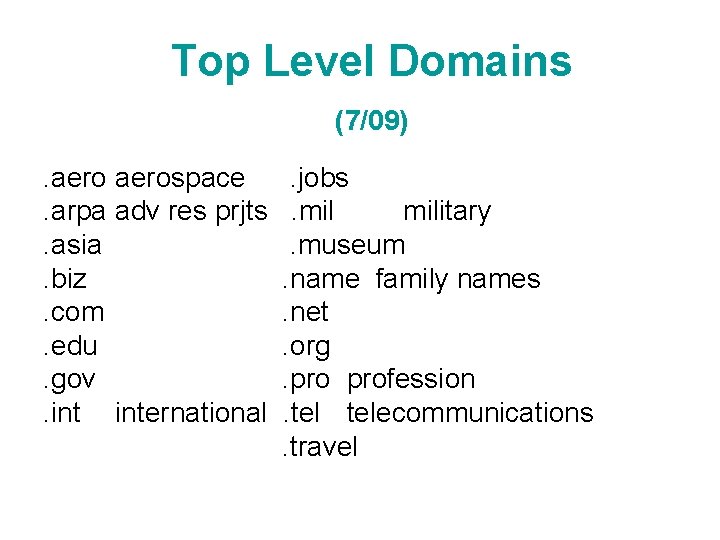
Top Level Domains (7/09). aerospace. arpa adv res prjts. asia. biz. com. edu. gov. international . jobs. military. museum. name family names. net. org. profession. telecommunications. travel
Domain Name Servers • Internet servers that translate domain names into IP addresses • ISPs go first to a default DNS to resolve a name • Name queries work up the hierarchy to the root DNS servers if required Copyright © 2010 Pearson Education, Inc. Publishing as Prentice Hall 19
Other Protocols • File Transfer Protocol (FTP) – File-sharing protocol – Files are downloaded and uploaded using the Internet – Faster download – Safer from viruses and worms • Telnet – Protocol for connecting to a remote computer and a TCP/IP service – Enables a client computer to control a server computer Copyright © 2010 Pearson Education, Inc. Publishing as Prentice Hall 20
HTTP and SSL • Hypertext Transfer Protocol (HTTP) – Protocol for transferring hypertext documents – Hypertext documents are linked to other documents (through hyperlinks) • Secure Hypertext Transfer Protocol (S-HTTP) • Secure Socket Layer (SSL) – Security protocols that protect sensitive information – Encrypts data Copyright © 2010 Pearson Education, Inc. Publishing as Prentice Hall 21
HTML/XHTML • Hypertext Markup Language (HTML) – Tags that describe the formatting and layout of a Web page • Extensible Hypertext Markup Language (XHTML) – Successor to HTML – Has much more stringent rules regarding tagging • HTML/XHTML – Not true programming languages but sets of rules for marking up blocks of text so that a browser knows how to display them Copyright © 2010 Pearson Education, Inc. Publishing as Prentice Hall 22
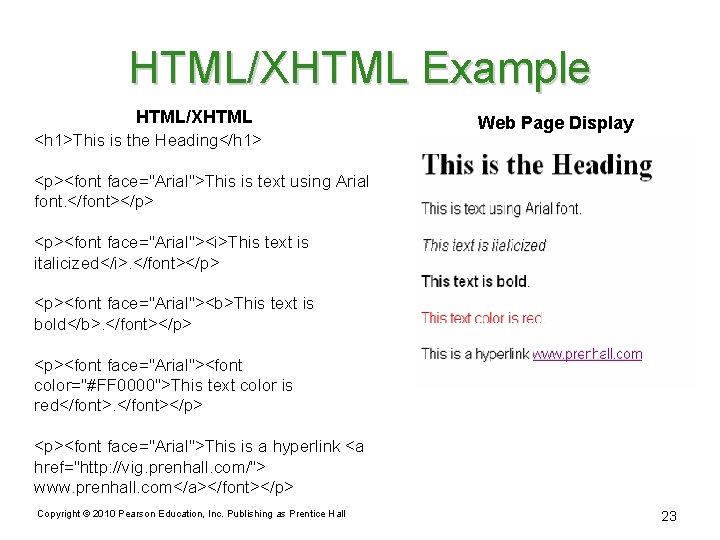
HTML/XHTML Example HTML/XHTML <h 1>This is the Heading</h 1> Web Page Display <p><font face="Arial">This is text using Arial font. </font></p> <p><font face="Arial"><i>This text is italicized</i>. </font></p> <p><font face="Arial"><b>This text is bold</b>. </font></p> <p><font face="Arial"><font color="#FF 0000">This text color is red</font></p> <p><font face="Arial">This is a hyperlink <a href="http: //vig. prenhall. com/"> www. prenhall. com</a></font></p> Copyright © 2010 Pearson Education, Inc. Publishing as Prentice Hall 23
Extensible Markup Language (XML) • Designed for information exchange (interaction) • Tools used to create your own markup language • Used in e-commerce transactions • Extensible = you can add your own rules Copyright © 2010 Pearson Education, Inc. Publishing as Prentice Hall 24
Common Gateway Interface (CGI) • Browsers request that a program file executes (runs) • CGI files are often called CGI scripts • Adds Web page interaction – Adding names to guest books/mailing lists – Completing forms – Interaction means you can put data onto your server and it gets sent back to a website Copyright © 2010 Pearson Education, Inc. Publishing as Prentice Hall 25
Dynamic HTML • A combination of technologies – HTML/XHTML – Cascading style sheets – Java. Script • Allows a Web page to change in response to user action • Brings special effects to otherwise static Web pages Copyright © 2010 Pearson Education, Inc. Publishing as Prentice Hall 26
Cascading Style Sheets • Statements that define in one single location how to display HTML/XHTML elements • Enable a Web developer to define a style for each HTML/XHTML element – The rule may be applied to as many elements on as many Web pages as needed – Speeds up global changes Copyright © 2010 Pearson Education, Inc. Publishing as Prentice Hall 27
Document Object Model • Organizes the objects and elements of a Web page • Defines every item on a Web page as an object • Developers can easily change the properties of these objects • A programming technique Copyright © 2010 Pearson Education, Inc. Publishing as Prentice Hall 28
Client-Side Applications • Programs that run on a client computer with no interaction with the server • Types of client-side applications include – HTML/XHTML document embedded with Java. Script code – Applet: Small program that resides on the server Copyright © 2010 Pearson Education, Inc. Publishing as Prentice Hall 29
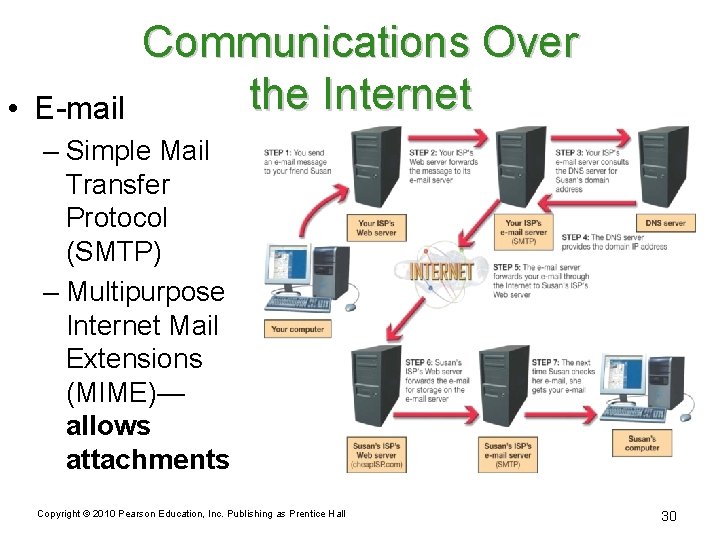
• E-mail Communications Over the Internet – Simple Mail Transfer Protocol (SMTP) – Multipurpose Internet Mail Extensions (MIME)— allows attachments Copyright © 2010 Pearson Education, Inc. Publishing as Prentice Hall 30
Communications Over the Internet • E-mail security – Encryption • Private-key encryption • Public-key encryption – Secure data transmission software • Safe. Message – commercial software Copyright © 2010 Pearson Education, Inc. Publishing as Prentice Hall 31
Instant Messaging (IM) • Client/server program for real-time, text-based conversations • Popular IM programs – – – AOL Instant Messenger ICQ Yahoo! Messenger Windows Live Twitter • Increasing security threats – Should not be used for sensitive data Copyright © 2010 Pearson Education, Inc. Publishing as Prentice Hall 32
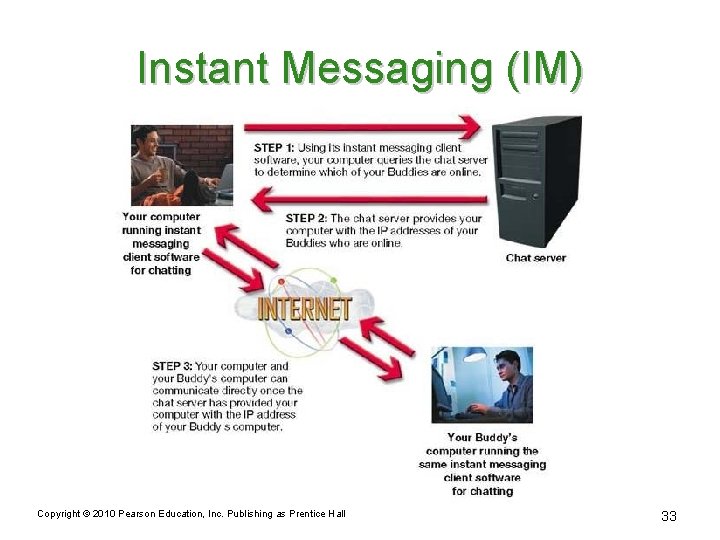
Instant Messaging (IM) Copyright © 2010 Pearson Education, Inc. Publishing as Prentice Hall 33
Voice Over Internet (Vo. IP) • Allows free long-distance phone calls over the Internet • Some cell phones are Vo. IP enabled – Customers must be able to connect to a Wi. Fi signal—T-Mobile Hot. Spot@Home Copyright © 2010 Pearson Education, Inc. Publishing as Prentice Hall 34
- Slides: 34