
Teams with security isolation in Microsoft 365 A
- Slides: 1
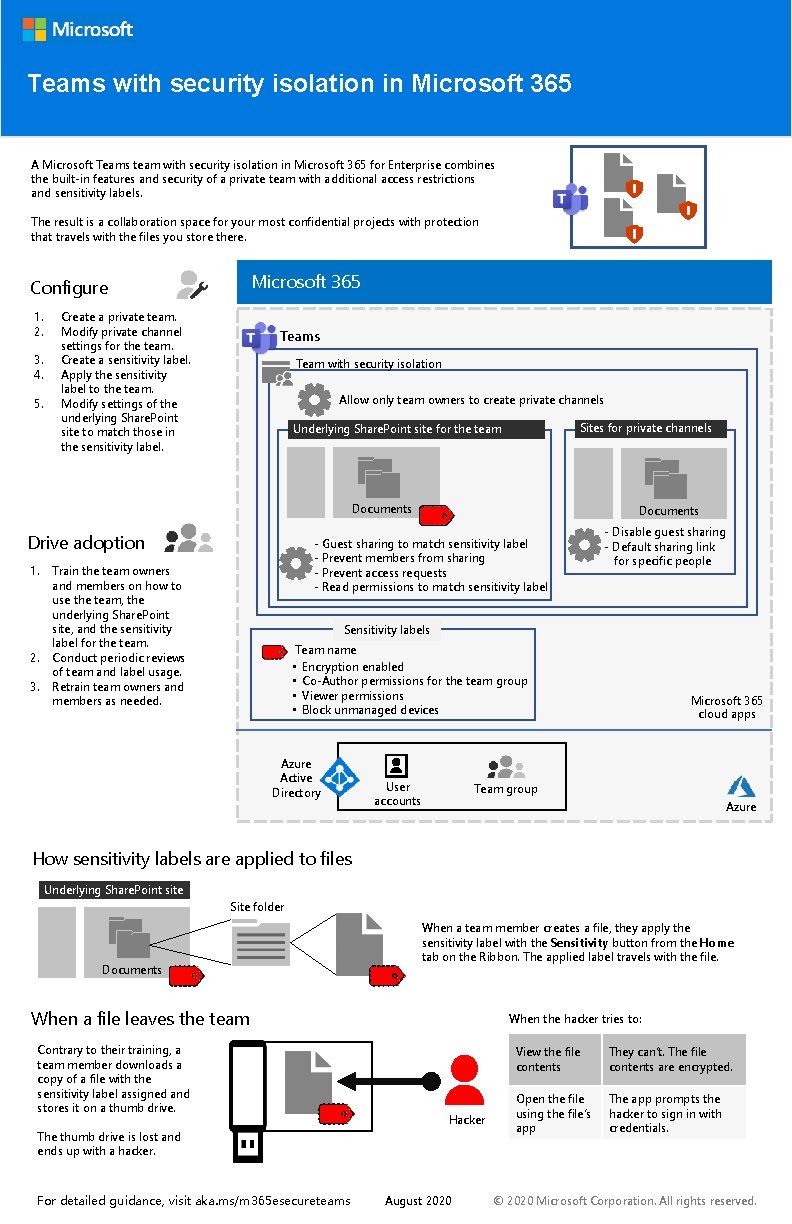
Teams with security isolation in Microsoft 365 A Microsoft Teams team with security isolation in Microsoft 365 for Enterprise combines the built-in features and security of a private team with additional access restrictions and sensitivity labels. The result is a collaboration space for your most confidential projects with protection that travels with the files you store there. Microsoft 365 Configure 1. 2. 3. 4. 5. Create a private team. Modify private channel settings for the team. Create a sensitivity label. Apply the sensitivity label to the team. Modify settings of the underlying Share. Point site to match those in the sensitivity label. Teams Team with security isolation Allow only team owners to create private channels Sites for private channels Underlying Share. Point site for the team Documents Drive adoption 1. 2. 3. Documents - Guest sharing to match sensitivity label - Prevent members from sharing - Prevent access requests - Read permissions to match sensitivity label Train the team owners and members on how to use the team, the underlying Share. Point site, and the sensitivity label for the team. Conduct periodic reviews of team and label usage. Retrain team owners and members as needed. - Disable guest sharing - Default sharing link for specific people Sensitivity labels Team name • Encryption enabled • Co-Author permissions for the team group • Viewer permissions • Block unmanaged devices Azure Active Directory User accounts Microsoft 365 cloud apps Team group Azure How sensitivity labels are applied to files Underlying Share. Point site Site folder Documents When a team member creates a file, they apply the sensitivity label with the Sensitivity button from the Home tab on the Ribbon. The applied label travels with the file. When a file leaves the team Contrary to their training, a team member downloads a copy of a file with the sensitivity label assigned and stores it on a thumb drive. When the hacker tries to: Hacker The thumb drive is lost and ends up with a hacker. For detailed guidance, visit aka. ms/m 365 esecureteams August 2020 View the file contents They can’t. The file contents are encrypted. Open the file using the file’s app The app prompts the hacker to sign in with credentials. © 2020 Microsoft Corporation. All rights reserved.