
Teaching Math Science to Students Who Are Visually
- Slides: 20
Teaching Math & Science to Students Who Are Visually Impaired Guidelines for designing tactile graphics n Teaching tactile graphics in math n Teaching tactile graphics in science n
Questions to Ask Yourself n n When should I introduce tactile graphics? (early) What’s the main purpose of this picture and what’s the simplest way to convey it? What is necessary and unnecessary? Will the graphic lead to a better understanding or is the same information provided in text?
Rule of Thumb n n Plan ahead, does the teacher consider it important? Simpler is better, but keep necessities Embossed paper vs. materials put on top of the paper Pay attention to contrast and spacing (Use color contrast if the student has some usable vision)
Rule of Thumb Continued n n n n Use only relevant information Avoid using too many kinds of symbols Use straightedges when possible Think tactile, not visual (picture borders? ) Points (highest), outline, textures (lowest) Not necessarily an exact reproduction Cost and time not primary consideration
Paging n n If a picture presents several concepts at once, consider breaking up into several pictures (one may be an overview) Use keys, legends, and abbreviations when needed and have easy access to them for reference (before or after on same page, on facing page, not on back of graphic)
Labels n n Don’t break up a line for a label For a key, use single letters with single letter indicator or capital letter indicator or use 2 -letter abbreviations. Spell out the full label in the key Omit capital signs in labels if not needed Retain the capital in titles or captions where there is more room
Graphs n n n Omit grid lines if only the shape of the graph is important Put unit markers along the outside of the axis Leave space between bars on bar graph and texture bars
Lines n n n Dotted or dashed lines stand out more than solid lines Use lead lines (connect graphic to label) sparingly so they aren’t confused with the actual graphic (different and less prominent than graphic) Use different types of lines to convey different types of information
Textures n n n Use textures sparingly Avoid decorating the graphic Orient texture in the same direction or it changes meaning With 2 or more textures, use border lines Primary (rough), secondary (smooth) APH Tactile Marking Mat (makes crayon marks tactile)
APH Items n n n Graphic art tape Feel and Peel Stickers Textured Paper Collection graph paper, stick-on rulers Draftsman board Braille Transcriber’s Kit: Math (rulers, number lines, protractors, thermometers, clock faces, low-relief graph paper)
Non-APH Items n n n n Wikki Stix Hot glue gun Foam sheets Sandpaper String or heavy thread (use of knots) Pipe cleaners Lots of other household and craft items
Puff or Craft Paint n n n n smaller tips help provide more control glitter, regular, dotted, dashed, thin, thick pull away from paint placement angle bottle away from straightedge leave time for drying careful of sharp peaks don't fold papers or put other papers on top of it or they tend to stick
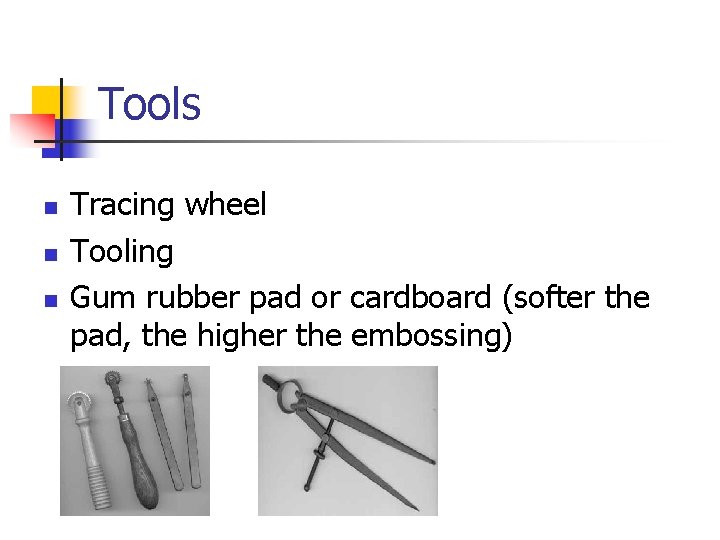
Tools n n n Tracing wheel Tooling Gum rubber pad or cardboard (softer the pad, the higher the embossing)
Kits from APH n Tactile Graphics Starter Kit n n Tactile Graphics Kit n n Craft ink, fabrics, point symbols, slate and stylus, manual with good and bad examples Point symbol tongs, areal pattern plates, line drawing tools, slate and stylus, braille eraser, rubber embossing pad, ruler, foil sheets Line-Drawing Tool Kit (tools only)
Software n Quick. Tac n Tiger Software n Using graphics from the Internet n Using the drawing toolbar n Using Excel graphs
Higher Cost Options n Microcapsule paper and an image enhancement device n n n TIE (Tactile Image Enhancer) Repro-tronics website link PIAF (Pictures in a Flash) Humanware website link Swell-form machine American Thermoform website link
Links n n BANA’s Guidelines and Standards for Tactile Graphics can be viewed online or downloaded at Braille Authority website link APH Tactile Graphic Image Library Tactile Graphic Library link APH
Early Learning from APH n n Setting the Stage for Tactile Understanding: Making Tactile Pictures Make Sense (transition between real objects, thermoform, raised-line drawings) Flip-over concept books (Line Paths, Parts of a Whole) Teaching Touch (tracking, searching, verbal description, use of symbols) Tactual Discrimination Worksheets
Teaching Tactile Graphics in Math n n n Students need to understand vocabulary such as diagonal, parallel, perpendicular, intersecting, angles, symmetry, reflection, rotation When graphing, have axes (thicker), grid lines (thinner), and graphed lines appear differently Use textbooks and APH Geometry tactile graphics
Teaching tactile graphics in science n n n Evaluate whether a tactile graphic or a model is more appropriate. Must often it should be explicitly taught before the student needs to use it. Use textbooks and APH basic science, life science, anatomy tactile graphics