
Tableau Environment and User Roles Re Amherst Data
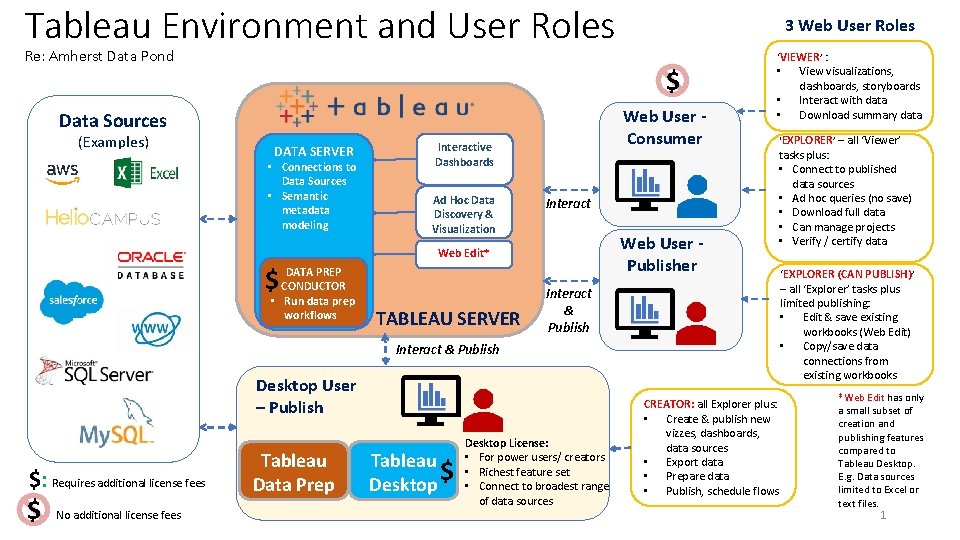
Tableau Environment and User Roles Re: Amherst Data Pond $ Web User Consumer Data Sources (Examples) 3 Web User Roles DATA SERVER • Connections to Data Sources • Semantic metadata modeling Interactive Dashboards Ad Hoc Data Discovery & Visualization Interact Web User Publisher Web Edit* DATA PREP $ CONDUCTOR • Run data prep workflows TABLEAU SERVER ‘VIEWER’ : • View visualizations, dashboards, storyboards • Interact with data • Download summary data ‘EXPLORER’ – all ‘Viewer’ tasks plus: • Connect to published data sources • Ad hoc queries (no save) • Download full data • Can manage projects • Verify / certify data Interact & Publish Desktop User – Publish $: Requires additional license fees $ No additional license fees Tableau Data Prep Tableau $ Desktop License: • For power users/ creators • Richest feature set • Connect to broadest range of data sources CREATOR: all Explorer plus: • Create & publish new vizzes, dashboards, data sources • Export data • Prepare data • Publish, schedule flows ‘EXPLORER (CAN PUBLISH) ’ – all ‘Explorer’ tasks plus limited publishing: • Edit & save existing workbooks (Web Edit) • Copy/save data connections from existing workbooks *Web Edit has only a small subset of creation and publishing features compared to Tableau Desktop. E. g. Data sources limited to Excel or text files. 1
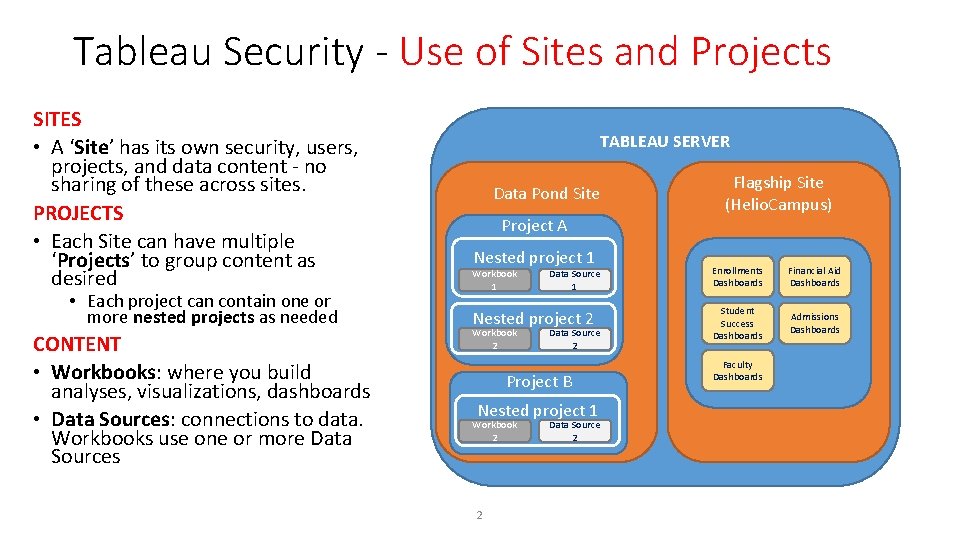
Tableau Security - Use of Sites and Projects SITES • A ‘Site’ has its own security, users, projects, and data content - no sharing of these across sites. PROJECTS • Each Site can have multiple ‘Projects’ to group content as desired • Each project can contain one or more nested projects as needed CONTENT • Workbooks: where you build analyses, visualizations, dashboards • Data Sources: connections to data. Workbooks use one or more Data Sources TABLEAU SERVER Data Pond Site Project A Nested project 1 Workbook 1 Data Source 1 Nested project 2 Workbook 2 Data Source 2 Project B Nested project 1 Workbook 2 2 Data Source 2 Flagship Site (Helio. Campus) Enrollments Dashboards Financial Aid Dashboards Student Success Dashboards Admissions Dashboards Faculty Dashboards
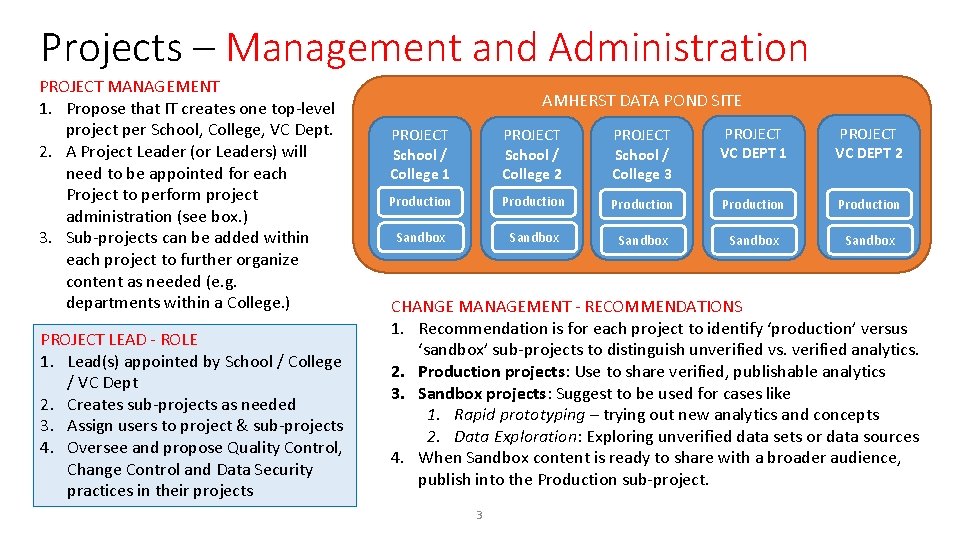
Projects – Management and Administration PROJECT MANAGEMENT 1. Propose that IT creates one top-level project per School, College, VC Dept. 2. A Project Leader (or Leaders) will need to be appointed for each Project to perform project administration (see box. ) 3. Sub-projects can be added within each project to further organize content as needed (e. g. departments within a College. ) PROJECT LEAD - ROLE 1. Lead(s) appointed by School / College / VC Dept 2. Creates sub-projects as needed 3. Assign users to project & sub-projects 4. Oversee and propose Quality Control, Change Control and Data Security practices in their projects AMHERST DATA POND SITE PROJECT School / College 1 PROJECT School / College 2 PROJECT School / College 3 PROJECT VC DEPT 1 PROJECT VC DEPT 2 Production Production Sandbox Sandbox CHANGE MANAGEMENT - RECOMMENDATIONS 1. Recommendation is for each project to identify ‘production’ versus ‘sandbox’ sub-projects to distinguish unverified vs. verified analytics. 2. Production projects: Use to share verified, publishable analytics 3. Sandbox projects: Suggest to be used for cases like 1. Rapid prototyping – trying out new analytics and concepts 2. Data Exploration: Exploring unverified data sets or data sources 4. When Sandbox content is ready to share with a broader audience, publish into the Production sub-project. 3
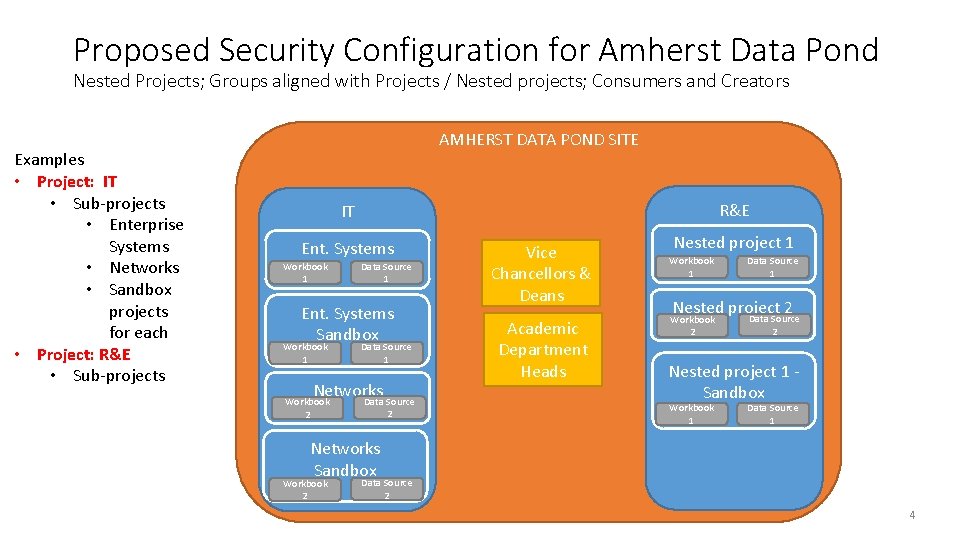
Proposed Security Configuration for Amherst Data Pond Nested Projects; Groups aligned with Projects / Nested projects; Consumers and Creators Examples • Project: IT • Sub-projects • Enterprise Systems • Networks • Sandbox projects for each • Project: R&E • Sub-projects AMHERST DATA POND SITE R&E IT Ent. Systems Workbook 1 Data Source 1 Ent. Systems Sandbox Workbook 1 Data Source 1 Networks Workbook 2 Data Source 2 Vice Chancellors & Deans Academic Department Heads Nested project 1 Workbook 1 Data Source 1 Nested project 2 Workbook 2 Data Source 2 Nested project 1 Sandbox Workbook 1 Data Source 1 Networks Sandbox Workbook 2 Data Source 2 4
- Slides: 4