
Systems Technology Group Parallel File Systems from the
- Slides: 26
Systems & Technology Group Parallel File Systems from the Application Programmer Perspective (Part 1) Scott Denham sdenham@us. ibm. com IT Architect – Industrial Sector IBM Deep Computing © 2008 IBM Corporation
IBM Systems and Technology Group Agenda Some basic assumptions Components of the I/O subsystem The I/O Stack Parallelism In I/O GPFS – a parallel file system Performance considerations Performance analysis 2008 March
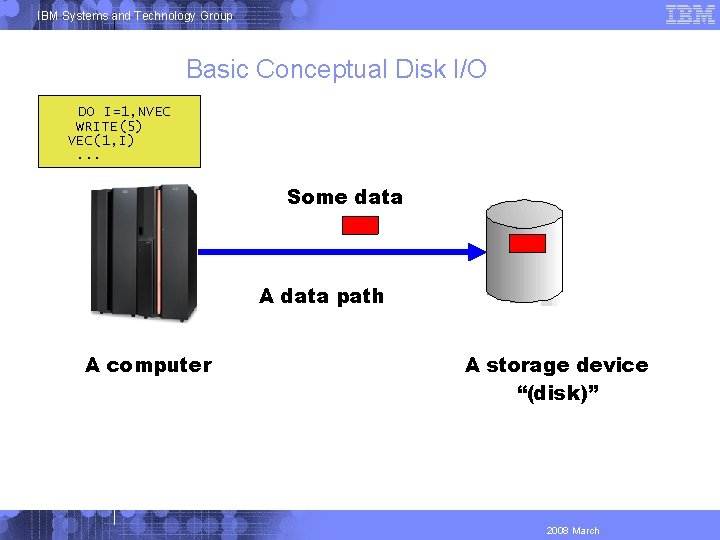
IBM Systems and Technology Group Basic Conceptual Disk I/O DO I=1, NVEC WRITE(5) VEC(1, I). . . Some data A data path A computer A storage device “(disk)” 2008 March
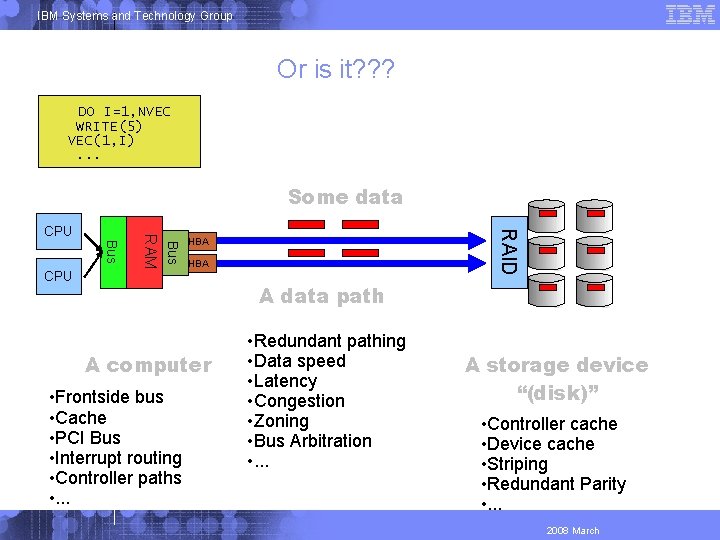
IBM Systems and Technology Group Or is it? ? ? DO I=1, NVEC WRITE(5) VEC(1, I). . . Some data RAID Bus CPU RAM CPU HBA A data path A computer • Frontside bus • Cache • PCI Bus • Interrupt routing • Controller paths • . . . • Redundant pathing • Data speed • Latency • Congestion • Zoning • Bus Arbitration • . . . A storage device “(disk)” • Controller cache • Device cache • Striping • Redundant Parity • . . . 2008 March
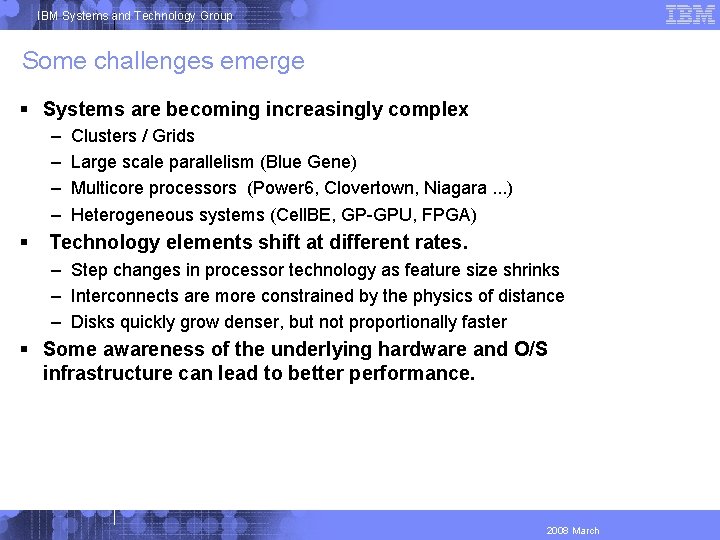
IBM Systems and Technology Group Some challenges emerge Systems are becoming increasingly complex – – Clusters / Grids Large scale parallelism (Blue Gene) Multicore processors (Power 6, Clovertown, Niagara. . . ) Heterogeneous systems (Cell. BE, GP-GPU, FPGA) Technology elements shift at different rates. – Step changes in processor technology as feature size shrinks – Interconnects are more constrained by the physics of distance – Disks quickly grow denser, but not proportionally faster Some awareness of the underlying hardware and O/S infrastructure can lead to better performance. 2008 March
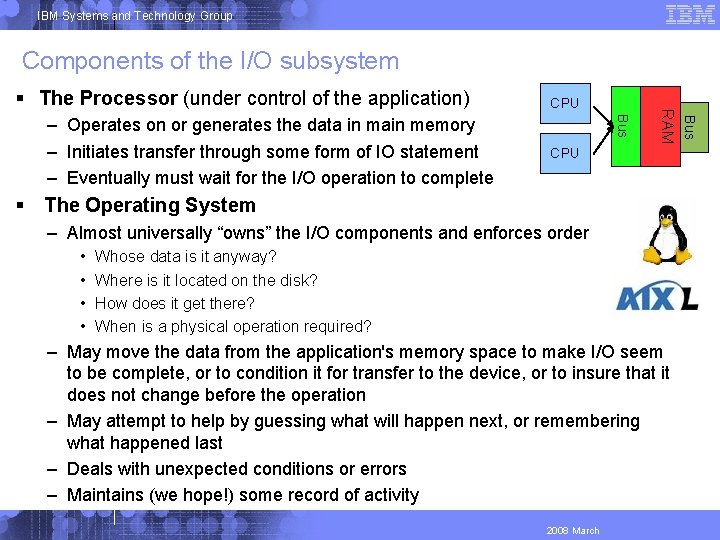
IBM Systems and Technology Group Components of the I/O subsystem CPU The Operating System – Almost universally “owns” the I/O components and enforces order • • Whose data is it anyway? Where is it located on the disk? How does it get there? When is a physical operation required? – May move the data from the application's memory space to make I/O seem to be complete, or to condition it for transfer to the device, or to insure that it does not change before the operation – May attempt to help by guessing what will happen next, or remembering what happened last – Deals with unexpected conditions or errors – Maintains (we hope!) some record of activity 2008 March Bus – Operates on or generates the data in main memory – Initiates transfer through some form of IO statement – Eventually must wait for the I/O operation to complete CPU RAM The Processor (under control of the application)
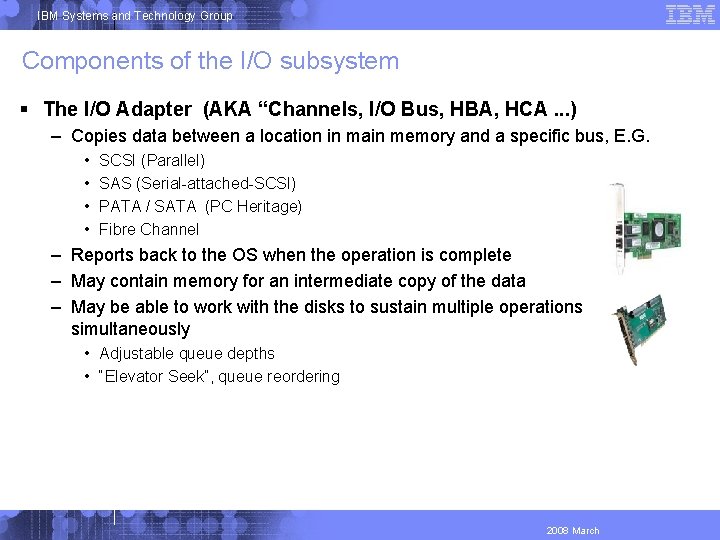
IBM Systems and Technology Group Components of the I/O subsystem The I/O Adapter (AKA “Channels, I/O Bus, HBA, HCA. . . ) – Copies data between a location in main memory and a specific bus, E. G. • • SCSI (Parallel) SAS (Serial-attached-SCSI) PATA / SATA (PC Heritage) Fibre Channel – Reports back to the OS when the operation is complete – May contain memory for an intermediate copy of the data – May be able to work with the disks to sustain multiple operations simultaneously • Adjustable queue depths • “Elevator Seek”, queue reordering 2008 March
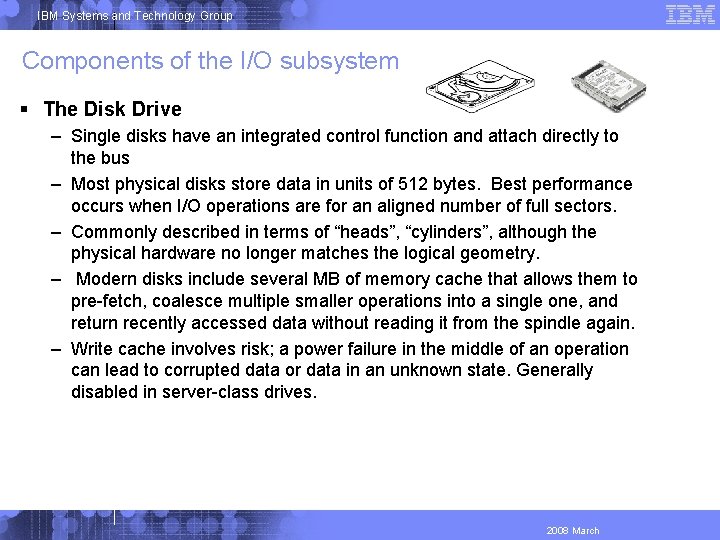
IBM Systems and Technology Group Components of the I/O subsystem The Disk Drive – Single disks have an integrated control function and attach directly to the bus – Most physical disks store data in units of 512 bytes. Best performance occurs when I/O operations are for an aligned number of full sectors. – Commonly described in terms of “heads”, “cylinders”, although the physical hardware no longer matches the logical geometry. – Modern disks include several MB of memory cache that allows them to pre-fetch, coalesce multiple smaller operations into a single one, and return recently accessed data without reading it from the spindle again. – Write cache involves risk; a power failure in the middle of an operation can lead to corrupted data or data in an unknown state. Generally disabled in server-class drives. 2008 March
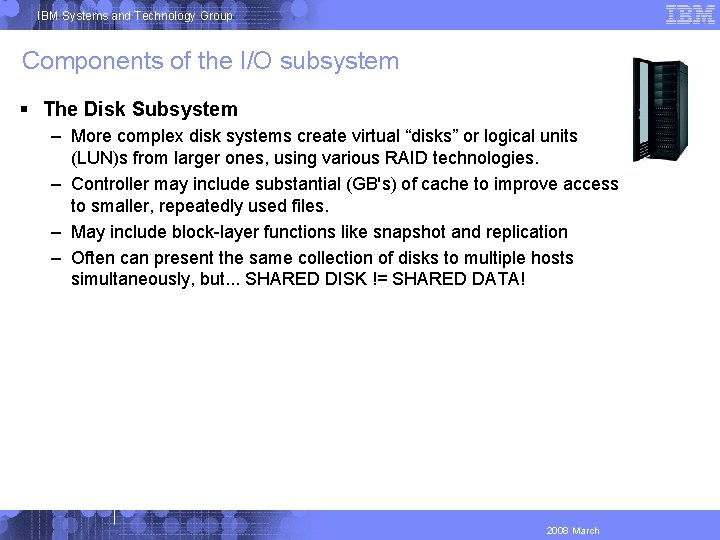
IBM Systems and Technology Group Components of the I/O subsystem The Disk Subsystem – More complex disk systems create virtual “disks” or logical units (LUN)s from larger ones, using various RAID technologies. – Controller may include substantial (GB's) of cache to improve access to smaller, repeatedly used files. – May include block-layer functions like snapshot and replication – Often can present the same collection of disks to multiple hosts simultaneously, but. . . SHARED DISK != SHARED DATA! 2008 March
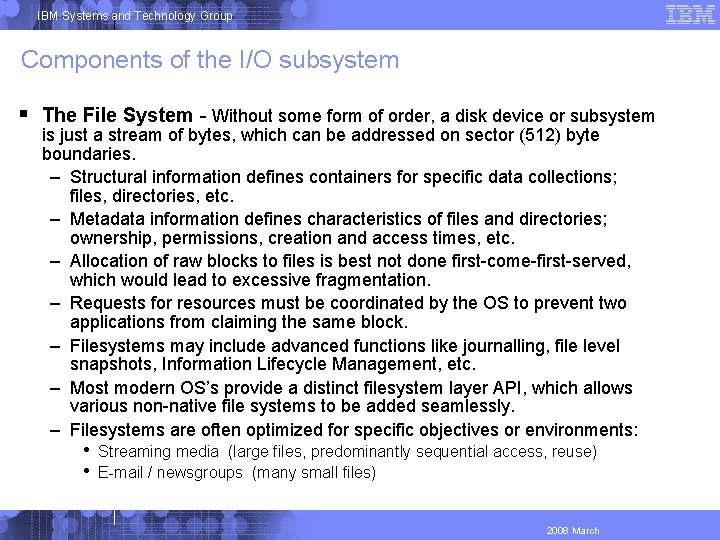
IBM Systems and Technology Group Components of the I/O subsystem The File System - Without some form of order, a disk device or subsystem is just a stream of bytes, which can be addressed on sector (512) byte boundaries. – Structural information defines containers for specific data collections; files, directories, etc. – Metadata information defines characteristics of files and directories; ownership, permissions, creation and access times, etc. – Allocation of raw blocks to files is best not done first-come-first-served, which would lead to excessive fragmentation. – Requests for resources must be coordinated by the OS to prevent two applications from claiming the same block. – Filesystems may include advanced functions like journalling, file level snapshots, Information Lifecycle Management, etc. – Most modern OS’s provide a distinct filesystem layer API, which allows various non-native file systems to be added seamlessly. – Filesystems are often optimized for specific objectives or environments: • • Streaming media (large files, predominantly sequential access, reuse) E-mail / newsgroups (many small files) 2008 March
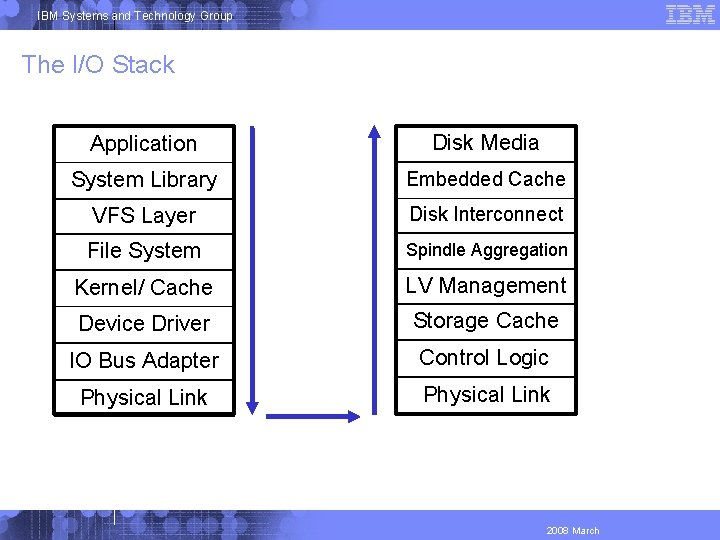
IBM Systems and Technology Group The I/O Stack Application Disk Media System Library Embedded Cache VFS Layer Disk Interconnect File System Spindle Aggregation Kernel/ Cache LV Management Device Driver Storage Cache IO Bus Adapter Control Logic Physical Link 2008 March
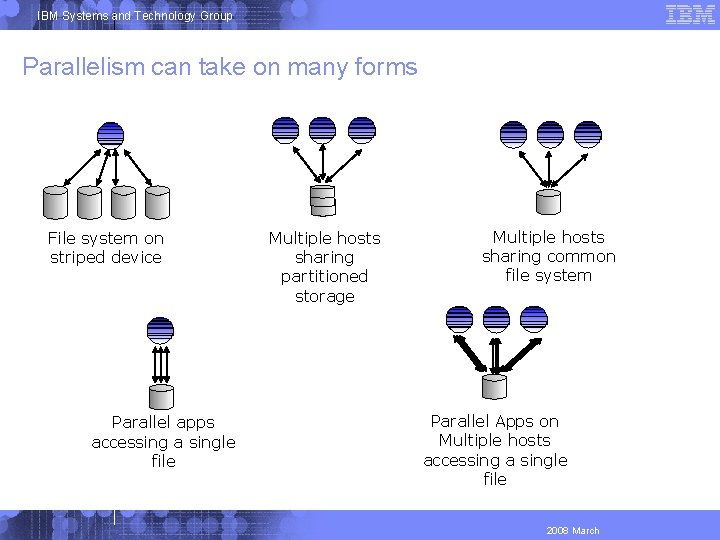
IBM Systems and Technology Group Parallelism can take on many forms File system on striped device Parallel apps accessing a single file Multiple hosts sharing partitioned storage Multiple hosts sharing common file system Parallel Apps on Multiple hosts accessing a single file 2008 March
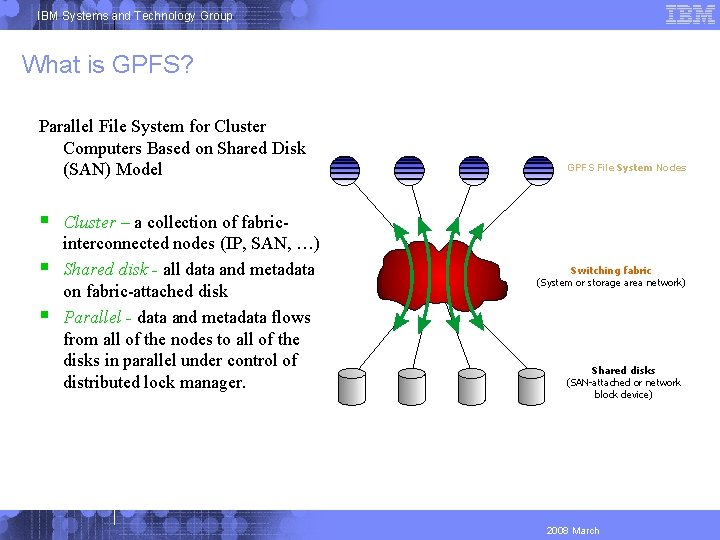
IBM Systems and Technology Group What is GPFS? Parallel File System for Cluster Computers Based on Shared Disk (SAN) Model Cluster – a collection of fabricinterconnected nodes (IP, SAN, …) Shared disk - all data and metadata on fabric-attached disk Parallel - data and metadata flows from all of the nodes to all of the disks in parallel under control of distributed lock manager. GPFS File System Nodes Switching fabric (System or storage area network) Shared disks (SAN-attached or network block device) 2008 March
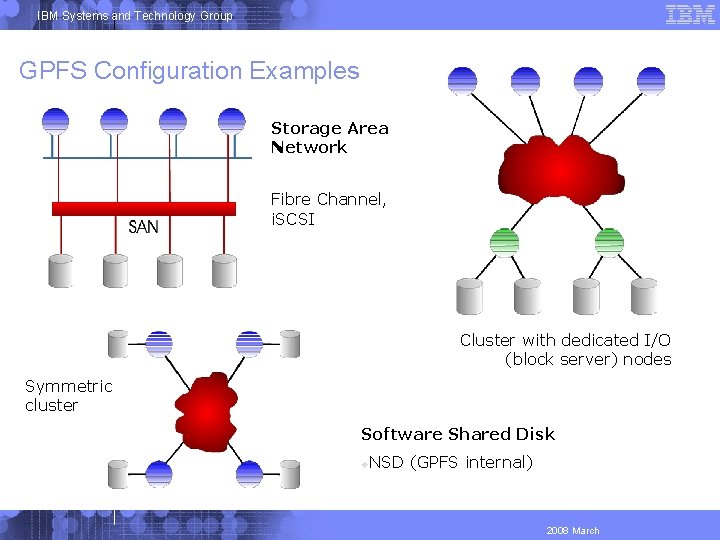
IBM Systems and Technology Group GPFS Configuration Examples Storage Area Network Fibre Channel, i. SCSI Cluster with dedicated I/O (block server) nodes Symmetric cluster Software Shared Disk NSD (GPFS internal) 2008 March
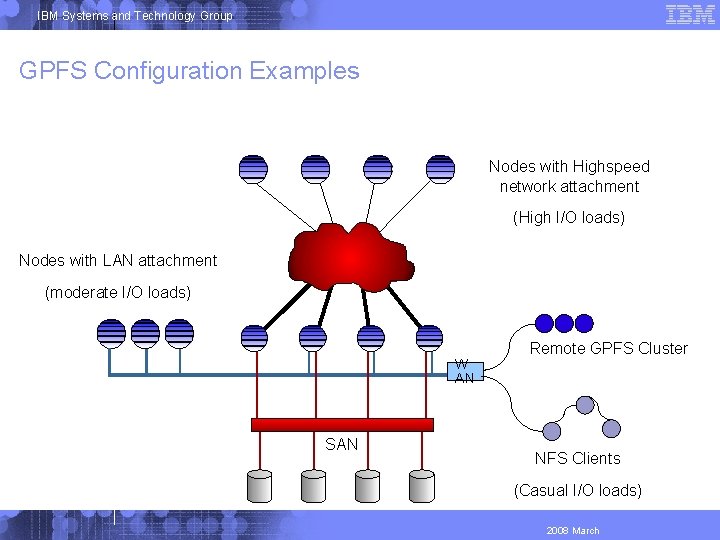
IBM Systems and Technology Group GPFS Configuration Examples Nodes with Highspeed network attachment (High I/O loads) Nodes with LAN attachment (moderate I/O loads) W AN SAN Remote GPFS Cluster NFS Clients (Casual I/O loads) 2008 March
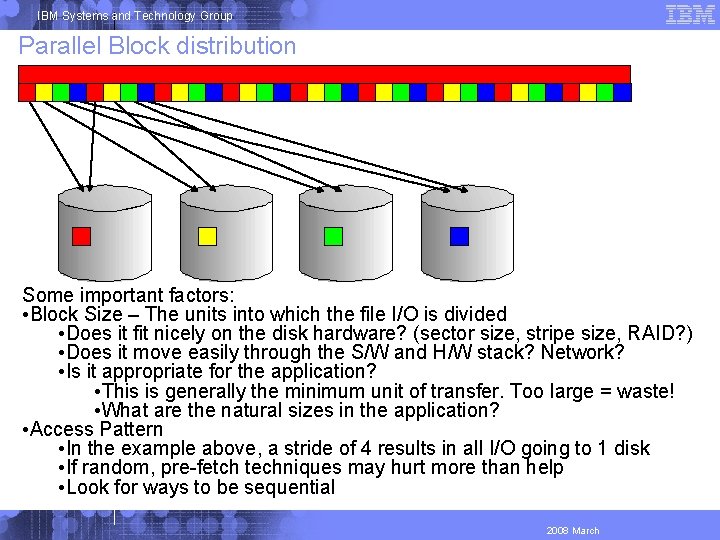
IBM Systems and Technology Group Parallel Block distribution Some important factors: • Block Size – The units into which the file I/O is divided • Does it fit nicely on the disk hardware? (sector size, stripe size, RAID? ) • Does it move easily through the S/W and H/W stack? Network? • Is it appropriate for the application? • This is generally the minimum unit of transfer. Too large = waste! • What are the natural sizes in the application? • Access Pattern • In the example above, a stride of 4 results in all I/O going to 1 disk • If random, pre-fetch techniques may hurt more than help • Look for ways to be sequential 2008 March
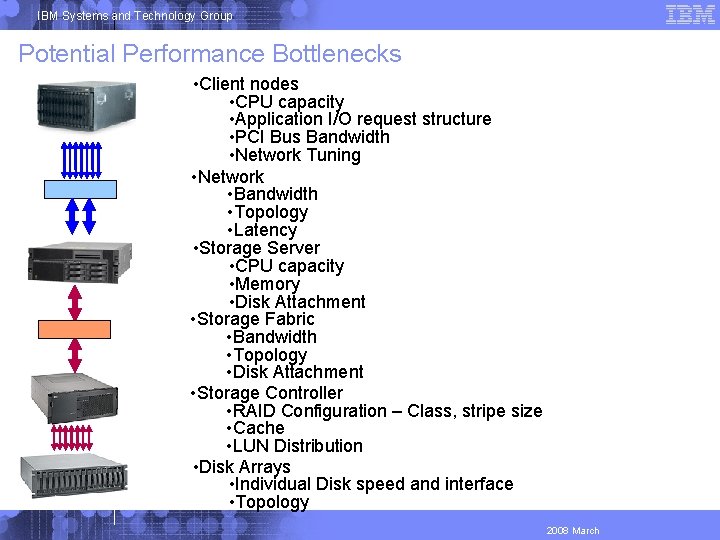
IBM Systems and Technology Group Potential Performance Bottlenecks • Client nodes • CPU capacity • Application I/O request structure • PCI Bus Bandwidth • Network Tuning • Network • Bandwidth • Topology • Latency • Storage Server • CPU capacity • Memory • Disk Attachment • Storage Fabric • Bandwidth • Topology • Disk Attachment • Storage Controller • RAID Configuration – Class, stripe size • Cache • LUN Distribution • Disk Arrays • Individual Disk speed and interface • Topology 2008 March
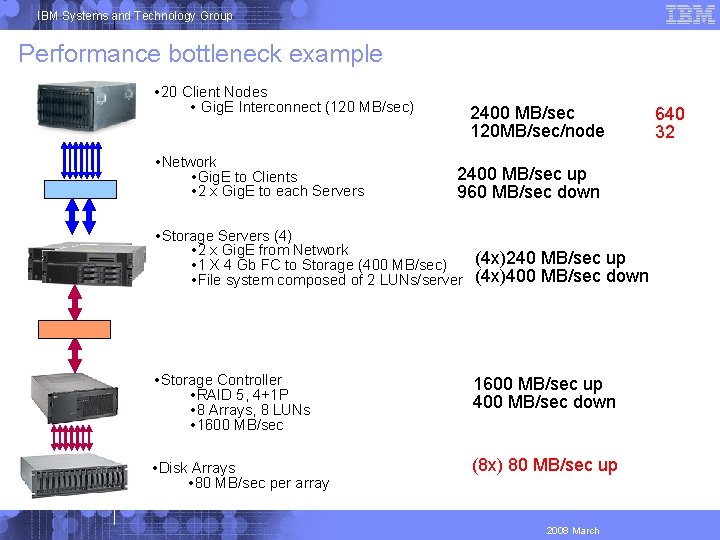
IBM Systems and Technology Group Performance bottleneck example • 20 Client Nodes • Gig. E Interconnect (120 MB/sec) • Network • Gig. E to Clients • 2 x Gig. E to each Servers 2400 MB/sec 120 MB/sec/node 2400 MB/sec up 2400 MB/secup up 960 MB/sec down 960 MB/secdown • Storage Servers (4) • 2 x Gig. E from Network (4 x)240 MB/sec up • 1 X 4 Gb FC to Storage (400 MB/sec) • File system composed of 2 LUNs/server (4 x)400 MB/sec down • Storage Controller • RAID 5, 4+1 P • 8 Arrays, 8 LUNs • 1600 MB/sec up 400 MB/sec down • Disk Arrays • 80 MB/sec per array (8 x) 80 MB/sec up 2008 March 960 640 48 32
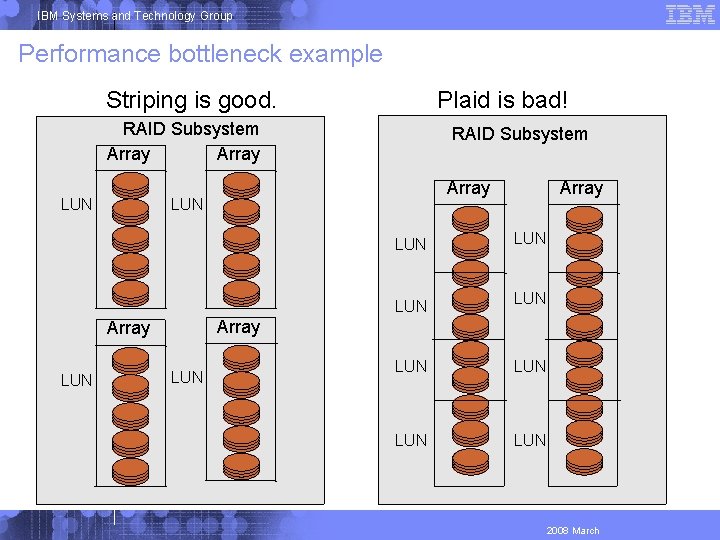
IBM Systems and Technology Group Performance bottleneck example Striping is good. Plaid is bad! RAID Subsystem Array LUN LUN LUN Array LUN LUN LUN 2008 March
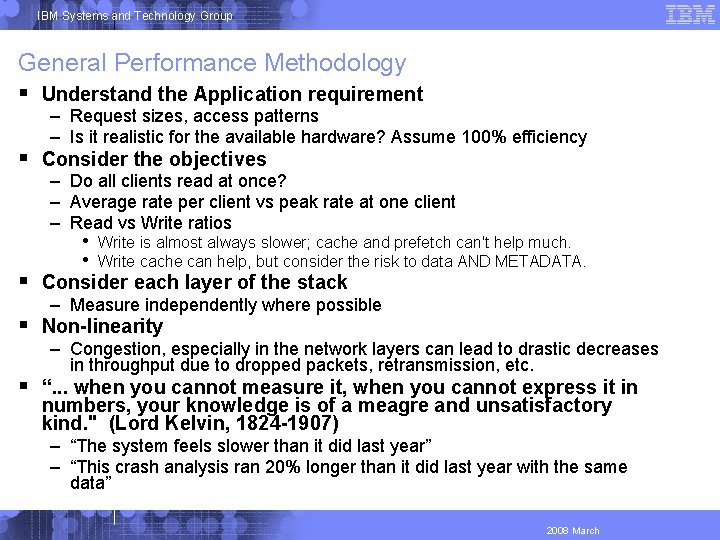
IBM Systems and Technology Group General Performance Methodology Understand the Application requirement – Request sizes, access patterns – Is it realistic for the available hardware? Assume 100% efficiency Consider the objectives • Write is almost always slower; cache and prefetch can't help much. • Write cache can help, but consider the risk to data AND METADATA. Consider each layer of the stack Non-linearity “. . . when you cannot measure it, when you cannot express it in numbers, your knowledge is of a meagre and unsatisfactory kind. " (Lord Kelvin, 1824 -1907) – Do all clients read at once? – Average rate per client vs peak rate at one client – Read vs Write ratios – Measure independently where possible – Congestion, especially in the network layers can lead to drastic decreases in throughput due to dropped packets, retransmission, etc. – “The system feels slower than it did last year” – “This crash analysis ran 20% longer than it did last year with the same data” 2008 March
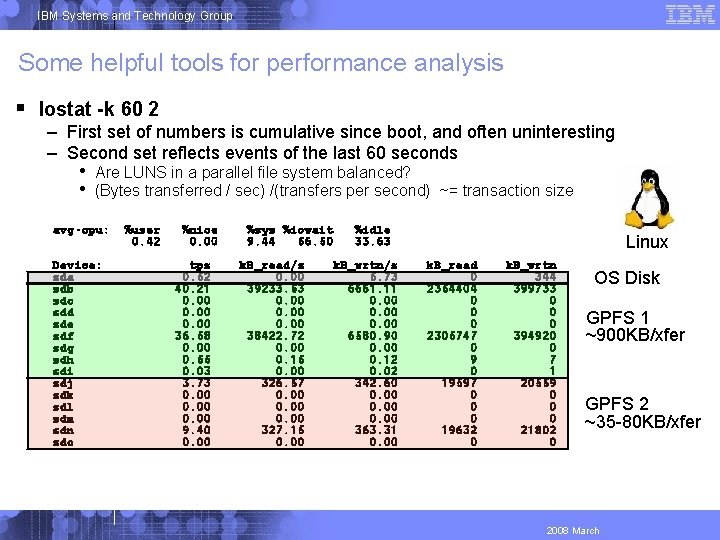
IBM Systems and Technology Group Some helpful tools for performance analysis Iostat -k 60 2 – First set of numbers is cumulative since boot, and often uninteresting – Second set reflects events of the last 60 seconds • • Are LUNS in a parallel file system balanced? (Bytes transferred / sec) /(transfers per second) ~= transaction size avg-cpu: Device: sda sdb sdc sdd sde sdf sdg sdh sdi sdj sdk sdl sdm sdn sdo %user 0. 42 %nice 0. 00 tps 0. 52 40. 21 0. 00 36. 58 0. 00 0. 55 0. 03 3. 73 0. 00 9. 40 0. 00 %sys %iowait 9. 44 56. 50 k. B_read/s 0. 00 39233. 53 0. 00 38422. 72 0. 00 0. 15 0. 00 326. 57 0. 00 327. 15 0. 00 %idle 33. 63 k. B_wrtn/s 5. 73 6661. 11 0. 00 6580. 90 0. 00 0. 12 0. 02 342. 60 0. 00 363. 31 0. 00 Linux k. B_read 0 2354404 0 0 0 2305747 0 9 0 19597 0 0 0 19632 0 k. B_wrtn 344 399733 0 0 0 394920 0 7 1 20559 0 0 0 21802 0 OS Disk GPFS 1 ~900 KB/xfer GPFS 2 ~35 -80 KB/xfer 2008 March
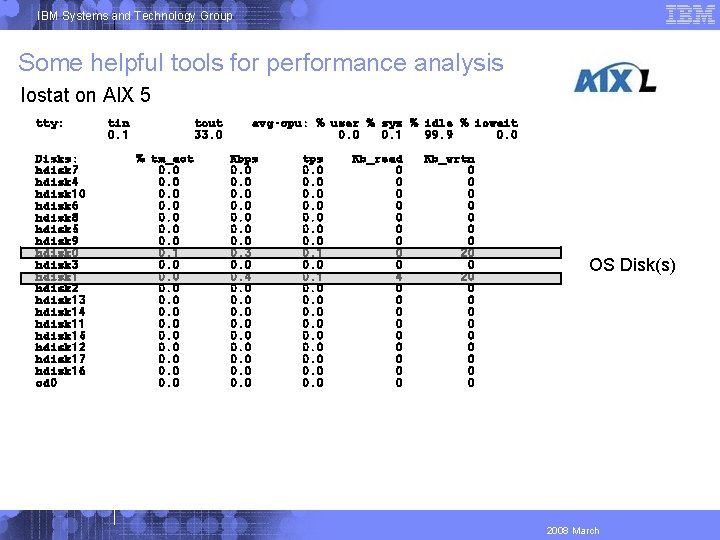
IBM Systems and Technology Group Some helpful tools for performance analysis Iostat on AIX 5 tty: Disks: hdisk 7 hdisk 4 hdisk 10 hdisk 6 hdisk 8 hdisk 5 hdisk 9 hdisk 0 hdisk 3 hdisk 1 hdisk 2 hdisk 13 hdisk 14 hdisk 11 hdisk 15 hdisk 12 hdisk 17 hdisk 16 cd 0 tin 0. 1 tout 33. 0 % tm_act 0. 0 0. 1 0. 0 0. 0 avg-cpu: % user % sys % idle % iowait 0. 0 0. 1 99. 9 0. 0 Kbps 0. 0 0. 3 0. 0 0. 4 0. 0 0. 0 tps 0. 0 0. 1 0. 0 0. 0 Kb_read 0 0 0 0 0 4 0 0 0 0 0 Kb_wrtn 0 0 0 0 20 0 0 OS Disk(s) 2008 March
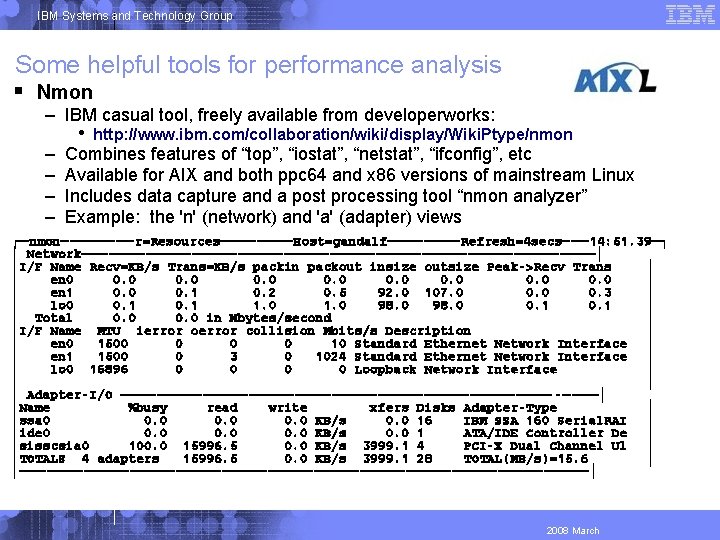
IBM Systems and Technology Group Some helpful tools for performance analysis Nmon – IBM casual tool, freely available from developerworks: – – • http: //www. ibm. com/collaboration/wiki/display/Wiki. Ptype/nmon Combines features of “top”, “iostat”, “netstat”, “ifconfig”, etc Available for AIX and both ppc 64 and x 86 versions of mainstream Linux Includes data capture and a post processing tool “nmon analyzer” Example: the 'n' (network) and 'a' (adapter) views ┌─nmon────r=Resources────Host=gandalf────Refresh=4 secs───14: 51. 39─┐ │ Network────────────────────────────│ │I/F Name Recv=KB/s Trans=KB/s packin packout insize outsize Peak->Recv Trans │ │ en 0 0. 0 │ │ en 1 0. 0 0. 1 0. 2 0. 5 92. 0 107. 0 0. 3 │ │ lo 0 0. 1 1. 0 98. 0 0. 1 │ │ Total 0. 0 in Mbytes/second │ │I/F Name MTU ierror oerror collision Mbits/s Description │ │ en 0 1500 0 10 Standard Ethernet Network Interface │ │ en 1 1500 0 3 0 1024 Standard Ethernet Network Interface │ │ lo 0 16896 0 0 Loopback Network Interface │ │ Adapter-I/O ──────────────────────── -────│ │Name %busy read write xfers Disks Adapter-Type │ │ssa 0 0. 0 KB/s 0. 0 16 IBM SSA 160 Serial. RAI │ │ide 0 0. 0 KB/s 0. 0 1 ATA/IDE Controller De │ │sisscsia 0 100. 0 15996. 5 0. 0 KB/s 3999. 1 4 PCI-X Dual Channel Ul │ │TOTALS 4 adapters 15996. 5 0. 0 KB/s 3999. 1 28 TOTAL(MB/s)=15. 6 │ │───────────────────────────────│ 2008 March
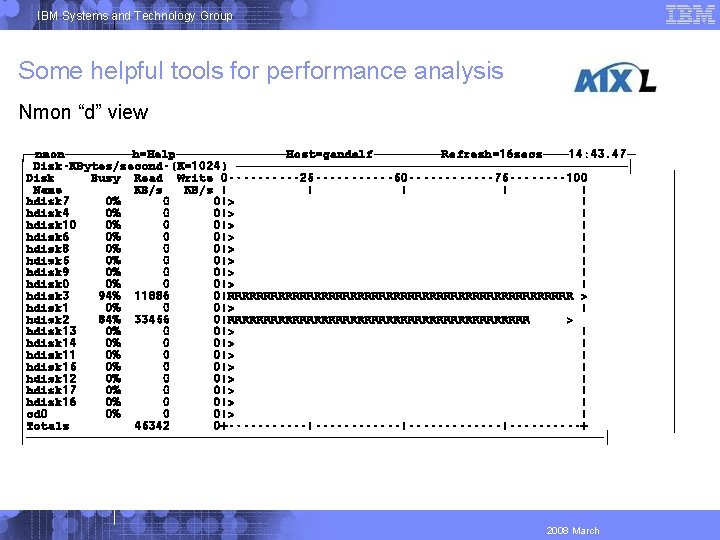
IBM Systems and Technology Group Some helpful tools for performance analysis Nmon “d” view ┌─nmon────h=Help───────Host=gandalf────Refresh=16 secs───14: 43. 47─ │ Disk-KBytes/second-(K=1024) ───────────────────────│ │Disk Busy Read Write 0 -----25 ------50 ------75 ----100 │ Name KB/s | | | │hdisk 7 0% 0 0|> | │hdisk 4 0% 0 0|> | │hdisk 10 0% 0 0|> | │hdisk 6 0% 0 0|> | │hdisk 8 0% 0 0|> | │hdisk 5 0% 0 0|> | │hdisk 9 0% 0 0|> | │hdisk 0 0% 0 0|> | │hdisk 3 94% 11886 0|RRRRRRRRRRRRRRRRRRRRRRRR > │hdisk 1 0% 0 0|> | │hdisk 2 84% 33456 0|RRRRRRRRRRRRRRRRRRRRR > │hdisk 13 0% 0 0|> | │hdisk 14 0% 0 0|> | │hdisk 11 0% 0 0|> | │hdisk 15 0% 0 0|> | │hdisk 12 0% 0 0|> | │hdisk 17 0% 0 0|> | │hdisk 16 0% 0 0|> | │cd 0 0% 0 0|> | │Totals 45342 0+-----------|-------|-----+ │──────────────────────────────────│ 2008 March │ │ │ │ │ │
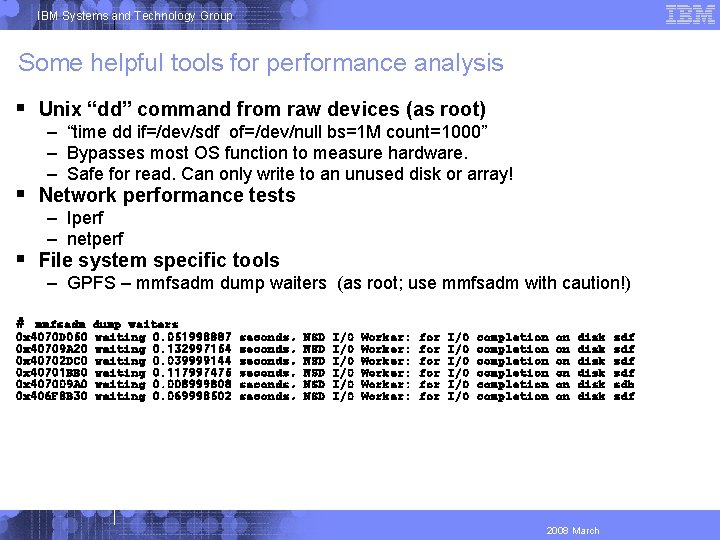
IBM Systems and Technology Group Some helpful tools for performance analysis Unix “dd” command from raw devices (as root) Network performance tests File system specific tools # dump waiters waiting 0. 051998887 waiting 0. 132997154 waiting 0. 039999144 waiting 0. 117997475 waiting 0. 008999808 waiting 0. 069998502 – “time dd if=/dev/sdf of=/dev/null bs=1 M count=1000” – Bypasses most OS function to measure hardware. – Safe for read. Can only write to an unused disk or array! – Iperf – netperf – GPFS – mmfsadm dump waiters (as root; use mmfsadm with caution!) mmfsadm 0 x 4070 D 050 0 x 40709 A 20 0 x 40702 DC 0 0 x 40701 BB 0 0 x 407009 A 0 0 x 406 F 8 B 30 seconds, seconds, NSD NSD NSD I/O I/O I/O Worker: Worker: for for for I/O I/O I/O completion completion on disk disk 2008 March sdf sdf sdb sdf
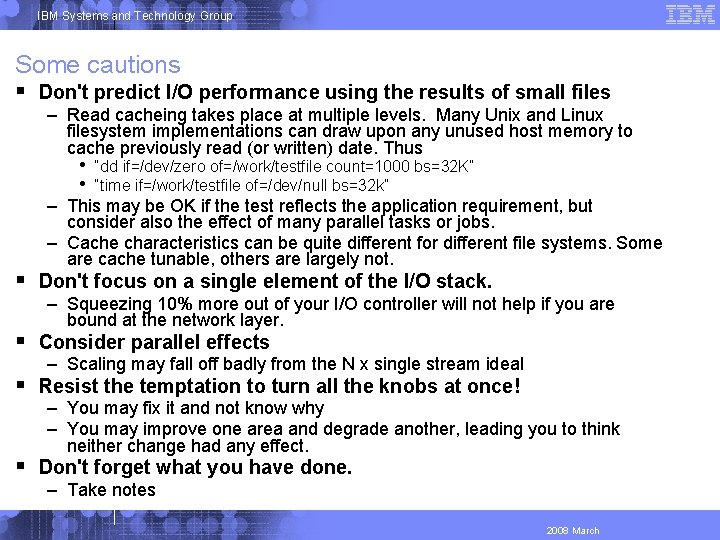
IBM Systems and Technology Group Some cautions Don't predict I/O performance using the results of small files – Read cacheing takes place at multiple levels. Many Unix and Linux filesystem implementations can draw upon any unused host memory to cache previously read (or written) date. Thus • • “dd if=/dev/zero of=/work/testfile count=1000 bs=32 K” “time if=/work/testfile of=/dev/null bs=32 k” – This may be OK if the test reflects the application requirement, but consider also the effect of many parallel tasks or jobs. – Cache characteristics can be quite different for different file systems. Some are cache tunable, others are largely not. Don't focus on a single element of the I/O stack. Consider parallel effects Resist the temptation to turn all the knobs at once! Don't forget what you have done. – Squeezing 10% more out of your I/O controller will not help if you are bound at the network layer. – Scaling may fall off badly from the N x single stream ideal – You may fix it and not know why – You may improve one area and degrade another, leading you to think neither change had any effect. – Take notes 2008 March