
Systems Architecture Seventh Edition Chapter 5 Data Storage
- Slides: 54
Systems Architecture, Seventh Edition Chapter 5 Data Storage Technology © 2016. Cengage Learning. All rights reserved.
Chapter Objectives • In this chapter, you will learn to: – Describe the distinguishing characteristics of primary and secondary storage – Describe the devices used to implement primary storage – Compare secondary storage alternatives – Describe factors that storage device performance – Choose appropriate secondary storage technologies and devices © 2016. Cengage Learning. All rights reserved. Systems Architecture, Seventh Edition
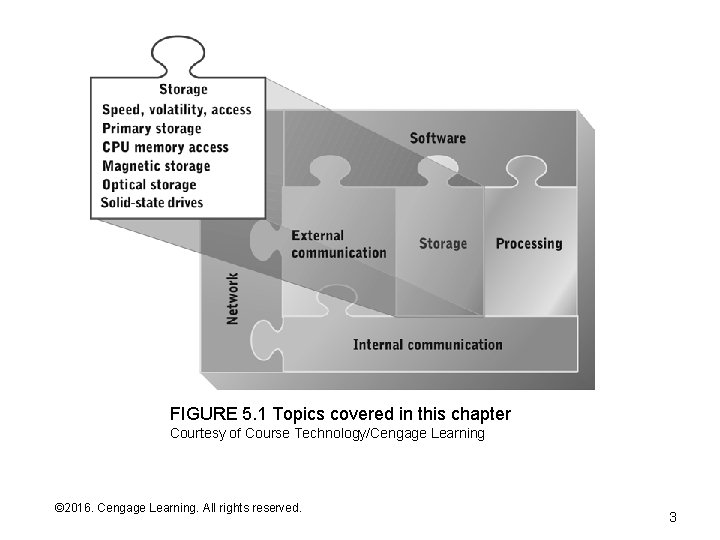
FIGURE 5. 1 Topics covered in this chapter Courtesy of Course Technology/Cengage Learning © 2016. Cengage Learning. All rights reserved. Systems Architecture, Seventh Edition 3
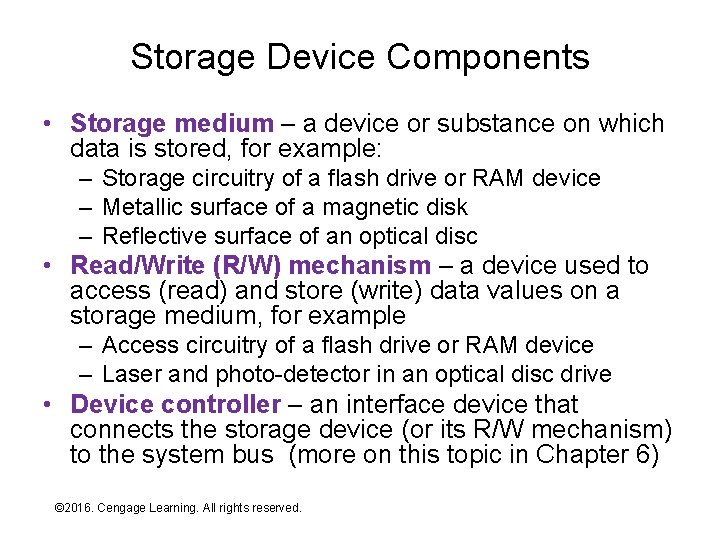
Storage Device Components • Storage medium – a device or substance on which data is stored, for example: – Storage circuitry of a flash drive or RAM device – Metallic surface of a magnetic disk – Reflective surface of an optical disc • Read/Write (R/W) mechanism – a device used to access (read) and store (write) data values on a storage medium, for example – Access circuitry of a flash drive or RAM device – Laser and photo-detector in an optical disc drive • Device controller – an interface device that connects the storage device (or its R/W mechanism) to the system bus (more on this topic in Chapter 6) © 2016. Cengage Learning. All rights reserved. Systems Architecture, Seventh Edition
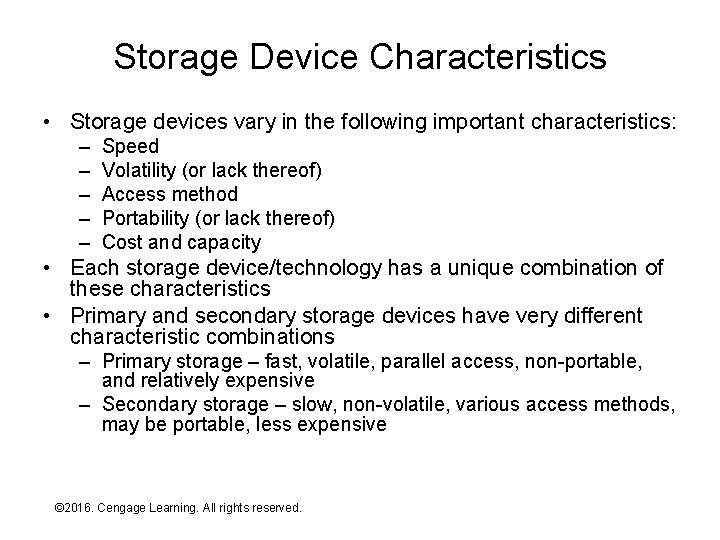
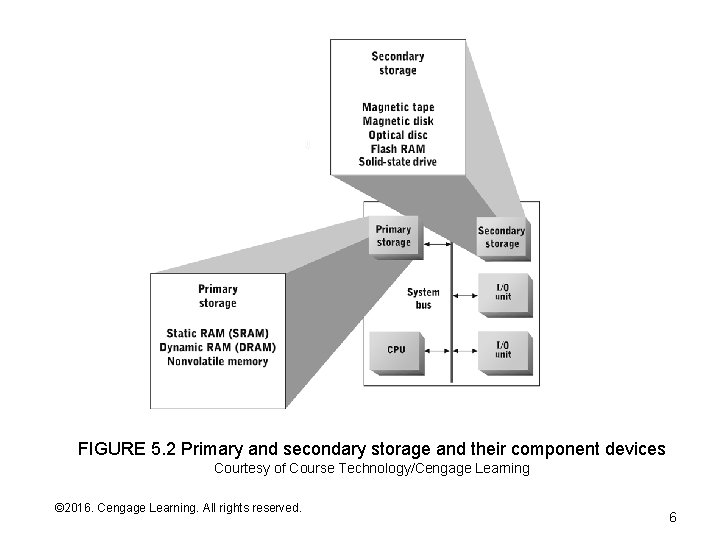
Storage Device Characteristics • Storage devices vary in the following important characteristics: – – – Speed Volatility (or lack thereof) Access method Portability (or lack thereof) Cost and capacity • Each storage device/technology has a unique combination of these characteristics • Primary and secondary storage devices have very different characteristic combinations – Primary storage – fast, volatile, parallel access, non-portable, and relatively expensive – Secondary storage – slow, non-volatile, various access methods, may be portable, less expensive © 2016. Cengage Learning. All rights reserved. Systems Architecture, Seventh Edition
FIGURE 5. 2 Primary and secondary storage and their component devices Courtesy of Course Technology/Cengage Learning © 2016. Cengage Learning. All rights reserved. Systems Architecture, Seventh Edition 6
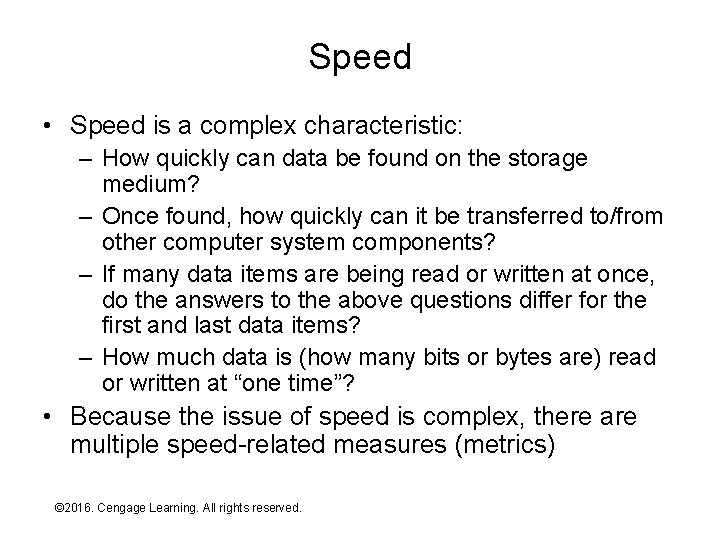
Speed • Speed is a complex characteristic: – How quickly can data be found on the storage medium? – Once found, how quickly can it be transferred to/from other computer system components? – If many data items are being read or written at once, do the answers to the above questions differ for the first and last data items? – How much data is (how many bits or bytes are) read or written at “one time”? • Because the issue of speed is complex, there are multiple speed-related measures (metrics) © 2016. Cengage Learning. All rights reserved. Systems Architecture, Seventh Edition
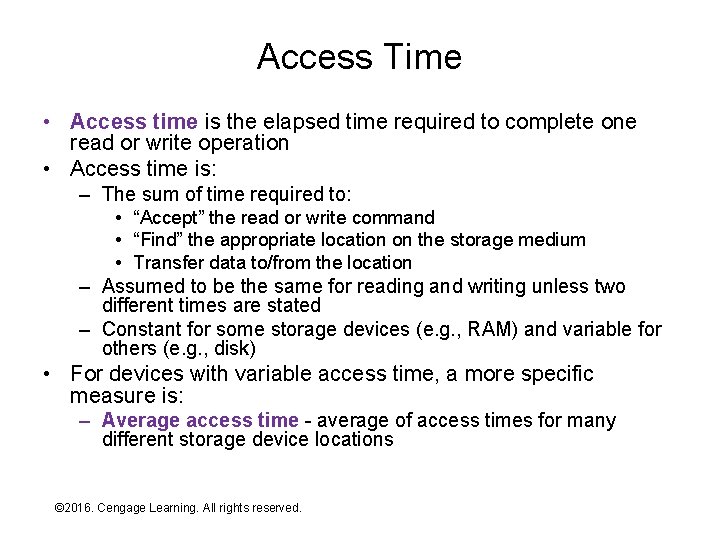
Access Time • Access time is the elapsed time required to complete one read or write operation • Access time is: – The sum of time required to: • “Accept” the read or write command • “Find” the appropriate location on the storage medium • Transfer data to/from the location – Assumed to be the same for reading and writing unless two different times are stated – Constant for some storage devices (e. g. , RAM) and variable for others (e. g. , disk) • For devices with variable access time, a more specific measure is: – Average access time - average of access times for many different storage device locations © 2016. Cengage Learning. All rights reserved. Systems Architecture, Seventh Edition
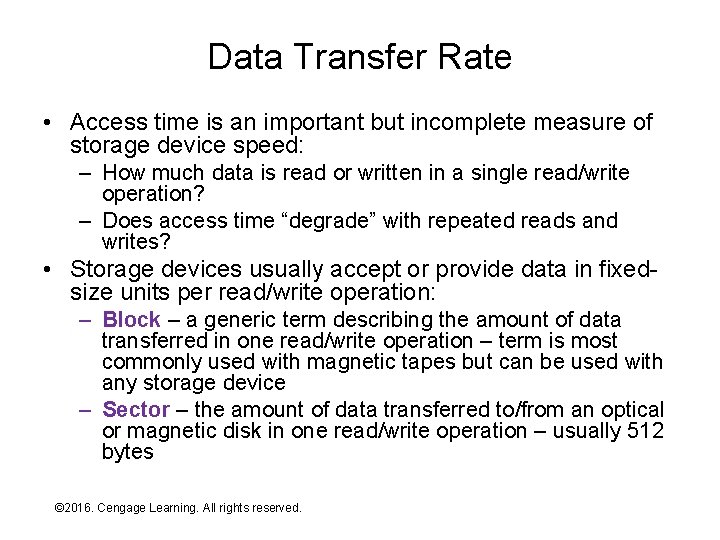
Data Transfer Rate • Access time is an important but incomplete measure of storage device speed: – How much data is read or written in a single read/write operation? – Does access time “degrade” with repeated reads and writes? • Storage devices usually accept or provide data in fixedsize units per read/write operation: – Block – a generic term describing the amount of data transferred in one read/write operation – term is most commonly used with magnetic tapes but can be used with any storage device – Sector – the amount of data transferred to/from an optical or magnetic disk in one read/write operation – usually 512 bytes © 2016. Cengage Learning. All rights reserved. Systems Architecture, Seventh Edition
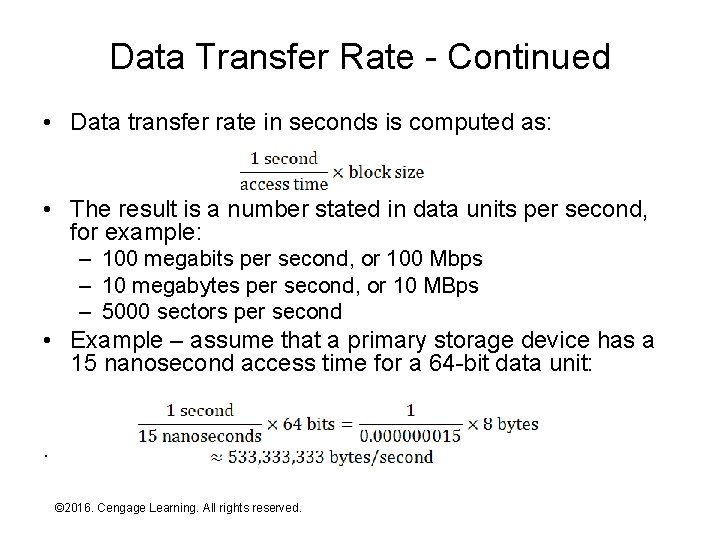
Data Transfer Rate - Continued • Data transfer rate in seconds is computed as: • The result is a number stated in data units per second, for example: – 100 megabits per second, or 100 Mbps – 10 megabytes per second, or 10 MBps – 5000 sectors per second • Example – assume that a primary storage device has a 15 nanosecond access time for a 64 -bit data unit: . © 2016. Cengage Learning. All rights reserved. Systems Architecture, Seventh Edition
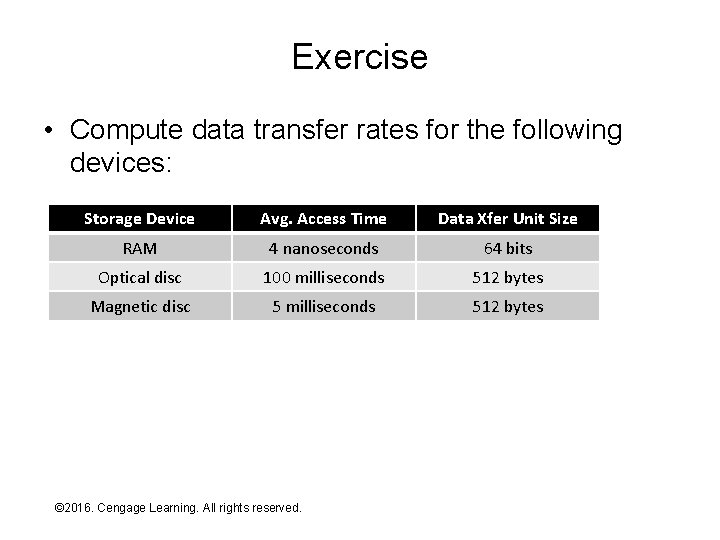
Exercise • Compute data transfer rates for the following devices: Storage Device Avg. Access Time Data Xfer Unit Size RAM 4 nanoseconds 64 bits Optical disc 100 milliseconds 512 bytes Magnetic disc 5 milliseconds 512 bytes © 2016. Cengage Learning. All rights reserved. Systems Architecture, Seventh Edition
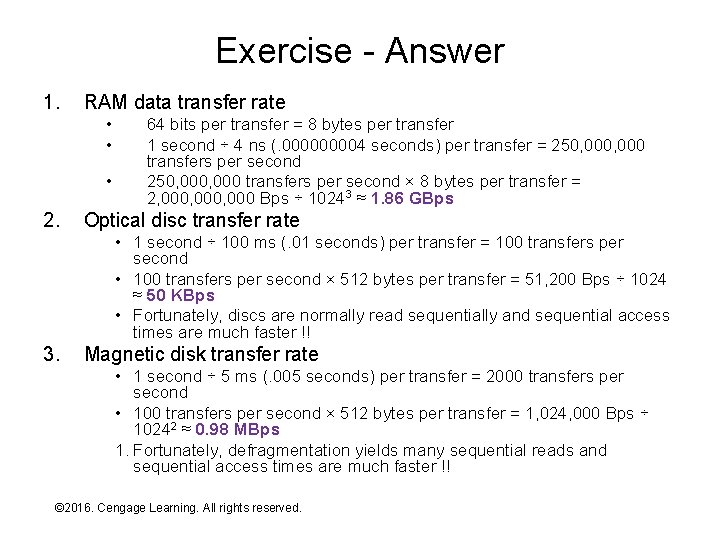
Exercise - Answer 1. RAM data transfer rate • • • 2. 64 bits per transfer = 8 bytes per transfer 1 second ÷ 4 ns (. 00004 seconds) per transfer = 250, 000, 000 transfers per second × 8 bytes per transfer = 2, 000, 000 Bps ÷ 10243 ≈ 1. 86 GBps Optical disc transfer rate • 1 second ÷ 100 ms (. 01 seconds) per transfer = 100 transfers per second • 100 transfers per second × 512 bytes per transfer = 51, 200 Bps ÷ 1024 ≈ 50 KBps • Fortunately, discs are normally read sequentially and sequential access times are much faster !! 3. Magnetic disk transfer rate • 1 second ÷ 5 ms (. 005 seconds) per transfer = 2000 transfers per second • 100 transfers per second × 512 bytes per transfer = 1, 024, 000 Bps ÷ 10242 ≈ 0. 98 MBps 1. Fortunately, defragmentation yields many sequential reads and sequential access times are much faster !! © 2016. Cengage Learning. All rights reserved. Systems Architecture, Seventh Edition
Volatility • A storage device or medium is: – Nonvolatile – if it holds data without loss over long periods of time (typically, years or decades) – Volatile – if it cannot reliably hold data for long periods of time • Volatility is not a binary characteristic, it’s a matter of degree, for example: – RAM is non-volatile in typical use but its storage life can be extended hours or days with battery backup – Flash RAM circuits hold data indefinitely but they “wear out” with repeated use – Data stored on a magnetic disk will last decades if the device is powered off, but the device will normally fail in less than two decades if used continuously • For storage devices with removable storage media (e. g. , DVD), the “lifetimes” of both the device and the medium must be considered – For example, you could put a DVD in a time capsule to be opened in 1000 years, but will anyone have a working DVD reader at that time? © 2016. Cengage Learning. All rights reserved. Systems Architecture, Seventh Edition
Access Methods • Access methods fall into three broad classes: – Serial access • Tape, for example • Access locations or organized serially (in a line) • Access to location N requires accessing (or skipping over) locations 1 through N+1 • Old technology – avoided whenever possible! – Random access • Disk, for example • Also called direct access • Any location on the storage medium can be accessed in (approximately) the same amount of time – Parallel access • Disk arrays, for example • Multiple locations on the same storage medium can be accessed at the same time • A single device can employ multiple methods! © 2016. Cengage Learning. All rights reserved. Systems Architecture, Seventh Edition
Portability • Storage device portability comes in two forms: – The entire device (medium, R/W mechanism, and maybe the controller) is portable • For example, flash drive, compact flash card, external USB hard drive, many cell phones when connected to the USB port of a laptop or desktop computer – Only the storage medium is removable and portable • For example, CD and DVD • Portability is usually obtained at the expense of speed – For portable devices – slower “external” communication technologies and standards are used • For example, flash drive vs. installed RAM – For removable media – loss of control over environmental conditions necessitates performance compromises • For example, sealed magnetic disc drive vs. CD or DVD © 2016. Cengage Learning. All rights reserved. Systems Architecture, Seventh Edition
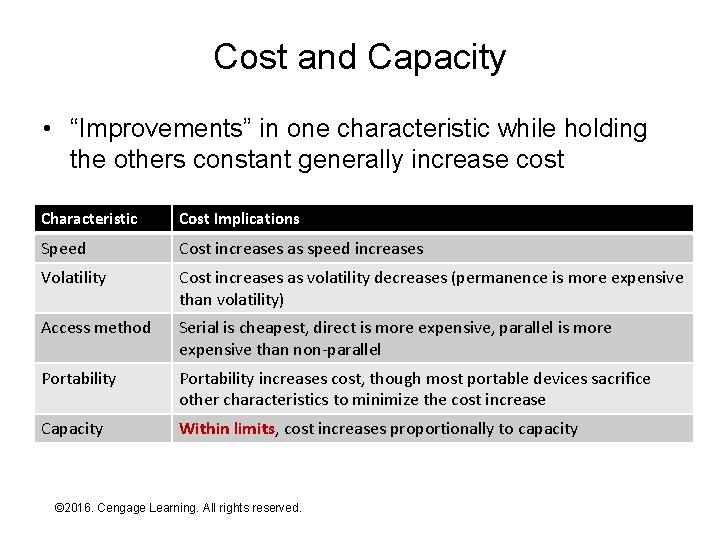
Cost and Capacity • “Improvements” in one characteristic while holding the others constant generally increase cost Characteristic Cost Implications Speed Cost increases as speed increases Volatility Cost increases as volatility decreases (permanence is more expensive than volatility) Access method Serial is cheapest, direct is more expensive, parallel is more expensive than non-parallel Portability increases cost, though most portable devices sacrifice other characteristics to minimize the cost increase Capacity Within limits, cost increases proportionally to capacity © 2016. Cengage Learning. All rights reserved. Systems Architecture, Seventh Edition
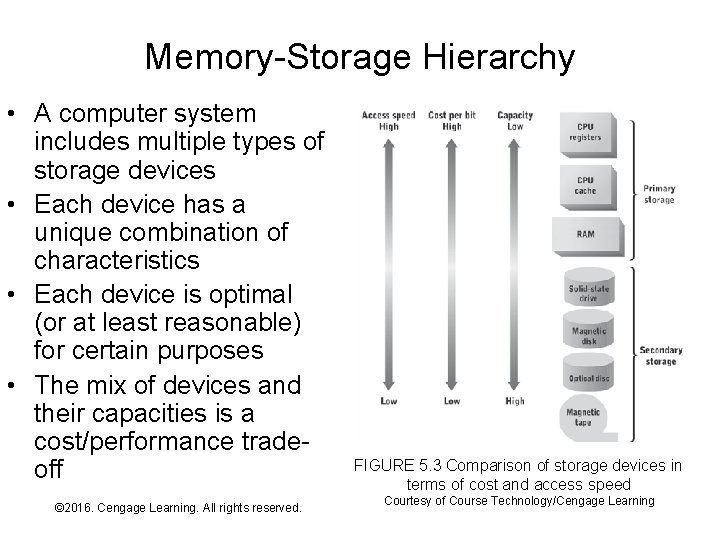
Memory-Storage Hierarchy • A computer system includes multiple types of storage devices • Each device has a unique combination of characteristics • Each device is optimal (or at least reasonable) for certain purposes • The mix of devices and their capacities is a cost/performance tradeoff © 2016. Cengage Learning. All rights reserved. Systems Architecture, Seventh Edition FIGURE 5. 3 Comparison of storage devices in terms of cost and access speed Courtesy of Course Technology/Cengage Learning
Primary and Secondary Storage • Primary storage holds instructions and data for immediate/frequent CPU access – Speed mismatches between the CPU and primary storage cause wait states – Minimizing wait states dramatically improves CPU and computer system performance – Thus, primary storage devices generally emphasize speed and “faster” access methods at the expense of other characteristics • Secondary storage holds large quantities of data for long time periods – Thus, secondary storage devices tend to emphasize non-volatility and cost at the expense of other characteristics © 2016. Cengage Learning. All rights reserved. Systems Architecture, Seventh Edition
Storing Electrical Signals • Data is represented and processed within the CPU as electrical signals • Thus, to store a CPU’s data we must either: – Store electrical signals directly – Use the electrical signals to generate something else that can be stored • Methods of directly storing electrical signals include: – Batteries – poorly suited to rapid storage/retrieval – Capacitors – faster than batteries, but require frequent recharge unless they’re “big” – Mechanical switches – non-volatile, but slow and unreliable – Transistor-based switches – Very fast but require continuous flow of electricity (i. e. , volatile) © 2016. Cengage Learning. All rights reserved. Systems Architecture, Seventh Edition
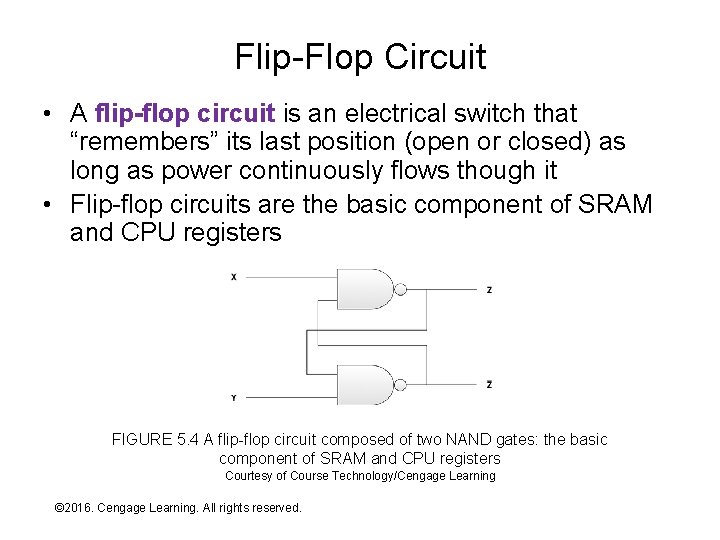
Flip-Flop Circuit • A flip-flop circuit is an electrical switch that “remembers” its last position (open or closed) as long as power continuously flows though it • Flip-flop circuits are the basic component of SRAM and CPU registers FIGURE 5. 4 A flip-flop circuit composed of two NAND gates: the basic component of SRAM and CPU registers Courtesy of Course Technology/Cengage Learning © 2016. Cengage Learning. All rights reserved. Systems Architecture, Seventh Edition
Random Access Memory • Random Access Memory (RAM) is a primary storage technology with the following characteristics: – – Bits are stored using transistors and/or capacitors Semiconductor chip Read and write access time is approximately equal Combination of random and parallel access • Basic RAM types: – Static RAM (SRAM) • All bit storage uses flip-flop circuits • Very fast but relatively expensive – Dynamic RAM (DRAM) • Uses transistors and capacitors • Capacitors require many refresh cycles per second – reads/writes must wait for a refresh to complete • Slower and less expensive than SRAM © 2016. Cengage Learning. All rights reserved. Systems Architecture, Seventh Edition
Performance Enhancement Techniques • Both RAM types are slower than the CPU • Various “tricks” can be played (individually or in combination) to minimize the difference, including: – Read-ahead memory access • Assume sequential access to memory locations • Prefetch next memory location and have it “waiting by the door” – Synchronous read operations • A variation on read-ahead • Pipelined memory access based on the CPU or bus clock (for example, SDRAM) or a fraction of the clock (for example, DDR SDRAM) • As with CPU pipelining, out-of-sequence accesses can reduce/eliminate the performance gain – On-chip caches • Used in combination with some form of read-ahead access • The “waiting space by the door” is composed of SRAM (the cache) • The “real” storage is DRAM • Sometimes called enhanced DRAM (EDRAM) © 2016. Cengage Learning. All rights reserved. Systems Architecture, Seventh Edition
Non-Volatile Memory • Non-volatile memory: – Any memory device that can hold content without continuous power flow – Before 1990 (and occasionally since), implemented using various forms of read-only memory • ROM technologies (oldest to newest, but all are “old”): – Read-only memory (ROM) • Circuitry has data content “designed in” – Programmable ROM (PROM) • Manufactured blank and written once • Each bit has a one and zero circuit – fry the one that you don’t need! – Erasable PROM (EPROM) • Manufactured blank, written non-destructively • Reset to blank state by exposure to ultraviolet light – Electronically-erasable PROM (EEPROM) • Lose the UV light and do the same thing by sending an appropriate signal • The device contains circuitry to “erase itself” © 2016. Cengage Learning. All rights reserved. Systems Architecture, Seventh Edition
Non-Volatile RAM • Non-volatile RAM (NVRAM): – Any RAM device that can hold content without continuous power flow – The “Holy Grail” before the 1990 s – As with many “quests”, success solves old problems but creates new ones • The first and still most widely-used NVRAM is called flash RAM: – Cost and bit density is comparable to DRAM – Reads at DRAM speeds but writes more slowly (how much more slowly is a rapidly changing thing) – Every write is mildly destructive – device begins to fail after many writes (how many is also a changing thing, currently 100, 000 s to low millions) © 2016. Cengage Learning. All rights reserved. Systems Architecture, Seventh Edition
Non-Volatile RAM – Newer Technologies • Magnetoresistive RAM (MRAM) – Stores bit values with two magnetic elements – – • One with fixed polarity • Other with polarity that changes when a bit is written Second magnetic element’s polarity determines whether a current passing between the elements encounters low (a 0 bit) or high (a 1 bit) resistance Read and write speeds comparable with SRAM Density comparable with DRAM Writes aren’t destructive―better longevity than flash RAM • Phase-change memory (PRAM or PCRAM) – Germanium, antimony, and tellurium (GST) – GST switches between amorphous and crystalline states when heated • Amorphous state exhibits low reflectivity (useful in rewritable optical storage media) and high electrical resistance • Crystalline state exhibits high reflectivity and low electrical resistance. – Lower storage density and slower read times than flash RAM – Write time is much faster, and it doesn’t wear out as quickly • Unknown whether either technology will succeed in the marketplace © 2016. Cengage Learning. All rights reserved. Systems Architecture, Seventh Edition
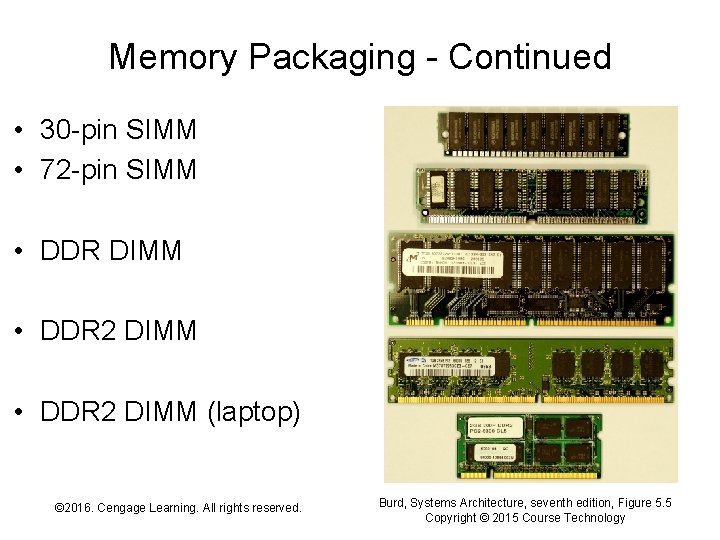
Memory Packaging • Early packages were dual-inline package (DIP) chips installed on expansion cards or directly in motherboard • Replaced in the late 1980 s by single in-line memory modules (SIMMs) – DIPS are permanently mounted on a small card • Current packaging is dual in-line memory modules (DIMMs) – SIMMs with (different) electrical contacts on both sides – More contacts required by larger word sizes and © 2016. Cengage Learning. All rights reserved. Systems Architecture, Seventh Edition bus width
Memory Packaging - Continued • 30 -pin SIMM • 72 -pin SIMM • DDR DIMM • DDR 2 DIMM (laptop) © 2016. Cengage Learning. All rights reserved. Systems Architecture, Seventh Edition Burd, Systems Architecture, seventh edition, Figure 5. 5 Copyright © 2015 Course Technology
Magnetic Storage Principles • Magnetic storage converts bit values represented as electrical signals into variations in the magnetic field of a specific location on a magnetic storage medium • The storage medium is typically metallic or some other coercible material (i. e. , a material that will accept and hold a magnetic charge) © 2016. Cengage Learning. All rights reserved. Systems Architecture, Seventh Edition
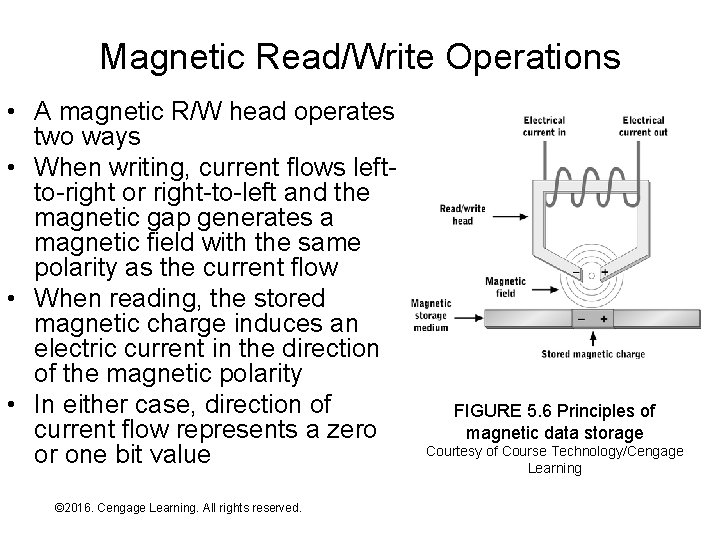
Magnetic Read/Write Operations • A magnetic R/W head operates two ways • When writing, current flows leftto-right or right-to-left and the magnetic gap generates a magnetic field with the same polarity as the current flow • When reading, the stored magnetic charge induces an electric current in the direction of the magnetic polarity • In either case, direction of current flow represents a zero or one bit value © 2016. Cengage Learning. All rights reserved. Systems Architecture, Seventh Edition FIGURE 5. 6 Principles of magnetic data storage Courtesy of Course Technology/Cengage Learning
Magnetic Storage Limitations • Stored magnetic charge must be above a minimum amount required to generate detectable current flow in the R/W head – sometimes called the read threshold – When stored magnetic charge falls below the read threshold, data is effectively “lost” • The stored charge is determined by: – – Strength of the “write” magnetic field Mass of coercible material that holds a bit value Magnetic properties of the coercible material Loss of charge due to magnetic leakage, magnetic decay, and loss of coercible material • Magnetic decay is the loss of magnetic charge strength over time – All magnets lose charge over time – Rate of charge loss varies with coercible material and its mass © 2016. Cengage Learning. All rights reserved. Systems Architecture, Seventh Edition
Magnetic Storage Limitations Continued • Magnetic leakage is the cancellation of magnetic charge in adjacent areas of opposite polarity – Causes relatively rapid loss of charge – Worst when bit storage areas can be adjacent in three dimensions (e. g. , magnetic tape) • With most magnetic storage medium the coercible material is a coating: – High-purity metals on disk platters – Iron-oxide or chrome oxide on magnetic tapes – Friction during the read/write process can wear away coercible material – primarily an issue for tapes and floppy disks – Time, physical stress, heat, and humidity can weaken the bond that holds the coercible material to the substrate – especially a problem with tapes dues to stretching © 2016. Cengage Learning. All rights reserved. Systems Architecture, Seventh Edition
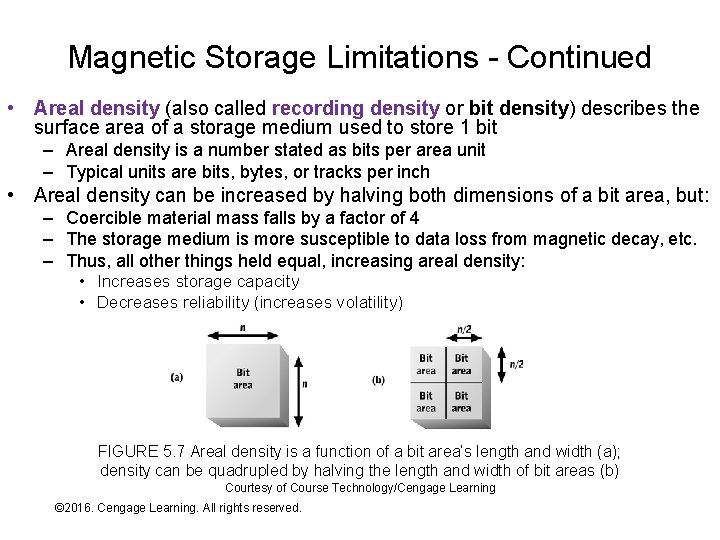
Magnetic Storage Limitations - Continued • Areal density (also called recording density or bit density) describes the surface area of a storage medium used to store 1 bit – Areal density is a number stated as bits per area unit – Typical units are bits, bytes, or tracks per inch • Areal density can be increased by halving both dimensions of a bit area, but: – Coercible material mass falls by a factor of 4 – The storage medium is more susceptible to data loss from magnetic decay, etc. – Thus, all other things held equal, increasing areal density: • Increases storage capacity • Decreases reliability (increases volatility) FIGURE 5. 7 Areal density is a function of a bit area’s length and width (a); density can be quadrupled by halving the length and width of bit areas (b) Courtesy of Course Technology/Cengage Learning © 2016. Cengage Learning. All rights reserved. Systems Architecture, Seventh Edition
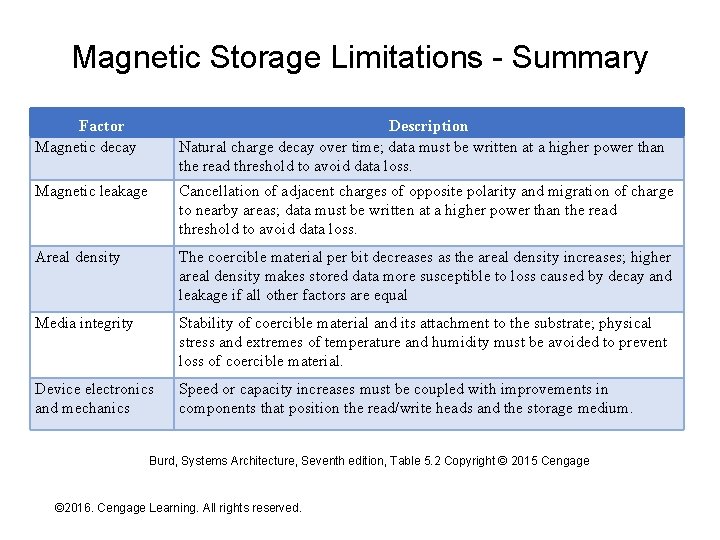
Magnetic Storage Limitations - Summary Factor Magnetic decay Description Natural charge decay over time; data must be written at a higher power than the read threshold to avoid data loss. Magnetic leakage Cancellation of adjacent charges of opposite polarity and migration of charge to nearby areas; data must be written at a higher power than the read threshold to avoid data loss. Areal density The coercible material per bit decreases as the areal density increases; higher areal density makes stored data more susceptible to loss caused by decay and leakage if all other factors are equal Media integrity Stability of coercible material and its attachment to the substrate; physical stress and extremes of temperature and humidity must be avoided to prevent loss of coercible material. Device electronics and mechanics Speed or capacity increases must be coupled with improvements in components that position the read/write heads and the storage medium. Burd, Systems Architecture, Seventh edition, Table 5. 2 Copyright © 2015 Cengage © 2016. Cengage Learning. All rights reserved. Systems Architecture, Seventh Edition
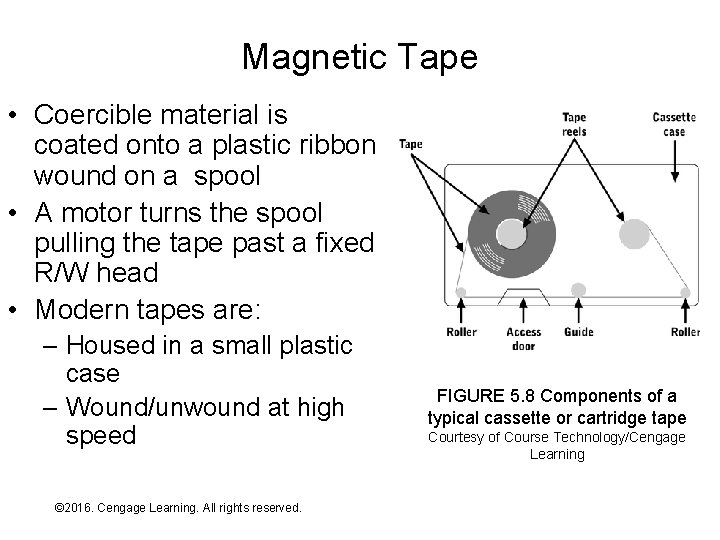
Magnetic Tape • Coercible material is coated onto a plastic ribbon wound on a spool • A motor turns the spool pulling the tape past a fixed R/W head • Modern tapes are: – Housed in a small plastic case – Wound/unwound at high speed © 2016. Cengage Learning. All rights reserved. Systems Architecture, Seventh Edition FIGURE 5. 8 Components of a typical cassette or cartridge tape Courtesy of Course Technology/Cengage Learning
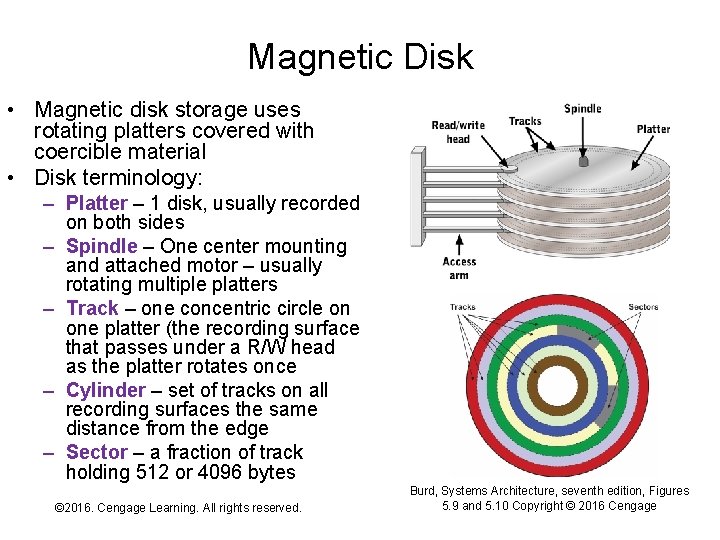
Magnetic Disk • Magnetic disk storage uses rotating platters covered with coercible material • Disk terminology: – Platter – 1 disk, usually recorded on both sides – Spindle – One center mounting and attached motor – usually rotating multiple platters – Track – one concentric circle on one platter (the recording surface that passes under a R/W head as the platter rotates once – Cylinder – set of tracks on all recording surfaces the same distance from the edge – Sector – a fraction of track holding 512 or 4096 bytes © 2016. Cengage Learning. All rights reserved. Systems Architecture, Seventh Edition Burd, Systems Architecture, seventh edition, Figures 5. 9 and 5. 10 Copyright © 2016 Cengage
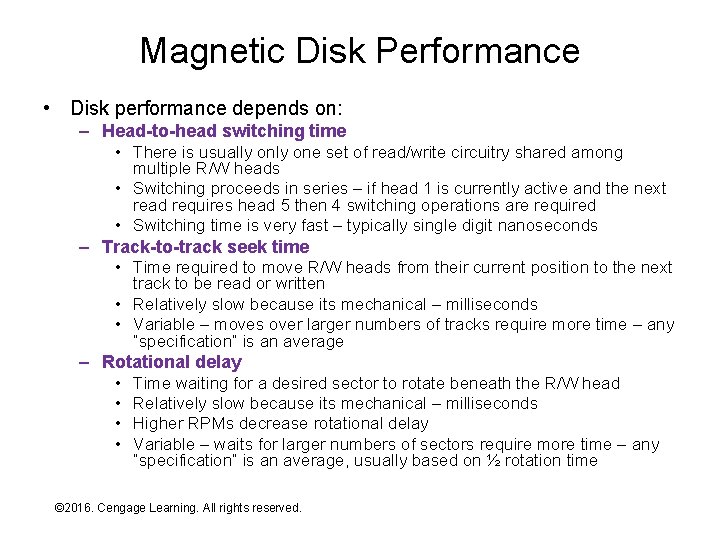
Magnetic Disk Performance • Disk performance depends on: – Head-to-head switching time • There is usually one set of read/write circuitry shared among multiple R/W heads • Switching proceeds in series – if head 1 is currently active and the next read requires head 5 then 4 switching operations are required • Switching time is very fast – typically single digit nanoseconds – Track-to-track seek time • Time required to move R/W heads from their current position to the next track to be read or written • Relatively slow because its mechanical – milliseconds • Variable – moves over larger numbers of tracks require more time – any “specification” is an average – Rotational delay • Time waiting for a desired sector to rotate beneath the R/W head • Relatively slow because its mechanical – milliseconds • Higher RPMs decrease rotational delay • Variable – waits for larger numbers of sectors require more time – any “specification” is an average, usually based on ½ rotation time © 2016. Cengage Learning. All rights reserved. Systems Architecture, Seventh Edition
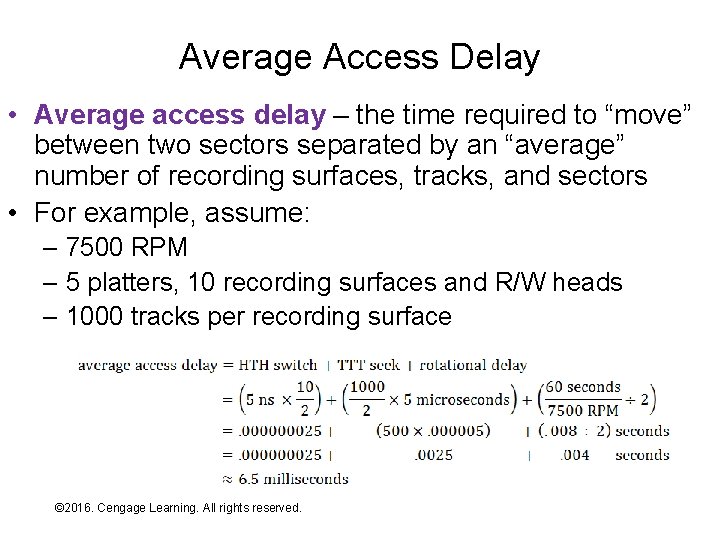
Average Access Delay • Average access delay – the time required to “move” between two sectors separated by an “average” number of recording surfaces, tracks, and sectors • For example, assume: – 7500 RPM – 5 platters, 10 recording surfaces and R/W heads – 1000 tracks per recording surface © 2016. Cengage Learning. All rights reserved. Systems Architecture, Seventh Edition
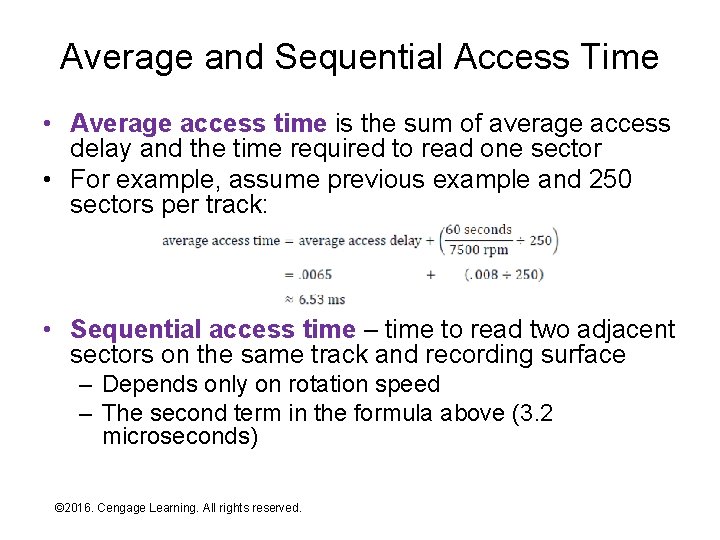
Average and Sequential Access Time • Average access time is the sum of average access delay and the time required to read one sector • For example, assume previous example and 250 sectors per track: • Sequential access time – time to read two adjacent sectors on the same track and recording surface – Depends only on rotation speed – The second term in the formula above (3. 2 microseconds) © 2016. Cengage Learning. All rights reserved. Systems Architecture, Seventh Edition
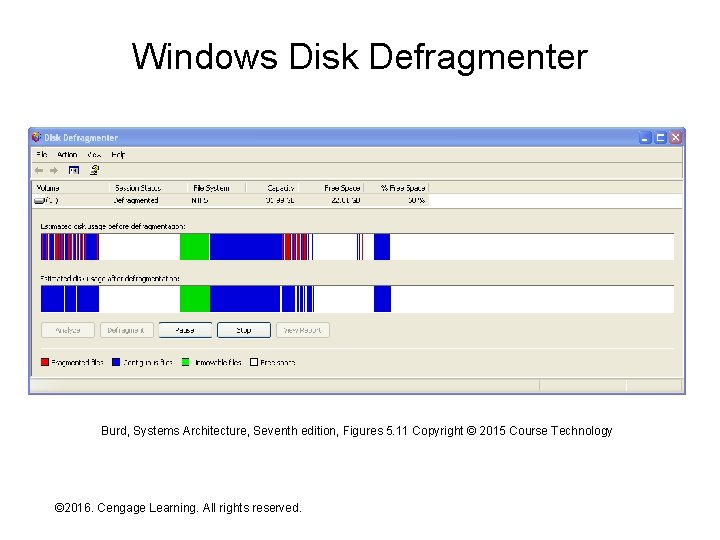
Fragmentation • As data contents are created and deleted over time sectors of a single file tend to become scattered across random disk locations – This condition is called fragmentation – Requiring file storage in sequential sectors isn’t feasible – not flexible enough (more on this in Chapter 12) • Since average access time is so much greater than sequential access time – Fragmentation substantially reduces read/write performance – Files are most efficient to read when they’re sequential by: • Sequential sectors in a track • Sequential tracks in a cylinder • Sequential cylinders • Defragmentation is a disk reorganization process that takes scattered sectors of the same file and reorganizes them for maximal read/write efficiency © 2016. Cengage Learning. All rights reserved. Systems Architecture, Seventh Edition
Windows Disk Defragmenter Burd, Systems Architecture, Seventh edition, Figures 5. 11 Copyright © 2015 Course Technology © 2016. Cengage Learning. All rights reserved. Systems Architecture, Seventh Edition
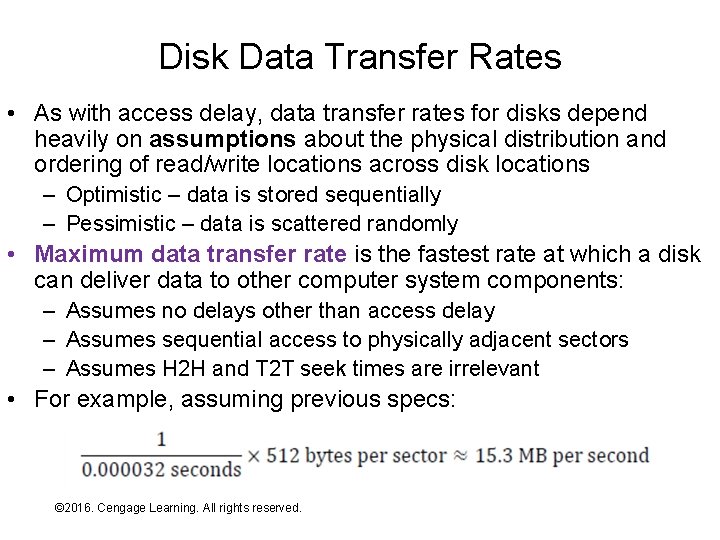
Disk Data Transfer Rates • As with access delay, data transfer rates for disks depend heavily on assumptions about the physical distribution and ordering of read/write locations across disk locations – Optimistic – data is stored sequentially – Pessimistic – data is scattered randomly • Maximum data transfer rate is the fastest rate at which a disk can deliver data to other computer system components: – Assumes no delays other than access delay – Assumes sequential access to physically adjacent sectors – Assumes H 2 H and T 2 T seek times are irrelevant • For example, assuming previous specs: © 2016. Cengage Learning. All rights reserved. Systems Architecture, Seventh Edition
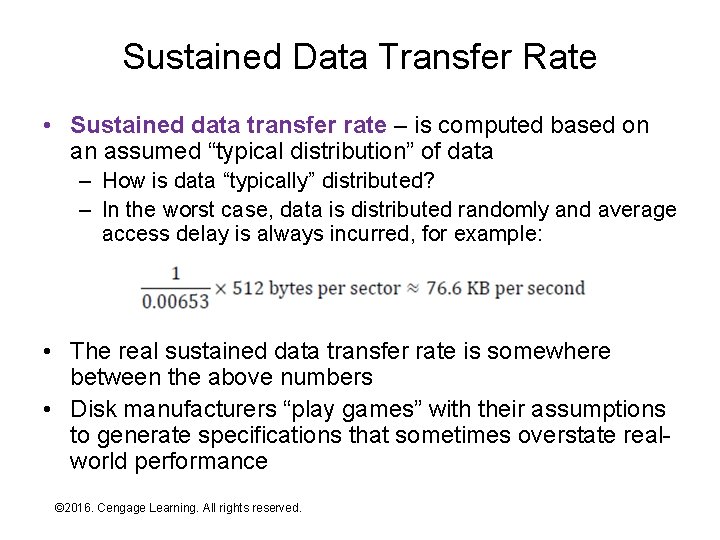
Sustained Data Transfer Rate • Sustained data transfer rate – is computed based on an assumed “typical distribution” of data – How is data “typically” distributed? – In the worst case, data is distributed randomly and average access delay is always incurred, for example: • The real sustained data transfer rate is somewhere between the above numbers • Disk manufacturers “play games” with their assumptions to generate specifications that sometimes overstate realworld performance © 2016. Cengage Learning. All rights reserved. Systems Architecture, Seventh Edition
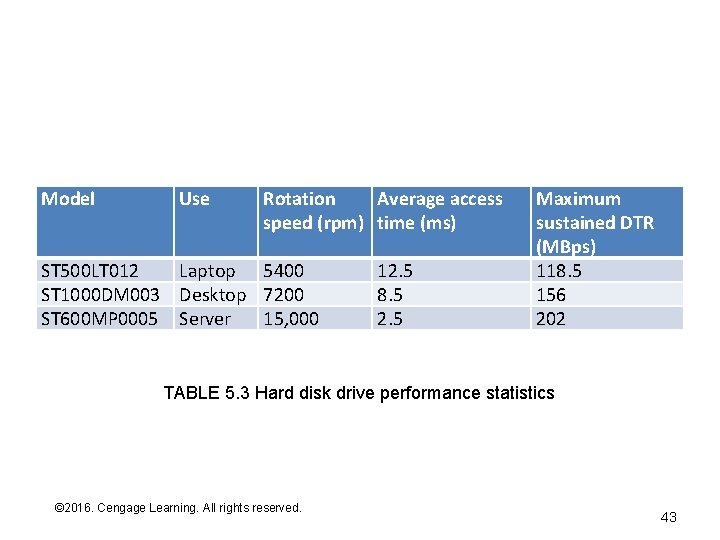
Model Use Rotation Average access speed (rpm) time (ms) ST 500 LT 012 Laptop 5400 ST 1000 DM 003 Desktop 7200 ST 600 MP 0005 Server 15, 000 12. 5 8. 5 2. 5 Maximum sustained DTR (MBps) 118. 5 156 202 TABLE 5. 3 Hard disk drive performance statistics © 2016. Cengage Learning. All rights reserved. Systems Architecture, Seventh Edition 43
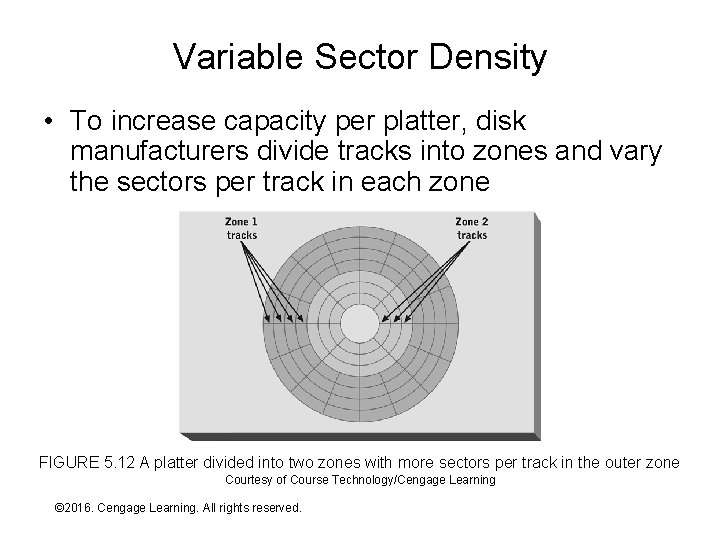
Variable Sector Density • To increase capacity per platter, disk manufacturers divide tracks into zones and vary the sectors per track in each zone FIGURE 5. 12 A platter divided into two zones with more sectors per track in the outer zone Courtesy of Course Technology/Cengage Learning © 2016. Cengage Learning. All rights reserved. Systems Architecture, Seventh Edition
Solid-State Drives • A solid-state drive (SSD) is a secondary storage device that packages flash memory (or other NVM devices) within a format that mimics a traditional magnetic disk drive: – Magnetic disk format enables interchangeability – SSDs will evolve their own formats and interface standards over time – already happening in highdensity servers • The pros and cons compared to magnetic disks are in flux (see next slide) • Neither technology is clearly superior to the other at present, though SSDs continue to make inroads and will likely “improve” more quickly © 2016. Cengage Learning. All rights reserved. Systems Architecture, Seventh Edition
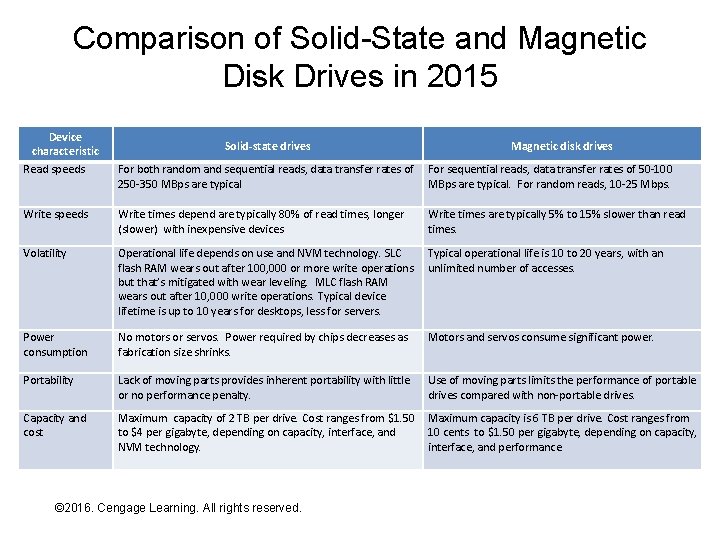
Comparison of Solid-State and Magnetic Disk Drives in 2015 Device characteristic Read speeds Solid-state drives Magnetic disk drives For both random and sequential reads, data transfer rates of 250 -350 MBps are typical For sequential reads, data transfer rates of 50 -100 MBps are typical. For random reads, 10 -25 Mbps. Write speeds Write times depend are typically 80% of read times, longer (slower) with inexpensive devices Write times are typically 5% to 15% slower than read times. Volatility Operational life depends on use and NVM technology. SLC flash RAM wears out after 100, 000 or more write operations but that’s mitigated with wear leveling. MLC flash RAM wears out after 10, 000 write operations. Typical device lifetime is up to 10 years for desktops, less for servers. Typical operational life is 10 to 20 years, with an unlimited number of accesses. Power consumption No motors or servos. Power required by chips decreases as fabrication size shrinks. Motors and servos consume significant power. Portability Lack of moving parts provides inherent portability with little or no performance penalty. Use of moving parts limits the performance of portable drives compared with non-portable drives. Capacity and cost Maximum capacity of 2 TB per drive. Cost ranges from $1. 50 to $4 per gigabyte, depending on capacity, interface, and NVM technology. Maximum capacity is 6 TB per drive. Cost ranges from 10 cents to $1. 50 per gigabyte, depending on capacity, interface, and performance. © 2016. Cengage Learning. All rights reserved. Systems Architecture, Seventh Edition
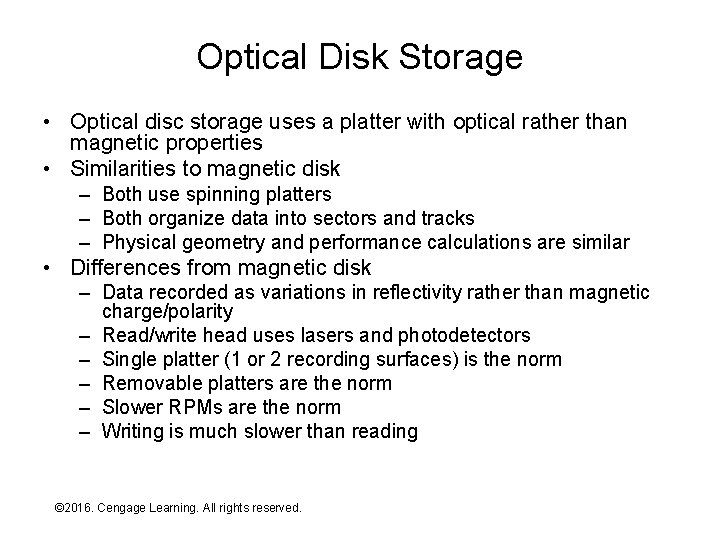
Optical Disk Storage • Optical disc storage uses a platter with optical rather than magnetic properties • Similarities to magnetic disk – Both use spinning platters – Both organize data into sectors and tracks – Physical geometry and performance calculations are similar • Differences from magnetic disk – Data recorded as variations in reflectivity rather than magnetic charge/polarity – Read/write head uses lasers and photodetectors – Single platter (1 or 2 recording surfaces) is the norm – Removable platters are the norm – Slower RPMs are the norm – Writing is much slower than reading © 2016. Cengage Learning. All rights reserved. Systems Architecture, Seventh Edition
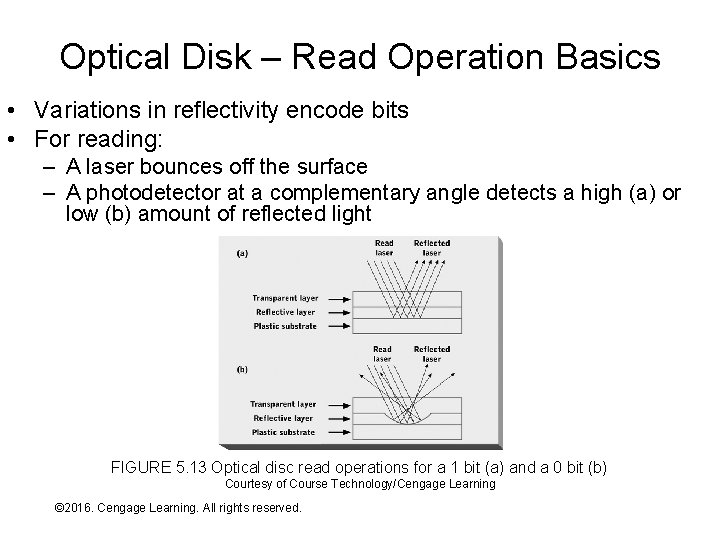
Optical Disk – Read Operation Basics • Variations in reflectivity encode bits • For reading: – A laser bounces off the surface – A photodetector at a complementary angle detects a high (a) or low (b) amount of reflected light FIGURE 5. 13 Optical disc read operations for a 1 bit (a) and a 0 bit (b) Courtesy of Course Technology/Cengage Learning © 2016. Cengage Learning. All rights reserved. Systems Architecture, Seventh Edition
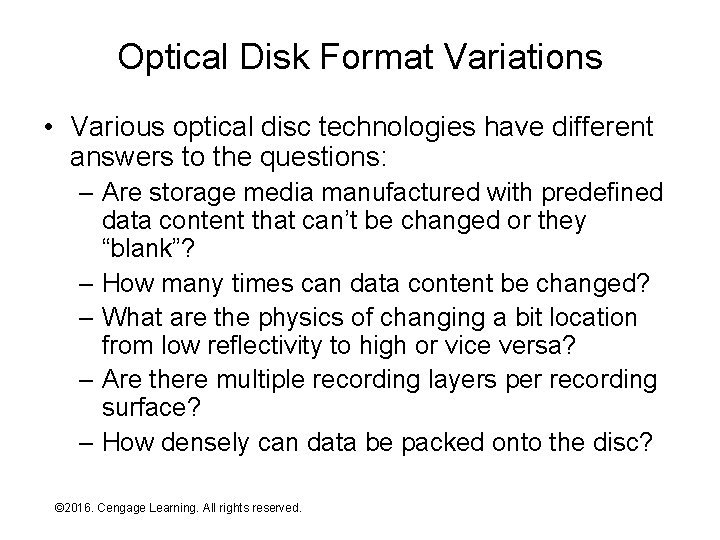
Optical Disk Format Variations • Various optical disc technologies have different answers to the questions: – Are storage media manufactured with predefined data content that can’t be changed or they “blank”? – How many times can data content be changed? – What are the physics of changing a bit location from low reflectivity to high or vice versa? – Are there multiple recording layers per recording surface? – How densely can data be packed onto the disc? © 2016. Cengage Learning. All rights reserved. Systems Architecture, Seventh Edition
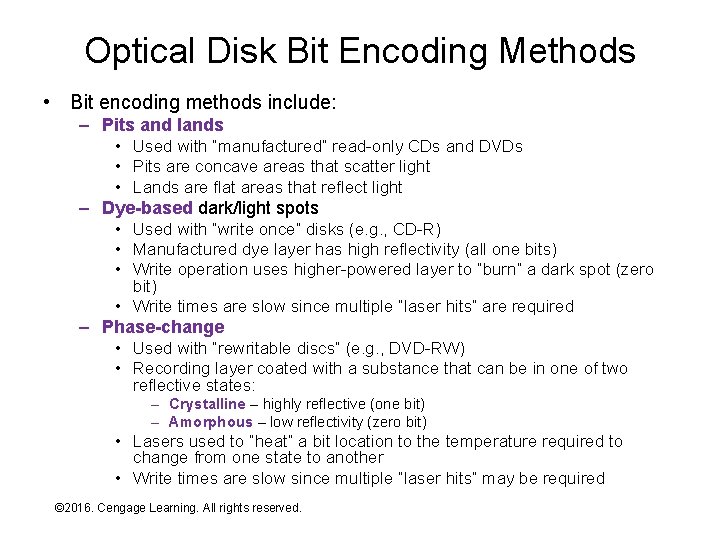
Optical Disk Bit Encoding Methods • Bit encoding methods include: – Pits and lands • Used with “manufactured” read-only CDs and DVDs • Pits are concave areas that scatter light • Lands are flat areas that reflect light – Dye-based dark/light spots • Used with “write once” disks (e. g. , CD-R) • Manufactured dye layer has high reflectivity (all one bits) • Write operation uses higher-powered layer to “burn” a dark spot (zero bit) • Write times are slow since multiple “laser hits” are required – Phase-change • Used with “rewritable discs” (e. g. , DVD-RW) • Recording layer coated with a substance that can be in one of two reflective states: – Crystalline – highly reflective (one bit) – Amorphous – low reflectivity (zero bit) • Lasers used to “heat” a bit location to the temperature required to change from one state to another • Write times are slow since multiple “laser hits” may be required © 2016. Cengage Learning. All rights reserved. Systems Architecture, Seventh Edition
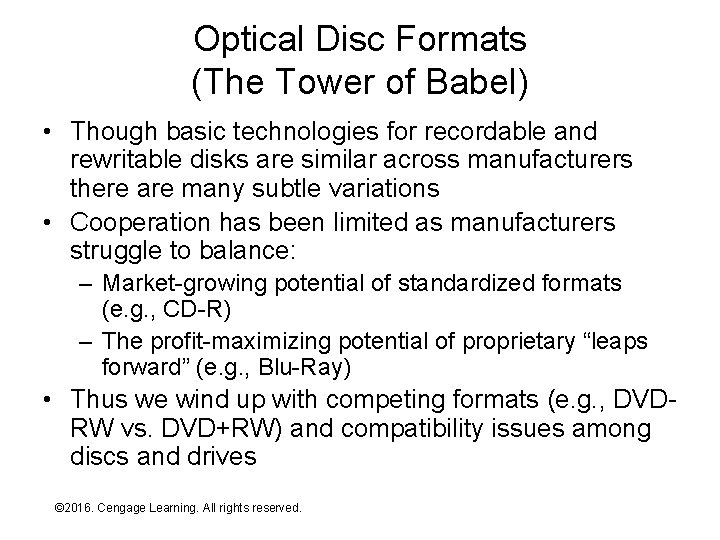
Optical Disc Formats (The Tower of Babel) • Though basic technologies for recordable and rewritable disks are similar across manufacturers there are many subtle variations • Cooperation has been limited as manufacturers struggle to balance: – Market-growing potential of standardized formats (e. g. , CD-R) – The profit-maximizing potential of proprietary “leaps forward” (e. g. , Blu-Ray) • Thus we wind up with competing formats (e. g. , DVDRW vs. DVD+RW) and compatibility issues among discs and drives © 2016. Cengage Learning. All rights reserved. Systems Architecture, Seventh Edition
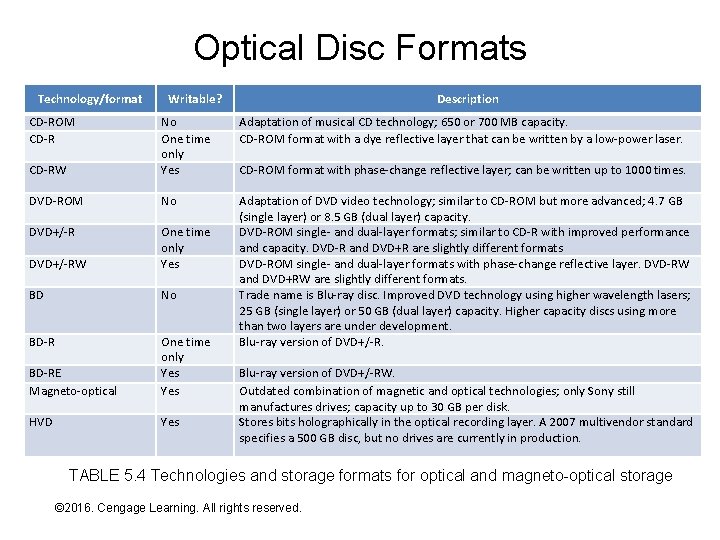
Optical Disc Formats Technology/format CD-ROM CD-R Writable? Description Adaptation of musical CD technology; 650 or 700 MB capacity. CD-ROM format with a dye reflective layer that can be written by a low-power laser. CD-RW No One time only Yes DVD-ROM No DVD+/-RW One time only Yes BD No BD-RE Magneto-optical One time only Yes Adaptation of DVD video technology; similar to CD-ROM but more advanced; 4. 7 GB (single layer) or 8. 5 GB (dual layer) capacity. DVD-ROM single- and dual-layer formats; similar to CD-R with improved performance and capacity. DVD-R and DVD+R are slightly different formats DVD-ROM single- and dual-layer formats with phase-change reflective layer. DVD-RW and DVD+RW are slightly different formats. Trade name is Blu-ray disc. Improved DVD technology using higher wavelength lasers; 25 GB (single layer) or 50 GB (dual layer) capacity. Higher capacity discs using more than two layers are under development. Blu-ray version of DVD+/-R. HVD Yes CD-ROM format with phase-change reflective layer; can be written up to 1000 times. Blu-ray version of DVD+/-RW. Outdated combination of magnetic and optical technologies; only Sony still manufactures drives; capacity up to 30 GB per disk. Stores bits holographically in the optical recording layer. A 2007 multivendor standard specifies a 500 GB disc, but no drives are currently in production. TABLE 5. 4 Technologies and storage formats for optical and magneto-optical storage © 2016. Cengage Learning. All rights reserved. Systems Architecture, Seventh Edition
Cloud-Based Storage • Cloud-based storage services come in many forms but they have common features and underlying principles: – A service provider manages large amounts of storage hardware in remote locations shared by many users thus realizing significant economies of scale – Data is stored in multiple remote locations to protect against loss and ensure availability when and where needed – High-speed network connections among local computer systems and storage service providers enable rapid movement of data – Data stored on local storage devices is frequently or continuously synchronized with copies stored in remote locations – Software on both local and remote computer systems keeps track of all data copies and coordinates data movement among local and remote storage locations as needed – Users aren’t aware of (and don’t care about) the work that software does behind the scenes to ensure data protection and availability © 2016. Cengage Learning. All rights reserved. Systems Architecture, Seventh Edition
Summary • Storage devices and their underlying technologies • Characteristics common to all storage devices • Technology, strengths, and weaknesses of primary and secondary storage © 2016. Cengage Learning. All rights reserved. Systems Architecture, Seventh Edition