
Systems Architecture Seventh Edition Chapter 11 Operating Systems
- Slides: 48
Systems Architecture, Seventh Edition Chapter 11 Operating Systems © 2016. Cengage Learning. All rights reserved.
Chapter Objectives • In this chapter, you will learn to: – Describe the functions and layers of an operating system – List the resources allocated by the operating system and describe the allocation process – Explain how an operating system manages processes and threads – Compare CPU scheduling methods – Explain how an operating system manages memory © 2016. Cengage Learning. All rights reserved. Systems Architecture, Seventh Edition
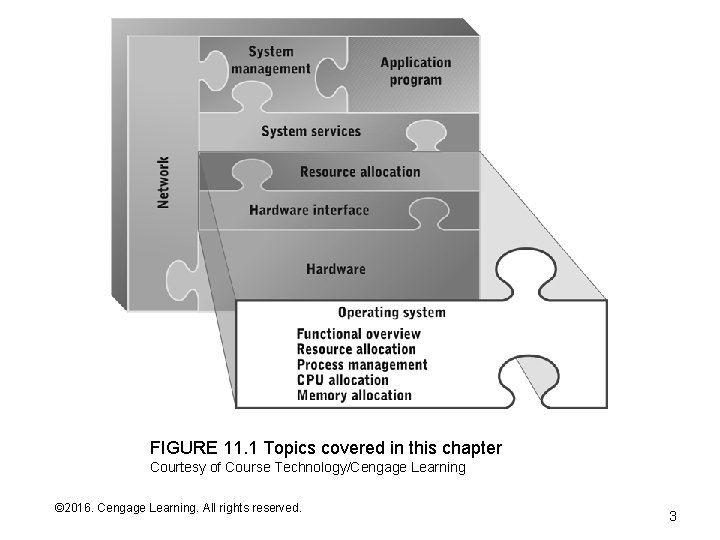
FIGURE 11. 1 Topics covered in this chapter Courtesy of Course Technology/Cengage Learning © 2016. Cengage Learning. All rights reserved. Systems Architecture, Seventh Edition 3
Operating Systems – Why Do They Exist? • Early computers didn’t need operating systems because: – They were only able to execute one program at a time in batch mode – The set of hardware resources was relatively simple – Users were highly trained (they had to be!) • Increasing hardware complexity created a chain of events: – Hardware resources became more numerous and varied (e. g. , multiple storage and I/O devices – More complex and diverse hardware enabled more powerful programs but they were more difficult to write because of all the hardware control and interface issues – Hardware became powerful enough to run multiple programs at the same time but there was no easy way to keep them from interfering with one another – Programmers found themselves writing code to do the same sorts of things over and over again, such as: • Read or write data from files stored in disk • Interact with printers and other I/O devices • Manage memory contents (e. g. , implementing buffers) © 2016. Cengage Learning. All rights reserved. Systems Architecture, Seventh Edition
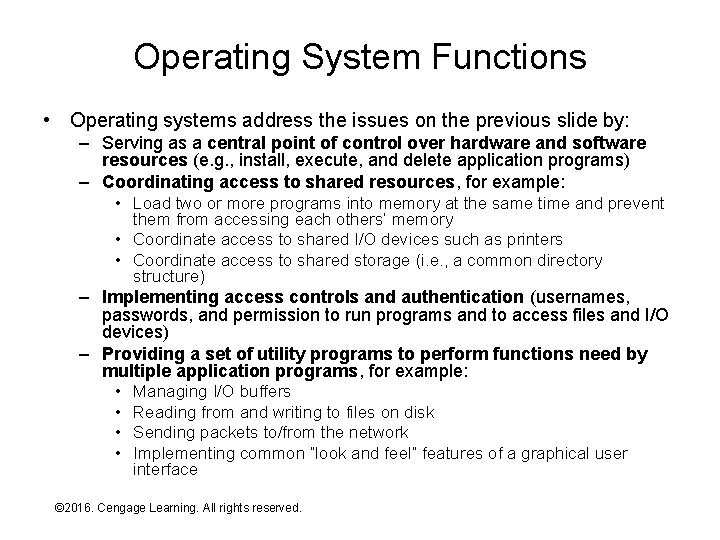
Operating System Functions • Operating systems address the issues on the previous slide by: – Serving as a central point of control over hardware and software resources (e. g. , install, execute, and delete application programs) – Coordinating access to shared resources, for example: • Load two or more programs into memory at the same time and prevent them from accessing each others’ memory • Coordinate access to shared I/O devices such as printers • Coordinate access to shared storage (i. e. , a common directory structure) – Implementing access controls and authentication (usernames, passwords, and permission to run programs and to access files and I/O devices) – Providing a set of utility programs to perform functions need by multiple application programs, for example: • Managing I/O buffers • Reading from and writing to files on disk • Sending packets to/from the network • Implementing common “look and feel” features of a graphical user interface © 2016. Cengage Learning. All rights reserved. Systems Architecture, Seventh Edition
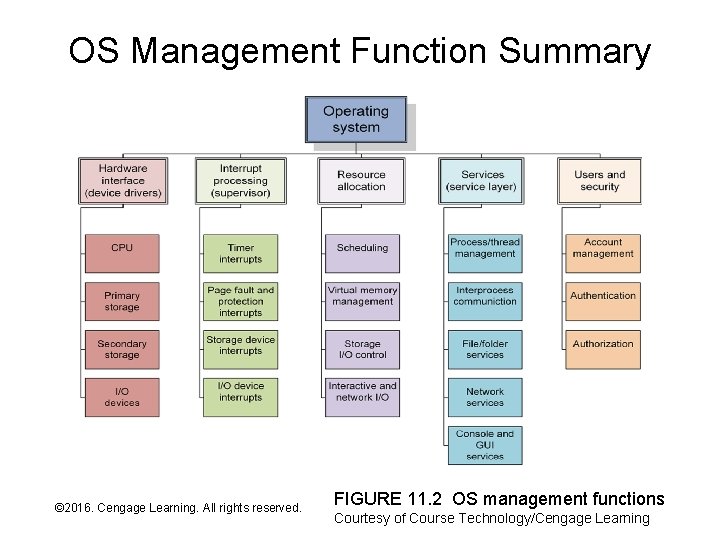
OS Management Function Summary © 2016. Cengage Learning. All rights reserved. Systems Architecture, Seventh Edition FIGURE 11. 2 OS management functions Courtesy of Course Technology/Cengage Learning
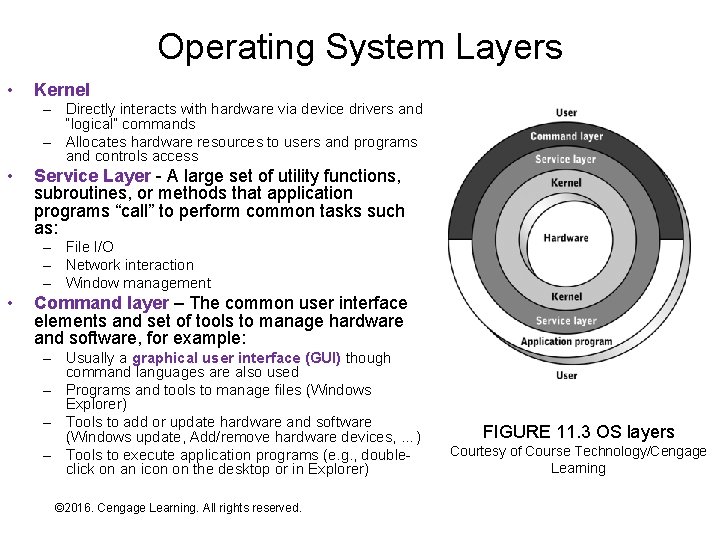
Operating System Layers • Kernel – Directly interacts with hardware via device drivers and “logical” commands – Allocates hardware resources to users and programs and controls access • Service Layer - A large set of utility functions, subroutines, or methods that application programs “call” to perform common tasks such as: – File I/O – Network interaction – Window management • Command layer – The common user interface elements and set of tools to manage hardware and software, for example: – Usually a graphical user interface (GUI) though command languages are also used – Programs and tools to manage files (Windows Explorer) – Tools to add or update hardware and software (Windows update, Add/remove hardware devices, …) – Tools to execute application programs (e. g. , doubleclick on an icon on the desktop or in Explorer) © 2016. Cengage Learning. All rights reserved. Systems Architecture, Seventh Edition FIGURE 11. 3 OS layers Courtesy of Course Technology/Cengage Learning
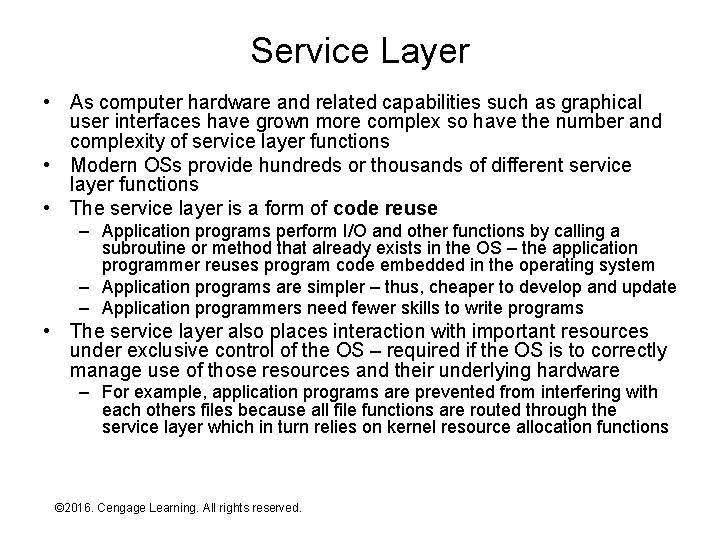
Service Layer • As computer hardware and related capabilities such as graphical user interfaces have grown more complex so have the number and complexity of service layer functions • Modern OSs provide hundreds or thousands of different service layer functions • The service layer is a form of code reuse – Application programs perform I/O and other functions by calling a subroutine or method that already exists in the OS – the application programmer reuses program code embedded in the operating system – Application programs are simpler – thus, cheaper to develop and update – Application programmers need fewer skills to write programs • The service layer also places interaction with important resources under exclusive control of the OS – required if the OS is to correctly manage use of those resources and their underlying hardware – For example, application programs are prevented from interfering with each others files because all file functions are routed through the service layer which in turn relies on kernel resource allocation functions © 2016. Cengage Learning. All rights reserved. Systems Architecture, Seventh Edition
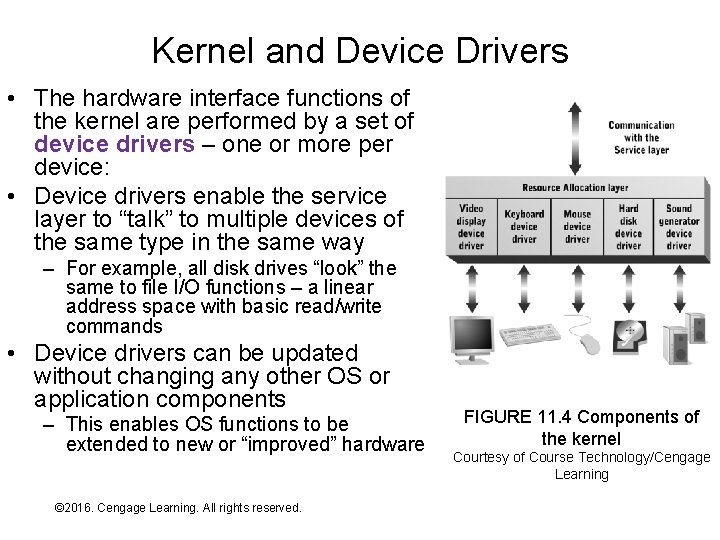
Kernel and Device Drivers • The hardware interface functions of the kernel are performed by a set of device drivers – one or more per device: • Device drivers enable the service layer to “talk” to multiple devices of the same type in the same way – For example, all disk drives “look” the same to file I/O functions – a linear address space with basic read/write commands • Device drivers can be updated without changing any other OS or application components – This enables OS functions to be extended to new or “improved” hardware © 2016. Cengage Learning. All rights reserved. Systems Architecture, Seventh Edition FIGURE 11. 4 Components of the kernel Courtesy of Course Technology/Cengage Learning
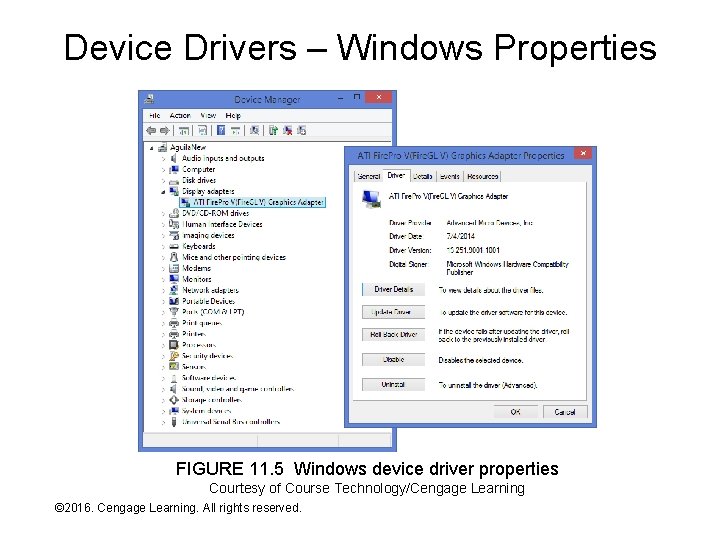
Device Drivers – Windows Properties FIGURE 11. 5 Windows device driver properties Courtesy of Course Technology/Cengage Learning © 2016. Cengage Learning. All rights reserved. Systems Architecture, Seventh Edition
Exercise • On a Windows computer do the following: – Right-click My Computer and select Properties – Select Device Manager – Expand the category “Sound, video, and game controllers (click the + sign) – Right-click on the audio device and select Properties – Examine the contents of the three tabs, especially the one titled Driver © 2016. Cengage Learning. All rights reserved. Systems Architecture, Seventh Edition
Resource Allocation • Resource allocation is a needed function whenever multiple “things” compete for access to a limited set of resources, for example: – Departments and employees competing for budget – Packages competing for space within trucks, planes, and warehouses – Vehicles competing for access to roadways and intersections • Resource allocation is the process of deciding: – – Who gets to use what resource How much of resource they get When they get it When they have to give it up • Complexity increases as the number and diversity of resources and competitors rises – For example, consider the complexity of budgeting and room scheduling in a 4 -room elementary school vs. a university © 2016. Cengage Learning. All rights reserved. Systems Architecture, Seventh Edition
Single-Tasking Resource Allocation • If a computer supports only one running application at a time it is said to be single-tasking • Single-tasking resource allocation is simple since there’s little competition for hardware resources • Two possible ways to “implement” resource allocation: 1. Let the application programs do it themselves (the approach taken in the earliest computers) 2. Provide a simple OS to manage resources shared by multiple programs over time – e. g. , files on disk (the approach taken in computers of the 1950 s and early 1960 s) • In the latter case there are two real-time “competitors” for resources: – – The OS itself Whatever application program is currently running © 2016. Cengage Learning. All rights reserved. Systems Architecture, Seventh Edition
Multitasking and Resource Allocation • • A multitasking environment enables multiple application programs to “run” concurrently (at the same time) – Early OSs didn’t support multitasking because hardware resources were too limited to support multiple executing programs (e. g. , how many running programs can you fit in 4 KBytes of RAM? ) – As hardware improved, multitasking became possible and desirable Multitasking “ups the ante” for OS resource allocation – Decisions must ensure that programs don’t “hurt” one another – Elaborate “accounting methods” are required to keep track of which resources are free, which are allocated, and to which programs – Decisions about allocating scare resources such as CPU time and memory must be made and changed quickly (dynamically in real time) – The application environment changes rapidly so decisions and “accounting” updates must also happen rapidly – Decisions must be made in such a way that they don’t impact overall performance – for example, what is the “best” use of the CPU at this precise moment © 2016. Cengage Learning. All rights reserved. Systems Architecture, Seventh Edition
Resource Allocation as Management • One of the most important tasks performed by managers in a modern organization is resource allocation: – Managers either make the allocation decisions or set the policies that drive manual or automated allocation decisions – Managers are responsible for “accounting” for resources though that task is usually delegated to supporting personnel or systems • Key management-related questions in organizational design include: – How many managers are needed and how should work be distributed among them? – What resources are used by management (a. k. a, management or system overhead) as opposed to the parts of the organization that do the “real work” • Some key management goals include: – Minimize resources consumed by management functions to maximize those available for real work – Have “just enough” management to ensure that organizational components doing the real work don’t interfere with one another – Make decision that maximize productivity of the organization as a whole © 2016. Cengage Learning. All rights reserved. Systems Architecture, Seventh Edition
Exercise • Consider a two-person catering company with one truck and one small kitchen – How often do “orders” arrive? – What resources do the people use to “fill” the orders? – How do they coordinate their use of resources? • Consider a large kitchen in a busy restaurant with hundreds of customers at a time and dozens of employees – How often do orders arrive? – What resources are used to do “fill” the orders? – How do employees coordinate their use of resources? © 2016. Cengage Learning. All rights reserved. Systems Architecture, Seventh Edition
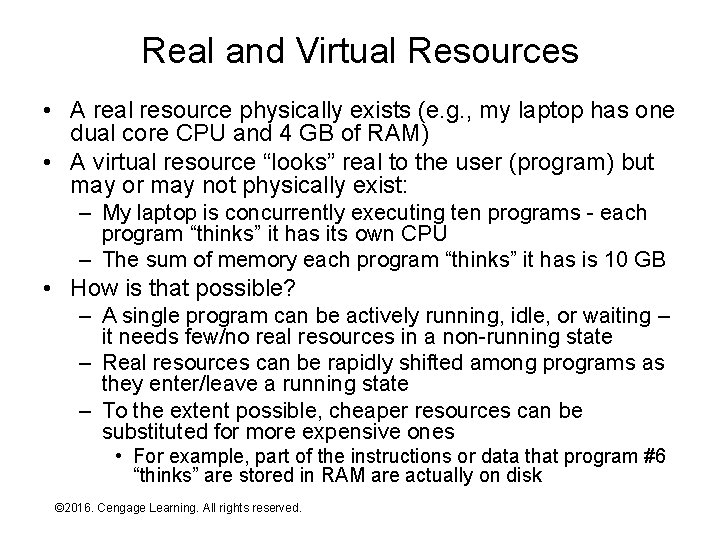
Real and Virtual Resources • A real resource physically exists (e. g. , my laptop has one dual core CPU and 4 GB of RAM) • A virtual resource “looks” real to the user (program) but may or may not physically exist: – My laptop is concurrently executing ten programs - each program “thinks” it has its own CPU – The sum of memory each program “thinks” it has is 10 GB • How is that possible? – A single program can be actively running, idle, or waiting – it needs few/no real resources in a non-running state – Real resources can be rapidly shifted among programs as they enter/leave a running state – To the extent possible, cheaper resources can be substituted for more expensive ones • For example, part of the instructions or data that program #6 “thinks” are stored in RAM are actually on disk © 2016. Cengage Learning. All rights reserved. Systems Architecture, Seventh Edition
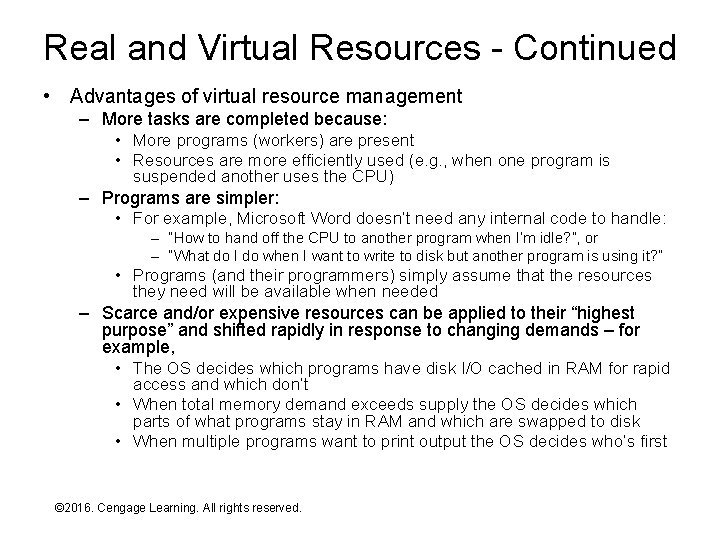
Real and Virtual Resources - Continued • Advantages of virtual resource management – More tasks are completed because: • More programs (workers) are present • Resources are more efficiently used (e. g. , when one program is suspended another uses the CPU) – Programs are simpler: • For example, Microsoft Word doesn’t need any internal code to handle: – “How to hand off the CPU to another program when I’m idle? ”, or – “What do I do when I want to write to disk but another program is using it? ” • Programs (and their programmers) simply assume that the resources they need will be available when needed – Scarce and/or expensive resources can be applied to their “highest purpose” and shifted rapidly in response to changing demands – for example, • The OS decides which programs have disk I/O cached in RAM for rapid access and which don’t • When total memory demand exceeds supply the OS decides which parts of what programs stay in RAM and which are swapped to disk • When multiple programs want to print output the OS decides who’s first © 2016. Cengage Learning. All rights reserved. Systems Architecture, Seventh Edition
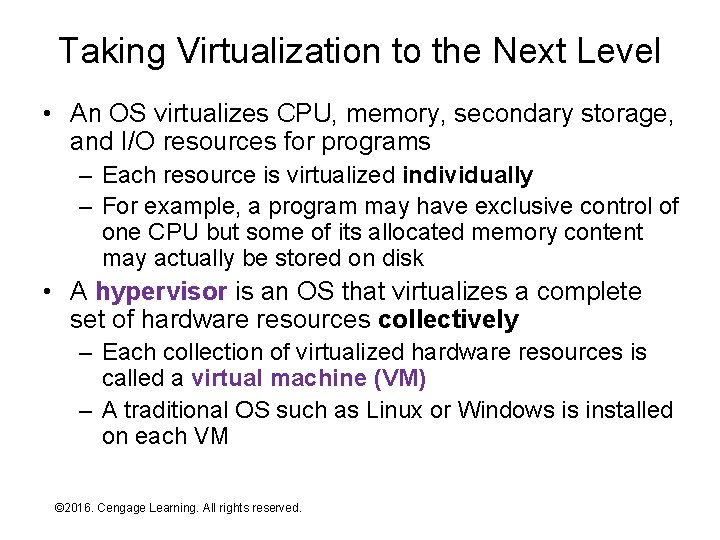
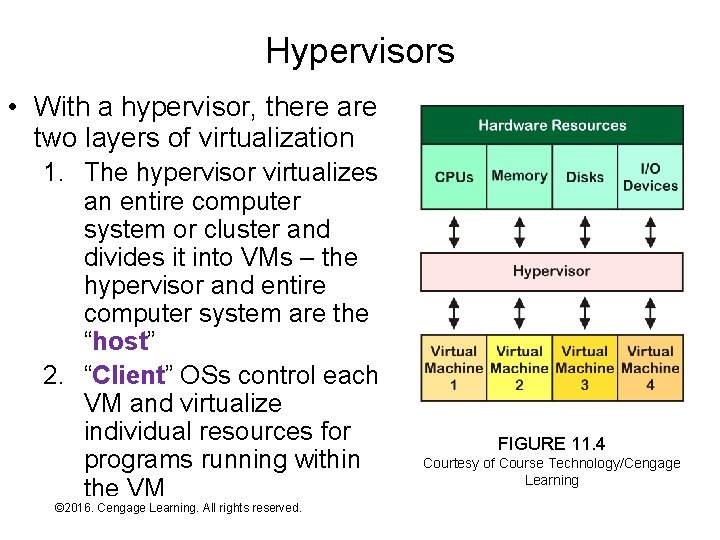
Taking Virtualization to the Next Level • An OS virtualizes CPU, memory, secondary storage, and I/O resources for programs – Each resource is virtualized individually – For example, a program may have exclusive control of one CPU but some of its allocated memory content may actually be stored on disk • A hypervisor is an OS that virtualizes a complete set of hardware resources collectively – Each collection of virtualized hardware resources is called a virtual machine (VM) – A traditional OS such as Linux or Windows is installed on each VM © 2016. Cengage Learning. All rights reserved. Systems Architecture, Seventh Edition
Hypervisors • With a hypervisor, there are two layers of virtualization 1. The hypervisor virtualizes an entire computer system or cluster and divides it into VMs – the hypervisor and entire computer system are the “host” 2. “Client” OSs control each VM and virtualize individual resources for programs running within the VM © 2016. Cengage Learning. All rights reserved. Systems Architecture, Seventh Edition FIGURE 11. 4 Courtesy of Course Technology/Cengage Learning
Hypervisor Types and Applications • A bare-metal hypervisor installs directly on the computer system or cluster – VMware ESX, Microsoft Hyper-V, and Citrix Xen are examples – The hypervisor is a complete OS, though it is specialized to creating and managing VMs and is “bare bones” in most other respects – Used for applications such as: • Server consolidation – one hardware platform supports multiple virtual servers • Desktop virtualization – one hardware platform supports multiple “desktop” VMs • A virtualization environment is an application that installs under a traditional OS and enables VMs to be created and run within it – VMware Workstation and Microsoft Virtual PC are examples – It runs as an application, though typically with elevated privileges/priority – Used for applications such as: • Multi-platform software development and testing • Running two OSs on the same desktop or laptop machine – for example, VMware Fusion © 2016. Cengage Learning. All rights reserved. Systems Architecture, Seventh Edition
Process Management • From the OS’s point of view, programs (including the OS itself) are divided into processes to which virtual resources are allocated • Processes are further subdivided into threads – more on this in a few slides • As programs are started the OS adds information about their processes to a process list or process queue, which stores information such as: – – Identification – a process number Who owns the process What state the process is in (e. g. , running or idle) What priority the process has for resource allocation © 2016. Cengage Learning. All rights reserved. Systems Architecture, Seventh Edition
Exercise • On a Windows machine do the following: – Start -> Run, enter taskmgr, press enter (or, Ctrl-Alt-Delete and select Start Task Manager) – Click the Processes tab and click the check box to show process from all users – Right-click on the wininit. exe process, note the contents of the pop-up menu, and select Open File Location. Note the location within C: of the file, then close then Explorer window. – Click View on the Task Manager menu bar, select Columns, and check a few of the unselected columns – e. g. , • CPU Time • I/O Read Bytes • I/O Write Bytes • I/O Other Bytes – Which processes have consumed the most CPU resources? – Which processes have consumed the most I/O resources? © 2016. Cengage Learning. All rights reserved. Systems Architecture, Seventh Edition
Process Groups and Architecture • • A process is unit of software that can be in a running or idle state and to which any virtual resource can be allocated A process can create, or spawn, other processes by calling the appropriate OS service layer function A parent process spawns one or more child processes – the entire group of related processes is a process family Spawning enables programs to subdivide themselves into independent units and minimize their resource footprint: – Functions that aren’t needed all the time are omitted from the parent process – When the function needs to be performed the parent process spawns a child process to do it – Resources for the function aren’t allocated until the child process is spawned – Resources are freed when the child process exits • • This is a modular architecture for building and executing large programs The alternative, a. k. a. monolithic architecture: – Requires more resources (the ones allocated to idle modules) – Makes program design much more complex – Makes program update more complex (can’t swap out smaller modules) © 2016. Cengage Learning. All rights reserved. Systems Architecture, Seventh Edition
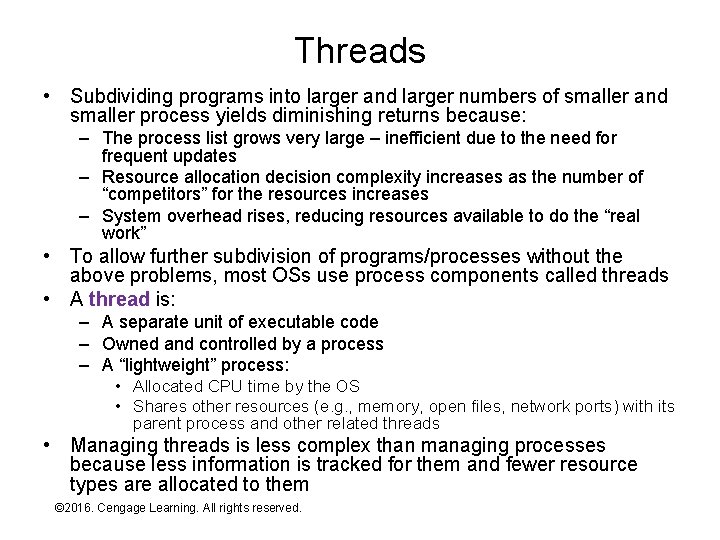
Threads • Subdividing programs into larger and larger numbers of smaller and smaller process yields diminishing returns because: – The process list grows very large – inefficient due to the need for frequent updates – Resource allocation decision complexity increases as the number of “competitors” for the resources increases – System overhead rises, reducing resources available to do the “real work” • To allow further subdivision of programs/processes without the above problems, most OSs use process components called threads • A thread is: – A separate unit of executable code – Owned and controlled by a process – A “lightweight” process: • Allocated CPU time by the OS • Shares other resources (e. g. , memory, open files, network ports) with its parent process and other related threads • Managing threads is less complex than managing processes because less information is tracked for them and fewer resource types are allocated to them © 2016. Cengage Learning. All rights reserved. Systems Architecture, Seventh Edition
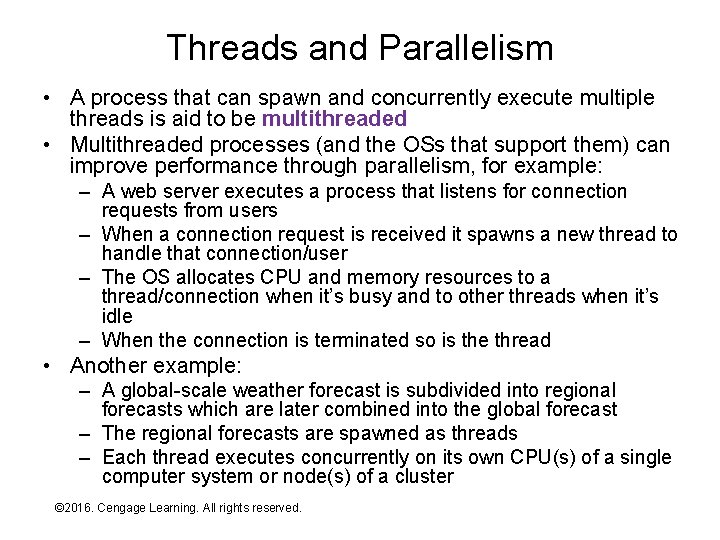
Threads and Parallelism • A process that can spawn and concurrently execute multiple threads is aid to be multithreaded • Multithreaded processes (and the OSs that support them) can improve performance through parallelism, for example: – A web server executes a process that listens for connection requests from users – When a connection request is received it spawns a new thread to handle that connection/user – The OS allocates CPU and memory resources to a thread/connection when it’s busy and to other threads when it’s idle – When the connection is terminated so is the thread • Another example: – A global-scale weather forecast is subdivided into regional forecasts which are later combined into the global forecast – The regional forecasts are spawned as threads – Each thread executes concurrently on its own CPU(s) of a single computer system or node(s) of a cluster © 2016. Cengage Learning. All rights reserved. Systems Architecture, Seventh Edition
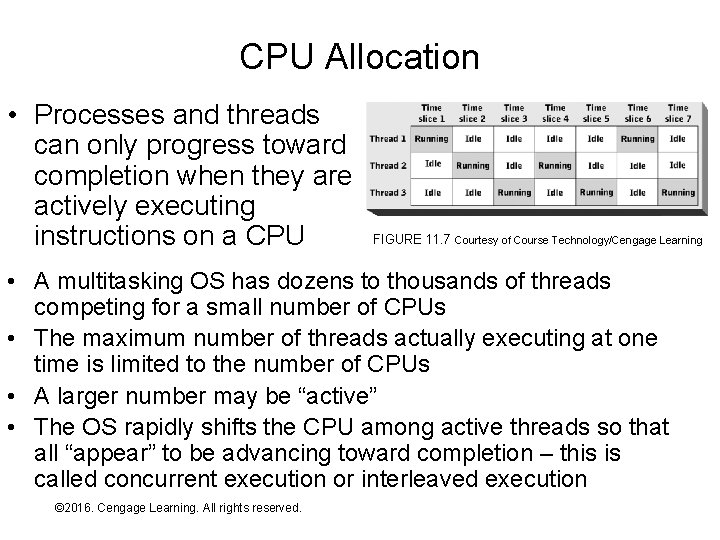
CPU Allocation • Processes and threads can only progress toward completion when they are actively executing instructions on a CPU FIGURE 11. 7 Courtesy of Course Technology/Cengage Learning • A multitasking OS has dozens to thousands of threads competing for a small number of CPUs • The maximum number of threads actually executing at one time is limited to the number of CPUs • A larger number may be “active” • The OS rapidly shifts the CPU among active threads so that all “appear” to be advancing toward completion – this is called concurrent execution or interleaved execution © 2016. Cengage Learning. All rights reserved. Systems Architecture, Seventh Edition
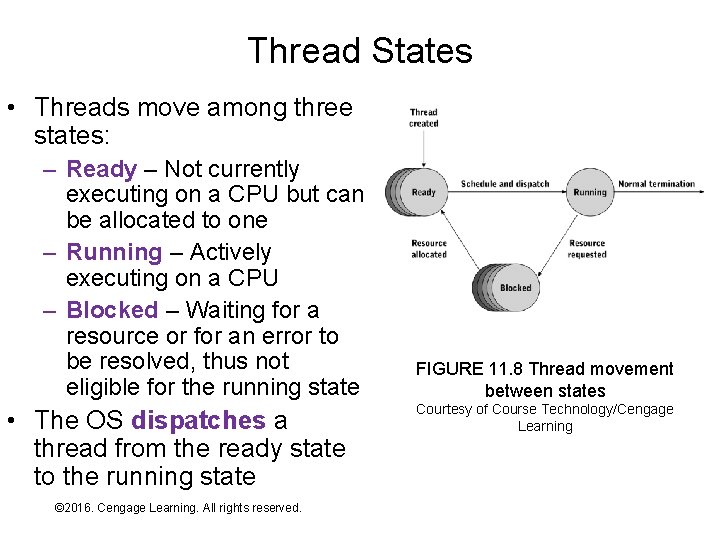
Thread States • Threads move among three states: – Ready – Not currently executing on a CPU but can be allocated to one – Running – Actively executing on a CPU – Blocked – Waiting for a resource or for an error to be resolved, thus not eligible for the running state • The OS dispatches a thread from the ready state to the running state © 2016. Cengage Learning. All rights reserved. Systems Architecture, Seventh Edition FIGURE 11. 8 Thread movement between states Courtesy of Course Technology/Cengage Learning
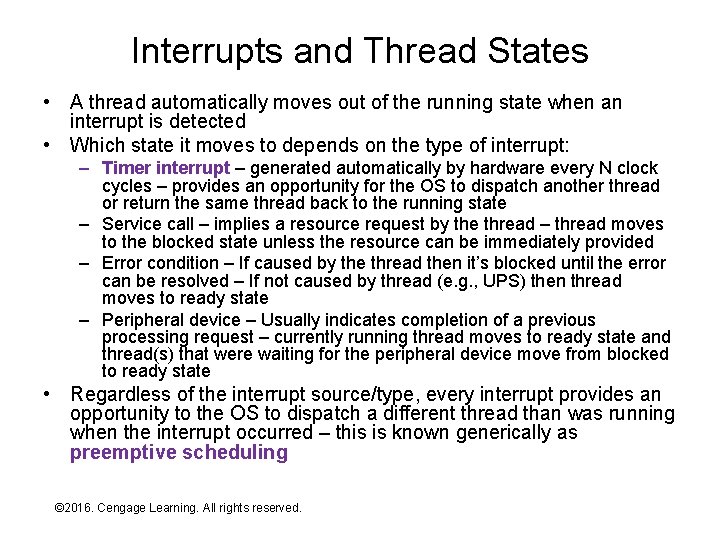
Interrupts and Thread States • A thread automatically moves out of the running state when an interrupt is detected • Which state it moves to depends on the type of interrupt: – Timer interrupt – generated automatically by hardware every N clock cycles – provides an opportunity for the OS to dispatch another thread or return the same thread back to the running state – Service call – implies a resource request by the thread – thread moves to the blocked state unless the resource can be immediately provided – Error condition – If caused by the thread then it’s blocked until the error can be resolved – If not caused by thread (e. g. , UPS) then thread moves to ready state – Peripheral device – Usually indicates completion of a previous processing request – currently running thread moves to ready state and thread(s) that were waiting for the peripheral device move from blocked to ready state • Regardless of the interrupt source/type, every interrupt provides an opportunity to the OS to dispatch a different thread than was running when the interrupt occurred – this is known generically as preemptive scheduling © 2016. Cengage Learning. All rights reserved. Systems Architecture, Seventh Edition
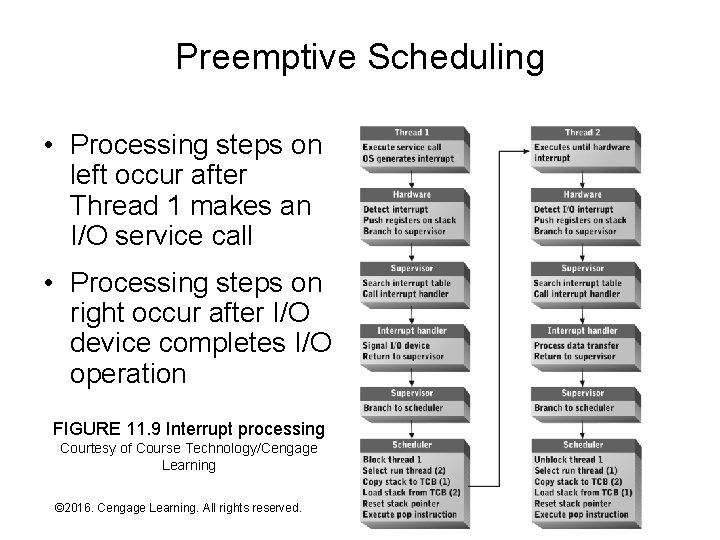
Preemptive Scheduling • Processing steps on left occur after Thread 1 makes an I/O service call • Processing steps on right occur after I/O device completes I/O operation FIGURE 11. 9 Interrupt processing Courtesy of Course Technology/Cengage Learning © 2016. Cengage Learning. All rights reserved. Systems Architecture, Seventh Edition
Scheduling • How does the OS decide what thread(s) will be dispatched (scheduled) next? – Or, stated another way, on what bases is the dispatching decision made? • There are two general scheduling methods and variations on each: – Priority-based – Real-time © 2016. Cengage Learning. All rights reserved. Systems Architecture, Seventh Edition
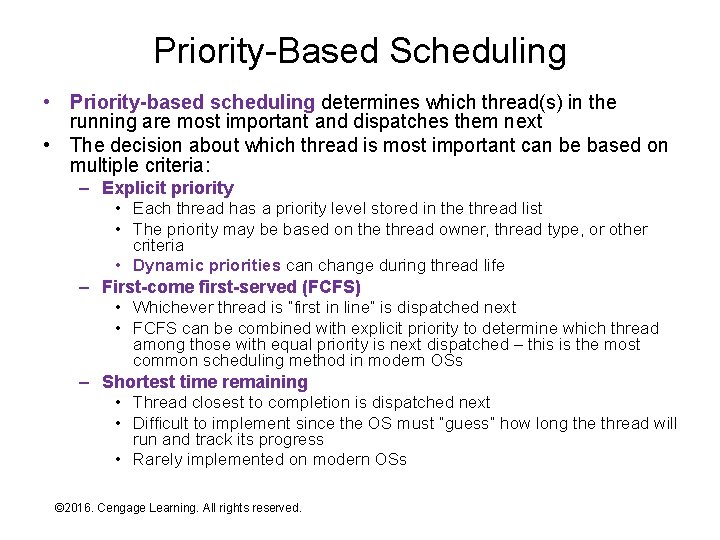
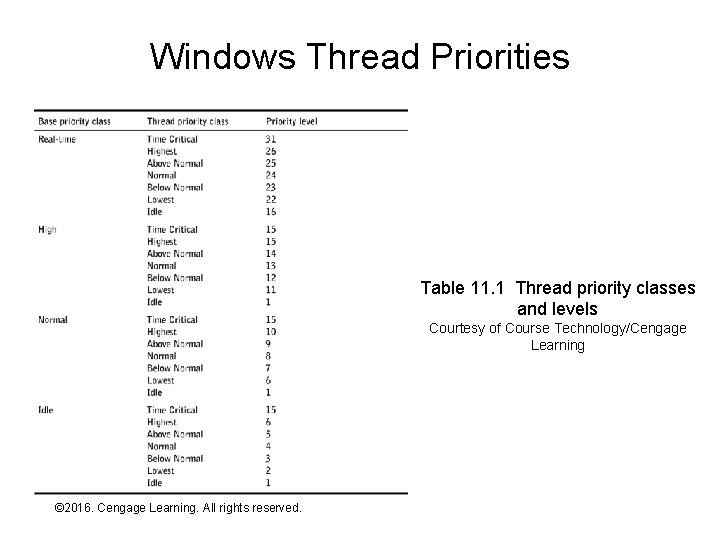
Priority-Based Scheduling • Priority-based scheduling determines which thread(s) in the running are most important and dispatches them next • The decision about which thread is most important can be based on multiple criteria: – Explicit priority • Each thread has a priority level stored in the thread list • The priority may be based on the thread owner, thread type, or other criteria • Dynamic priorities can change during thread life – First-come first-served (FCFS) • Whichever thread is “first in line” is dispatched next • FCFS can be combined with explicit priority to determine which thread among those with equal priority is next dispatched – this is the most common scheduling method in modern OSs – Shortest time remaining • Thread closest to completion is dispatched next • Difficult to implement since the OS must “guess” how long the thread will run and track its progress • Rarely implemented on modern OSs © 2016. Cengage Learning. All rights reserved. Systems Architecture, Seventh Edition
Windows Thread Priorities Table 11. 1 Thread priority classes and levels Courtesy of Course Technology/Cengage Learning © 2016. Cengage Learning. All rights reserved. Systems Architecture, Seventh Edition
Exercise • On a Windows machine – Start task manager – Click the Processes tab – Click the button or check box to show processes from all users – Right-click on winlogin. exe, mouse over Set Priority, and view the current priority – Check a few other processes – Download PVIEW. EXE and start it – Select the process winlogon and examine the number and priority of each thread – Do the same check for a few other processes © 2016. Cengage Learning. All rights reserved. Systems Architecture, Seventh Edition
Real-Time Scheduling • Real-time scheduling guarantees that a process will receive whatever resources (including CPU cycles) are needed to “keep up with its workload” – A thread cycle is one unit of “work” performed by the thread (e. g. , process one transaction or data sample) – OS must know the maximum number of CPU cycles required to complete one thread cycle and must track consumption • Few OSs support real-time scheduling due to the complexity involved © 2016. Cengage Learning. All rights reserved. Systems Architecture, Seventh Edition
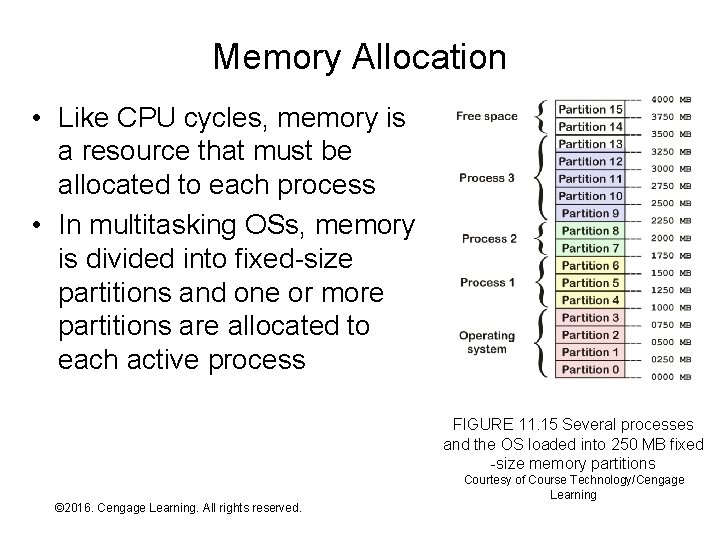
Memory Allocation • Like CPU cycles, memory is a resource that must be allocated to each process • In multitasking OSs, memory is divided into fixed-size partitions and one or more partitions are allocated to each active process FIGURE 11. 15 Several processes and the OS loaded into 250 MB fixed -size memory partitions © 2016. Cengage Learning. All rights reserved. Systems Architecture, Seventh Edition Courtesy of Course Technology/Cengage Learning
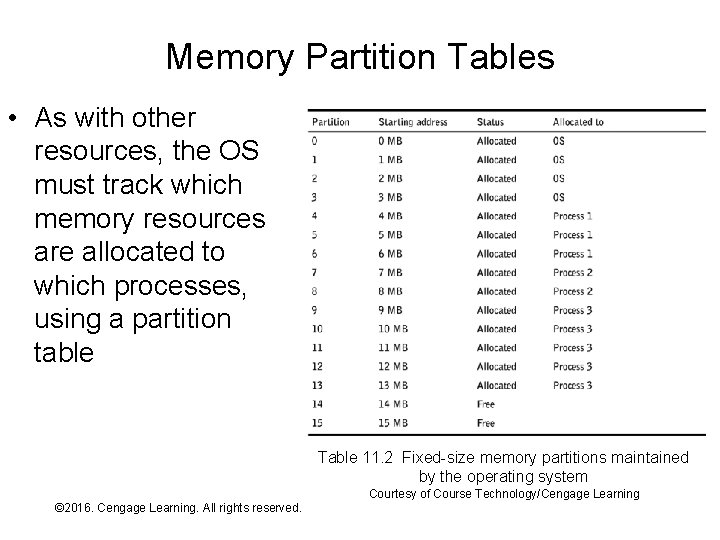
Memory Partition Tables • As with other resources, the OS must track which memory resources are allocated to which processes, using a partition table Table 11. 2 Fixed-size memory partitions maintained by the operating system Courtesy of Course Technology/Cengage Learning © 2016. Cengage Learning. All rights reserved. Systems Architecture, Seventh Edition
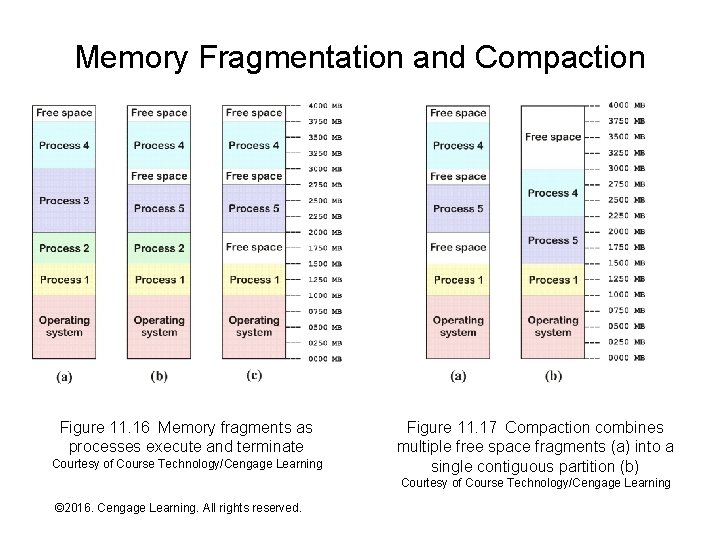
Memory Fragmentation • Processes change over time: – Start, execute, terminate – Grow and shrink • As processes change over time the memory allocated to them becomes fragmented: – Memory partitions allocated to a process become scattered throughout physical memory – Fragmentation is a performance problem for OSs that allocate memory contiguously – corrected through compaction which is slow – OSs that allocate memory non-contiguously don’t need to compact memory © 2016. Cengage Learning. All rights reserved. Systems Architecture, Seventh Edition
Memory Fragmentation and Compaction Figure 11. 16 Memory fragments as processes execute and terminate Courtesy of Course Technology/Cengage Learning Figure 11. 17 Compaction combines multiple free space fragments (a) into a single contiguous partition (b) Courtesy of Course Technology/Cengage Learning © 2016. Cengage Learning. All rights reserved. Systems Architecture, Seventh Edition
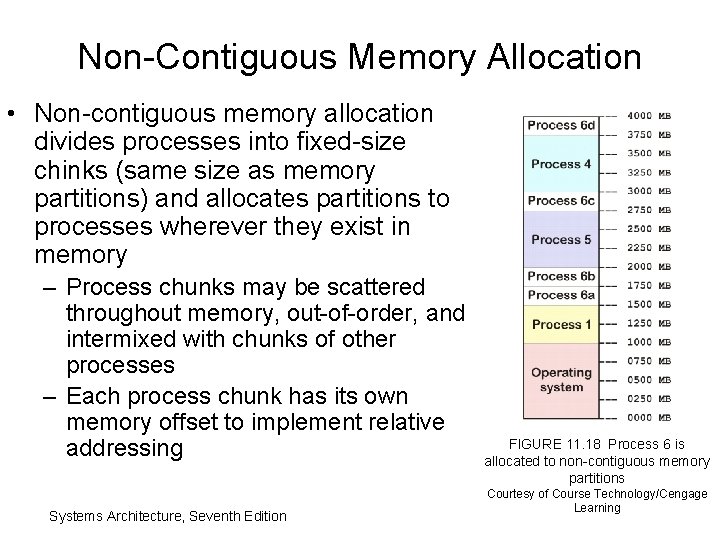
Non-Contiguous Memory Allocation • Non-contiguous memory allocation divides processes into fixed-size chinks (same size as memory partitions) and allocates partitions to processes wherever they exist in memory – Process chunks may be scattered throughout memory, out-of-order, and intermixed with chunks of other processes – Each process chunk has its own memory offset to implement relative addressing Systems Architecture, Seventh Edition FIGURE 11. 18 Process 6 is allocated to non-contiguous memory partitions Courtesy of Course Technology/Cengage Learning
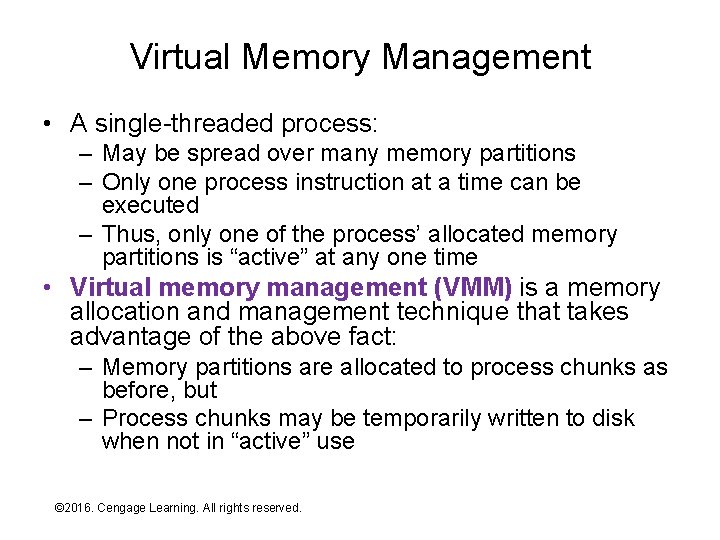
Virtual Memory Management • A single-threaded process: – May be spread over many memory partitions – Only one process instruction at a time can be executed – Thus, only one of the process’ allocated memory partitions is “active” at any one time • Virtual memory management (VMM) is a memory allocation and management technique that takes advantage of the above fact: – Memory partitions are allocated to process chunks as before, but – Process chunks may be temporarily written to disk when not in “active” use © 2016. Cengage Learning. All rights reserved. Systems Architecture, Seventh Edition
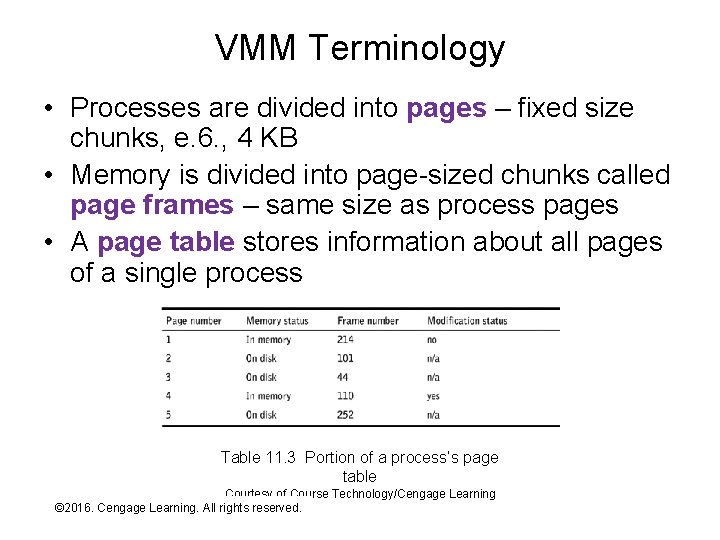
VMM Terminology • Processes are divided into pages – fixed size chunks, e. 6. , 4 KB • Memory is divided into page-sized chunks called page frames – same size as process pages • A page table stores information about all pages of a single process Table 11. 3 Portion of a process’s page table Courtesy of Course Technology/Cengage Learning © 2016. Cengage Learning. All rights reserved. Systems Architecture, Seventh Edition
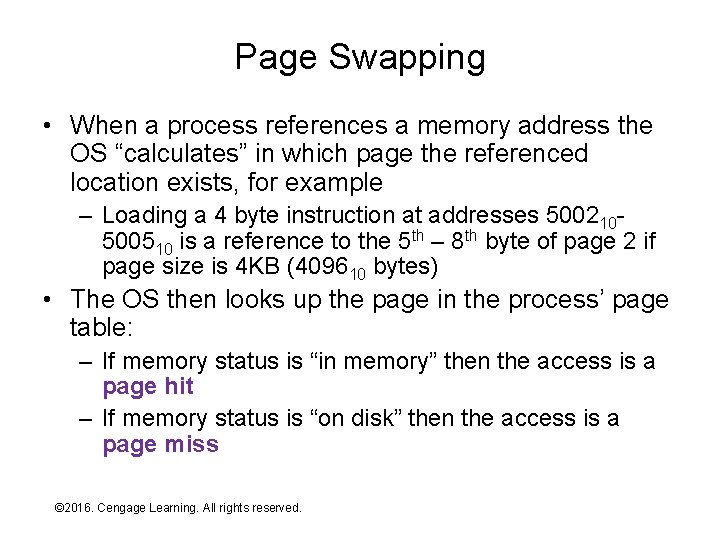
Page Swapping • When a process references a memory address the OS “calculates” in which page the referenced location exists, for example – Loading a 4 byte instruction at addresses 500210500510 is a reference to the 5 th – 8 th byte of page 2 if page size is 4 KB (409610 bytes) • The OS then looks up the page in the process’ page table: – If memory status is “in memory” then the access is a page hit – If memory status is “on disk” then the access is a page miss © 2016. Cengage Learning. All rights reserved. Systems Architecture, Seventh Edition
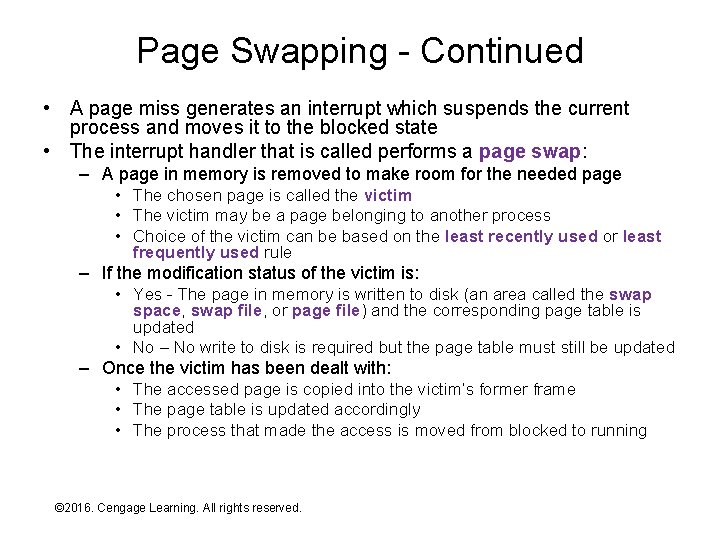
Page Swapping - Continued • A page miss generates an interrupt which suspends the current process and moves it to the blocked state • The interrupt handler that is called performs a page swap: – A page in memory is removed to make room for the needed page • The chosen page is called the victim • The victim may be a page belonging to another process • Choice of the victim can be based on the least recently used or least frequently used rule – If the modification status of the victim is: • Yes - The page in memory is written to disk (an area called the swap space, swap file, or page file) and the corresponding page table is updated • No – No write to disk is required but the page table must still be updated – Once the victim has been dealt with: • The accessed page is copied into the victim’s former frame • The page table is updated accordingly • The process that made the access is moved from blocked to running © 2016. Cengage Learning. All rights reserved. Systems Architecture, Seventh Edition
Exercise • On a Windows machine: – Right-click My Computer and select Properties – Select Advanced system settings – Click the Advanced tab and click Settings in the Performance group – Click the Advanced tab – Click Change in the Virtual memory area – Examine but don’t change the settings © 2016. Cengage Learning. All rights reserved. Systems Architecture, Seventh Edition
Memory Protection • Memory protection refers to OS and/or hardware protection of memory allocated to one process from reads and (especially) writes from other processes • Memory protection is both a security and reliability issue: – Prevent processes from reading important data or overwriting data/instructions in other processes (e. g. , a virus) – Prevent one process from accidentally crashing another when it “misuses” memory • The protection mechanism is simple though tedious – check every read and write operation to ensure that the referenced location “belongs” to the process trying to perform the operation – Requires some mechanism for tracking process ownership of memory locations (the page table(s) can be extended for this purpose) – Requires processing overhead for every memory reference – a potential performance bottleneck © 2016. Cengage Learning. All rights reserved. Systems Architecture, Seventh Edition
Memory Management Hardware • If the operating system had to execute CPU instructions to implement memory protection and VMM then system performance would be a fraction of that implied by CPU clock rate – Every fetch, load, and store, would require page calculations and checks of ownership – at least a dozen CPU instructions • Modern CPUs implement much of the overhead of memory protection and VMM in hardware, for example: – VMM page tables and related offset addressing handled by hardware (build into control unit) – VMM page misses generate an interrupt so that the OS can choose a victim – Per process page tables managed by hardware and used to limit what page frames a process can “see”, any reference not in the table generates a fatal error interrupt © 2016. Cengage Learning. All rights reserved. Systems Architecture, Seventh Edition
Summary • • • Operating system overview Resource allocation Process management CPU allocation Memory allocation © 2016. Cengage Learning. All rights reserved. Systems Architecture, Seventh Edition