
Systems Analysis and Design 11 th Edition Chapter
- Slides: 49
Systems Analysis and Design 11 th Edition Chapter 5 Data and Process Modeling Copyright © 2017 Cengage Learning. All Rights Reserved. May not be scanned, copied 1 or duplicated, or posted to a publicly accessible website, in whole or in part.
Chapter Objectives Describe data and process modeling concepts and tools, including data flow diagrams, a data dictionary, and process descriptions � Describe the symbols used in data flow diagrams and explain the rules for their use � Draw data flow diagrams in a sequence, from general to specific � Explain how to level and balance a set of data flow diagrams � Describe how a data dictionary is used and what it contains � Use process description tools, including structured English, decision tables, and decision trees � Describe the relationship between logical and physical models � Copyright © 2017 Cengage Learning. All Rights Reserved. May not be scanned, copied 2 or duplicated, or posted to a publicly accessible website, in whole or in part.
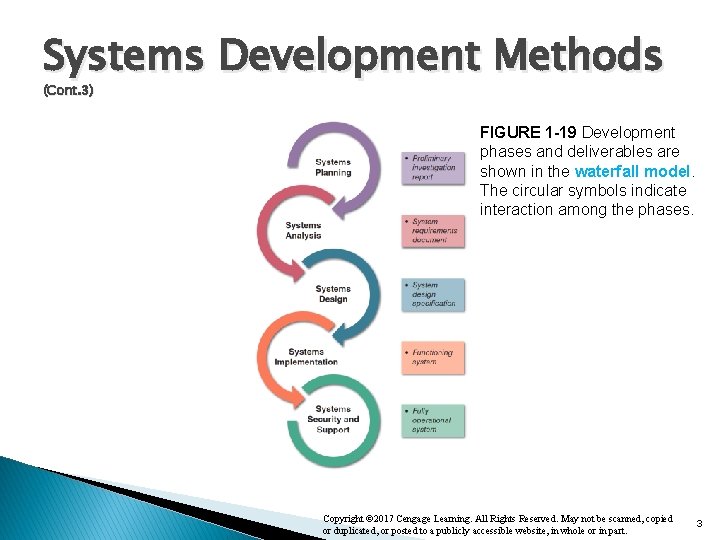
Systems Development Methods (Cont. 3) FIGURE 1 -19 Development phases and deliverables are shown in the waterfall model. The circular symbols indicate interaction among the phases. Copyright © 2017 Cengage Learning. All Rights Reserved. May not be scanned, copied or duplicated, or posted to a publicly accessible website, in whole or in part. 3
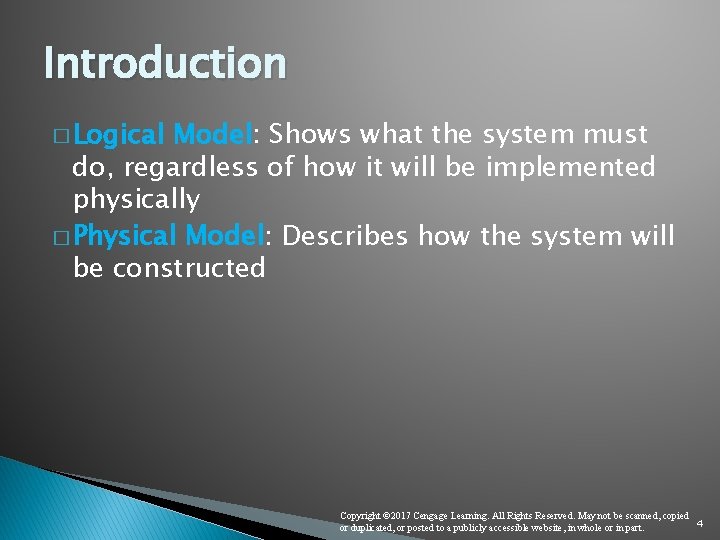
Introduction � Logical Model: Shows what the system must do, regardless of how it will be implemented physically � Physical Model: Describes how the system will be constructed Copyright © 2017 Cengage Learning. All Rights Reserved. May not be scanned, copied 4 or duplicated, or posted to a publicly accessible website, in whole or in part.
Overview of Data and Process Modeling Tools � Systems analysts use graphical techniques to describe an information system � Data flow diagram (DFD) - Uses various symbols to show the system transforms input data into useful information Copyright © 2017 Cengage Learning. All Rights Reserved. May not be scanned, copied 5 or duplicated, or posted to a publicly accessible website, in whole or in part.
Data Flow Diagrams �A data flow diagram (DFD) shows how data moves through an information system but does not show program logic or processing steps � A set of DFDs provides a logical model that shows what the system does, not how it does it Copyright © 2017 Cengage Learning. All Rights Reserved. May not be scanned, copied 6 or duplicated, or posted to a publicly accessible website, in whole or in part.
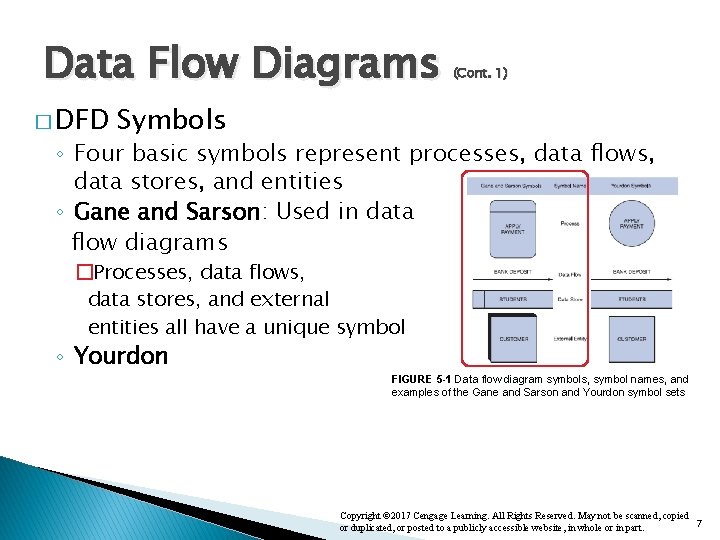
Data Flow Diagrams � DFD (Cont. 1) Symbols ◦ Four basic symbols represent processes, data flows, data stores, and entities ◦ Gane and Sarson: Used in data flow diagrams �Processes, data flows, data stores, and external entities all have a unique symbol ◦ Yourdon FIGURE 5 -1 Data flow diagram symbols, symbol names, and examples of the Gane and Sarson and Yourdon symbol sets Copyright © 2017 Cengage Learning. All Rights Reserved. May not be scanned, copied 7 or duplicated, or posted to a publicly accessible website, in whole or in part.
Data Flow Diagrams (Cont. 2) Process Symbol • Must have at least one input and at least one output • Contains business logic that transforms the data • Process name identifies its function (Label: verb + noun) • Examples : “apply rent payment” or “calculate commission” • Process number does not signify precedence • In DFDs, a process symbol can be referred to as a black box Copyright © 2017 Cengage Learning. All Rights Reserved. May not be scanned, copied 8 or duplicated, or posted to a publicly accessible website, in whole or in part.
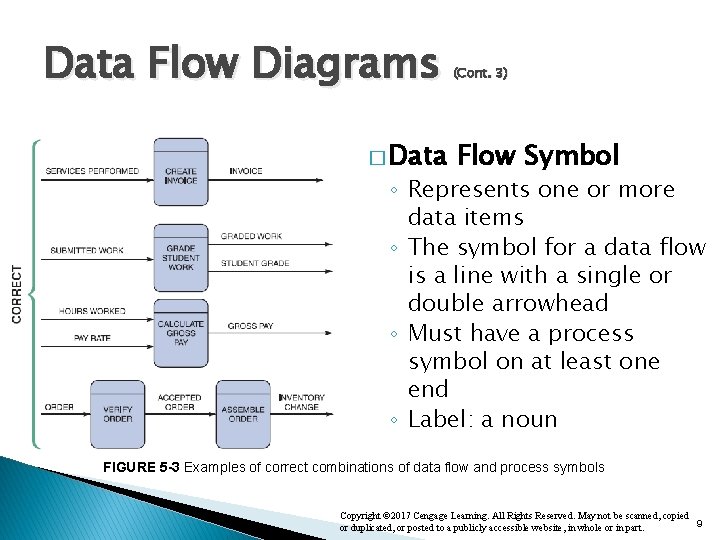
Data Flow Diagrams � Data (Cont. 3) Flow Symbol ◦ Represents one or more data items ◦ The symbol for a data flow is a line with a single or double arrowhead ◦ Must have a process symbol on at least one end ◦ Label: a noun FIGURE 5 -3 Examples of correct combinations of data flow and process symbols Copyright © 2017 Cengage Learning. All Rights Reserved. May not be scanned, copied 9 or duplicated, or posted to a publicly accessible website, in whole or in part.
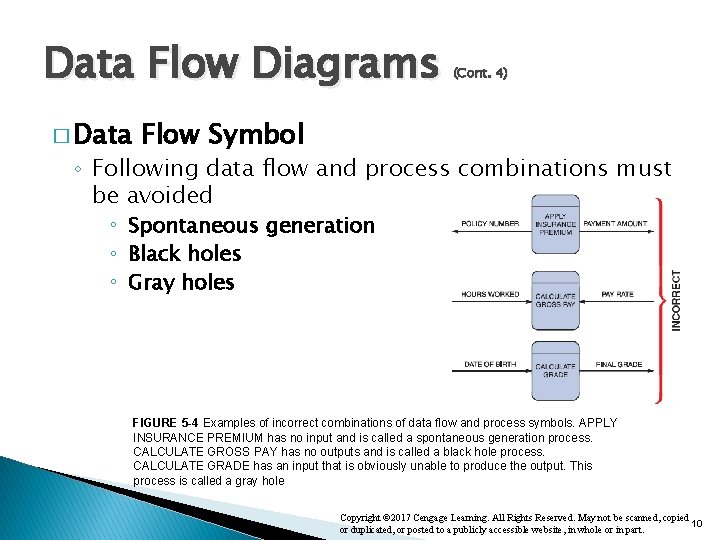
Data Flow Diagrams � Data (Cont. 4) Flow Symbol ◦ Following data flow and process combinations must be avoided ◦ Spontaneous generation ◦ Black holes ◦ Gray holes FIGURE 5 -4 Examples of incorrect combinations of data flow and process symbols. APPLY INSURANCE PREMIUM has no input and is called a spontaneous generation process. CALCULATE GROSS PAY has no outputs and is called a black hole process. CALCULATE GRADE has an input that is obviously unable to produce the output. This process is called a gray hole Copyright © 2017 Cengage Learning. All Rights Reserved. May not be scanned, copied 10 or duplicated, or posted to a publicly accessible website, in whole or in part.
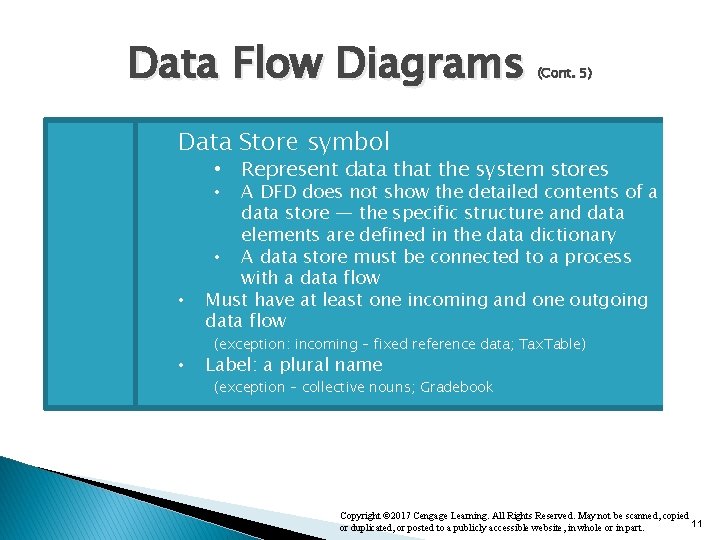
Data Flow Diagrams (Cont. 5) Data Store symbol • Represent data that the system stores A DFD does not show the detailed contents of a data store — the specific structure and data elements are defined in the data dictionary • A data store must be connected to a process with a data flow Must have at least one incoming and one outgoing data flow • • • (exception: incoming – fixed reference data; Tax. Table) Label: a plural name (exception – collective nouns; Gradebook Copyright © 2017 Cengage Learning. All Rights Reserved. May not be scanned, copied 11 or duplicated, or posted to a publicly accessible website, in whole or in part.
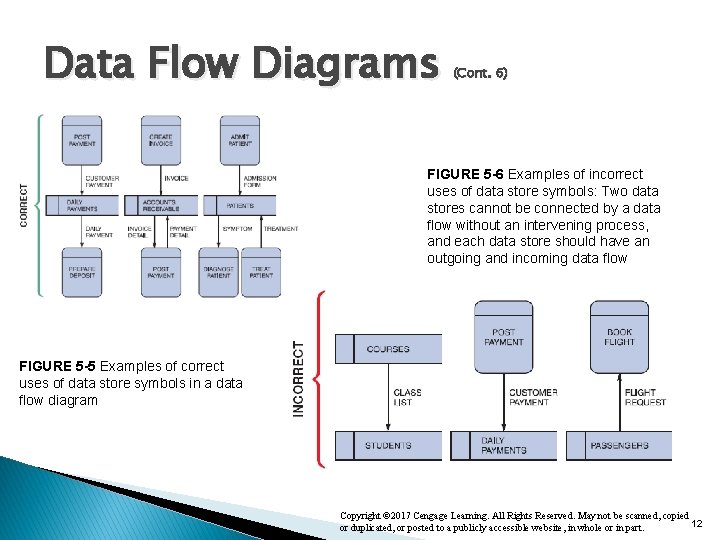
Data Flow Diagrams (Cont. 6) FIGURE 5 -6 Examples of incorrect uses of data store symbols: Two data stores cannot be connected by a data flow without an intervening process, and each data store should have an outgoing and incoming data flow FIGURE 5 -5 Examples of correct uses of data store symbols in a data flow diagram Copyright © 2017 Cengage Learning. All Rights Reserved. May not be scanned, copied 12 or duplicated, or posted to a publicly accessible website, in whole or in part.
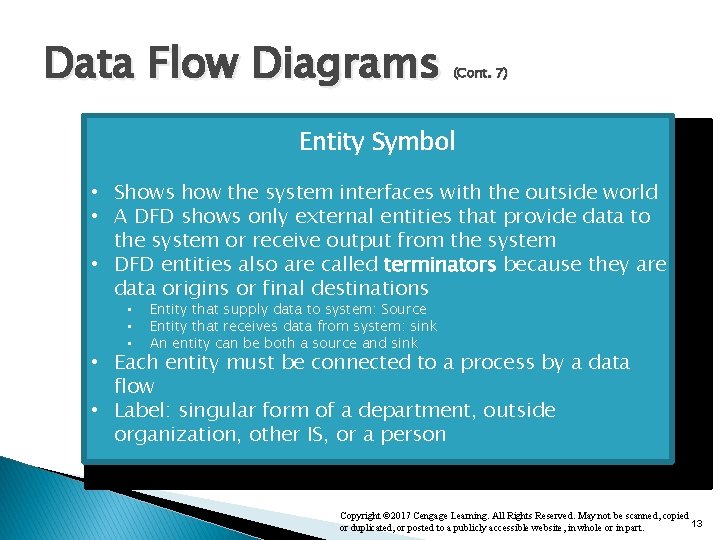
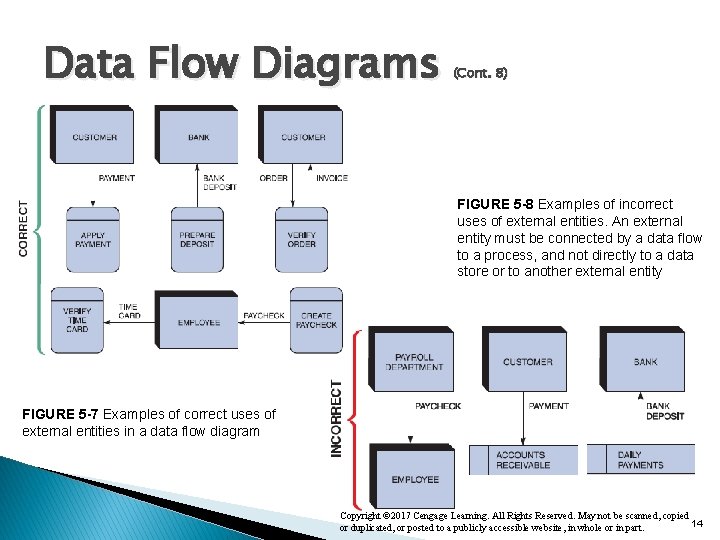
Data Flow Diagrams (Cont. 7) Entity Symbol • Shows how the system interfaces with the outside world • A DFD shows only external entities that provide data to the system or receive output from the system • DFD entities also are called terminators because they are data origins or final destinations • • • Entity that supply data to system: Source Entity that receives data from system: sink An entity can be both a source and sink • Each entity must be connected to a process by a data flow • Label: singular form of a department, outside organization, other IS, or a person Copyright © 2017 Cengage Learning. All Rights Reserved. May not be scanned, copied 13 or duplicated, or posted to a publicly accessible website, in whole or in part.
Data Flow Diagrams (Cont. 8) FIGURE 5 -8 Examples of incorrect uses of external entities. An external entity must be connected by a data flow to a process, and not directly to a data store or to another external entity FIGURE 5 -7 Examples of correct uses of external entities in a data flow diagram Copyright © 2017 Cengage Learning. All Rights Reserved. May not be scanned, copied 14 or duplicated, or posted to a publicly accessible website, in whole or in part.
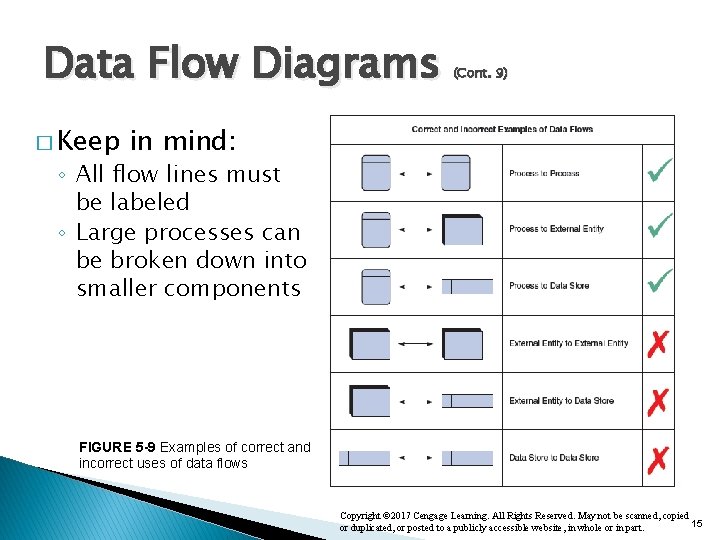
Data Flow Diagrams � Keep (Cont. 9) in mind: ◦ All flow lines must be labeled ◦ Large processes can be broken down into smaller components FIGURE 5 -9 Examples of correct and incorrect uses of data flows Copyright © 2017 Cengage Learning. All Rights Reserved. May not be scanned, copied 15 or duplicated, or posted to a publicly accessible website, in whole or in part.
Creating a Set of DFDs � Create a graphical model of the information system based on your fact-finding results ◦ First, you will review a set of guidelines for drawing DFDs ◦ Then you will learn how to apply these guidelines and create a set of DFDs using a three-step process Copyright © 2017 Cengage Learning. All Rights Reserved. May not be scanned, copied 16 or duplicated, or posted to a publicly accessible website, in whole or in part.
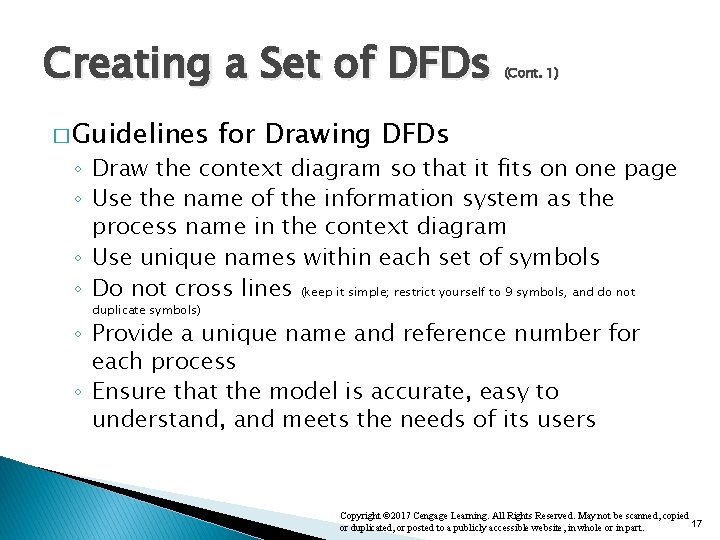
Creating a Set of DFDs � Guidelines (Cont. 1) for Drawing DFDs ◦ Draw the context diagram so that it fits on one page ◦ Use the name of the information system as the process name in the context diagram ◦ Use unique names within each set of symbols ◦ Do not cross lines (keep it simple; restrict yourself to 9 symbols, and do not duplicate symbols) ◦ Provide a unique name and reference number for each process ◦ Ensure that the model is accurate, easy to understand, and meets the needs of its users Copyright © 2017 Cengage Learning. All Rights Reserved. May not be scanned, copied 17 or duplicated, or posted to a publicly accessible website, in whole or in part.
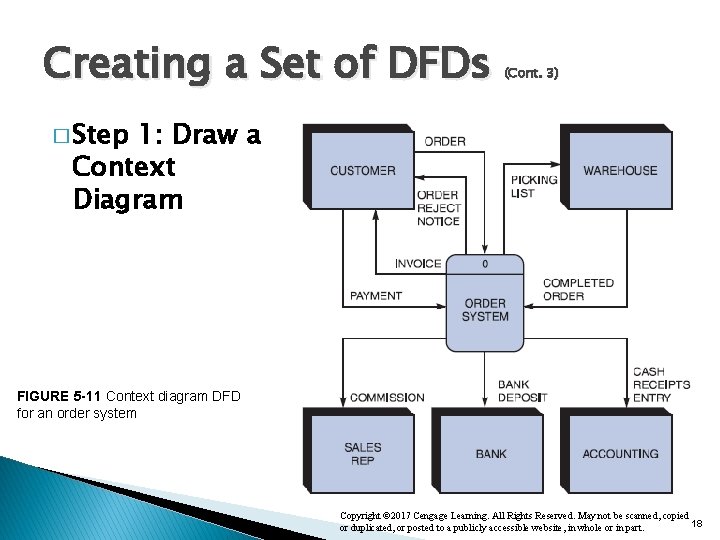
Creating a Set of DFDs (Cont. 3) � Step 1: Draw a Context Diagram FIGURE 5 -11 Context diagram DFD for an order system Copyright © 2017 Cengage Learning. All Rights Reserved. May not be scanned, copied 18 or duplicated, or posted to a publicly accessible website, in whole or in part.
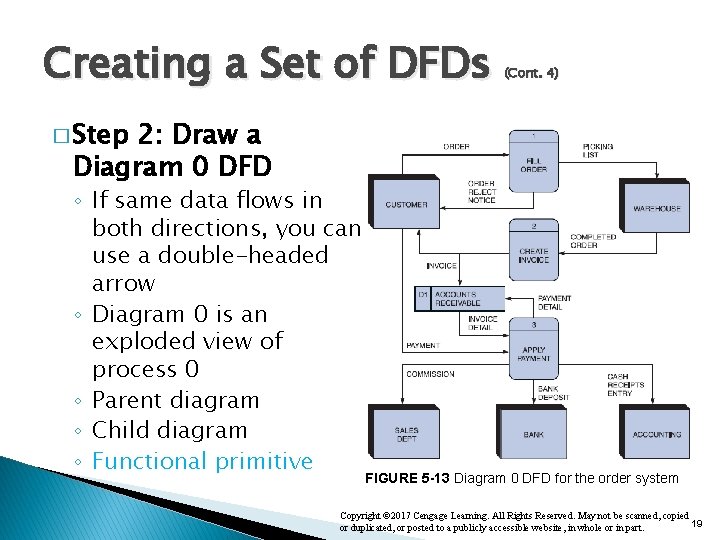
Creating a Set of DFDs (Cont. 4) � Step 2: Draw a Diagram 0 DFD ◦ If same data flows in both directions, you can use a double-headed arrow ◦ Diagram 0 is an exploded view of process 0 ◦ Parent diagram ◦ Child diagram ◦ Functional primitive FIGURE 5 -13 Diagram 0 DFD for the order system Copyright © 2017 Cengage Learning. All Rights Reserved. May not be scanned, copied 19 or duplicated, or posted to a publicly accessible website, in whole or in part.
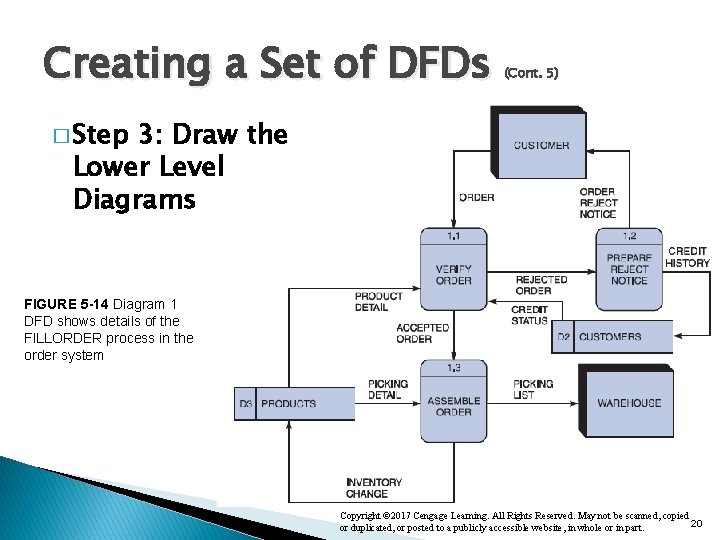
Creating a Set of DFDs (Cont. 5) � Step 3: Draw the Lower Level Diagrams FIGURE 5 -14 Diagram 1 DFD shows details of the FILLORDER process in the order system Copyright © 2017 Cengage Learning. All Rights Reserved. May not be scanned, copied 20 or duplicated, or posted to a publicly accessible website, in whole or in part.
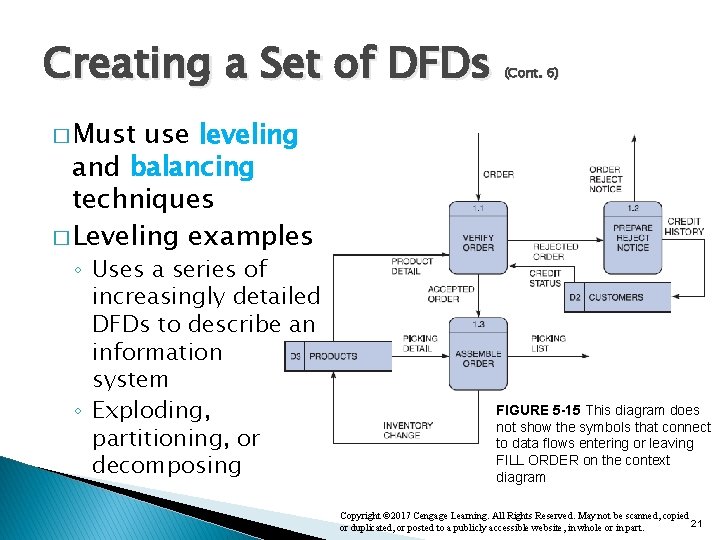
Creating a Set of DFDs (Cont. 6) � Must use leveling and balancing techniques � Leveling examples ◦ Uses a series of increasingly detailed DFDs to describe an information system ◦ Exploding, partitioning, or decomposing FIGURE 5 -15 This diagram does not show the symbols that connect to data flows entering or leaving FILL ORDER on the context diagram Copyright © 2017 Cengage Learning. All Rights Reserved. May not be scanned, copied 21 or duplicated, or posted to a publicly accessible website, in whole or in part.
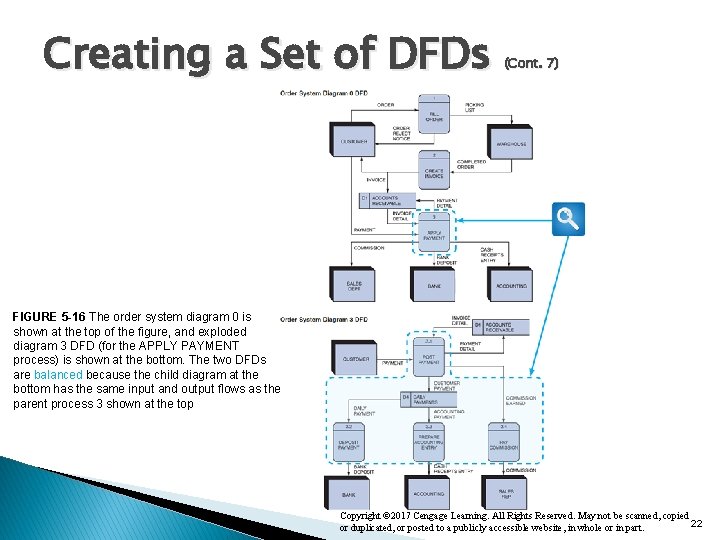
Creating a Set of DFDs (Cont. 7) FIGURE 5 -16 The order system diagram 0 is shown at the top of the figure, and exploded diagram 3 DFD (for the APPLY PAYMENT process) is shown at the bottom. The two DFDs are balanced because the child diagram at the bottom has the same input and output flows as the parent process 3 shown at the top Copyright © 2017 Cengage Learning. All Rights Reserved. May not be scanned, copied 22 or duplicated, or posted to a publicly accessible website, in whole or in part.
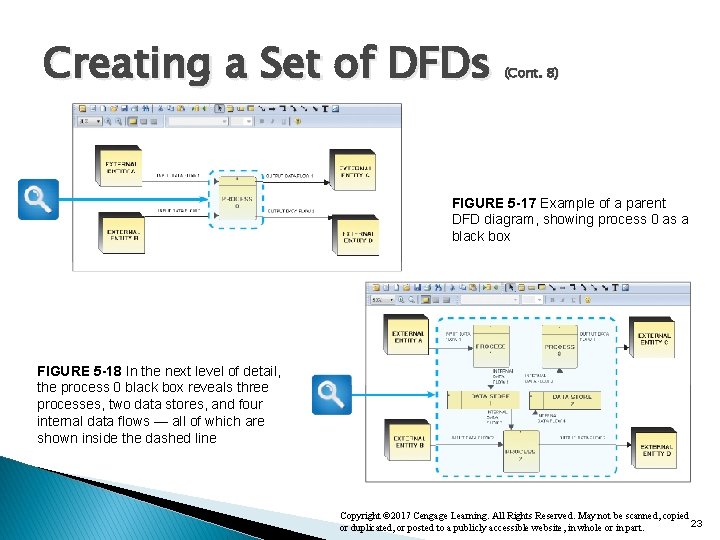
Creating a Set of DFDs (Cont. 8) FIGURE 5 -17 Example of a parent DFD diagram, showing process 0 as a black box FIGURE 5 -18 In the next level of detail, the process 0 black box reveals three processes, two data stores, and four internal data flows — all of which are shown inside the dashed line Copyright © 2017 Cengage Learning. All Rights Reserved. May not be scanned, copied 23 or duplicated, or posted to a publicly accessible website, in whole or in part.
Exercise: University Grading System Develop a context diagram and diagram 0 for the information system described in the following narrative: Consider a student’s work grading system where students submit their work for grading and receive graded work, instructors set parameters for automatic grading and receive grade reports, and provide the “Students’ Record System” with final grades, and receives class rosters. The grading system establishes the gradebook (based on the received class roster and grading parameters), grade student work, assign final grade, and produce grade report for the instructor.
Data Dictionary • • • A data dictionary, or data repository, is a central storehouse of information about a system’s data An analyst uses the data dictionary to collect, document, and organize specific facts about a system Defines and describes all data elements and meaningful combinations of data elements Copyright © 2017 Cengage Learning. All Rights Reserved. May not be scanned, copied 25 or duplicated, or posted to a publicly accessible website, in whole or in part.
Data Dictionary (Cont. 1) � Data element: Smallest piece of data that has meaning within an information system ◦ Called data item or field ◦ Are combined into records, also called data structures � Record: Meaningful combination of related data elements that is included in a data flow or retained in a data store ◦ Called data structures Copyright © 2017 Cengage Learning. All Rights Reserved. May not be scanned, copied 26 or duplicated, or posted to a publicly accessible website, in whole or in part.
Data Dictionary � Using (Cont. 2) CASE Tools for Documentation ◦ More complex the system, more difficult it is to maintain full and accurate documentation ◦ Modern CASE tools simplify the task ◦ A CASE repository ensures data consistency Copyright © 2017 Cengage Learning. All Rights Reserved. May not be scanned, copied 27 or duplicated, or posted to a publicly accessible website, in whole or in part.
Data Dictionary � Documenting (Cont. 3) the Data Elements ◦ Every data element in the data dictionary should be documented ◦ Objective - To provide clear, comprehensive information about the data and processes that make up a system Copyright © 2017 Cengage Learning. All Rights Reserved. May not be scanned, copied 28 or duplicated, or posted to a publicly accessible website, in whole or in part.
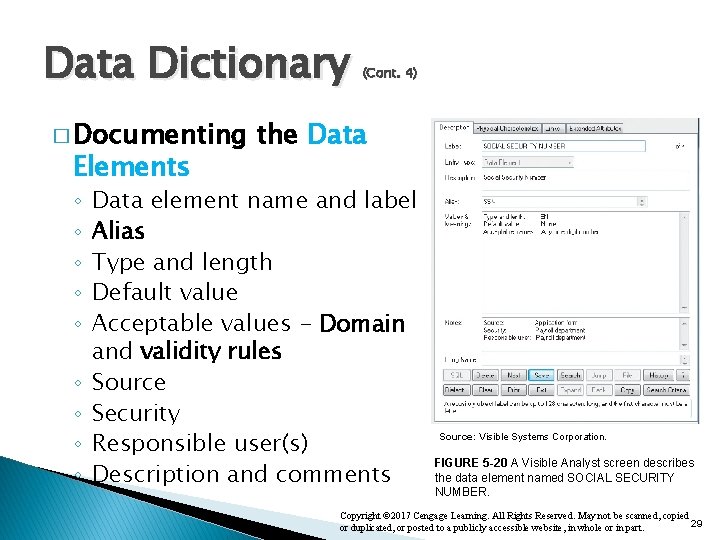
Data Dictionary � Documenting Elements ◦ ◦ ◦ ◦ ◦ (Cont. 4) the Data element name and label Alias Type and length Default value Acceptable values - Domain and validity rules Source Security Responsible user(s) Description and comments Source: Visible Systems Corporation. FIGURE 5 -20 A Visible Analyst screen describes the data element named SOCIAL SECURITY NUMBER. Copyright © 2017 Cengage Learning. All Rights Reserved. May not be scanned, copied 29 or duplicated, or posted to a publicly accessible website, in whole or in part.
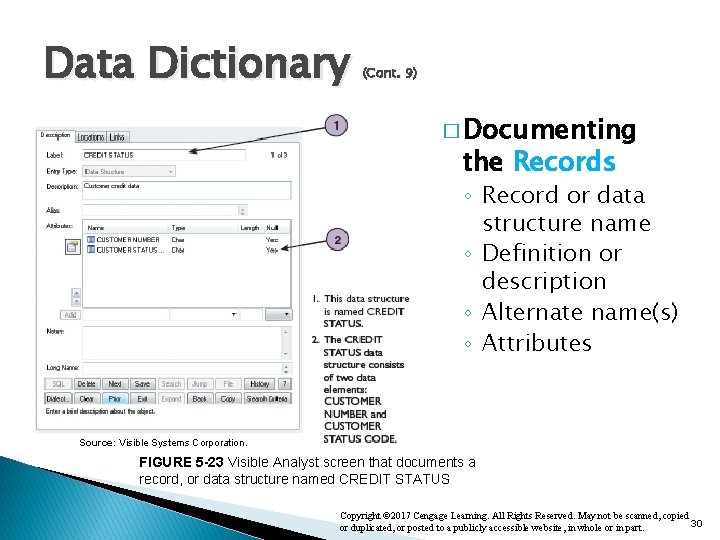
Data Dictionary (Cont. 9) � Documenting the Records ◦ Record or data structure name ◦ Definition or description ◦ Alternate name(s) ◦ Attributes Source: Visible Systems Corporation. FIGURE 5 -23 Visible Analyst screen that documents a record, or data structure named CREDIT STATUS Copyright © 2017 Cengage Learning. All Rights Reserved. May not be scanned, copied 30 or duplicated, or posted to a publicly accessible website, in whole or in part.
Data Dictionary � Documenting ◦ ◦ ◦ ◦ (Cont. 5) the Data Flows Data flow name or label Description Alternate name(s) Origin Destination Record Volume and frequency Copyright © 2017 Cengage Learning. All Rights Reserved. May not be scanned, copied 31 or duplicated, or posted to a publicly accessible website, in whole or in part.
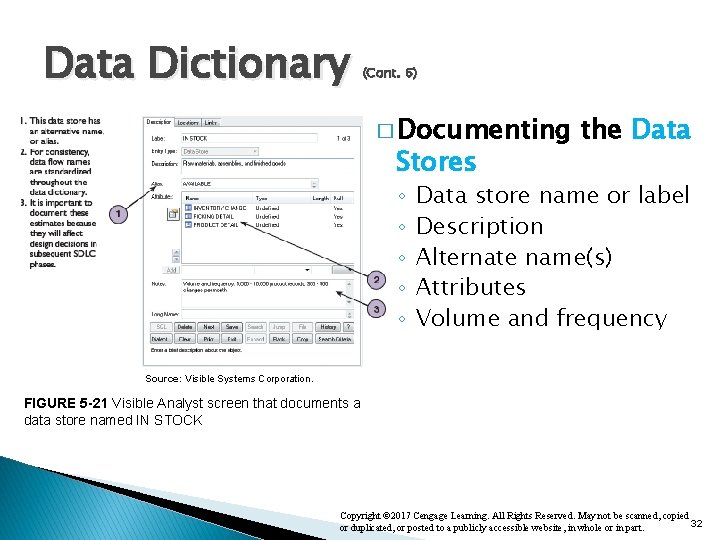
Data Dictionary (Cont. 6) � Documenting Stores ◦ ◦ ◦ the Data store name or label Description Alternate name(s) Attributes Volume and frequency Source: Visible Systems Corporation. FIGURE 5 -21 Visible Analyst screen that documents a data store named IN STOCK Copyright © 2017 Cengage Learning. All Rights Reserved. May not be scanned, copied 32 or duplicated, or posted to a publicly accessible website, in whole or in part.
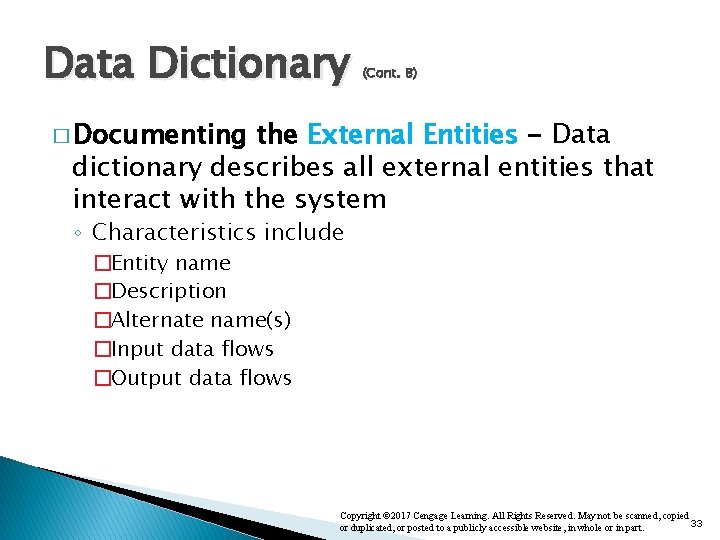
Data Dictionary (Cont. 8) � Documenting the External Entities - Data dictionary describes all external entities that interact with the system ◦ Characteristics include �Entity name �Description �Alternate name(s) �Input data flows �Output data flows Copyright © 2017 Cengage Learning. All Rights Reserved. May not be scanned, copied 33 or duplicated, or posted to a publicly accessible website, in whole or in part.
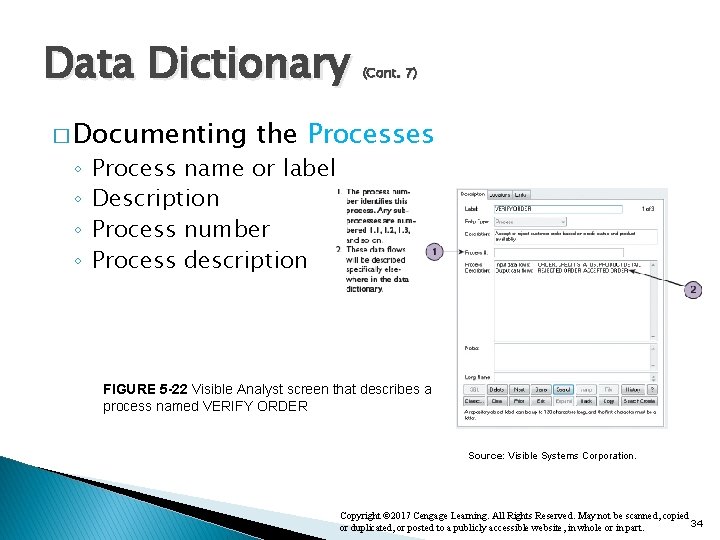
Data Dictionary � Documenting ◦ ◦ (Cont. 7) the Processes Process name or label Description Process number Process description FIGURE 5 -22 Visible Analyst screen that describes a process named VERIFY ORDER Source: Visible Systems Corporation. Copyright © 2017 Cengage Learning. All Rights Reserved. May not be scanned, copied 34 or duplicated, or posted to a publicly accessible website, in whole or in part.
Data Dictionary (Cont. 10) � Data Dictionary Reports - Following can be obtained ◦ Alphabetized list of all data elements by name ◦ Report describing each data element and indicating the user or department that is responsible for data entry, updating, or deletion ◦ Report of all data flows and data stores that use a particular data element ◦ Detailed reports showing all characteristics of data elements, records, data flows, processes, or any other selected item stored in the data Copyright © 2017 Cengage Learning. All Rights Reserved. May not be scanned, copied 35 or duplicated, or posted to a publicly accessible website, in whole or in part.
Process Description Tools � Process description: Documents the details of a functional primitive and represents a specific set of processing steps and business logic � Tools – modular design, structured English, decision tables, and decision trees � Used in object-oriented development ◦ O-O analysis - combines data and the processes that act on the data into things called objects, and similar objects can be grouped together into classes ◦ O-O processes are called methods Copyright © 2017 Cengage Learning. All Rights Reserved. May not be scanned, copied 36 or duplicated, or posted to a publicly accessible website, in whole or in part.
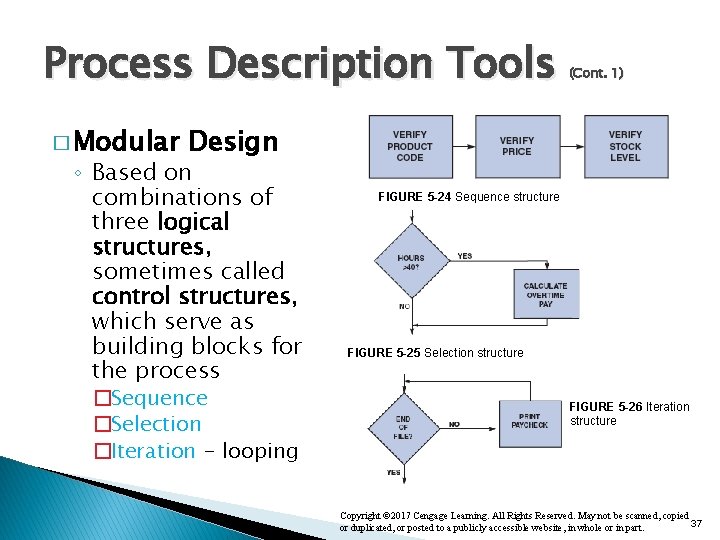
Process Description Tools � Modular (Cont. 1) Design ◦ Based on combinations of three logical structures, sometimes called control structures, which serve as building blocks for the process �Sequence �Selection �Iteration - looping FIGURE 5 -24 Sequence structure FIGURE 5 -25 Selection structure FIGURE 5 -26 Iteration structure Copyright © 2017 Cengage Learning. All Rights Reserved. May not be scanned, copied 37 or duplicated, or posted to a publicly accessible website, in whole or in part.
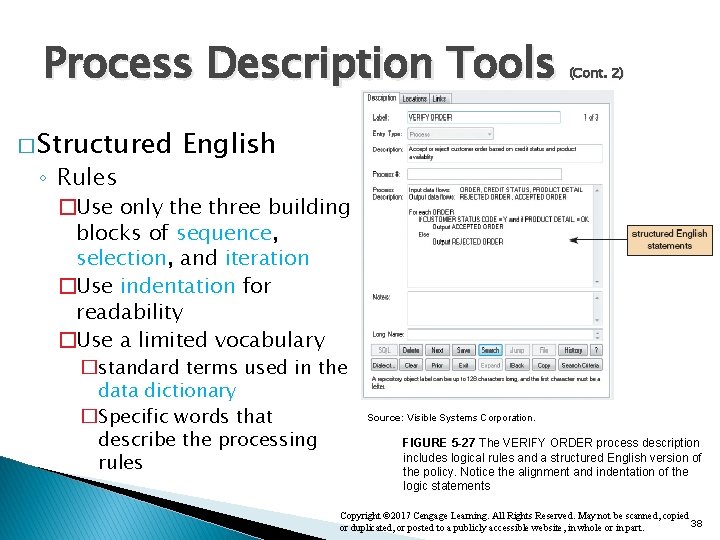
Process Description Tools � Structured ◦ Rules (Cont. 2) English �Use only the three building blocks of sequence, selection, and iteration �Use indentation for readability �Use a limited vocabulary �standard terms used in the data dictionary �Specific words that describe the processing rules Source: Visible Systems Corporation. FIGURE 5 -27 The VERIFY ORDER process description includes logical rules and a structured English version of the policy. Notice the alignment and indentation of the logic statements Copyright © 2017 Cengage Learning. All Rights Reserved. May not be scanned, copied 38 or duplicated, or posted to a publicly accessible website, in whole or in part.
Exercise: University Library System Using modular design and structured English describe the following Library System process, labeled: “Checkout books” “Library users are categorized into students and faculty. To check out books from the library users must be active at the university (Students/faculty must be enrolled/employed). Users can check out multiple books simultaneously however different rules apply depending on user type: ◦ Students have a maximum of 3 books checked out at a time. ◦ Faculty have a maximum of 5 books checked out at a time. When checking out books, the following has to be completed for each book: 1. Confirm that book is not checked out in the system, 2. Check out the book to the student/faculty (associate book ID to person ID), and 3. Update the RFID system to avoid alarm at library doors”
Process Description Tools � Decision (Cont. 3) Tables ◦ Show a logical structure, with all possible combinations of conditions and resulting actions �Every possible outcome should be considered to ensure that nothing has been overlooked ◦ Number of rules doubles each time a condition is added ◦ Can have more than two possible outcomes ◦ Are the best way to describe a complex set of conditions Copyright © 2017 Cengage Learning. All Rights Reserved. May not be scanned, copied 40 or duplicated, or posted to a publicly accessible website, in whole or in part.
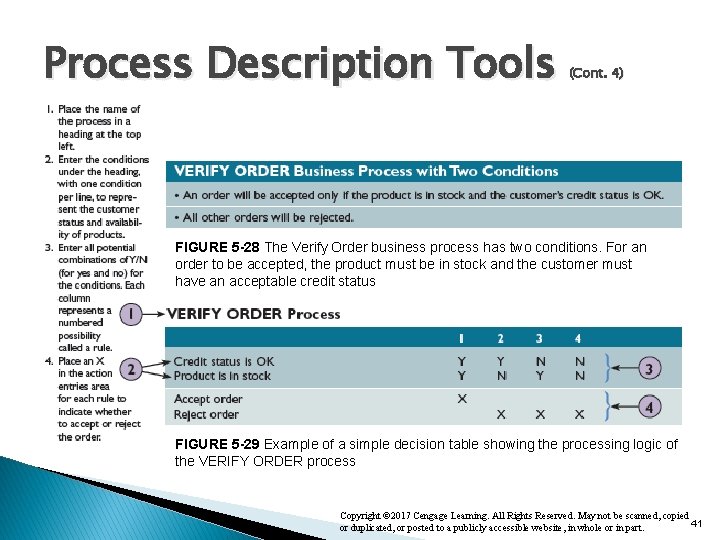
Process Description Tools (Cont. 4) FIGURE 5 -28 The Verify Order business process has two conditions. For an order to be accepted, the product must be in stock and the customer must have an acceptable credit status FIGURE 5 -29 Example of a simple decision table showing the processing logic of the VERIFY ORDER process Copyright © 2017 Cengage Learning. All Rights Reserved. May not be scanned, copied 41 or duplicated, or posted to a publicly accessible website, in whole or in part.
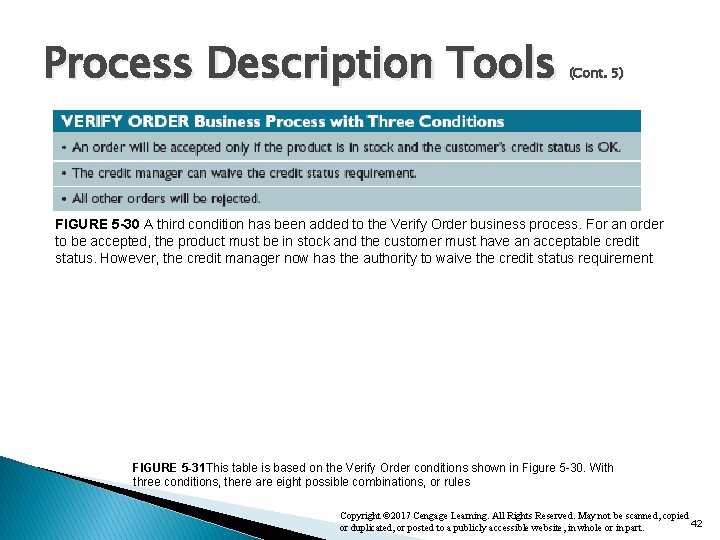
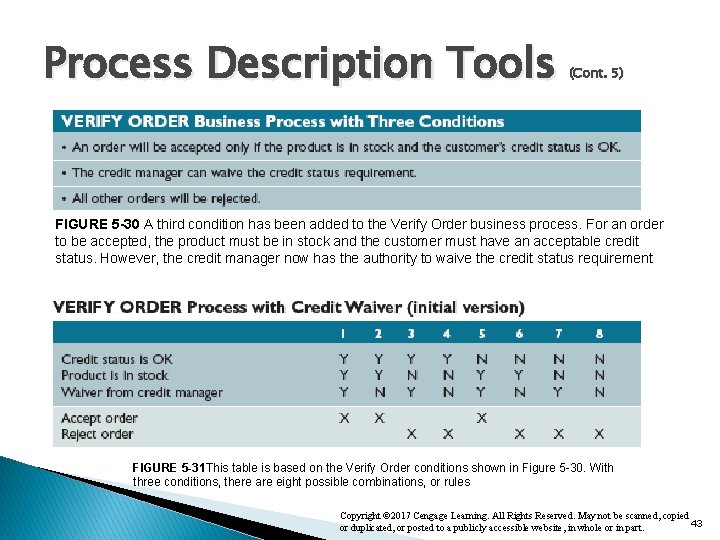
Process Description Tools (Cont. 5) FIGURE 5 -30 A third condition has been added to the Verify Order business process. For an order to be accepted, the product must be in stock and the customer must have an acceptable credit status. However, the credit manager now has the authority to waive the credit status requirement FIGURE 5 -31 This table is based on the Verify Order conditions shown in Figure 5 -30. With three conditions, there are eight possible combinations, or rules Copyright © 2017 Cengage Learning. All Rights Reserved. May not be scanned, copied 42 or duplicated, or posted to a publicly accessible website, in whole or in part.
Process Description Tools (Cont. 5) FIGURE 5 -30 A third condition has been added to the Verify Order business process. For an order to be accepted, the product must be in stock and the customer must have an acceptable credit status. However, the credit manager now has the authority to waive the credit status requirement FIGURE 5 -31 This table is based on the Verify Order conditions shown in Figure 5 -30. With three conditions, there are eight possible combinations, or rules Copyright © 2017 Cengage Learning. All Rights Reserved. May not be scanned, copied 43 or duplicated, or posted to a publicly accessible website, in whole or in part.
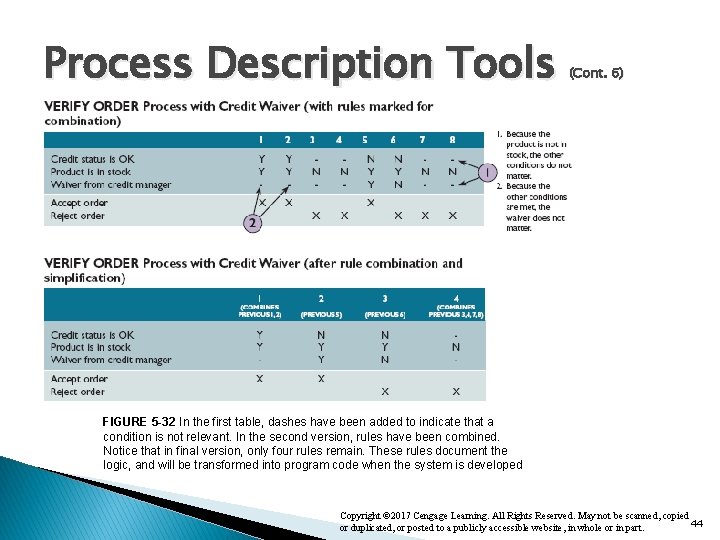
Process Description Tools (Cont. 6) FIGURE 5 -32 In the first table, dashes have been added to indicate that a condition is not relevant. In the second version, rules have been combined. Notice that in final version, only four rules remain. These rules document the logic, and will be transformed into program code when the system is developed Copyright © 2017 Cengage Learning. All Rights Reserved. May not be scanned, copied 44 or duplicated, or posted to a publicly accessible website, in whole or in part.
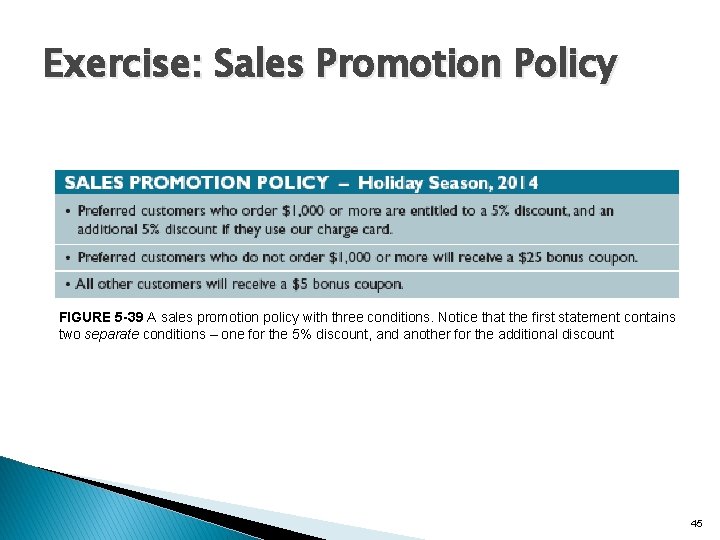
Exercise: Sales Promotion Policy FIGURE 5 -39 A sales promotion policy with three conditions. Notice that the first statement contains two separate conditions – one for the 5% discount, and another for the additional discount 45
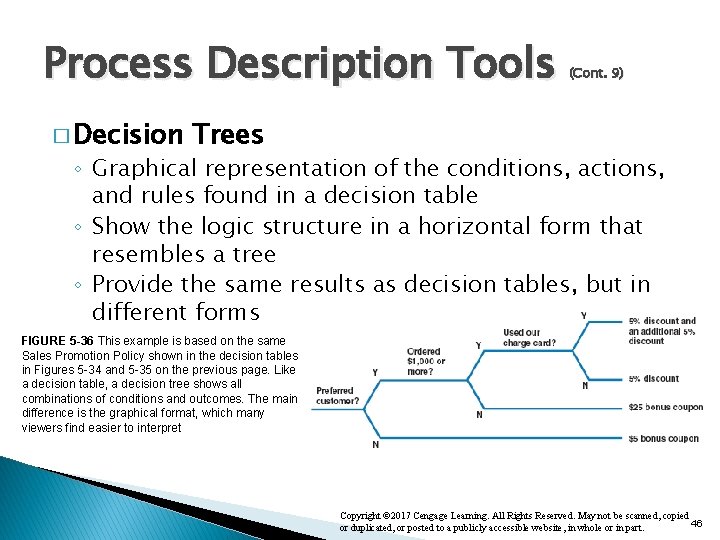
Process Description Tools � Decision (Cont. 9) Trees ◦ Graphical representation of the conditions, actions, and rules found in a decision table ◦ Show the logic structure in a horizontal form that resembles a tree ◦ Provide the same results as decision tables, but in different forms FIGURE 5 -36 This example is based on the same Sales Promotion Policy shown in the decision tables in Figures 5 -34 and 5 -35 on the previous page. Like a decision table, a decision tree shows all combinations of conditions and outcomes. The main difference is the graphical format, which many viewers find easier to interpret Copyright © 2017 Cengage Learning. All Rights Reserved. May not be scanned, copied 46 or duplicated, or posted to a publicly accessible website, in whole or in part.
Logical versus Physical Models � While structured analysis tools are used to develop a logical model for a new information system, such tools also can be used to develop physical models of an information system � A physical model shows how the system’s requirements are implemented Copyright © 2017 Cengage Learning. All Rights Reserved. May not be scanned, copied 47 or duplicated, or posted to a publicly accessible website, in whole or in part.
Logical versus Physical Models (Cont. 1) � Sequence of Models ◦ Systems analysts create a physical model of the current system and then develop a logical model of the current system before tackling a logical model of the new system �Performing extra step allows to understand the current system better Copyright © 2017 Cengage Learning. All Rights Reserved. May not be scanned, copied 48 or duplicated, or posted to a publicly accessible website, in whole or in part.
Logical versus Physical Models (Cont. 2) � Four-Model ◦ Develop: �A �A Approach physical model of the current system logical model of the new system physical model of the new system ◦ Disadvantage - Additional time and cost Copyright © 2017 Cengage Learning. All Rights Reserved. May not be scanned, copied 49 or duplicated, or posted to a publicly accessible website, in whole or in part.