
System x Asia Pacific IBM KVM Solution 2007
System x Asia Pacific IBM KVM Solution © 2007 IBM Corporation
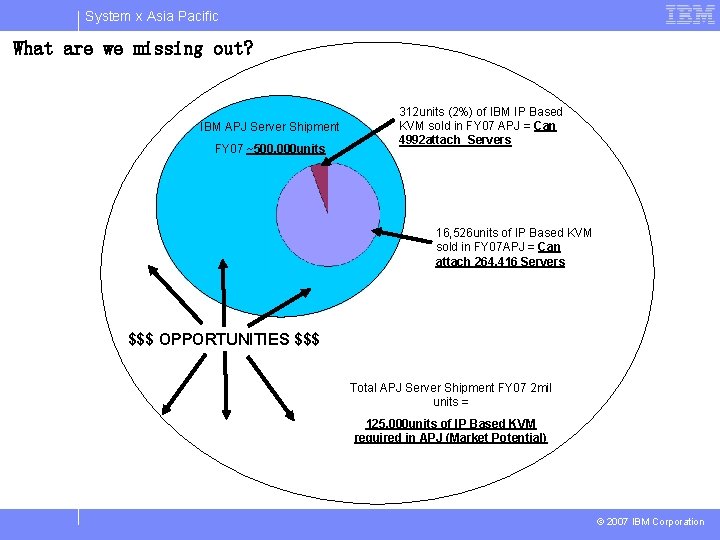
System x Asia Pacific What are we missing out? IBM APJ Server Shipment FY 07 ~500, 000 units 312 units (2%) of IBM IP Based KVM sold in FY 07 APJ = Can 4992 attach Servers 16, 526 units of IP Based KVM sold in FY 07 APJ = Can attach 264, 416 Servers $$$ OPPORTUNITIES $$$ Total APJ Server Shipment FY 07 2 mil units = 125, 000 units of IP Based KVM required in APJ (Market Potential) © 2007 IBM Corporation
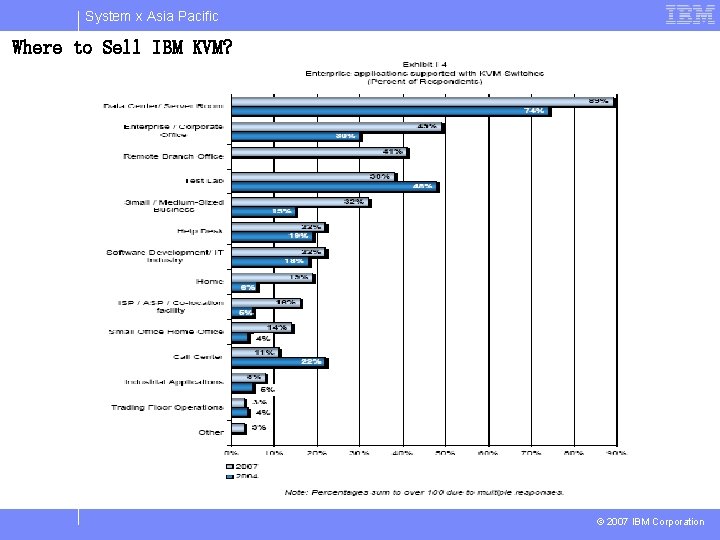
System x Asia Pacific Where to Sell IBM KVM? © 2007 IBM Corporation
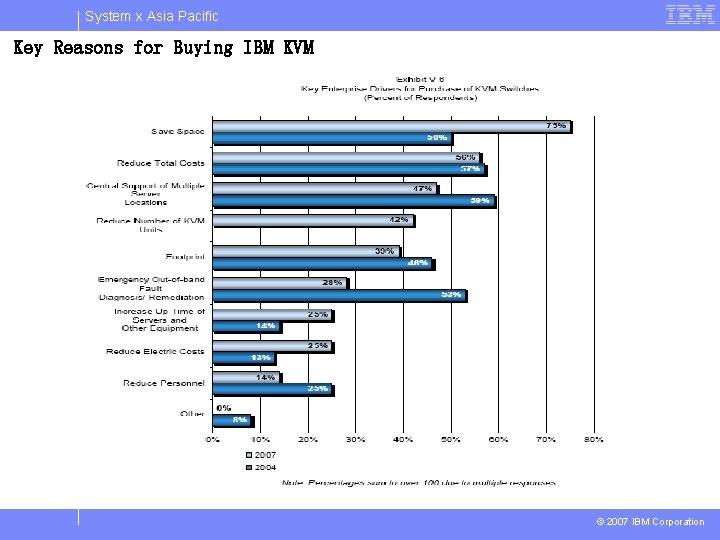
System x Asia Pacific Key Reasons for Buying IBM KVM © 2007 IBM Corporation
System x Asia Pacific IBM KVM Intro © 2007 IBM Corporation
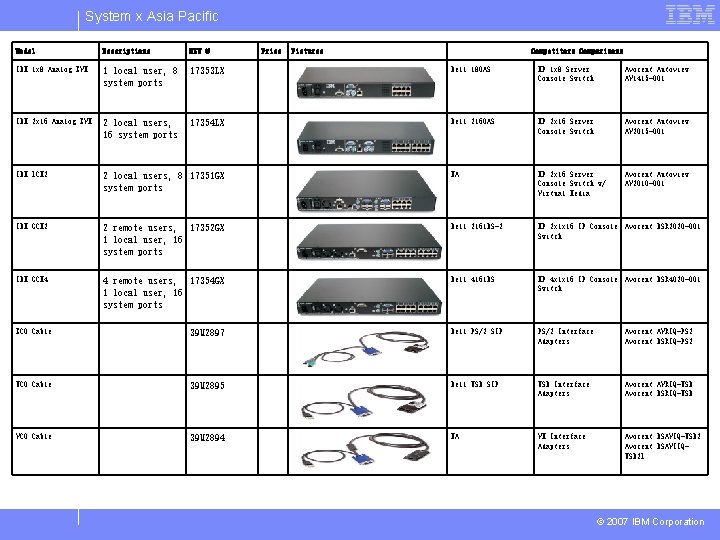
System x Asia Pacific Model Descriptions SKU # Price Pictures Competitors Comparisons IBM 1 x 8 Analog KVM 1 local user, 8 system ports 17353 LX Dell 180 AS HP 1 x 8 Server Console Switch Avocent Autoview AV 1415 -001 IBM 2 x 16 Analog KVM 2 local users, 16 system ports 17354 LX Dell 2160 AS HP 2 x 16 Server Console Switch Avocent Autoview AV 2015 -001 IBM LCM 2 2 local users, 8 17351 GX system ports NA HP 2 x 16 Server Console Switch w/ Virtual Media Avocent Autoview AV 2010 -001 IBM GCM 2 2 remote users, 17352 GX 1 local user, 16 system ports Dell 2161 DS-2 HP 2 x 1 x 16 IP Console Avocent DSR 2020 -001 Switch IBM GCM 4 4 remote users, 17354 GX 1 local user, 16 system ports Dell 4161 DS HP 4 x 1 x 16 IP Console Avocent DSR 4020 -001 Switch KCO Cable 39 M 2897 Dell PS/2 SIP PS/2 Interface Adapters Avocent AVRIQ-PS 2 Avocent DSRIQ-PS 2 UCO Cable 39 M 2895 Dell USB SIP USB Interface Adapters Avocent AVRIQ-USB Avocent DSRIQ-USB VCO Cable 39 M 2894 NA VM Interface Adapters Avocent DSAVIQ-USB 2 Avocent DSAVIIQUSB 2 L © 2007 IBM Corporation
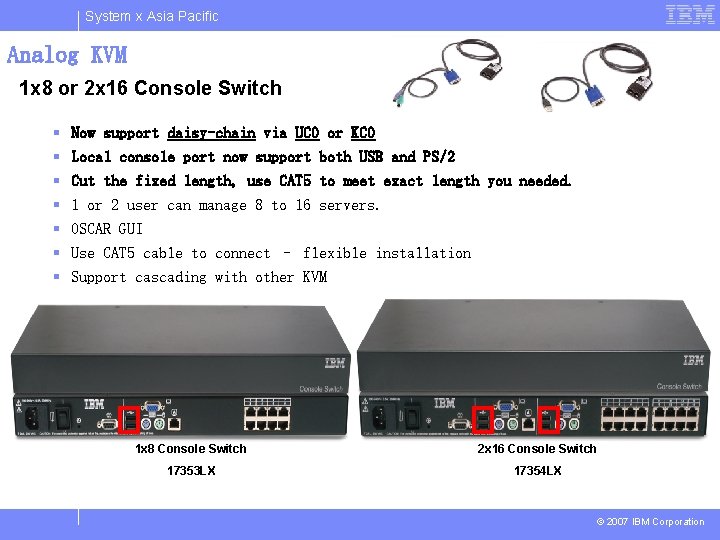
System x Asia Pacific Analog KVM 1 x 8 or 2 x 16 Console Switch § § § § Now support daisy-chain via UCO or KCO Local console port now support both USB and PS/2 Cut the fixed length, use CAT 5 to meet exact length you needed. 1 or 2 user can manage 8 to 16 servers. OSCAR GUI Use CAT 5 cable to connect – flexible installation Support cascading with other KVM 1 x 8 Console Switch 2 x 16 Console Switch 17353 LX 17354 LX © 2007 IBM Corporation
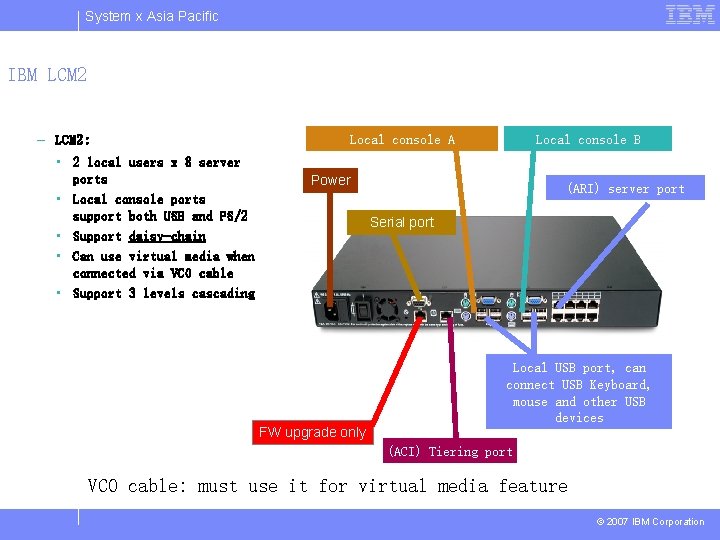
System x Asia Pacific IBM LCM 2 – LCM 2: • 2 local users x 8 server ports • Local console ports support both USB and PS/2 • Support daisy-chain • Can use virtual media when connected via VCO cable • Support 3 levels cascading Local console A Local console B Power (ARI) server port Serial port Local USB port, can connect USB Keyboard, mouse and other USB devices FW upgrade only (ACI) Tiering port VCO cable: must use it for virtual media feature © 2007 IBM Corporation

System x Asia Pacific IBM analog KVM cabling Connect your local keyboard, mouse and video to local console port Use OSCAR to access servers Connect UCO or KCO to servers Use CAT 5 cable connect UCO or KCO to KVM UCO and KCO cable support daisy -chain, up to 16 servers can be attached in 1 daisy-chain Connect your local keyboard, mouse and video to local console ports Use OSCAR to access servers Connect UCO or KCO to servers © 2007 IBM Corporation
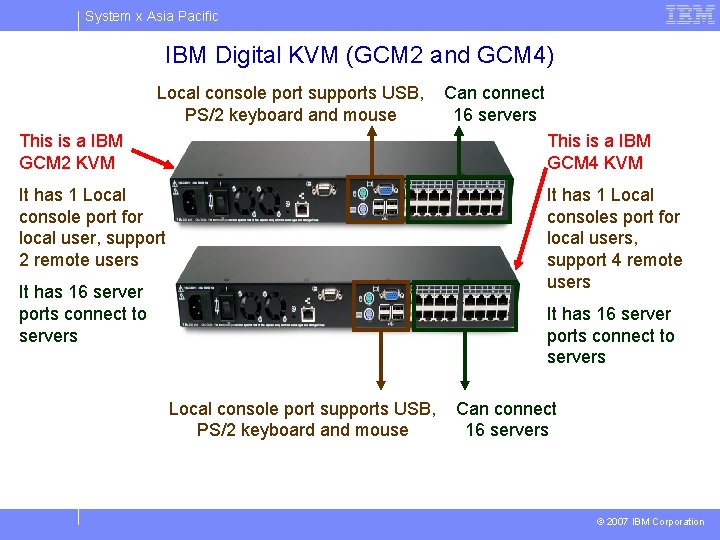
System x Asia Pacific IBM Digital KVM (GCM 2 and GCM 4) This is a IBM GCM 2 KVM Local console port supports USB, Can connect PS/2 keyboard and mouse 16 servers This is a IBM GCM 4 KVM It has 1 Local console port for local user, support 2 remote users It has 16 server ports connect to servers It has 1 Local consoles port for local users, support 4 remote users It has 16 server ports connect to servers Local console port supports USB, Can connect PS/2 keyboard and mouse 16 servers © 2007 IBM Corporation
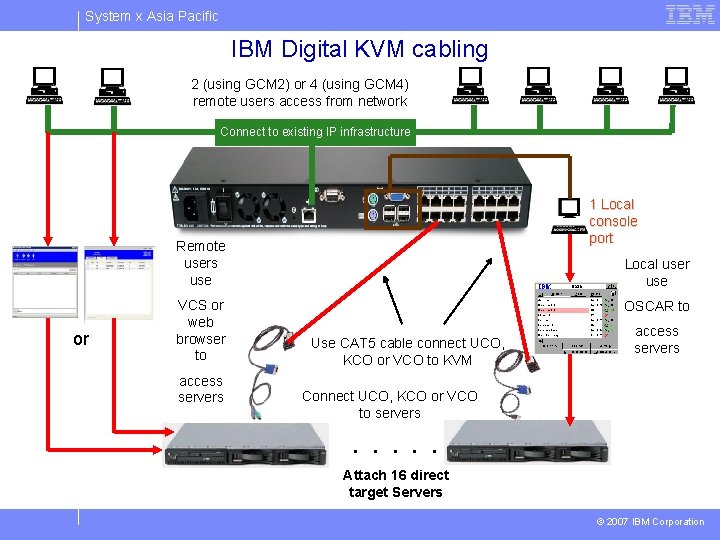
System x Asia Pacific IBM Digital KVM cabling 2 (using GCM 2) or 4 (using GCM 4) remote users access from network Connect to existing IP infrastructure 1 Local console port Remote users use or VCS or web browser to access servers Local user use OSCAR to Use CAT 5 cable connect UCO, KCO or VCO to KVM access servers Connect UCO, KCO or VCO to servers . . . Attach 16 direct target Servers © 2007 IBM Corporation
System x Asia Pacific KVM installation © 2007 IBM Corporation
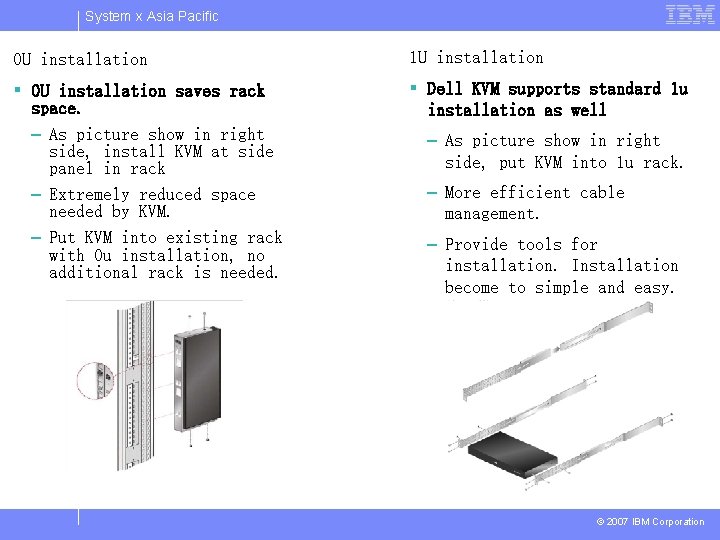
System x Asia Pacific 0 U installation 1 U installation § 0 U installation saves rack space. – As picture show in right side, install KVM at side panel in rack – Extremely reduced space needed by KVM. – Put KVM into existing rack with 0 u installation, no additional rack is needed. § Dell KVM supports standard 1 u installation as well – As picture show in right side, put KVM into 1 u rack. – More efficient cable management. – Provide tools for installation. Installation become to simple and easy. © 2007 IBM Corporation
System x Asia Pacific VCS and IBM digital KVM feature © 2007 IBM Corporation
System x Asia Pacific VCS - Virtual Console Software § We can use VCS to do almost all tasks of GCM 2/4 § VCS is a software that we are design for remote user access KVM. § VCS can configure KVM, access target server, FW upgrade and so on. § VCS also can enable SNMP service, integrate with LDAP, encrypt data. § VCS is free for customer, and LDAP license KEY is free for customer too. © 2007 IBM Corporation
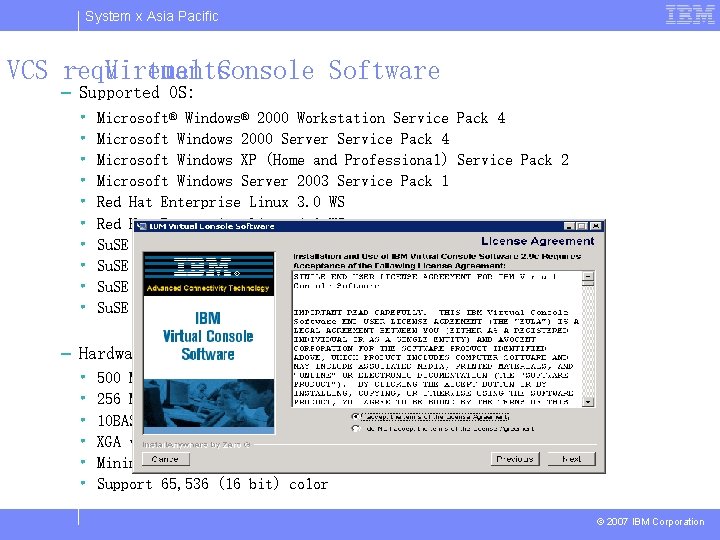
System x Asia Pacific VCS requirements – Virtual Console Software – Supported OS: • • • Microsoft® Windows® 2000 Workstation Service Pack 4 Microsoft Windows 2000 Server Service Pack 4 Microsoft Windows XP (Home and Professional) Service Pack 2 Microsoft Windows Server 2003 Service Pack 1 Red Hat Enterprise Linux 3. 0 WS Red Hat Enterprise Linux 4. 0 WS Su. SE Linux Enterprise Server 8 Su. SE Linux Enterprise Server 9 Su. SE Linux 9. 2 Su. SE Linux 9. 3 – Hardware requirements: • • • 500 MHz Pentium III 256 MB RAM 10 BASE-T or 100 BASE-T NIC XGA video card with acceleration Minimal resolution 800 x 600 Support 65, 536 (16 bit) color © 2007 IBM Corporation
System x Asia Pacific IBM digital KVM features Digital KVM unique features 1. Scan mode -can scan up to 16 servers in a window. -PCAnywhere and Terminal Services or any other software solution does not support this. 2. Digital sharing -3 modes are active, passive and stealth mode 3. Virtual Media -user can map a USB device to target server via remote or local. 4. Integrated with LDAP -authorization and authentication by a centre user database -LDAP license KEY included (Free) 5. Unlimited scalability -you can add digital KVM to existing analogue KVM environment to gain ability of remote access. © 2007 IBM Corporation
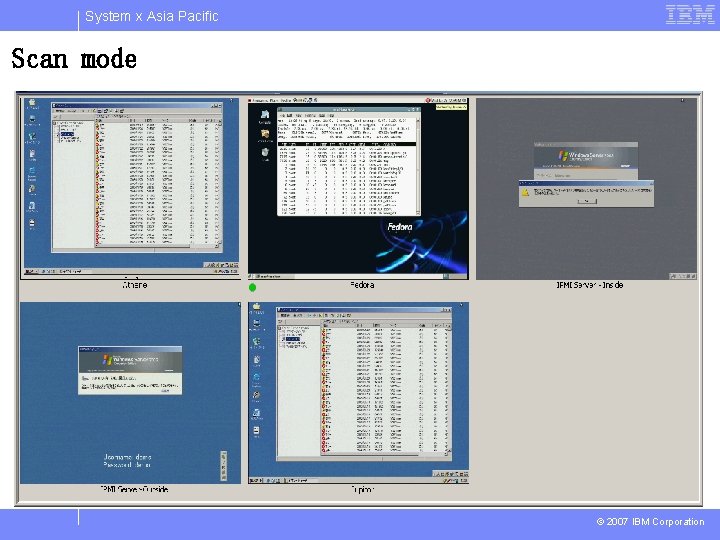
System x Asia Pacific Scan mode © 2007 IBM Corporation
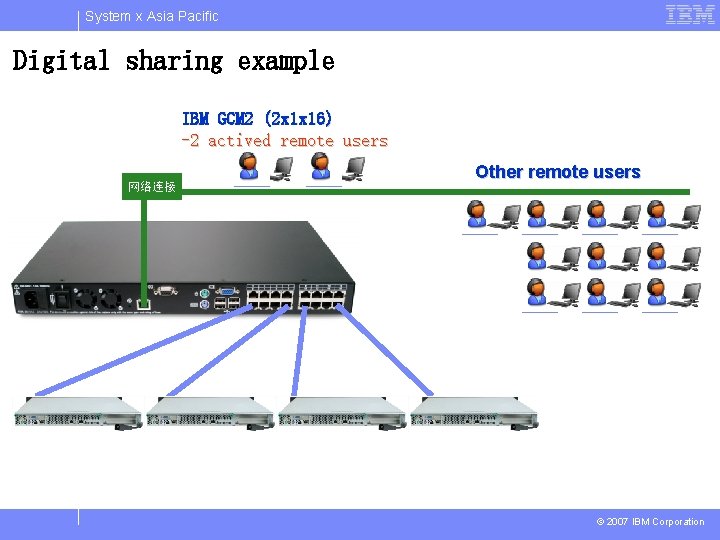
System x Asia Pacific Digital sharing example IBM GCM 2 (2 x 1 x 16) -2 actived remote users 网络连接 Other remote users © 2007 IBM Corporation
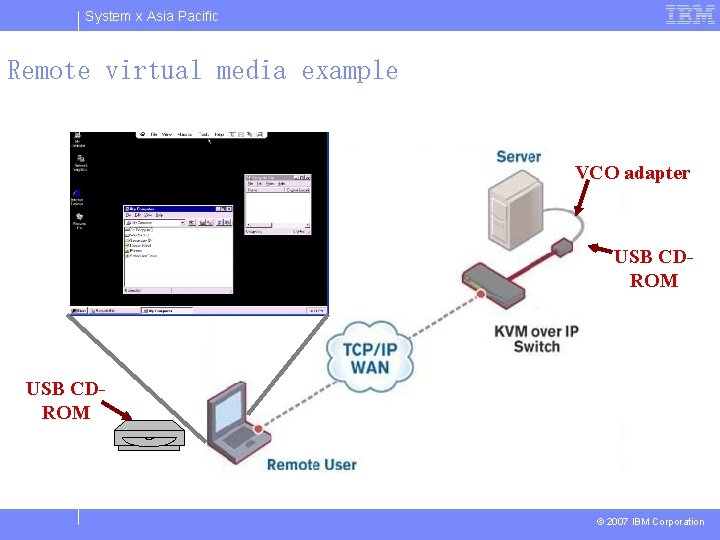
System x Asia Pacific Remote virtual media example VCO adapter USB CDROM © 2007 IBM Corporation
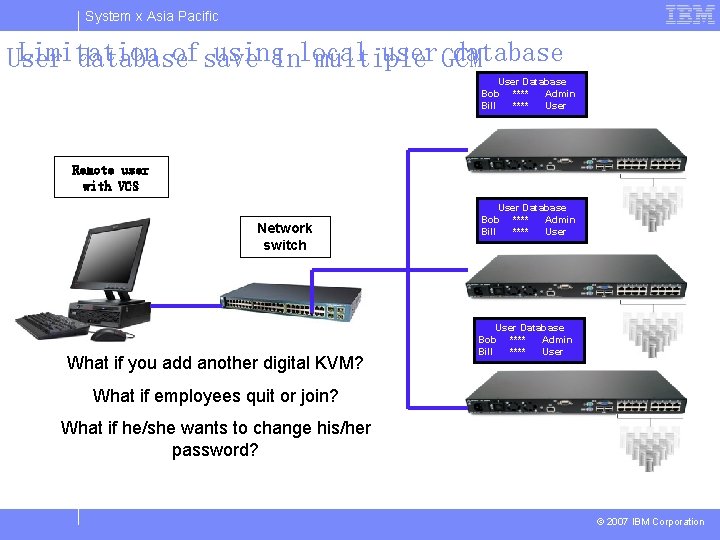
System x Asia Pacific Limitation of save usinginlocal user GCM database User database multiple User Database Bob **** Admin Bill **** User Remote user with VCS Network switch What if you add another digital KVM? User Database Bob **** Admin Bill **** User What if employees quit or join? What if he/she wants to change his/her password? © 2007 IBM Corporation
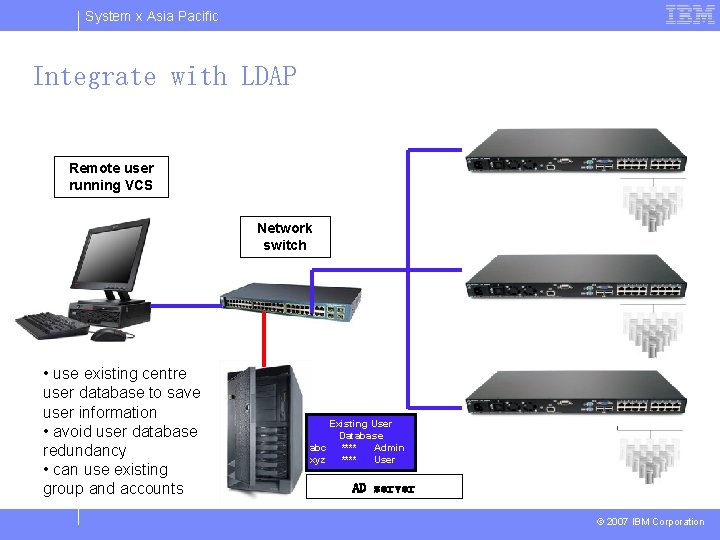
System x Asia Pacific Integrate with LDAP Remote user running VCS Network switch • use existing centre user database to save user information • avoid user database redundancy • can use existing group and accounts Existing User Database abc **** Admin xyz **** User AD server © 2007 IBM Corporation
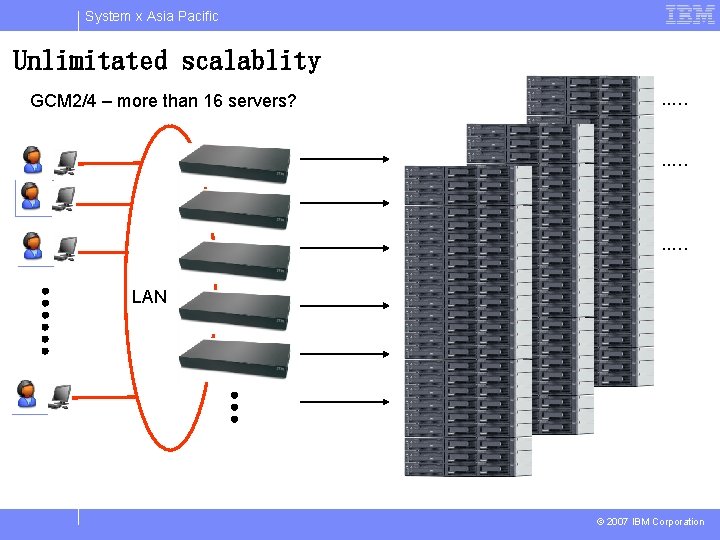
System x Asia Pacific Unlimitated scalablity GCM 2/4 – more than 16 servers? . . … LAN © 2007 IBM Corporation
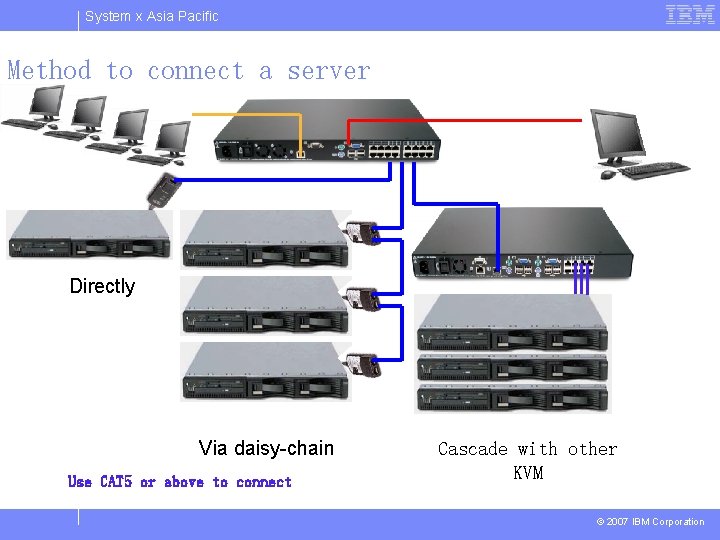
System x Asia Pacific Method to connect a server Directly Via daisy-chain Use CAT 5 or above to connect Cascade with other KVM © 2007 IBM Corporation
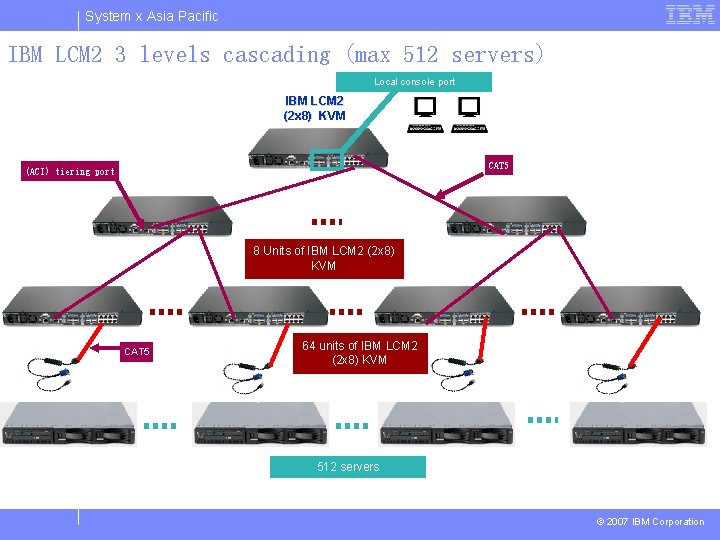
System x Asia Pacific IBM LCM 2 3 levels cascading (max 512 servers) Local console port IBM LCM 2 (2 x 8) KVM CAT 5 (ACI) tiering port 8 Units of IBM LCM 2 (2 x 8) KVM CAT 5 64 units of IBM LCM 2 (2 x 8) KVM 512 servers © 2007 IBM Corporation
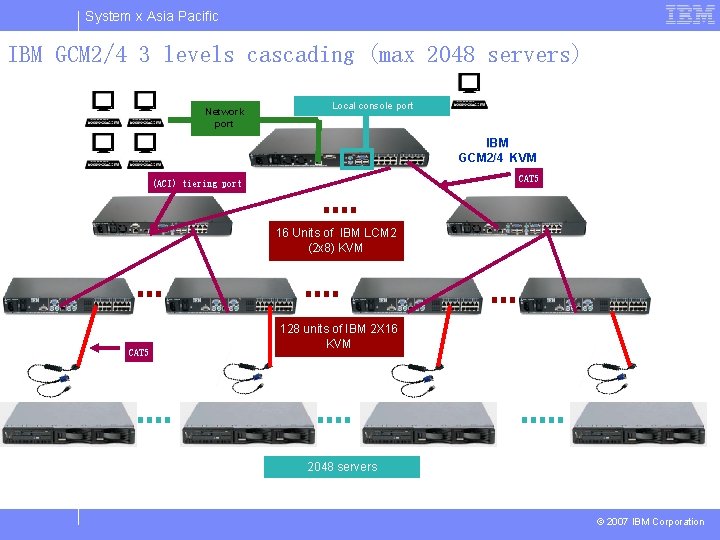
System x Asia Pacific IBM GCM 2/4 3 levels cascading (max 2048 servers) Network port Local console port IBM GCM 2/4 KVM CAT 5 (ACI) tiering port 16 Units of IBM LCM 2 (2 x 8) KVM CAT 5 128 units of IBM 2 X 16 KVM 2048 servers © 2007 IBM Corporation
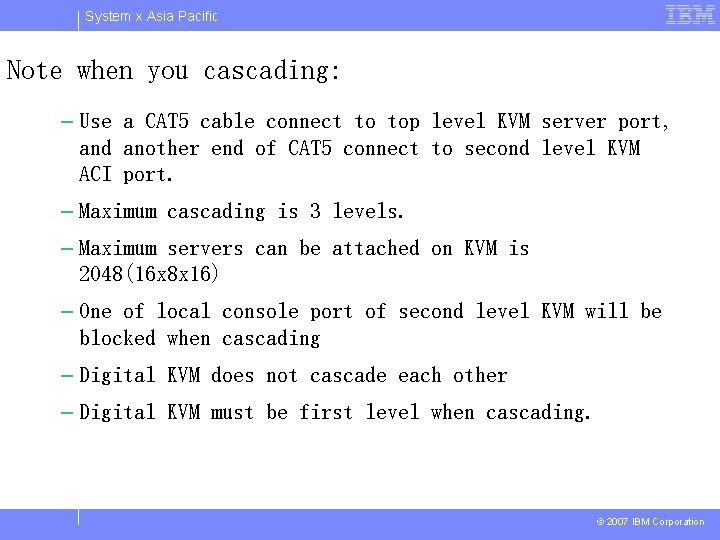
System x Asia Pacific Note when you cascading: – Use a CAT 5 cable connect to top level KVM server port, and another end of CAT 5 connect to second level KVM ACI port. – Maximum cascading is 3 levels. – Maximum servers can be attached on KVM is 2048(16 x 8 x 16) – One of local console port of second level KVM will be blocked when cascading – Digital KVM does not cascade each other – Digital KVM must be first level when cascading. © 2007 IBM Corporation
System x Asia Pacific New features added!!! § IBM GCM 2/4 will support OBWI (on-board web interface) technology. It is another way to access GCM 2/4 via web browser. § Avocent DSView 3. 6 (will release soon) has ability to access GCM 2/4 (a plug-in is required). Both Avocent KVM and IBM GCM 2/4 can be managed by DSView 3. 6. © 2007 IBM Corporation
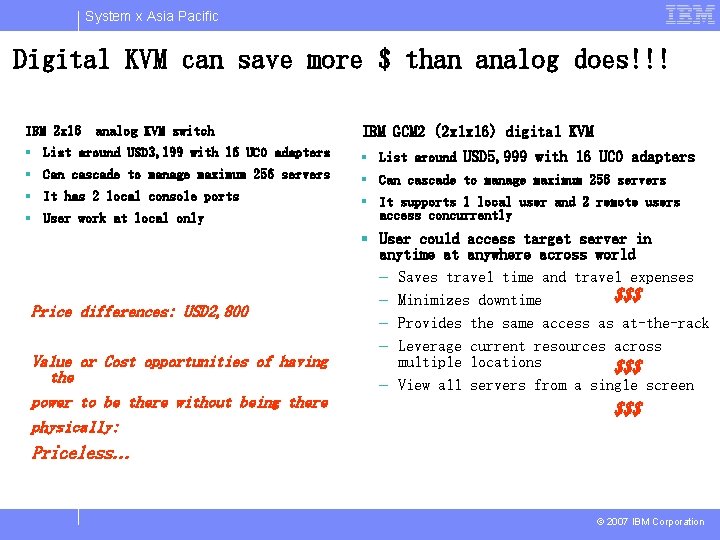
System x Asia Pacific Digital KVM can save more $ than analog does!!! IBM 2 x 16 analog KVM switch IBM GCM 2 (2 x 1 x 16) digital KVM § List around USD 3, 199 with 16 UCO adapters § List around USD 5, 999 with 16 UCO adapters § Can cascade to manage maximum 256 servers § It has 2 local console ports § It supports 1 local user and 2 remote users access concurrently § User work at local only Price differences: USD 2, 800 Value or Cost opportunities of having the power to be there without being there physically: § User could access target server in anytime at anywhere across world – Saves travel time and travel expenses $$$ – Minimizes downtime – Provides the same access as at-the-rack – Leverage current resources across multiple locations $$$ – View all servers from a single screen $$$ Priceless… © 2007 IBM Corporation
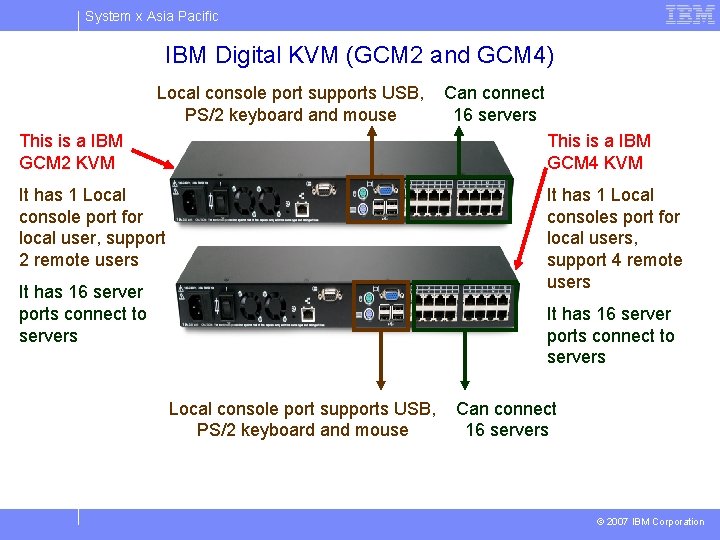
System x Asia Pacific IBM Digital KVM (GCM 2 and GCM 4) This is a IBM GCM 2 KVM Local console port supports USB, Can connect PS/2 keyboard and mouse 16 servers This is a IBM GCM 4 KVM It has 1 Local console port for local user, support 2 remote users It has 16 server ports connect to servers It has 1 Local consoles port for local users, support 4 remote users It has 16 server ports connect to servers Local console port supports USB, Can connect PS/2 keyboard and mouse 16 servers © 2007 IBM Corporation
System x Asia Pacific IBM i. Data. Plex – MP 5300 © 2007 IBM Corporation
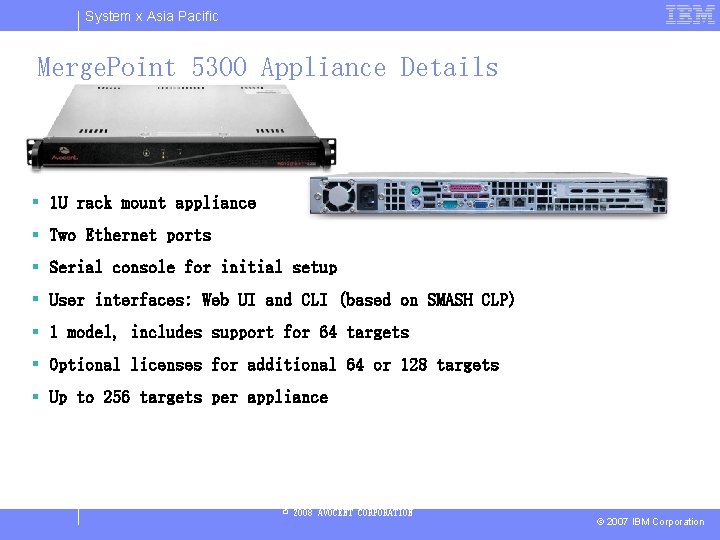
System x Asia Pacific Merge. Point 5300 Appliance Details § 1 U rack mount appliance § Two Ethernet ports § Serial console for initial setup § User interfaces: Web UI and CLI (based on SMASH CLP) § 1 model, includes support for 64 targets § Optional licenses for additional 64 or 128 targets § Up to 256 targets per appliance © 2008 AVOCENT CORPORATION © 2007 IBM Corporation
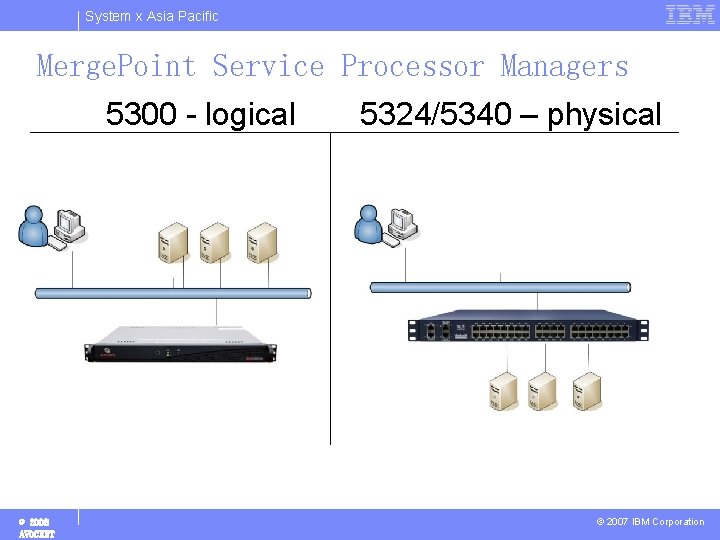
System x Asia Pacific Merge. Point Service Processor Managers 5300 - logical © 2008 AVOCENT 5324/5340 – physical © 2007 IBM Corporation
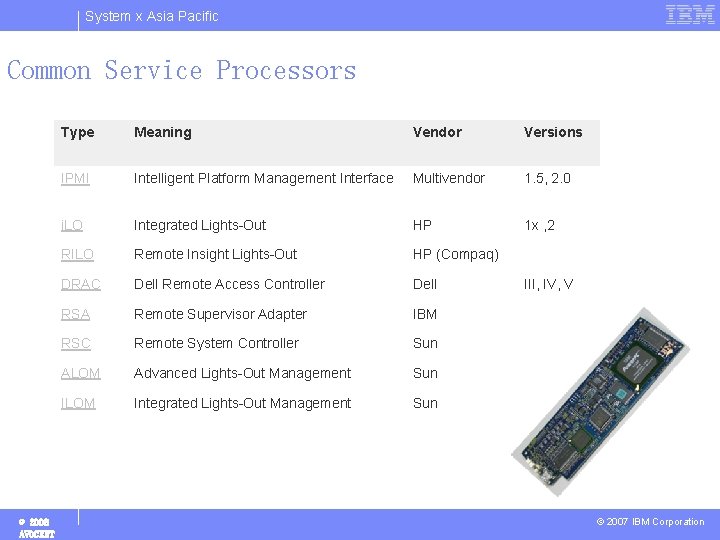
System x Asia Pacific Common Service Processors © 2008 AVOCENT Type Meaning Vendor Versions IPMI Intelligent Platform Management Interface Multivendor 1. 5, 2. 0 i. LO Integrated Lights-Out HP 1 x , 2 RILO Remote Insight Lights-Out HP (Compaq) DRAC Dell Remote Access Controller Dell III, IV, V RSA Remote Supervisor Adapter IBM I, II RSC Remote System Controller Sun ALOM Advanced Lights-Out Management Sun ILOM Integrated Lights-Out Management Sun © 2007 IBM Corporation
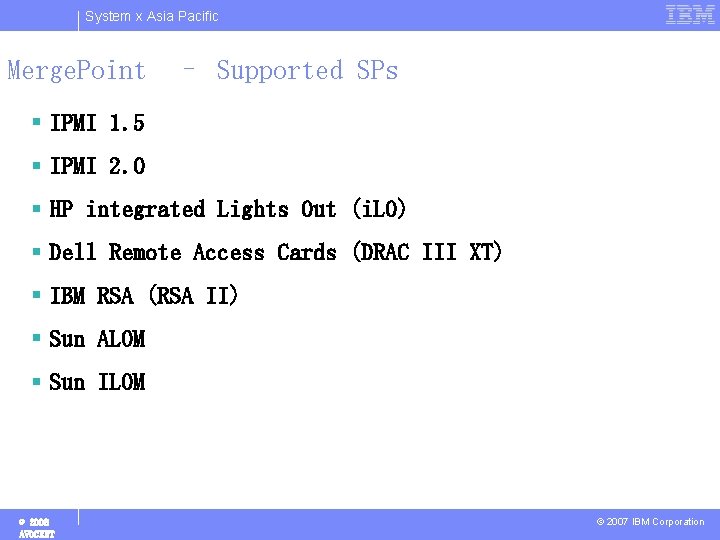
System x Asia Pacific Merge. Point – Supported SPs § IPMI 1. 5 § IPMI 2. 0 § HP integrated Lights Out (i. LO) § Dell Remote Access Cards (DRAC III XT) § IBM RSA (RSA II) § Sun ALOM § Sun ILOM © 2008 AVOCENT © 2007 IBM Corporation
System x Asia Pacific Thank you… Terence Teng OEM Sales Director – APAC Avocent Corporation, OEM Division Mobile Phone: +65 -90018808 Terence. Teng@avocent. com Wei pengchong Chee. Keong Ooi OEM Sales engineer Avocent Corporation, OEM Division Mobile Phone: +86 -136 5164 9889 Mobile Phone: +6012 455 5506 Pengchong. wei@avocent. com cheekeong. ooi@avocent. com © 2007 IBM Corporation
- Slides: 36