
System Optimization Networking Introduction The basic connection of
System Optimization Networking
Introduction • • • The basic connection of IP camera. WAN and LAN. DNS and DDNS. How to select bandwidth size. Dual stream and single stream.
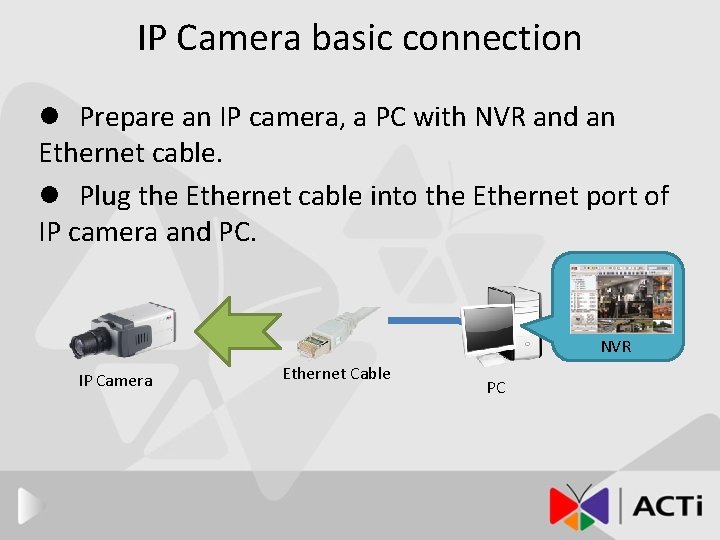
IP Camera basic connection l Prepare an IP camera, a PC with NVR and an Ethernet cable. l Plug the Ethernet cable into the Ethernet port of IP camera and PC. NVR IP Camera Ethernet Cable PC
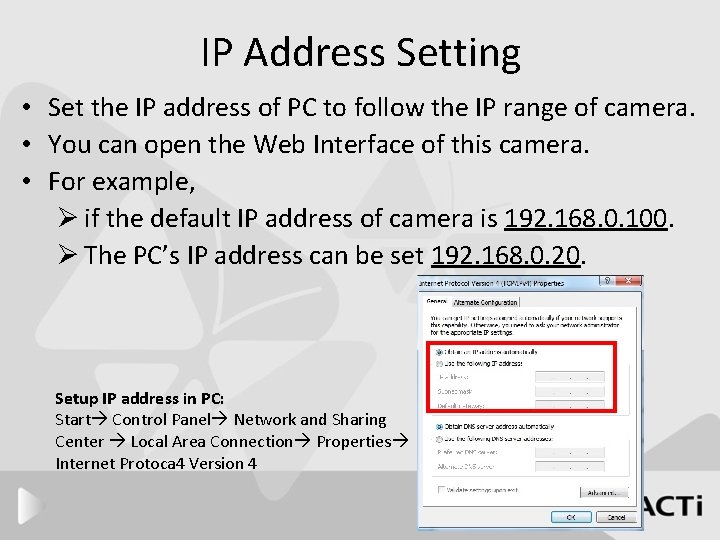
IP Address Setting • Set the IP address of PC to follow the IP range of camera. • You can open the Web Interface of this camera. • For example, Ø if the default IP address of camera is 192. 168. 0. 100. Ø The PC’s IP address can be set 192. 168. 0. 20. Setup IP address in PC: Start Control Panel Network and Sharing Center Local Area Connection Properties Internet Protoca 4 Version 4
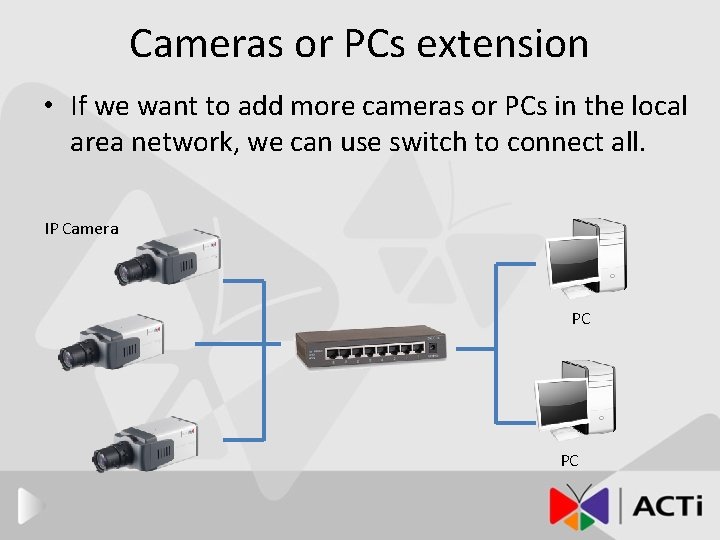
Cameras or PCs extension • If we want to add more cameras or PCs in the local area network, we can use switch to connect all. IP Camera PC PC
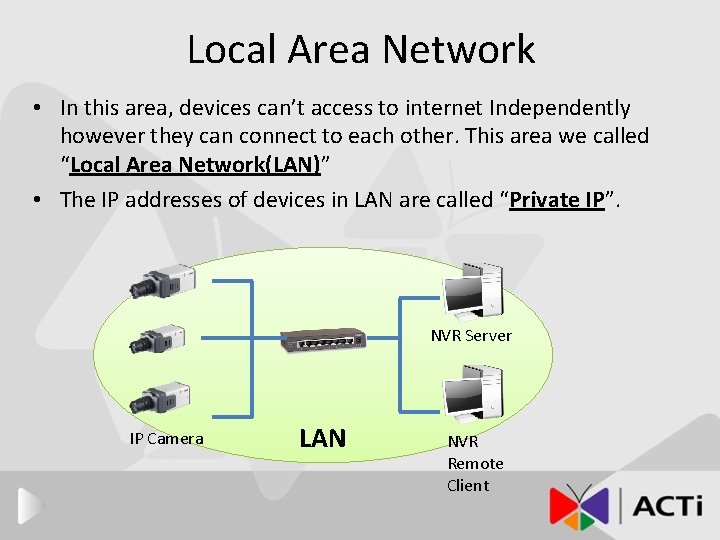
Local Area Network • In this area, devices can’t access to internet Independently however they can connect to each other. This area we called “Local Area Network(LAN)” • The IP addresses of devices in LAN are called “Private IP”. NVR Server IP Camera LAN NVR Remote Client
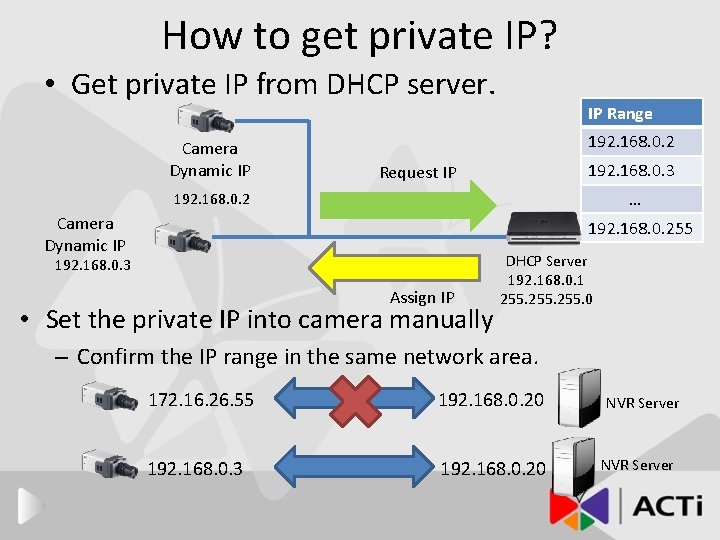
How to get private IP? • Get private IP from DHCP server. Camera Dynamic IP IP Range 192. 168. 0. 2 192. 168. 0. 3 Request IP … 192. 168. 0. 2 Camera Dynamic IP 192. 168. 0. 255 192. 168. 0. 3 Assign IP • Set the private IP into camera manually DHCP Server 192. 168. 0. 1 255. 0 – Confirm the IP range in the same network area. 172. 16. 26. 55 192. 168. 0. 20 192. 168. 0. 3 192. 168. 0. 20 NVR Server
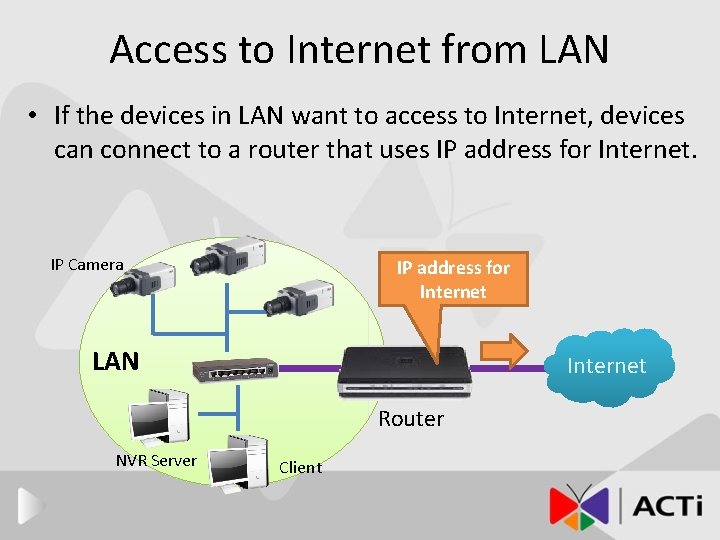
Access to Internet from LAN • If the devices in LAN want to access to Internet, devices can connect to a router that uses IP address for Internet. IP Camera IP address for Internet LAN Internet Router NVR Server Client
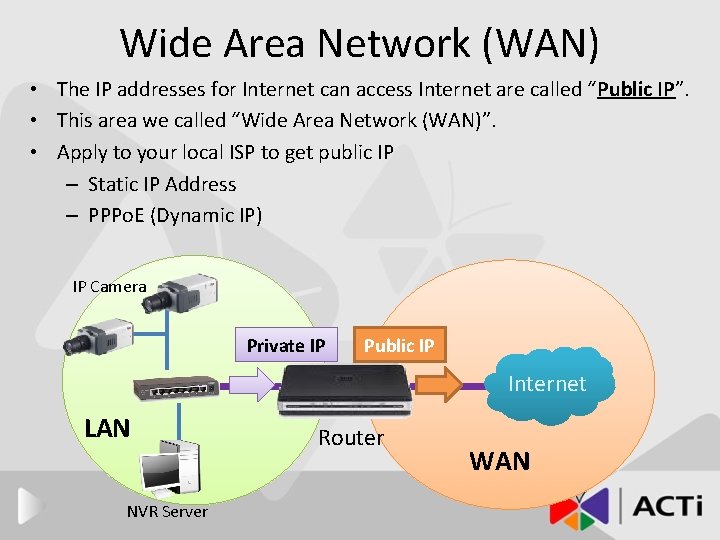
Wide Area Network (WAN) • The IP addresses for Internet can access Internet are called “Public IP”. • This area we called “Wide Area Network (WAN)”. • Apply to your local ISP to get public IP – Static IP Address – PPPo. E (Dynamic IP) IP Camera Private IP Public IP Internet LAN NVR Server Router WAN
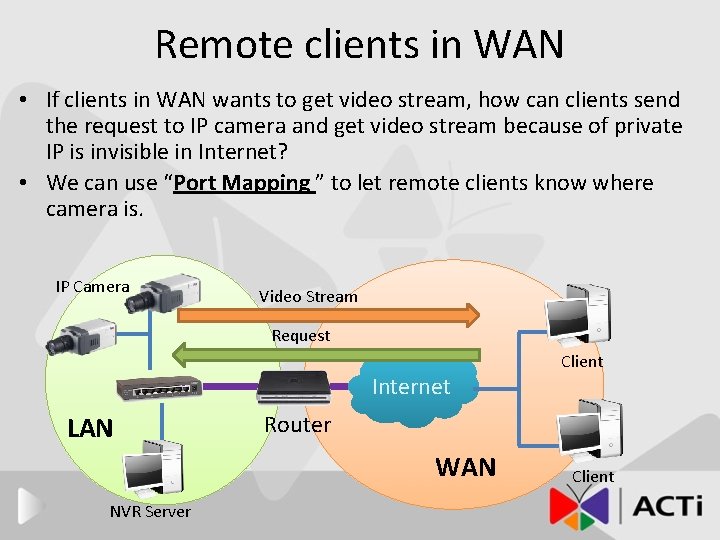
Remote clients in WAN • If clients in WAN wants to get video stream, how can clients send the request to IP camera and get video stream because of private IP is invisible in Internet? • We can use “Port Mapping ” to let remote clients know where camera is. IP Camera Video Stream Request Internet LAN Router WAN NVR Server Client
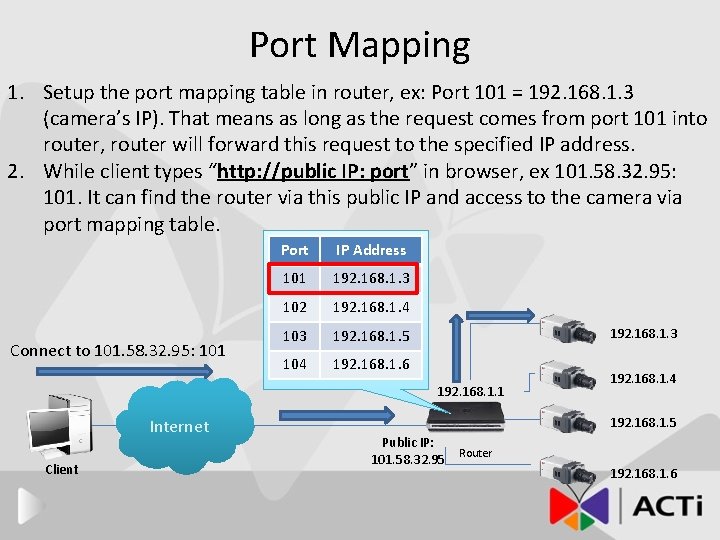
Port Mapping 1. Setup the port mapping table in router, ex: Port 101 = 192. 168. 1. 3 (camera’s IP). That means as long as the request comes from port 101 into router, router will forward this request to the specified IP address. 2. While client types “http: //public IP: port” in browser, ex 101. 58. 32. 95: 101. It can find the router via this public IP and access to the camera via port mapping table. Connect to 101. 58. 32. 95: 101 Port IP Address 101 192. 168. 1. 3 102 192. 168. 1. 4 103 192. 168. 1. 5 104 192. 168. 1. 6 192. 168. 1. 3 192. 168. 1. 1 Internet Client 192. 168. 1. 4 192. 168. 1. 5 Public IP: Router 101. 58. 32. 95 192. 168. 1. 6
Easy to search in Internet • Even remote clients can connect to IP cameras via router with public IP address, however the IP address is too hard to remember, instead of using friendly Domain name to access. • DNS (Domain Name System) and DDNS (Dynamic Domain Name System)
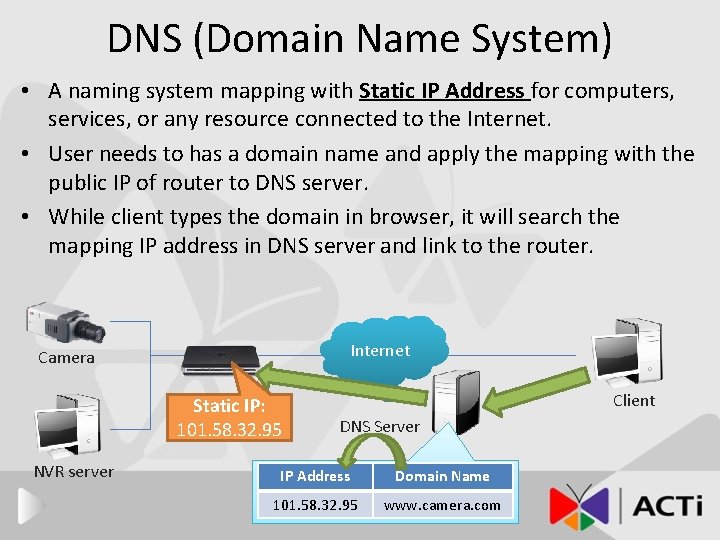
DNS (Domain Name System) • A naming system mapping with Static IP Address for computers, services, or any resource connected to the Internet. • User needs to has a domain name and apply the mapping with the public IP of router to DNS server. • While client types the domain in browser, it will search the mapping IP address in DNS server and link to the router. Internet Camera Static IP: 101. 58. 32. 95 NVR server Client DNS Server IP Address Domain Name 101. 58. 32. 95 www. camera. com
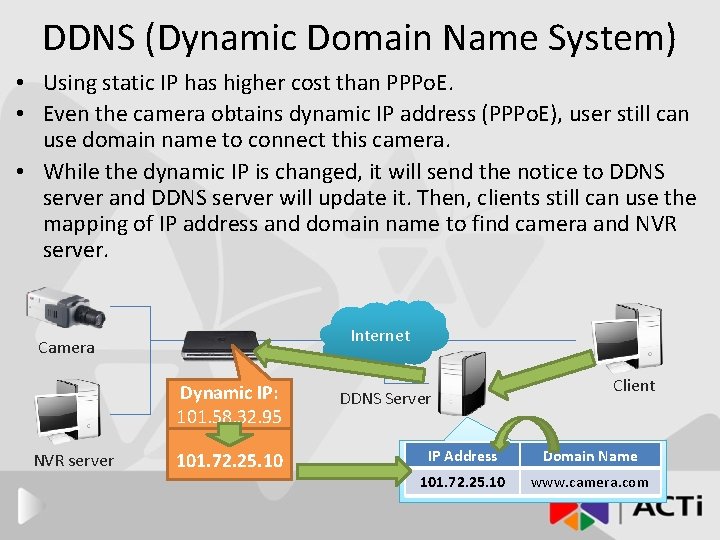
DDNS (Dynamic Domain Name System) • Using static IP has higher cost than PPPo. E. • Even the camera obtains dynamic IP address (PPPo. E), user still can use domain name to connect this camera. • While the dynamic IP is changed, it will send the notice to DDNS server and DDNS server will update it. Then, clients still can use the mapping of IP address and domain name to find camera and NVR server. Internet Camera Dynamic IP: 101. 58. 32. 95 NVR server 101. 72. 25. 10 DDNS Server IP Address Client Domain Name 101. 58. 32. 95 Go 101. 72. 25. 10 to this camerawww. camera. com

Network Bandwidth Size Selection
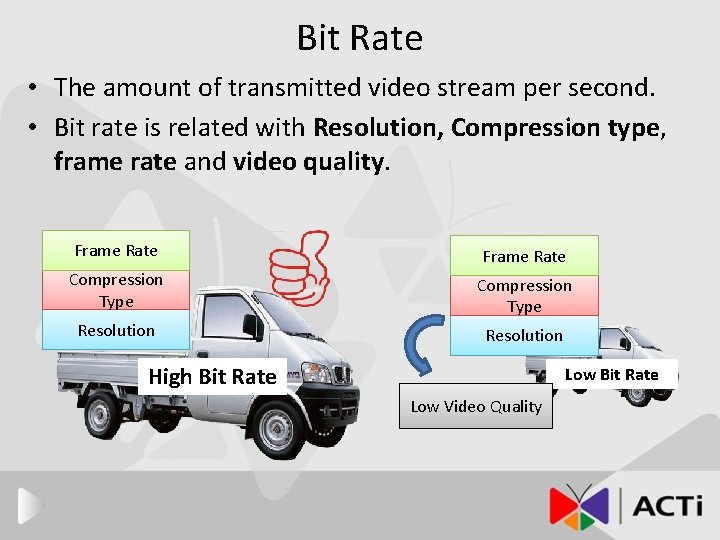
Bit Rate • The amount of transmitted video stream per second. • Bit rate is related with Resolution, Compression type, frame rate and video quality. Frame Rate Compression Video Stream Type Compression Type Resolution High Bit Rate Low Video Quality
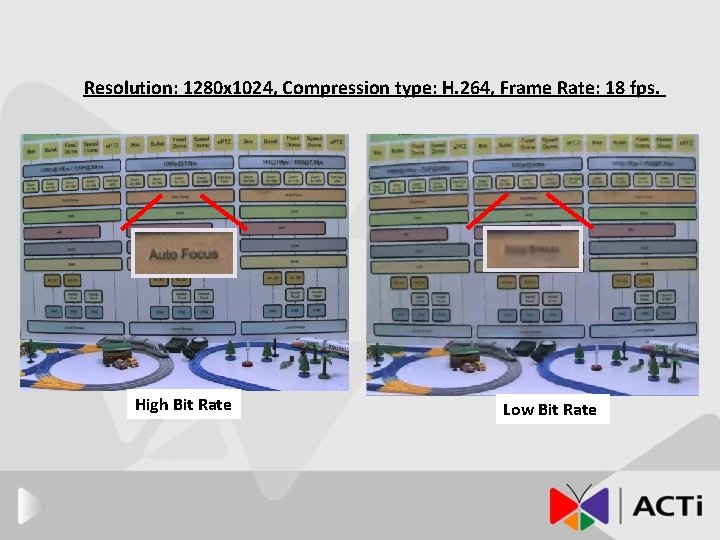
Resolution: 1280 x 1024, Compression type: H. 264, Frame Rate: 18 fps. High Bit Rate Low Bit Rate
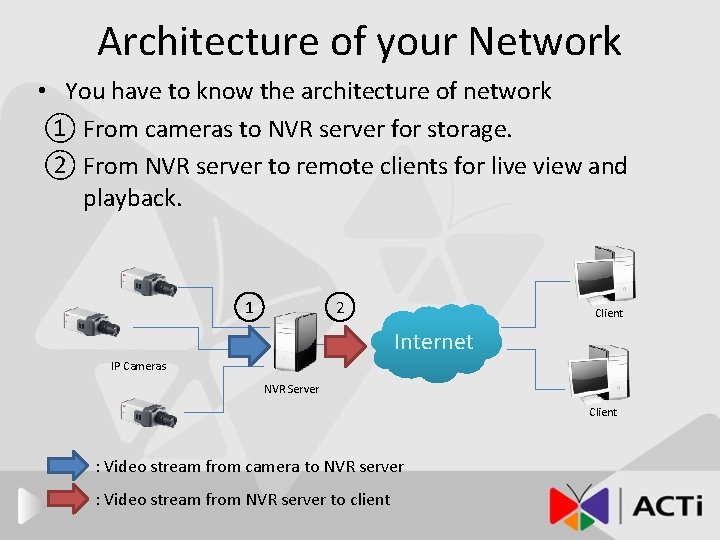
Architecture of your Network • You have to know the architecture of network ① From cameras to NVR server for storage. ② From NVR server to remote clients for live view and playback. 1 2 Client Internet IP Cameras NVR Server Client : Video stream from camera to NVR server : Video stream from NVR server to client
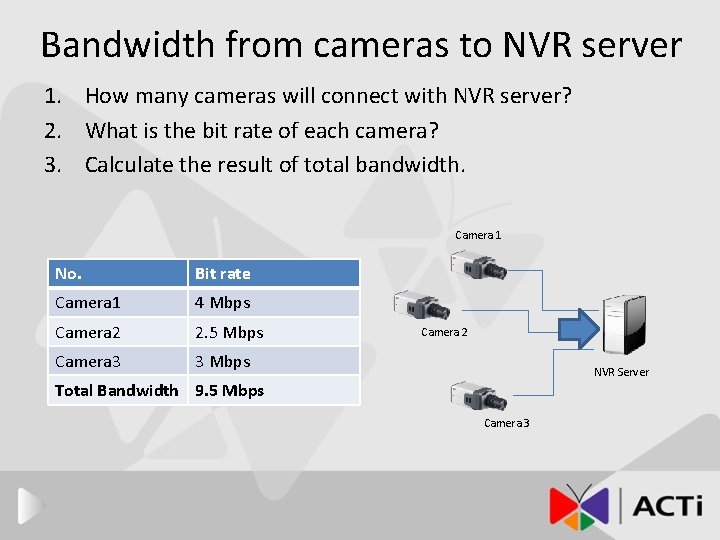
Bandwidth from cameras to NVR server 1. How many cameras will connect with NVR server? 2. What is the bit rate of each camera? 3. Calculate the result of total bandwidth. Camera 1 No. Bit rate Camera 1 4 Mbps Camera 2 2. 5 Mbps Camera 3 3 Mbps Camera 2 NVR Server Total Bandwidth 9. 5 Mbps Camera 3
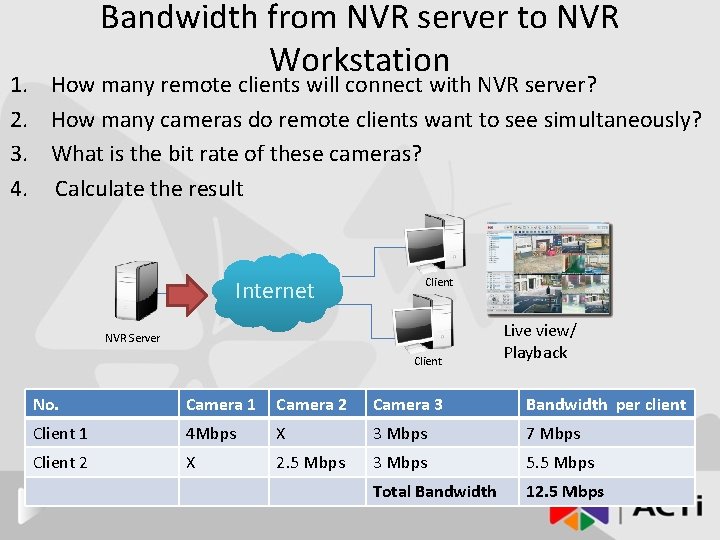
Bandwidth from NVR server to NVR Workstation 1. How many remote clients will connect with NVR server? 2. How many cameras do remote clients want to see simultaneously? 3. What is the bit rate of these cameras? 4. Calculate the result Internet Client NVR Server Client Live view/ Playback No. Camera 1 Camera 2 Camera 3 Bandwidth per client Client 1 4 Mbps X 3 Mbps 7 Mbps Client 2 X 2. 5 Mbps 3 Mbps 5. 5 Mbps Total Bandwidth 12. 5 Mbps
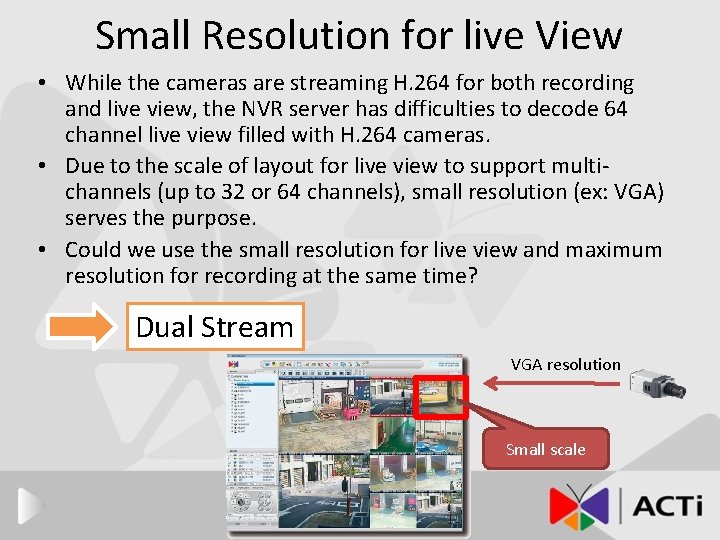
Small Resolution for live View • While the cameras are streaming H. 264 for both recording and live view, the NVR server has difficulties to decode 64 channel live view filled with H. 264 cameras. • Due to the scale of layout for live view to support multichannels (up to 32 or 64 channels), small resolution (ex: VGA) serves the purpose. • Could we use the small resolution for live view and maximum resolution for recording at the same time? Dual Stream VGA resolution Small scale
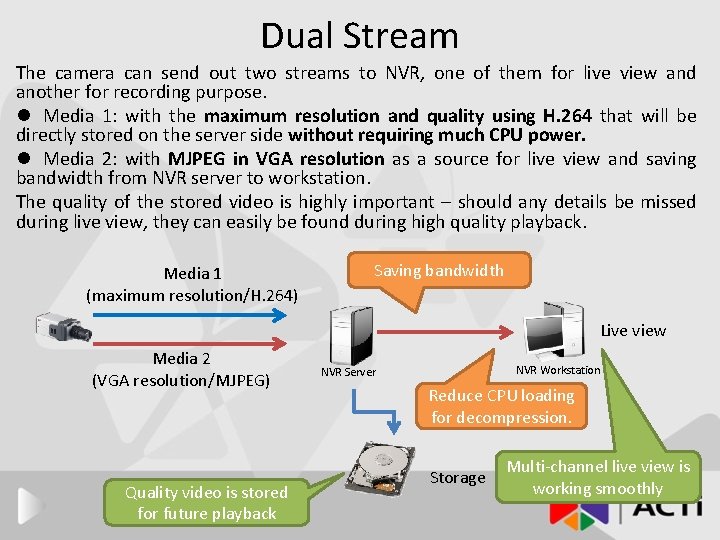
Dual Stream The camera can send out two streams to NVR, one of them for live view and another for recording purpose. l Media 1: with the maximum resolution and quality using H. 264 that will be directly stored on the server side without requiring much CPU power. l Media 2: with MJPEG in VGA resolution as a source for live view and saving bandwidth from NVR server to workstation. The quality of the stored video is highly important – should any details be missed during live view, they can easily be found during high quality playback. Media 1 (maximum resolution/H. 264) Saving bandwidth Live view Media 2 (VGA resolution/MJPEG) Quality video is stored for future playback NVR Workstation NVR Server Reduce CPU loading for decompression. Storage Multi-channel live view is working smoothly
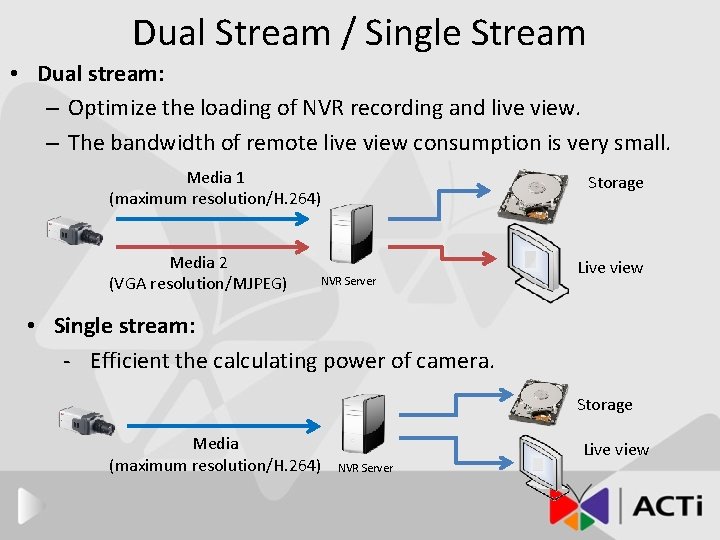
Dual Stream / Single Stream • Dual stream: – Optimize the loading of NVR recording and live view. – The bandwidth of remote live view consumption is very small. Media 1 (maximum resolution/H. 264) Media 2 (VGA resolution/MJPEG) Storage NVR Server Live view • Single stream: - Efficient the calculating power of camera. Storage Media (maximum resolution/H. 264) Live view NVR Server
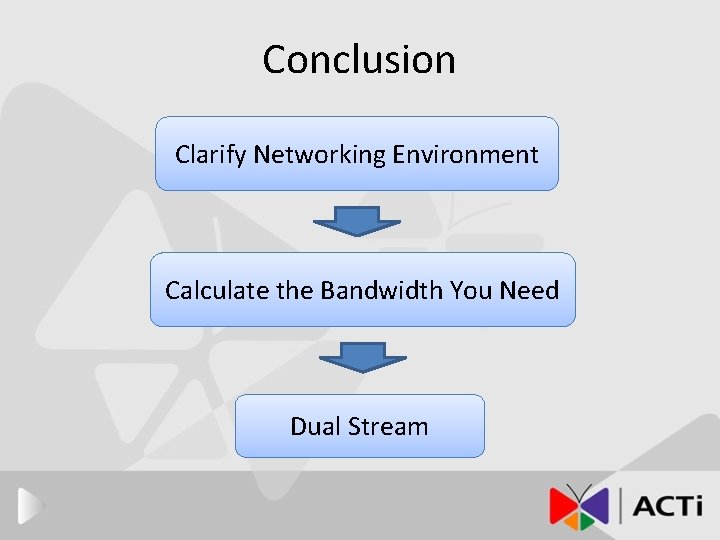
Conclusion Clarify Networking Environment Calculate the Bandwidth You Need Dual Stream
- Slides: 24