
SYSTEM MEMORY Computer memory is any physical device
- Slides: 31
SYSTEM MEMORY
• Computer memory is any physical device capable of storing information temporarily, like RAM (random access memory), or permanently, like ROM (read-only memory). Memory devices utilize integrated circuits and are used by operating systems, software, and hardware.
Volatile vs. non-volatile memory • Memory can be either volatile and nonvolatile memory. • Volatile memory is memory that loses its contents when the computer or hardware device loses power. • Computer RAM is an example of volatile memory. • It is why if your computer freezes or reboots when working on a program, you lose anything that hasn't been saved.
• Non-volatile memory, sometimes abbreviated as NVRAM, is memory that keeps its contents even if the power is lost. • EPROM is an example of non-volatile memory.
What happens to memory when the computer is turned off? • As mentioned above, because RAM is volatile memory, when the computer loses power, anything stored in RAM is lost. For example, while working on a document, it is stored in RAM. If it were saved to non-volatile memory (e. g. , the hard drive), it would be lost if the computer lost power.
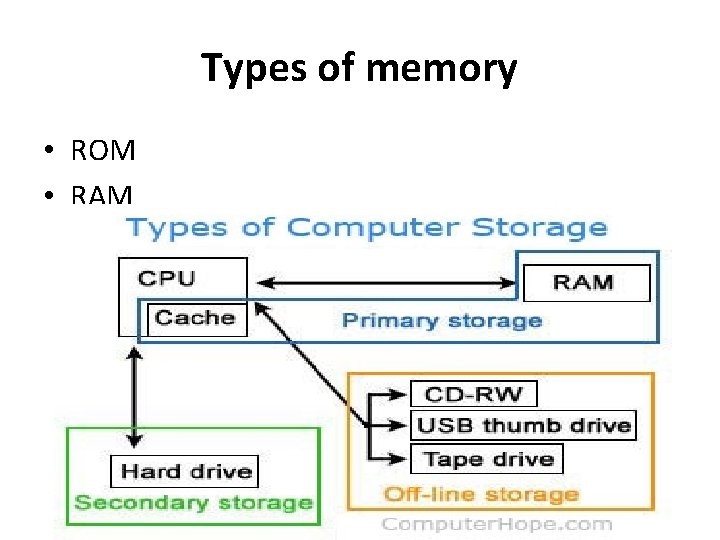
Memory is not disk storage • It is very common for new computer users to be confused by what parts in the computer are memory. Although both the hard drive and RAM are memory, it's more appropriate to refer to RAM as "memory" or "primary memory" and a hard drive as "storage" or "secondary storage. "
• When someone asks how much memory is in your computer, it is often between 1 GB and 16 GB of RAM and several hundred gigabytes, or even a terabyte, of hard disk drive storage. In other words, you always have more hard drive space than RAM.
Why is memory important or needed for a computer? • Each device in a computer operates at different speeds and computer memory gives your computer a place to quickly access data. If the CPU had to wait for a secondary storage device, like a hard disk drive, a computer would be much slower.
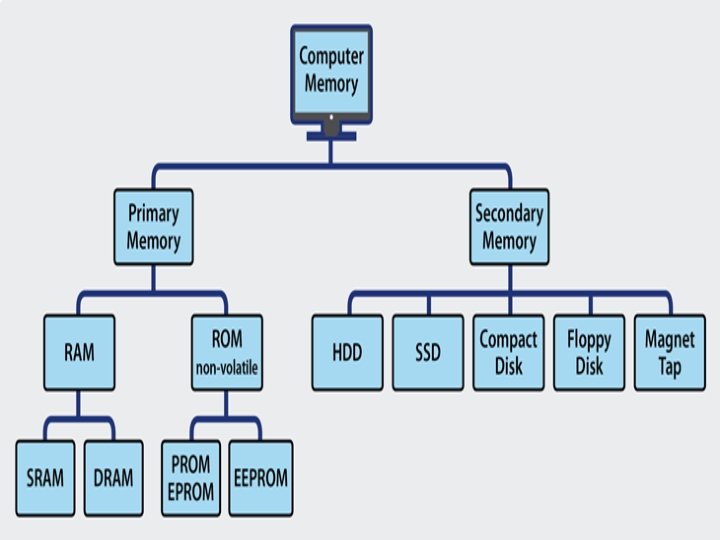
Types of memory • ROM • RAM
ROM • • ROM is separated into three categories: PROM EEPROM
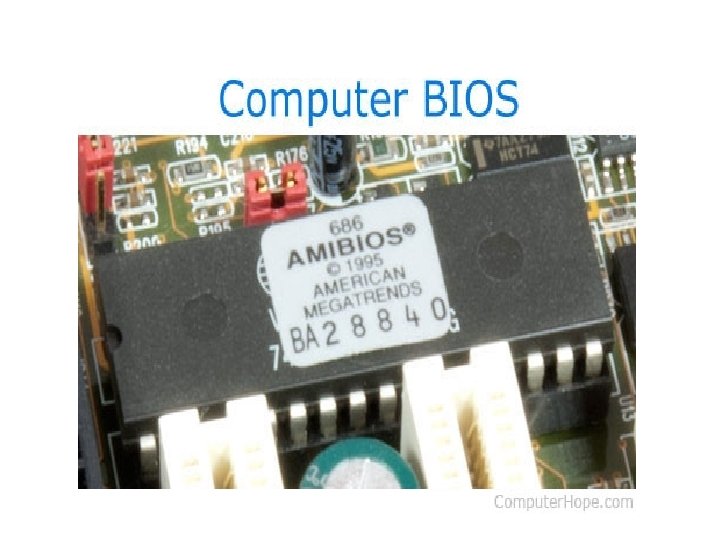
PROM • PROM or programmable ROM (programmable read-only memory) is a computer memory chip that can be programmed once after it is created. Once the PROM is programmed, the information written is permanent and cannot be erased or deleted. PROM was first developed by Wen Tsing Chow in 1956. An example of a PROM is a computer BIOS in early computers.
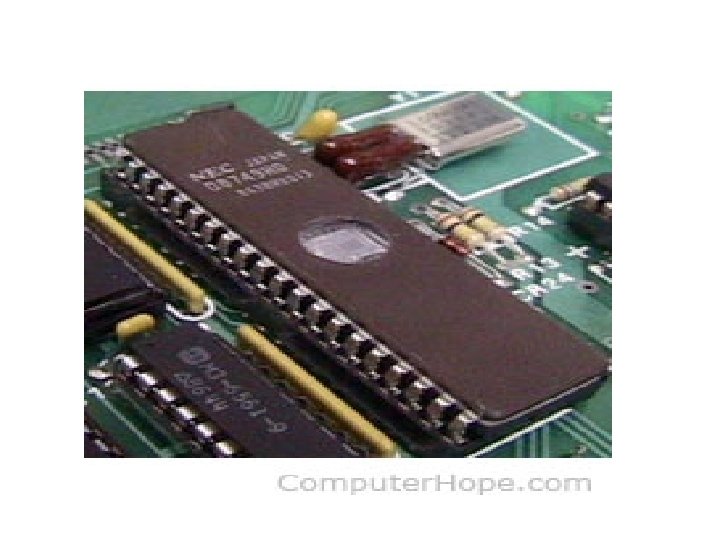
EPROM • Short for Erasable Programmable Read-Only Memory, EPROM is a non-volatile memory chip that was invented by Dov Frohman in 1971 while at Intel that can only be read. If exposed to ultraviolet light, an EPROM can be reprogrammed if needed, but otherwise does not accept or save any new data. Hardware manufactures use EPROM when it may be needed that the data contained on the EPROM needs to be changed.
EEPROM • Short for electrically erasable programmable read-only memory, EEPROM is a PROM that can be erased and reprogrammed using an electrical charge. EEPROM was developed by George Perlegos while at Intel in 1978 and unlike most memory inside a computer, this memory remembers data when the power is turned off.
• EEPROM was a replacement for PROM and EPROM chips and is used for later computer's BIOS that were built after 1994. Having a computer with an EEPROM allows a computer user to update the BIOS in their computer without having to open the computer or remove any chips.
• • There are six types of RAM: EDO RAM SDRAM DDR 2 RAM DDR 3 RAM DDR 4 RAM
EDO • Alternatively referred to as hyper page mode memory, EDO is short for Extended Data Out and is a type of memory developed in 1995 by Micron that was first used with Pentium computers. EDO allows a CPU to access memory 10 to 15 -percent faster • An upgraded variation of EDO memory is BEDO, although it was never widely used.
BEDO DRAM • Short for Burst EDO DRAM, BEDO DRAM is a newer EDO DRAM that is capable of processing four memory addresses in one burst. Unfortunately, the BEDO standard was owned by Micron and not available for free to the industry and since only the Intel 440 FX Natoma supported this standard, it was replaced by SDRAM.
BURST • Burst mode is a temporary high-speed data transmission mode used to facilitate sequential data transfer at maximum throughput. • Burst mode data transfer rate (DTR) speeds can be approximately two to five times faster than normal transmission protocols. Different types of devices employ a burst mode, including random access memory (RAM), hard drive interfaces and accelerated graphics ports. • Burst mode functionality is device-dependent, and does not require input from other devices.
SDRAM • , which is short for Synchronous DRAM, is a type of memory that synchronizes itself with the computer's system clock. • Being synchronized allows the memory to run at higher speeds than previous memory types and asynchronous DRAM and also supports up to 133 MHz system bus cycling. • Since 1993, this is the prevalent type of memory used in computers around the world.
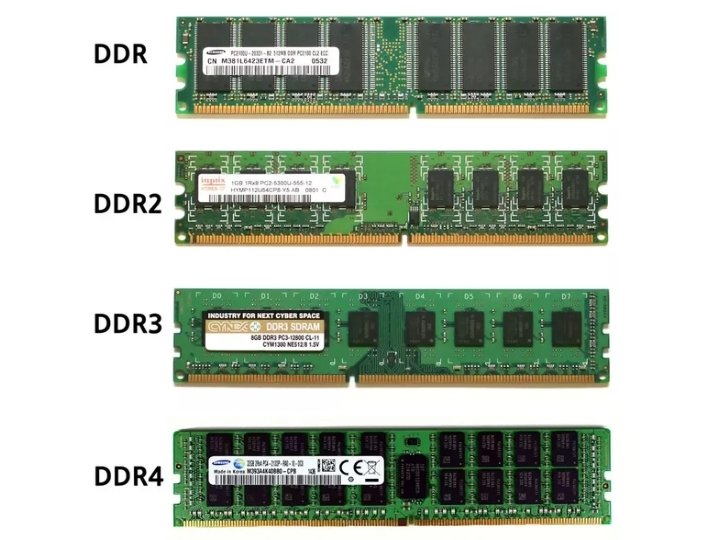
DDR • Short for double data rate, DDR is memory that was first introduced in 1996 and has since been replaced by DDR 2. DDR utilizes both the rising and falling edge of the system clock, potentially doubling the speed of the memory. • Today, DDR technology is found on high-end video cards and computer memory such as DDR-SDRAM.
DDR 2 • Short for double data rate two, DDR 2 is the second generation of DDR memory that was released in September 2003. DDR 2 is capable of operating at greater speeds than DDR, offers a greater bandwidth potential, operates on less power, and generates less heat. Due to architectural differences, DDR 2 memory modules are incompatible with DDR slots.
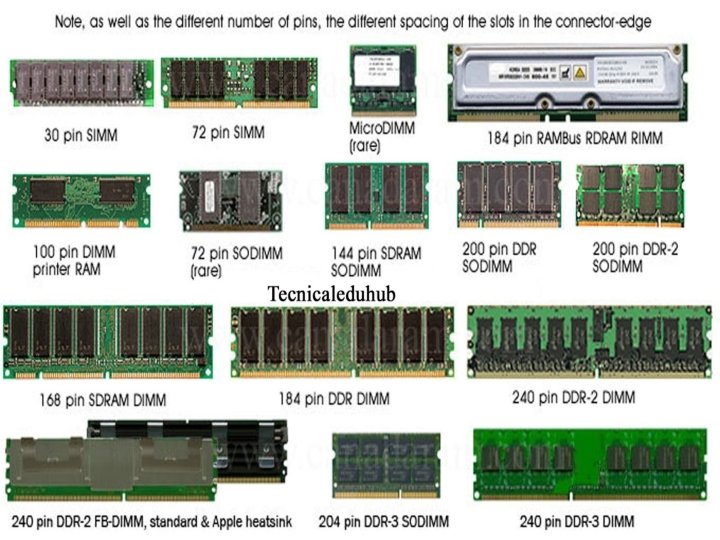
DDR 3 • Short for double data rate three, DDR 3 is a type of DRAM (dynamic random-access memory) released in June 2007 as the successor to DDR 2. • DDR 3 chips have bus clock speed of 400 MHz up to 1066 MHz, range in size from 1 to 24 GB, and consume nearly 30% less power than their predecessors. • DDR 3 RAM sticks for a desktop computer have 240 pins. For a laptop computer, DDR 3 RAM sticks have 204 pins. • These memory chips can only be installed on a motherboard that supports DDR 3 memory and are not backward compatible with DDR 2 memory slots.
DDR 4 • Short for double data rate four, DDR 4 is a type of system memory known as SDRAM and was released in September 2014 as the successor to DDR 3. • DDR 4 has bus clock speeds that range from 800 to 1600 MHz and range in storage capacity from 4 to 128 GB per DIMM. DDR 4 is also more efficient at 1. 2 V when compared to DDR 3's 1. 5 to 1. 65 V range.
RDRAM • Rambus Dynamic Random Access Memory (RDRAM) is a memory subsystem designed to transfer data at faster rates. • RDRAM was introduced in 1999 by Rambus, Inc. RDRAM technology was considerably faster than older memory models, like the Synchronous DRAM (SDRAM). Typical SDRAM has a data transfer rate of up to 133 MHz, while the RDRAM can transfer data at a speed of upto 800 MHz.
DUAL IN LINE MEMORY MODULE • DIMM is a module that contains one or several random access memory (RAM) chips on a small circuit board with pins that connect it to the computer motherboard. • The DIMM stores each data bit in a separate memory cell. DIMMs use a 64 -bit data path, since processors used in personal computers have a 64 -bit data width.
• RDRAM uses Rambus Inline Memory Module (RIMM) technology, which is installed in pairs, transfers data from rising and falling clock signal edges and doubles physical clock rates. • RIMM data travels on a 16 -bit bus that is similar to a packet network with transmitted data groups. • Internal RIMM speeds operate from 400 MHz to 800 MHz