
System Administration HW 4 Web ServerServices yoychen blzhuang
System Administration HW 4 - Web Server/Services yoychen, blzhuang
Computer Center, CS, NCTU 2 Environment setup You can choose one of following options q. Plan A: Free. BSD Server with Public IP q. Plan B: 使用 Virtual. Box 開兩台 Free. BSD server (bsd 1, bsd 2),兩台 VM 皆須設定兩個網卡 (NAT 及同一張 hostonly network adapter),bsd 1 為安裝作業用機器,bsd 2 為測 試作業部份 spec 用機器 • • http: //hadoopspark. blogspot. tw/2016/03/blog-post. html https: //askubuntu. com/questions/198452/no-host-only-adapterselected
Computer Center, CS, NCTU Requirements q Web Service • • • Virtual Host (5%) Hide Server Token (5%) HTTPS (30%) Access Control / Rewrite (10%) PHP (10%) q Database • My. SQL / Maria. DB (10%) q HTTP Application • • • 3 php. My. Admin (5%) Wordpress (5%) Basic PHP router (10%) q DEMO (10%)
Computer Center, CS, NCTU 4 Apache
Computer Center, CS, NCTU 5 Apache - Virtual Host q Setup a name-based virtual hosts in Apache. q 使用 ip 和 Domain 瀏覽網站根目錄會看到不同內容 (5%) q You can get domain names from: • https: //www. nctucs. net/ • https: //nctu. me/ • https: //www. noip. com/
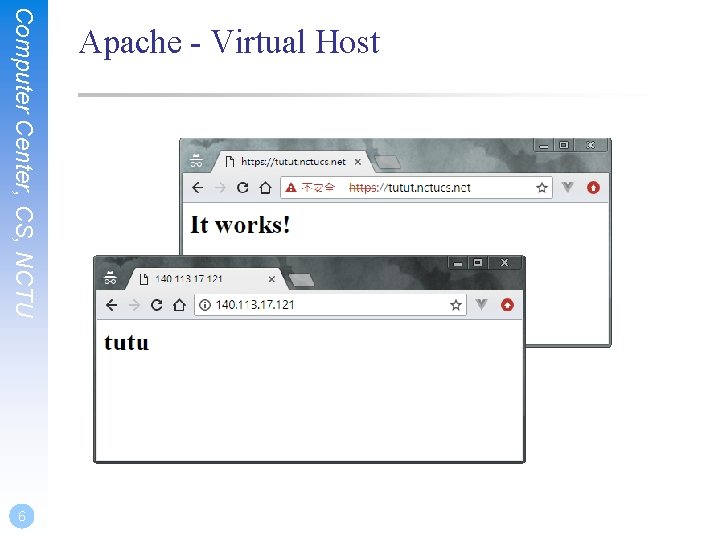
Computer Center, CS, NCTU 6 Apache - Virtual Host
Computer Center, CS, NCTU 7 Apache - Hide Server Token q 瀏覽 php 網頁時,Response header 中不包含 php 相關資 訊 (1%) q 網站的 Response header 只顯示沒有版本的 Apache 資訊 可以得到 (2%),如果完全隱藏 Apache 資訊或是偽裝成 其他 web service 的名字則得 (4%)
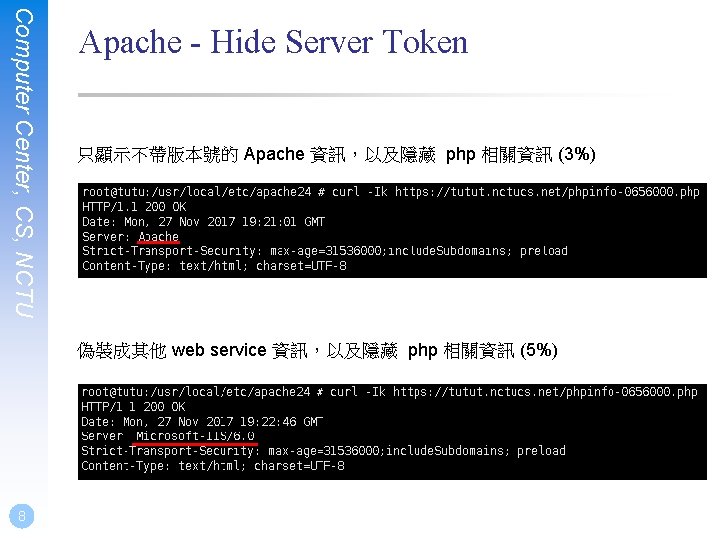
Computer Center, CS, NCTU Apache - Hide Server Token 只顯示不帶版本號的 Apache 資訊,以及隱藏 php 相關資訊 (3%) 偽裝成其他 web service 資訊,以及隱藏 php 相關資訊 (5%) 8
Computer Center, CS, NCTU Apache - HTTPS 使用 domain 瀏覽時 q�用 HTTPS (5%) • 可使用 self-signed certificate • 未� 用 HTTPS (-5%) • self-signed certificate 如果要使用 curl 做測試,記得加 -k 喔 q. HTTP auto redirect HTTPS (5%) • 未� 用 HTTPS 不給分 q�用 HSTS (10%) • 僅驗證 HTTPS 回傳的 header q所有 https 頁面皆�用 HTTP/2 (10%) 9
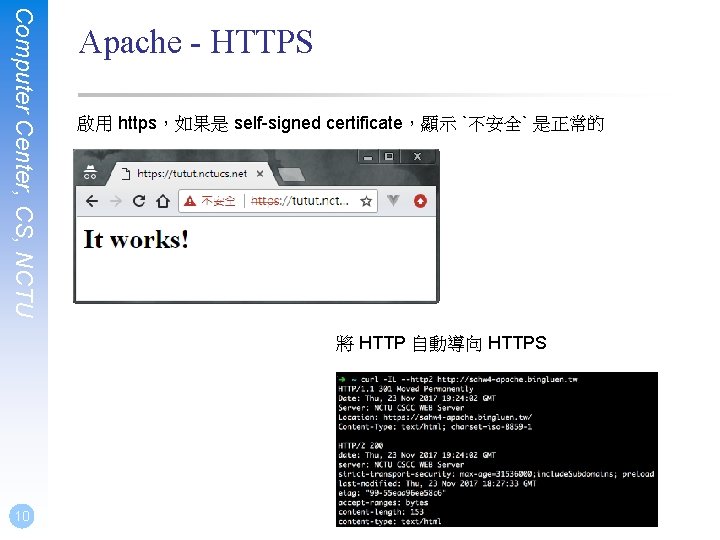
Computer Center, CS, NCTU Apache - HTTPS 啟用 https,如果是 self-signed certificate,顯示 `不安全` 是正常的 將 HTTP 自動導向 HTTPS 10
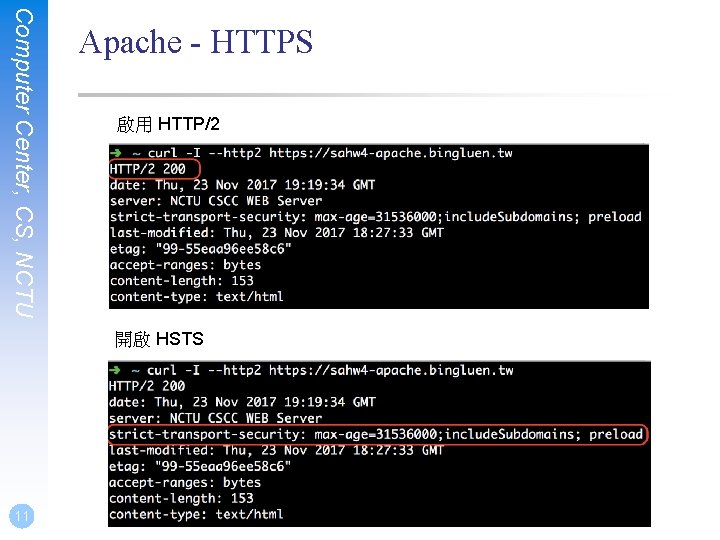
Computer Center, CS, NCTU Apache - HTTPS 啟用 HTTP/2 開啟 HSTS 11
Computer Center, CS, NCTU Apache - Access Control 使用 ip 瀏覽網頁時 如果您的環境是 Plan A: q僅 140. 113. 235. 0/24 可瀏覽 http: //{your apache server ip} (回傳 200)、 其他 IP (包含 localhost) 禁止瀏覽 (請回傳 403) (5%) • 可以登入 linux 1~6, bsd 1~6 來測試 如果您的環境是 Plan B: q僅 bsd 2 的 ip 可瀏覽 http: //{your apache server ip} (回傳 200)、其他 IP (包含 localhost) 禁止瀏覽 (請回傳 403) (5%) • 可以使用 curl 做測試 12
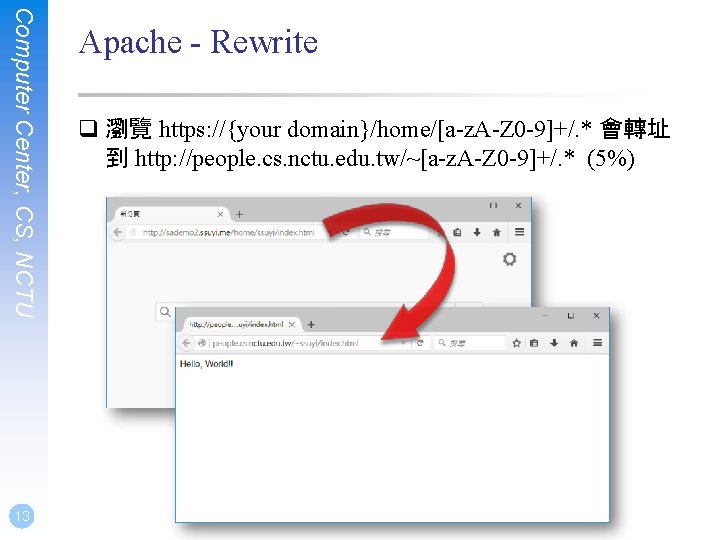
Computer Center, CS, NCTU 13 Apache - Rewrite q 瀏覽 https: //{your domain}/home/[a-z. A-Z 0 -9]+/. * 會轉址 到 http: //people. cs. nctu. edu. tw/~[a-z. A-Z 0 -9]+/. * (5%)
Computer Center, CS, NCTU 14 Apache - PHP 7 q PHP 版本為 7 以上 (5%) q 瀏覽 https: //{your domain}/phpinfo-{your student ID number}. php,會顯示 php info 頁面 (5%)
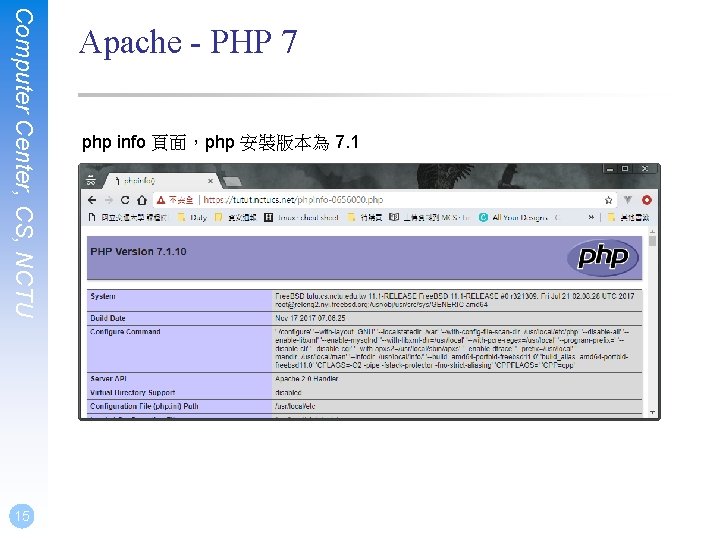
Computer Center, CS, NCTU 15 Apache - PHP 7 php info 頁面,php 安裝版本為 7. 1
Computer Center, CS, NCTU 16 Database
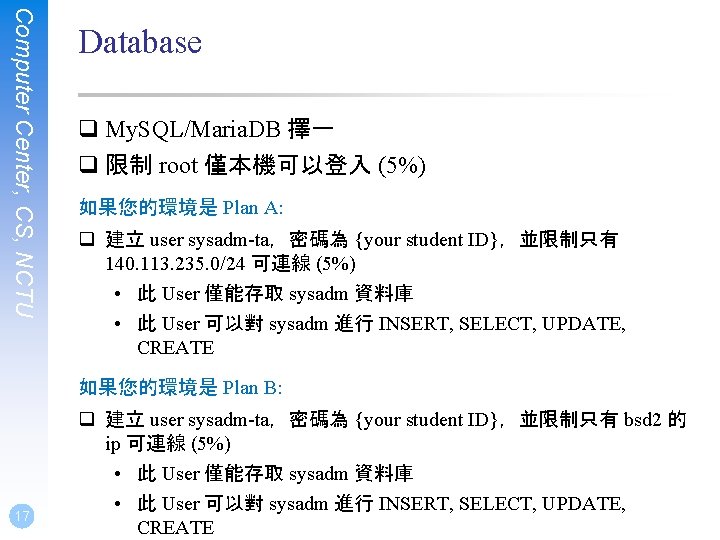
Computer Center, CS, NCTU Database q My. SQL/Maria. DB 擇一 q 限制 root 僅本機可以登入 (5%) 如果您的環境是 Plan A: q 建立 user sysadm-ta,密碼為 {your student ID},並限制只有 140. 113. 235. 0/24 可連線 (5%) • 此 User 僅能存取 sysadm 資料庫 • 此 User 可以對 sysadm 進行 INSERT, SELECT, UPDATE, CREATE 如果您的環境是 Plan B: 17 q 建立 user sysadm-ta,密碼為 {your student ID},並限制只有 bsd 2 的 ip 可連線 (5%) • 此 User 僅能存取 sysadm 資料庫 • 此 User 可以對 sysadm 進行 INSERT, SELECT, UPDATE, CREATE
Computer Center, CS, NCTU 18 HTTP Application
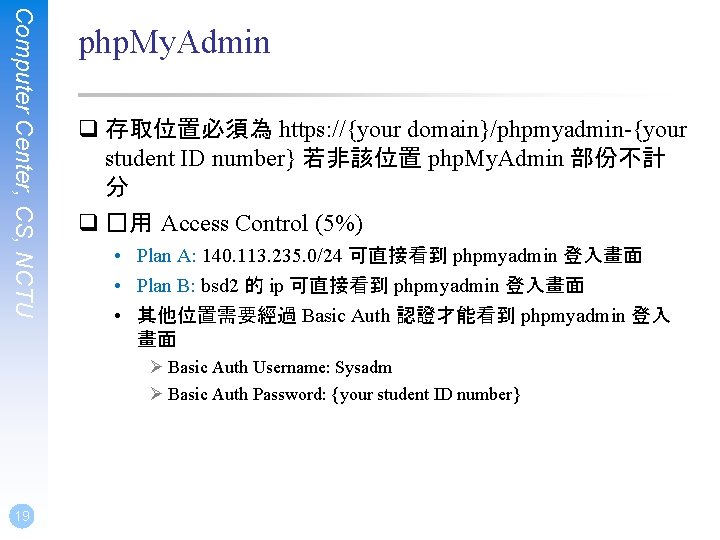
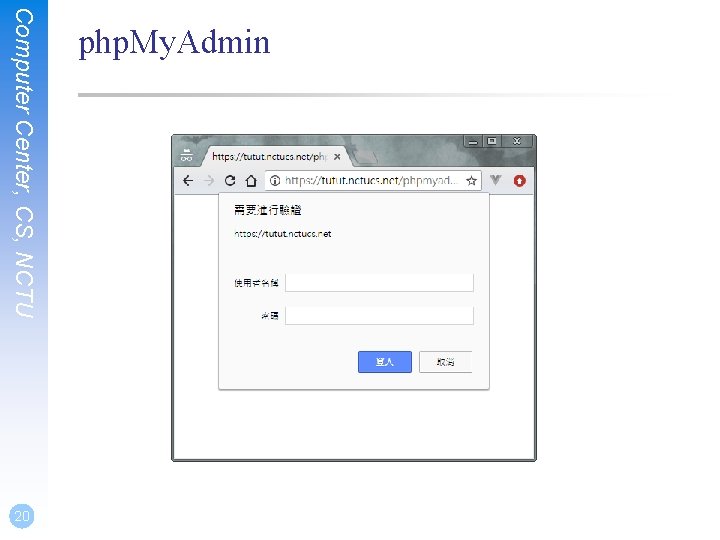
Computer Center, CS, NCTU php. My. Admin q 存取位置必須為 https: //{your domain}/phpmyadmin-{your student ID number} 若非該位置 php. My. Admin 部份不計 分 q �用 Access Control (5%) • Plan A: 140. 113. 235. 0/24 可直接看到 phpmyadmin 登入畫面 • Plan B: bsd 2 的 ip 可直接看到 phpmyadmin 登入畫面 • 其他位置需要經過 Basic Auth 認證才能看到 phpmyadmin 登入 畫面 Ø Basic Auth Username: Sysadm Ø Basic Auth Password: {your student ID number} 19
Computer Center, CS, NCTU 20 php. My. Admin
Computer Center, CS, NCTU 21 Wordpress q 存取位置為 https: //{your domain}/wordpress-{your student ID number} q 可以閱覽、新增、刪除、修改文章 (5%)
Computer Center, CS, NCTU 22 Basic PHP router q 於網站根目錄建立資料夾 app,裡面只能有一個檔案, 檔名為 index. php,請調整 apache 設定及撰寫 index. php, 來達到以下三個要求 (10%) • 瀏覽 https: //{your domain}/app/,回傳網頁內容 route / • 瀏覽 https: //{your domain}/app/{string},回傳網頁內容 route /{string} • 瀏覽 https: //{your domain}/app/hello? name={string},回傳網頁內 容 Hello, {string}
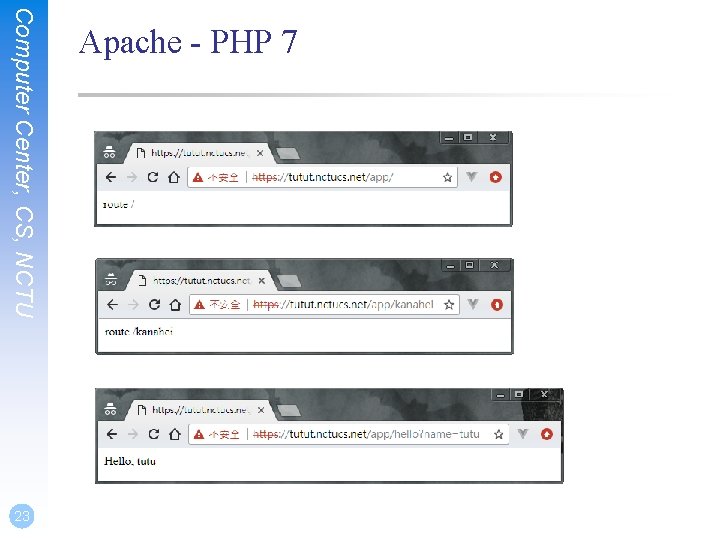
Computer Center, CS, NCTU 23 Apache - PHP 7
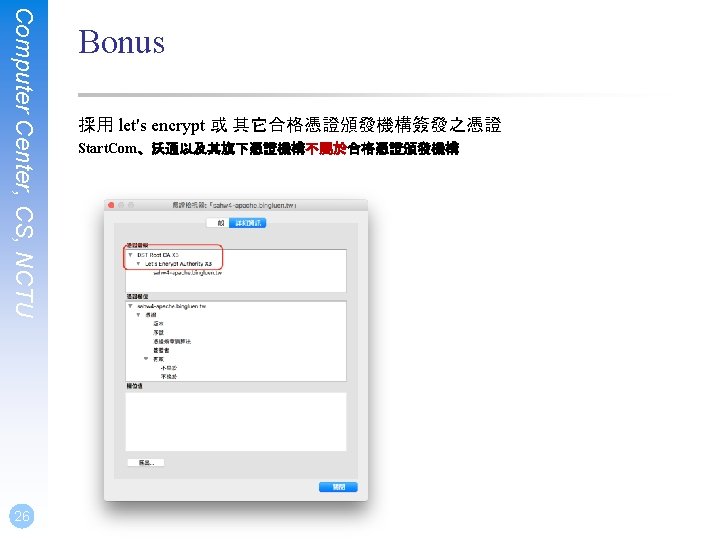
Computer Center, CS, NCTU 25 Bonus q 憑證使用 let's encrypt 或其他合格第三方憑證簽發 (5%) q 通過 SSL Lab 獲得 A+ (10%)
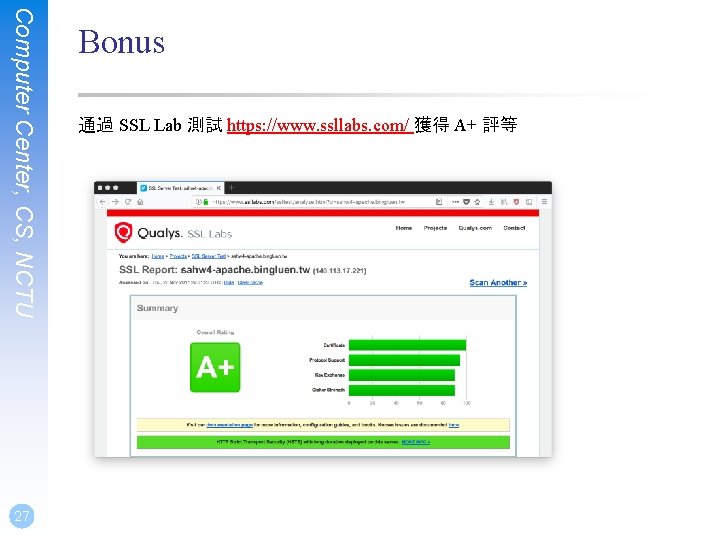
Computer Center, CS, NCTU 27 Bonus 通過 SSL Lab 測試 https: //www. ssllabs. com/ 獲得 A+ 評等
Computer Center, CS, NCTU 28 Deadline q 2017/12/13 23: 59 q You do not need to submit anything
Computer Center, CS, NCTU 30 Help q Email ta@nasa. cs. nctu. edu. tw q Goto CSCC to ask professional 3 F!
- Slides: 30