
synchronous Media Sharing Social and Communal Media Consumption
- Slides: 18
synchronous Media. Sharing: Social and Communal Media Consumption for Geographically Dispersed Users Maarten Wijnants Jeroen Dierckx Peter Quax Wim Lamotte Hasselt University – t. UL – IBBT – Expertise Centre for Digital Media Wetenschapspark 2, 3590 Diepenbeek, Belgium {firstname. lastname}@uhasselt. be
Introduction • Multiple persons are always physically co-located and in addition are concurrently consuming identical content • Technological advancements as well as evolving user habits are causing fundamental changes • Video-on-demand, Personal Video Recorder • The negative impact of these trends on social interaction and community-centric media consumption is apparent • Temporal disparity emerges as it is no longer guaranteed that users consume content simultaneously • Multimedia data is nowadays ubiquitously accessible via a plethora of devices and platforms, some of which are explicitly intended for single-person use
Introduction(cont. ) • Introduces the web-based synchronous Media. Sharing (s. MS) framework which aims to bridge the social interaction divide that is caused by media consumers' spatial disparity • Prominent already implemented features • Multi-device and cross-platform support • The ability to incorporate the service in (3 D) virtual environments • Support for heterogeneous media content types • Synchronous (i. e. , real-time) inter-participant communication facilities and integration with social networking websites
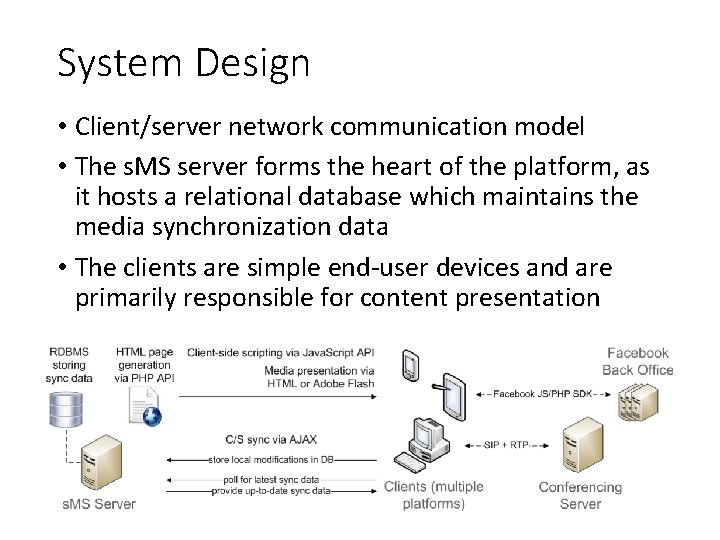
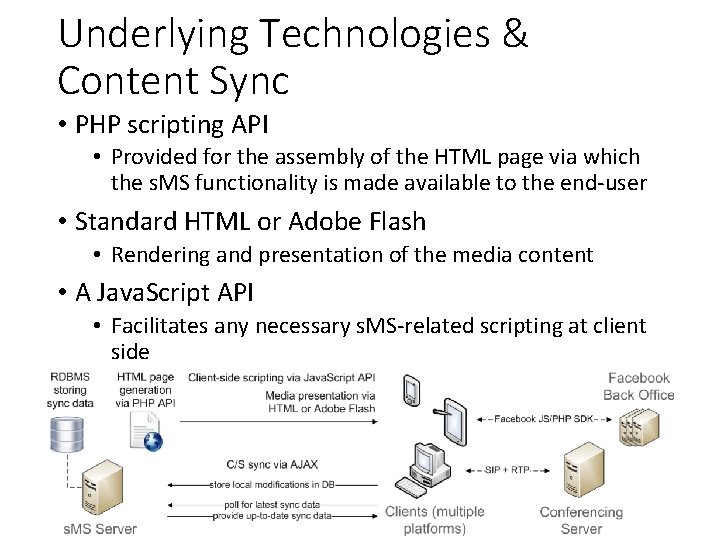
System Design • Client/server network communication model • The s. MS server forms the heart of the platform, as it hosts a relational database which maintains the media synchronization data • The clients are simple end-user devices and are primarily responsible for content presentation
Design Objectives & Resulting Implications • Multi-device and multi-platform support • The multi-device design objective advocates a standards -based solution (via a basic web browser) • Heterogeneity • A collection of pictures, sets of continuous media(video clip) • Specified by means of a Media RSS feed incorporating an entry specifying at least the item's Globally Unique IDentifier (GUID) and the source URL from which it can be retrieved • Cross-platform media sharing • Be feasible for users on different devices and platforms to jointly engage in s. MS sessions
Underlying Technologies & Content Sync • PHP scripting API • Provided for the assembly of the HTML page via which the s. MS functionality is made available to the end-user • Standard HTML or Adobe Flash • Rendering and presentation of the media content • A Java. Script API • Facilitates any necessary s. MS-related scripting at client side
Underlying Technologies & Content Sync(cont. ) • Client/server synchronization occurs by means of two -way AJAX communication • Client initiates an AJAX request to update the corresponding synchronization data in the database • Clients periodically solicit the most recent synchronization data that pertains to their current session from the server • Picture • The presently selected image is displayed at all participating sites as users advance through the input set • Video clip • The current video clip and the playback time of the currently showing clip
Database Design • Synchronization records are stored in the central database • The ID of the s. MS session • The URL of the Media RSS feed that syndicates the content that is being shared in the context of this session • The GUID of the currently selected content item and the current playback time of the item as well as a flag indicating the status of the playback(continuous media) • Each record includes • A timestamp value and a so-called master client ID • Master client • The author of the synchronization record • Be assumed to currently “control" the session
Database Design(cont. ) • On an incoming synchronization request from a client • The s. MS server fetches the correct record from the synchronization database and disseminates it • The received data is subsequently enforced locally by the client • Timestamp • discard duplicate or stale synchronization instructions received from the s. MS server • The master client information is exploited to periodically refresh the playback time of continuous media types in the synchronization database
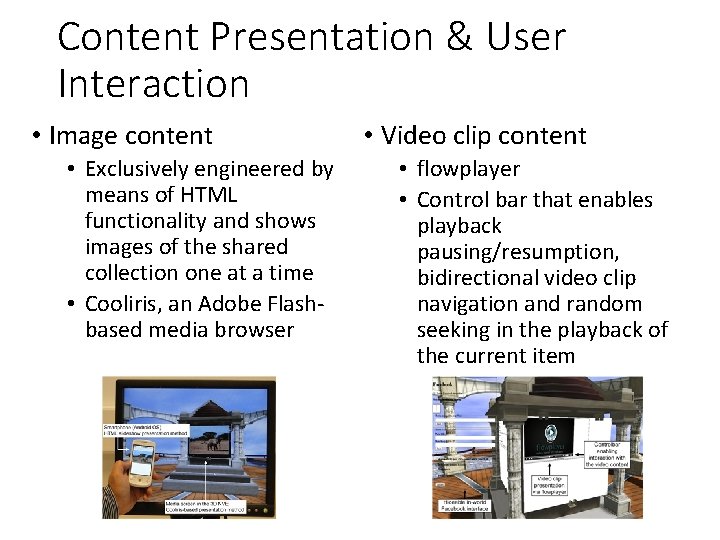
Content Presentation & User Interaction • Image content • Exclusively engineered by means of HTML functionality and shows images of the shared collection one at a time • Cooliris, an Adobe Flashbased media browser • Video clip content • flowplayer • Control bar that enables playback pausing/resumption, bidirectional video clip navigation and random seeking in the playback of the current item
Content Presentation & User Interaction(cont. ) • The s. MS Java. Script API pushes synchronization instructions to the s. MS server via AJAX • Continuous media • The master client of the session periodically updates the playback time of the current video clip in the database →newcomers are able to “catch up" on the playback time and hence start playback of the current video clip at the correct location
Real-time Interpersonal Communication • To create a true sense of connectedness and of concurrently and socially sharing media • Incorporates voice conferencing features • The communication functionality has been implemented via Androme's Intellivic SDK • Java. Script, C++, and. NET APIs • Session Initiation Protocol(SIP)
Social Network Interfacing • Be interfaced with Facebook • log in to Facebook, post messages to their Facebook news feed and transform entire photo albums from their Facebook profile into Media RSS feeds • Enables s. MS-related actions or events to trigger automatic posting of Facebook messages(optional) • Name of the session, URL link
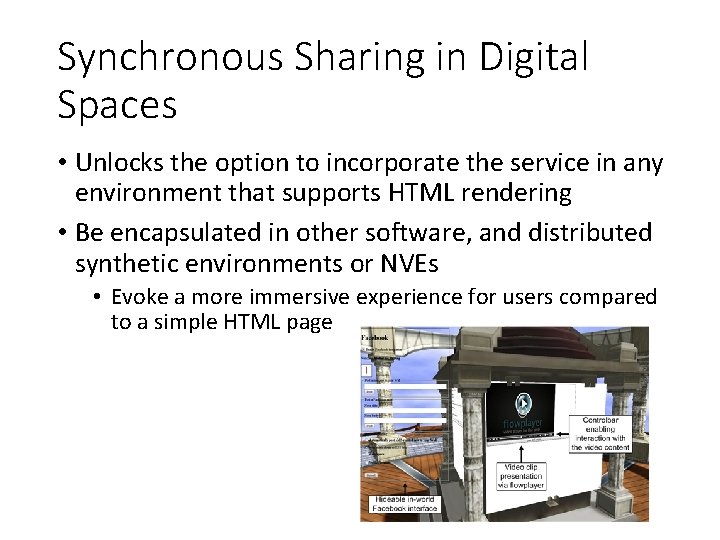
Synchronous Sharing in Digital Spaces • Unlocks the option to incorporate the service in any environment that supports HTML rendering • Be encapsulated in other software, and distributed synthetic environments or NVEs • Evoke a more immersive experience for users compared to a simple HTML page
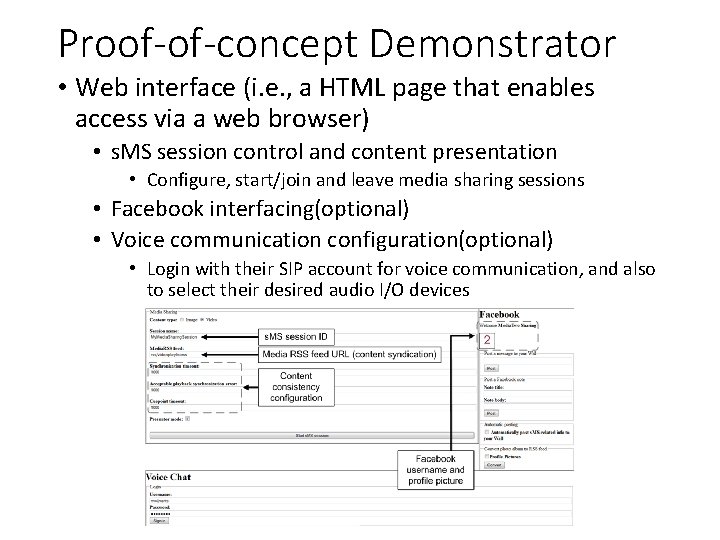
Proof-of-concept Demonstrator • Web interface (i. e. , a HTML page that enables access via a web browser) • s. MS session control and content presentation • Configure, start/join and leave media sharing sessions • Facebook interfacing(optional) • Voice communication configuration(optional) • Login with their SIP account for voice communication, and also to select their desired audio I/O devices
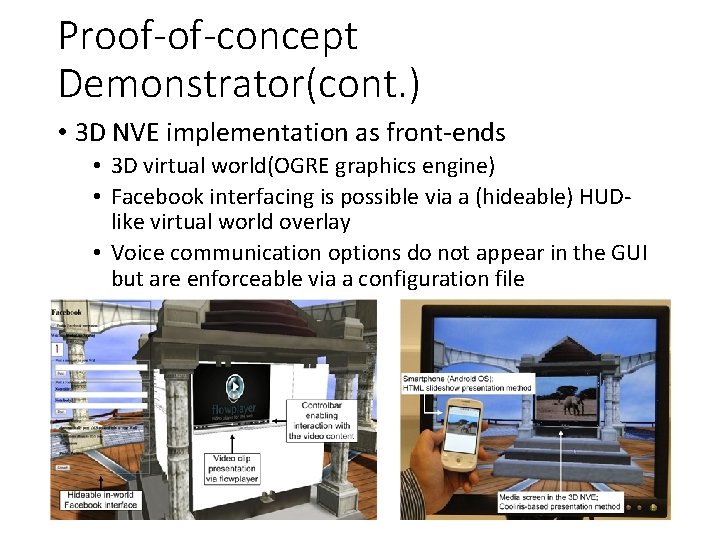
Proof-of-concept Demonstrator(cont. ) • 3 D NVE implementation as front-ends • 3 D virtual world(OGRE graphics engine) • Facebook interfacing is possible via a (hideable) HUDlike virtual world overlay • Voice communication options do not appear in the GUI but are enforceable via a configuration file
Envisioned Features • Social Presence Information • It is advisable for end-users to be aware of the current status and activities of their friends • The participant lists of active sessions, the media content that is being shared in ongoing sessions, a direct and clear overview of which sessions friends are currently attending, … • Based on XMPP standard • Personal Second Screen • Primary display • Present information regarding the active s. MS session, visualize (personalized) presence information, initiate private communication sessions with remote session participants, …
Future Work • Scheduled to be (iteratively) subjected to user trials • Accumulate both quantitative and qualitative feedback from end-users, as well as to gain insight in pertinent open questions • Voice communication • Content synchronization and consistency • Social presence information • Explore alternative hosting and deployment strategies for the s. MS system