
SUPPLIERS PORTAL ENX CERTIFICATE NEW RENAULT CERTIFICATION AUTHORITIES
- Slides: 11
SUPPLIERS PORTAL – ENX CERTIFICATE NEW RENAULT CERTIFICATION AUTHORITIES ADDED ON YOUR MICROSOFT INTERNET EXPLORER BROWSER DIR-SF / B 2 E 20/01/2020 1 Confidential C
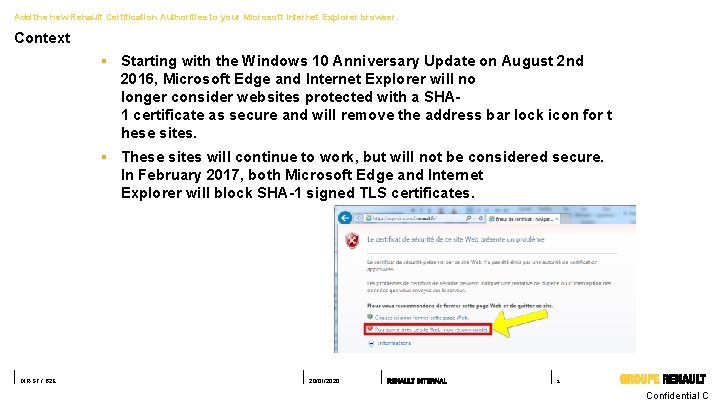
Add the new Renault Certification Authorities to your Microsoft Internet Explorer browser. Context § Starting with the Windows 10 Anniversary Update on August 2 nd 2016, Microsoft Edge and Internet Explorer will no longer consider websites protected with a SHA 1 certificate as secure and will remove the address bar lock icon for t hese sites. § These sites will continue to work, but will not be considered secure. In February 2017, both Microsoft Edge and Internet Explorer will block SHA-1 signed TLS certificates. DIR-SF / B 2 E 20/01/2020 2 Confidential C
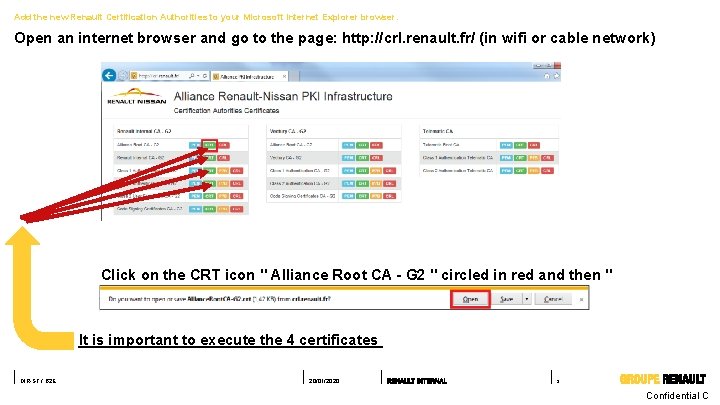
Add the new Renault Certification Authorities to your Microsoft Internet Explorer browser. Open an internet browser and go to the page: http: //crl. renault. fr/ (in wifi or cable network) Click on the CRT icon " Alliance Root CA - G 2 " circled in red and then " Open “. It is important to execute the 4 certificates DIR-SF / B 2 E 20/01/2020 3 Confidential C
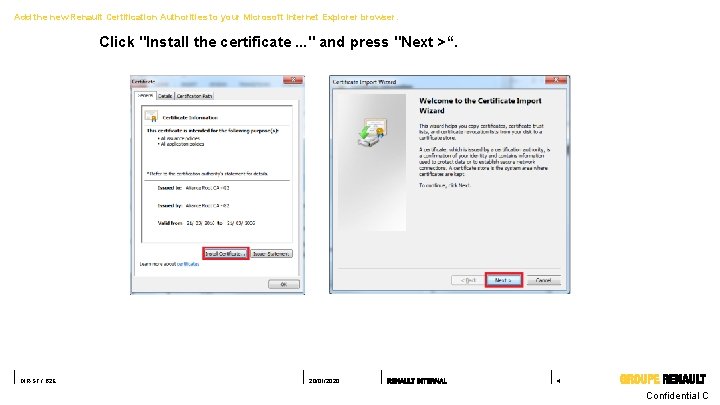
Add the new Renault Certification Authorities to your Microsoft Internet Explorer browser. Click "Install the certificate. . . " and press "Next >“. DIR-SF / B 2 E 20/01/2020 4 Confidential C
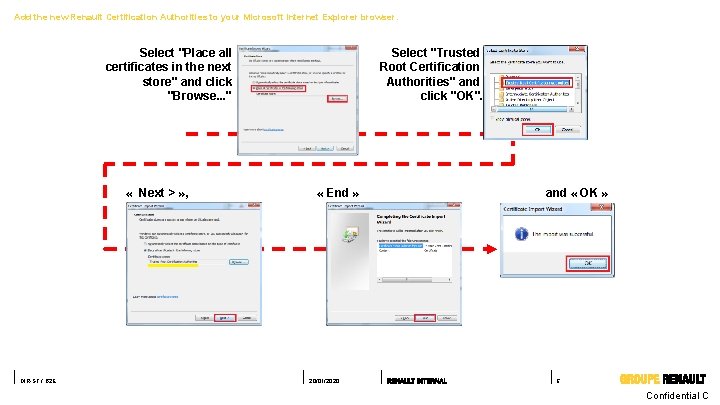
Add the new Renault Certification Authorities to your Microsoft Internet Explorer browser. Select "Place all certificates in the next store" and click "Browse. . . " « Next > » , DIR-SF / B 2 E Select "Trusted Root Certification Authorities" and click "OK". « End » 20/01/2020 and « OK » 5 Confidential C
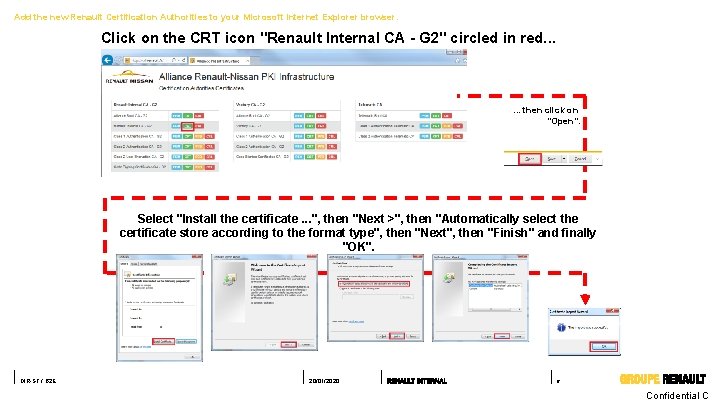
Add the new Renault Certification Authorities to your Microsoft Internet Explorer browser. Click on the CRT icon "Renault Internal CA - G 2" circled in red. . . then click on "Open". Select "Install the certificate. . . ", then "Next >", then "Automatically select the certificate store according to the format type", then "Next", then "Finish" and finally "OK". DIR-SF / B 2 E 20/01/2020 6 Confidential C
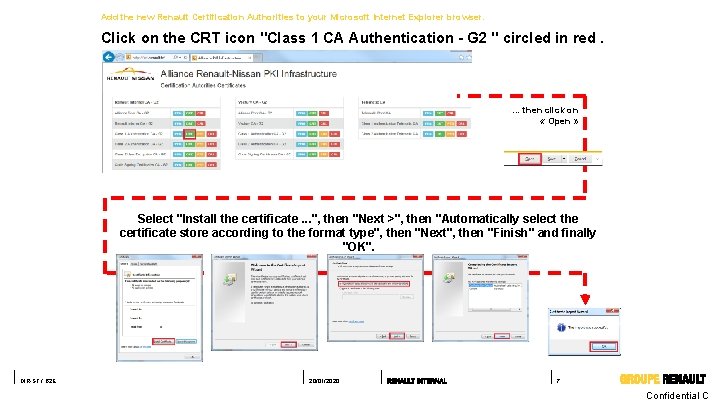
Add the new Renault Certification Authorities to your Microsoft Internet Explorer browser. Click on the CRT icon "Class 1 CA Authentication - G 2 " circled in red. … then click on « Open » Select "Install the certificate. . . ", then "Next >", then "Automatically select the certificate store according to the format type", then "Next", then "Finish" and finally "OK". DIR-SF / B 2 E 20/01/2020 7 Confidential C
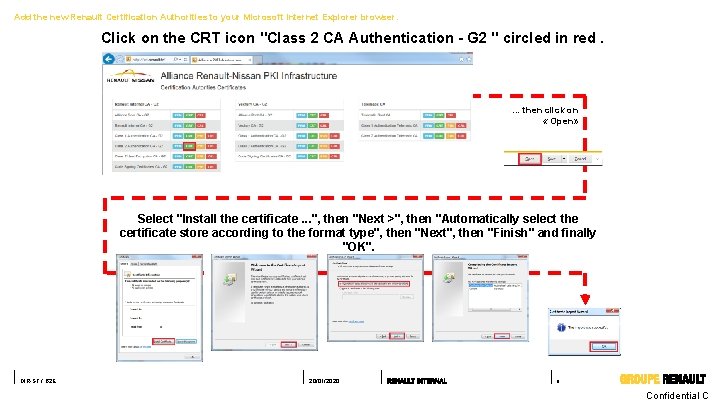
Add the new Renault Certification Authorities to your Microsoft Internet Explorer browser. Click on the CRT icon "Class 2 CA Authentication - G 2 " circled in red. … then click on « Open» Select "Install the certificate. . . ", then "Next >", then "Automatically select the certificate store according to the format type", then "Next", then "Finish" and finally "OK". DIR-SF / B 2 E 20/01/2020 8 Confidential C
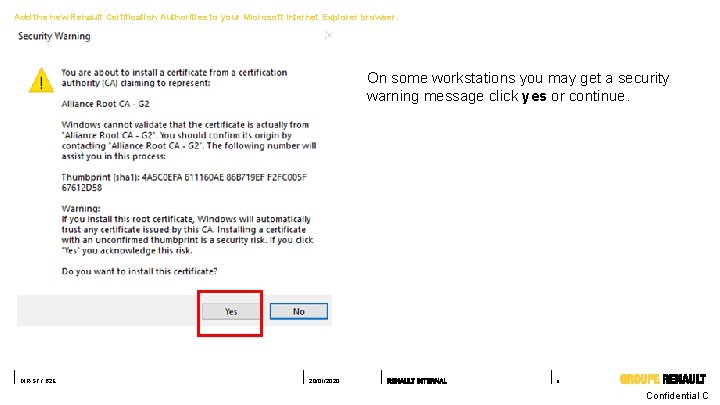
Add the new Renault Certification Authorities to your Microsoft Internet Explorer browser. On some workstations you may get a security warning message click yes or continue. DIR-SF / B 2 E 20/01/2020 9 Confidential C
Need help ? Do you need help? Please have a look on the support website : https: //suppliers-public. renault. com/HTML/Public-Home-Pageen. htm DIR-SF / B 2 E 20/01/2020 10 Confidential C