
Supplier Return Management Scenario Overview Click process chevrons

- Slides: 14
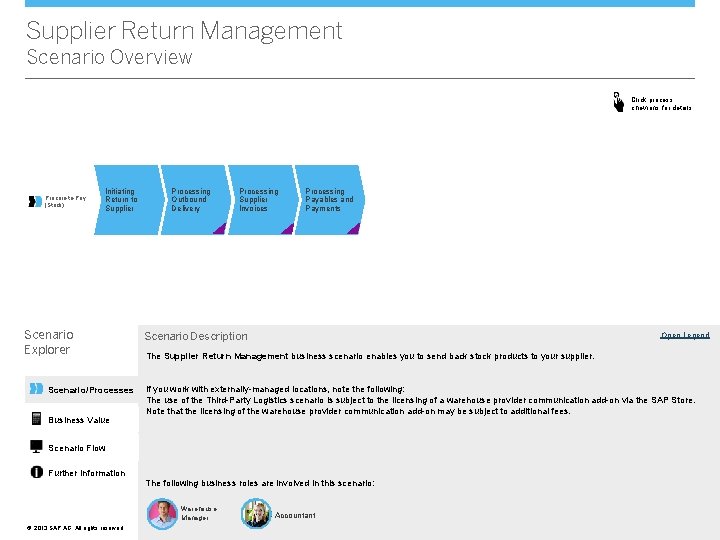
Supplier Return Management Scenario Overview Click process chevrons for details Procure-to-Pay (Stock) Initiating Return to Supplier Scenario Explorer Scenario/Processes Business Value Processing Outbound Delivery Processing Supplier Invoices Processing Payables and Payments Scenario Description Open Legend The Supplier Return Management business scenario enables you to send back stock products to your supplier. If you work with externally-managed locations, note the following: The use of the Third-Party Logistics scenario is subject to the licensing of a warehouse provider communication add-on via the SAP Store. Note that the licensing of the warehouse provider communication add-on may be subject to additional fees. Scenario Flow Further Information The following business roles are involved in this scenario: Warehouse Manager ©© 2013 SAP AG. All rights reserved. Accountant
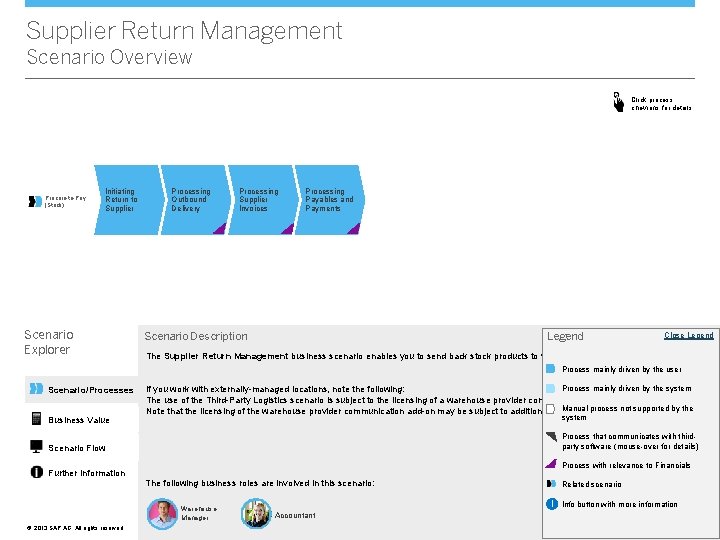
Supplier Return Management Scenario Overview Click process chevrons for details Procure-to-Pay (Stock) Initiating Return to Supplier Scenario Explorer Processing Outbound Delivery Processing Supplier Invoices Processing Payables and Payments Scenario Description Legend Open Legend Close Legend The Supplier Return Management business scenario enables you to send back stock products to your supplier. Process mainly driven by the user Scenario/Processes Business Value Process mainly driven by the system If you work with externally-managed locations, note the following: The use of the Third-Party Logistics scenario is subject to the licensing of a warehouse provider communication add-on via the SAP Store. Manual process not supported by the Note that the licensing of the warehouse provider communication add-on may be subject to additional fees. system Process that communicates with thirdparty software (mouse-over for details) Scenario Flow Process with relevance to Financials Further Information The following business roles are involved in this scenario: Warehouse Manager ©© 2013 SAP AG. All rights reserved. Related scenario i Info button with more information Accountant <Role Name>
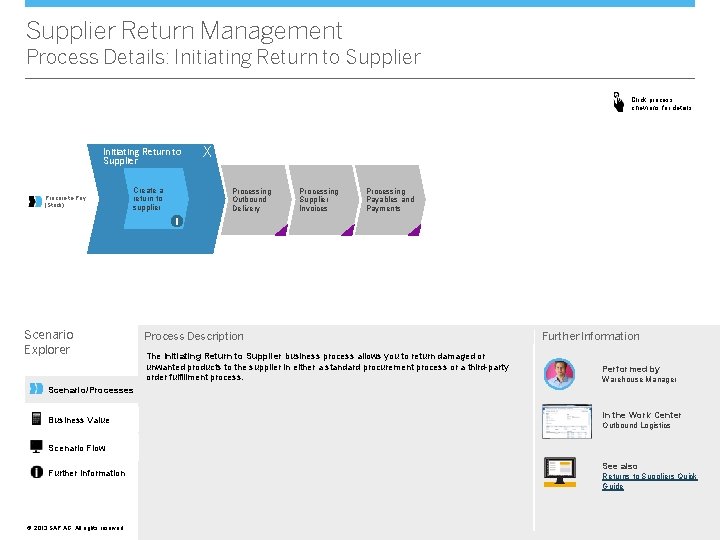
Supplier Return Management Process Details: Initiating Return to Supplier Click process chevrons for details Initiating Return to Supplier Procure-to-Pay (Stock) Create a return to supplier X Processing Outbound Delivery Processing Supplier Invoices Processing Payables and Payments i Scenario Explorer Process Description The Initiating Return to Supplier business process allows you to return damaged or unwanted products to the supplier in either a standard procurement process or a third-party order fulfillment process. Further Information Performed by Warehouse Manager Scenario/Processes Business Value In the Work Center Outbound Logistics Scenario Flow Further Information ©© 2013 SAP AG. All rights reserved. See also Returns to Suppliers Quick Guide
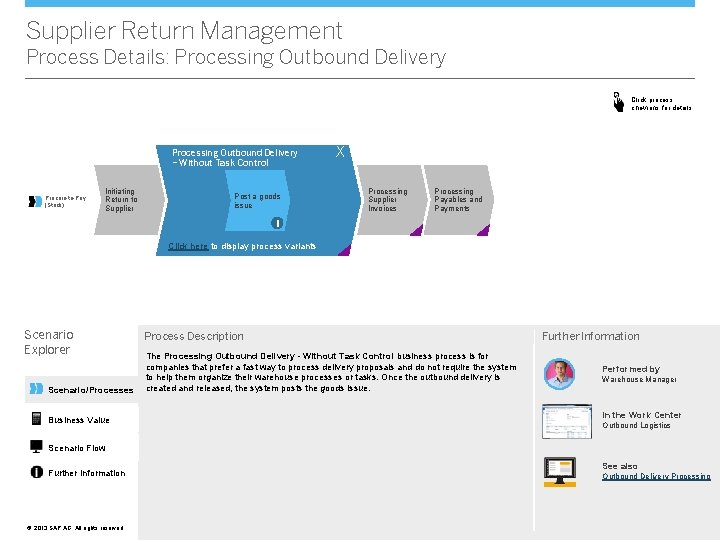
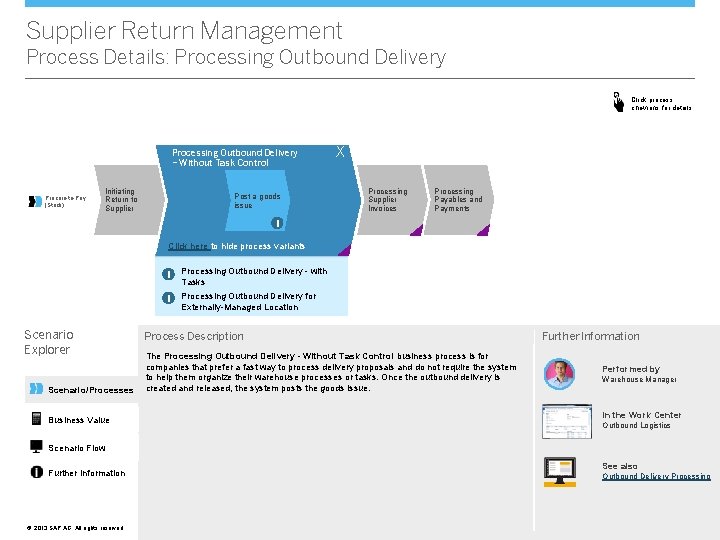
Supplier Return Management Process Details: Processing Outbound Delivery Click process chevrons for details Processing Outbound Delivery – Without Task Control Procure-to-Pay (Stock) Initiating Return to Supplier Post a goods issue X Processing Supplier Invoices Processing Payables and Payments i Click here to display process variants Scenario Explorer Scenario/Processes Business Value Process Description The Processing Outbound Delivery - Without Task Control business process is for companies that prefer a fast way to process delivery proposals and do not require the system to help them organize their warehouse processes or tasks. Once the outbound delivery is created and released, the system posts the goods issue. Further Information Performed by Warehouse Manager In the Work Center Outbound Logistics Scenario Flow Further Information ©© 2013 SAP AG. All rights reserved. See also Outbound Delivery Processing
Supplier Return Management Process Details: Processing Outbound Delivery Click process chevrons for details Processing Outbound Delivery – Without Task Control Procure-to-Pay (Stock) Initiating Return to Supplier X Post a goods issue Processing Supplier Invoices Processing Payables and Payments i Click here to hide process variants Scenario Explorer Scenario/Processes Business Value i Processing Outbound Delivery - with Tasks i Processing Outbound Delivery for Externally-Managed Location Process Description The Processing Outbound Delivery - Without Task Control business process is for companies that prefer a fast way to process delivery proposals and do not require the system to help them organize their warehouse processes or tasks. Once the outbound delivery is created and released, the system posts the goods issue. Further Information Performed by Warehouse Manager In the Work Center Outbound Logistics Scenario Flow Further Information ©© 2013 SAP AG. All rights reserved. See also Outbound Delivery Processing
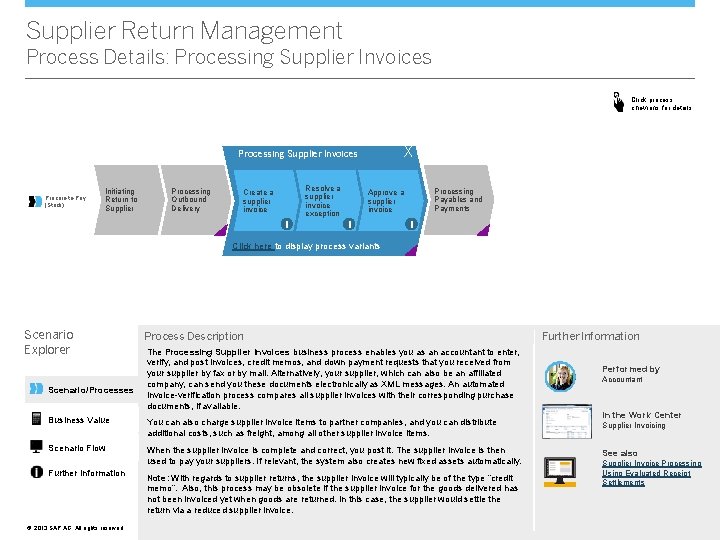
Supplier Return Management Process Details: Processing Supplier Invoices Click process chevrons for details X Processing Supplier Invoices Procure-to-Pay (Stock) Initiating Return to Supplier Processing Outbound Delivery Create a supplier invoice i Resolve a supplier invoice exception Processing Payables and Payments Approve a supplier invoice i i Click here to display process variants Scenario Explorer Scenario/Processes Process Description The Processing Supplier Invoices business process enables you as an accountant to enter, verify, and post invoices, credit memos, and down payment requests that you received from your supplier by fax or by mail. Alternatively, your supplier, which can also be an affiliated company, can send you these documents electronically as XML messages. An automated invoice-verification process compares all supplier invoices with their corresponding purchase documents, if available. Business Value You can also charge supplier invoice items to partner companies, and you can distribute additional costs, such as freight, among all other supplier invoice items. Scenario Flow When the supplier invoice is complete and correct, you post it. The supplier invoice is then used to pay your suppliers. If relevant, the system also creates new fixed assets automatically. Further Information ©© 2013 SAP AG. All rights reserved. Note: With regards to supplier returns, the supplier invoice will typically be of the type “credit memo”. Also, this process may be obsolete if the supplier invoice for the goods delivered has not been invoiced yet when goods are returned. In this case, the supplier would settle the return via a reduced supplier invoice. Further Information Performed by Accountant In the Work Center Supplier Invoicing See also Supplier Invoice Processing Using Evaluated Receipt Settlements
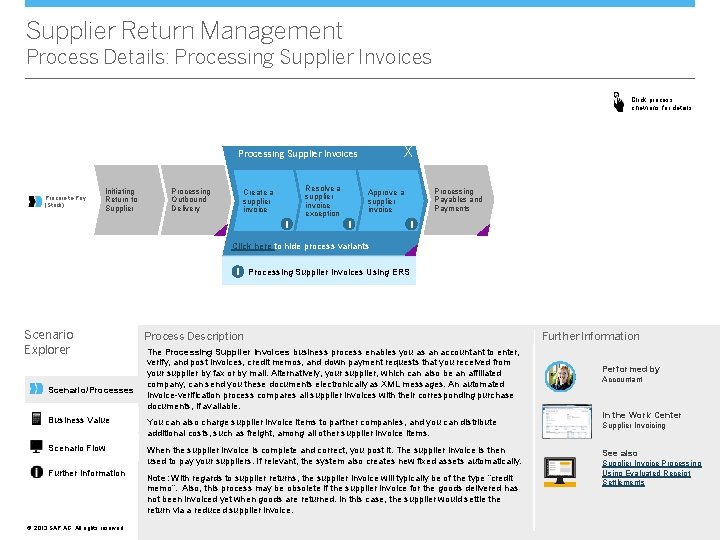
Supplier Return Management Process Details: Processing Supplier Invoices Click process chevrons for details X Processing Supplier Invoices Procure-to-Pay (Stock) Initiating Return to Supplier Processing Outbound Delivery Create a supplier invoice i Resolve a supplier invoice exception Processing Payables and Payments Approve a supplier invoice i i Click here to hide process variants i Processing Supplier Invoices Using ERS Scenario Explorer Scenario/Processes Process Description The Processing Supplier Invoices business process enables you as an accountant to enter, verify, and post invoices, credit memos, and down payment requests that you received from your supplier by fax or by mail. Alternatively, your supplier, which can also be an affiliated company, can send you these documents electronically as XML messages. An automated invoice-verification process compares all supplier invoices with their corresponding purchase documents, if available. Business Value You can also charge supplier invoice items to partner companies, and you can distribute additional costs, such as freight, among all other supplier invoice items. Scenario Flow When the supplier invoice is complete and correct, you post it. The supplier invoice is then used to pay your suppliers. If relevant, the system also creates new fixed assets automatically. Further Information ©© 2013 SAP AG. All rights reserved. Note: With regards to supplier returns, the supplier invoice will typically be of the type “credit memo”. Also, this process may be obsolete if the supplier invoice for the goods delivered has not been invoiced yet when goods are returned. In this case, the supplier would settle the return via a reduced supplier invoice. Further Information Performed by Accountant In the Work Center Supplier Invoicing See also Supplier Invoice Processing Using Evaluated Receipt Settlements
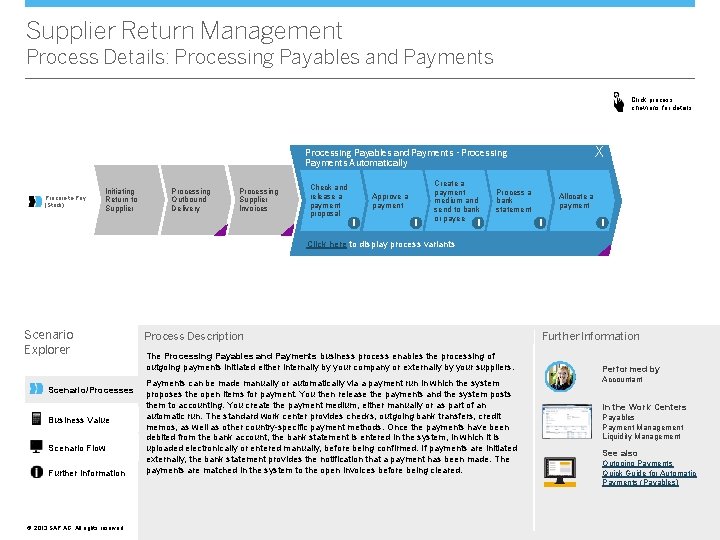
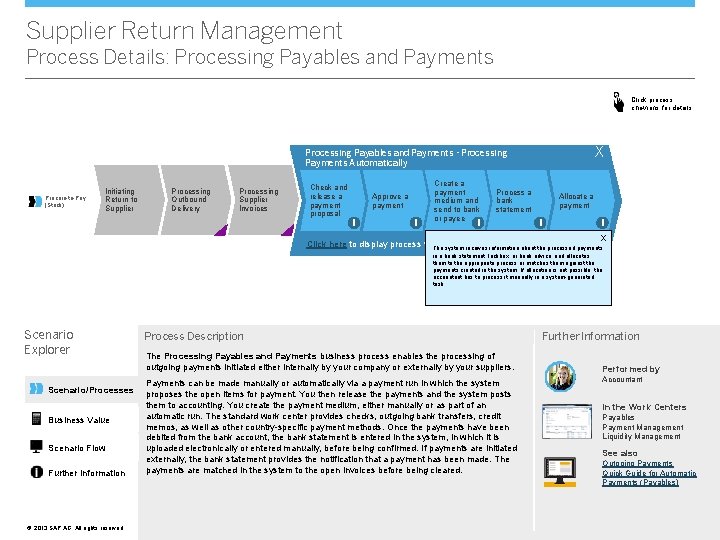
Supplier Return Management Process Details: Processing Payables and Payments Click process chevrons for details X Processing Payables and Payments - Processing Payments Automatically Procure-to-Pay (Stock) Initiating Return to Supplier Processing Outbound Delivery Processing Supplier Invoices Check and release a payment proposal Approve a payment i i Create a payment medium and send to bank or payee Process a bank statement i Allocate a payment i i Click here to display process variants Scenario Explorer Scenario/Processes Business Value Scenario Flow Further Information ©© 2013 SAP AG. All rights reserved. Process Description The Processing Payables and Payments business process enables the processing of outgoing payments initiated either internally by your company or externally by your suppliers. Payments can be made manually or automatically via a payment run in which the system proposes the open items for payment. You then release the payments and the system posts them to accounting. You create the payment medium, either manually or as part of an automatic run. The standard work center provides checks, outgoing bank transfers, credit memos, as well as other country-specific payment methods. Once the payments have been debited from the bank account, the bank statement is entered in the system, in which it is uploaded electronically or entered manually, before being confirmed. If payments are initiated externally, the bank statement provides the notification that a payment has been made. The payments are matched in the system to the open invoices before being cleared. Further Information Performed by Accountant In the Work Centers Payables Payment Management Liquidity Management See also Outgoing Payments Quick Guide for Automatic Payments (Payables)
Supplier Return Management Process Details: Processing Payables and Payments Click process chevrons for details X Processing Payables and Payments - Processing Payments Automatically Procure-to-Pay (Stock) Initiating Return to Supplier Processing Outbound Delivery Processing Supplier Invoices Check and release a payment proposal Approve a payment i i Create a payment medium and send to bank or payee Click here to display process variants Process a bank statement i Allocate a payment i i X The accountant releases the payment that the manager may previously have approved. The system creates the payment medium in an automatic run or the accountant creates it manually. The system provides checks and outgoing bank transfers and the option of remittance advices. The accountant prints checks and sends them by mail to the payee. Bank transfers stored in a file are sent by the accountant to the bank or uploaded to the banking software. Scenario Explorer Scenario/Processes Business Value Scenario Flow Further Information ©© 2013 SAP AG. All rights reserved. Process Description The Processing Payables and Payments business process enables the processing of outgoing payments initiated either internally by your company or externally by your suppliers. Payments can be made manually or automatically via a payment run in which the system proposes the open items for payment. You then release the payments and the system posts them to accounting. You create the payment medium, either manually or as part of an automatic run. The standard work center provides checks, outgoing bank transfers, credit memos, as well as other country-specific payment methods. Once the payments have been debited from the bank account, the bank statement is entered in the system, in which it is uploaded electronically or entered manually, before being confirmed. If payments are initiated externally, the bank statement provides the notification that a payment has been made. The payments are matched in the system to the open invoices before being cleared. Further Information Performed by Accountant In the Work Centers Payables Payment Management Liquidity Management See also Outgoing Payments Quick Guide for Automatic Payments (Payables)
Supplier Return Management Process Details: Processing Payables and Payments Click process chevrons for details X Processing Payables and Payments - Processing Payments Automatically Procure-to-Pay (Stock) Initiating Return to Supplier Processing Outbound Delivery Processing Supplier Invoices Check and release a payment proposal Approve a payment i i Create a payment medium and send to bank or payee Process a bank statement i Allocate a payment i i X Click here to display process variants The system receives information about the processed payments in a bank statement, lockbox, or bank advice, and allocates them to the appropriate process or matches them against the payments created in the system. If allocation is not possible, the accountant has to process it manually in a system-generated task. Scenario Explorer Scenario/Processes Business Value Scenario Flow Further Information ©© 2013 SAP AG. All rights reserved. Process Description The Processing Payables and Payments business process enables the processing of outgoing payments initiated either internally by your company or externally by your suppliers. Payments can be made manually or automatically via a payment run in which the system proposes the open items for payment. You then release the payments and the system posts them to accounting. You create the payment medium, either manually or as part of an automatic run. The standard work center provides checks, outgoing bank transfers, credit memos, as well as other country-specific payment methods. Once the payments have been debited from the bank account, the bank statement is entered in the system, in which it is uploaded electronically or entered manually, before being confirmed. If payments are initiated externally, the bank statement provides the notification that a payment has been made. The payments are matched in the system to the open invoices before being cleared. Further Information Performed by Accountant In the Work Centers Payables Payment Management Liquidity Management See also Outgoing Payments Quick Guide for Automatic Payments (Payables)
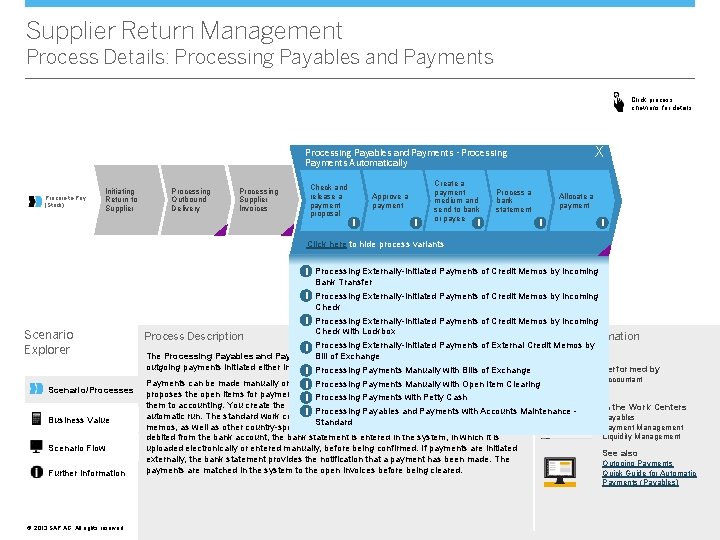
Supplier Return Management Process Details: Processing Payables and Payments Click process chevrons for details X Processing Payables and Payments - Processing Payments Automatically Procure-to-Pay (Stock) Initiating Return to Supplier Processing Outbound Delivery Processing Supplier Invoices Check and release a payment proposal Approve a payment i i Create a payment medium and send to bank or payee Process a bank statement i Allocate a payment i i Click here to hide process variants i Processing Externally-Initiated Payments of Credit Memos by Incoming Bank Transfer i Processing Externally-Initiated Payments of Credit Memos by Incoming Check i Processing Externally-Initiated Payments of Credit Memos by Incoming Scenario Explorer Scenario/Processes Business Value Scenario Flow Further Information ©© 2013 SAP AG. All rights reserved. Process Description Check with Lockbox Further Information i Processing Externally-Initiated Payments of External Credit Memos by The Processing Payables and Payments business process enables the processing of Bill of Exchange outgoing payments initiated either internally by your company or externally by your suppliers. i Processing Payments Manually with Bills of Exchange Payments can be made manually or automatically via a payment run in which the system i Processing Payments Manually with Open Item Clearing proposes the open items for payment. You then release the payments and the system posts i Processing Payments with Petty Cash them to accounting. You create the payment medium, either manually or as part of an i Processing Payables and Payments with Accounts Maintenance - automatic run. The standard work center provides checks, outgoing bank transfers, credit Standard memos, as well as other country-specific payment methods. Once the payments have been debited from the bank account, the bank statement is entered in the system, in which it is uploaded electronically or entered manually, before being confirmed. If payments are initiated externally, the bank statement provides the notification that a payment has been made. The payments are matched in the system to the open invoices before being cleared. Performed by Accountant In the Work Centers Payables Payment Management Liquidity Management See also Outgoing Payments Quick Guide for Automatic Payments (Payables)
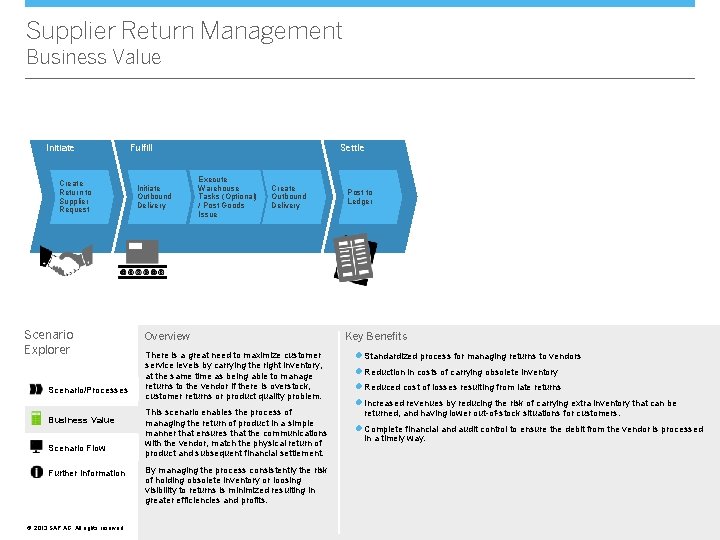
Supplier Return Management Business Value Initiate Create Return to Supplier Request Scenario Explorer Scenario/Processes Business Value Scenario Flow Further Information ©© 2013 SAP AG. All rights reserved. Fulfill Initiate Outbound Delivery Settle Execute Warehouse Tasks (Optional) / Post Goods Issue Create Outbound Delivery Overview There is a great need to maximize customer service levels by carrying the right inventory, at the same time as being able to manage returns to the vendor if there is overstock, customer returns or product quality problem. This scenario enables the process of managing the return of product in a simple manner that ensures that the communications with the vendor, match the physical return of product and subsequent financial settlement. By managing the process consistently the risk of holding obsolete inventory or loosing visibility to returns is minimized resulting in greater efficiencies and profits. Post to Ledger Key Benefits l Standardized process for managing returns to vendors l Reduction in costs of carrying obsolete inventory l Reduced cost of losses resulting from late returns l Increased revenues by reducing the risk of carrying extra inventory that can be returned, and having lower out-of-stock situations for customers. l Complete financial and audit control to ensure the debit from the vendor is processed in a timely way.
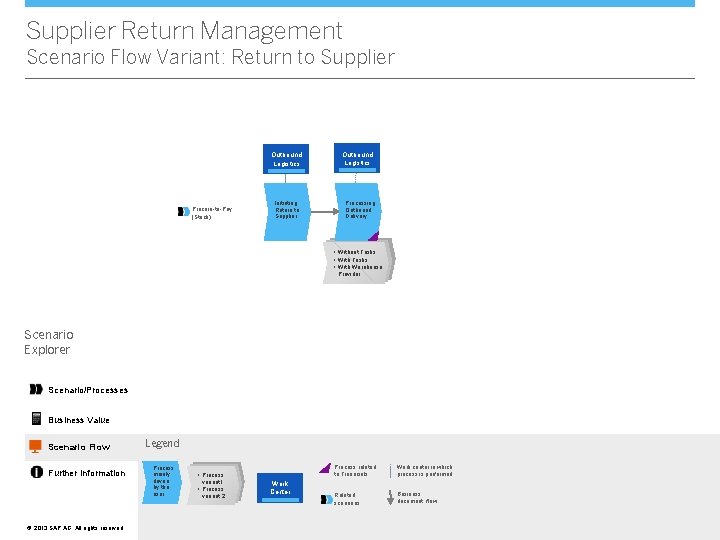
Supplier Return Management Scenario Flow Variant: Return to Supplier Outbound Logistics Procure-to-Pay (Stock) Initiating Return to Supplier Outbound Logistics Processing Outbound Delivery • Without Tasks • With Warehouse Provider Scenario Explorer Scenario/Processes Business Value Scenario Flow Further Information ©© 2013 SAP AG. All rights reserved. Legend Process mainly driven by the user • Process variant 1 • Process variant 2 Work Center Process related to Financials Work center in which process is performed Related scenarios Business document flow
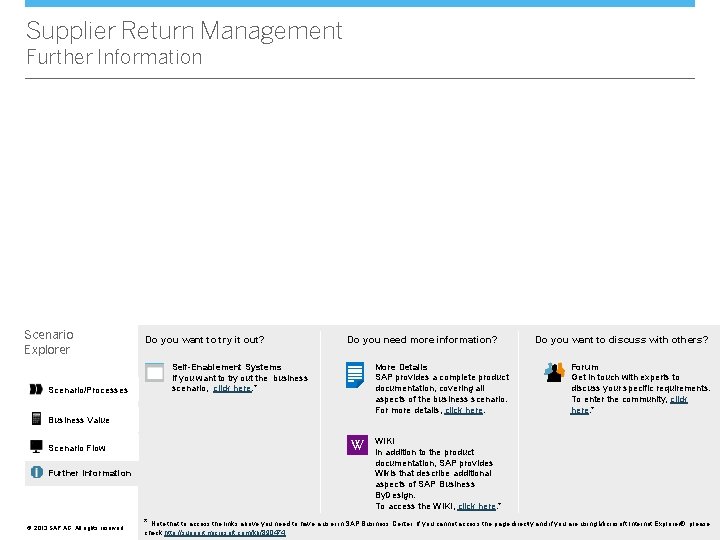
Supplier Return Management Further Information Scenario Explorer Scenario/Processes Do you want to try it out? Do you need more information? More Details SAP provides a complete product documentation, covering all aspects of the business scenario. For more details, click here. Self-Enablement Systems If you want to try out the business scenario, click here. * Business Value VV Scenario Flow Further Information ©© 2013 SAP AG. All rights reserved. Do you want to discuss with others? Forum Get in touch with experts to discuss your specific requirements. To enter the community, click here. * WIKI In addition to the product documentation, SAP provides Wikis that describe additional aspects of SAP Business By. Design. To access the WIKI, click here. * * Note that to access the links above you need to have a user in SAP Business Center. If you cannot access the page directly and if you are using Microsoft Internet Explorer®, please check http: //support. microsoft. com/kb/890474.