
SUPOR Precise and Scalable Sensitive User Input Detection

SUPOR: Precise and Scalable Sensitive User Input Detection for Android Apps Jianjun Huang, Zhichun Li, Xusheng Xiao, Zhenyu Wu, Kangjie Lu, Xiangyu Zhang, Guofei Jiang
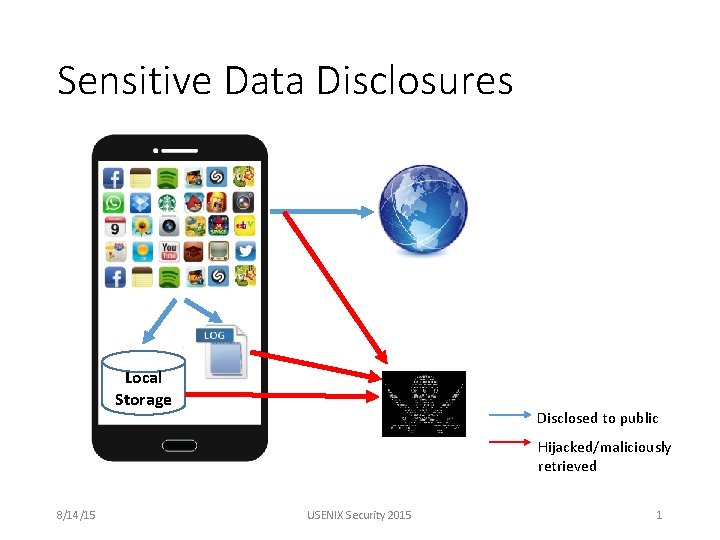
Sensitive Data Disclosures Local Storage Disclosed to public Hijacked/maliciously retrieved 8/14/15 USENIX Security 2015 1
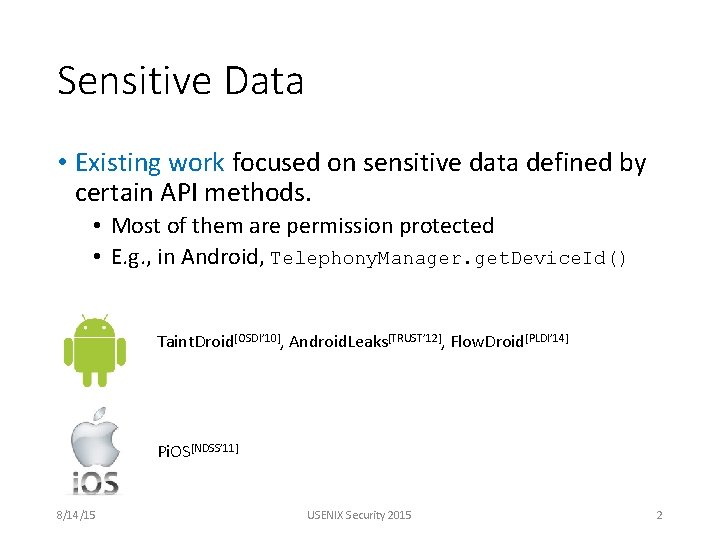
Sensitive Data • Existing work focused on sensitive data defined by certain API methods. • Most of them are permission protected • E. g. , in Android, Telephony. Manager. get. Device. Id() Taint. Droid[OSDI’ 10], Android. Leaks[TRUST’ 12], Flow. Droid[PLDI’ 14] Pi. OS[NDSS’ 11] 8/14/15 USENIX Security 2015 2
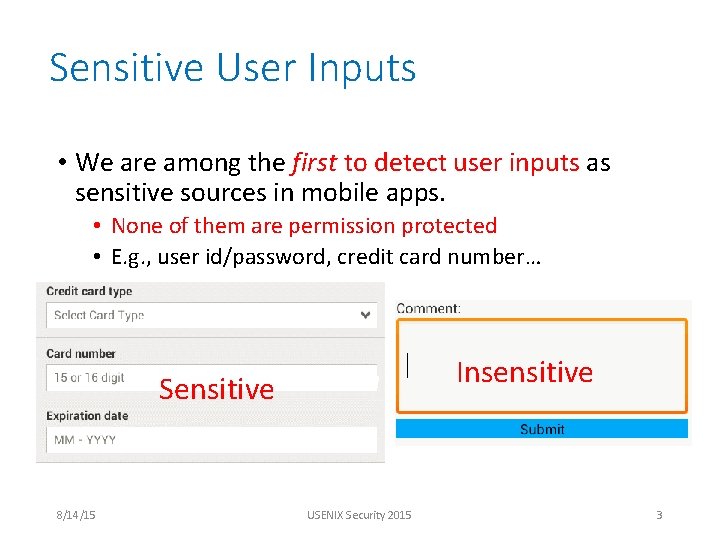
Sensitive User Inputs • We are among the first to detect user inputs as sensitive sources in mobile apps. • None of them are permission protected • E. g. , user id/password, credit card number… Insensitive Sensitive 8/14/15 USENIX Security 2015 3
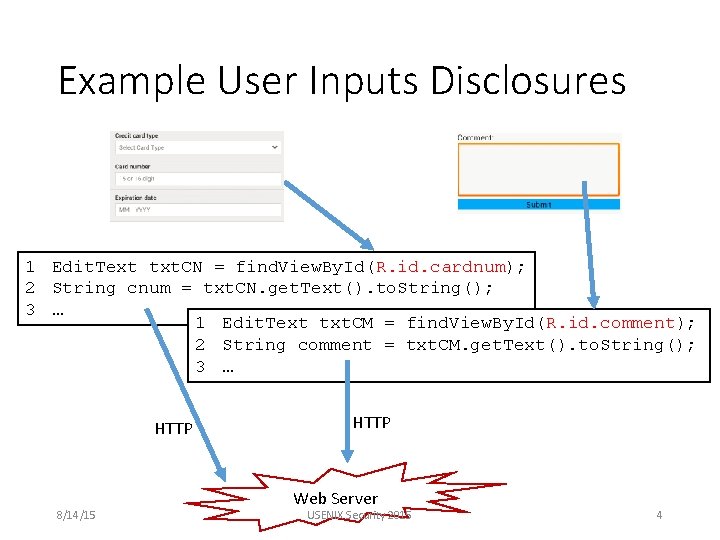
Example User Inputs Disclosures 1 Edit. Text txt. CN = find. View. By. Id(R. id. cardnum); 2 String cnum = txt. CN. get. Text(). to. String(); 3 … 1 Edit. Text txt. CM = find. View. By. Id(R. id. comment); 2 String comment = txt. CM. get. Text(). to. String(); 3 … HTTP 8/14/15 HTTP Web Server USENIX Security 2015 4
Research Problems • How to systematically discover the input fields from an app’s UI? • How to identify which input fields are sensitive? • How to associate the sensitive input fields to the corresponding variables in the apps that store their values? 8/14/15 USENIX Security 2015 5
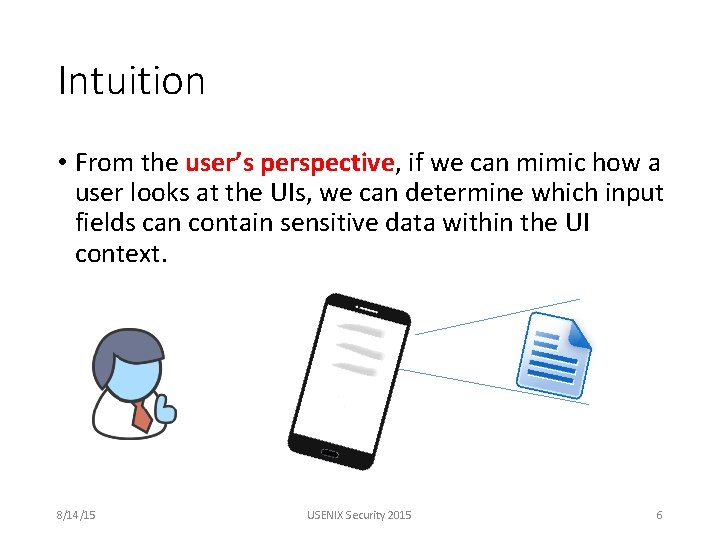
Intuition • From the user’s perspective, if we can mimic how a user looks at the UIs, we can determine which input fields can contain sensitive data within the UI context. 8/14/15 USENIX Security 2015 6
Feasibility • Render the statically defined UI layouts Android i. OS Windows Phone Layout format XML NIB/XIB/Storyboard XAML/HTML Static UI Render ADT Xcode Visual Studio APIs map widgets to code Yes Yes • Associate labels to input fields based on physical locations 8/14/15 USENIX Security 2015 7
SUPOR: Sensitive User in. Put detect. OR 8/14/15 USENIX Security 2015 8
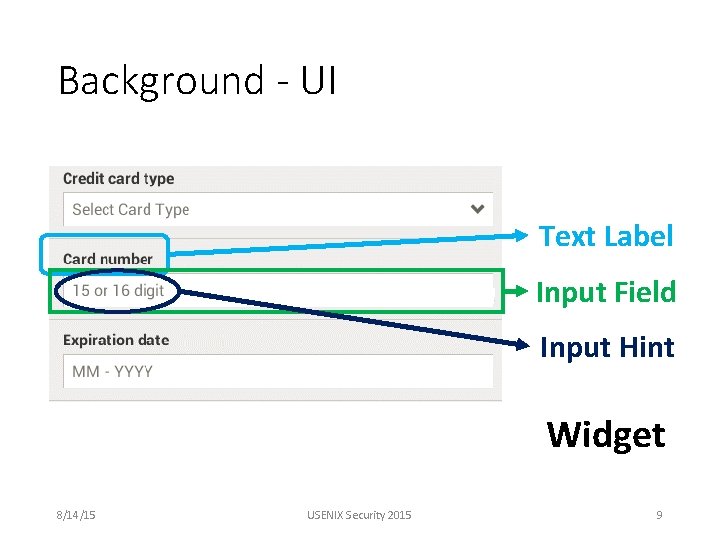
Background - UI Text Label Input Field Input Hint Widget 8/14/15 USENIX Security 2015 9
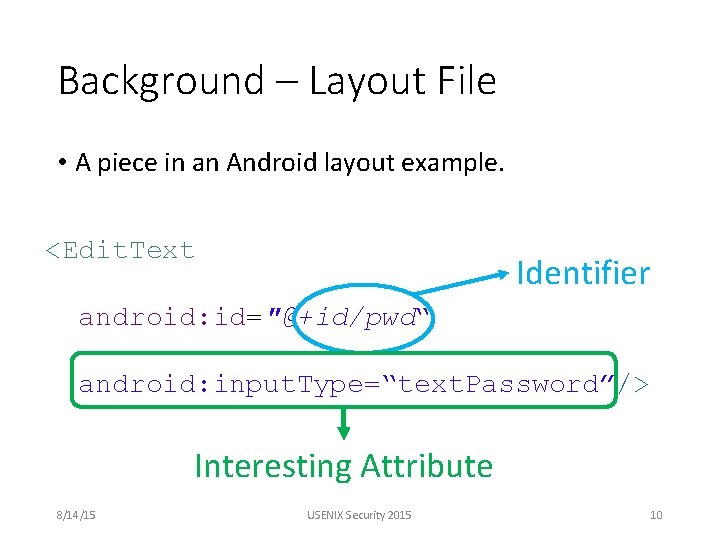
Background – Layout File • A piece in an Android layout example. <Edit. Text Identifier android: id="@+id/pwd“ android: input. Type=“text. Password”/> Interesting Attribute 8/14/15 USENIX Security 2015 10
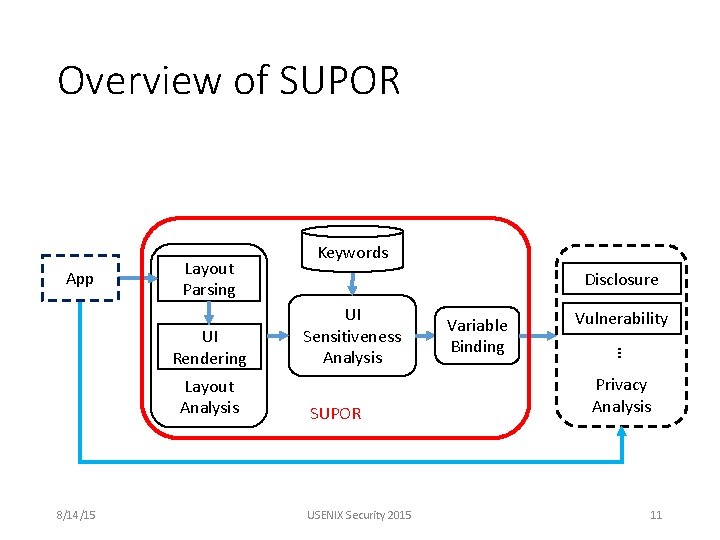
Overview of SUPOR App Layout Parsing Layout Analysis 8/14/15 Disclosure UI Sensitiveness Analysis SUPOR USENIX Security 2015 Variable Binding Vulnerability … UI Rendering Keywords Privacy Analysis 11
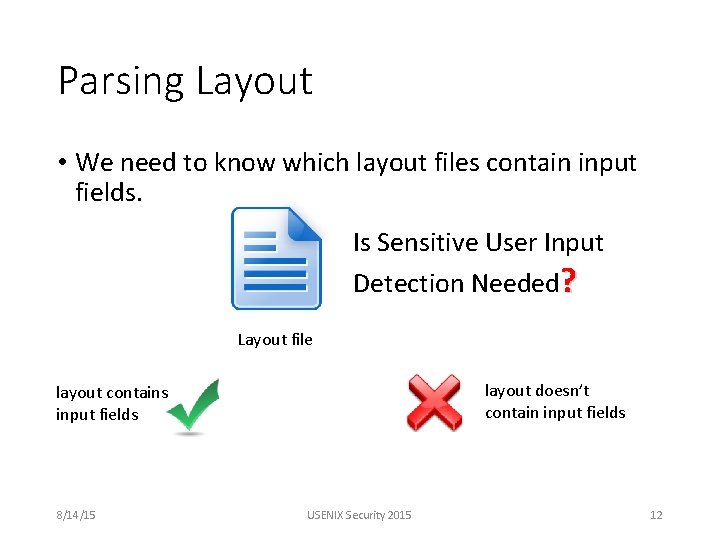
Parsing Layout • We need to know which layout files contain input fields. Is Sensitive User Input Detection Needed? Layout file layout doesn’t contain input fields layout contains input fields 8/14/15 USENIX Security 2015 12
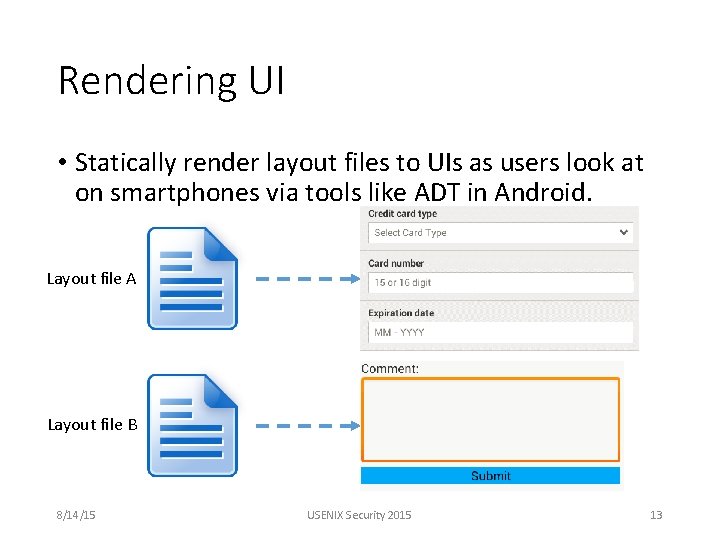
Rendering UI • Statically render layout files to UIs as users look at on smartphones via tools like ADT in Android. Layout file A Layout file B 8/14/15 USENIX Security 2015 13
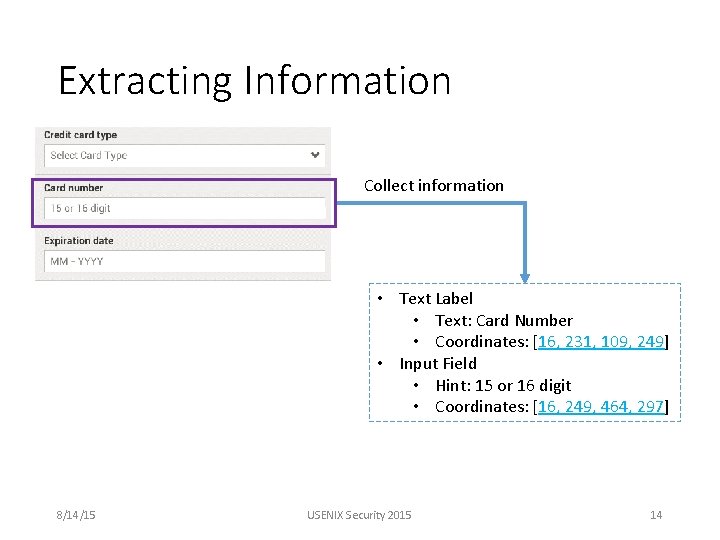
Extracting Information Collect information • Text Label • Text: Card Number • Coordinates: [16, 231, 109, 249] • Input Field • Hint: 15 or 16 digit • Coordinates: [16, 249, 464, 297] 8/14/15 USENIX Security 2015 14
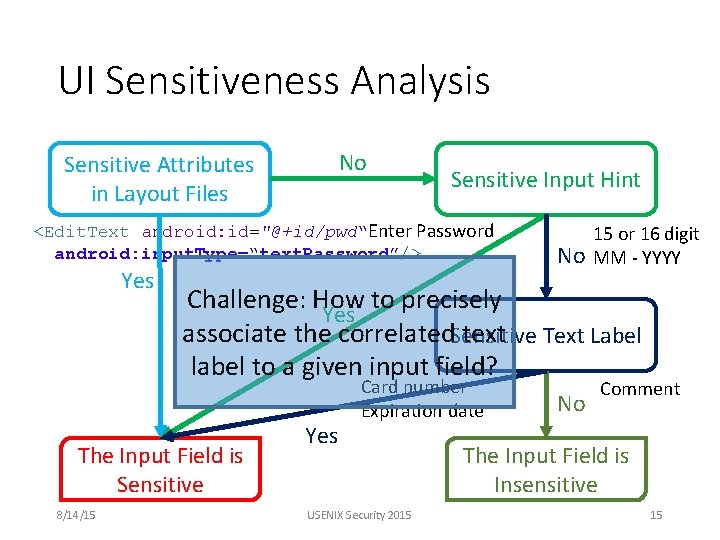
UI Sensitiveness Analysis No Sensitive Attributes in Layout Files Sensitive Input Hint <Edit. Text android: id="@+id/pwd“Enter Password android: input. Type=“text. Password”/> Yes Challenge: How to precisely Yes associate the correlated. Sensitive text Text Label label to a given input field? The Input Field is Sensitive 8/14/15 No 15 or 16 digit MM - YYYY Yes Card number Expiration date USENIX Security 2015 No Comment The Input Field is Insensitive 15
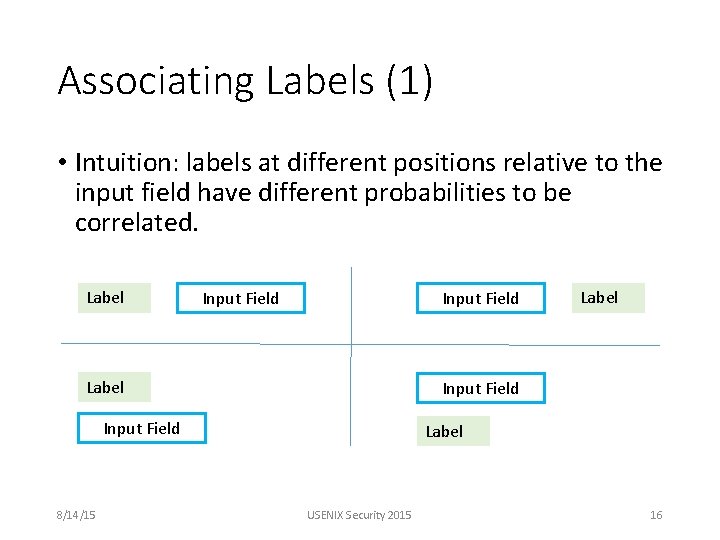
Associating Labels (1) • Intuition: labels at different positions relative to the input field have different probabilities to be correlated. Label Input Field 8/14/15 Label USENIX Security 2015 16
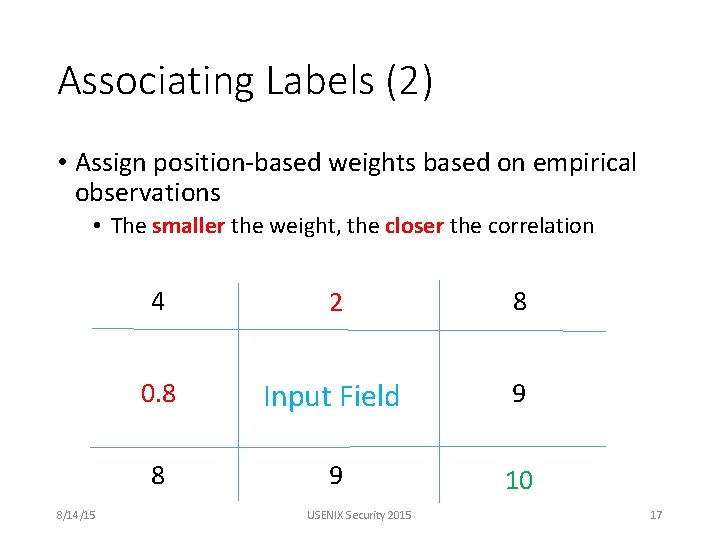
Associating Labels (2) • Assign position-based weights based on empirical observations • The smaller the weight, the closer the correlation 8/14/15 4 2 8 0. 8 Input Field 9 8 9 10 USENIX Security 2015 17
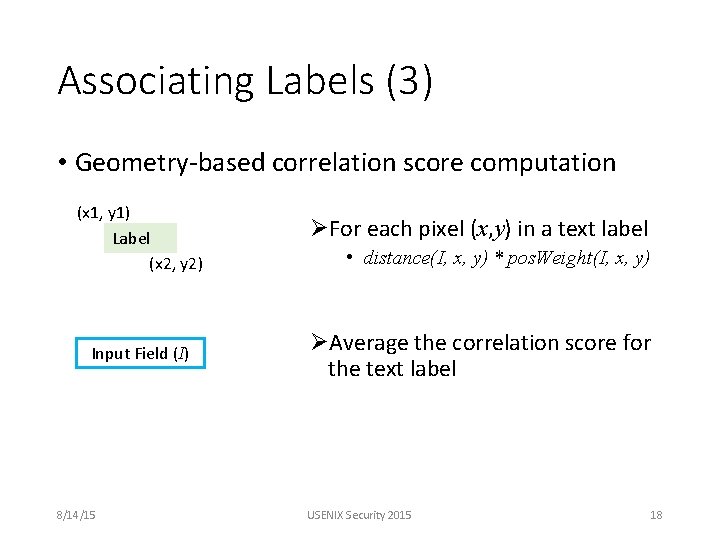
Associating Labels (3) • Geometry-based correlation score computation (x 1, y 1) Label (x 2, y 2) Input Field (I) 8/14/15 ØFor each pixel (x, y) in a text label • distance(I, x, y) * pos. Weight(I, x, y) ØAverage the correlation score for the text label USENIX Security 2015 18
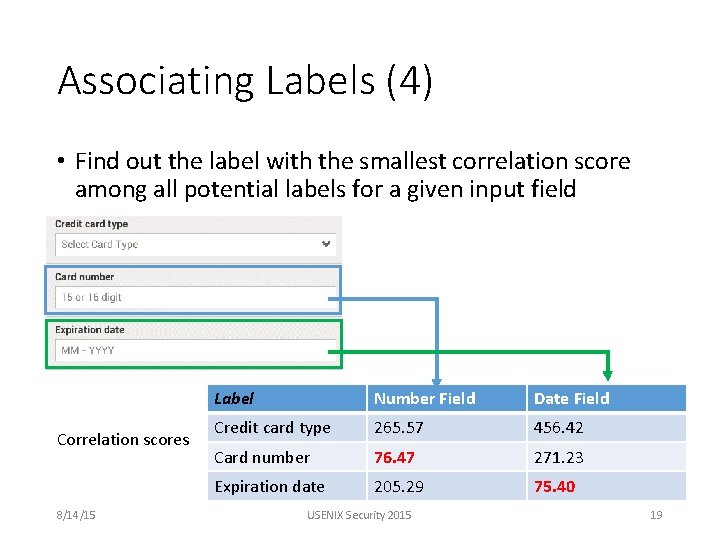
Associating Labels (4) • Find out the label with the smallest correlation score among all potential labels for a given input field Correlation scores 8/14/15 Label Number Field Date Field Credit card type 265. 57 456. 42 Card number 76. 47 271. 23 Expiration date 205. 29 75. 40 USENIX Security 2015 19
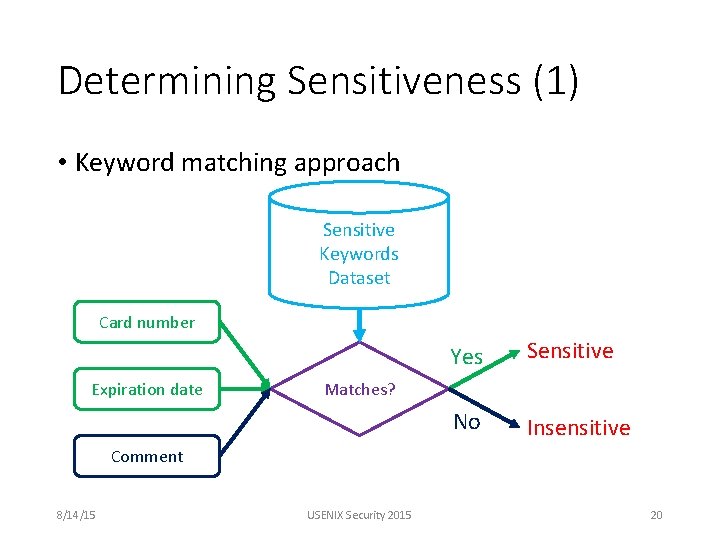
Determining Sensitiveness (1) • Keyword matching approach Sensitive Keywords Dataset Card number Expiration date Yes Sensitive No Insensitive Matches? Comment 8/14/15 USENIX Security 2015 20
Determining Sensitiveness (2) • Why is keyword matching approach effective? • Small screen and short phrases or sentences • We only analyze the most relevant text label 8/14/15 USENIX Security 2015 21
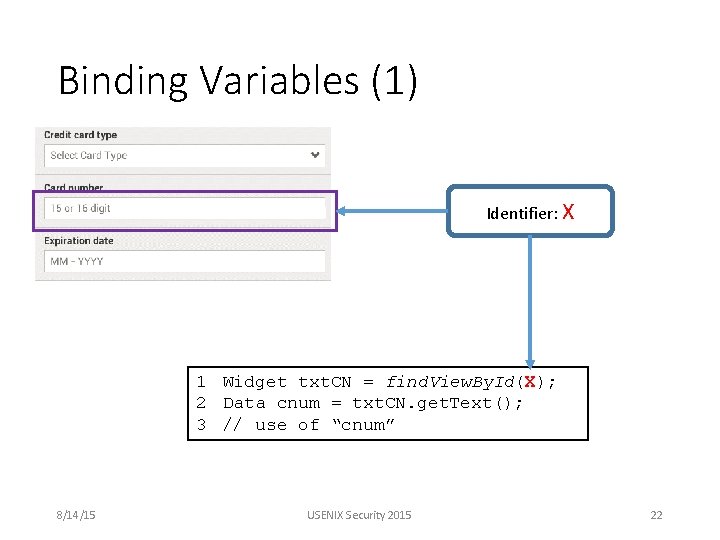
Binding Variables (1) Identifier: X 1 Widget txt. CN = find. View. By. Id(X); 2 Data cnum = txt. CN. get. Text(); 3 // use of “cnum” 8/14/15 USENIX Security 2015 22
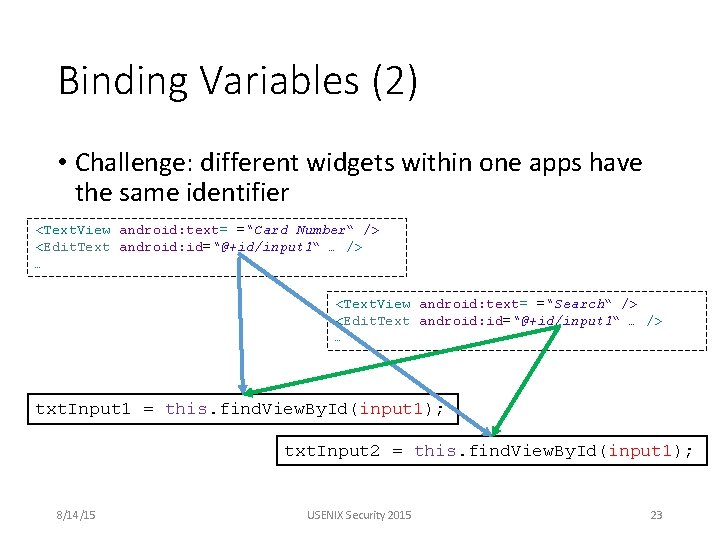
Binding Variables (2) • Challenge: different widgets within one apps have the same identifier <Text. View android: text= =“Card Number“ /> <Edit. Text android: id=“@+id/input 1“ … /> … <Text. View android: text= =“Search“ /> <Edit. Text android: id=“@+id/input 1“ … /> … txt. Input 1 = this. find. View. By. Id(input 1); txt. Input 2 = this. find. View. By. Id(input 1); 8/14/15 USENIX Security 2015 23
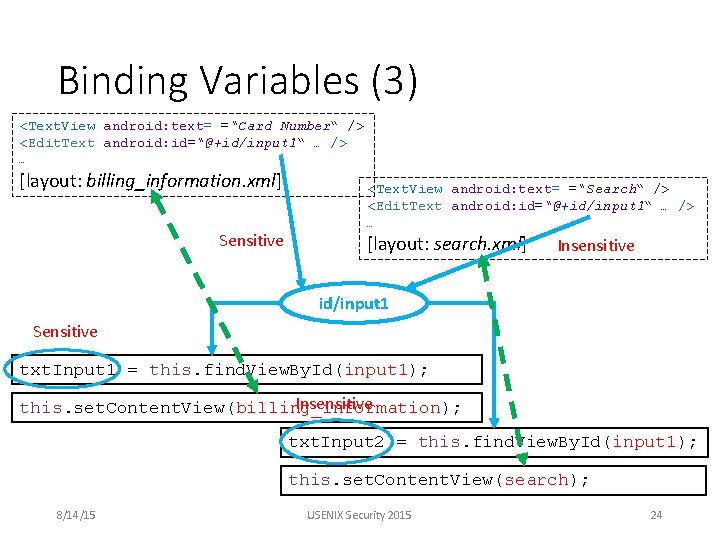
Binding Variables (3) <Text. View android: text= =“Card Number“ /> <Edit. Text android: id=“@+id/input 1“ … /> … [layout: billing_information. xml] Sensitive <Text. View android: text= =“Search“ /> <Edit. Text android: id=“@+id/input 1“ … /> … [layout: search. xml] Insensitive id/input 1 Sensitive txt. Input 1 = this. find. View. By. Id(input 1); Insensitive this. set. Content. View(billing_information); txt. Input 2 = this. find. View. By. Id(input 1); this. set. Content. View(search); 8/14/15 USENIX Security 2015 24
![Implementation & Evaluation • Implemented for Android apps and built on Dalysis[CHEX CCS’ 12],](http://slidetodoc.com/presentation_image_h/3158e74965561352409f1e2eb3dbe3b7/image-26.jpg "Implementation & Evaluation • Implemented for Android apps and built on Dalysis[CHEX CCS’ 12],")
Implementation & Evaluation • Implemented for Android apps and built on Dalysis[CHEX CCS’ 12], IBM WALA and ADT. • Only input fields of type Edit. Text are analyzed, i. e. other user inputs like checkbox are ignored. • Implemented a sensitive user inputs disclosure detection system by combining SUPOR and static taint analysis • 16, 000 apps were evaluated 8/14/15 USENIX Security 2015 25
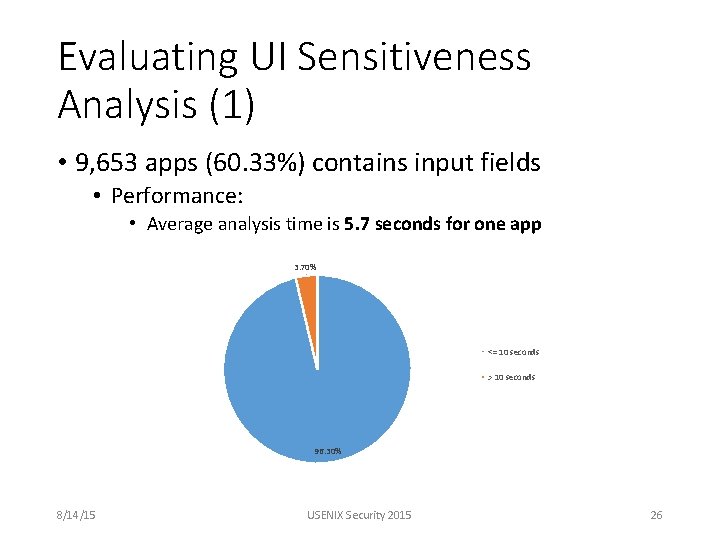
Evaluating UI Sensitiveness Analysis (1) • 9, 653 apps (60. 33%) contains input fields • Performance: • Average analysis time is 5. 7 seconds for one app 3. 70% <= 10 seconds > 10 seconds 96. 30% 8/14/15 USENIX Security 2015 26
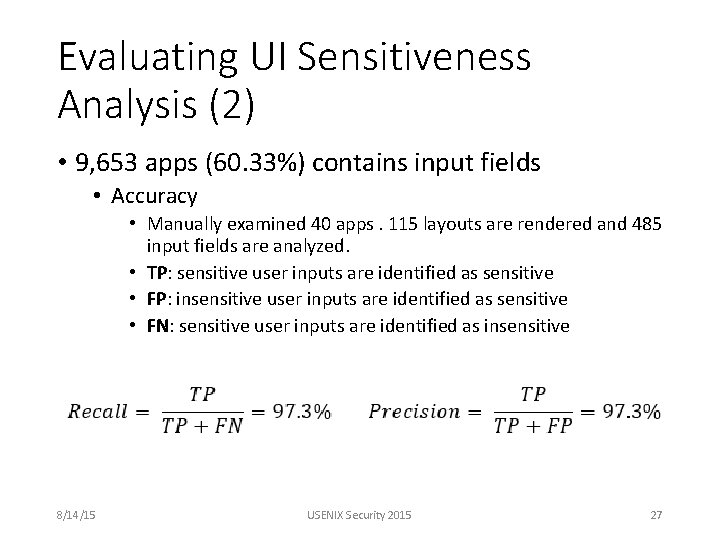
Evaluating UI Sensitiveness Analysis (2) • 9, 653 apps (60. 33%) contains input fields • Accuracy • Manually examined 40 apps. 115 layouts are rendered and 485 input fields are analyzed. • TP: sensitive user inputs are identified as sensitive • FP: insensitive user inputs are identified as sensitive • FN: sensitive user inputs are identified as insensitive 8/14/15 USENIX Security 2015 27
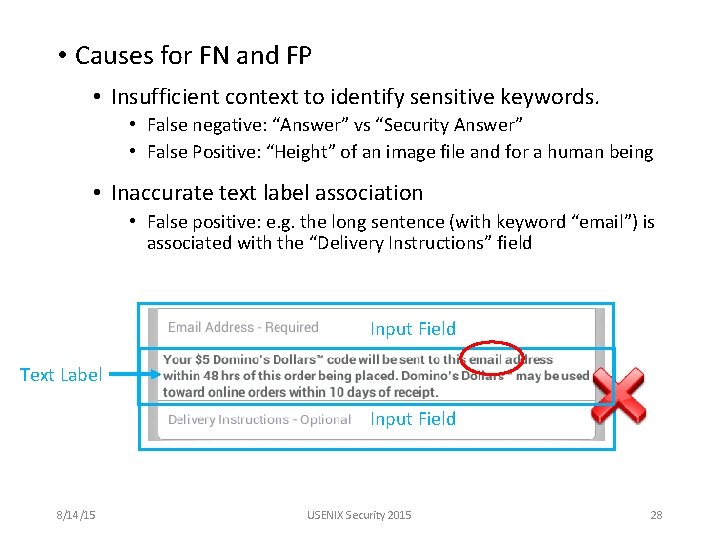
• Causes for FN and FP • Insufficient context to identify sensitive keywords. • False negative: “Answer” vs “Security Answer” • False Positive: “Height” of an image file and for a human being • Inaccurate text label association • False positive: e. g. the long sentence (with keyword “email”) is associated with the “Delivery Instructions” field Input Field Text Label Input Field 8/14/15 USENIX Security 2015 28
Evaluating Disclosure Analysis • For all 16, 000 apps • Throughput: 11. 1 apps/minute • A cluster of 8 servers • 3 apps are analyzed on each server in parallel • Manually examined 104 apps • False positive rate is 8. 7% • Limitations of underlying taint analysis framework • E. g. lack of accurate modeling of arrays 8/14/15 USENIX Security 2015 29
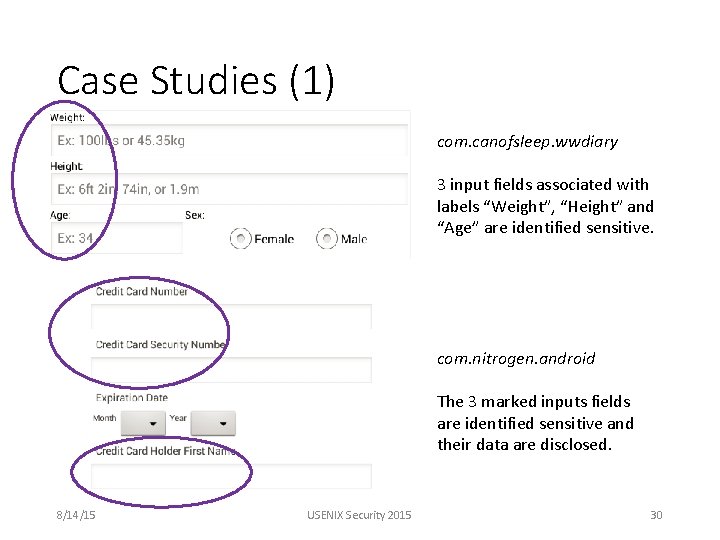
Case Studies (1) com. canofsleep. wwdiary 3 input fields associated with labels “Weight”, “Height” and “Age” are identified sensitive. com. nitrogen. android The 3 marked inputs fields are identified sensitive and their data are disclosed. 8/14/15 USENIX Security 2015 30
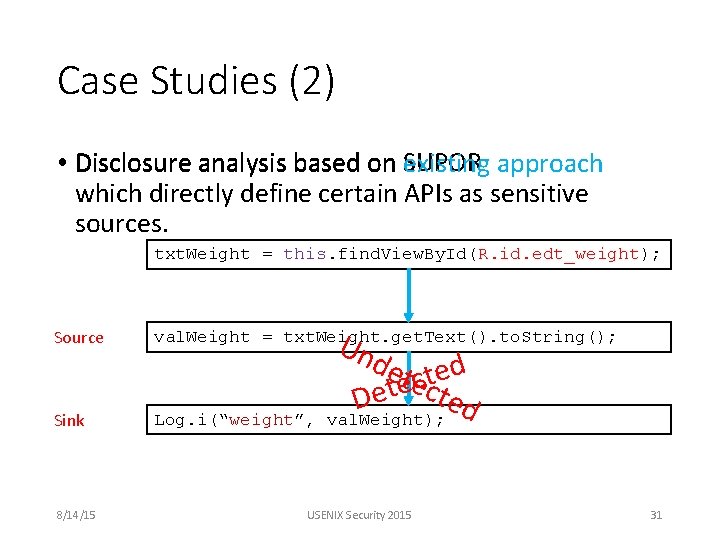
Case Studies (2) • Disclosure analysis based on SUPOR existing approach which directly define certain APIs as sensitive sources. txt. Weight = this. find. View. By. Id(R. id. edt_weight); Un det ted ecct e ed D val. Weight); Source val. Weight = txt. Weight. get. Text(). to. String(); Sink Log. i(“weight”, 8/14/15 USENIX Security 2015 31
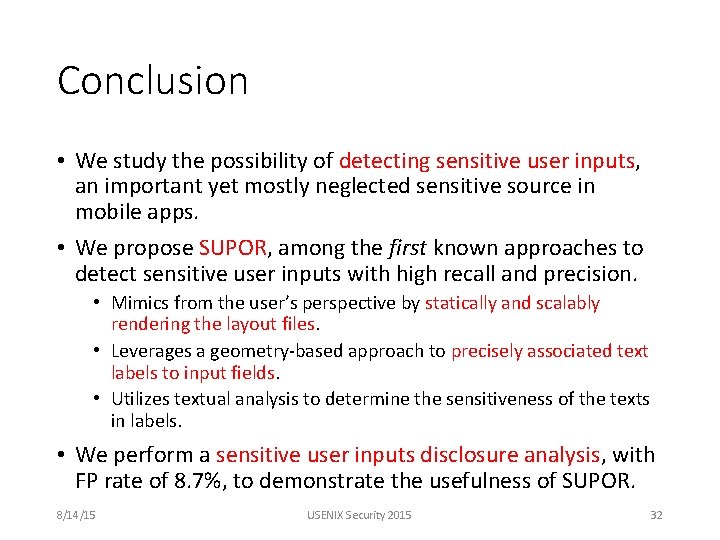
Conclusion • We study the possibility of detecting sensitive user inputs, an important yet mostly neglected sensitive source in mobile apps. • We propose SUPOR, among the first known approaches to detect sensitive user inputs with high recall and precision. • Mimics from the user’s perspective by statically and scalably rendering the layout files. • Leverages a geometry-based approach to precisely associated text labels to input fields. • Utilizes textual analysis to determine the sensitiveness of the texts in labels. • We perform a sensitive user inputs disclosure analysis, with FP rate of 8. 7%, to demonstrate the usefulness of SUPOR. 8/14/15 USENIX Security 2015 32

Thank You! Q&A 8/14/15 USENIX Security 2015 33
Related work • A lot of work focus on privacy disclosure problems on [Flow. Droid predefined sensitive data sources in the phone. PLDI’ 14, Pi. OS NDSS’ 11, AAPL NDSS’ 15] • Flow. Droid employs a limited form of sensitive input fields— password fields. [PLDI’ 14] • As. Droid checks UI text to detect the contradiction between the expected behaviors and program behaviors. [ICSE’ 14] • UIPicker uses supervised learning to collect sensitive keywords and corresponding layouts. It also uses the sibling elements in layout files as the description text for a widget. [USENIX Security’ 15] 8/14/15 USENIX Security 2015 34
Keyword dataset construction • Crawl texts from apps’ resource files • Adapt NLP techniques to extract nouns and noun phrases from the top 5, 000 frequent text lines. • Manually inspect top frequent nouns and noun phrases to identify sensitive keywords. 8/14/15 USENIX Security 2015 35
Why not use XML structure to compute correlation scores? • Many developers defines relative positions of the widgets, which are not what users perceive • XML structure in this case does not guarantee that sibling widgets are physically close. 8/14/15 USENIX Security 2015 36
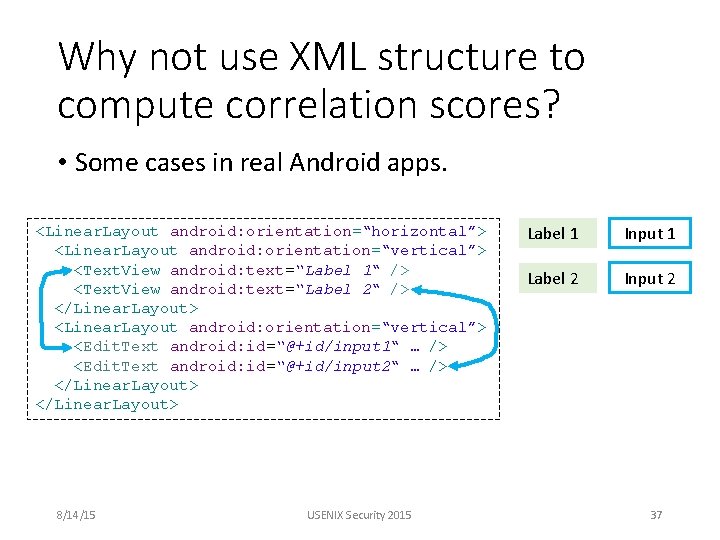
Why not use XML structure to compute correlation scores? • Some cases in real Android apps. <Linear. Layout android: orientation=“horizontal”> <Linear. Layout android: orientation=“vertical”> <Text. View android: text=“Label 1“ /> <Text. View android: text=“Label 2“ /> </Linear. Layout> <Linear. Layout android: orientation=“vertical”> <Edit. Text android: id=“@+id/input 1“ … /> <Edit. Text android: id=“@+id/input 2“ … /> </Linear. Layout> 8/14/15 USENIX Security 2015 Label 1 Input 1 Label 2 Input 2 37
- Slides: 38