
Substation Simulation Testing Demonstration Browser based remote monitoring
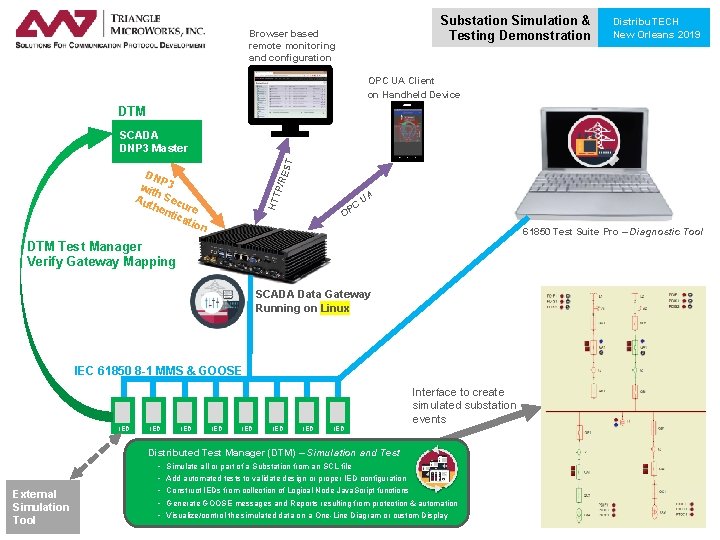
Substation Simulation & Testing Demonstration Browser based remote monitoring and configuration Distribu. TECH New Orleans 2019 OPC UA Client on Handheld Device DTM /RE ST SCADA DNP 3 Master HTT P DN P wit 3 h. S Au the ecure ntic atio n C OP UA 61850 Test Suite Pro – Diagnostic Tool DTM Test Manager Verify Gateway Mapping SCADA Data Gateway Running on Linux IEC 61850 8 -1 MMS & GOOSE IED IED Interface to create simulated substation events Distributed Test Manager (DTM) – Simulation and Test External Simulation Tool - Simulate all or part of a Substation from an SCL file Add automated tests to validate design or proper IED configuration Construct IEDs from collection of Logical Node Java. Script functions Generate GOOSE messages and Reports resulting from protection & automation Visualize/control the simulated data on a One-Line Diagram or custom Display
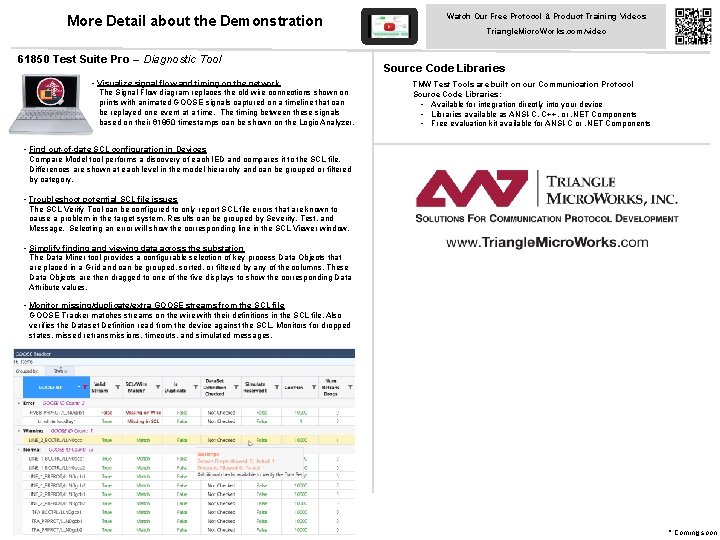
More Detail about the Demonstration 61850 Test Suite Pro – Diagnostic Tool • Visualize signal flow and timing on the network The Signal Flow diagram replaces the old wire connections shown on prints with animated GOOSE signals captured on a timeline that can be replayed one event at a time. The timing between these signals based on their 61850 timestamps can be shown on the Logic Analyzer. Watch Our Free Protocol & Product Training Videos Triangle. Micro. Works. com/video Source Code Libraries TMW Test Tools are built on our Communication Protocol Source Code Libraries: • Available for integration directly into your device • Libraries available as ANSI-C, C++, or. NET Components • Free evaluation kit available for ANSI-C or. NET Components • Find out-of-date SCL configuration in Devices Compare Model tool performs a discovery of each IED and compares it to the SCL file. Differences are shown at each level in the model hierarchy and can be grouped or filtered by category. • Troubleshoot potential SCL file issues The SCL Verify Tool can be configured to only report SCL file errors that are known to cause a problem in the target system. Results can be grouped by Severity, Test, and Message. Selecting an error will show the corresponding line in the SCL Viewer window. • Simplify finding and viewing data across the substation The Data Miner tool provides a configurable selection of key process Data Objects that are placed in a Grid and can be grouped, sorted, or filtered by any of the columns. These Data Objects are then dragged to one of the five displays to show the corresponding Data Attribute values. • Monitor missing/duplicate/extra GOOSE streams from the SCL file GOOSE Tracker matches streams on the wire with their definitions in the SCL file. Also verifies the Dataset Definition read from the device against the SCL. Monitors for dropped states, missed retransmissions, timeouts, and simulated messages. * Coming soon
- Slides: 2