
Subject Name Operating Systems Subject Code 10 CS
• Subject Name: Operating Systems • Subject Code: 10 CS 53 • Prepared By: Mrs. Jisha Jose, Mrs. Thanu Kurian, Mrs. Preethi Sheba Hepsiba • Department: Computer Science and Engineering • Date: 30/08/2014 1/1/2022
Unit- II Process Management • • • Process concept Process scheduling Operations on processes Inter-process communication Multi-threaded programming Overview Multi-threading models Thread libraries Threading issues Process scheduling 1/1/2022
Unit- II Process Management(Contd. . ) • • • Basic concepts Scheduling criteria Scheduling algorithms Multiple-processor scheduling Thread scheduling 1/1/2022
Unit- II Process Management • • • Process concept Process scheduling Operations on processes Inter-process communication Multi-threaded programming Overview Multi-threading models Thread libraries Threading issues Process scheduling 1/1/2022
Process Concept • • The Process State Process Control Block Threads 1/1/2022
Contd. . The Process • An operating system executes a variety of programs: – Batch system executes jobs – Time-shared systems has user programs or tasks • The terms job and process are used interchangeably. • Process – a program in execution • A process includes: Ø Text section – program code Ø Program counter – address of the next instruction to be executed Ø Process stack – temporary data Ø Data section – memory dynamically allocated during process execution 1/1/2022
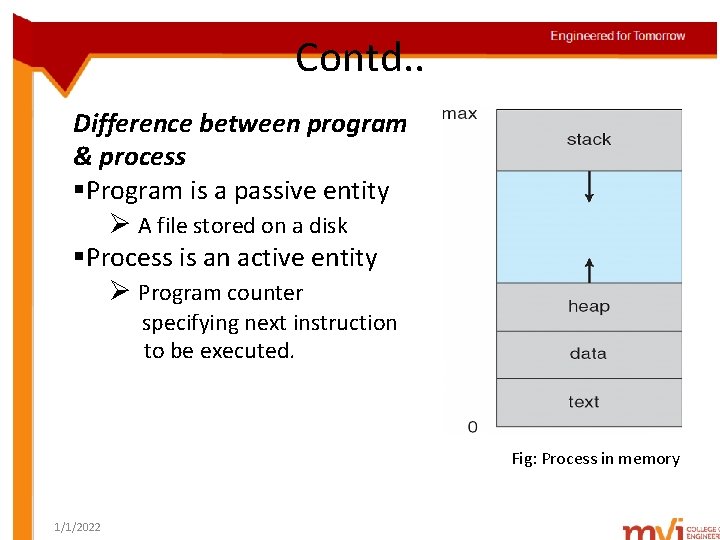
Contd. . Difference between program & process §Program is a passive entity Ø A file stored on a disk §Process is an active entity Ø Program counter specifying next instruction to be executed. Fig: Process in memory 1/1/2022
Contd. . Process State • As a process executes, it changes state • Each process can be in one of the following states : Ø new: The process is being created Ø running: Instructions are being executed Ø waiting: The process is waiting for some event to occur Ø ready: The process is waiting to be assigned to a processor Ø terminated: The process has finished execution 1/1/2022
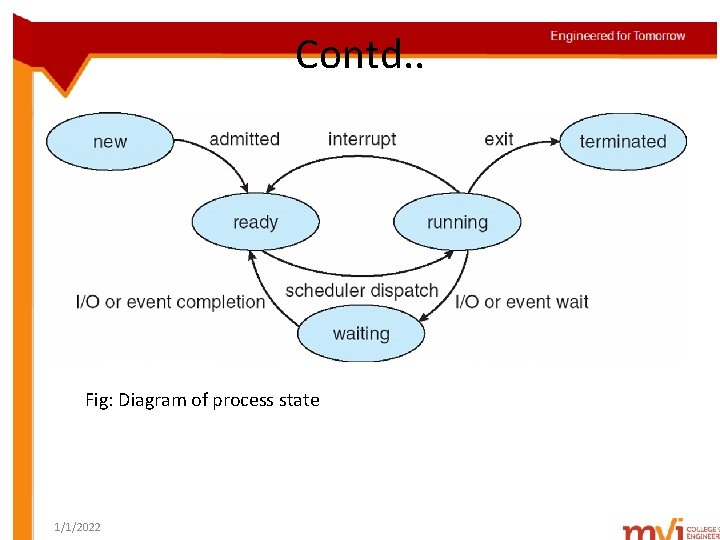
Contd. . Fig: Diagram of process state 1/1/2022
Contd. . Process Control Block § Each process in OS is represented by a process control block(PCB). § Also called as task control block. § A PCB contains following information 1. Process state – new, ready, running, waiting, halted 2. Program counter – Address of next instruction to be executed 3. CPU registers Ø Ø accumulators index-registers stack pointers general-purpose registers 4. CPU scheduling information Ø process priority pointers Ø scheduling queues Ø scheduling parameters 1/1/2022
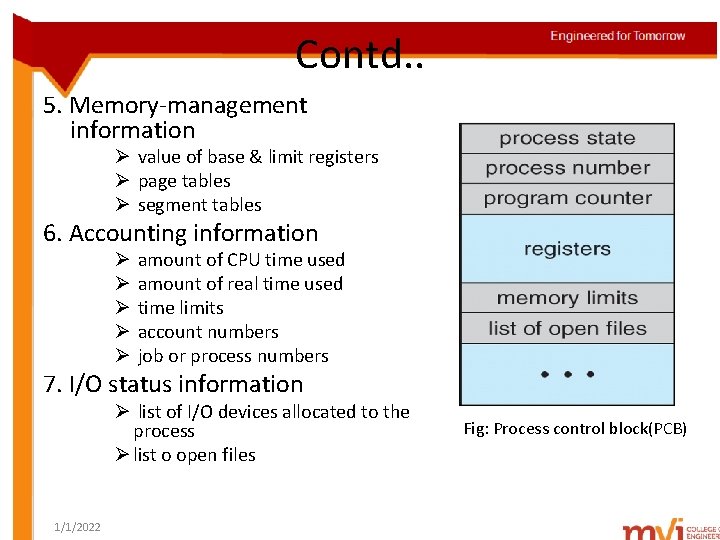
Contd. . 5. Memory-management information Ø value of base & limit registers Ø page tables Ø segment tables 6. Accounting information Ø Ø Ø amount of CPU time used amount of real time used time limits account numbers job or process numbers 7. I/O status information Ø list of I/O devices allocated to the process Ø list o open files 1/1/2022 Fig: Process control block(PCB)
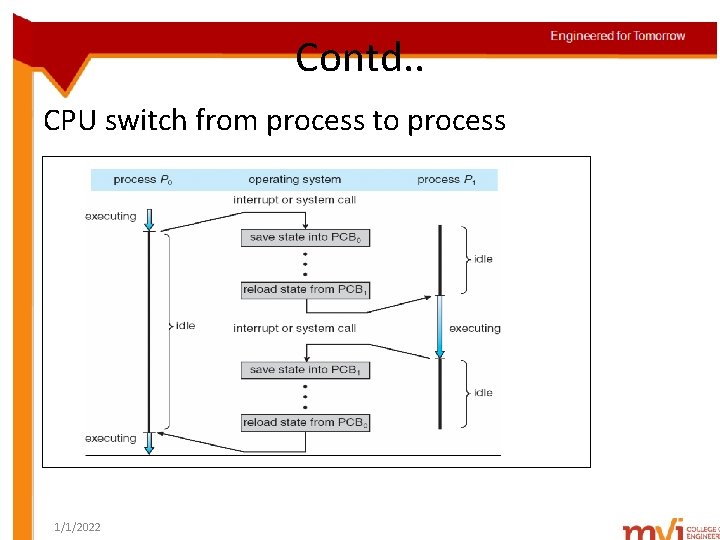
Contd. . CPU switch from process to process 1/1/2022
Contd. . Threads § Process – a program that performs a single thread of execution. § Ex: when a process runs a word-processor program, a single thread of instruction is executed. § Single control thread allows process to execute only one task at a time. § Modern OS allows a process to execute multiple threads at a time. 1/1/2022
Unit- II Process Management • • • Process concept Process scheduling Operations on processes Inter-process communication Multi-threaded programming Overview Multi-threading models Thread libraries Threading issues Process scheduling 1/1/2022
Process Scheduling § Scheduling Queues § Schedulers § Context Switch • Objective of multiprogramming – Maximize CPU utilization by running some process all the time. • Objective of time-sharing – ensure user- system interaction, by frequent switching of processes among CPU. • Process scheduler- selects an available process from a set of available processes for CPU allocation. 1/1/2022
Contd. . Scheduling Queues § Job Queue – As processes enter the system, they are put into job queue. § Ready Queue – Processes residing in main memory, ready and waiting to execute. § Device Queue – List of processes waiting for a particular I/O device. § A ready queue header consists of pointers to first & final PCBs in the list. § Each PCB has a pointer to the next PCB in the ready queue. 1/1/2022
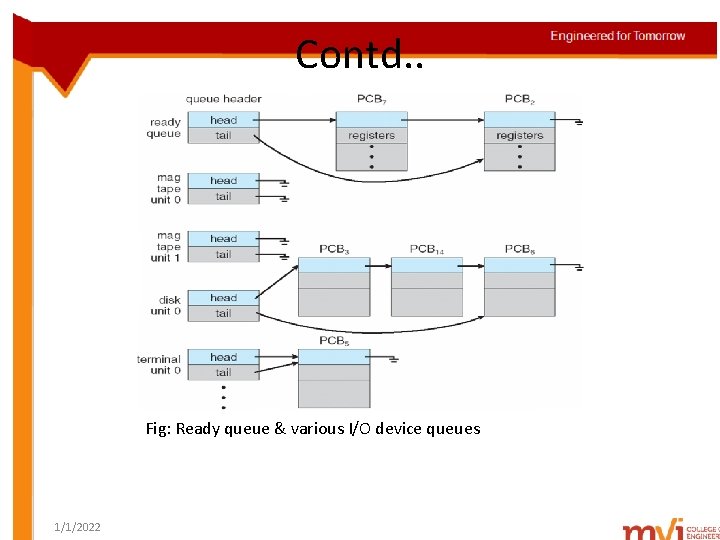
Contd. . Fig: Ready queue & various I/O device queues 1/1/2022
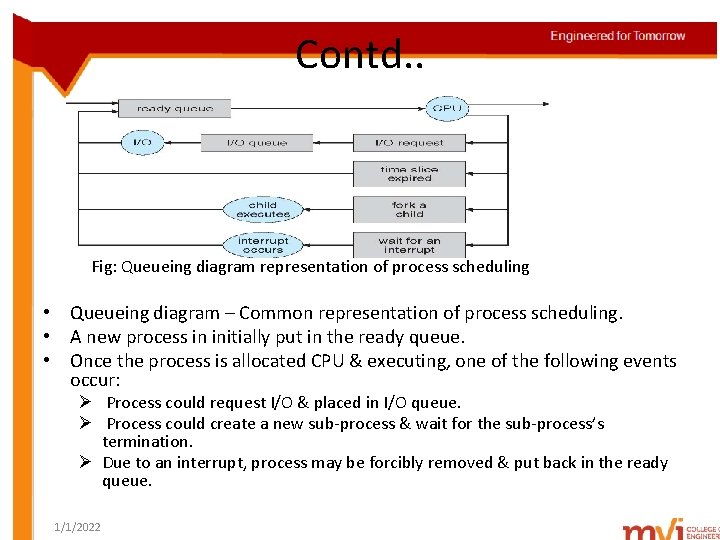
Contd. . Fig: Queueing diagram representation of process scheduling • Queueing diagram – Common representation of process scheduling. • A new process in initially put in the ready queue. • Once the process is allocated CPU & executing, one of the following events occur: Ø Process could request I/O & placed in I/O queue. Ø Process could create a new sub-process & wait for the sub-process’s termination. Ø Due to an interrupt, process may be forcibly removed & put back in the ready queue. 1/1/2022
Contd. . Schedulers § § A process migrates among various scheduling queues, in its lifetime. OS must select processes from these queues in some fashion. Scheduler- carries out this scheduling process. Long-term scheduler Ø Ø Used in a batch system selects processes from job pool & loads them into memory for execution Executes less frequently(every few minutes) Controls the degree of multiprogramming § Short-term scheduler Ø selects process waiting in the ready queue & allocates CPU. Ø executes more frequently(every 100 ms) § I/O-bound process – spends more time doing I/O than computations, § CPU-bound process – spends more time doing computations; few very long CPU bursts 1/1/2022
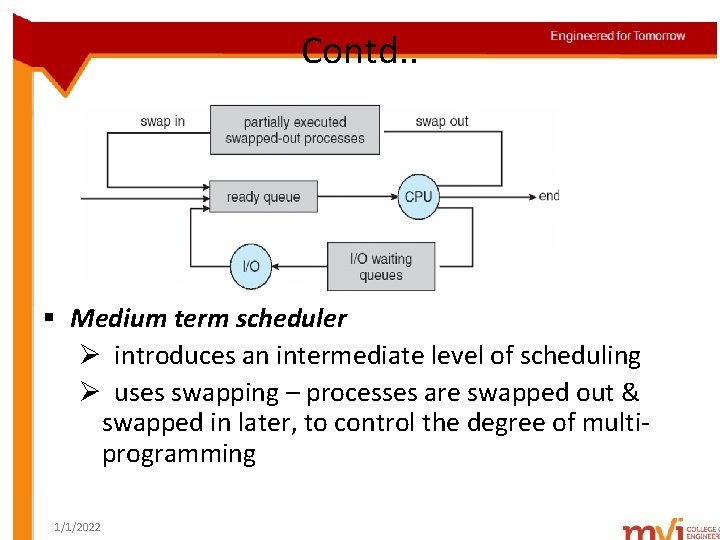
Contd. . § Medium term scheduler Ø introduces an intermediate level of scheduling Ø uses swapping – processes are swapped out & swapped in later, to control the degree of multiprogramming 1/1/2022
Contd. . Context Switch § When an interrupt occurs, the following action take place : Ø System saves the context of the currently executing process & suspends the process temporarily. Ø Transfers control to interrupt-service routine Ø After execution of interrupt service routine, reloads the saved context of the suspended process. Ø The suspended process resumes execution from the last saved state. § This process is called context-switching. • Context of a process represented in the PCB • Context-switch time is overhead; the system does no useful work while switching – The more complex the OS and the PCB -> longer the context switch 1/1/2022
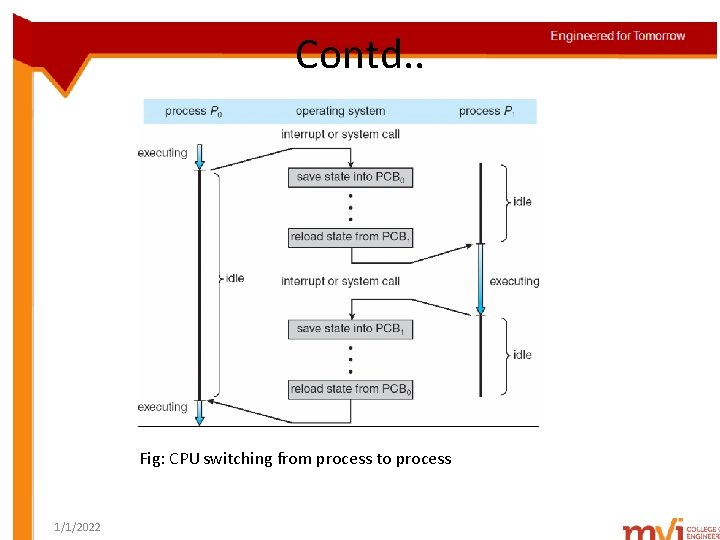
Contd. . Fig: CPU switching from process to process 1/1/2022
Unit- II Process Management • • • Process concept Process scheduling Operations on processes Inter-process communication Multi-threaded programming Overview Multi-threading models Thread libraries Threading issues Process scheduling 1/1/2022
Operations on Processes § Process Creation § Process Termination 1/1/2022
Contd. . Process Creation create_process system call – used to create new processes. Parent process- creating process Children processes- newly created processes Process identifier(pid) – A unique integer used by the OS to identify processes. § When a process creates a new sub-process: § § Ø the sub-process receives the resources directly from the OS or a sub-set from its parent Ø there are 2 possibilities in terms of execution - Parent continues to execute concurrently with its children. - Parent waits until some or all of its children have terminated. 1/1/2022
Contd. . Ø 2 possibilities in terms of address space of the new process : - child process has the same program & data as parent. - child process has a new program loaded into it. 1/1/2022
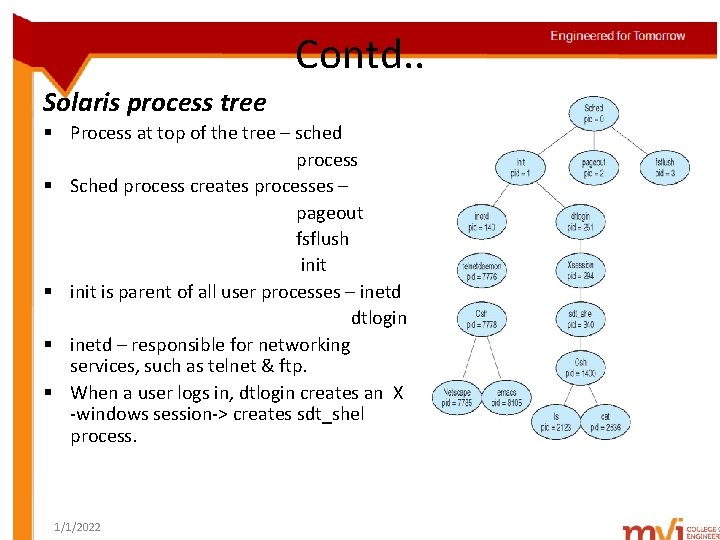
Contd. . Solaris process tree § Process at top of the tree – sched process § Sched process creates processes – pageout fsflush init § init is parent of all user processes – inetd dtlogin § inetd – responsible for networking services, such as telnet & ftp. § When a user logs in, dtlogin creates an X -windows session-> creates sdt_shel process. 1/1/2022
Contd. . fork() system call § Used to create a new process. § New process consists of a copy of the address space of the original process. § Allows parent process to communicate easily with the child process. § Returns 0 to a new child process & non-zero pid to the parent of the child process. exec() system call § Used after the fork() system call, to replace process’s memory space with a new program § Parent can create more children or issue a wait() system call to move off the ready queue. 1/1/2022
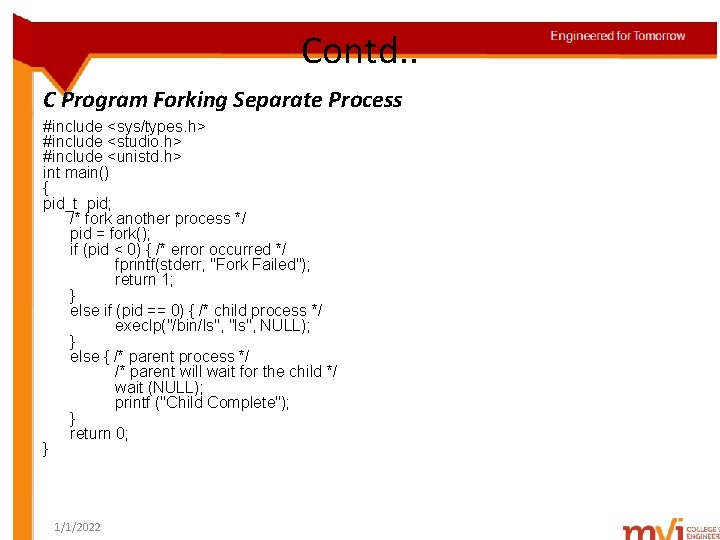
Contd. . C Program Forking Separate Process #include <sys/types. h> #include <studio. h> #include <unistd. h> int main() { pid_t pid; /* fork another process */ pid = fork(); if (pid < 0) { /* error occurred */ fprintf(stderr, "Fork Failed"); return 1; } else if (pid == 0) { /* child process */ execlp("/bin/ls", "ls", NULL); } else { /* parent process */ /* parent will wait for the child */ wait (NULL); printf ("Child Complete"); } return 0; } 1/1/2022
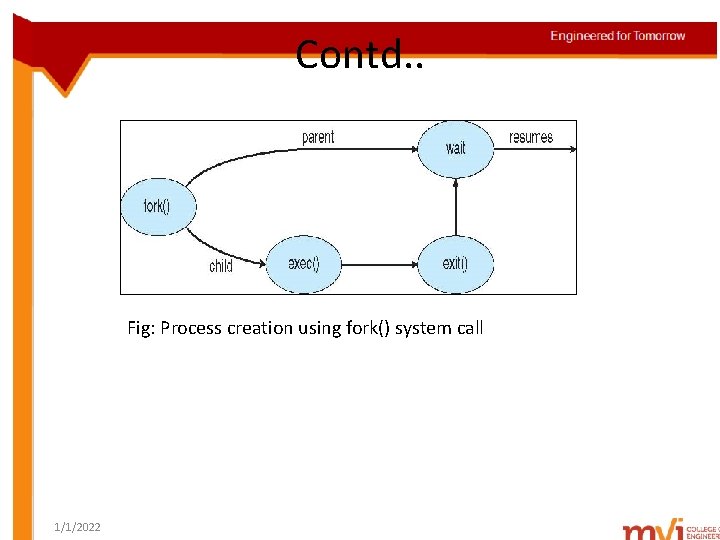
Contd. . Fig: Process creation using fork() system call 1/1/2022
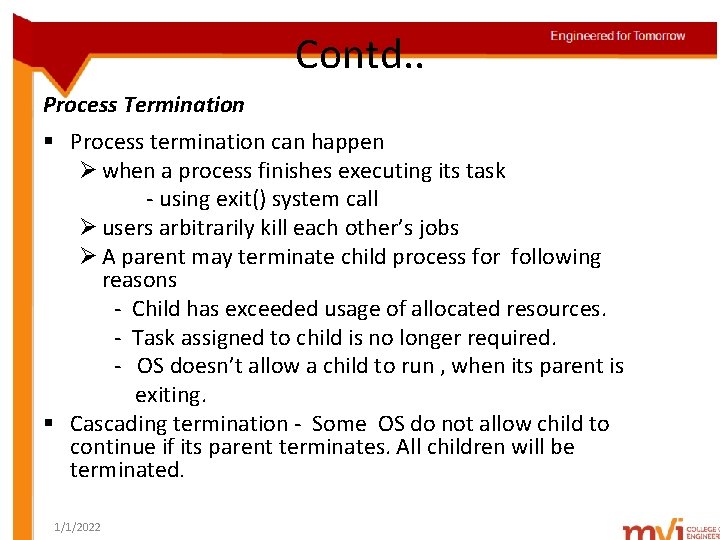
Contd. . Process Termination § Process termination can happen Ø when a process finishes executing its task - using exit() system call Ø users arbitrarily kill each other’s jobs Ø A parent may terminate child process for following reasons - Child has exceeded usage of allocated resources. - Task assigned to child is no longer required. - OS doesn’t allow a child to run , when its parent is exiting. § Cascading termination - Some OS do not allow child to continue if its parent terminates. All children will be terminated. 1/1/2022
Unit- II Process Management • • • Process concept Process scheduling Operations on processes Inter-process communication Multi-threaded programming Overview Multi-threading models Thread libraries Threading issues Process scheduling 1/1/2022
Inter-process Communication § Processes executing concurrently can be Ø independent – if a process can neither affect nor be affected by other executing processes. Ø co-operating – if a process affects or be affected by other executing processes. § Reasons for having co-operative processes Ø Ø 1/1/2022 Information sharing Computation speedup Modularity Convenience
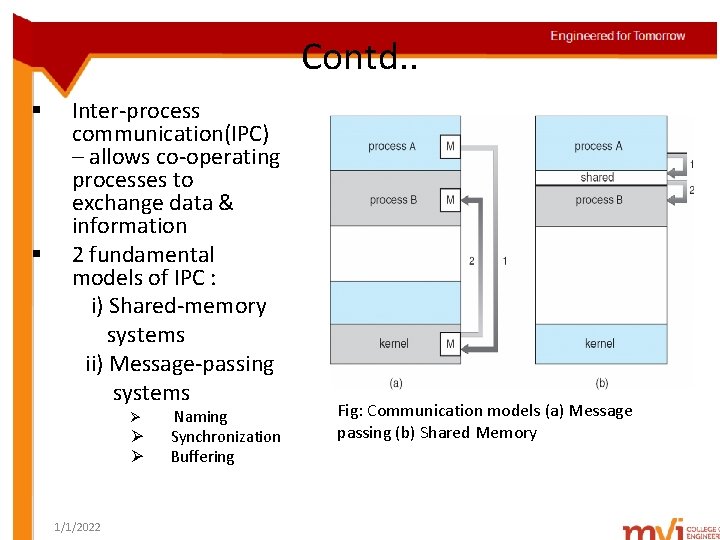
Contd. . § § Inter-process communication(IPC) – allows co-operating processes to exchange data & information 2 fundamental models of IPC : i) Shared-memory systems ii) Message-passing systems Ø Ø Ø 1/1/2022 Naming Synchronization Buffering Fig: Communication models (a) Message passing (b) Shared Memory
Contd. . Shared-Memory Systems § Requires communicating processes to establish a region of shared memory. § If process A wants to communicate with process B, then process A should attach itself to the address space of process B. § Processes can exchange information, by reading & writing data in the shared areas. Producer – Consumer problem § A producer process produces information, consumed by consumer process. § Ex: Web server produces HTML files & images, consumed by client web browser. § Problem- Production > Consumption Production < Consumption 1/1/2022
Contd. . Solution to producer-consumer problem § Use buffers to fill items produced and consumed. § Two types of buffers can be used i)unbounded buffer – no limit on the buffer size - consumer may have to wait - producers can always produce new items. ii)bounded buffer - fixed buffer size - consumer must wait if buffer is empty - producer must wait if buffer is full 1/1/2022
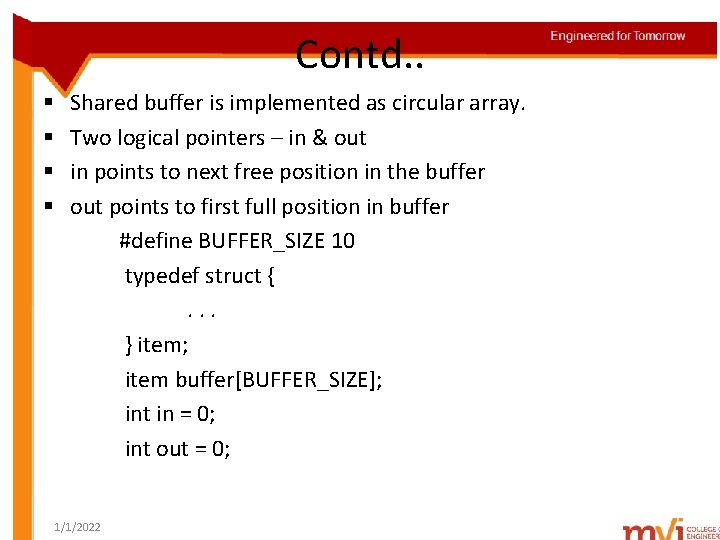
Contd. . § § Shared buffer is implemented as circular array. Two logical pointers – in & out in points to next free position in the buffer out points to first full position in buffer #define BUFFER_SIZE 10 typedef struct {. . . } item; item buffer[BUFFER_SIZE]; int in = 0; int out = 0; 1/1/2022
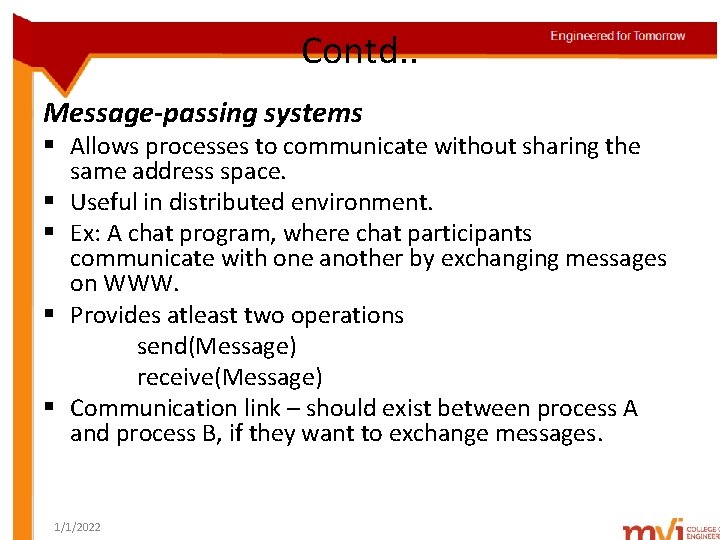
Contd. . Message-passing systems § Allows processes to communicate without sharing the same address space. § Useful in distributed environment. § Ex: A chat program, where chat participants communicate with one another by exchanging messages on WWW. § Provides atleast two operations send(Message) receive(Message) § Communication link – should exist between process A and process B, if they want to exchange messages. 1/1/2022
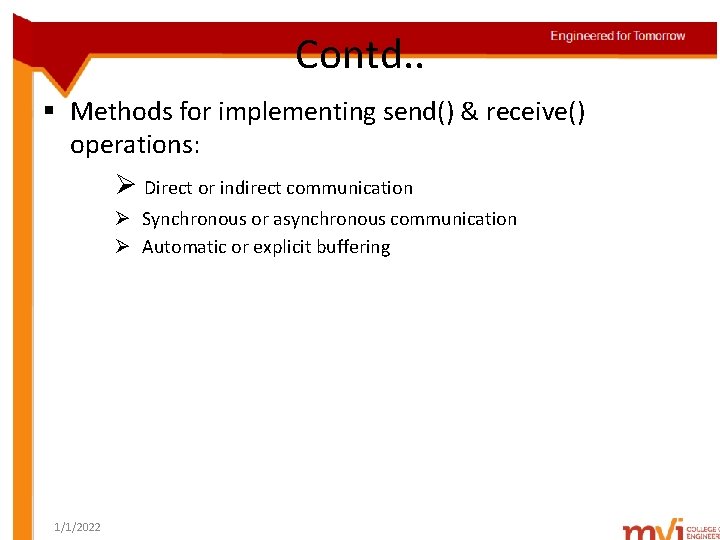
Contd. . § Methods for implementing send() & receive() operations: Ø Direct or indirect communication Ø Synchronous or asynchronous communication Ø Automatic or explicit buffering 1/1/2022
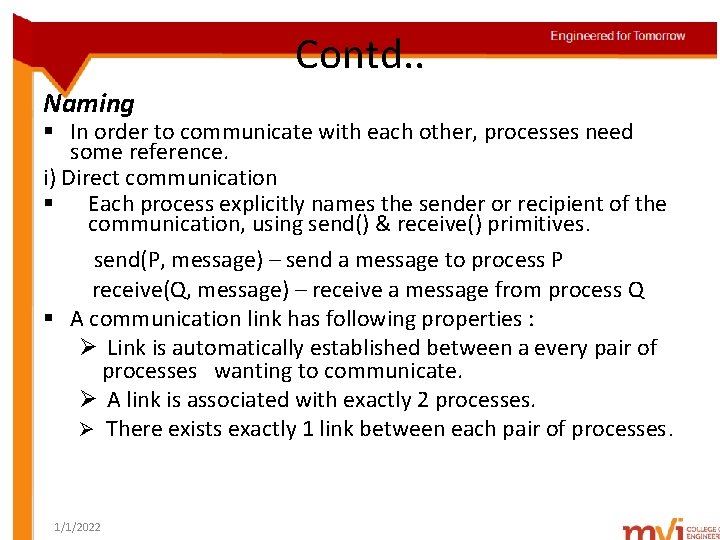
Contd. . Naming § In order to communicate with each other, processes need some reference. i) Direct communication § Each process explicitly names the sender or recipient of the communication, using send() & receive() primitives. send(P, message) – send a message to process P receive(Q, message) – receive a message from process Q § A communication link has following properties : Ø Link is automatically established between a every pair of processes wanting to communicate. Ø A link is associated with exactly 2 processes. Ø There exists exactly 1 link between each pair of processes. 1/1/2022
Contd. . ii) Indirect communication § Messages are sent to & received from mailboxes or ports. § Mailbox – an object where messages can be place into and removed from § 2 processes can communicate only, if they have a shared mailbox. § send() & receive() primitives are defined as: Ø send(A, message) – send a message to mailbox A Ø receive(A, message) – receive a message from mailbox A § A communication link has following properties: Ø Link is established between a pair of processes only, if they have a shared mailbox. Ø A link may be associated with more than 2 processes. Ø No. of links exist between each pair of processes, each link corresponding to one mailbox. 1/1/2022
Contd. . Synchronization § Communication between processes are through calls to send() & receive() primitives. § Message passing can be of following types: Ø Blocking send – sending process is blocked until message received by receiving process or mailbox. Ø Non-blocking send – sending process sends message & resumes operation Ø Blocking receive – receiver blocks until message is available Ø Non-blocking receive – receiver retrieves either a valid message or null 1/1/2022
Contd. . Buffering § Messages exchanged between communicating processes reside in a temporary queue. § Each queue can be implemented as: Ø Zero capacity - Queue has a maximum length of zero - link cannot have messages waiting in it. Ø Bounded capacity - Queue has finite length n. - At most, n messages can reside in it. Ø Unbounded capacity - Queue’s length is infinite - Any no. of messages can wait in it. 1/1/2022
Unit- II Process Management • • • Process concept Process scheduling Operations on processes Inter-process communication Multi-threaded programming Overview Multi-threading models Thread libraries Threading issues Process scheduling 1/1/2022
Multi-threaded Programming Overview § Thread – basic unit of CPU utilization § Comprises – a thread ID - a program counter - a register set - a stack § Shares with other threads belonging to the same process – its code section - its data section - other OS resources( open files & signals) § Single-threaded process – A traditional process having a single thread of control, can perform one task at a time. § Multi-threaded process – Process having multiple threads of control, can perform multiple tasks at a time. 1/1/2022
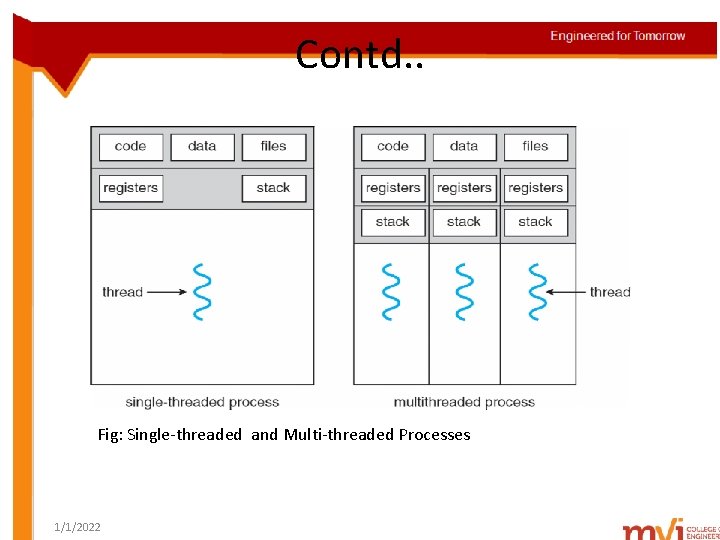
Contd. . Fig: Single-threaded and Multi-threaded Processes 1/1/2022
Motivation § A single application may be required to perform several similar tasks. § Ex: A web server receives requests for web pages from multiple clients. § Solution – For each request, the server creates a separate process to service that request. § Process creation is time-consuming & resource intensive. § One way to overcome- Use a single process with multiple threads, one thread for each request. § Most OS kernels are multi-threaded. Ø Solaris, Linux 1/1/2022
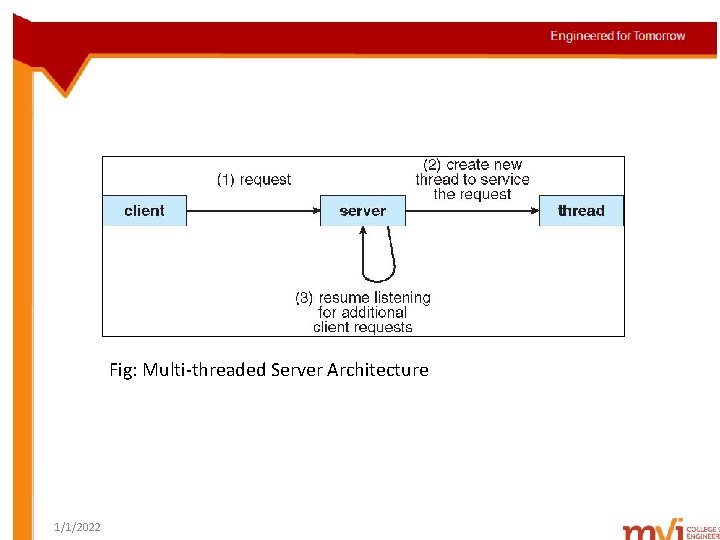
Fig: Multi-threaded Server Architecture 1/1/2022
Benefits of multi-threaded programming 1. Responsiveness Ø A program with multiple threads can run, even when part of it is blocked or performing a lengthy operation. Ø Ex: A multi-threaded web browser allows user interaction in one thread, while uploading an image in another thread. 2. Resource Sharing Ø Resource sharing techniques such as shared memory or message passing are arranged by the programmer. Ø Threads share memory & data of processes to which they belong. 1/1/2022
3. Economy Ø Process creation is expensive in terms of memory & resource allocation. Ø Creating & context-switching threads, is more economical, as threads share resources of the process. 4. Scalability 4. Ø 1/1/2022 A single-threaded process can run only on one processor, even if there are multiple processors. A multi-threaded process can run parallel on different processors.
Multi-core programming Placing multiple computing cores on a single chip. Each core appears as a separate processor to the OS. Consider an application with four threads. On a system with single core, only one thread can be executed at a time. § On a system with multiple cores, threads run in parallel. § Each core is assigned a separate thread. § Challenges in multi-core programming § § Ø Ø Ø 1/1/2022 Dividing activities Balance Data splitting Data dependency Testing and Debugging
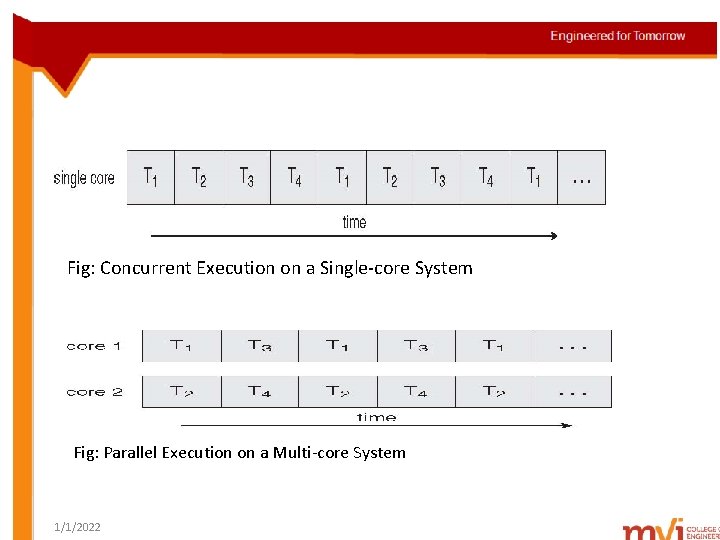
Fig: Concurrent Execution on a Single-core System Fig: Parallel Execution on a Multi-core System 1/1/2022
Unit- II Process Management • • • Process concept Process scheduling Operations on processes Inter-process communication Multi-threaded programming Overview Multi-threading models Thread libraries Threading issues Process scheduling 1/1/2022
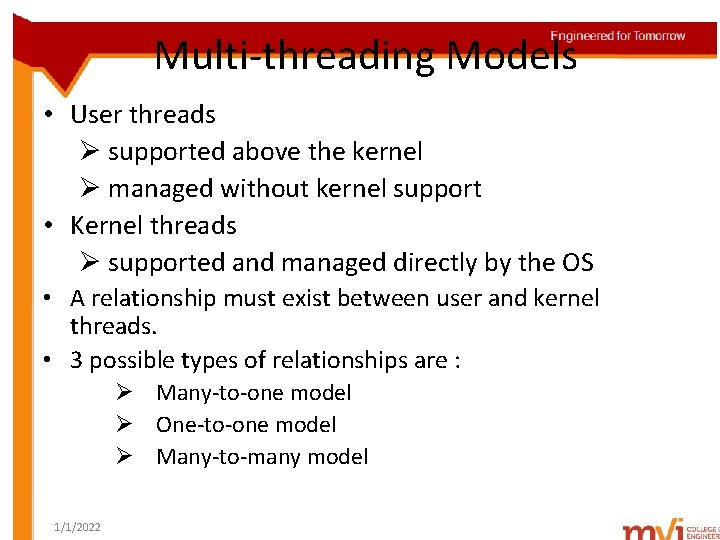
Multi-threading Models • User threads Ø supported above the kernel Ø managed without kernel support • Kernel threads Ø supported and managed directly by the OS • A relationship must exist between user and kernel threads. • 3 possible types of relationships are : Ø Many-to-one model Ø One-to-one model Ø Many-to-many model 1/1/2022
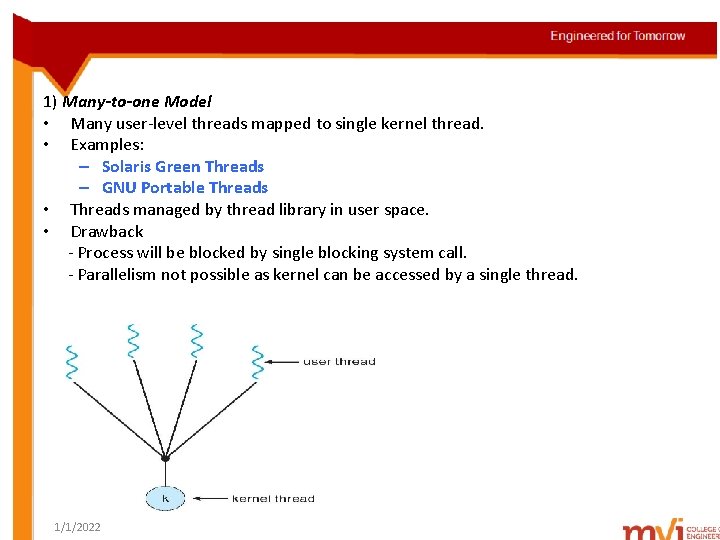
1) Many-to-one Model • Many user-level threads mapped to single kernel thread. • Examples: – Solaris Green Threads – GNU Portable Threads • Threads managed by thread library in user space. • Drawback - Process will be blocked by single blocking system call. - Parallelism not possible as kernel can be accessed by a single thread. 1/1/2022
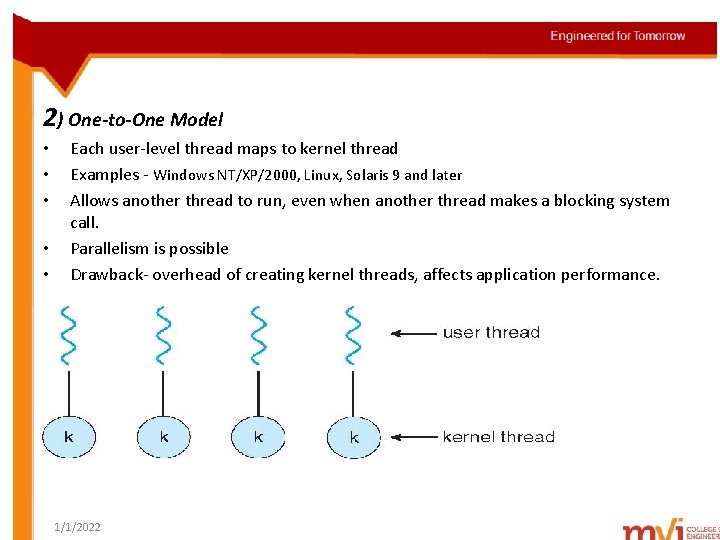
2) One-to-One Model • • • Each user-level thread maps to kernel thread Examples - Windows NT/XP/2000, Linux, Solaris 9 and later Allows another thread to run, even when another thread makes a blocking system call. Parallelism is possible Drawback- overhead of creating kernel threads, affects application performance. 1/1/2022
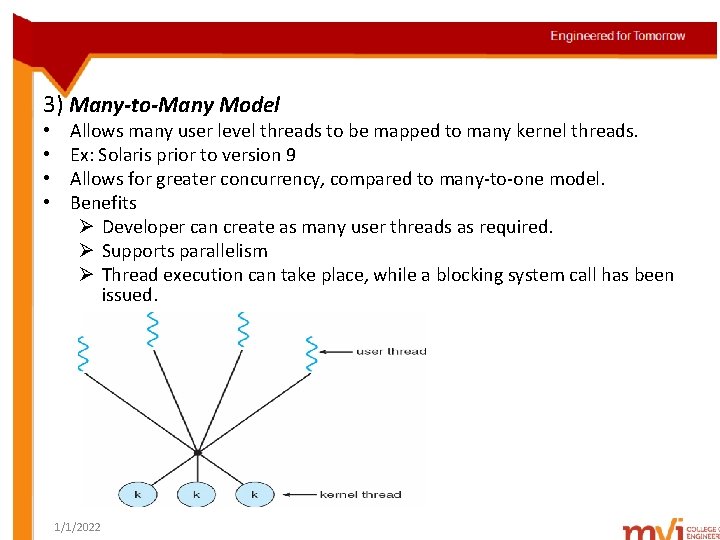
3) Many-to-Many Model • • Allows many user level threads to be mapped to many kernel threads. Ex: Solaris prior to version 9 Allows for greater concurrency, compared to many-to-one model. Benefits Ø Developer can create as many user threads as required. Ø Supports parallelism Ø Thread execution can take place, while a blocking system call has been issued. 1/1/2022
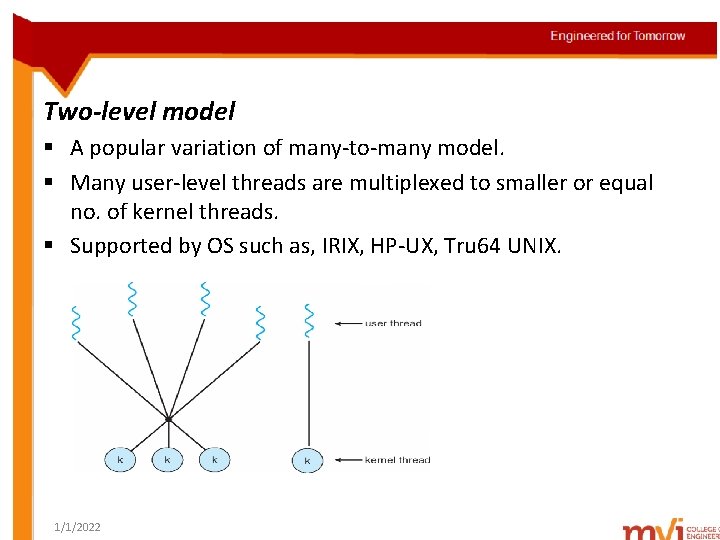
Two-level model § A popular variation of many-to-many model. § Many user-level threads are multiplexed to smaller or equal no. of kernel threads. § Supported by OS such as, IRIX, HP-UX, Tru 64 UNIX. 1/1/2022
Unit- II Process Management • • • Process concept Process scheduling Operations on processes Inter-process communication Multi-threaded programming Overview Multi-threading models Thread libraries Threading issues Process scheduling 1/1/2022
Thread Libraries • Thread library provides programmer with API for creating and managing threads. • Two primary ways of implementing – Library entirely in user space – Kernel-level library supported by the OS • 3 thread libraries in use today: i) POSIX Pthreads ii) Win 32 iii) Java 1/1/2022
1. Pthreads • Refers to POSIX standard (IEEE 1003. 1 c) API for thread creation and synchronization. • Specification for thread behavior, not an implementation. • Following C program, demonstrates basic Pthreads API, for constructing a multi-threaded program. • This program calculates the summation of a nonnegative integer in a separate thread. • All Pthreads program must include the pthread. h header file. 1/1/2022
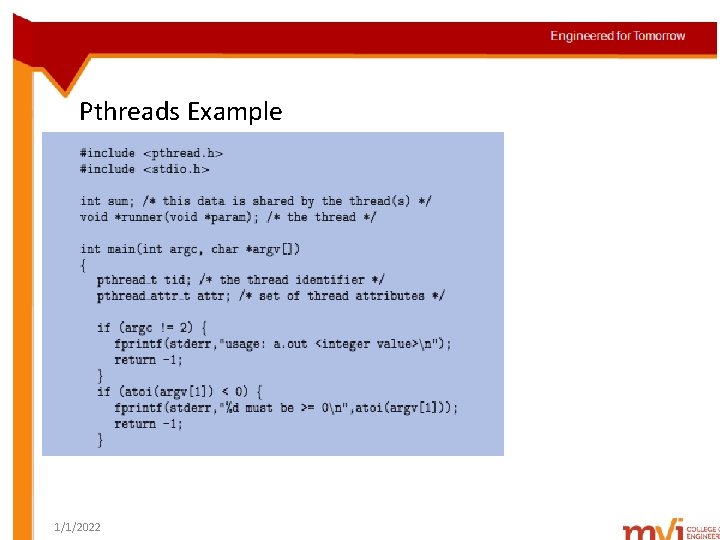
Pthreads Example 1/1/2022

1/1/2022
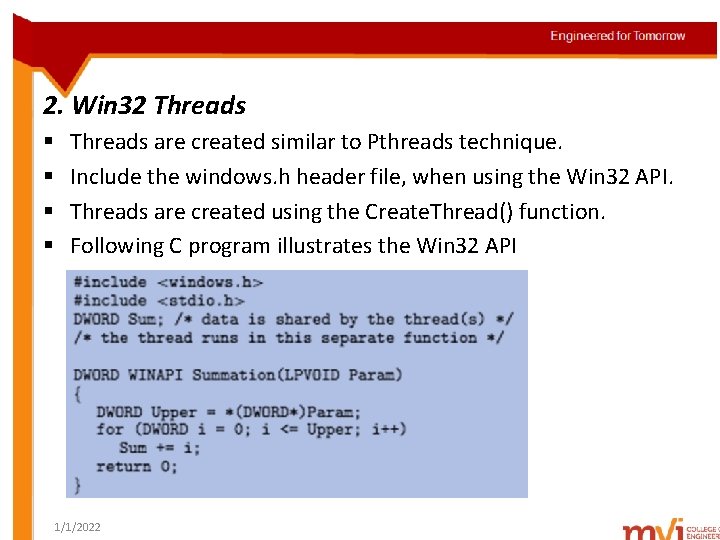
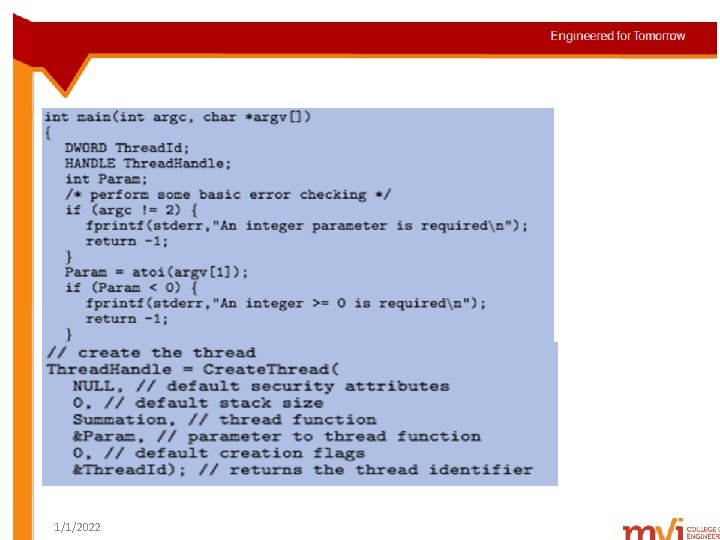
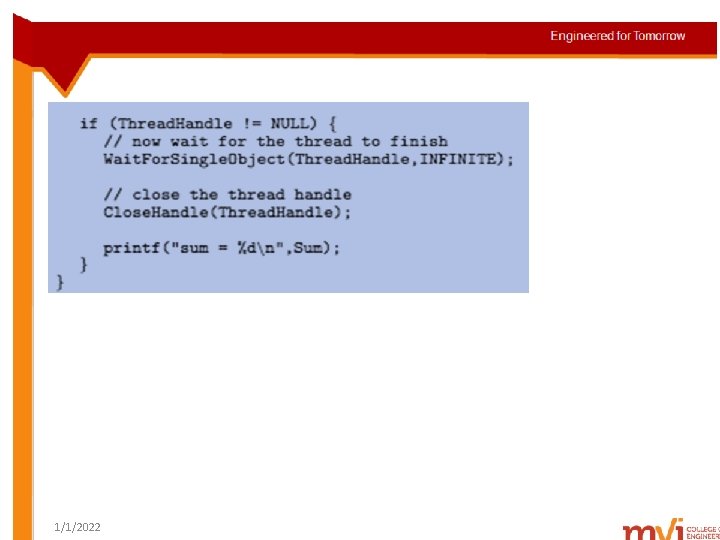
2. Win 32 Threads § § Threads are created similar to Pthreads technique. Include the windows. h header file, when using the Win 32 API. Threads are created using the Create. Thread() function. Following C program illustrates the Win 32 API 1/1/2022
1/1/2022
1/1/2022
3. Java Threads • Threads are the fundamental model of program execution in a Java program. • A simple Java program runs as a single thread in the JVM. • Techniques for creating threads in a Java program: – Extending Thread class & over-riding run() method. – Implementing the Runnable interface 1/1/2022
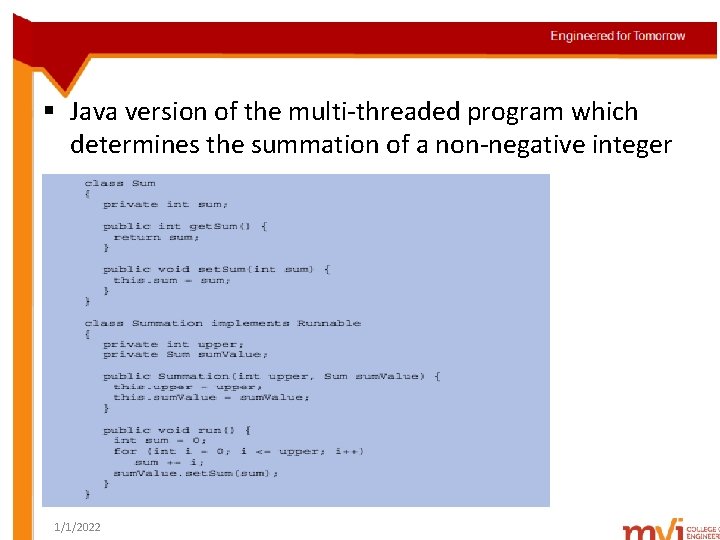
§ Java version of the multi-threaded program which determines the summation of a non-negative integer 1/1/2022
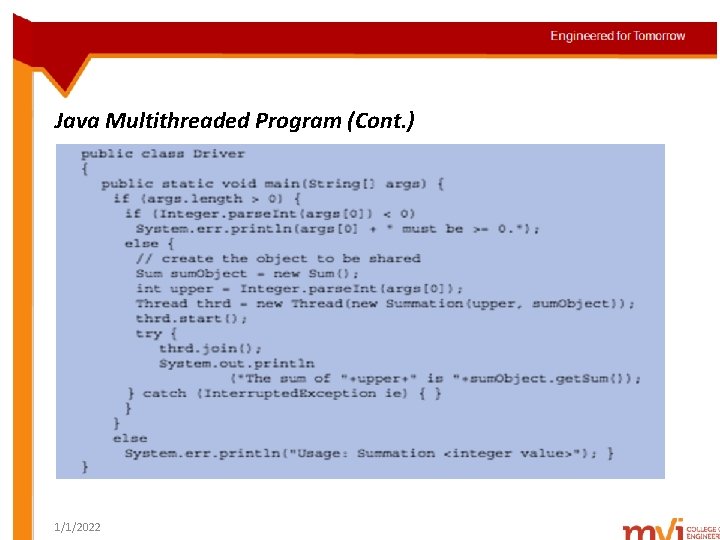
Java Multithreaded Program (Cont. ) 1/1/2022
Unit- II Process Management • • • Process concept Process scheduling Operations on processes Inter-process communication Multi-threaded programming Overview Multi-threading models Thread libraries Threading issues Process scheduling 1/1/2022
Threading Issues • • • The fork() & exec() system calls Cancellation Signal Handling Thread Pools Thread-Specific Data Scheduler Activations 1/1/2022
The fork( ) & exec( ) system calls § Q: Does fork() duplicate only the calling thread or all threads? A: Some UNIX systems have two versions of fork( ) - fork( ) which duplicates all threads - fork( ) which duplicates only the thread making the system call Based on the application, appropriate version of fork() is chosen. § When an exec() system call is invoked - program specified in the parameter to exec() will replace the entire process(including all threads) 1/1/2022
Thread Cancellation § Task of terminating a thread before its completion. § Ex: Multiple threads are performing search operation, & one thread returns the result. Remaining threads will be canceled. § Target thread – A thread that is to be canceled § Cancellation of a thread occur in 2 scenarios: i) Asynchronous cancellation – One thread immediately terminates the target thread. ii) Deferred cancellation – Target thread periodically checks, whether it should terminate. 1/1/2022
Signal Handling § Used in UNIX systems, to notify a process about the occurrence of a particular event. § A signal – synchronous or asynchronous follow the same pattern : Ø A signal is generated by the occurrence of a particular event. Ø A generated signal is delivered to a process. Ø Once delivered, the signal must be handled. § Example of synchronous signals Ø illegal memory access Ø division by 0 1/1/2022
§ Example of asynchronous signals Ø terminating a process with specific keystrokes(Ctrl C) Ø expiry of a timer § A signal may be handled by 1 of the possible handlers: Ø A default signal handler Ø A user-defined signal handler § Default signal handler - Every signal has a defaultsignal handler, run by the kernel § User-defined signal handler – invoked deliberately to handle a signal, over-rides the default signal handler. 1/1/2022
Q: How are signals handled in single-threaded programs & multi-threaded programs? A: In a single-threaded program, signals are directly delivered to the process. § In a multi-threaded program, following options exist: Ø Ø 1/1/2022 Deliver the signal to its applying thread Deliver the signal to every thread in the process Deliver the signal to certain threads in the process Assign a specific read to receive all signals for the process
Thread Pools § A multi-threaded server has potential problems : Ø After incurring overhead involved in thread creation, the thread is discarded. Ø Unlimited threads exhaust system resources(CPU time, memory). § Solution to this problem – A Thread Pool § Thread pool – At process startup, no. of threads are created & placed into a pool, where they wait for work. Q: How does this work? A: When a server receives a request, it awakens a thread from this pool & passes the request for service. § After completion of service, the thread returns to pool & waits for more work. 1/1/2022
§ If pool contains no available thread, server waits until, a thread becomes free. § Benefits Ø Servicing a request with an existing thread, is faster than waiting to create a thread. Ø Limits the no. of threads that exist at any one point. 1/1/2022
Thread-Specific Data § Threads belonging to a process, share the data of the process. § In some situations, thread might need its own copy of certain data. § We call such data – thread specific data. § Ex: In a transaction-processing system, each transaction has a unique identifier. § Thread-specific data is used to associate each thread with its unique identifier. 1/1/2022
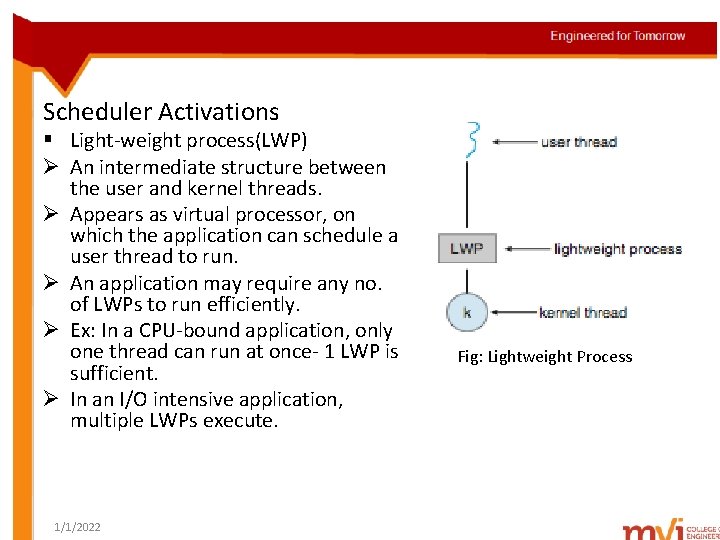
Scheduler Activations § Light-weight process(LWP) Ø An intermediate structure between the user and kernel threads. Ø Appears as virtual processor, on which the application can schedule a user thread to run. Ø An application may require any no. of LWPs to run efficiently. Ø Ex: In a CPU-bound application, only one thread can run at once- 1 LWP is sufficient. Ø In an I/O intensive application, multiple LWPs execute. 1/1/2022 Fig: Lightweight Process
§ Scheduler Activation A scheme for communication between the user-thread library and the kernel. Q: How does it work? A: The kernel provides an application with a set of LWPs, which it can use for scheduling of threads. Kernel informs the application about certain events – known as upcall procedure. Upcalls are handled by the thread library with an upcall handler. 1/1/2022
• Ex: Suppose an application thread is about to block, the following events occur : • Kernel makes an upcall to the application informing a possibility of blocking. • Kernel allocates a new LWP to the application. • Application runs an upcall handler on the new LWP, which saves the blocking thread’s state. • Upcall handler schedules another thread to run on the new LWP. 1/1/2022
Unit- II Process Management • • • Process concept Process scheduling Operations on processes Inter-process communication Multi-threaded programming Overview Multi-threading models Thread libraries Threading issues Process scheduling 1/1/2022
Process Scheduling Basic concepts § § CPU - I/O Burst Cycle CPU scheduler Pre-emptive Scheduling Dispatcher 1/1/2022
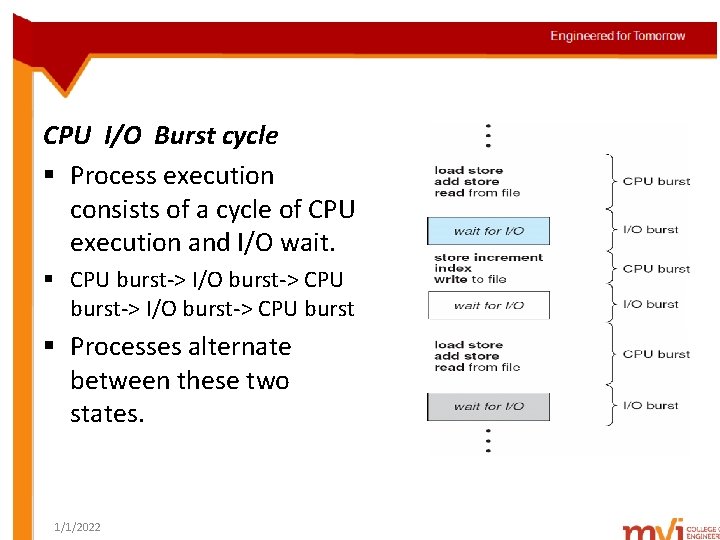
CPU I/O Burst cycle § Process execution consists of a cycle of CPU execution and I/O wait. § CPU burst-> I/O burst-> CPU burst § Processes alternate between these two states. 1/1/2022
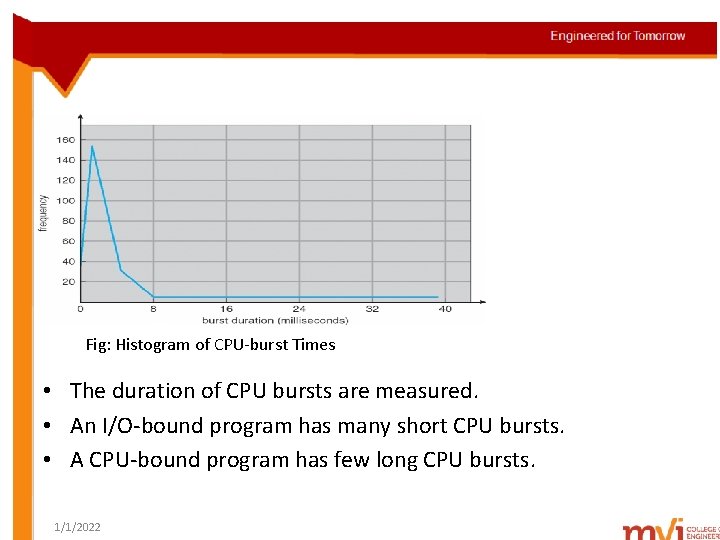
Fig: Histogram of CPU-burst Times • The duration of CPU bursts are measured. • An I/O-bound program has many short CPU bursts. • A CPU-bound program has few long CPU bursts. 1/1/2022
CPU Scheduler § Whenever the CPU becomes idle, OS selects one of the processes from the ready queue, for execution. § This process is carried out by CPU scheduler(short-term scheduler). Pre-emptive Scheduling § CPU scheduling happens under following circumstances Ø When a process switches from running state to the waiting state. Ø When a process switches from running state to ready state. Ø When a process switches from waiting state to ready state. Ø When a process terminates. 1/1/2022
• Non-preemptive scheduling Ø Once the CPU has been allocated to a process, it keeps the CPU, until it completes its task or switches to waiting state. Ø This type of scheduling takes place under circumstances 1 & 4. • Pre-emptive scheduling Ø Process which has been allocated CPU, will release the CPU, before its task completion. Ø This type of scheduling takes place under circumstances 2 & 3. 1/1/2022
Dispatcher § Is the module that gives control of the CPU to the process selected by short-term scheduler. § Function of the dispatcher : Ø Ø Ø Switching context Switching to user mode Jumping to proper location in the user program, to restart that program. § Dispatch latency – time taken by the dispatcher, to stop one process and start another. 1/1/2022
Scheduling Criteria § Different CPU-scheduling algorithms have different properties. § Which algorithm to use in which situation, can be judged by the following criteria : Ø CPU utilization – keep the CPU as busy as possible Ø Throughput – # of processes that complete their execution per time unit Ø Turnaround time – interval from the time of process submission to the time of process completion Ø Waiting time – amount of time a process spends waiting in the ready queue Ø Response time – amount of time it takes from when a request was submitted until the first response is produced, not output (for time-sharing environment 1/1/2022
Unit- II Process Management(Contd. . ) • • • Basic concepts Scheduling criteria Scheduling algorithms Thread scheduling Multiple-processor scheduling 1/1/2022
Scheduling Algorithms § First-come, First-served Scheduling § Shortest-Job-First Scheduling § Priority Scheduling § Round-Robin Scheduling § Multi-level Queue Scheduling § Multi-level Feedback Queue Scheduling 1/1/2022
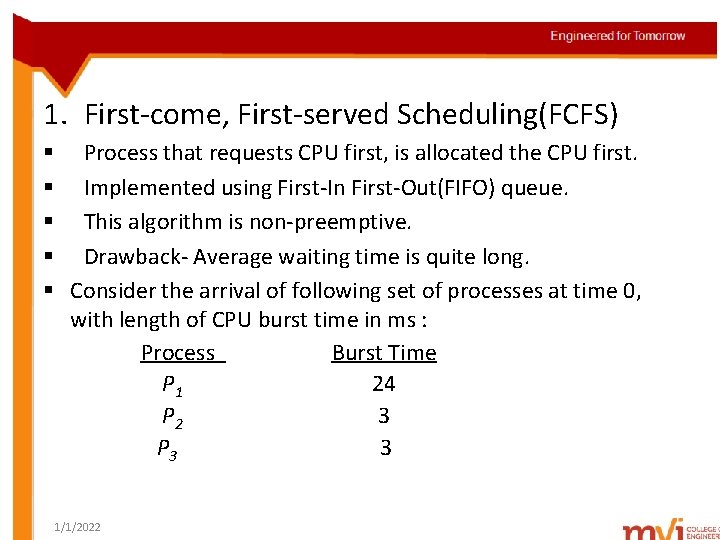
1. First-come, First-served Scheduling(FCFS) § Process that requests CPU first, is allocated the CPU first. § Implemented using First-In First-Out(FIFO) queue. § This algorithm is non-preemptive. § Drawback- Average waiting time is quite long. § Consider the arrival of following set of processes at time 0, with length of CPU burst time in ms : Process Burst Time P 1 24 P 2 3 P 3 3 1/1/2022
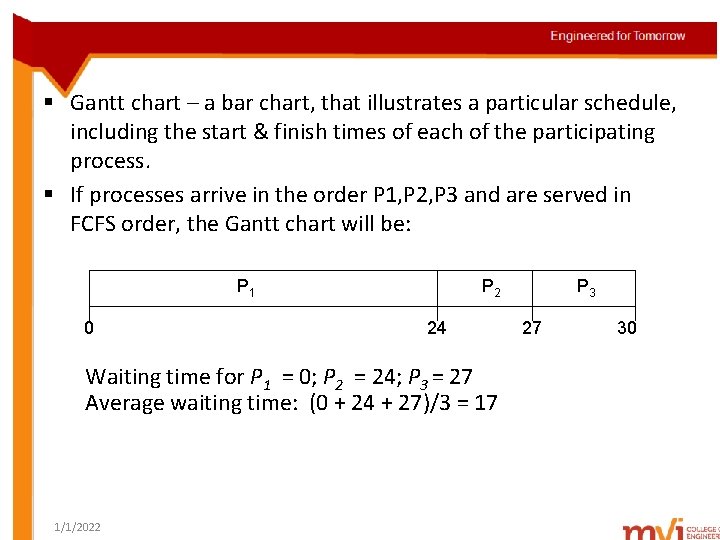
§ Gantt chart – a bar chart, that illustrates a particular schedule, including the start & finish times of each of the participating process. § If processes arrive in the order P 1, P 2, P 3 and are served in FCFS order, the Gantt chart will be: P 1 0 P 2 24 Waiting time for P 1 = 0; P 2 = 24; P 3 = 27 Average waiting time: (0 + 24 + 27)/3 = 17 1/1/2022 P 3 27 30
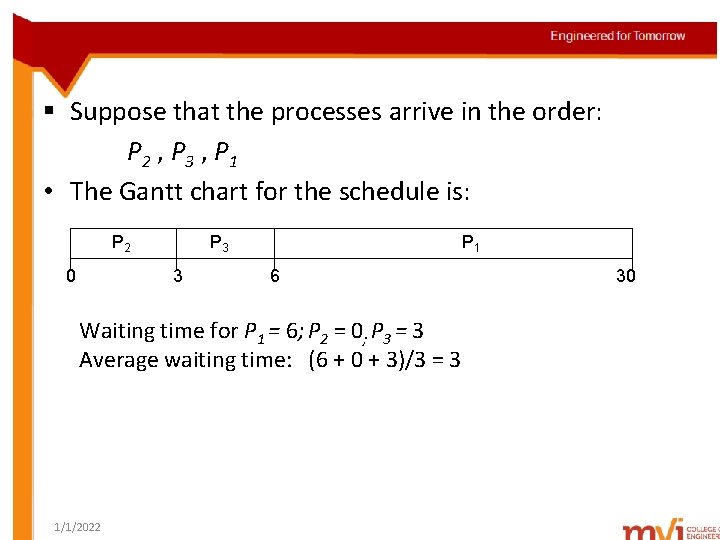
§ Suppose that the processes arrive in the order: P 2 , P 3 , P 1 • The Gantt chart for the schedule is: P 2 0 P 3 3 P 1 6 Waiting time for P 1 = 6; P 2 = 0; P 3 = 3 Average waiting time: (6 + 0 + 3)/3 = 3 1/1/2022 30
Shortest-Job-First Scheduling • Also known as shortest-next-CPU-burst algorithm. • Scheduling depends on the length of the next CPU burst of a process. § The CPU will be assigned to the process, having the smallest next CPU burst. § If the next CPU bursts of two processes are same, FCFS scheduling breaks the tie. • Benefit : SJF is optimal – gives minimum average waiting time for a given set of processes • Drawbacks: Ø The difficulty is knowing the length of the next CPU request Ø Cannot be implemented at the level of short-term scheduling 1/1/2022
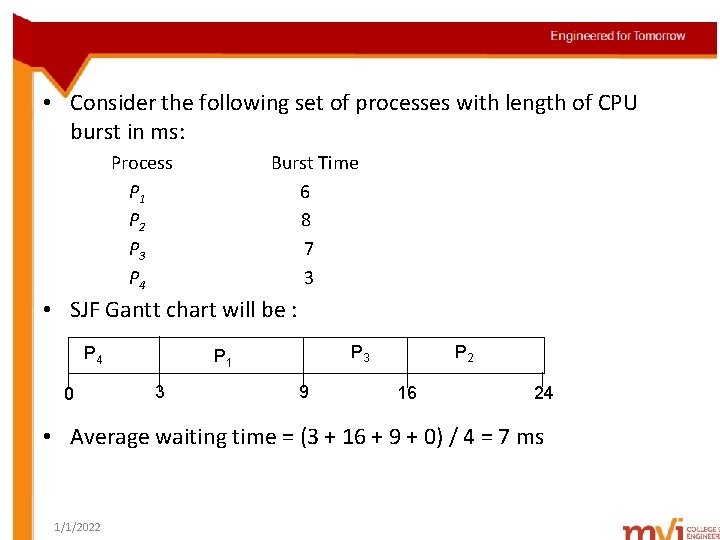
• Consider the following set of processes with length of CPU burst in ms: Process. Arrival Time. Burst Time P 1 6 P 2 8 P 3 7 P 4 3 • SJF Gantt chart will be : P 4 0 P 3 P 1 3 9 P 2 16 24 • Average waiting time = (3 + 16 + 9 + 0) / 4 = 7 ms 1/1/2022
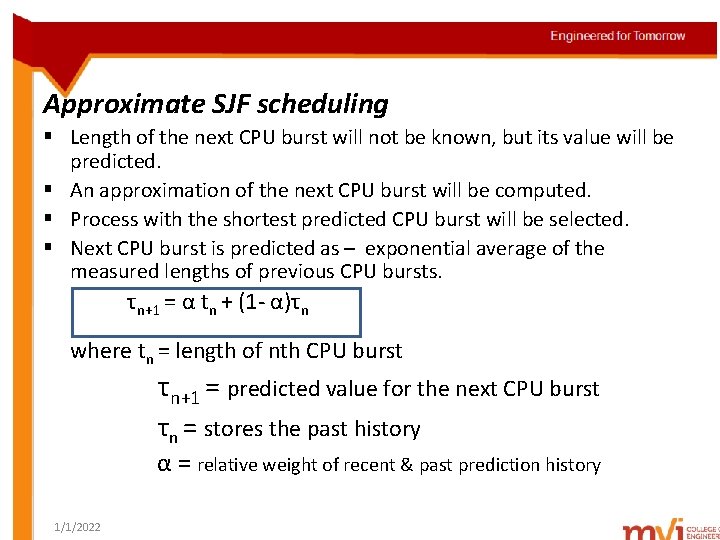
Approximate SJF scheduling § Length of the next CPU burst will not be known, but its value will be predicted. § An approximation of the next CPU burst will be computed. § Process with the shortest predicted CPU burst will be selected. § Next CPU burst is predicted as – exponential average of the measured lengths of previous CPU bursts. τn+1 = α tn + (1 - α)τn where tn = length of nth CPU burst τn+1 = predicted value for the next CPU burst τn = stores the past history α = relative weight of recent & past prediction history 1/1/2022
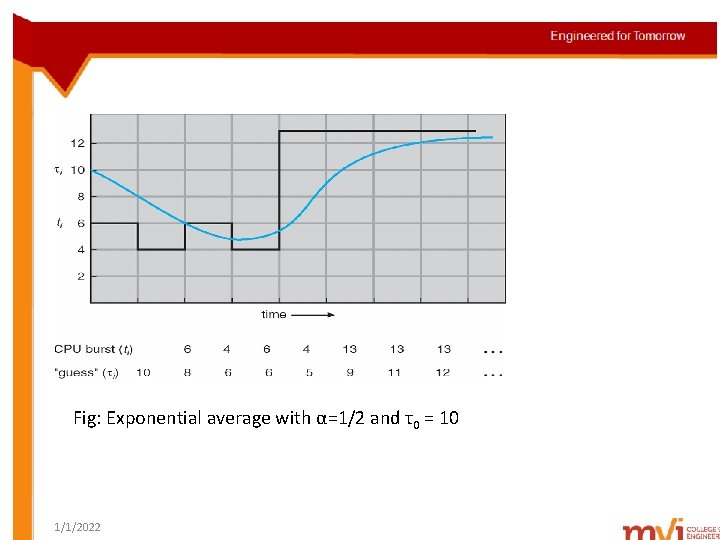
Fig: Exponential average with α=1/2 and τ0 = 10 1/1/2022
Shortest-remaining–time-first scheduling(SRTFS) § SJF algorithm can be pre-emptive or non-preemptive. § The next CPU burst of the newly arrived process may be shorter than the remaining burst time of the currently executing process. § A pre-emptive SJF algorithm will pre-empt the currently executing process. § A non-preemptive SJF algorithm will allow the currently executing to finish its CPU burst. § Pre-emptive SJF scheduling is called Shortest Remaining Time First Scheduling(SRTFS). 1/1/2022
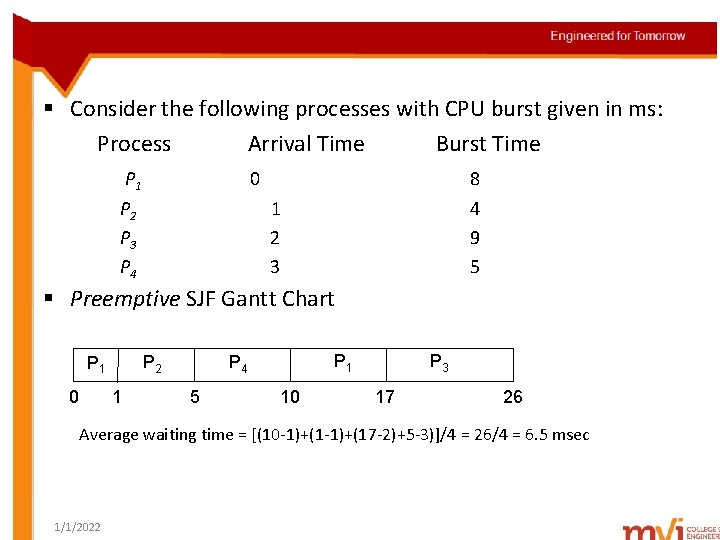
§ Consider the following processes with CPU burst given in ms: Process Arrival Time Burst Time P 1 P 2 P 3 P 4 0 8 4 9 5 1 2 3 § Preemptive SJF Gantt Chart 0 1 P 4 P 2 P 1 5 10 P 3 17 26 Average waiting time = [(10 -1)+(17 -2)+5 -3)]/4 = 26/4 = 6. 5 msec 1/1/2022
3. Priority Scheduling • A priority is associated with each process • The CPU is allocated to the process with the highest priority (smallest integer highest priority). • Equal priority processes are scheduled in FCFS order. • Priority scheduling can be either pre-emptive or non-preemptive. • Problem = Starvation or indefinite blocking - A process is ready to run, but waiting for CPU – low priority processes may wait indefinitely • Solution = Aging - gradually increase the priority of the processes waiting for a long time 1/1/2022
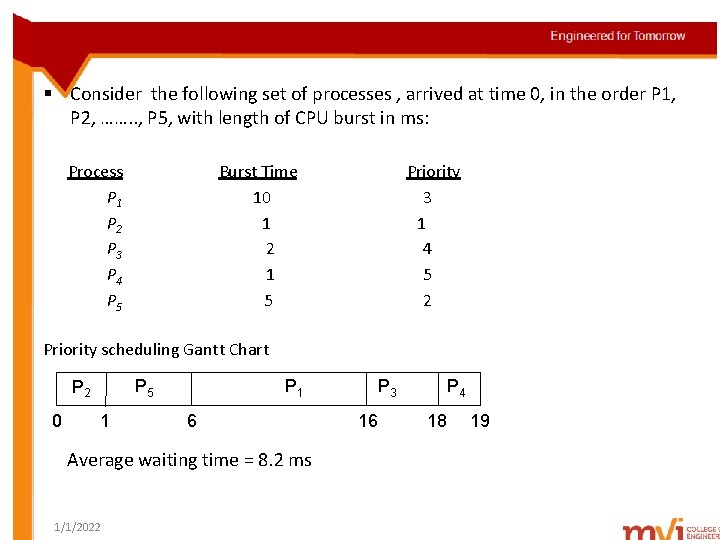
§ Consider the following set of processes , arrived at time 0, in the order P 1, P 2, ……. . , P 5, with length of CPU burst in ms: Process. A P 1 P 2 P 3 P 4 P 5 arri Burst Time. T 10 1 2 1 5 Priority 3 1 4 5 2 Priority scheduling Gantt Chart 0 P 1 P 5 P 2 1 6 Average waiting time = 8. 2 ms 1/1/2022 P 3 16 P 4 18 19
4. Round-Robin Scheduling • Each process gets a small unit of CPU time (time quantum q), usually 10 -100 ms. • After this time has elapsed, the process is preempted and added to the end of the ready queue. • If there are n processes in the ready queue and the time quantum is q, then each process gets 1/n of the CPU time in chunks of at most q time units at once. • Ready queue is implemented as FIFO queue of processes • Timer interrupts every quantum to schedule next process • Performance – depends on size of time quantum – q large scheduling same as FCFS – q small processor sharing 1/1/2022
Q: What is processor sharing? A: Creates the appearance that each of n process, has its own processor running at 1/n, the speed of the real processor. § The hardware executes 1 instruction for one set of registers & proceeds to next set. § This cycle continues, resulting in 10 slow processors rather than 1 fast one. 1/1/2022
Q: How a smaller time quantum increases context switches? A: Consider a process with 10 time units to be scheduled. § If quantum is 12 time units, process finishes in less than 1 time quantum. § If quantum is 6 time units, process requires 2 quanta, resulting in context-switch. § If quantum is 1 time unit, it results in 9 context-switches, slowing the process execution. § Larger time quantum results in lesser context-switches. § If context-switch time = 10% of time quantum 10% of CPU time is spent in context switching 1/1/2022
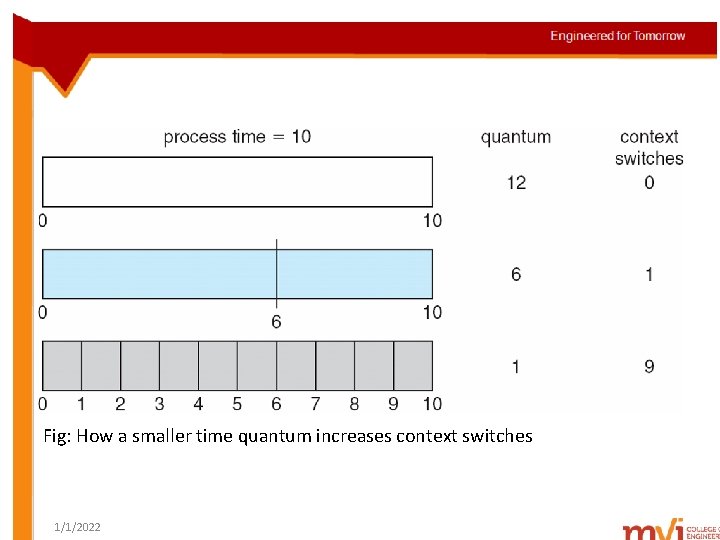
Fig: How a smaller time quantum increases context switches 1/1/2022
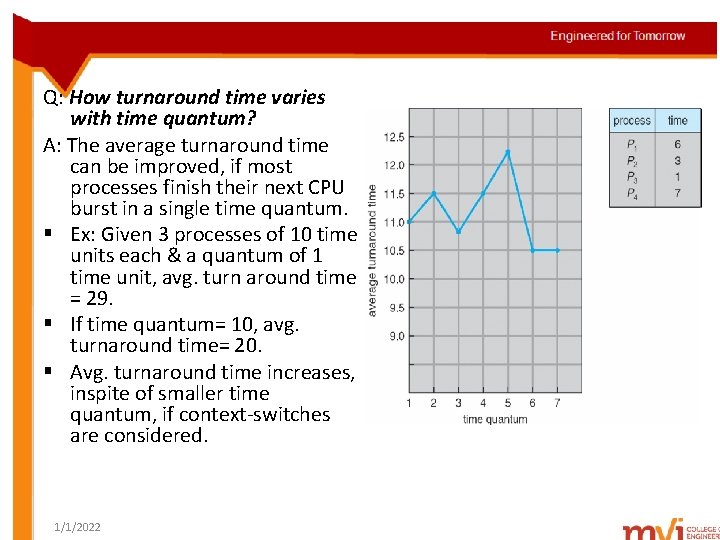
Q: How turnaround time varies with time quantum? A: The average turnaround time can be improved, if most processes finish their next CPU burst in a single time quantum. § Ex: Given 3 processes of 10 time units each & a quantum of 1 time unit, avg. turn around time = 29. § If time quantum= 10, avg. turnaround time= 20. § Avg. turnaround time increases, inspite of smaller time quantum, if context-switches are considered. 1/1/2022
5. Multi-level Queue scheduling • Ready queue is partitioned into several separate queues • Processes permanently assigned to a given queue, based on properties of the process memory size, process priority, process type • Each queue has its own scheduling algorithm: foreground queue – RR scheduling algorithm background queue – FCFS scheduling algorithm • Scheduling must be done between the queues, such as fixed-priority pre-emptive scheduling. • Ex: foreground queue has absolute priority over background queue 1/1/2022
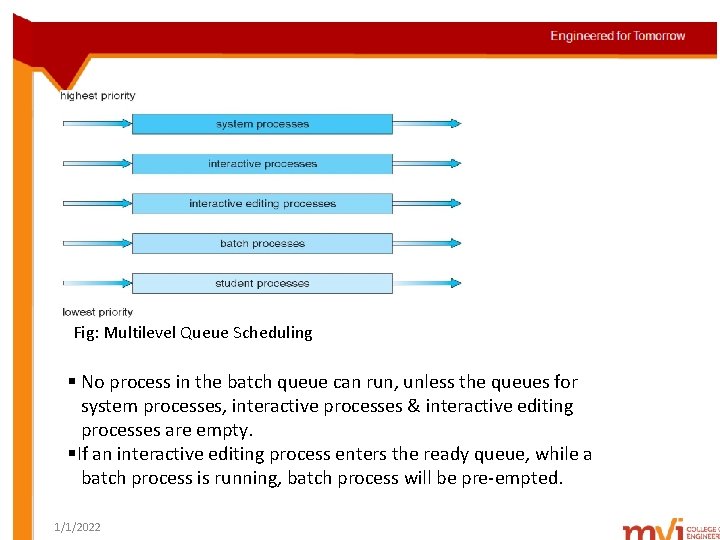
Fig: Multilevel Queue Scheduling § No process in the batch queue can run, unless the queues for system processes, interactive processes & interactive editing processes are empty. §If an interactive editing process enters the ready queue, while a batch process is running, batch process will be pre-empted. 1/1/2022
6. Multi-level Feedback Scheduling § Allows a process to move between queues. § Separate processes according the characteristics of their CPU bursts. § Ex: CPU-bound processes reside in lower-priority queue. I/O bound & interactive processes reside in higher-priority queues. § A process that waits too long in a lower priority queue, may be moved to a higher-priority queue. • Multilevel-feedback-queue scheduler defined by the following parameters: – – – 1/1/2022 number of queues scheduling algorithms for each queue method used to determine when to upgrade a process method used to determine when to demote a process method used to determine which queue a process will enter when that process needs service
Example of Multi-level Feedback Queue Scheduling § Consider a multi-level feedback queue scheduler, with 3 processes(from 0 to 2). § Scheduler first executes all processes in queue 0. § Only when queue 0 is empty, processes in queue 1 are executed. § Processes in queue 2 will be executed, only when queues 0 & 1 are empty. § If a process arrive in queue 1, process in queue 2, will be preempted. 1/1/2022
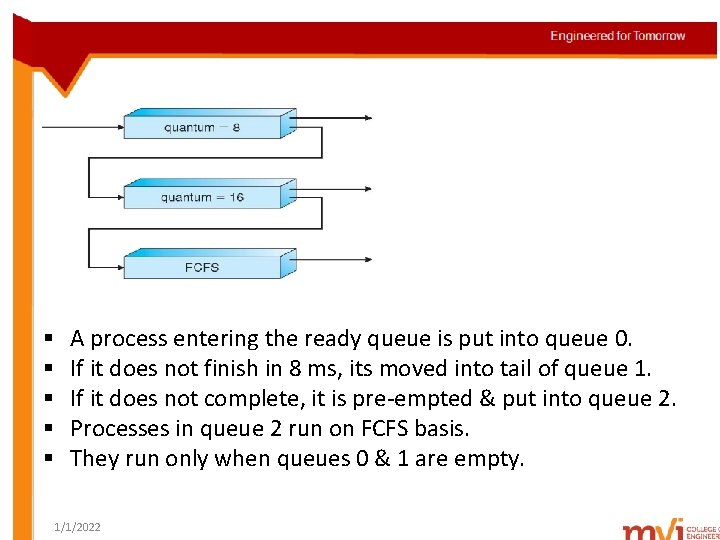
§ § § A process entering the ready queue is put into queue 0. If it does not finish in 8 ms, its moved into tail of queue 1. If it does not complete, it is pre-empted & put into queue 2. Processes in queue 2 run on FCFS basis. They run only when queues 0 & 1 are empty. 1/1/2022
Unit- II Process Management(Contd. . ) • • • Basic concepts Scheduling criteria Scheduling algorithms Thread scheduling Multiple-processor scheduling 1/1/2022
Thread Scheduling • Contention Scope • Pthread Scheduling 1/1/2022
Thread Scheduling Contention Scope § Thread library schedules user-level threads to run on an available LWP. § This scheme is known as process-contention scope(PCS). § There is competition among the threads belonging to the same process, for the CPU. § System-contention scope(SCS) – kernel decides the CPU onto, which kernel thread is to be scheduled. § Systems using Windows XP, Solaris & Linux, schedule threads using only SCS. 1/1/2022
Pthread Scheduling § Pthreads identifies the following contention scope values: Ø PTHREAD_SCOPE_PROCESS schedules threads using PCS scheduling Ø PTHREAD_SCOPE_SYSTEM schedules threads using SCS scheduling § PTHREAD_SCOPE_PROCESS schedules user-level threads onto available LWPS. § PTHREAD_SCOPE_SYSTEM scheduling policy will create & bind an LWP for each user-level thread. § Pthread IPC provides 2 functions, for getting & setting the contention scope policy: Ø pthread_attr_setscope(pthread_attr_t *attr, int scope) Ø pthread_attr_getscope(pthread_attr_t *attr, int *scope) 1/1/2022
Unit- II Process Management(Contd. . ) • • • Basic concepts Scheduling criteria Scheduling algorithms Thread scheduling Multiple-processor scheduling 1/1/2022
Multiple-Processor Scheduling • • • Approaches to Multiple-Processor Scheduling Processor Affinity Load Balancing Multi-core Processors Virtualization and Sharing 1/1/2022
Approaches to Multiple-Processor Scheduling § Multiple-processor scheduling Symmetric multiprocessing Asymmetric multiprocessing § Asymmetric multiprocessing Ø Master server – a single processor, handles scheduling decisions, I/O processing & other system activities. Ø No data sharing, as 1 processor handles all data structures. § Symmetric multiprocessing Ø All processes will be in a common ready queue or each processor maintains its own ready queue. 1/1/2022
Processor Affinity & its need § The data most recently accessed by a process will be cached by the processor & used for successive accesses. § Suppose the process migrates to a different processor. § First processor’s cache has to be invalidated & the second processor’s cache has to be re-populated. § This incurs a high cost overhead. § So SMP systems avoid migration of processes from one processor to another, & keeps it running on the same processor. § This is called processor affinity. § A process has affinity for the processor, on which it is currently running. 1/1/2022
Soft affinity § OS has a policy for keeping the process run on the same processor, but doesn’t guarantee its implementation. § Ex: Linux provides system calls, which support migration of process Hard affinity § OS specifies the process, not to migrate to other processors. § Ex: Solaris limits processes to processor sets. 1/1/2022
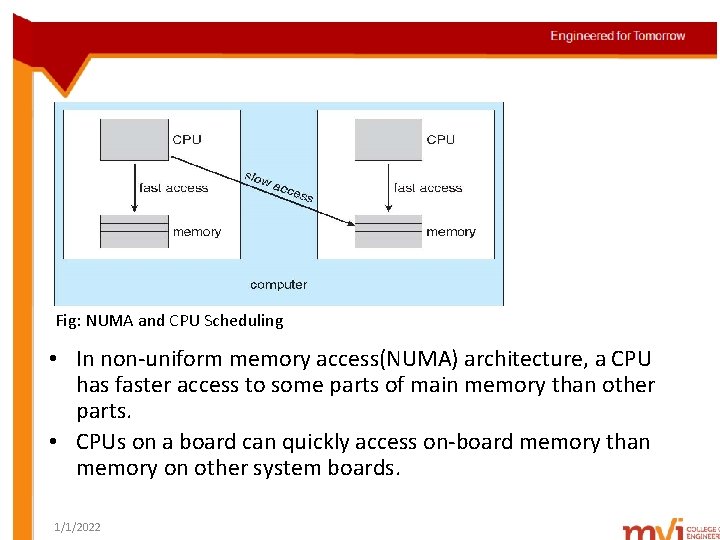
Fig: NUMA and CPU Scheduling • In non-uniform memory access(NUMA) architecture, a CPU has faster access to some parts of main memory than other parts. • CPUs on a board can quickly access on-board memory than memory on other system boards. 1/1/2022
Load Balancing § Keeps the workload evenly distributed across all processors in an SMP system. § Approaches to load balancing push migration pull migration § Push migration Ø A specific task periodically checks load on each processor. Ø If there is an imbalance, processes will be pushed from overloaded to idle/less-busy processors. § Pull migration Ø Idle processor pulls a waiting task out of a busy processor. 1/1/2022
Multi-core Processors § Multiple processor cores are placed on the same chip. § Each core has a register set to maintain its architectural state. § Appears as a separate physical processor to the OS. Scheduling in multi-core processors § When a processor accesses memory, it spends a significant amount of time, waiting for the data to become available. § This is known as memory stall. 1/1/2022
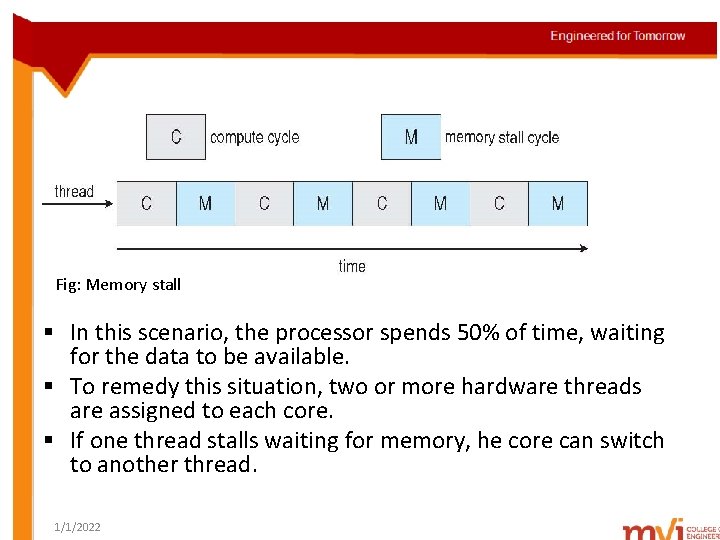
Fig: Memory stall § In this scenario, the processor spends 50% of time, waiting for the data to be available. § To remedy this situation, two or more hardware threads are assigned to each core. § If one thread stalls waiting for memory, he core can switch to another thread. 1/1/2022
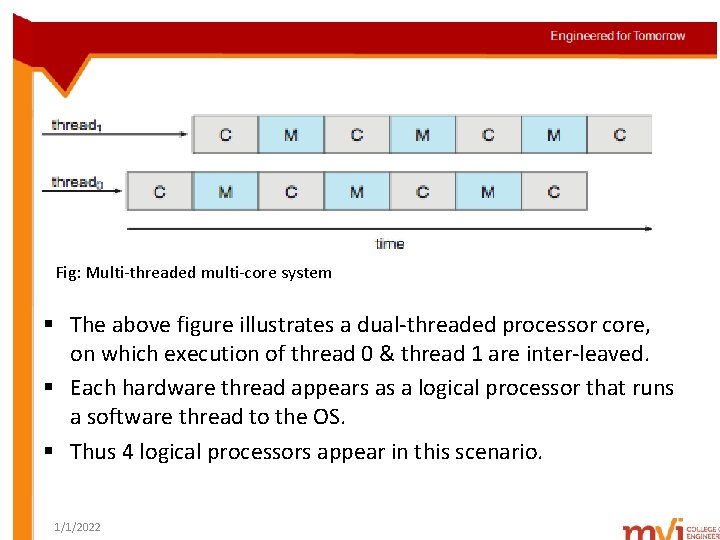
Fig: Multi-threaded multi-core system § The above figure illustrates a dual-threaded processor core, on which execution of thread 0 & thread 1 are inter-leaved. § Each hardware thread appears as a logical processor that runs a software thread to the OS. § Thus 4 logical processors appear in this scenario. 1/1/2022
Q: How to multi-thread a processor? A: There are 2 ways : coarse-grained multi-threading fine-grained multi-threading i)Coarse-grained multi-threading Ø A thread executes on a processor, until memory stall occurs. Ø Due to the delay caused by memory stall, processor must switch to another thread, for execution. ii)Fine-grained multi-threading Ø Switches between at a much finer level of granularity. Ø Includes logic for thread-switching 1/1/2022
Virtualization & Scheduling § Most virtualized environments have 1 host OS & many guest OS. § The host OS creates & manages virtual machines. § Each virtual machine has a guest OS installed & applications running within that guest. • Each guest doing its own scheduling – Not knowing it doesn’t own the CPUs – Can result in poor response time – Can effect time-of-day clocks in guests • Virtualization undoes good scheduling algorithm efforts of guests. 1/1/2022

1/1/2022
- Slides: 130