
Structuring Interactive Cluster Analysis Wayne Oldford University of

- Slides: 82
Structuring Interactive Cluster Analysis Wayne Oldford University of Waterloo June, 2003 Structuring Interactive Cluster Analysis R. W. Oldford 1
Structuring Interactive Cluster Analysis This talk is about interactive cluster analysis, that is about interactive tools for finding and identifying groups in data. But more than that, it's about stepping back and understanding the structure of this process so that software tools can be organized to simplify and to aid the analysis. Wayne Oldford University of Waterloo June, 2003 Structuring Interactive Cluster Analysis R. W. Oldford 2
The problem of `cluster analysis' or of `finding groups in data' is ill defined. So there can be no universal solution and any claimed solution must necessarily solve some other suitably constrained problem and not the more general one. Overview Argument: • • ill-defined problem high-interaction desirable explore partitions recast algorithms What we need instead are highly interactive tools which allow us to adapt to the peculiarities of the data and the problem at hand. These tools are usefully organized and integrated if we step back and consider the problem as one of exploratory data analysis, except that now, in addition to the data itself, the exploration is to take place as well on the space of partitions of the data. Existing algorithms need to be recast, and new ones developed, in terms of exploring the space of partitions. The algorithms can then be easily integrated with other interactive tools so that jointly they provide a broadly useful and easily adapted tool-set for finding and identifying groups in data. June, 2003 Structuring Interactive Cluster Analysis R. W. Oldford 3
Overview Argument: Develop by example: • • • ill-defined problem high-interaction desirable explore partitions recast algorithms June, 2003 problems resources interactive clustering partition moves implications prototype interface Structuring Interactive Cluster Analysis R. W. Oldford 4
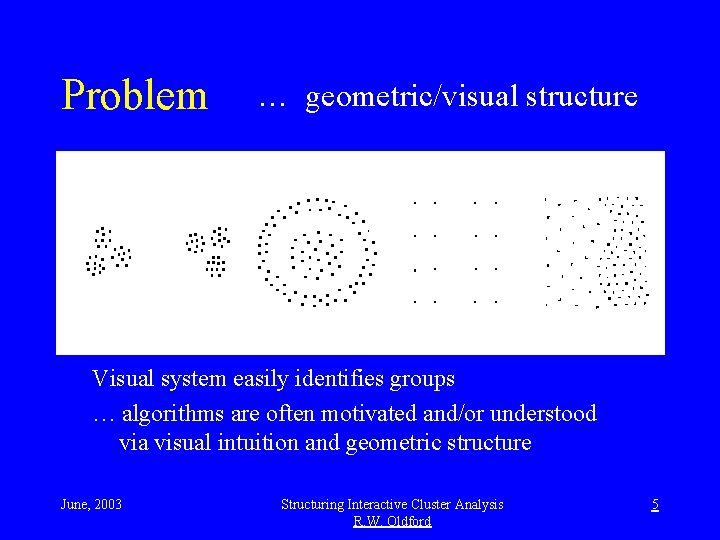
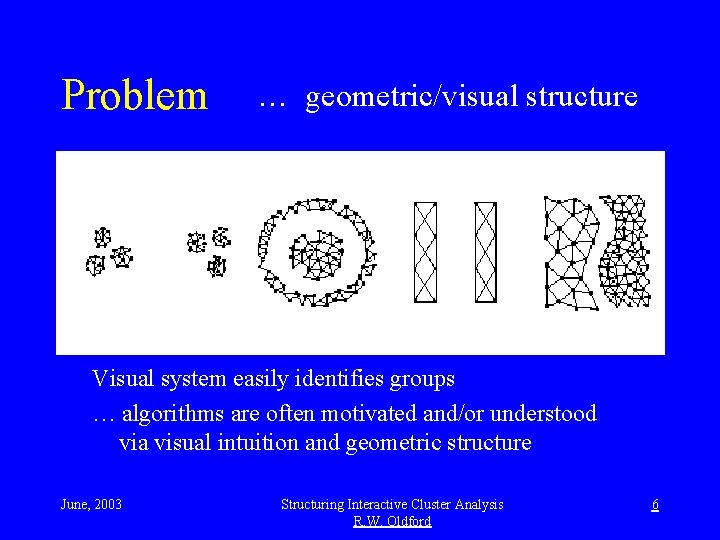
Problem … geometric/visual structure Visual system easily identifies groups … algorithms are often motivated and/or understood via visual intuition and geometric structure June, 2003 Structuring Interactive Cluster Analysis R. W. Oldford 5
Problem … geometric/visual structure Visual system easily identifies groups … algorithms are often motivated and/or understood via visual intuition and geometric structure June, 2003 Structuring Interactive Cluster Analysis R. W. Oldford 6
Problem … Consider visually grouping here: Context matters … each point is a document located by each word’s frequency within the document June, 2003 Structuring Interactive Cluster Analysis R. W. Oldford 7
Problem … two similar documents of different lengths should be “closer” … one of these has more text than the other. June, 2003 Structuring Interactive Cluster Analysis R. W. Oldford 8
Problem … green “closer” to orange than to red? … “distance” measured by angle? June, 2003 Structuring Interactive Cluster Analysis R. W. Oldford 9
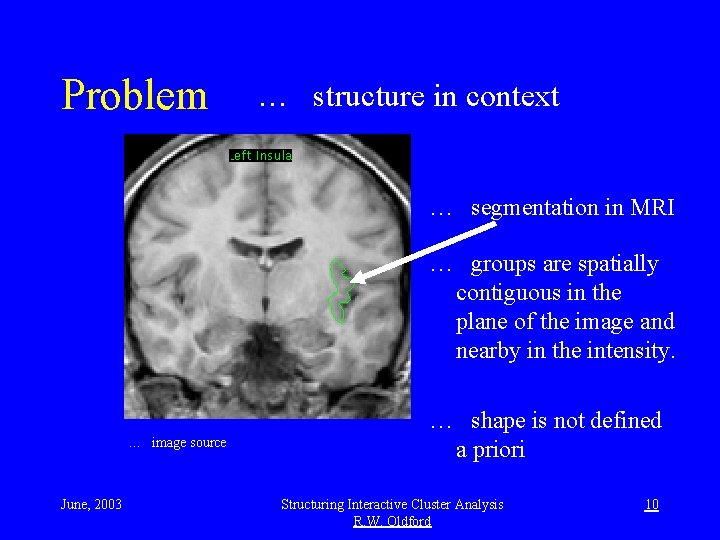
Problem … structure in context … segmentation in MRI … groups are spatially contiguous in the plane of the image and nearby in the intensity. … image source June, 2003 … shape is not defined a priori Structuring Interactive Cluster Analysis R. W. Oldford 10
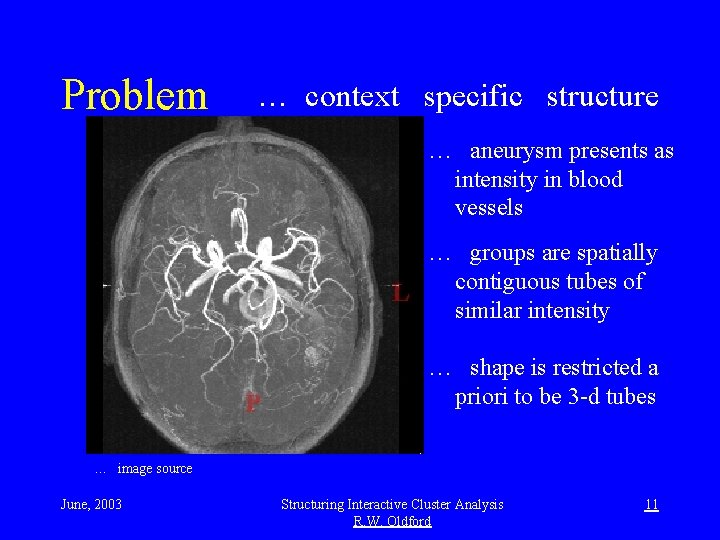
Problem … context specific structure … aneurysm presents as intensity in blood vessels … groups are spatially contiguous tubes of similar intensity … shape is restricted a priori to be 3 -d tubes … image source June, 2003 Structuring Interactive Cluster Analysis R. W. Oldford 11
Problem … some specific some not … image source … same slice, five different measurements at each location … spatial grouping as before, additional grouping possible across measurements June, 2003 Structuring Interactive Cluster Analysis R. W. Oldford 12
Problem … some specific some not … image source 4 dimensional data from connected images: … 2 d spatial with clear biological grouping, connected to … 2 d intensity measures with abstract structure/grouping June, 2003 Structuring Interactive Cluster Analysis R. W. Oldford 13
Problem • Find groups in data – Similar objects are together – Groups are separated • Problem is ill defined: – What do you mean similar? • E. g. what is contiguous structure? – When are groups separate? – Can we believe it? June, 2003 Structuring Interactive Cluster Analysis R. W. Oldford 14
Computational resources 1. Processing 2. Memory 3. Display June, 2003 Structuring Interactive Cluster Analysis R. W. Oldford 15
Computational resources (and response) 1. Processing • Gflops, Tflops, multiple processors • “computationally intensive” methods • problem constrained and optimized 2. Memory 3. Display June, 2003 Structuring Interactive Cluster Analysis R. W. Oldford 16
Computational resources (and response) 1. Processing 2. Memory • GBs, TBs, disk and RAM • try to analyze huge data-sets • data-sets larger than necessary? 3. Display June, 2003 Structuring Interactive Cluster Analysis R. W. Oldford 17
Computational resources (and response) 1. Processing 2. Memory 3. Display • high resolution, large • graphics processors, digital video • more data, more visual detail June, 2003 Structuring Interactive Cluster Analysis R. W. Oldford 18
Computational resources 1. Processing 2. Memory 3. Display Exploit no one resource exclusively Balance and integrate June, 2003 Structuring Interactive Cluster Analysis R. W. Oldford 19
High interaction (much overlooked by researchers) • assume multiple displays • integrate computational resources • challenge is to design software to be simple, understandable, integrated and extensible June, 2003 Structuring Interactive Cluster Analysis R. W. Oldford 20
Example: image analysis … find groups via intensity (contours and two small unusual structures revealed) June, 2003 Structuring Interactive Cluster Analysis R. W. Oldford 21
Example: image analysis … other measurements may contain interesting structure June, 2003 Structuring Interactive Cluster Analysis R. W. Oldford 22
Example: image analysis … identify new structure location in the original image June, 2003 Structuring Interactive Cluster Analysis R. W. Oldford 23
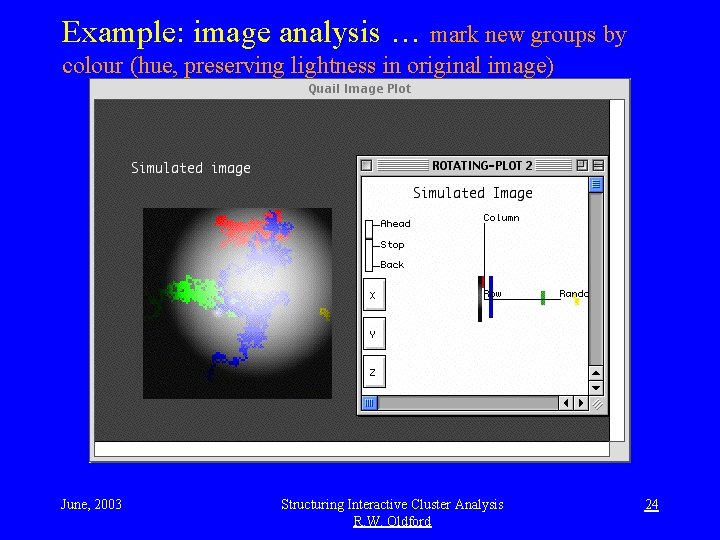
Example: image analysis … mark new groups by colour (hue, preserving lightness in original image) June, 2003 Structuring Interactive Cluster Analysis R. W. Oldford 24
Example: image analysis … explore relation between old and new groups via contours in the image itself June, 2003 Structuring Interactive Cluster Analysis R. W. Oldford 25
Example: 8 dimensions from teeth measurements on species (+ sex) humans Gorillas, orangutans chimps hominids Proconsul Africanus June, 2003 Structuring Interactive Cluster Analysis R. W. Oldford 26
Example: apes, hominids, modern humans • multiple and very different views - 3 -d point clouds (of first 3 discriminant co-ordinates) - cases identified in a list - each point represented as a smooth curve by projecting it on a direction vector smoothly moving around the surface of an 8 -d sphere - all linked via colour by cases being displayed • context helps - knowing the species encourages grouping - grouping based on context + the visual information • grouping is confirmed across different kinds of display June, 2003 Structuring Interactive Cluster Analysis R. W. Oldford 27
Example: mutual support and shapes a 3 -d projection Shape from all dimensions How many groups? June, 2003 Structuring Interactive Cluster Analysis R. W. Oldford 28
Example: mutual support and shapes Groups found here Same in all dimensions? How many groups? June, 2003 Structuring Interactive Cluster Analysis R. W. Oldford 29
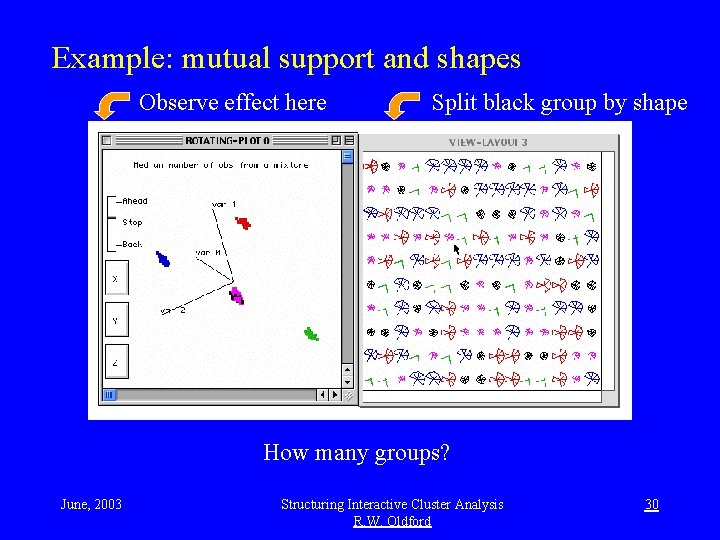
Example: mutual support and shapes Observe effect here Split black group by shape How many groups? June, 2003 Structuring Interactive Cluster Analysis R. W. Oldford 30
Example: mutual support and shapes Get new 3 -d projection Coloured by shape Five groups corroborated June, 2003 Structuring Interactive Cluster Analysis R. W. Oldford 31
Example: exploratory data analysis How many groups? June, 2003 Structuring Interactive Cluster Analysis R. W. Oldford 32
Example: exploratory data analysis Choose data to cut away Explore the rest Distinguish groups June, 2003 Structuring Interactive Cluster Analysis R. W. Oldford 33
Example: exploratory data analysis Bring data back Explore all together Some black with red? Focus on centre June, 2003 Structuring Interactive Cluster Analysis R. W. Oldford 34
Example: exploratory data analysis Explore separately Mark group Discard new view Explore all together Two groups June, 2003 Structuring Interactive Cluster Analysis R. W. Oldford 35
Interactive clustering • visual grouping – location, motion, shape, texture, . . . – linking across displays • manual – selection • cases, variates, groups, . . . – colouring – focus • immediate and incremental – context can be used to form groups • multiple partitions June, 2003 Structuring Interactive Cluster Analysis R. W. Oldford 36
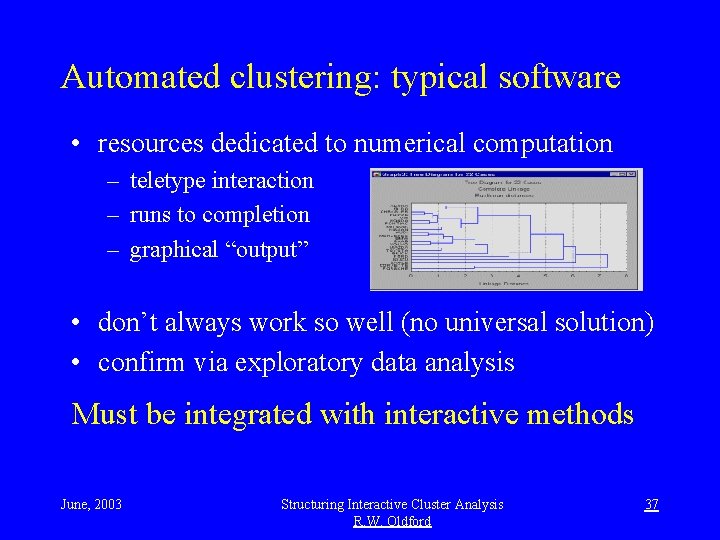
Automated clustering: typical software • resources dedicated to numerical computation – teletype interaction – runs to completion – graphical “output” • don’t always work so well (no universal solution) • confirm via exploratory data analysis Must be integrated with interactive methods June, 2003 Structuring Interactive Cluster Analysis R. W. Oldford 37
Example: K-means clustering K = 2 groups Starting groups as shown have centre ball in one group K-means moves one point at a time to “improve” 2 groups June, 2003 Structuring Interactive Cluster Analysis R. W. Oldford 38
Example: K-means clustering K = 2 groups Final groups shown maximize F-like statistic (between/within) Central ball is lost K-means poor for this data configuration June, 2003 Structuring Interactive Cluster Analysis R. W. Oldford 39
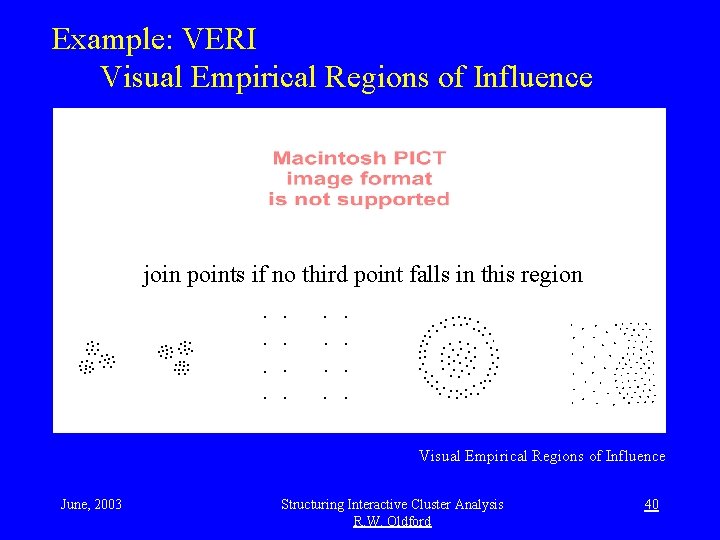
Example: VERI Visual Empirical Regions of Influence join points if no third point falls in this region Visual Empirical Regions of Influence June, 2003 Structuring Interactive Cluster Analysis R. W. Oldford 40
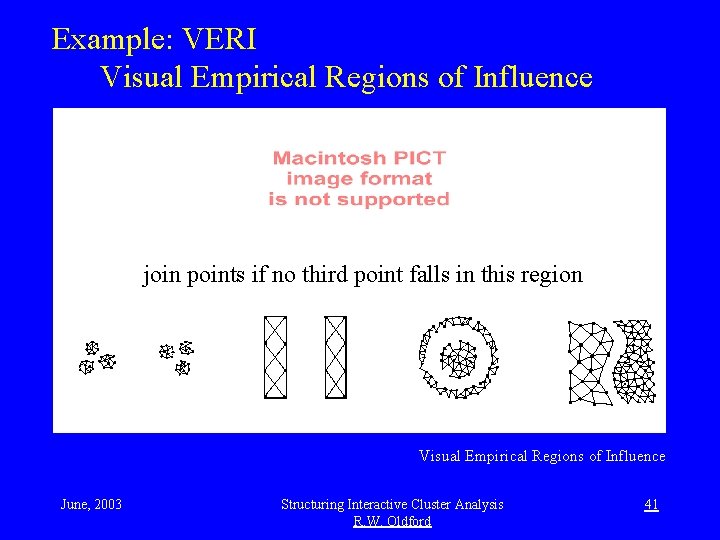
Example: VERI Visual Empirical Regions of Influence join points if no third point falls in this region Visual Empirical Regions of Influence June, 2003 Structuring Interactive Cluster Analysis R. W. Oldford 41
Visual Empirical Regions of Influence • psychophysical experiments of human visual perception to join data points – very special circumstances (two lines of three equispaced points each) • works well on demonstration 2 -d cases • extends to higher dimensions – two points are joined or not depending on their joint configuration with a third point – each third point examined forms a plane with the candidate pair and so VERI shape applies – works in high-d with published demonstration cases June, 2003 Structuring Interactive Cluster Analysis R. W. Oldford 42
Example: VERI Each colour is a different group found by VERI. Central ball is lost. VERI fails for this data configuration (also for small perturbations of demonstration cases). There is no universal method, nor can there be. June, 2003 Structuring Interactive Cluster Analysis R. W. Oldford 43
Example: VERI (with parameters) VERI algorithm, but parameterized now to shrink region size. Becomes minimal spanning tree in the limit (MST gets 2 groups here). Again. no universal method possible, but methods can be parameterized. June, 2003 Structuring Interactive Cluster Analysis R. W. Oldford 44
Integrating automatic methods: Move about the space of partitions: Pa --> Pb --> Pc --> …. Which operators f f(Pa) --> Pb are of interest? June, 2003 Structuring Interactive Cluster Analysis R. W. Oldford 45
Refine Need not be nested. Nesting produces hierarchy June, 2003 Structuring Interactive Cluster Analysis R. W. Oldford Reduce 46
Reassign June, 2003 Structuring Interactive Cluster Analysis R. W. Oldford 47
Refinement sequence: 1 Begin with partition containing all points in one group. June, 2003 Structuring Interactive Cluster Analysis R. W. Oldford 48
Refinement sequence: 1 -> 2 Refine partition to move to a new partition containing two groups. This refinement was had by projecting all points onto the eigen-vector of the largest eigen value of the sample variance covariance matrix and splitting at the largest gap between projected points. Blue points are on the outer sphere. June, 2003 Structuring Interactive Cluster Analysis R. W. Oldford 49
Refinement sequence: 1 -> 2 -> 3 Refine partition (2) to move to a new partition containing three groups. Refinement move: • select group whose sample var-cov matrix has largest eigen-value • for that group, project and split as before. Green points are also on the outer sphere. June, 2003 Structuring Interactive Cluster Analysis R. W. Oldford 50
Refinement sequence: 1 -> 2 -> 3 -> 4 Refine partition (3) to move to a new partition containing four groups. Refinement move as before, again splits red group. New group contains a single (magenta) point on the outer sphere (middle right, up). Exploration of the data shows this to be a very poor partition with that single isolated point. June, 2003 Structuring Interactive Cluster Analysis R. W. Oldford 51
Refinement sequence: 1 -> 2 -> 3 -> 4 -> 5 Refine partition (4) to move to a new partition containing five groups. Refinement move as before, again splits red group. New group contains a single (black) point on the outer sphere (bottom left). Again a poor partition; no further refinement step taken at this point. June, 2003 Structuring Interactive Cluster Analysis R. W. Oldford 52
Reassign, reduce sequence: 5 -> 5 A reassign move from one partition of five to another. Reassignment move: k-means maximizing an F statistic. Seems a better partition than before; explore to confirm. June, 2003 Structuring Interactive Cluster Analysis R. W. Oldford 53
Explore present partition: 5 Reassignment seems to have isolated central red ball. Remaining groups distributed around a spherical surface. Consider reduction moves from this partition to `nearby’ partitions with fewer groups. June, 2003 Structuring Interactive Cluster Analysis R. W. Oldford 54
Partition to be reduced: 5 Same partition - back in the original position to make subsequent reduction moves visually comparable with previous refinement and reassignment moves. Choice of reduction move can be based on what we have learned from exploring this partition. June, 2003 Structuring Interactive Cluster Analysis R. W. Oldford 55
Reduce sequence: 5 -> 4 Reduce partition (5) to move to a new partition containing four groups. Reduction move: Single-linkage between groups. i. e. join closest two groups as measured by euclidean distance between nearest points in each group. Seems reasonable choice given structure observed in previous exploration. June, 2003 Structuring Interactive Cluster Analysis R. W. Oldford 56
Reduce sequence: 5 -> 4 -> 3 Reduce partition (4) to move to a new partition containing three groups. Reduction move: As before. Red ball remains. Exploration suggests one more reduction move. June, 2003 Structuring Interactive Cluster Analysis R. W. Oldford 57
Reduce sequence: 5 -> 4 -> 3 -> 2 Reduce partition (3) to move to a new partition containing two groups. Reduction move: As before. This partition seems best. Interactive exploration important to choose type and details of potentially interesting moves from one partition to another. June, 2003 Structuring Interactive Cluster Analysis R. W. Oldford 58
Moves (generic functions) • refine (Pold) --> Pnew examples: break minimal spanning tree • reduce (Pold) --> Pnew join near centres • reassign (Pold) --> Pnew k-means maximize F • partition (graphic) --> Pnew colours from point cloud June, 2003 Structuring Interactive Cluster Analysis R. W. Oldford 59
Challenges: • varying focus • subsets (selected manually and at random) • merging new data into partition • exploring multiple partitions • interactive display and comparison • resolving many to one • interface design • control panels, options • interaction June, 2003 Structuring Interactive Cluster Analysis R. W. Oldford 60
A prototype interface • cluster analysis hub - an analysis hub (Oldford, 1997) created on demand for partition: - having all points in one group for named data-set, or - as defined by colours of all points in topmost plot, or - as defined by colours of selected points in topmost plot - new hub can always be created for any subset - maintains list of saved partitions - offers moves from current partition via one of: - reduce, refine, or reassign - manually from current colours (so as to capture interactive modification of existing partition) - Other operations on one or more partitions (e. g. cluster plot, dendrogram, . . . ) June, 2003 Structuring Interactive Cluster Analysis R. W. Oldford 61
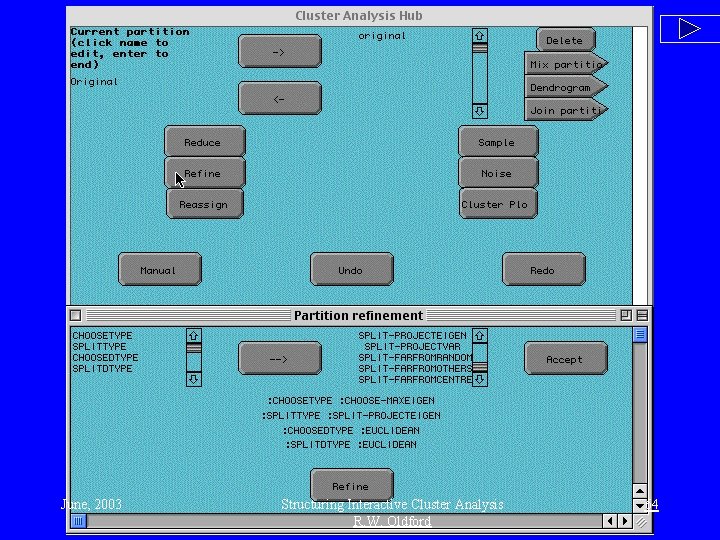
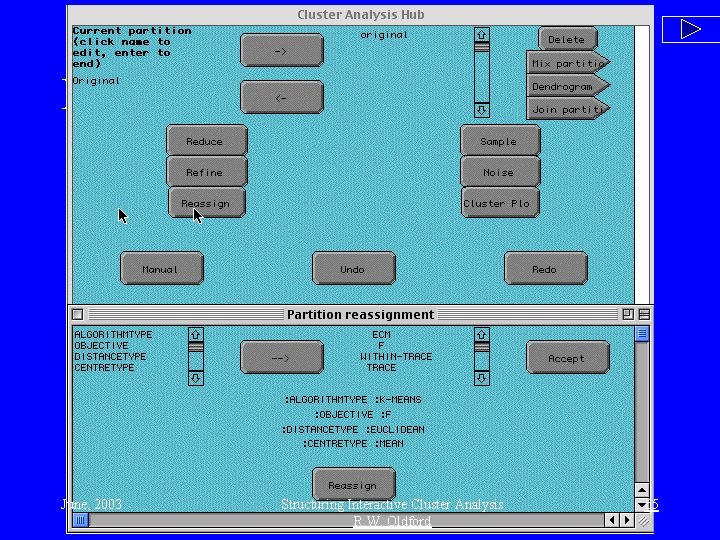
Interface illustration: details of moves • Each move - refine, reduce, reassign - is an entire collection of possible moves, each with many possible choices. • The next few slides illustrate the prototype implementation where: • Buttons for refine, reduce, and reassign are given at the topmost level. • Once selected, each button pops up its own control panel where various different kinds of moves and parameter choices can be made. E. g. the analyst might choose to reduce by any of: • Join groups with closest centres using Euclidean distance • Join groups whose farthest points are closest (i. e. “complete linkage”) • Choose group with greatest spread and disperse its points among the remaining groups. … June, 2003 Structuring Interactive Cluster Analysis R. W. Oldford 62
Interface - reduce June, 2003 Structuring Interactive Cluster Analysis R. W. Oldford 63
Interface - refine June, 2003 Structuring Interactive Cluster Analysis R. W. Oldford 64
Interface - reassign June, 2003 Structuring Interactive Cluster Analysis R. W. Oldford 65
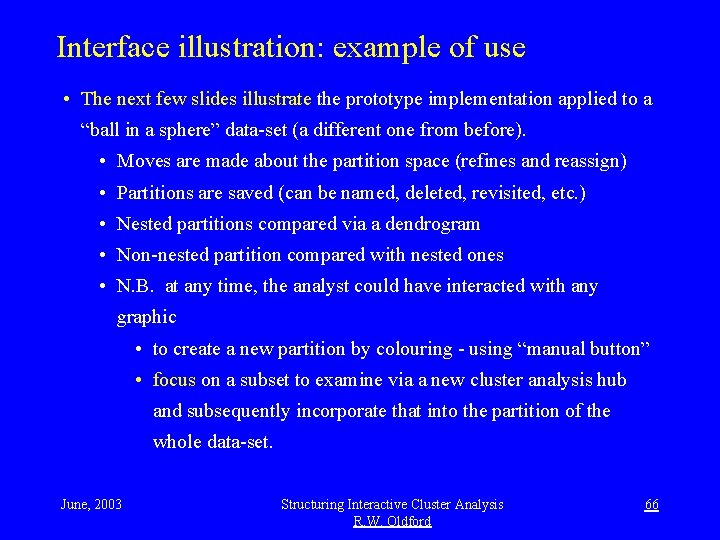
Interface illustration: example of use • The next few slides illustrate the prototype implementation applied to a “ball in a sphere” data-set (a different one from before). • Moves are made about the partition space (refines and reassign) • Partitions are saved (can be named, deleted, revisited, etc. ) • Nested partitions compared via a dendrogram • Non-nested partition compared with nested ones • N. B. at any time, the analyst could have interacted with any graphic • to create a new partition by colouring - using “manual button” • focus on a subset to examine via a new cluster analysis hub and subsequently incorporate that into the partition of the whole data-set. June, 2003 Structuring Interactive Cluster Analysis R. W. Oldford 66
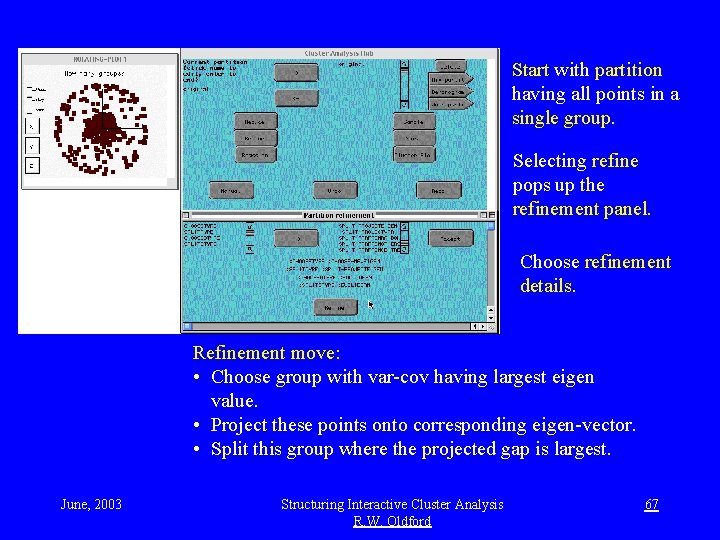
Start with partition having all points in a single group. Interaction Selecting refine pops up the refinement panel. Choose refinement details. Refinement move: • Choose group with var-cov having largest eigen value. • Project these points onto corresponding eigen-vector. • Split this group where the projected gap is largest. June, 2003 Structuring Interactive Cluster Analysis R. W. Oldford 67
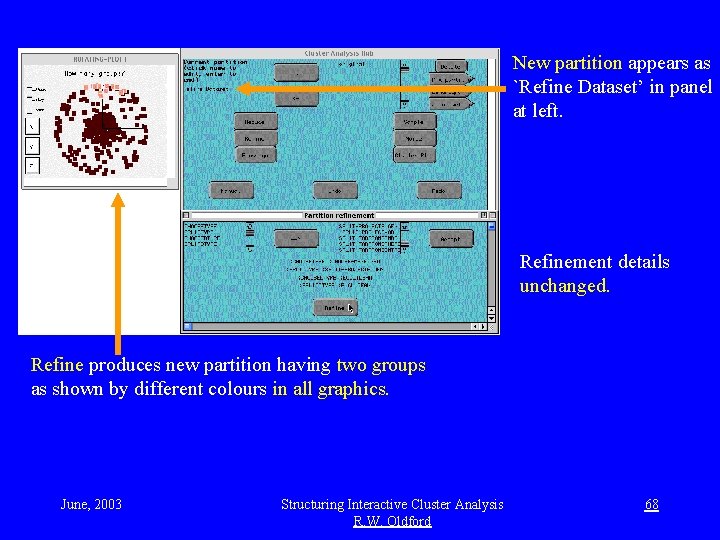
New partition appears as `Refine Dataset’ in panel at left. Interaction Refinement details unchanged. Refine produces new partition having two groups as shown by different colours in all graphics. June, 2003 Structuring Interactive Cluster Analysis R. W. Oldford 68
name and save partition Saved partition list. New partition is named and saved. Refinement details unchanged. New partition has three groups. June, 2003 Structuring Interactive Cluster Analysis R. W. Oldford 69
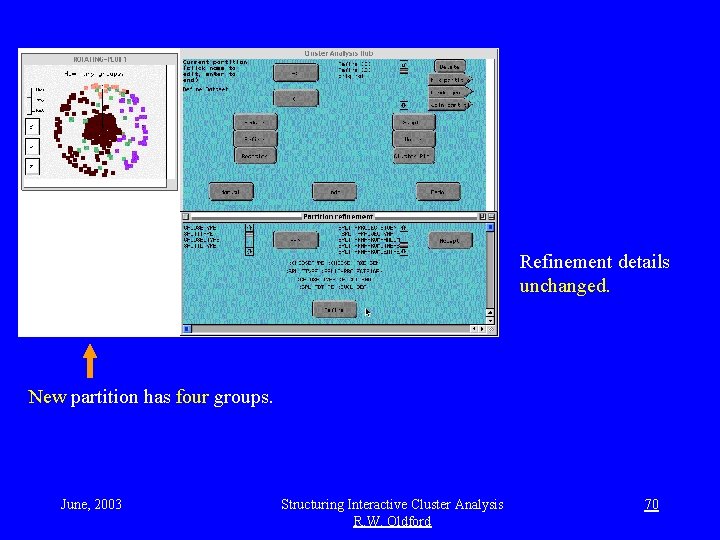
prototype - refine to 4 Refinement details unchanged. New partition has four groups. June, 2003 Structuring Interactive Cluster Analysis R. W. Oldford 70
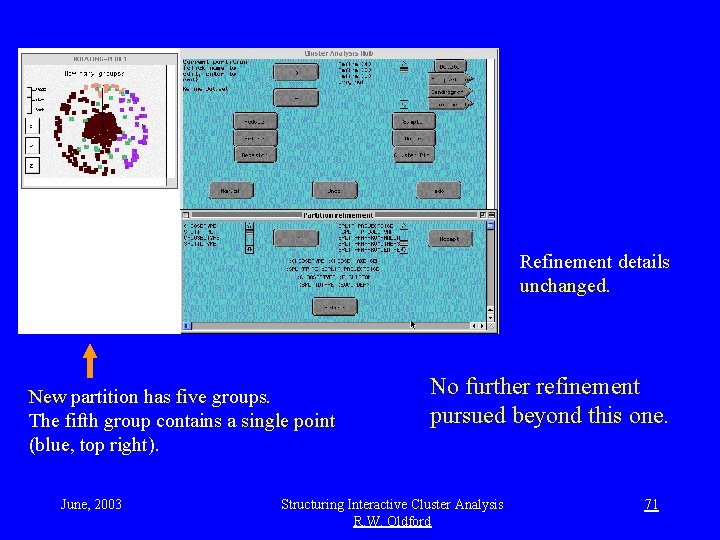
prototype - refine to 5 Refinement details unchanged. New partition has five groups. The fifth group contains a single point (blue, top right). June, 2003 No further refinement pursued beyond this one. Structuring Interactive Cluster Analysis R. W. Oldford 71
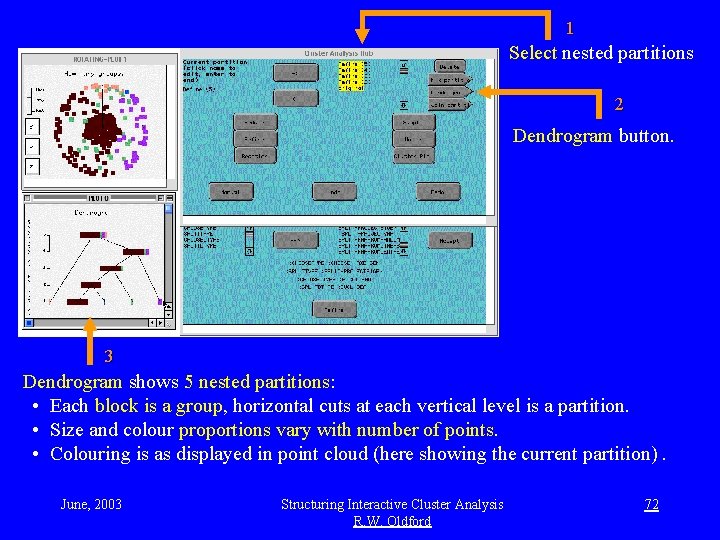
1 Select nested partitions and view dendrogram Select nested partitions 2 Dendrogram button. 3 Dendrogram shows 5 nested partitions: • Each block is a group, horizontal cuts at each vertical level is a partition. • Size and colour proportions vary with number of points. • Colouring is as displayed in point cloud (here showing the current partition). June, 2003 Structuring Interactive Cluster Analysis R. W. Oldford 72
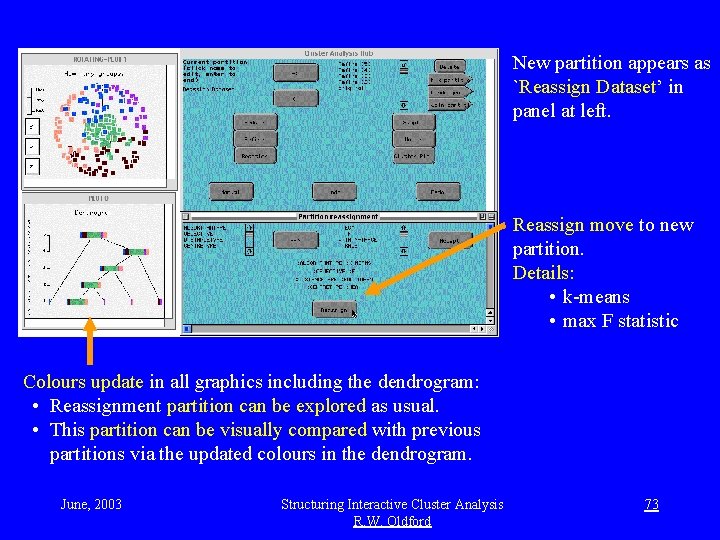
Reassign, dendrogram updated New partition appears as `Reassign Dataset’ in panel at left. Reassign move to new partition. Details: • k-means • max F statistic Colours update in all graphics including the dendrogram: • Reassignment partition can be explored as usual. • This partition can be visually compared with previous partitions via the updated colours in the dendrogram. June, 2003 Structuring Interactive Cluster Analysis R. W. Oldford 73
Cluster plot + dendrogram interaction movie Cluster plot button operates on selected partition Cluster plot: • groups as boxes • close groups are visually close (via multi-dimensional scaling) Nested and non-nested partitions can be visually compared simultaneously through interaction. June, 2003 Structuring Interactive Cluster Analysis R. W. Oldford 74
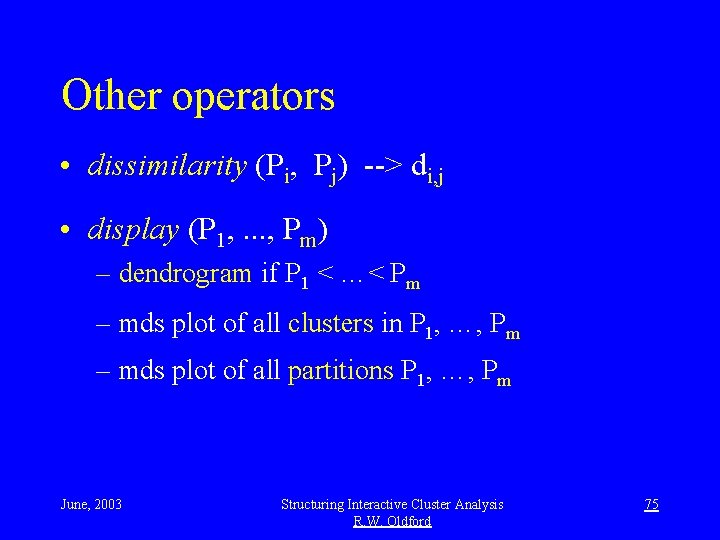
Other operators • dissimilarity (Pi, Pj) --> di, j • display (P 1, . . . , Pm) – dendrogram if P 1 < …< Pm – mds plot of all clusters in P 1, …, Pm – mds plot of all partitions P 1, …, Pm June, 2003 Structuring Interactive Cluster Analysis R. W. Oldford 75
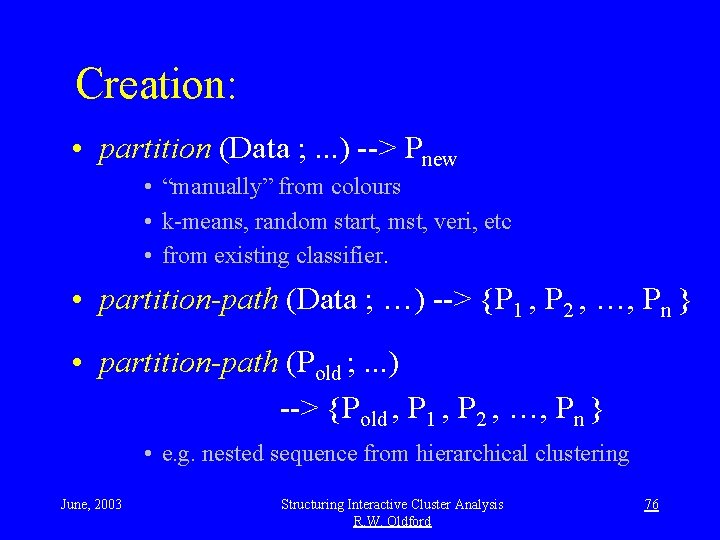
Creation: • partition (Data ; . . . ) --> Pnew • “manually” from colours • k-means, random start, mst, veri, etc • from existing classifier. • partition-path (Data ; …) --> {P 1 , P 2 , …, Pn } • partition-path (Pold ; . . . ) --> {Pold , P 1 , P 2 , …, Pn } • e. g. nested sequence from hierarchical clustering June, 2003 Structuring Interactive Cluster Analysis R. W. Oldford 76
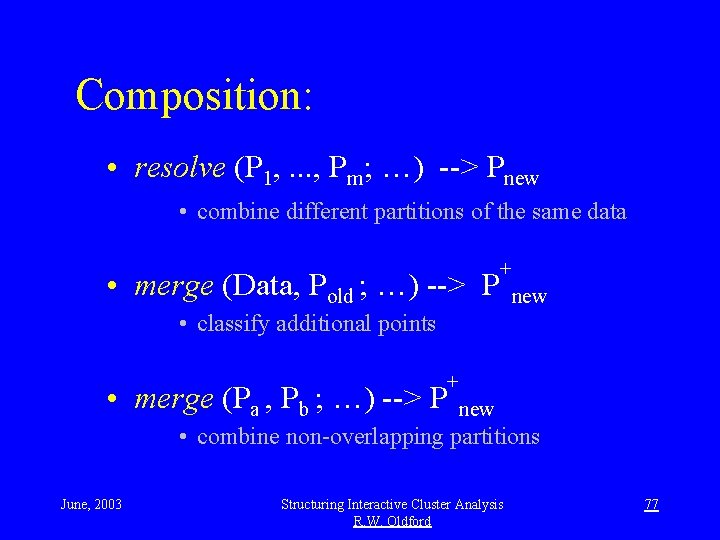
Composition: • resolve (P 1, . . . , Pm; …) --> Pnew • combine different partitions of the same data • merge (Data, Pold ; …) --> P + new • classify additional points • merge (Pa , Pb ; …) --> P + new • combine non-overlapping partitions June, 2003 Structuring Interactive Cluster Analysis R. W. Oldford 77
Implications: • Algorithms (re)cast in terms of moves: – refine, reduce – reassign – partition, partition-path – easily understandable (e. g. geometric structures) – specify required data structures • e. g. ms tree, triangulation, var-cov matrix, … June, 2003 Structuring Interactive Cluster Analysis R. W. Oldford 78
New problems: • interface design • multiple partitions – comparison and/or resolution – multiple display • inference June, 2003 Structuring Interactive Cluster Analysis R. W. Oldford 79
Summary • Cluster analysis is naturally exploratory and needs integration with modern interactive data analysis. • Enlarging the problem to partitions: – simplifies and gives structure – encourages exploratory approach – integrates naturally – introduces new possibilities (analysis and research) June, 2003 Structuring Interactive Cluster Analysis R. W. Oldford 80
Related references: • Interactive clustering CASI talk, Oldford (2001) • Quail: Overview (Interface 1998), graphics (Hurley and Oldford, ISI 1999) and code. • Design principles: Oldford (Interface 1999) • Analysis hubs: Oldford (Interface 1997) June, 2003 Structuring Interactive Cluster Analysis R. W. Oldford 81
Acknowledgements: • Catherine Hurley, Erin Mc. Leish, Rayan Yahfoufi, Natasha Wiebe • U(W) students in statistical computing • Quail: Quantitative Analysis in Lisp http: //www. stats. uwaterloo. ca/Quail June, 2003 Structuring Interactive Cluster Analysis R. W. Oldford 82