
Structure of a Java program class a program
![public class Hello 2 { public static void main(String[] args) { System. out. println("Hello,](https://slidetodoc.com/presentation_image_h2/2f7f85cfce2f7c98049ecc4183b56143/image-2.jpg "public class Hello 2 { public static void main(String[] args) { System. out. println(\"Hello,")
![Program: Memory public class Variable. Demo { public static void main(String[] args){ int lucky.](https://slidetodoc.com/presentation_image_h2/2f7f85cfce2f7c98049ecc4183b56143/image-12.jpg "Program: Memory public class Variable. Demo { public static void main(String[] args){ int lucky.")
![public class Stars 1 { public static void main(String[]args) { draw. Line. Of 13](https://slidetodoc.com/presentation_image_h2/2f7f85cfce2f7c98049ecc4183b56143/image-23.jpg "public class Stars 1 { public static void main(String[]args) { draw. Line. Of 13")
- Slides: 39
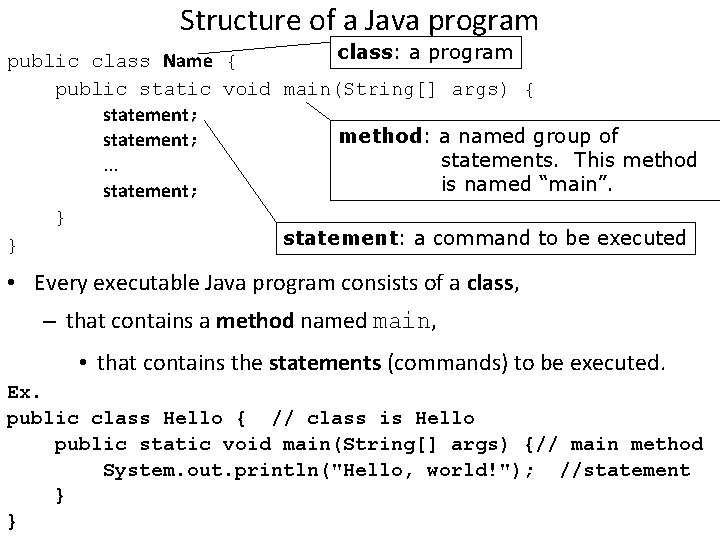
Structure of a Java program class: a program public class Name { public static void main(String[] args) { statement; method: a named group of statement; statements. This method. . . is named “main”. statement; } statement: a command to be executed } • Every executable Java program consists of a class, – that contains a method named main, • that contains the statements (commands) to be executed. Ex. public class Hello { // class is Hello public static void main(String[] args) {// main method System. out. println("Hello, world!"); //statement } }
public class Hello 2 { public static void main(String[] args) { System. out. println("Hello, world!"); System. out. println("This program produces four"); System. out. println("lines of output. "); } What is the output of this program? } Syntax template for the java main method: public static void main(String[] args) { <statement>; Output of the program: <statement>; Hello, world!. . . <statement>; This program produces four lines of output. } Copyright 2006 by Pearson Education 2
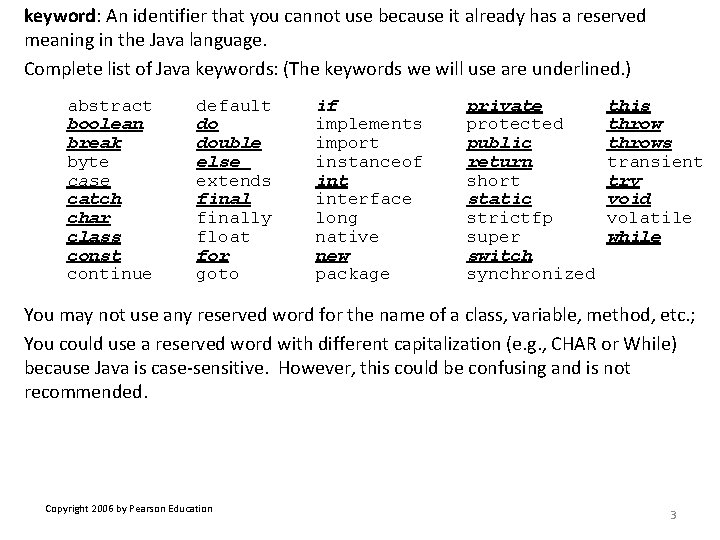
keyword: An identifier that you cannot use because it already has a reserved meaning in the Java language. Complete list of Java keywords: (The keywords we will use are underlined. ) abstract boolean break byte case catch char class const continue default do double else extends finally float for goto if implements import instanceof interface long native new package private protected public return short static strictfp super switch synchronized this throws transient try void volatile while You may not use any reserved word for the name of a class, variable, method, etc. ; You could use a reserved word with different capitalization (e. g. , CHAR or While) because Java is case-sensitive. However, this could be confusing and is not recommended. Copyright 2006 by Pearson Education 3
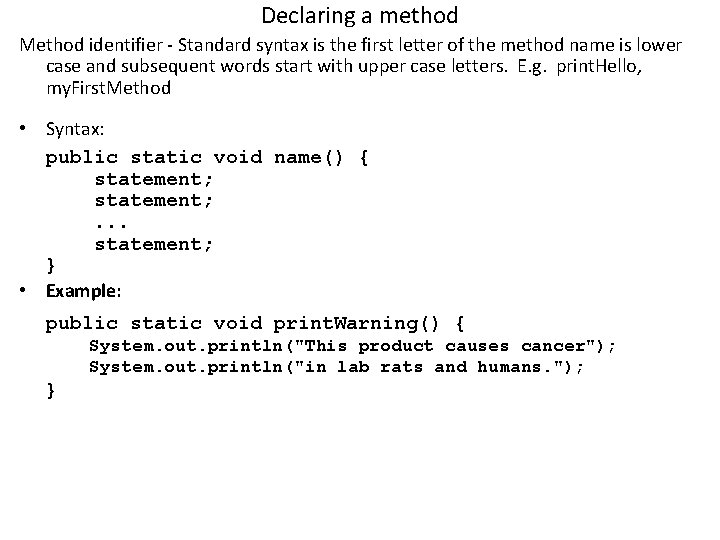
Declaring a method Method identifier - Standard syntax is the first letter of the method name is lower case and subsequent words start with upper case letters. E. g. print. Hello, my. First. Method • Syntax: public static void name() { statement; . . . statement; } • Example: public static void print. Warning() { System. out. println("This product causes cancer"); System. out. println("in lab rats and humans. "); }
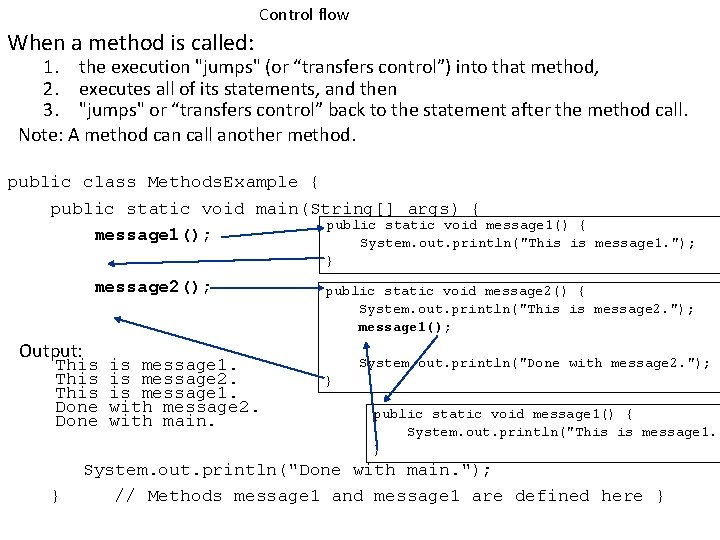
Control flow When a method is called: 1. the execution "jumps" (or “transfers control”) into that method, 2. executes all of its statements, and then 3. "jumps" or “transfers control” back to the statement after the method call. Note: A method can call another method. public class Methods. Example { public static void main(String[] args) { public static void message 1() { message 1(); System. out. println("This is message 1. "); } message 2(); Output: This Done } is message 1. is message 2. is message 1. with message 2. with main. public static void message 2() { System. out. println("This is message 2. "); message 1(); System. out. println("Done with message 2. "); } public static void message 1() { System. out. println("This is message 1. " } System. out. println("Done with main. "); // Methods message 1 and message 1 are defined here }
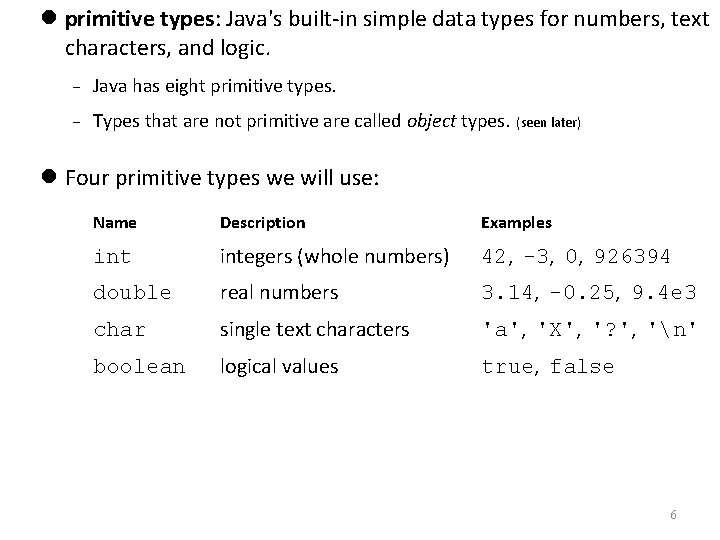
primitive types: Java's built-in simple data types for numbers, text characters, and logic. Java has eight primitive types. Types that are not primitive are called object types. (seen later) Four primitive types we will use: Name Description Examples integers (whole numbers) 42, -3, 0, 926394 double real numbers 3. 14, -0. 25, 9. 4 e 3 char single text characters 'a', 'X', '? ', 'n' boolean logical values true, false 6
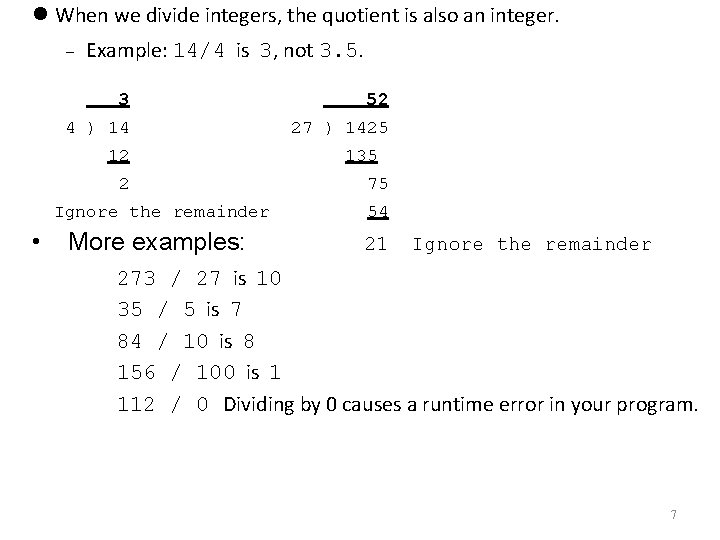
When we divide integers, the quotient is also an integer. Example: 14/4 is 3, not 3. 5. 3 52 4 ) 14 27 ) 1425 12 2 • 135 75 Ignore the remainder 54 More examples: 21 Ignore the remainder 273 / 27 is 10 35 / 5 is 7 84 / 10 is 8 156 / 100 is 1 112 / 0 Dividing by 0 causes a runtime error in your program. 7
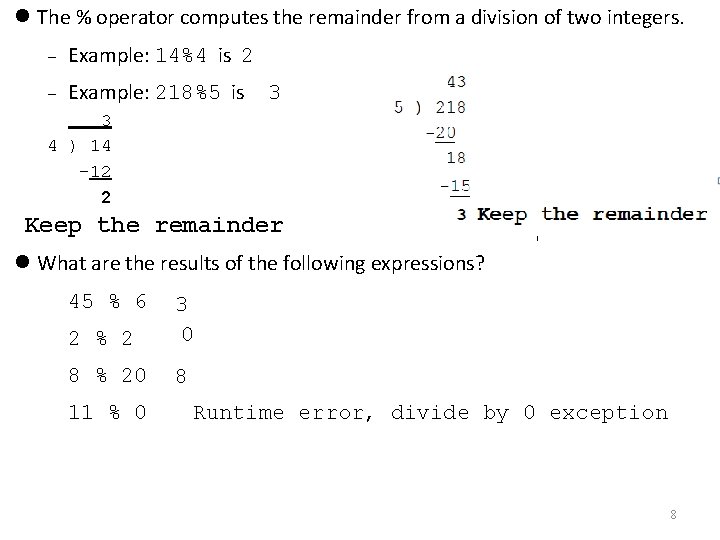
The % operator computes the remainder from a division of two integers. Example: 14%4 is 2 Example: 218%5 is 3 3 4 ) 14 -12 2 Keep the remainder What are the results of the following expressions? 45 % 6 2 % 2 3 0 8 % 20 8 11 % 0 Runtime error, divide by 0 exception 8
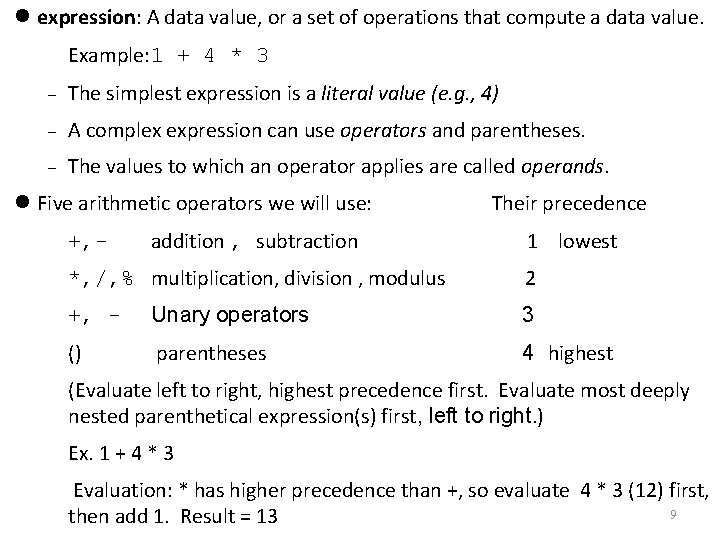
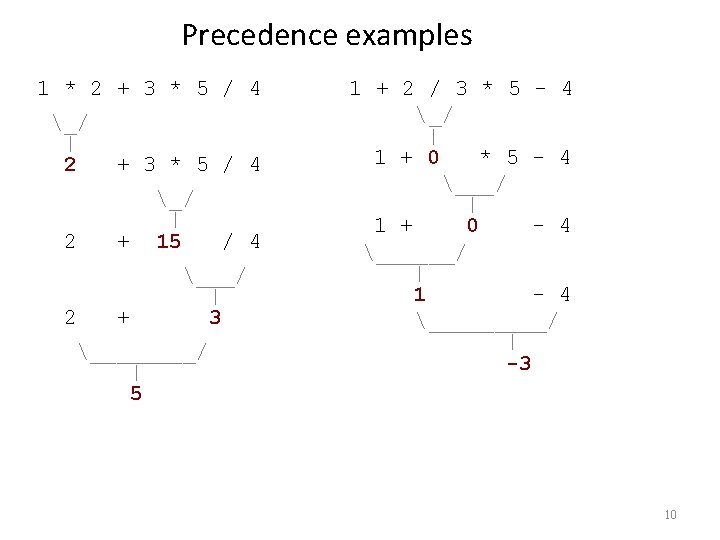
expression: A data value, or a set of operations that compute a data value. Example: 1 + 4 * 3 The simplest expression is a literal value (e. g. , 4) A complex expression can use operators and parentheses. The values to which an operator applies are called operands. Five arithmetic operators we will use: addition , subtraction Their precedence 1 lowest +, - *, /, % multiplication, division , modulus +, - Unary operators 3 () parentheses 4 highest (Evaluate left to right, highest precedence first. Evaluate most deeply nested parenthetical expression(s) first, left to right. ) Ex. 1 + 4 * 3 Evaluation: * has higher precedence than +, so evaluate 4 * 3 (12) first, 9 then add 1. Result = 13 2
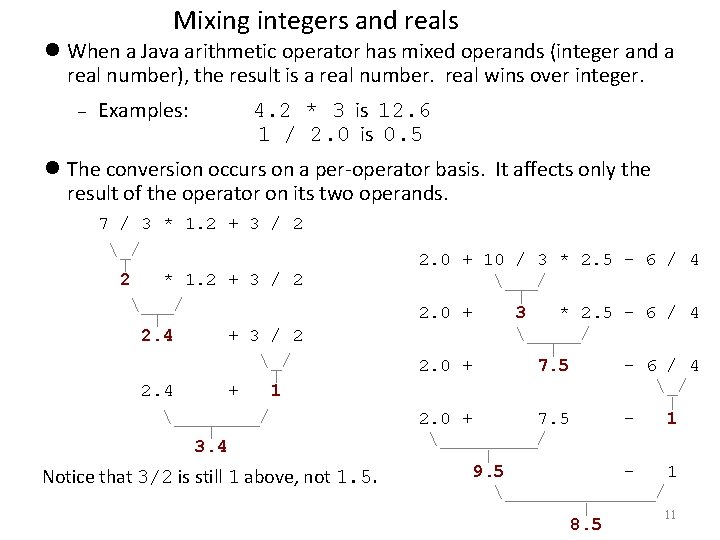
Mixing integers and reals When a Java arithmetic operator has mixed operands (integer and a real number), the result is a real number. real wins over integer. Examples: 4. 2 * 3 is 12. 6 1 / 2. 0 is 0. 5 The conversion occurs on a per-operator basis. It affects only the result of the operator on its two operands. 7 / 3 * 1. 2 + 3 / 2 _/ | 2 * 1. 2 + 3 / 2 ___/ | 2. 4 + 3 / 2 _/ | 2. 4 + 1 ____/ | 3. 4 Notice that 3/2 is still 1 above, not 1. 5. • 2. 0 + 10 / 3 * 2. 5 - 6 / 4 • ___/ | 2. 0 + 3 * 2. 5 - 6 / 4 • _____/ | 2. 0 + 7. 5 - 6 / 4 • _/ | 2. 0 + 7. 5 1 • _____/ | 9. 5 1 • _______/ | 11 8. 5
Program: Memory public class Variable. Demo { public static void main(String[] args){ int lucky. Number; Variable declaration sets up memory space Assignment statement gives variable a value lucky. Number = 7; 7 System. out. println( lucky. Number ); } } println uses the value Output: 7 12
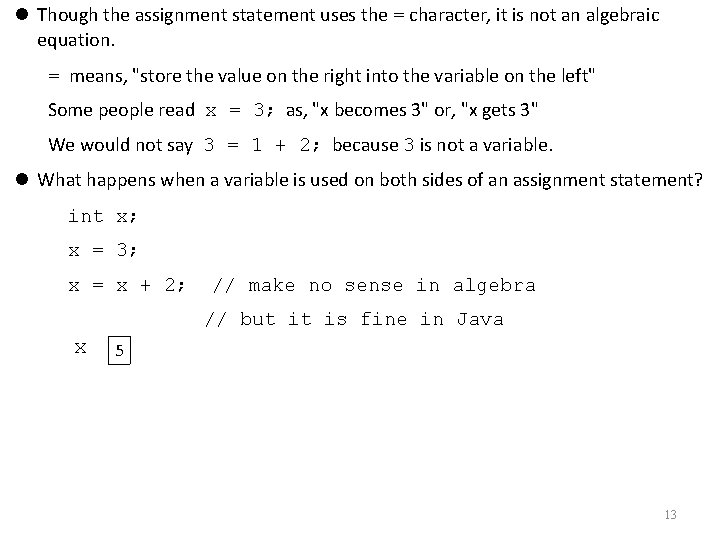
Though the assignment statement uses the = character, it is not an algebraic equation. = means, "store the value on the right into the variable on the left" Some people read x = 3; as, "x becomes 3" or, "x gets 3" We would not say 3 = 1 + 2; because 3 is not a variable. What happens when a variable is used on both sides of an assignment statement? int x; x = 3; x = x + 2; // make no sense in algebra // but it is fine in Java x 5 13
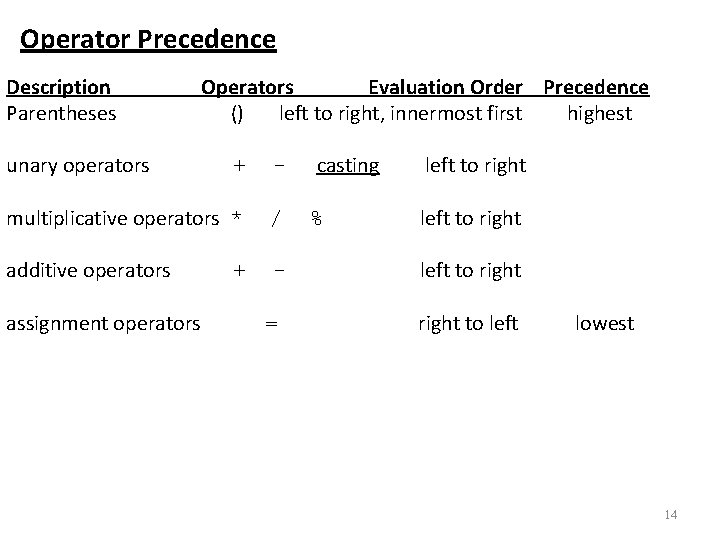
Operator Precedence Description Parentheses unary operators Operators Evaluation Order Precedence () left to right, innermost first highest + - multiplicative operators * / additive operators - assignment operators + = casting % left to right to left lowest 14
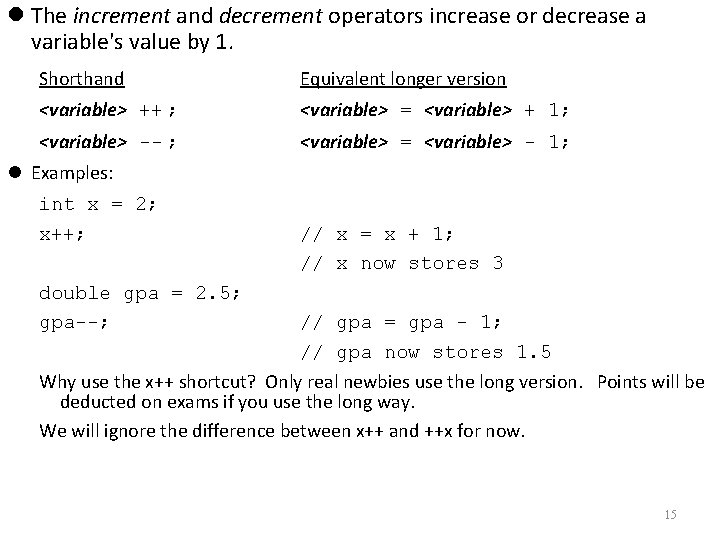
The increment and decrement operators increase or decrease a variable's value by 1. Shorthand Equivalent longer version <variable> ++ ; <variable> = <variable> + 1; <variable> -- ; <variable> = <variable> - 1; Examples: int x = 2; x++; double gpa = 2. 5; gpa--; // x = x + 1; // x now stores 3 // gpa = gpa - 1; // gpa now stores 1. 5 Why use the x++ shortcut? Only real newbies use the long version. Points will be deducted on exams if you use the long way. We will ignore the difference between x++ and ++x for now. 15
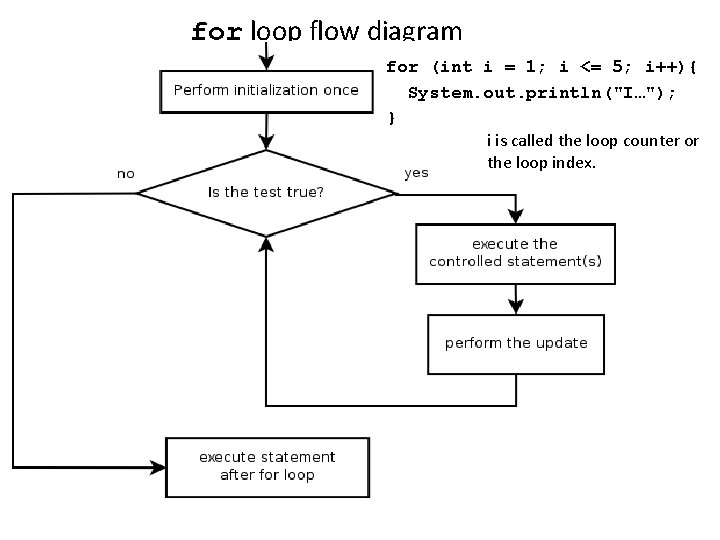
for loop flow diagram for (int i = 1; i <= 5; i++){ System. out. println("I…"); } I is called the loop counter or i is calledloop theindex loop counter or the loop index.
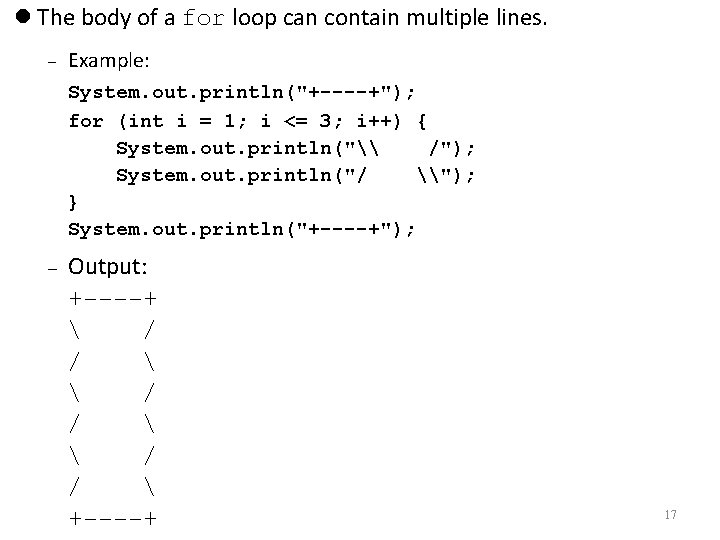
The body of a for loop can contain multiple lines. Example: System. out. println("+----+"); for (int i = 1; i <= 3; i++) { System. out. println("\ /"); System. out. println("/ \"); } System. out. println("+----+"); Output: +----+ / / +----+ 17
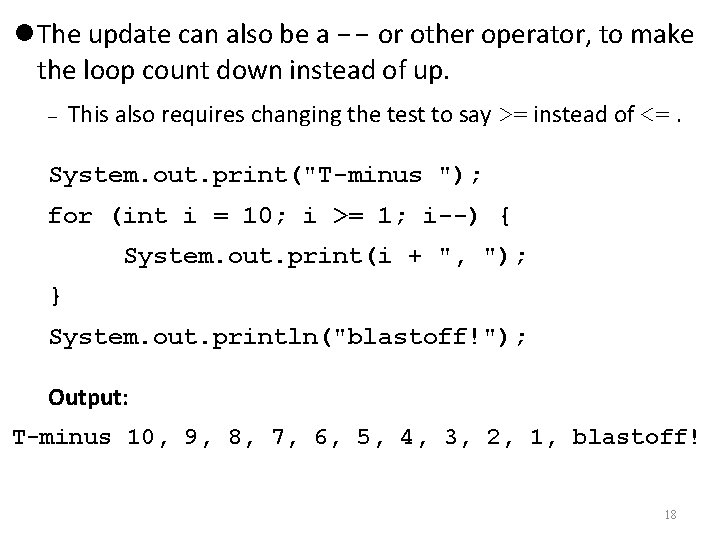
The update can also be a -- or other operator, to make the loop count down instead of up. This also requires changing the test to say >= instead of <=. System. out. print("T-minus "); for (int i = 10; i >= 1; i--) { System. out. print(i + ", "); } System. out. println("blastoff!"); Output: T-minus 10, 9, 8, 7, 6, 5, 4, 3, 2, 1, blastoff! 18
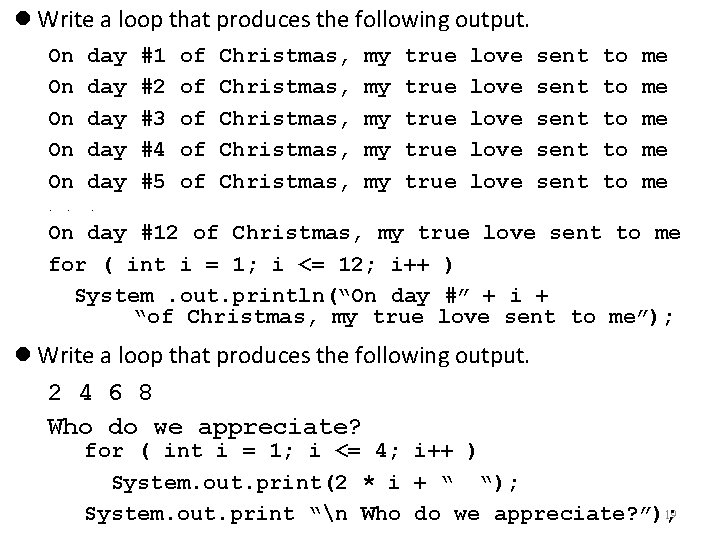
Write a loop that produces the following output. On On On day day day . . . #1 #2 #3 #4 #5 of of of Christmas, Christmas, my my my true true love love sent sent to to to me me me On day #12 of Christmas, my true love sent to me for ( int i = 1; i <= 12; i++ ) System. out. println(“On day #” + i + “of Christmas, my true love sent to me”); Write a loop that produces the following output. 2 4 6 8 Who do we appreciate? for ( int i = 1; i <= 4; i++ ) System. out. print(2 * i + “ “); 19 System. out. print “n Who do we appreciate? ”);
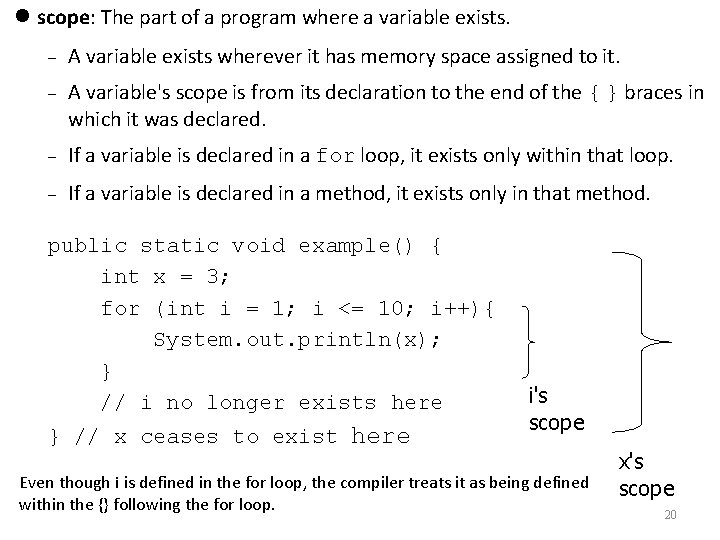
scope: The part of a program where a variable exists. A variable exists wherever it has memory space assigned to it. A variable's scope is from its declaration to the end of the { } braces in which it was declared. If a variable is declared in a for loop, it exists only within that loop. If a variable is declared in a method, it exists only in that method. public static void example() { int x = 3; for (int i = 1; i <= 10; i++){ System. out. println(x); } // i no longer exists here } // x ceases to exist here i's scope Even though i is defined in the for loop, the compiler treats it as being defined within the {} following the for loop. x's scope 20
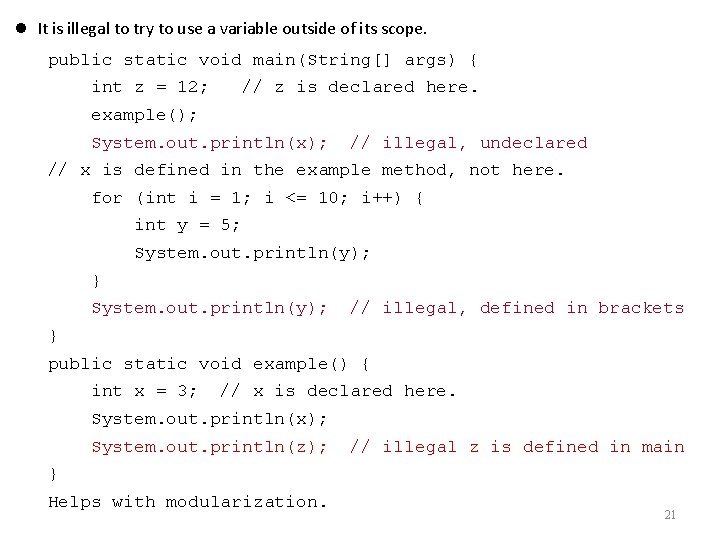
It is illegal to try to use a variable outside of its scope. public static void main(String[] args) { int z = 12; // z is declared here. example(); System. out. println(x); // illegal, undeclared // x is defined in the example method, not here. for (int i = 1; i <= 10; i++) { int y = 5; System. out. println(y); } System. out. println(y); // illegal, defined in brackets } public static void example() { int x = 3; // x is declared here. System. out. println(x); System. out. println(z); // illegal z is defined in main } Helps with modularization. 21
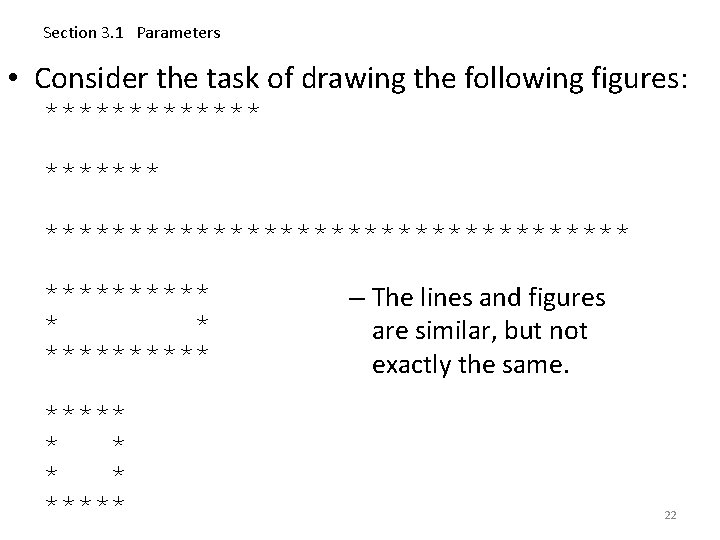
Section 3. 1 Parameters • Consider the task of drawing the following figures: ********************* ***** * * ***** – The lines and figures are similar, but not exactly the same. 22
public class Stars 1 { public static void main(String[]args) { draw. Line. Of 13 Stars(); redundant draw. Line. Of 7 Stars(); draw. Line. Of 35 Stars(); draw 10 x 3 Box(); draw 5 x 4 Box(); redundant } The methods at left are redundant. public static void draw. Line. Of 13 Stars() { What would be a better solution? for (int i = 1; i <= 13; i++) { System. out. print("*"); } System. out. println(); } public static void draw. Line. Of 7 Stars() { for (int i = 1; i <= 7; i++) { System. out. print("*"); } System. out. println(); } public static void draw. Line. Of 35 Stars() { for (int i = 1; i <= 35; i++) { System. out. print("*"); } System. out. println(); }. . . draw. Stars - A method to draw a line of any number of stars. draw. Box - A method to draw a box of any size. 23
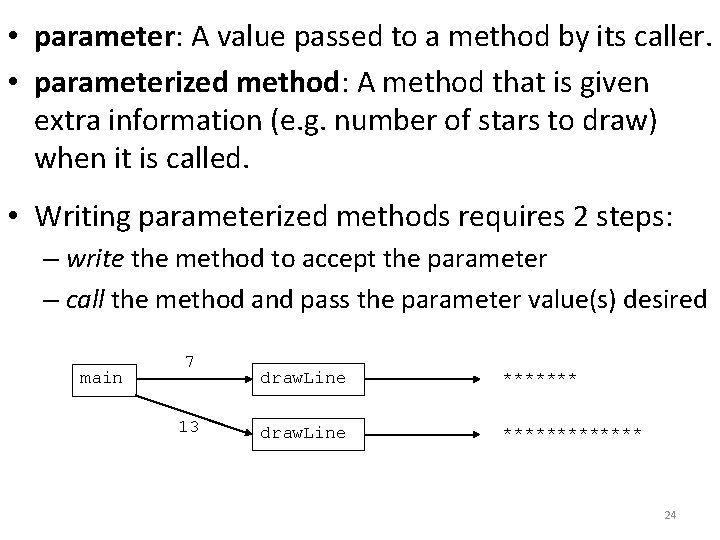
• parameter: A value passed to a method by its caller. • parameterized method: A method that is given extra information (e. g. number of stars to draw) when it is called. • Writing parameterized methods requires 2 steps: – write the method to accept the parameter – call the method and pass the parameter value(s) desired main 7 13 draw. Line ************* 24
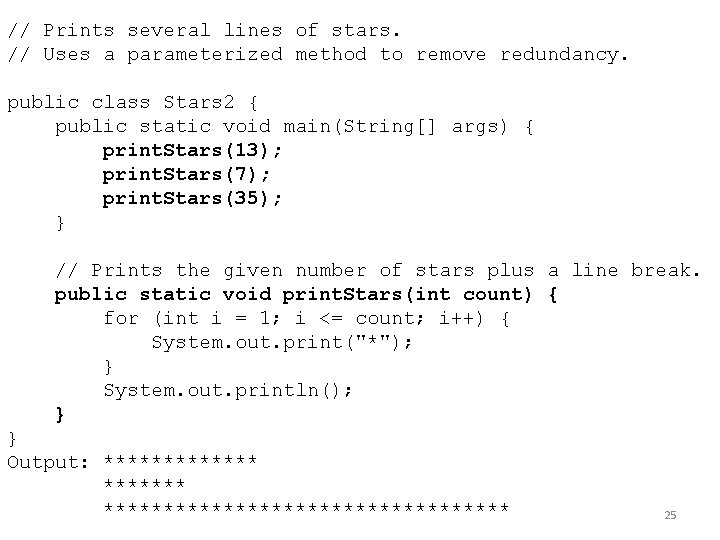
// Prints several lines of stars. // Uses a parameterized method to remove redundancy. public class Stars 2 { public static void main(String[] args) { print. Stars(13); print. Stars(7); print. Stars(35); } // Prints the given number of stars plus a line break. public static void print. Stars(int count) { for (int i = 1; i <= count; i++) { System. out. print("*"); } System. out. println(); } } Output: ******************** 25
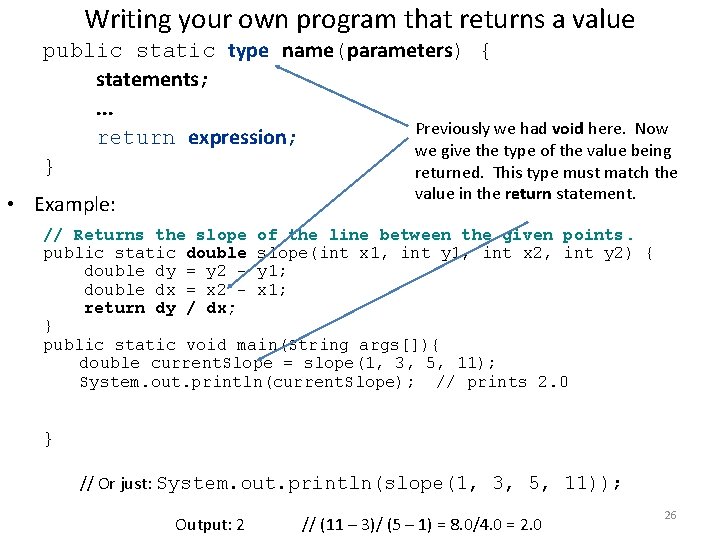
Writing your own program that returns a value public static type name(parameters) { statements; . . . Previously we had void here. Now return expression; we give the type of the value being } returned. This type must match the value in the return statement. • Example: // Returns the slope of the line between the given points. public static double slope(int x 1, int y 1, int x 2, int y 2) { double dy = y 2 - y 1; double dx = x 2 - x 1; return dy / dx; } public static void main(String args[]){ double current. Slope = slope(1, 3, 5, 11); System. out. println(current. Slope); // prints 2. 0 } // Or just: System. out. println(slope(1, 3, 5, 11)); Output: 2 // (11 – 3)/ (5 – 1) = 8. 0/4. 0 = 2. 0 26
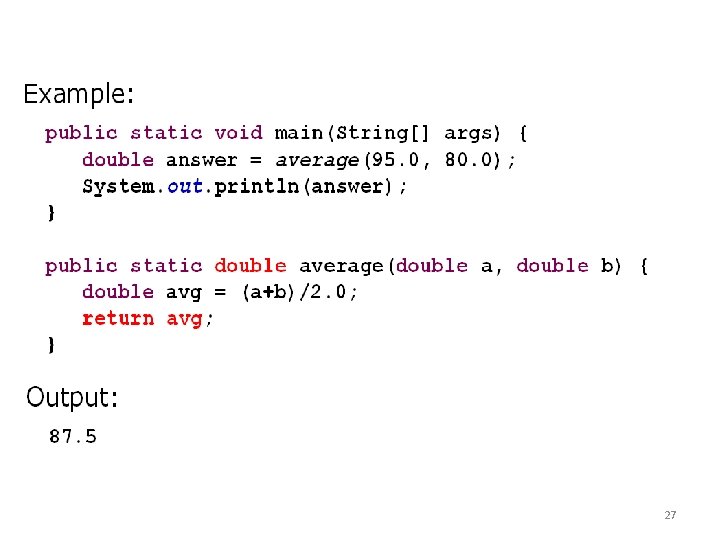
27
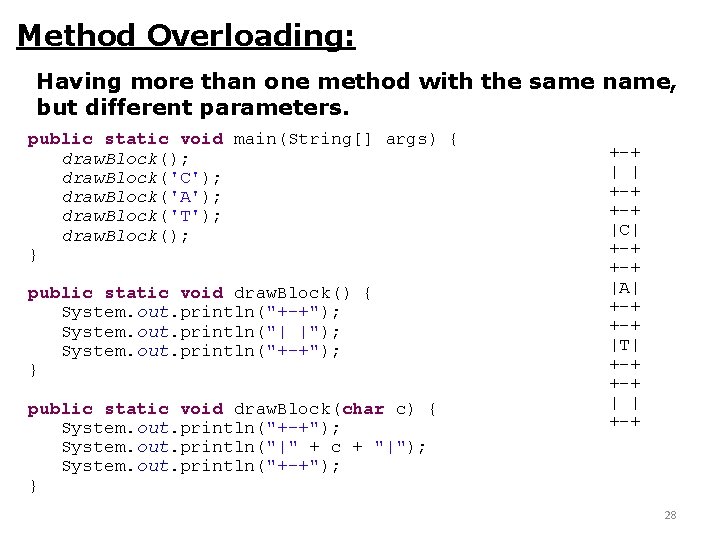
Method Overloading: Having more than one method with the same name, but different parameters. public static void main(String[] args) { draw. Block(); draw. Block('C'); draw. Block('A'); draw. Block('T'); draw. Block(); } public static void draw. Block() { System. out. println("+-+"); System. out. println("| |"); System. out. println("+-+"); } public static void draw. Block(char c) { System. out. println("+-+"); System. out. println("|" + c + "|"); System. out. println("+-+"); } +-+ | | +-+ |C| +-+ |A| +-+ |T| +-+ | | +-+ 28
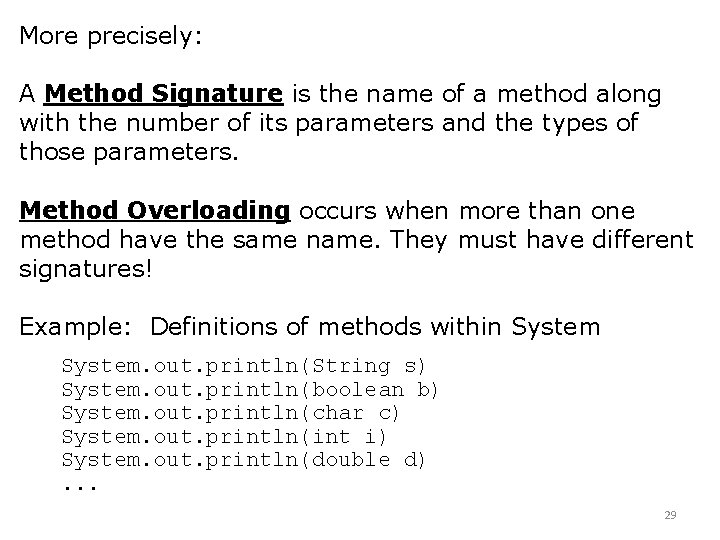
More precisely: A Method Signature is the name of a method along with the number of its parameters and the types of those parameters. Method Overloading occurs when more than one method have the same name. They must have different signatures! Example: Definitions of methods within System. out. println(String s) System. out. println(boolean b) System. out. println(char c) System. out. println(int i) System. out. println(double d). . . 29
End of Midterm 1 material, Spring 2012
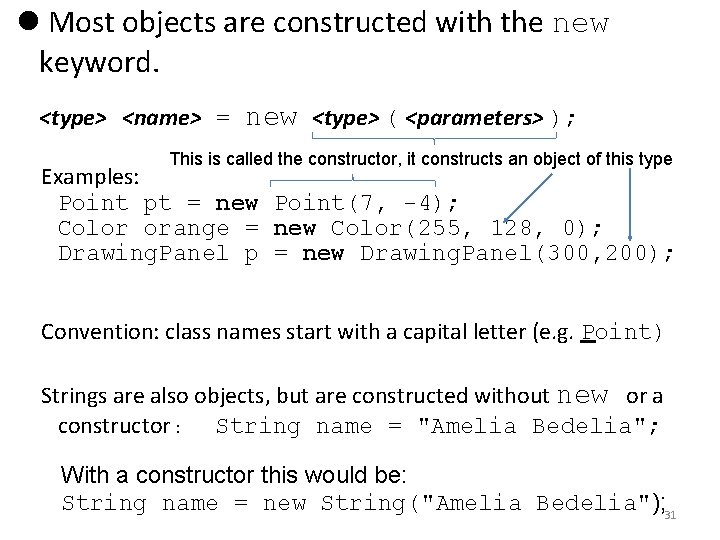
Most objects are constructed with the new keyword. <type> <name> = new <type> ( <parameters> ); This is called the constructor, it constructs an object of this type Examples: Point pt = new Point(7, -4); Color orange = new Color(255, 128, 0); Drawing. Panel p = new Drawing. Panel(300, 200); Convention: class names start with a capital letter (e. g. Point) Strings are also objects, but are constructed without new or a constructor : String name = "Amelia Bedelia"; With a constructor this would be: String name = new String("Amelia Bedelia"); 31
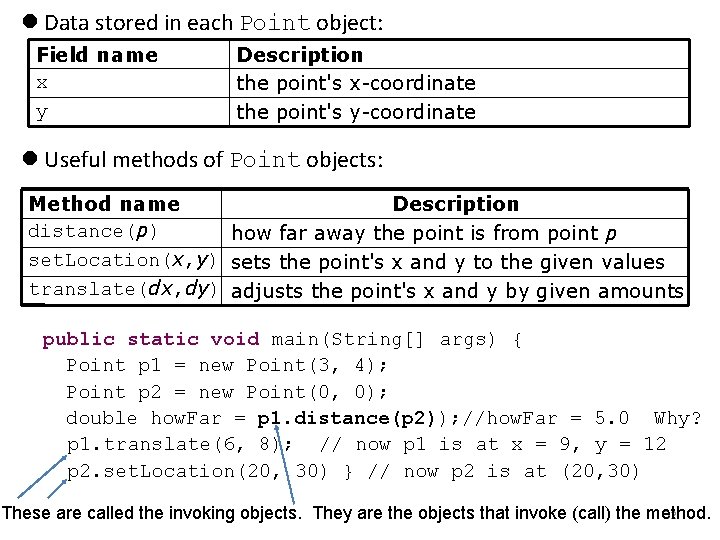
Data stored in each Point object: Field name x y Description the point's x-coordinate the point's y-coordinate Useful methods of Point objects: Method name Description distance(p) how far away the point is from point p set. Location(x, y) sets the point's x and y to the given values translate(dx, dy) adjusts the point's x and y by given amounts public static void main(String[] args) { Point p 1 = new Point(3, 4); Point p 2 = new Point(0, 0); double how. Far = p 1. distance(p 2)); //how. Far = 5. 0 Why? p 1. translate(6, 8); // now p 1 is at x = 9, y = 12 p 2. set. Location(20, 30) } // now p 2 is at (20, 30) 32 These are called the invoking objects. They are the objects that invoke (call) the method.
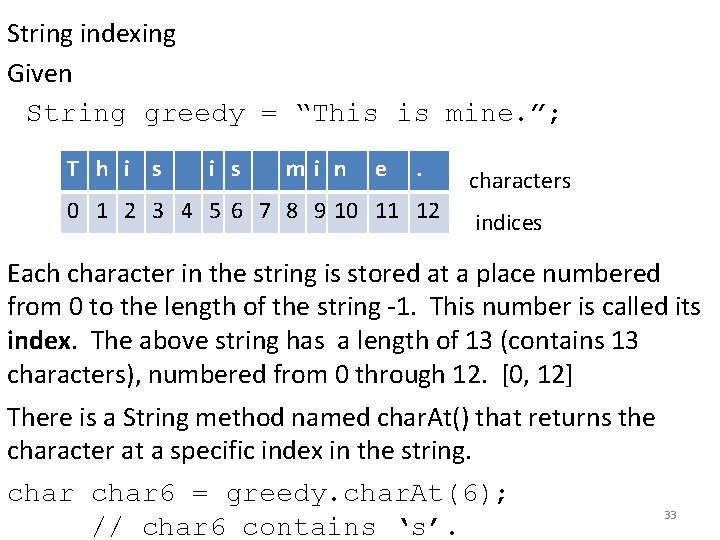
String indexing Given String greedy = “This is mine. ”; T h i s mi n e . 0 1 2 3 4 5 6 7 8 9 10 11 12 characters indices Each character in the string is stored at a place numbered from 0 to the length of the string -1. This number is called its index. The above string has a length of 13 (contains 13 characters), numbered from 0 through 12. [0, 12] There is a String method named char. At() that returns the character at a specific index in the string. char 6 = greedy. char. At(6); // char 6 contains ‘s’. 33
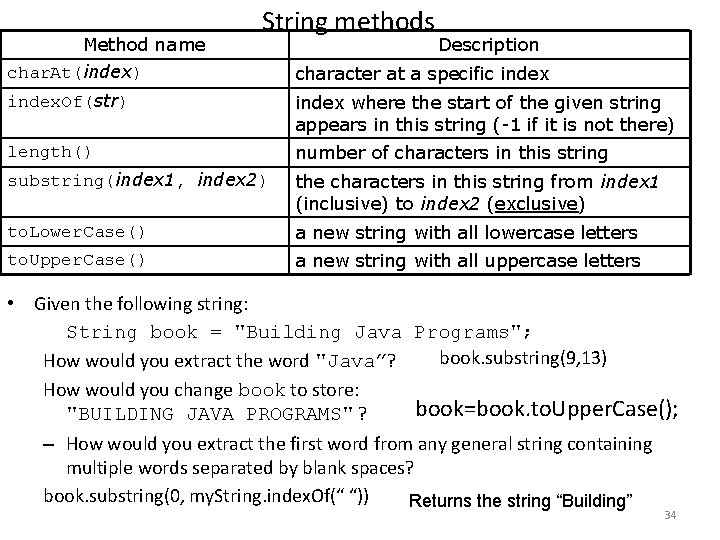
Method name char. At(index) String methods Description character at a specific index. Of(str) index where the start of the given string appears in this string (-1 if it is not there) length() number of characters in this string substring(index 1, index 2) the characters in this string from index 1 (inclusive) to index 2 (exclusive) to. Lower. Case() a new string with all lowercase letters to. Upper. Case() a new string with all uppercase letters • Given the following string: String book = "Building Java Programs"; book. substring(9, 13) How would you extract the word "Java”? How would you change book to store: book=book. to. Upper. Case(); "BUILDING JAVA PROGRAMS" ? – How would you extract the first word from any general string containing multiple words separated by blank spaces? book. substring(0, my. String. index. Of(“ “)) Returns the string “Building” 34
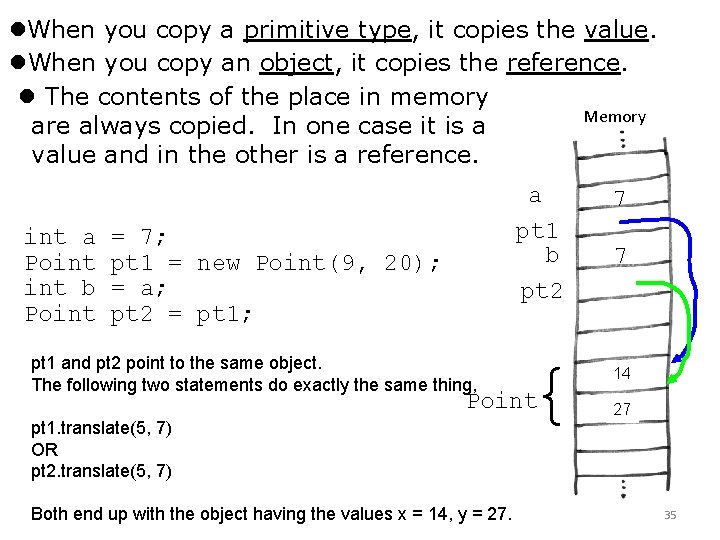
When you copy a primitive type, it copies the value. When you copy an object, it copies the reference. The contents of the place in memory Memory are always copied. In one case it is a value and in the other is a reference. int a Point b Point a pt 1 b pt 2 = 7; pt 1 = new Point(9, 20); = a; pt 2 = pt 1; pt 1 and pt 2 point to the same object. The following two statements do exactly the same thing, { Point pt 1. translate(5, 7) OR pt 2. translate(5, 7) Both end up with the object having the values x = 14, y = 27. 7 7 14 9 27 20 35
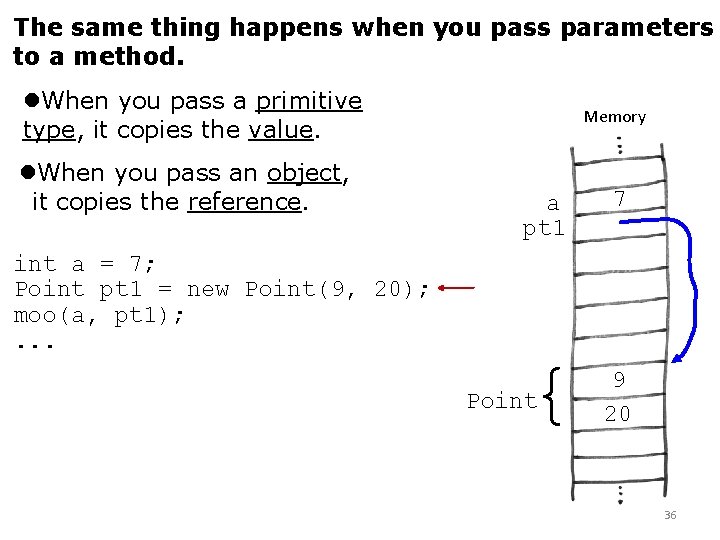
The same thing happens when you pass parameters to a method. When you pass a primitive type, it copies the value. When you pass an object, it copies the reference. int a = 7; Point pt 1 = new Point(9, 20); moo(a, pt 1); . . . Memory a pt 1 { Point 7 9 20 36
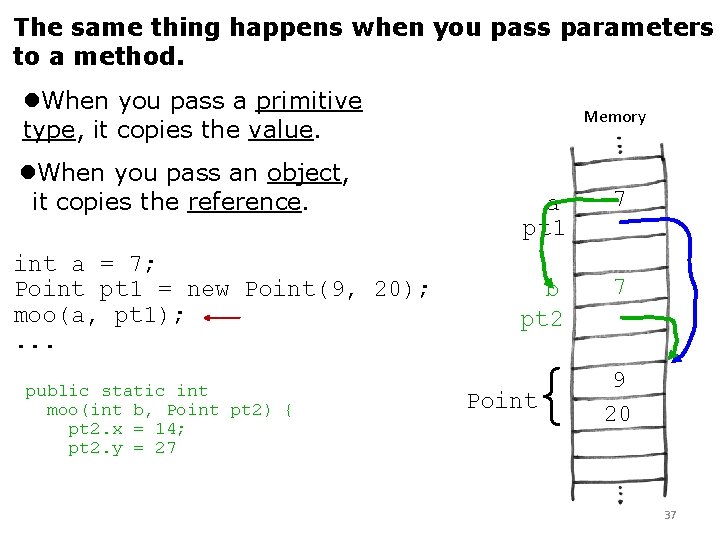
The same thing happens when you pass parameters to a method. When you pass a primitive type, it copies the value. When you pass an object, it copies the reference. int a = 7; Point pt 1 = new Point(9, 20); moo(a, pt 1); . . . public static int moo(int b, Point pt 2) { pt 2. x = 14; pt 2. y = 27 Memory a pt 1 7 b pt 2 7 { Point 9 20 37
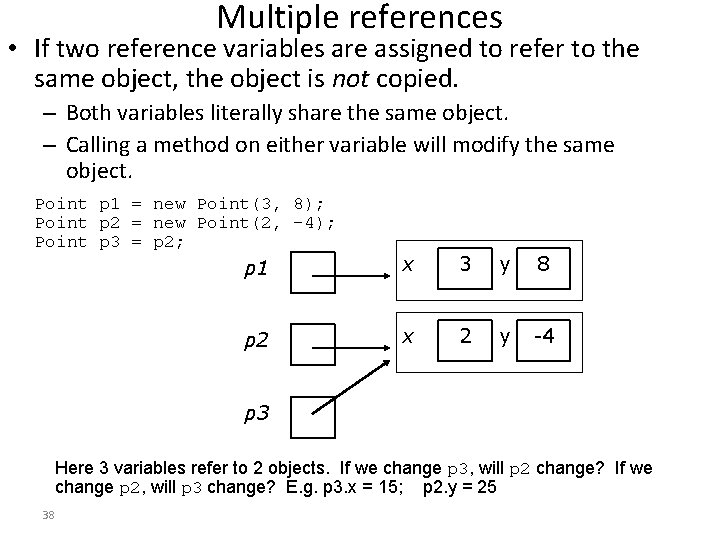
Multiple references • If two reference variables are assigned to refer to the same object, the object is not copied. – Both variables literally share the same object. – Calling a method on either variable will modify the same object. Point p 1 = new Point(3, 8); Point p 2 = new Point(2, -4); Point p 3 = p 2; p 1 x 3 y 8 p 2 x 2 y -4 p 3 Here 3 variables refer to 2 objects. If we change p 3, will p 2 change? If we change p 2, will p 3 change? E. g. p 3. x = 15; p 2. y = 25 38
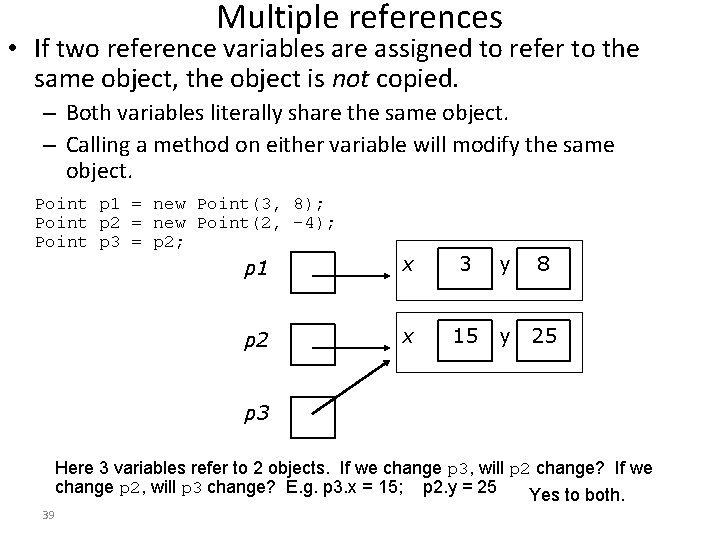
Multiple references • If two reference variables are assigned to refer to the same object, the object is not copied. – Both variables literally share the same object. – Calling a method on either variable will modify the same object. Point p 1 = new Point(3, 8); Point p 2 = new Point(2, -4); Point p 3 = p 2; p 1 x 3 y 8 p 2 x 15 y 25 p 3 Here 3 variables refer to 2 objects. If we change p 3, will p 2 change? If we change p 2, will p 3 change? E. g. p 3. x = 15; p 2. y = 25 Yes to both. 39