
Structural Testing Motivation The gcov Tool An example


- Slides: 24
Structural Testing Motivation The gcov Tool • An example using gcov • How does gcov do it • gcov subtleties Further structural testing measures • Flowcharts • Structural testing and flowcharts • Minimal test suites • Path coverage • Testing loops Time to cover: 25 35 minutes Computer Science 2212 a/b UWO 1
Structural Testing: Motivation Consider a typical programming project: • We have designed code based on requirements • We have also built in some additional features • Additional features interact with required features in various ways • We need to test code of additional features • We don’t remember what all of them are • Because new features are not mentioned in requirements, testing based on requirements will not help us Consider a function to sort an array of integers • Requirements state only that resulting array must preserve original elements and be sorted • Many different algorithms exist for doing this • A test suite which tests one algorithm thoroughly may not test another Computer Science 2212 a/b UWO 2
Structural Testing: Motivation continued In both these cases, the essential problem is: How do we know we have tested all of our code? • For all we know, some code may never have been executed by any test that we have run • User may do something that executes this untested code • It will therefore be run for the first time by the user • Code run for the first time often has bugs! Have we tested all of our code? • Tools exist to help us answer this question These tools generally called “code coverage tools” • Help us to see what percentage of code has been “covered” by some test case • These tools usually targeted to individual programming languages Good free code coverage tools exist for C • Seems only commercial tools exist for Java • We will look at one for C Computer Science 2212 a/b UWO 3
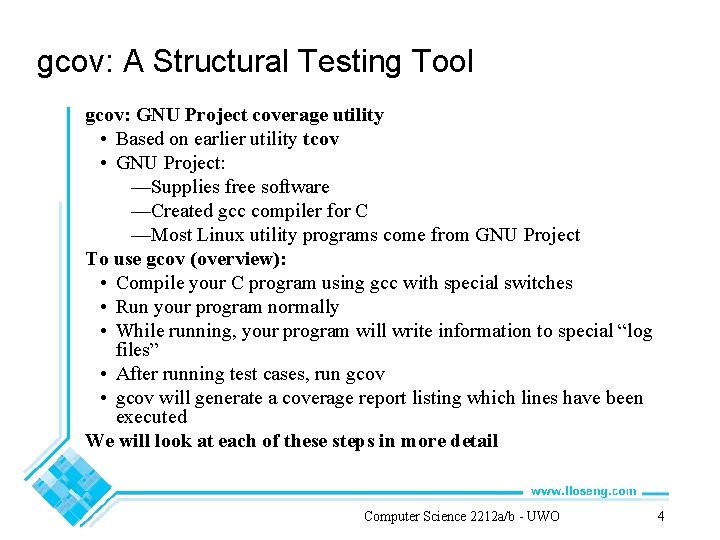
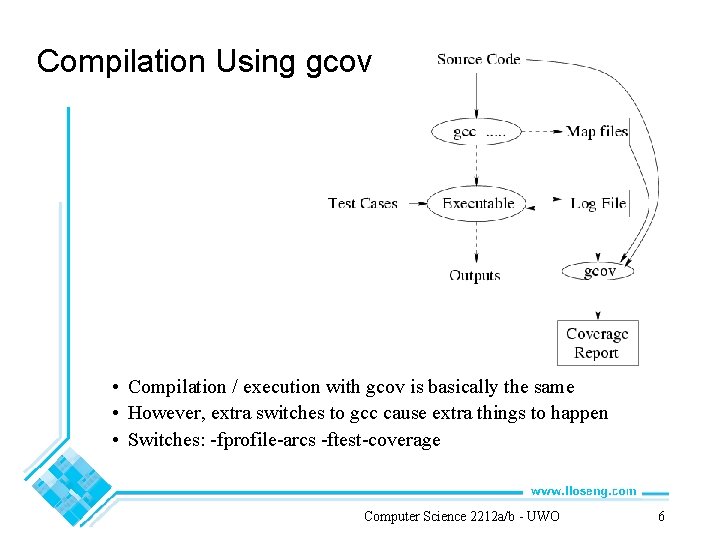
gcov: A Structural Testing Tool gcov: GNU Project coverage utility • Based on earlier utility tcov • GNU Project: —Supplies free software —Created gcc compiler for C —Most Linux utility programs come from GNU Project To use gcov (overview): • Compile your C program using gcc with special switches • Run your program normally • While running, your program will write information to special “log files” • After running test cases, run gcov • gcov will generate a coverage report listing which lines have been executed We will look at each of these steps in more detail Computer Science 2212 a/b UWO 4
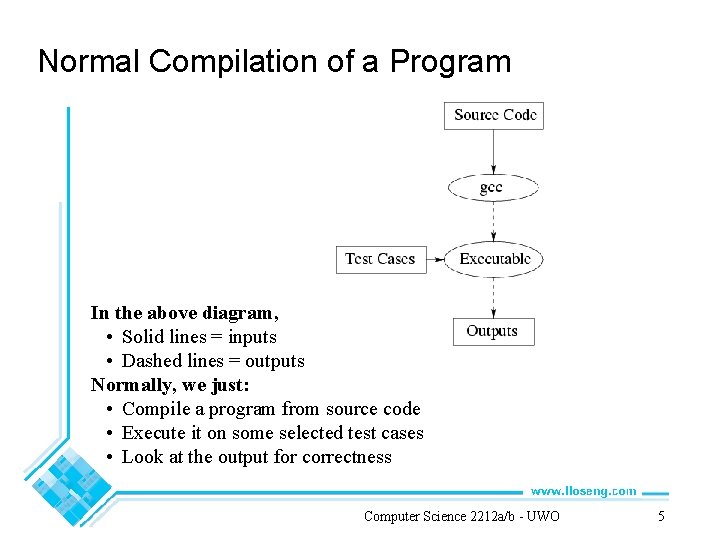
Normal Compilation of a Program In the above diagram, • Solid lines = inputs • Dashed lines = outputs Normally, we just: • Compile a program from source code • Execute it on some selected test cases • Look at the output for correctness Computer Science 2212 a/b UWO 5
Compilation Using gcov • Compilation / execution with gcov is basically the same • However, extra switches to gcc cause extra things to happen • Switches: fprofile arcs ftest coverage Computer Science 2212 a/b UWO 6
Compilation Using gcov continued When we compile with the extra switches, gcc does the following extra things: • Generates “map file” of the blocks of code in our source files • Generates object code which counts the number of times each block of code has been executed “Block of code”: • Any sequence of statements such that executing one of them guarantees we must execute the next one Example (program wordcount. c): • Instead of just “gcc wordcount. c”, we say gcc fprofile arcs ftest coverage wordcount. c • gcc generates map file wordcount. gcno • Exact format of the “map file” is not important to us Computer Science 2212 a/b UWO 7
Running a gcov-Compiled Program Run program as normal on test cases First time program is run, a coverage data file appears (with extension. gcda) • Coverage data file contains information about how many times each line of code has been executed Example: • After running wordcount, file wordcount. gcda is created Coverage data is updated every subsequent time program is run Coverage data is cumulative; e. g. • Line 42 executed 5 times on first run; • Line 42 executed 10 times on second run; • Therefore, coverage data stored in. gcda file shows 15 executions of line 42 Computer Science 2212 a/b UWO 8
Getting Information from gcov Run gcov with source file name as argument (e. g. gcov wordcount. c) gcov writes some statistics to screen, creates a file with extension “. gcov” (e. g. wordcount. c. gcov). gcov file contains: • On right: source code • On left: number of times each line has been executed • If lines have never been executed, . gcov file shows ##### to highlight it Computer Science 2212 a/b UWO 9
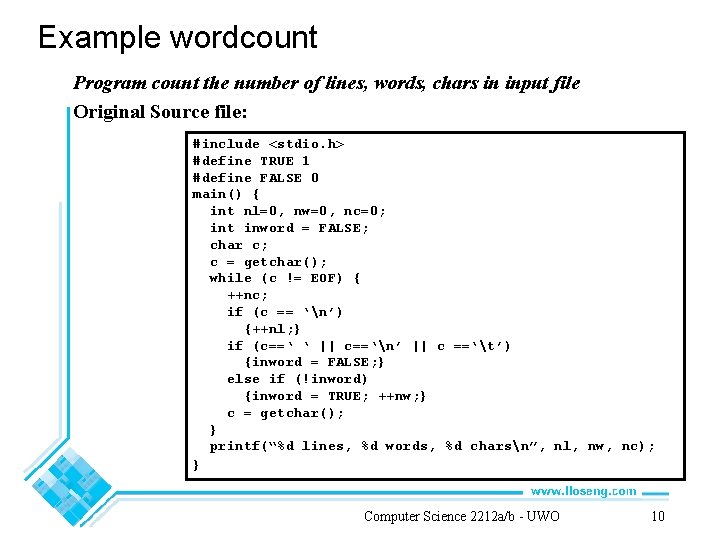
Example wordcount Program count the number of lines, words, chars in input file Original Source file: #include <stdio. h> #define TRUE 1 #define FALSE 0 main() { int nl=0, nw=0, nc=0; int inword = FALSE; char c; c = getchar(); while (c != EOF) { ++nc; if (c == ‘n’) {++nl; } if (c==‘ ‘ || c==‘n’ || c ==‘t’) {inword = FALSE; } else if (!inword) {inword = TRUE; ++nw; } c = getchar(); } printf(“%d lines, %d words, %d charsn”, nl, nw, nc); } Computer Science 2212 a/b UWO 10
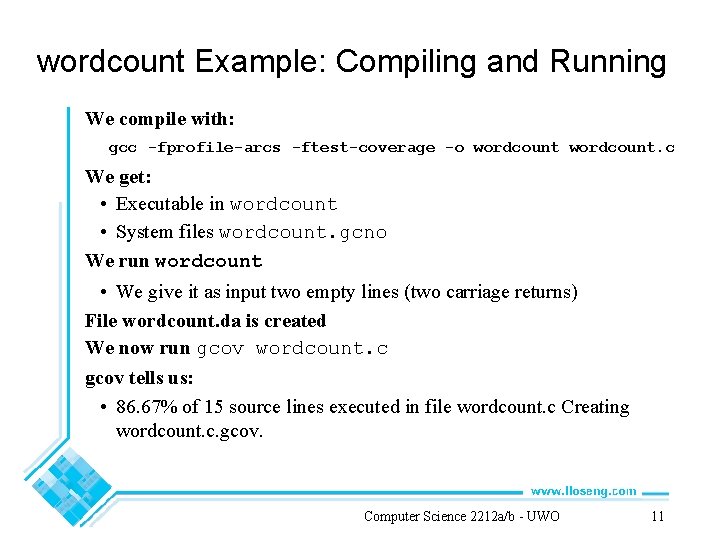
wordcount Example: Compiling and Running We compile with: gcc fprofile arcs ftest coverage o wordcount. c We get: • Executable in wordcount • System files wordcount. gcno We run wordcount • We give it as input two empty lines (two carriage returns) File wordcount. da is created We now run gcov wordcount. c gcov tells us: • 86. 67% of 15 source lines executed in file wordcount. c Creating wordcount. c. gcov. Computer Science 2212 a/b UWO 11
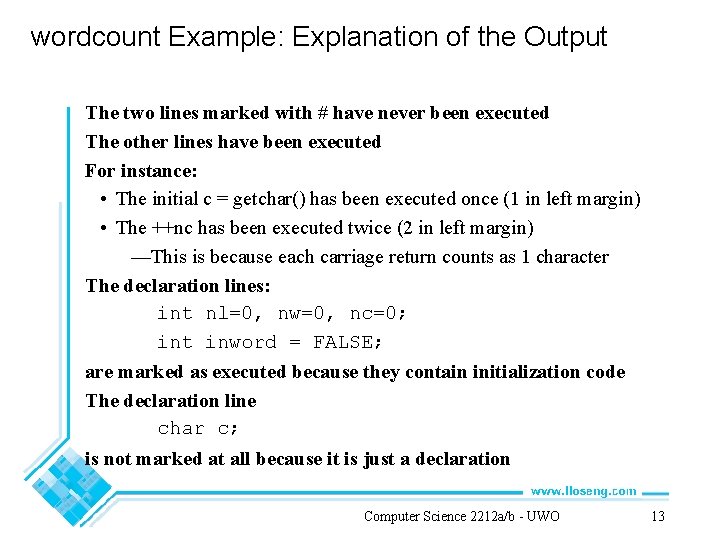
-: -: 1: 1: 1: -: -: 1: 4: 2: 2: 2: 4: 2: 2: -: 1: -: -: 0: Source: wordcount. c 0: Graph: wordcount. gcno 0: Data: wordcount. gcda 0: Runs: 1 0: Programs: 1 1: #include <stdio. h> 2: #define TRUE 1 3: #define FALSE 0 4: main() { 5: int n 1=0, nw=0, nc=0; 6: int inword=FALSE; 7: char c; 8: 9: c=getchar(); 10: while (c != EOF) { 11: ++nc; 12: if (c=='n') 13: {++n 1; } 14: if (c==' ' || c=='n' || c=='t') 15: {inword=FALSE; } #####: 16: else if (!inword) #####: 17: {inword=TRUE; ++nw; } 18: c=getchar(); 19: } 20: printf("%d lines, %d words, %d charsn", 21: n 1, nw, nc); 22: } Computer Science 2212 a/b UWO 12
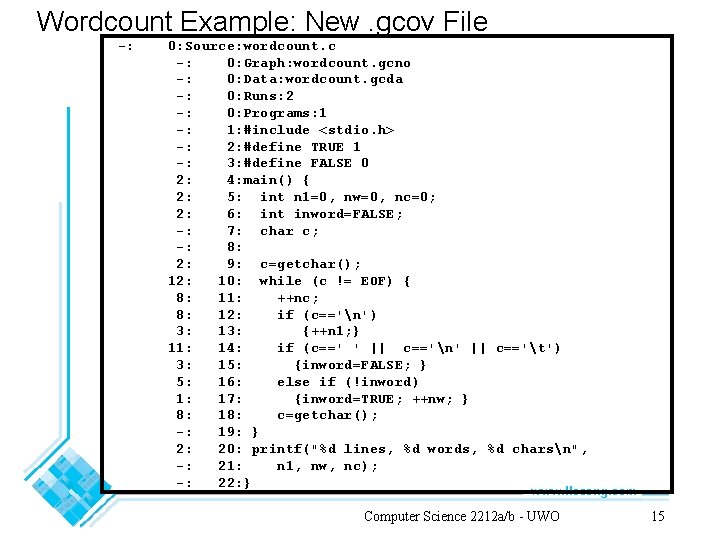
wordcount Example: Explanation of the Output The two lines marked with # have never been executed The other lines have been executed For instance: • The initial c = getchar() has been executed once (1 in left margin) • The ++nc has been executed twice (2 in left margin) —This is because each carriage return counts as 1 character The declaration lines: int nl=0, nw=0, nc=0; int inword = FALSE; are marked as executed because they contain initialization code The declaration line char c; is not marked at all because it is just a declaration Computer Science 2212 a/b UWO 13
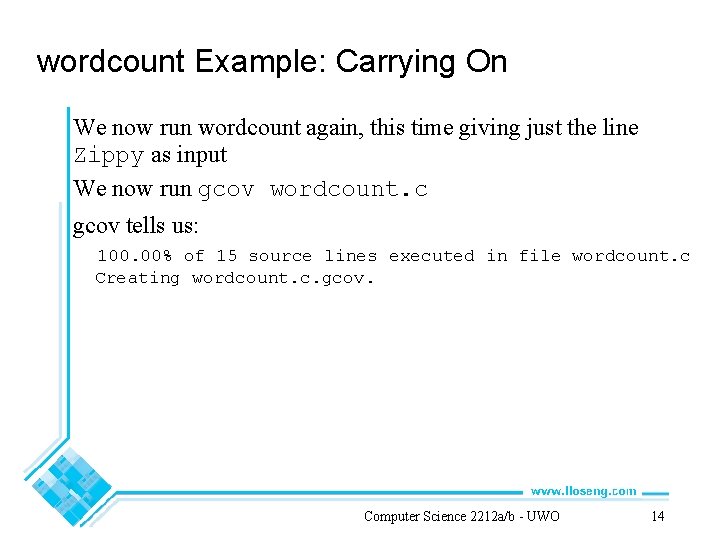
wordcount Example: Carrying On We now run wordcount again, this time giving just the line Zippy as input We now run gcov wordcount. c gcov tells us: 100. 00% of 15 source lines executed in file wordcount. c Creating wordcount. c. gcov. Computer Science 2212 a/b UWO 14
Wordcount Example: New. gcov File : 0: Source: wordcount. c : 0: Graph: wordcount. gcno : 0: Data: wordcount. gcda : 0: Runs: 2 : 0: Programs: 1 : 1: #include <stdio. h> : 2: #define TRUE 1 : 3: #define FALSE 0 2: 4: main() { 2: 5: int n 1=0, nw=0, nc=0; 2: 6: int inword=FALSE; : 7: char c; : 8: 2: 9: c=getchar(); 12: 10: while (c != EOF) { 8: 11: ++nc; 8: 12: if (c=='n') 3: 13: {++n 1; } 11: 14: if (c==' ' || c=='n' || c=='t') 3: 15: {inword=FALSE; } 5: 16: else if (!inword) 1: 17: {inword=TRUE; ++nw; } 8: 18: c=getchar(); : 19: } 2: 20: printf("%d lines, %d words, %d charsn", : 21: n 1, nw, nc); : 22: } Computer Science 2212 a/b UWO 15
wordcount Example: New Output We have given the system an input file of 6 characters on this run (5 letters + carriage return) Along with the 2 characters we gave on the previous run, the runs of wordcount have read 8 characters Hence, ++nc line has been executed 8 times in total • Counts on other lines have similarly been updated We have now executed the case where we have a non whitespace character • Therefore, the lines else if (!inword) { inword = TRUE; ++nw; } have been executed • Therefore, 100% of the lines of the program have now been executed Computer Science 2212 a/b UWO 16
Measuring the Usefulness of a Test Suite A good structural test suite will execute most lines of code • It may not be possible to execute all lines • Executing a large percentage may be acceptable • Hence, measure of code covered (% of lines executed) is a good measure of the usefulness of such a test suite However, with gcov: • As we keep executing test cases, the. gcda file keeps getting updated Therefore, to measure goodness of a test suite, what we would like to do is: • Reset all counts in. gcda file to 0 • Run test suite • Run gcov and look at % of lines covered To reset all counts in the. gcda file: • Just remove the file! Your compiled code will: • Assume this is the first time it has been run again • Create the. gcda file anew Computer Science 2212 a/b UWO 17
How Does gcov Do It? Each block in code numbered gcc inserts some code into your program at beginning of main, beginning of each block, end of main • At beginning of main: —Program zeros out a big array • During execution: —Every time block n executed, entry n of array incremented • At end of main: —If. gcda file does not exist, program creates it —Otherwise, program reads. gcda file, increments counts in array, writes out. gcda file again Does similar processing for calls to exit() as at end of main Map files map source line number to block • gcov program matches block execution counts in. da file with source lines Computer Science 2212 a/b UWO 18
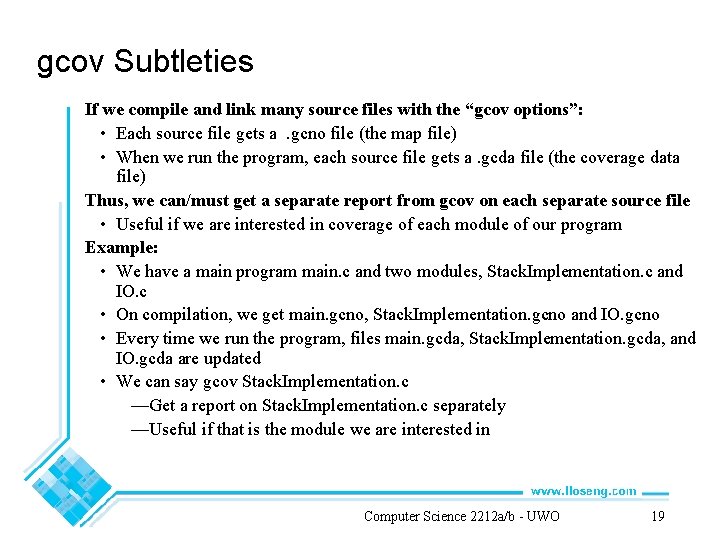
gcov Subtleties If we compile and link many source files with the “gcov options”: • Each source file gets a. gcno file (the map file) • When we run the program, each source file gets a. gcda file (the coverage data file) Thus, we can/must get a separate report from gcov on each separate source file • Useful if we are interested in coverage of each module of our program Example: • We have a main program main. c and two modules, Stack. Implementation. c and IO. c • On compilation, we get main. gcno, Stack. Implementation. gcno and IO. gcno • Every time we run the program, files main. gcda, Stack. Implementation. gcda, and IO. gcda are updated • We can say gcov Stack. Implementation. c —Get a report on Stack. Implementation. c separately —Useful if that is the module we are interested in Computer Science 2212 a/b UWO 19
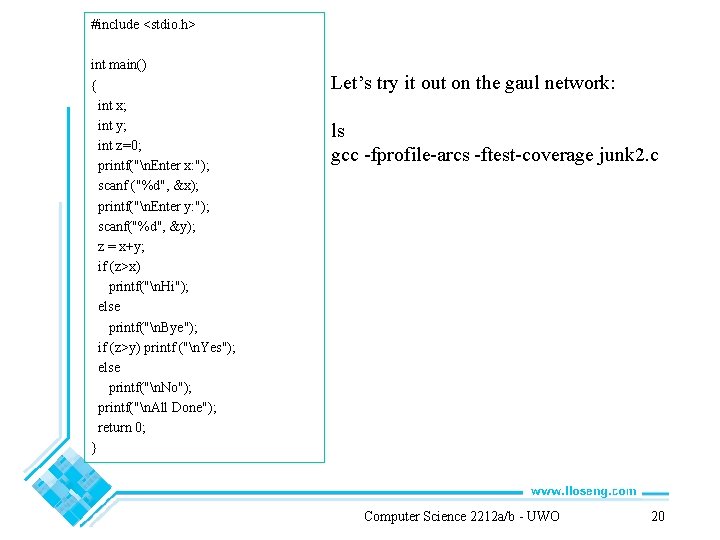
#include <stdio. h> int main() { int x; int y; int z=0; printf("n. Enter x: "); scanf ("%d", &x); printf("n. Enter y: "); scanf("%d", &y); z = x+y; if (z>x) printf("n. Hi"); else printf("n. Bye"); if (z>y) printf ("n. Yes"); else printf("n. No"); printf("n. All Done"); return 0; } Let’s try it out on the gaul network: ls gcc fprofile arcs ftest coverage junk 2. c Computer Science 2212 a/b UWO 20
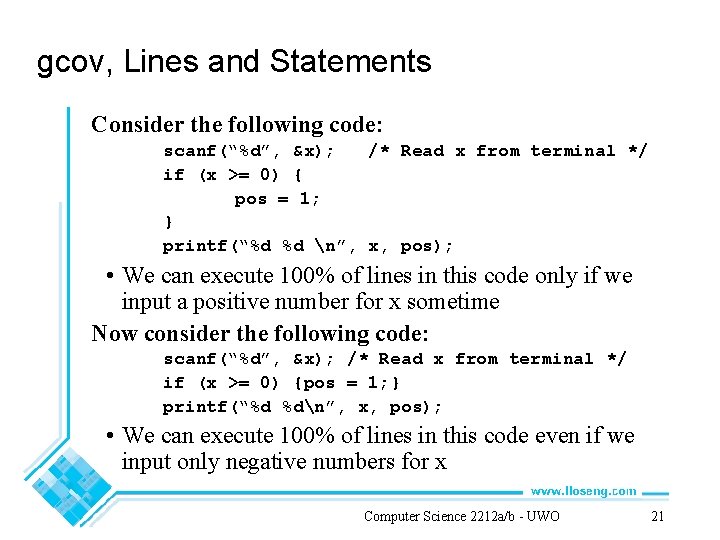
gcov, Lines and Statements Consider the following code: scanf(“%d”, &x); /* Read x from terminal */ if (x >= 0) { pos = 1; } printf(“%d %d n”, x, pos); • We can execute 100% of lines in this code only if we input a positive number for x sometime Now consider the following code: scanf(“%d”, &x); /* Read x from terminal */ if (x >= 0) {pos = 1; } printf(“%d %dn”, x, pos); • We can execute 100% of lines in this code even if we input only negative numbers for x Computer Science 2212 a/b UWO 21
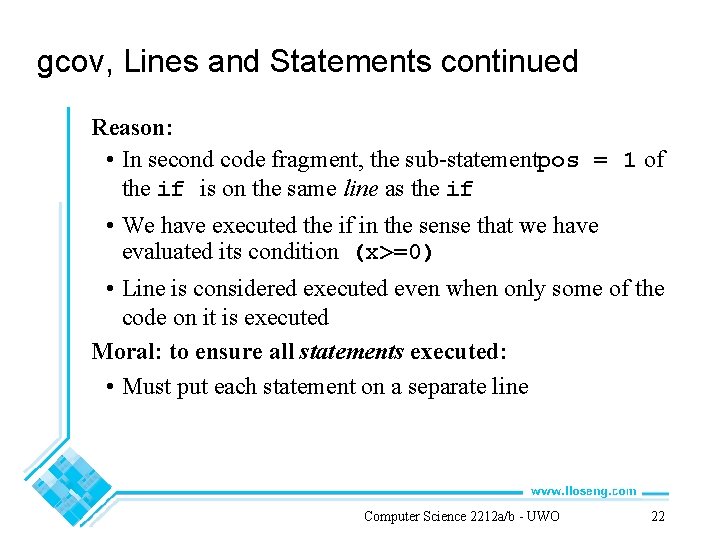
gcov, Lines and Statements continued Reason: • In second code fragment, the sub statementpos = 1 of the if is on the same line as the if • We have executed the if in the sense that we have evaluated its condition (x>=0) • Line is considered executed even when only some of the code on it is executed Moral: to ensure all statements executed: • Must put each statement on a separate line Computer Science 2212 a/b UWO 22
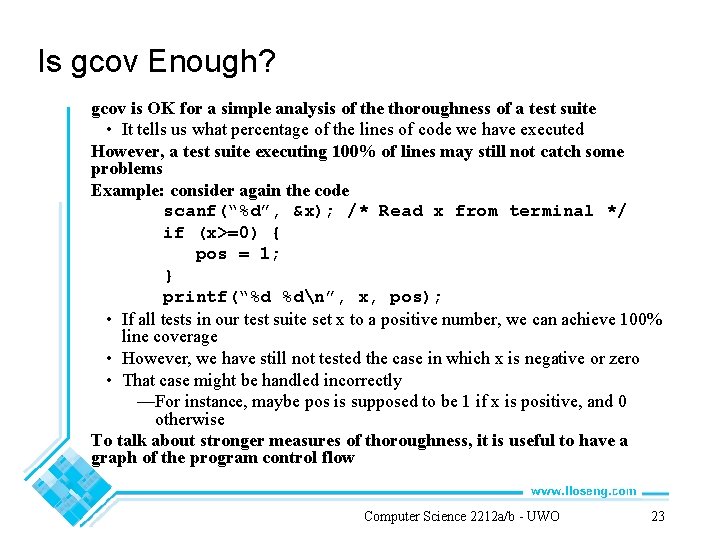
Is gcov Enough? gcov is OK for a simple analysis of the thoroughness of a test suite • It tells us what percentage of the lines of code we have executed However, a test suite executing 100% of lines may still not catch some problems Example: consider again the code scanf(“%d”, &x); /* Read x from terminal */ if (x>=0) { pos = 1; } printf(“%d %dn”, x, pos); • If all tests in our test suite set x to a positive number, we can achieve 100% line coverage • However, we have still not tested the case in which x is negative or zero • That case might be handled incorrectly —For instance, maybe pos is supposed to be 1 if x is positive, and 0 otherwise To talk about stronger measures of thoroughness, it is useful to have a graph of the program control flow Computer Science 2212 a/b UWO 23
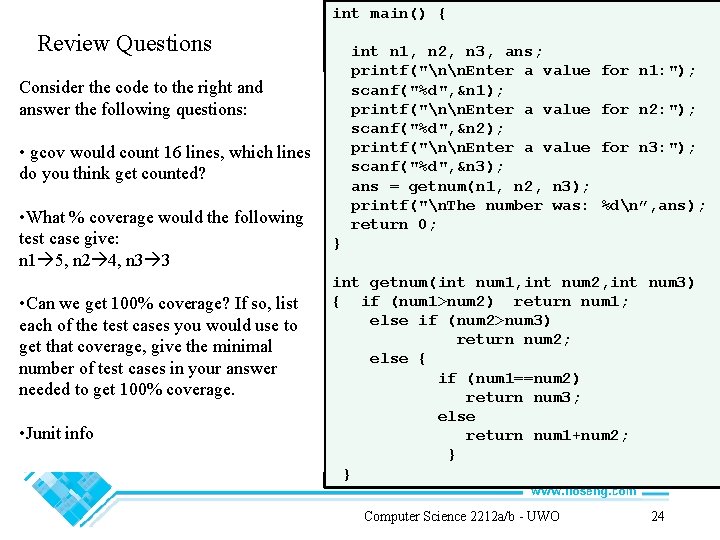
int main() { Review Questions int n 1, n 2, n 3, ans; printf("nn. Enter a value scanf("%d", &n 1); printf("nn. Enter a value scanf("%d", &n 2); printf("nn. Enter a value scanf("%d", &n 3); ans = getnum(n 1, n 2, n 3); printf("n. The number was: return 0; Consider the code to the right and answer the following questions: • gcov would count 16 lines, which lines do you think get counted? • What % coverage would the following test case give: n 1 5, n 2 4, n 3 3 • Can we get 100% coverage? If so, list each of the test cases you would use to get that coverage, give the minimal number of test cases in your answer needed to get 100% coverage. • Junit info for n 1: "); for n 2: "); for n 3: "); %dn”, ans); } int getnum(int num 1, int num 2, int num 3) { if (num 1>num 2) return num 1; else if (num 2>num 3) return num 2; else { if (num 1==num 2) return num 3; else return num 1+num 2; } } Computer Science 2212 a/b UWO 24