
Street Use Permit Amendments Overview External Workshop SDOT






![Revision amendment application steps 1 1. Select the [Permit Type] Revision amendment type 2.](https://slidetodoc.com/presentation_image_h/1dacbc15db5465d5da599ad0972fd682/image-18.jpg "Revision amendment application steps 1 1. Select the [Permit Type] Revision amendment type 2.")














- Slides: 62
Street Use Permit Amendments Overview External Workshop SDOT Street Use Melody Berry, Michelle Allenofand Dale Sijera 11/03/20 Department Transportation 11/03/20 Department of Transportation
Our vision, mission, and core values Vision: Seattle is a thriving equitable community powered by dependable transportation Mission: to deliver a transportation system that provides safe and affordable access to places and opportunities 11/03/20 Department of Transportation 2 Committed to 6 core values : • Equity • Safety • Mobility • Sustainability • Livability • Excellence
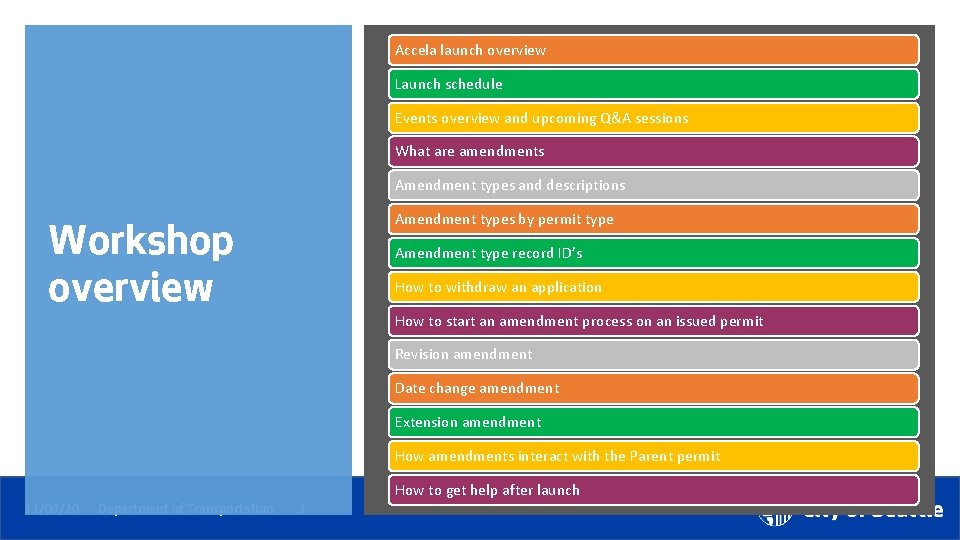
Accela launch overview Launch schedule Events overview and upcoming Q&A sessions What are amendments Amendment types and descriptions Workshop overview Amendment types by permit type Amendment type record ID’s How to withdraw an application How to start an amendment process on an issued permit Revision amendment Date change amendment Extension amendment How amendments interact with the Parent permit How to get help after launch 11/03/20 Department of Transportation 3
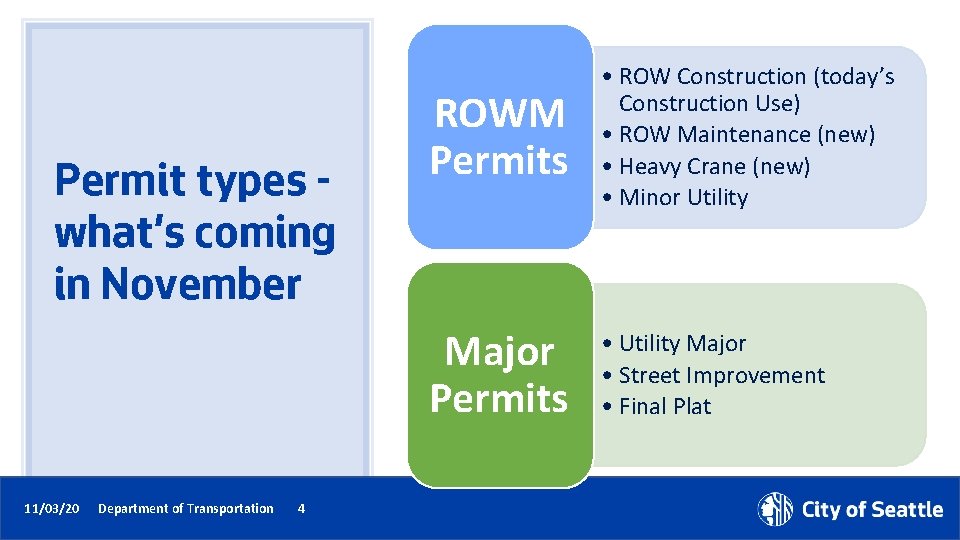
Permit types what’s coming in November 11/03/20 Department of Transportation 4 ROWM Permits • ROW Construction (today’s Construction Use) • ROW Maintenance (new) • Heavy Crane (new) • Minor Utility Major Permits • Utility Major • Street Improvement • Final Plat
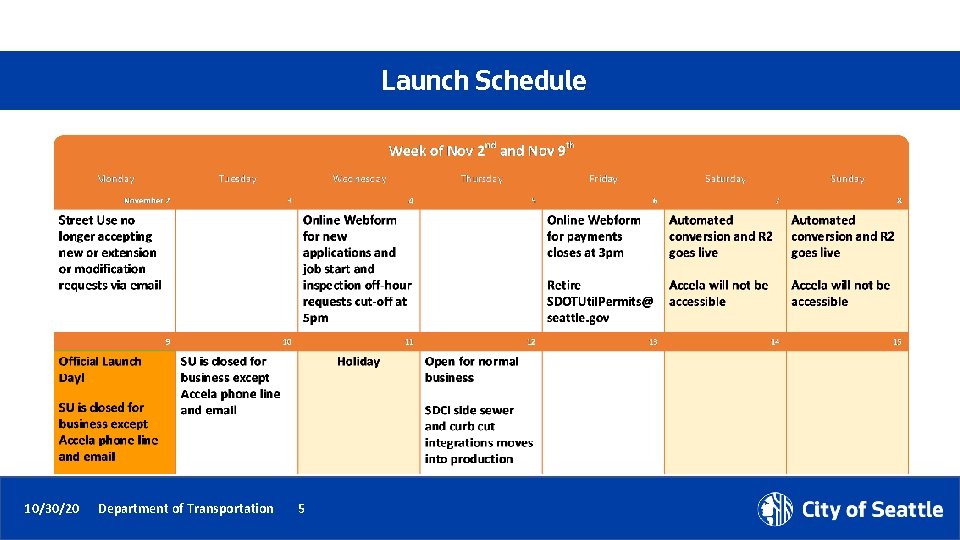
Launch Schedule 10/30/20 Department of Transportation 5
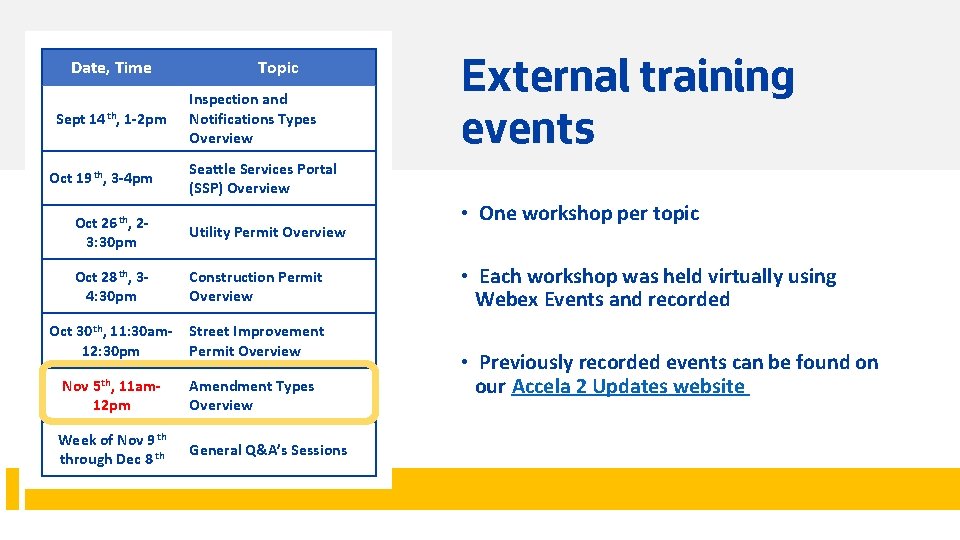
Date, Time Sept 14 th, 1 -2 pm Oct 19 th, 3 -4 pm Topic Inspection and Notifications Types Overview Seattle Services Portal (SSP) Overview Oct 26 th, 23: 30 pm Utility Permit Overview Oct 28 th, 34: 30 pm Construction Permit Overview Oct 30 th, 11: 30 am 12: 30 pm Street Improvement Permit Overview Nov 5 th, 11 am 12 pm Amendment Types Overview Week of Nov 9 th through Dec 8 th General Q&A’s Sessions 10/30/20 External training events Department of Transportation 6 • One workshop per topic • Each workshop was held virtually using Webex Events and recorded • Previously recorded events can be found on our Accela 2 Updates website
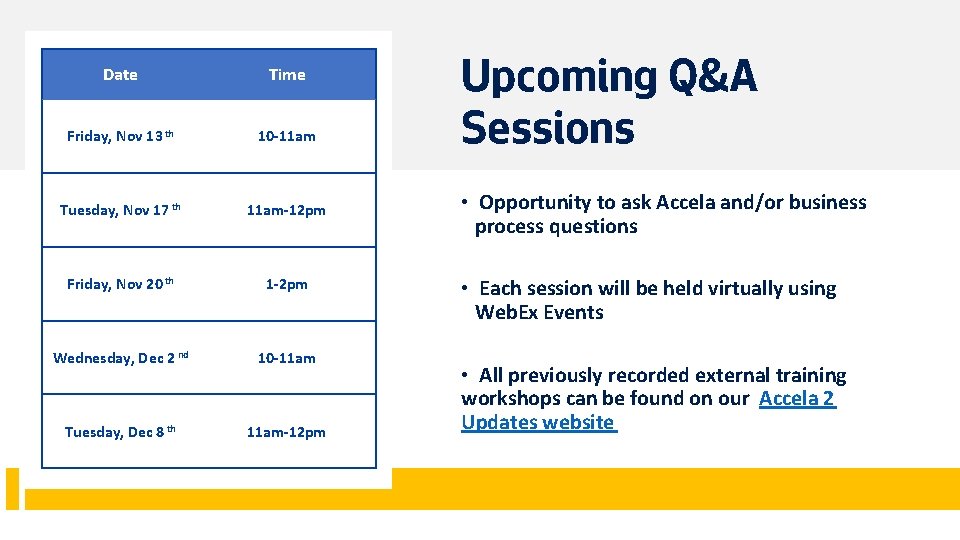
Date Time Friday, Nov 13 th 10 -11 am Tuesday, Nov 17 th 11 am-12 pm Friday, Nov 20 th 1 -2 pm Wednesday, Dec 2 nd 10 -11 am Tuesday, Dec 8 th 11 am-12 pm 11/03/20 Department of Transportation 7 Upcoming Q&A Sessions • Opportunity to ask Accela and/or business process questions • Each session will be held virtually using Web. Ex Events • All previously recorded external training workshops can be found on our Accela 2 Updates website
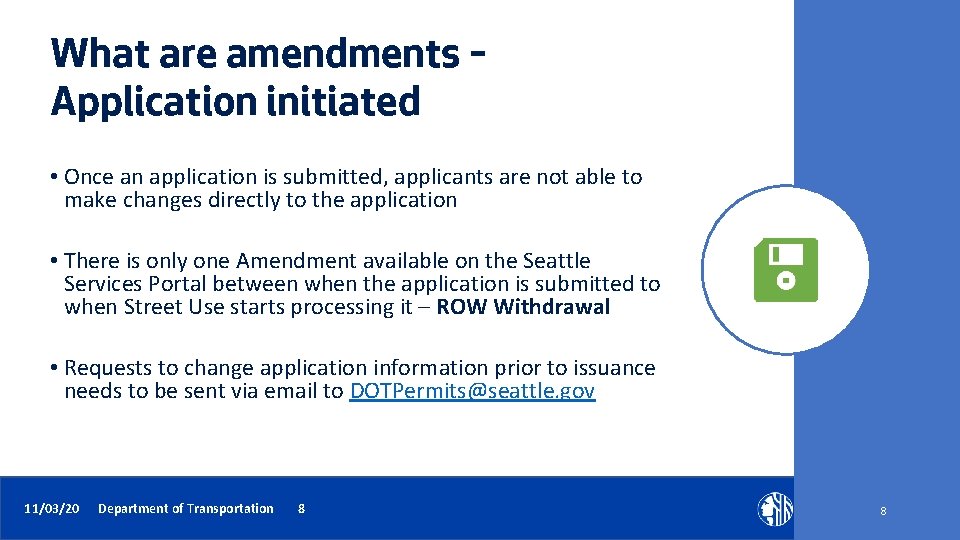
What are amendments – Application initiated • Once an application is submitted, applicants are not able to make changes directly to the application • There is only one Amendment available on the Seattle Services Portal between when the application is submitted to when Street Use starts processing it – ROW Withdrawal • Requests to change application information prior to issuance needs to be sent via email to DOTPermits@seattle. gov 11/03/20 Department of Transportation 8 8
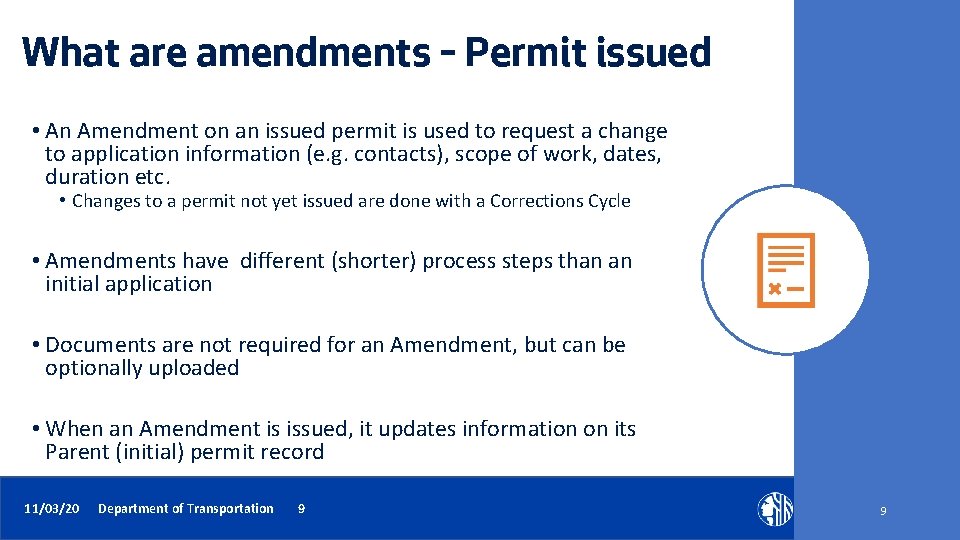
What are amendments – Permit issued • An Amendment on an issued permit is used to request a change to application information (e. g. contacts), scope of work, dates, duration etc. • Changes to a permit not yet issued are done with a Corrections Cycle • Amendments have different (shorter) process steps than an initial application • Documents are not required for an Amendment, but can be optionally uploaded • When an Amendment is issued, it updates information on its Parent (initial) permit record 11/03/20 Department of Transportation 9 9
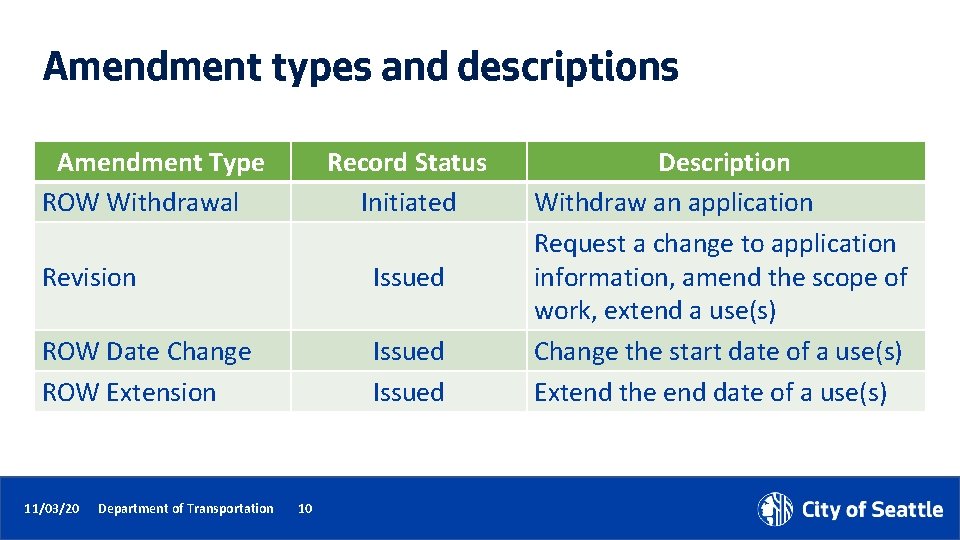
Amendment types and descriptions Amendment Type ROW Withdrawal Record Status Initiated Revision Issued ROW Date Change ROW Extension Issued 11/03/20 Department of Transportation 10 Description Withdraw an application Request a change to application information, amend the scope of work, extend a use(s) Change the start date of a use(s) Extend the end date of a use(s)
Amendment types by permit type Permit Type ROW Construction ROW Maintenance Heavy Crane Minor Utility Major Street Improvement SDOT Final Plat 11/03/20 Department of Transportation ROW Withdrawal Yes Yes Yes 11 Yes X X Yes ROW Date Change Yes Yes Yes ROW Extension Yes Yes Yes X X X Revision
Amendment record ID’s Amendment Type ROW Withdrawal Revision ROW Date Change ROW Extension 11/03/20 Department of Transportation Record ID [Parent Record ID] – AW 001 [Parent Record ID] – ADC 001 [Parent Record ID] – EXT 001 12 If multiple amendments are issued, the number string will be additive (e. g. A 002, A 003; EXT 001, EXT 002 etc. )
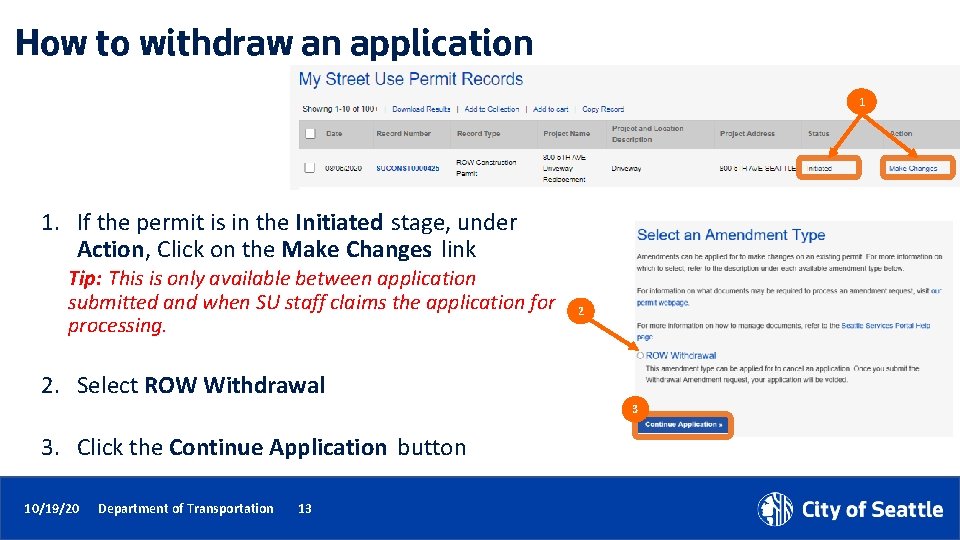
How to withdraw an application 1 1. If the permit is in the Initiated stage, under Action, Click on the Make Changes link Tip: This is only available between application submitted and when SU staff claims the application for processing. 2 2. Select ROW Withdrawal 3 3. Click the Continue Application button 10/19/20 Department of Transportation 13
How to start an amendment process on an issued permit 1 1. If the permit is in the Issued stage, under Action, Click on the Make Changes link 2. From the individual record, click on the Make Changes button 2 10/19/20 Department of Transportation 14
How to start an amendment process on an issued permit 3. Select the appropriate amendment type 4. Click the Continue Application button to start the amendment application process 3 4 11/03/20 Department of Transportation 15
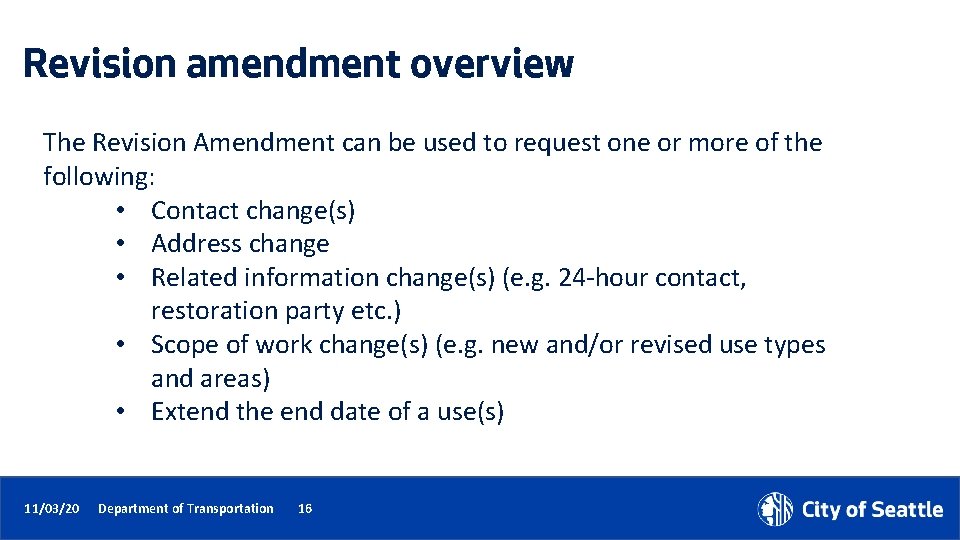
Revision amendment overview The Revision Amendment can be used to request one or more of the following: • Contact change(s) • Address change • Related information change(s) (e. g. 24 -hour contact, restoration party etc. ) • Scope of work change(s) (e. g. new and/or revised use types and areas) • Extend the end date of a use(s) 11/03/20 Department of Transportation 16
Revision amendment application steps Select Revision Amendment Type Review Parent Application Information 10/30/20 Enter Amendment Description Department of Transportation 17 Extend and/or Add Use(s) Upload Docs Review Application Information Submit & Thank You
Revision amendment application steps 1 1. Select the [Permit Type] Revision amendment type 2. Click the Continue Application button 2 11/03/20 Department of Transportation 18
Revision amendment application steps 3. Review read-only information copied from the Parent permit 3 11/03/20 Department of Transportation 19
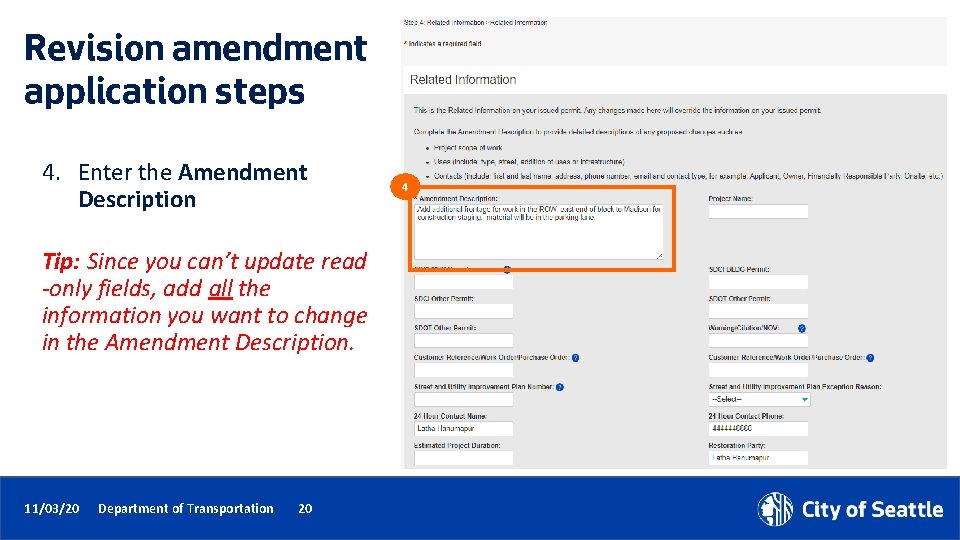
Revision amendment application steps 4. Enter the Amendment Description Tip: Since you can’t update read -only fields, add all the information you want to change in the Amendment Description. 11/03/20 Department of Transportation 20 4
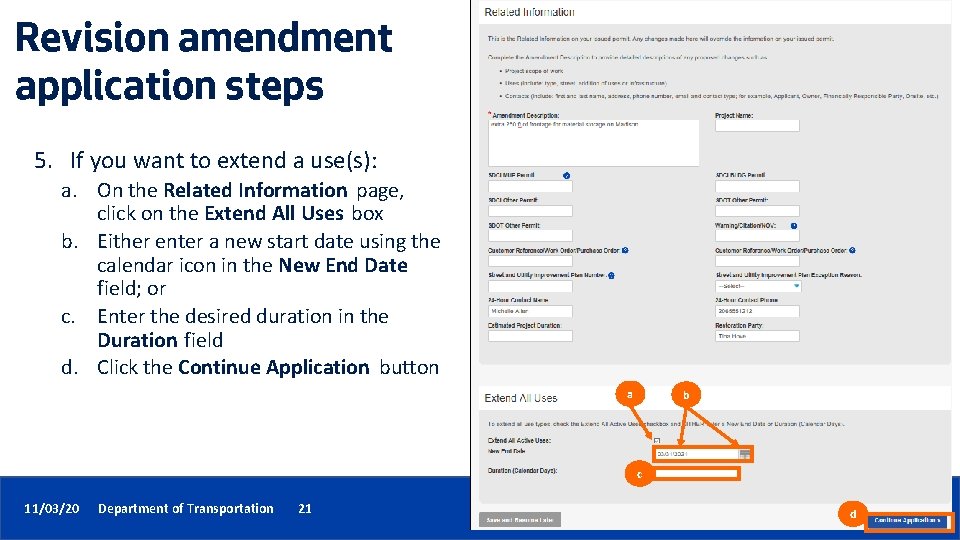
Revision amendment application steps 5. If you want to extend a use(s): a. On the Related Information page, click on the Extend All Uses box b. Either enter a new start date using the calendar icon in the New End Date field; or c. Enter the desired duration in the Duration field d. Click the Continue Application button a b c 11/03/20 Department of Transportation 21 d
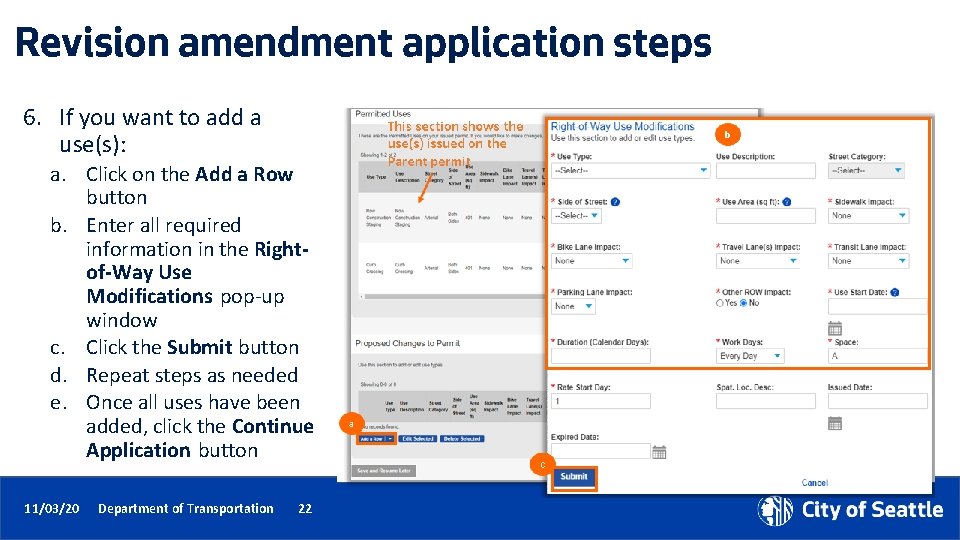
Revision amendment application steps 6. If you want to add a use(s): a. Click on the Add a Row button b. Enter all required information in the Rightof-Way Use Modifications pop-up window c. Click the Submit button d. Repeat steps as needed e. Once all uses have been added, click the Continue Application button 11/03/20 Department of Transportation 22
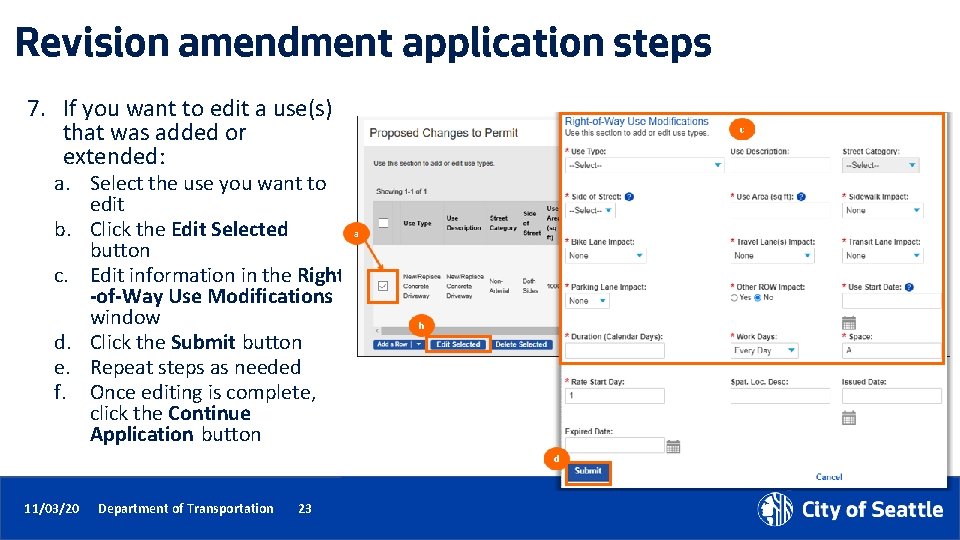
Revision amendment application steps 7. If you want to edit a use(s) that was added or extended: a. Select the use you want to edit b. Click the Edit Selected button c. Edit information in the Right -of-Way Use Modifications window d. Click the Submit button e. Repeat steps as needed f. Once editing is complete, click the Continue Application button 11/03/20 Department of Transportation 23
Revision amendment application steps 8. To upload a document: a. Click on the Select button b. Choose the desired document from your computer c. From the Document Type drop-down menu, select the type of document you are uploading Tip: For us to perform efficient plan review, only upload PDF documents. d. Add a description (optional) e. Click the Save button f. To upload another document, click the Select button g. To move to the next step, click on the Continue Application button 11/03/20 Department of Transportation 24 a c g d e f
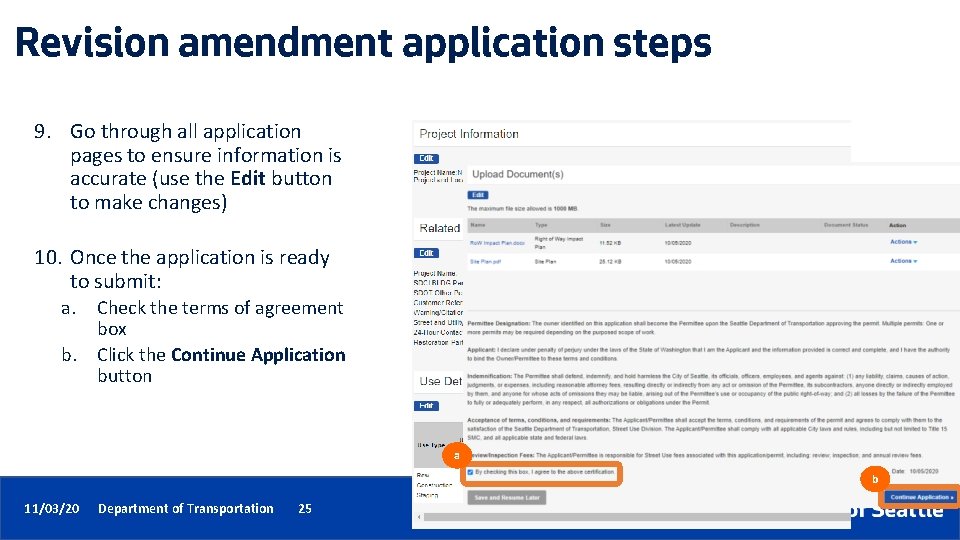
Revision amendment application steps 9. Go through all application pages to ensure information is accurate (use the Edit button to make changes) 10. Once the application is ready to submit: a. b. Check the terms of agreement box Click the Continue Application button a b 11/03/20 Department of Transportation 25 25
Revision amendment application steps 11. Once the application is submitted, you will receive a Thank You confirmation with your Record Number noted 11 12. You can open the permit by clicking on the blue hyperlink permit number 12 11/03/20 Department of Transportation 26
Date Change amendment • A Date Change Amendment is used to request a change to the start date of a use on an issued permit before the start of the use • Uses cannot be added or extended • No other changes can be requested 11/03/20 Department of Transportation 27
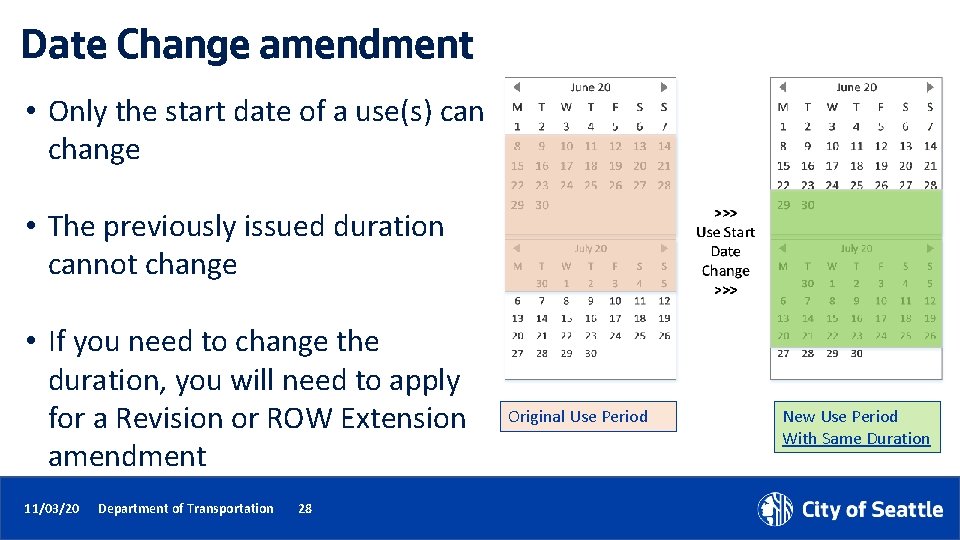
Date Change amendment • Only the start date of a use(s) can change • The previously issued duration cannot change • If you need to change the duration, you will need to apply for a Revision or ROW Extension amendment 11/03/20 Department of Transportation 28 Original Use Period New Use Period With Same Duration
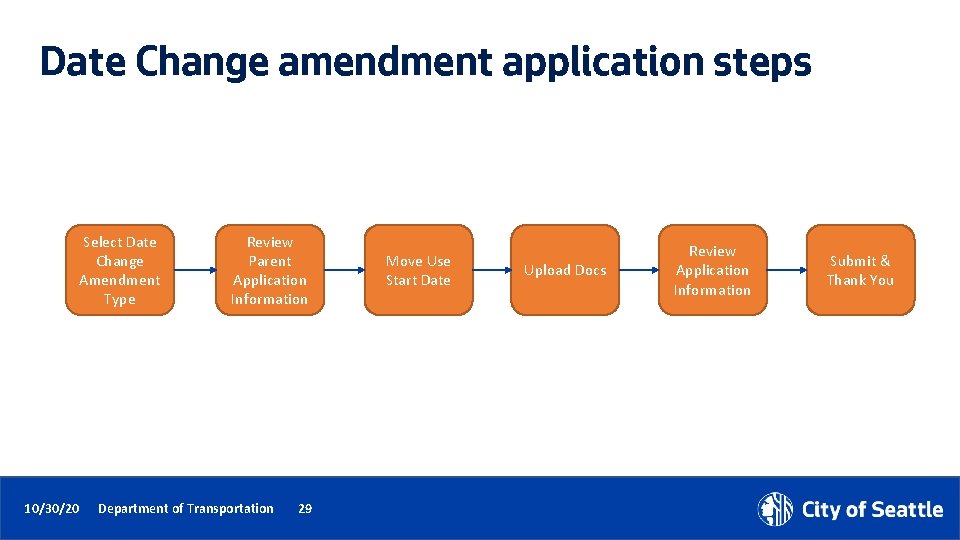
Date Change amendment application steps Select Date Change Amendment Type 10/30/20 Review Parent Application Information Department of Transportation 29 Move Use Start Date Upload Docs Review Application Information Submit & Thank You
Date Change amendment application steps 1. Select the ROW Date Change amendment type 2. Click the Continue Application button 1 2 11/03/20 Department of Transportation 30
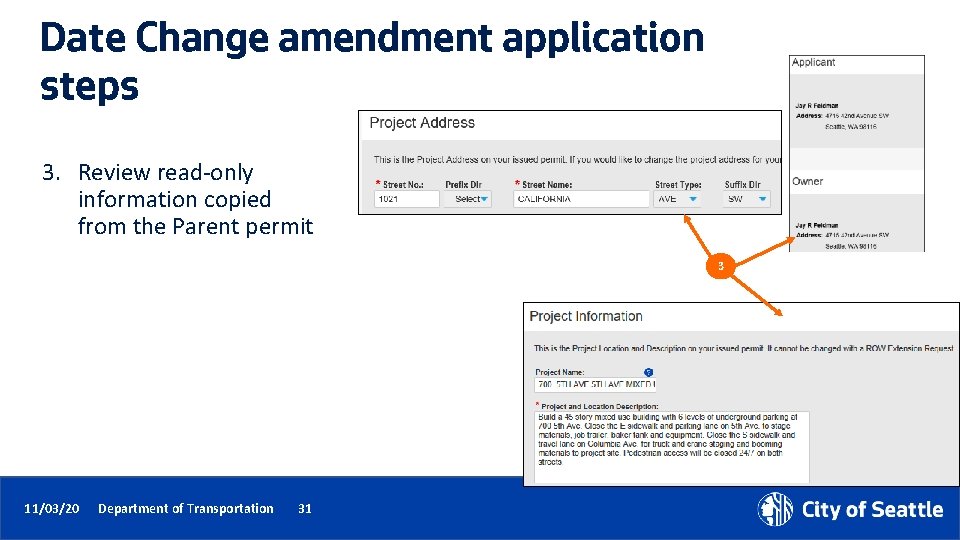
Date Change amendment application steps 3. Review read-only information copied from the Parent permit 3 11/03/20 Department of Transportation 31
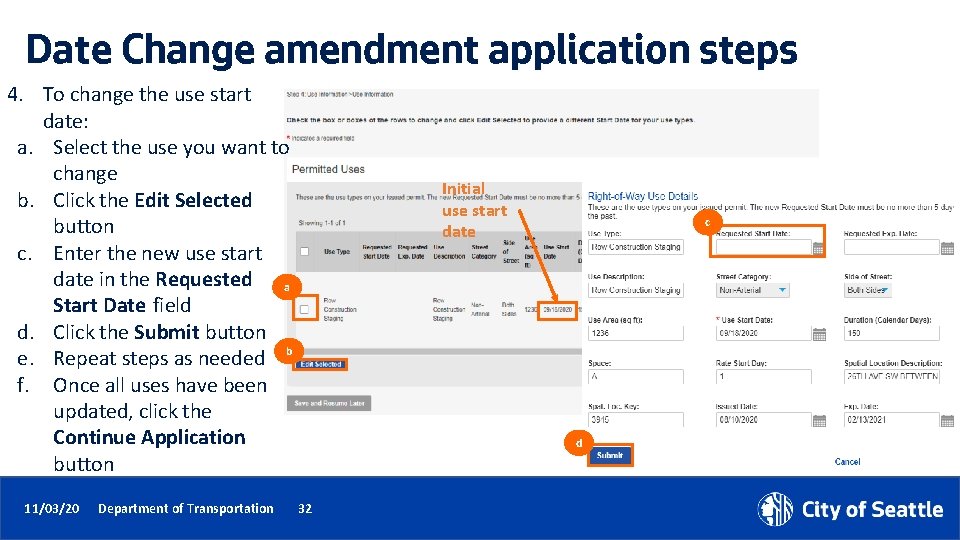
Date Change amendment application steps 4. To change the use start date: a. Select the use you want to change b. Click the Edit Selected button c. Enter the new use start date in the Requested a Start Date field d. Click the Submit button e. Repeat steps as needed b f. Once all uses have been updated, click the Continue Application button 11/03/20 Department of Transportation Initial use start date c d 32
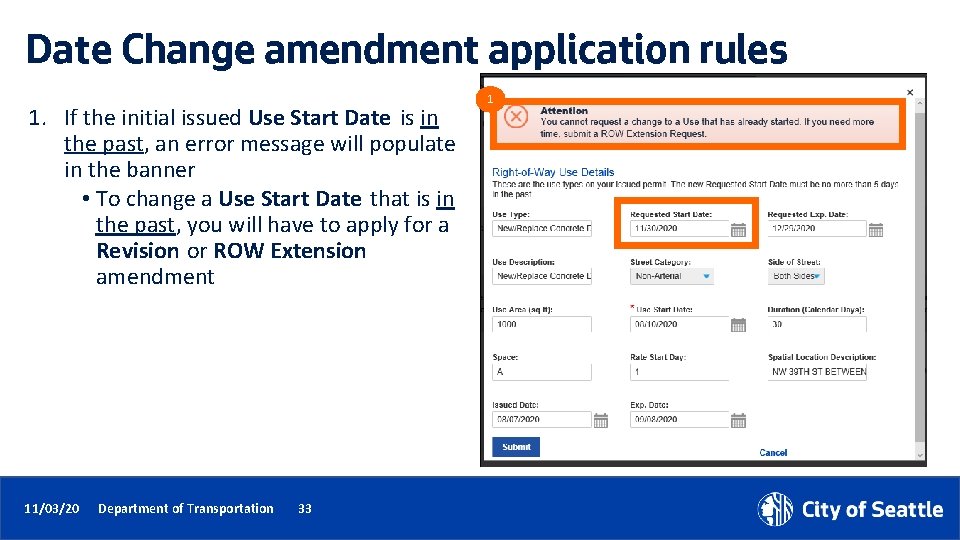
Date Change amendment application rules 1. If the initial issued Use Start Date is in the past, an error message will populate in the banner • To change a Use Start Date that is in the past, you will have to apply for a Revision or ROW Extension amendment 11/03/20 Department of Transportation 33 1
Date Change amendment application rules 2 2. If the initial issued Use Start Date is in the future and you request a new start date more than 5 days in the past, you will receive an error in the banner 3. The Requested Start Date will have to be changed to be less than 5 days in the past or apply for a Revision or ROW Extension amendment Tip: These are the same rules on a Revision amendment. If you need to backdate, use the Revision amendment and note in the Amendment Description what dates are needed. 11/03/20 Department of Transportation 34 3
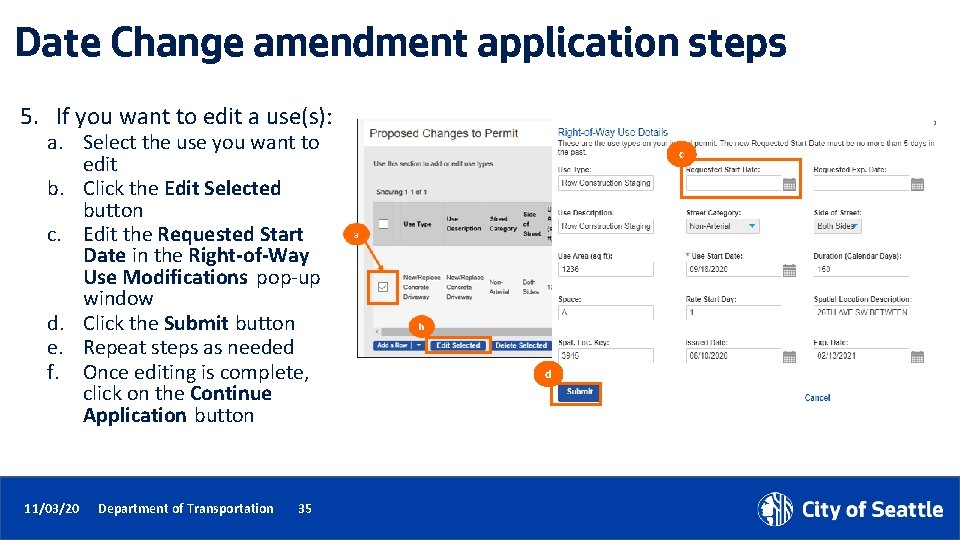
Date Change amendment application steps 5. If you want to edit a use(s): a. Select the use you want to edit b. Click the Edit Selected button c. Edit the Requested Start Date in the Right-of-Way Use Modifications pop-up window d. Click the Submit button e. Repeat steps as needed f. Once editing is complete, click on the Continue Application button 11/03/20 Department of Transportation 35 c d
Date Change amendment application steps 6. To upload a document: a. Click on the Select button b. Choose the desired document from your computer c. From the Document Type drop-down menu, select the type of document you are uploading Tip: For us to perform efficient plan review, only upload PDF documents. d. Add a description (optional) e. Click the Save button f. To upload another document, click the Select button g. To move to the next step, click on the Continue Application button 11/03/20 Department of Transportation 36 a c g d e f
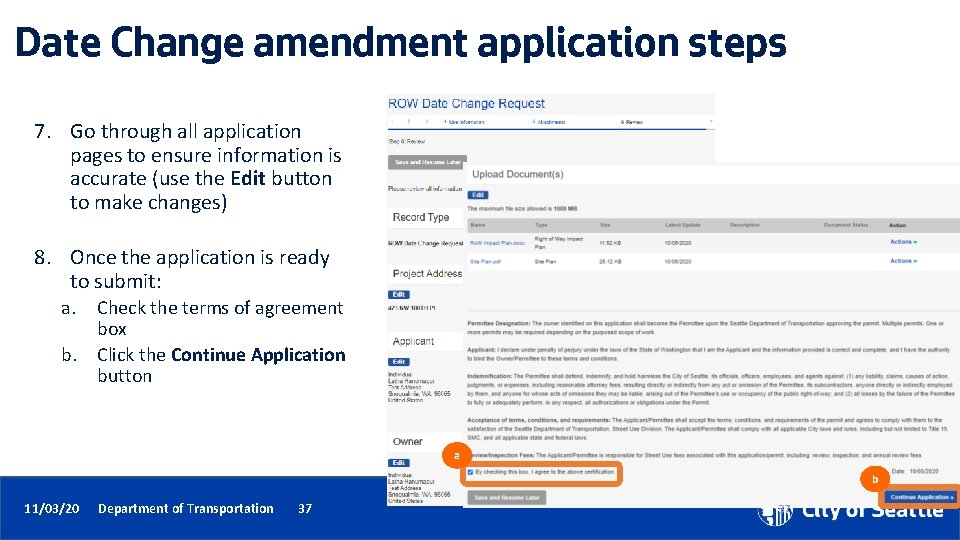
Date Change amendment application steps 7. Go through all application pages to ensure information is accurate (use the Edit button to make changes) 8. Once the application is ready to submit: a. b. Check the terms of agreement box Click the Continue Application button a b 11/03/20 Department of Transportation 37 37
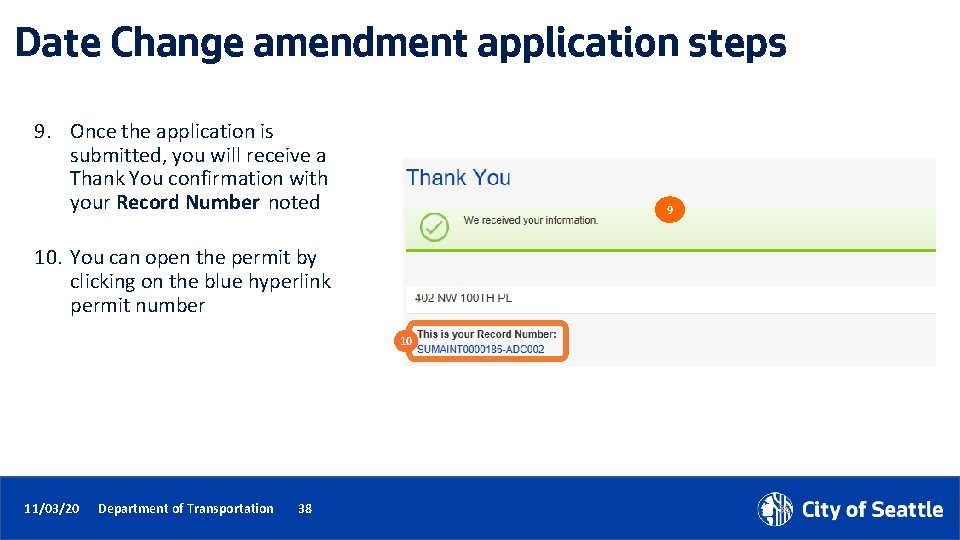
Date Change amendment application steps 9. Once the application is submitted, you will receive a Thank You confirmation with your Record Number noted 9 10. You can open the permit by clicking on the blue hyperlink permit number 10 11/03/20 Department of Transportation 38 38
Extension amendment • An Extension Amendment is used to request the extension of an existing use(s) on an issued permit • Uses cannot be added • No other change can be requested Tip: If you need to make a change to application information or add/change a use, you can do all of that under the Revision amendment. 11/03/20 Department of Transportation 39
Extension amendment application steps Select Extension Amendment Type 10/30/20 Review Parent Application Information Department of Transportation 40 Extend Uses Upload Docs Review Application Information Submit & Thank You
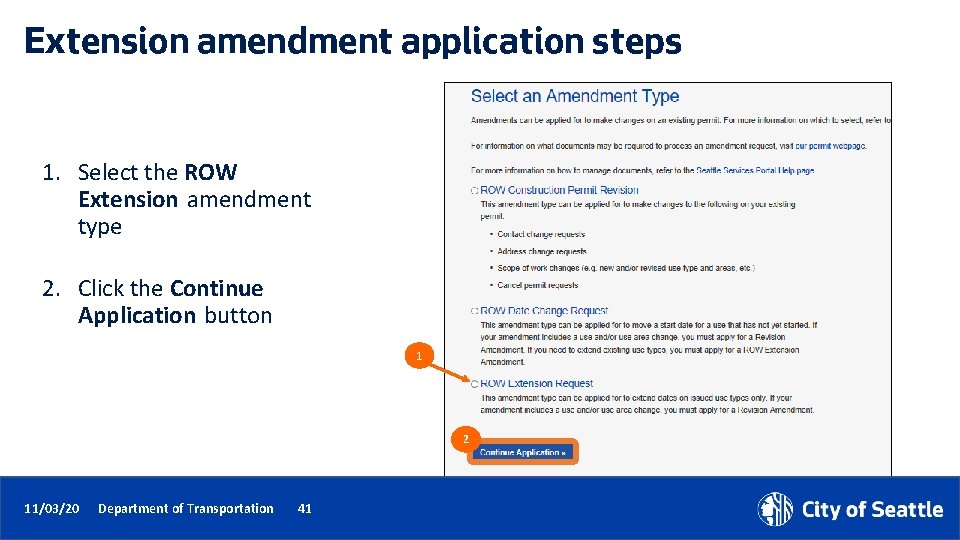
Extension amendment application steps 1. Select the ROW Extension amendment type 2. Click the Continue Application button 1 2 11/03/20 Department of Transportation 41
Extension amendment application steps 3. Review read-only information copied from the Parent permit 3 11/03/20 Department of Transportation 42
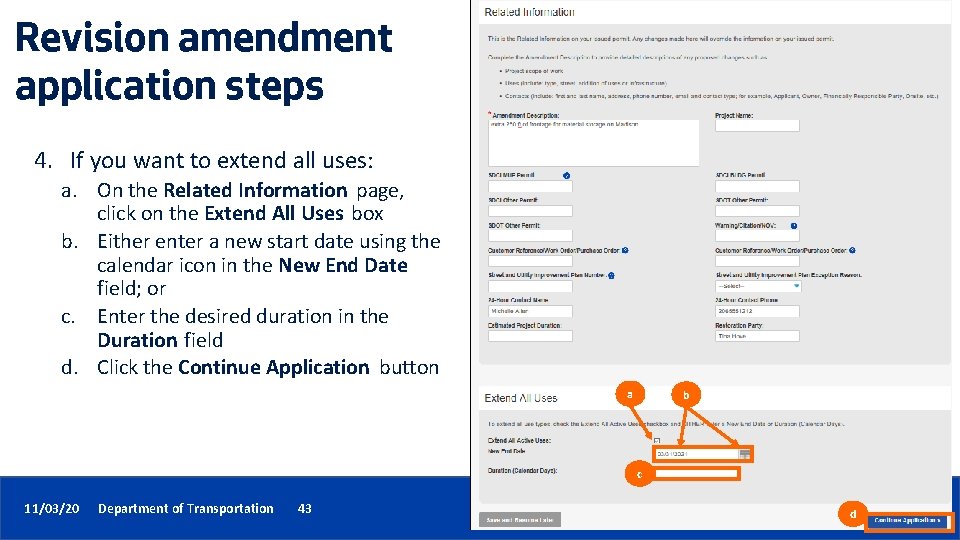
Revision amendment application steps 4. If you want to extend all uses: a. On the Related Information page, click on the Extend All Uses box b. Either enter a new start date using the calendar icon in the New End Date field; or c. Enter the desired duration in the Duration field d. Click the Continue Application button a b c 11/03/20 Department of Transportation 43 d
Extension amendment application steps 5. To extend one use at a time: a. b. c. d. e. f. On the Use Information page, click on box next to the use you want to extend Click the Edit Selected button In the Right-of-Way Use Details pop -up window, complete the Requested Start Date and Requested Duration fields Click the Submit button Repeat steps as needed to extend additional uses Once all uses have been extended, click the Continue Application button TIP: You must extend at least 1 use row before clicking Continue Application or you will get an error. This banner alerts you of the expiration date from the Parent permit c d a b f 11/03/20 Department of Transportation 44
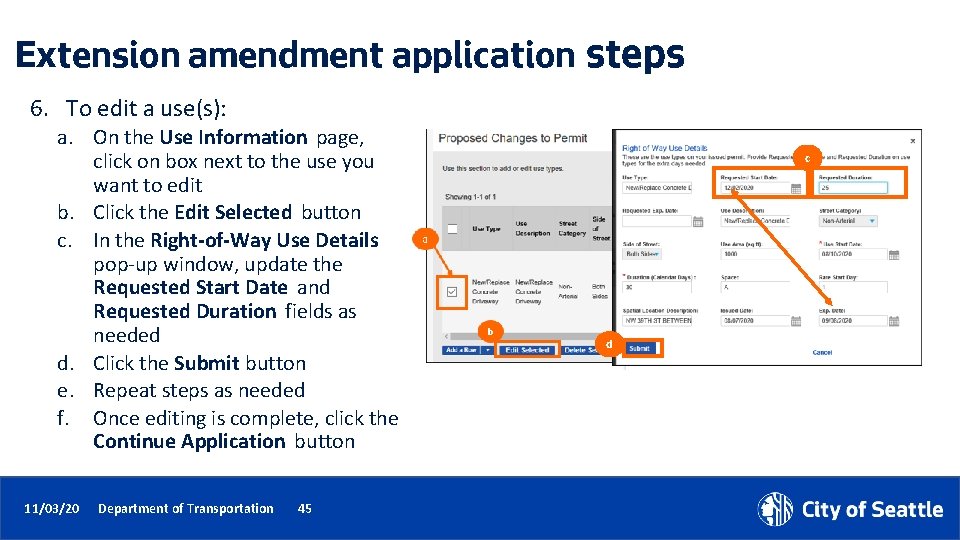
Extension amendment application steps 6. To edit a use(s): a. On the Use Information page, click on box next to the use you want to edit b. Click the Edit Selected button c. In the Right-of-Way Use Details pop-up window, update the Requested Start Date and Requested Duration fields as needed d. Click the Submit button e. Repeat steps as needed f. Once editing is complete, click the Continue Application button 11/03/20 Department of Transportation 45 c d
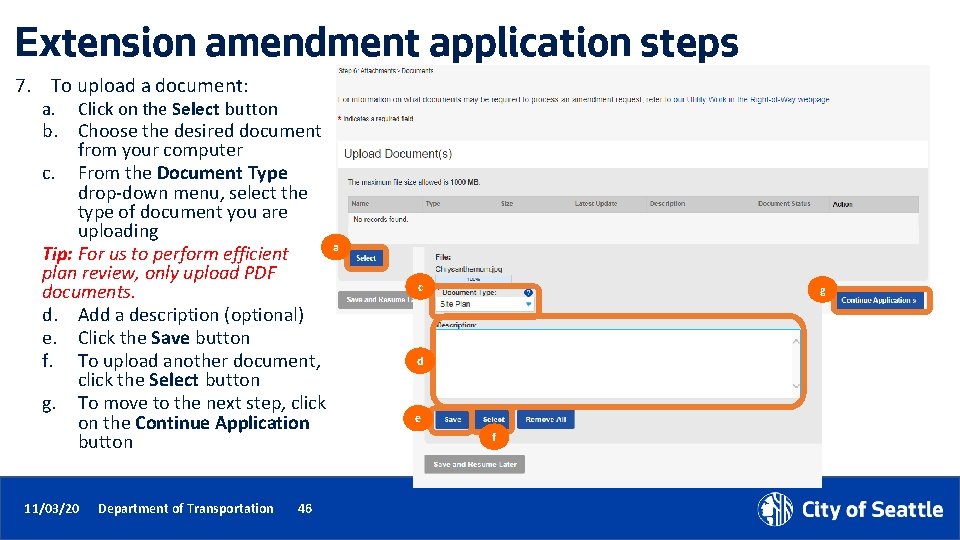
Extension amendment application steps 7. To upload a document: a. Click on the Select button b. Choose the desired document from your computer c. From the Document Type drop-down menu, select the type of document you are uploading Tip: For us to perform efficient plan review, only upload PDF documents. d. Add a description (optional) e. Click the Save button f. To upload another document, click the Select button g. To move to the next step, click on the Continue Application button 11/03/20 Department of Transportation 46 a c g d e f
Extension amendment application steps 8. Go through all application pages to ensure information is accurate (use the Edit button to make changes) 9. Once the application is ready to submit: a. b. Check the terms of agreement box Click the Continue Application button a b 11/03/20 Department of Transportation 47 47
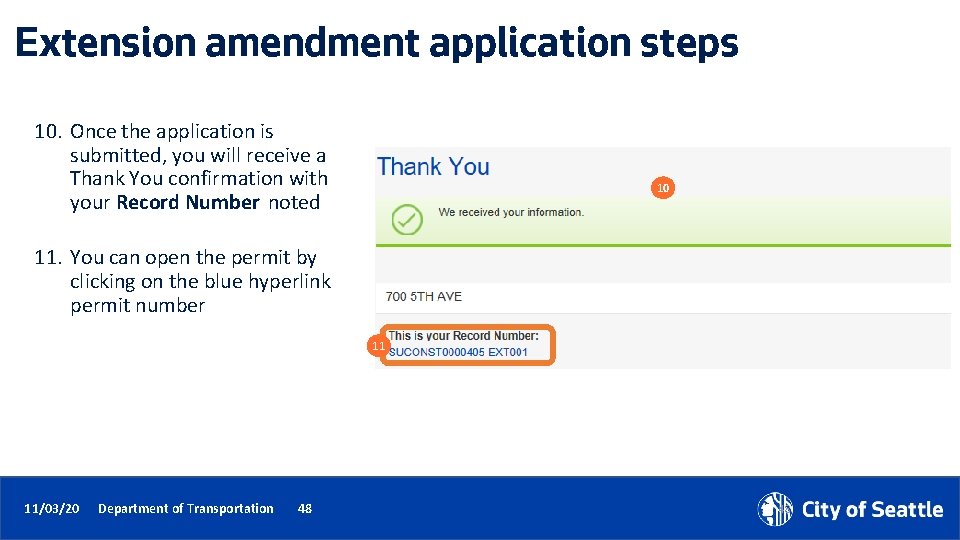
Extension amendment application steps 10. Once the application is submitted, you will receive a Thank You confirmation with your Record Number noted 10 11. You can open the permit by clicking on the blue hyperlink permit number 11 11/03/20 Department of Transportation 48 48
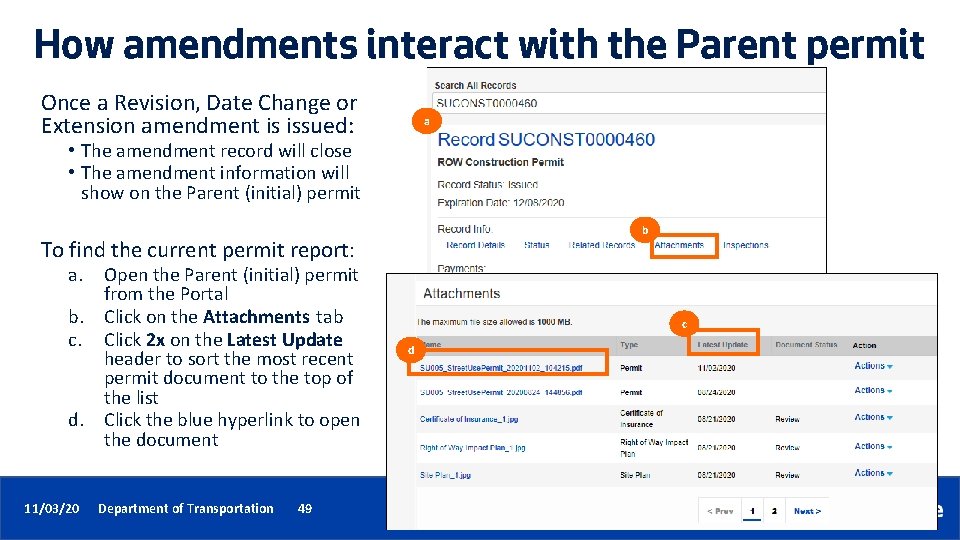
How amendments interact with the Parent permit Once a Revision, Date Change or Extension amendment is issued: a • The amendment record will close • The amendment information will show on the Parent (initial) permit b To find the current permit report: a. b. c. d. 11/03/20 Open the Parent (initial) permit from the Portal Click on the Attachments tab Click 2 x on the Latest Update header to sort the most recent permit document to the top of the list Click the blue hyperlink to open the document Department of Transportation 49 c d
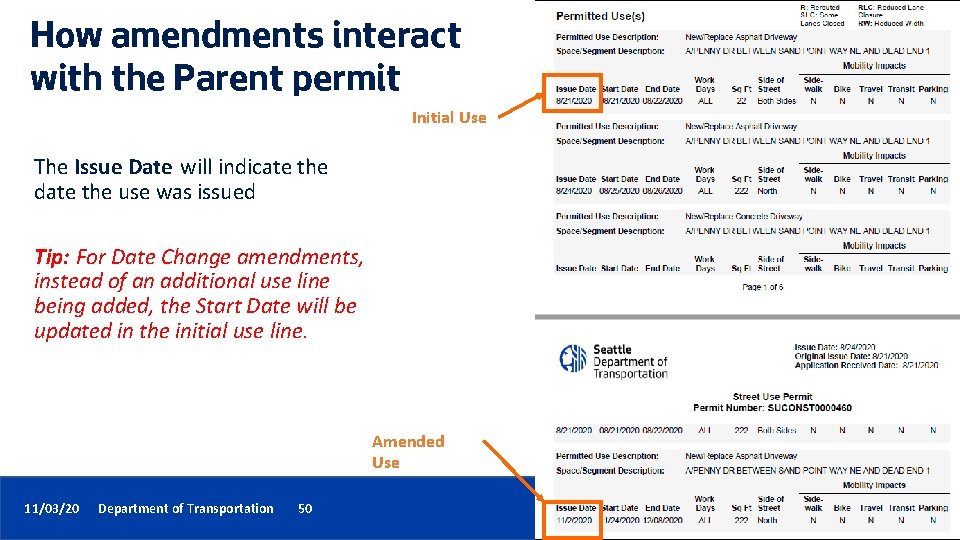
How amendments interact with the Parent permit Initial Use The Issue Date will indicate the date the use was issued Tip: For Date Change amendments, instead of an additional use line being added, the Start Date will be updated in the initial use line. Amended Use 11/03/20 Department of Transportation 50
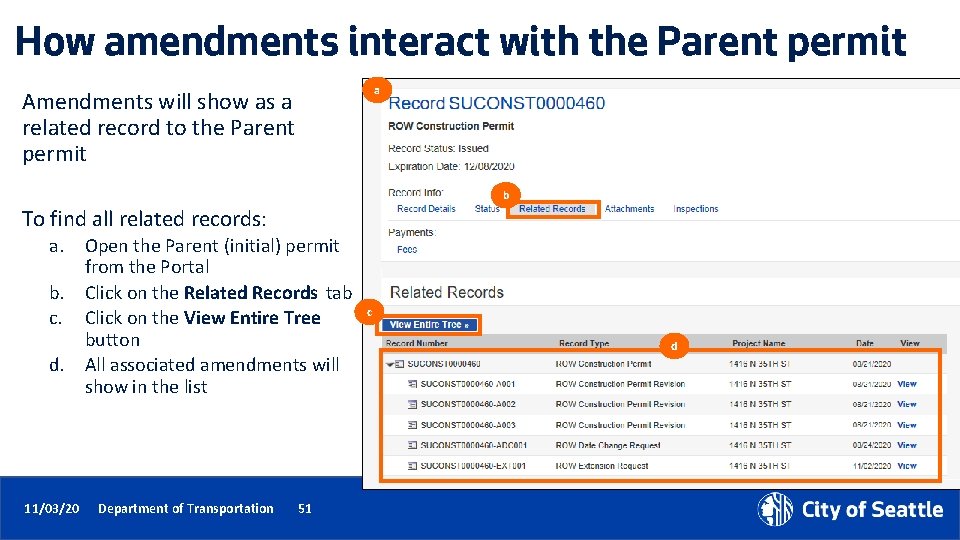
How amendments interact with the Parent permit a Amendments will show as a related record to the Parent permit b To find all related records: a. b. c. d. 11/03/20 Open the Parent (initial) permit from the Portal Click on the Related Records tab Click on the View Entire Tree button All associated amendments will show in the list Department of Transportation 51 c d
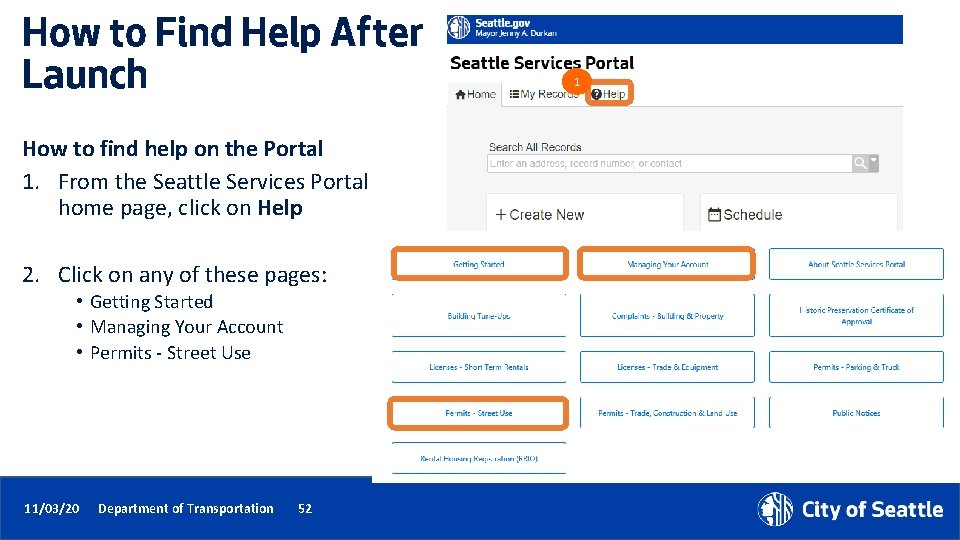
How to Find Help After Launch 1 How to find help on the Portal 1. From the Seattle Services Portal home page, click on Help 2. Click on any of these pages: • Getting Started • Managing Your Account • Permits - Street Use 2 11/03/20 Department of Transportation 52
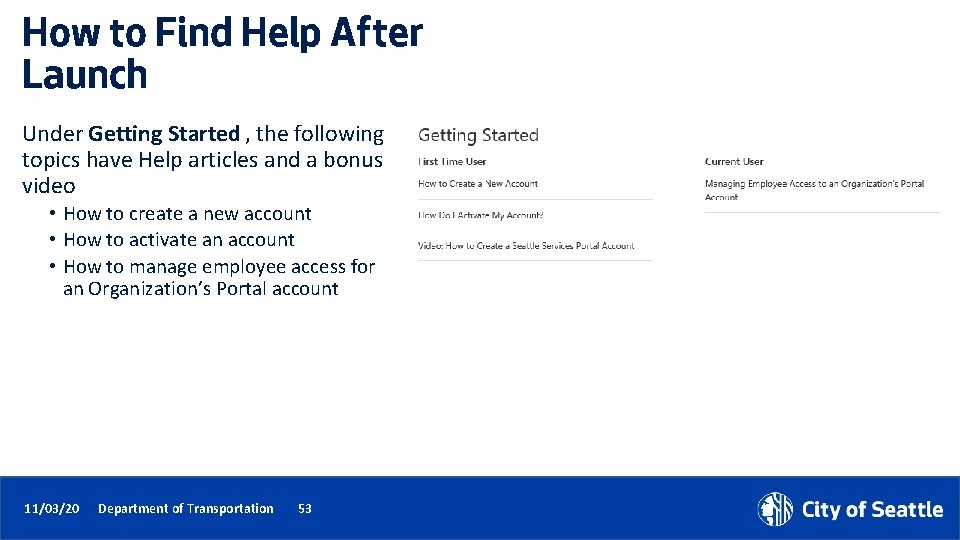
How to Find Help After Launch Under Getting Started , the following topics have Help articles and a bonus video • How to create a new account • How to activate an account • How to manage employee access for an Organization’s Portal account 11/03/20 Department of Transportation 53
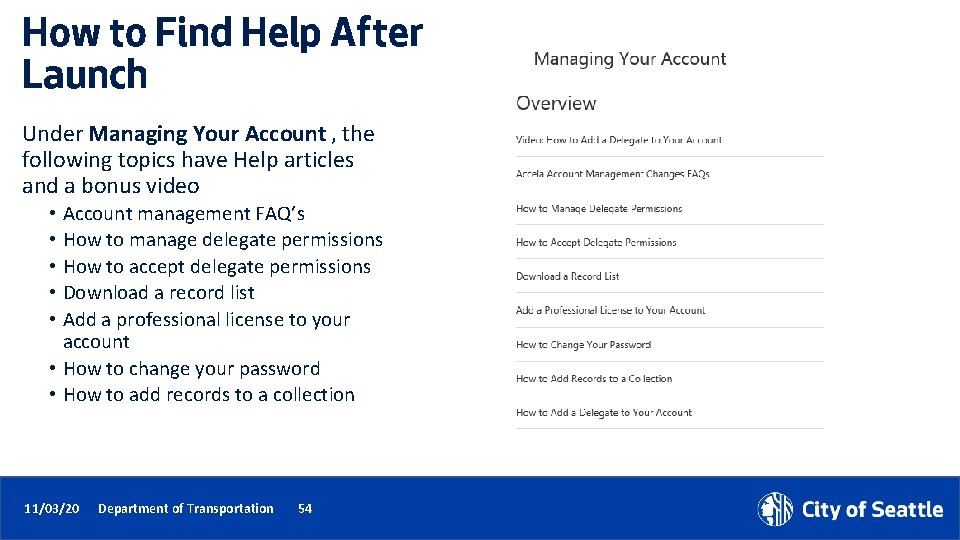
How to Find Help After Launch Under Managing Your Account , the following topics have Help articles and a bonus video • Account management FAQ’s • How to manage delegate permissions • How to accept delegate permissions • Download a record list • Add a professional license to your account • How to change your password • How to add records to a collection 11/03/20 Department of Transportation 54
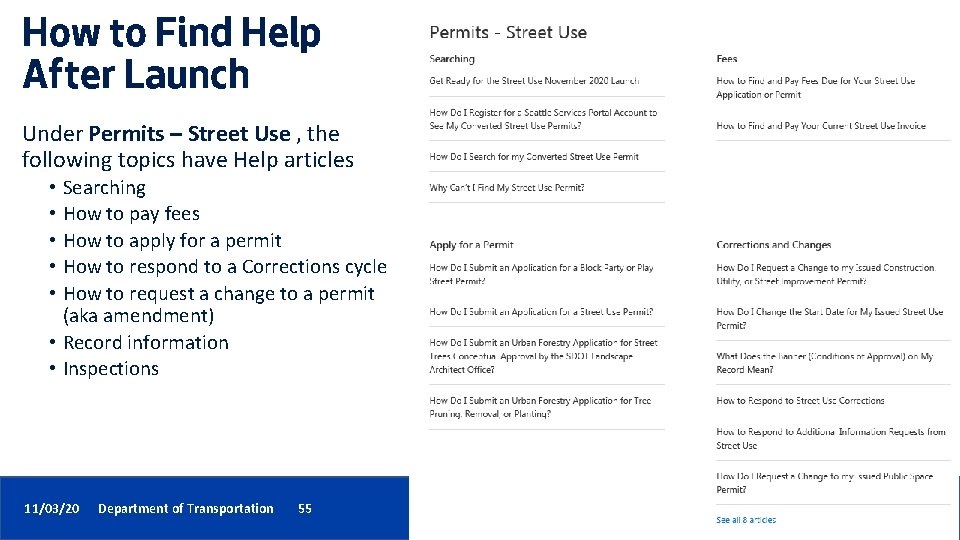
How to Find Help After Launch Under Permits – Street Use , the following topics have Help articles • Searching • How to pay fees • How to apply for a permit • How to respond to a Corrections cycle • How to request a change to a permit (aka amendment) • Record information • Inspections 11/03/20 Department of Transportation 55 55
How to Find Help After Launch How to find help on our website Go to our Accela Phase 2 Updates website (http: //www. seattle. gov/transportation/permits-andservices/permits/updates ) to find information on the following: • Previously recorded external training workshops and materials • Launch support information (e. g. Accela phone line and email) • Changes to help support (e. g. IT support, new Portal help articles etc. ) 11/03/20 Department of Transportation 56
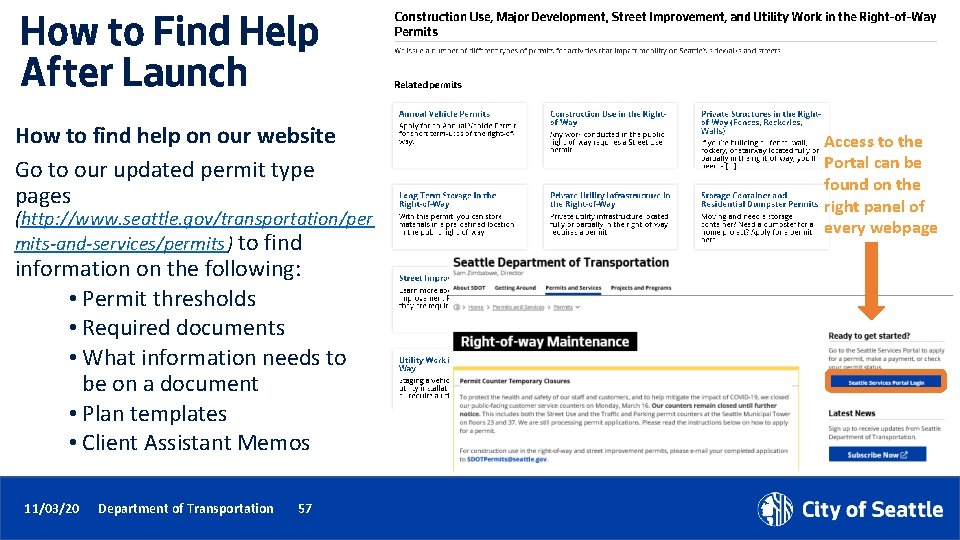
How to Find Help After Launch How to find help on our website Go to our updated permit type pages (http: //www. seattle. gov/transportation/per mits-and-services/permits ) to find information on the following: • Permit thresholds • Required documents • What information needs to be on a document • Plan templates • Client Assistant Memos 11/03/20 Department of Transportation 57 Access to the Portal can be found on the right panel of every webpage
How to set up a new user account and link to a converted contact 10/19/20 Department of Transportation 58 v You will only be able to view your converted permit(s) if your user account links to a converted contact v This can be difficult if you are not sure what contact information is on your permit or if you had multiple contacts created in Hansen
How to set up a new user account and link to a converted contact To create a new user account to link to a converted contact to see your converted permits: 1. Go to the Seattle Services Portal 3 2. Click on the Help link 3. Follow the steps in the How Do I Register for a Seattle Services Portal Account to See My Converted Street Use Permits Help article 10/19/20 Department of Transportation 59
How to get help if you can’t find your converted permits Please note: The below phone line and email will not be available until November 9 th, 2020 If you are still unable to find your converted permit, please contact us using our dedicated Accela phone line or email address You can expect to receive a response within 1 -2 business days 10/19/20 Department of Transportation 60 Accela Support Phone Line 206 -727 -8640 Accela Support Email dot_su_ssportal_questions@seattle. gov
Date Time Friday, Nov 13 th 10 -11 am Tuesday, Nov 17 th 11 am-12 pm Friday, Nov 20 th 1 -2 pm Wednesday, Dec 2 nd 10 -11 am Tuesday, Dec 8 th 11 am-12 pm 11/03/20 Department of Transportation 61 Upcoming Q&A Sessions • Opportunity to ask Accela and/or business process questions • Each session will be held virtually using Web. Ex Events • All previously recorded external training workshops can be found on our Accela 2 Updates website
Questions? Melody. Berry@seattle. gov www. seattle. gov/transportation 11/03/20 Department of Transportation 62