
Storage Resource Management a uniform interface to Grid




- Slides: 38
Storage Resource Management: a uniform interface to Grid storage systems Arie Shoshani LBNL (on behalf of the SRM collaboration) http: //sdm. lbl. gov/srm-wg 1
SRM Collaboration Goal Develop the functional specification of: Storage Resource Managers (SRMs) Definition SRMs are middleware components whose function is to provide dynamic space allocation file management of shared storage components on the Grid 2
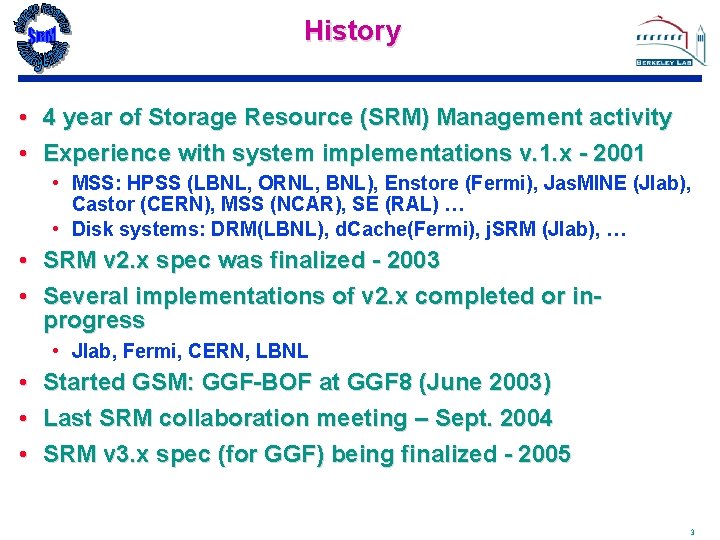
History • 4 year of Storage Resource (SRM) Management activity • Experience with system implementations v. 1. x - 2001 • MSS: HPSS (LBNL, ORNL, BNL), Enstore (Fermi), Jas. MINE (Jlab), Castor (CERN), MSS (NCAR), SE (RAL) … • Disk systems: DRM(LBNL), d. Cache(Fermi), j. SRM (Jlab), … • • SRM v 2. x spec was finalized - 2003 Several implementations of v 2. x completed or inprogress • Jlab, Fermi, CERN, LBNL • Started GSM: GGF-BOF at GGF 8 (June 2003) • Last SRM collaboration meeting – Sept. 2004 • SRM v 3. x spec (for GGF) being finalized - 2005 3
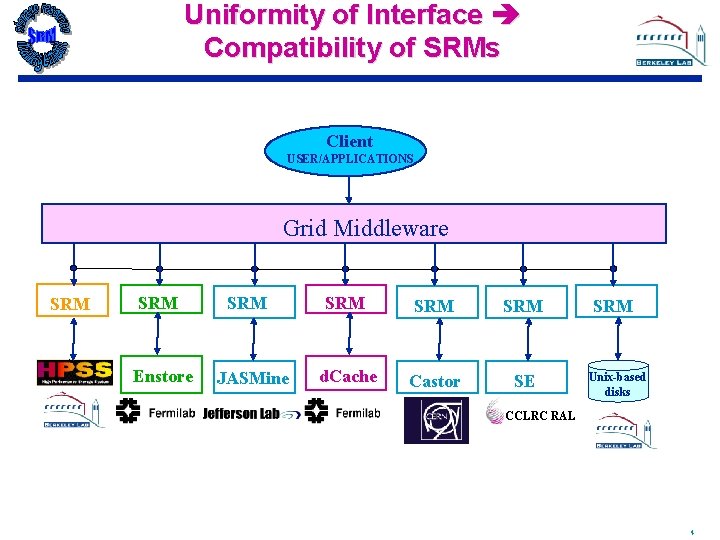
Uniformity of Interface Compatibility of SRMs Client USER/APPLICATIONS Grid Middleware SRM Enstore SRM JASMine SRM SRM d. Cache Castor SE SRM Unix-based disks CCLRC RAL 4
Current Storage Resource Management Active Working Group CERN: Olof Barring, Jean-Philippe Baud, James Casey, Peter Kunszt Rutherford lab: Jensen, Owen Synge Jefferson Lab: Bryan Hess, Andy Kowalski, Chip Watson Fermilab: Don Petravick, Timur Perelmutov LBNL: Junmin Gu , Arie Shoshani, Alex Sim, Kurt Stockinger Univa: Rich Wellner 5
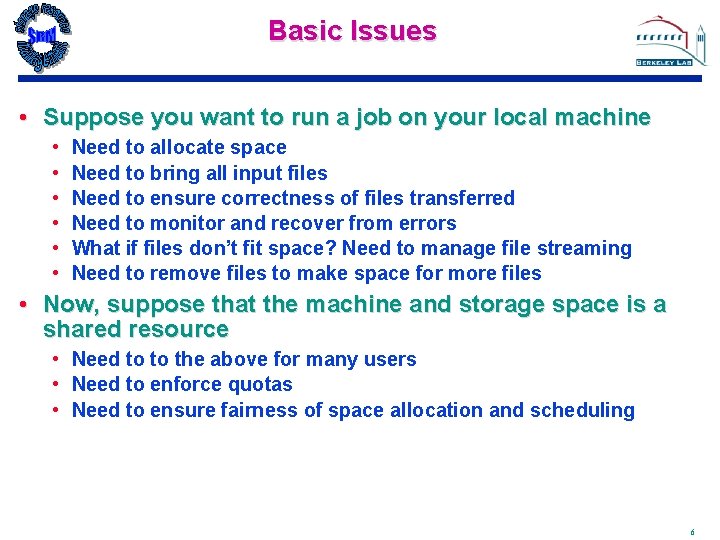
Basic Issues • Suppose you want to run a job on your local machine • • • Need to allocate space Need to bring all input files Need to ensure correctness of files transferred Need to monitor and recover from errors What if files don’t fit space? Need to manage file streaming Need to remove files to make space for more files • Now, suppose that the machine and storage space is a shared resource • Need to to the above for many users • Need to enforce quotas • Need to ensure fairness of space allocation and scheduling 6
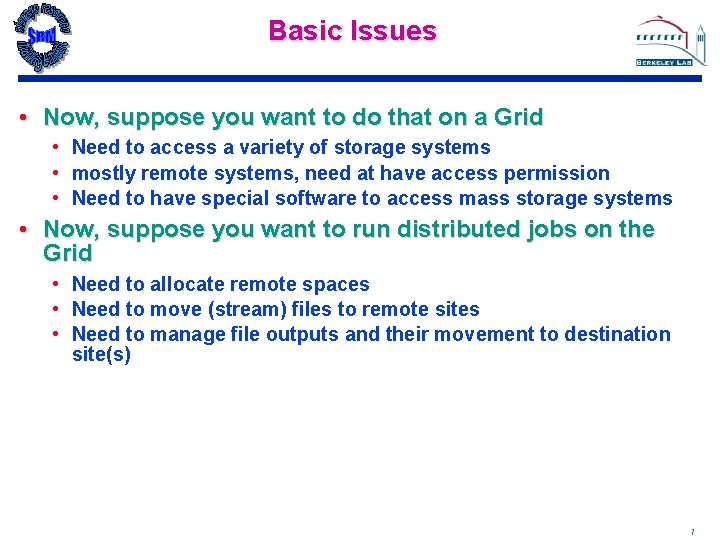
Basic Issues • Now, suppose you want to do that on a Grid • Need to access a variety of storage systems • mostly remote systems, need at have access permission • Need to have special software to access mass storage systems • Now, suppose you want to run distributed jobs on the Grid • Need to allocate remote spaces • Need to move (stream) files to remote sites • Need to manage file outputs and their movement to destination site(s) 7
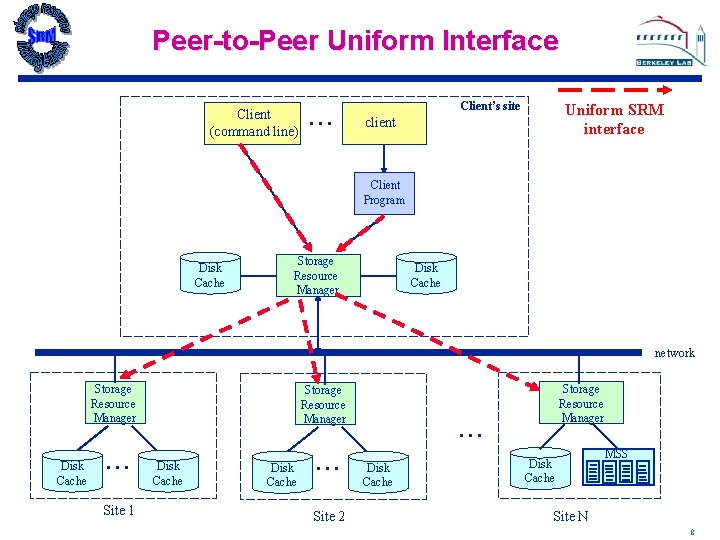
Peer-to-Peer Uniform Interface Client (command line) . . . Client’s site Uniform SRM interface client Client Program Disk Cache Storage Resource Manager Disk Cache network Storage Resource Manager Disk Cache . . . Site 1 Storage Resource Manager Disk Cache . . . Site 2 Storage Resource Manager . . . Disk Cache MSS Site N 8
General Analysis Scenario . . . client Client’s site Uniform SRM interface client logical query Request Interpreter Disk Cache result files Storage Resource Manager Disk Cache Compute Resource Manager Compute Engine Site 1 Execution DAG Replica catalog request planning Network Weather Service Requests for data placement and remote computation Storage Resource Manager Disk Cache A set of logical files Execution plan and site-specific files Request Executer Storage Resource Manager Metadata catalog Compute Resource Manager Compute Engine Site 2 network Storage Resource Manager . . . Disk Cache MSS Site N 9
Standards for Grid Storage Management • Main concepts • Allocate spaces • Get/put files from/into spaces • Pin files for a lifetime • Release files and spaces • Get files into spaces from remote sites • Manage directory structures in spaces • SRMs communicate as peer-to-peer • Negotiate transfer protocols • No logical name space management (rely of GGF- GFS) 10
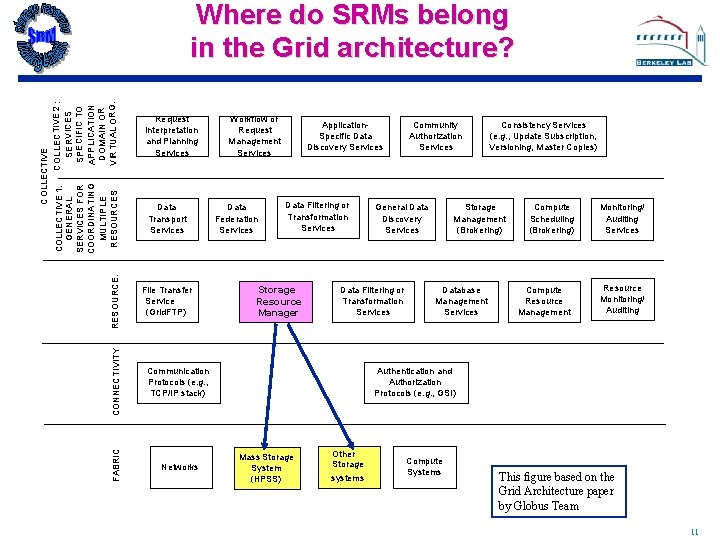
Request Interpretation and Planning Services Data Transport Services CONNECTIVITY File Transfer Service (Grid. FTP) Communication Protocols (e. g. , TCP/IP stack) FABRIC RESOURCE: COLLECTIVE COLLEC TIVE 2 : COLLECTIVE 1: GENERAL SERV ICES SERVICES FOR SPECIFIC TO COORDINATING APPLICATION DOMAIN OR MULTIPLE VIRTUAL ORG. RESOURCES Where do SRMs belong in the Grid architecture? Networks Workflow or Request Management Services Data Federation Services Application. Specific Data Discovery Services Data Filtering or Transformation Services Storage Resource Manager Community Authorization Services General Data Discovery Services Data Filtering or Transformation Services Consistency Services (e. g. , Update Subscription, Versioning, Master Copies) Storage Management (Brokering) Database Management Services Compute Scheduling (Brokering) Compute Resource Management Monitoring/ Auditing Services Resource Monitoring/ Auditing Authentication and Authorization Protocols (e. g. , GSI) Mass Storage System (HPSS) Other Storage systems Compute Systems This figure based on the Grid Architecture paper by Globus Team 11
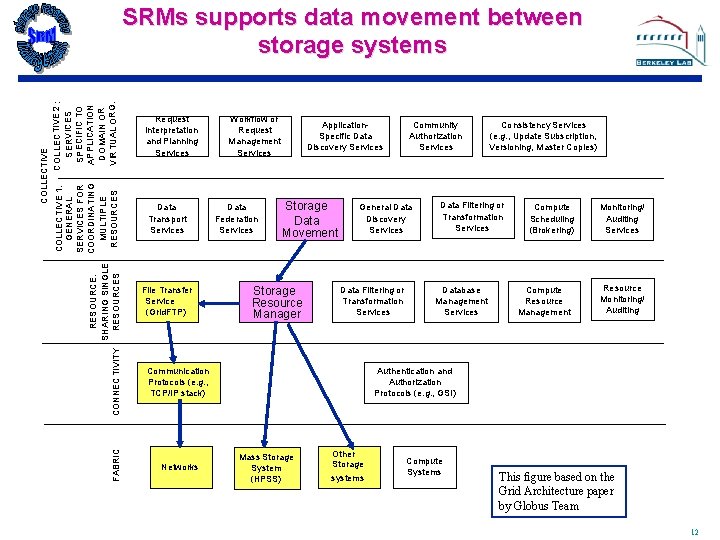
FABRIC COLLECTIVE COLLEC TIVE 2 : COLLECTIVE 1: GENERAL SERV ICES SERVICES FOR SPECIFIC TO COORDINATING APPLICATION RESOURCE: DOMAIN OR MULTIPLE SHARING SINGLE VIRTUAL ORG. RESOURCES CONNECTIVITY SRMs supports data movement between storage systems Request Interpretation and Planning Services Data Transport Services File Transfer Service (Grid. FTP) Workflow or Request Management Services Data Federation Services Application. Specific Data Discovery Services Storage Data Movement Storage Resource Manager General Data Discovery Services Data Filtering or Transformation Services Communication Protocols (e. g. , TCP/IP stack) Networks Community Authorization Services Consistency Services (e. g. , Update Subscription, Versioning, Master Copies) Data Filtering or Transformation Services Database Management Services Compute Scheduling (Brokering) Compute Resource Management Monitoring/ Auditing Services Resource Monitoring/ Auditing Authentication and Authorization Protocols (e. g. , GSI) Mass Storage System (HPSS) Other Storage systems Compute Systems This figure based on the Grid Architecture paper by Globus Team 12
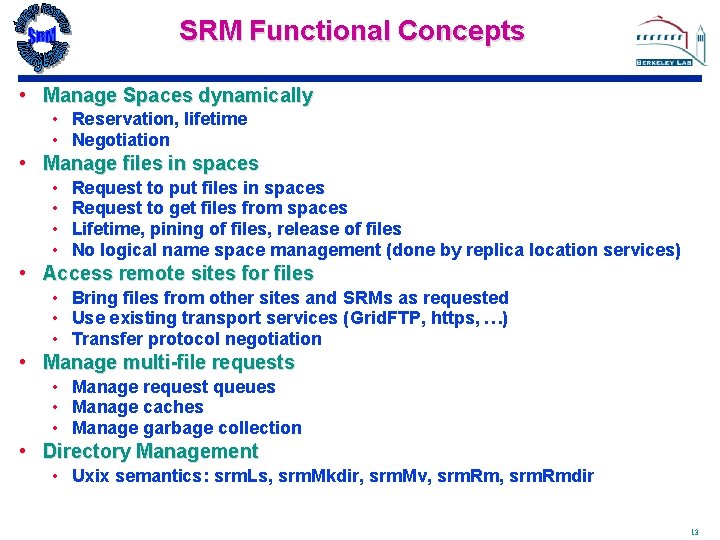
SRM Functional Concepts • Manage Spaces dynamically • Reservation, lifetime • Negotiation • Manage files in spaces • • Request to put files in spaces Request to get files from spaces Lifetime, pining of files, release of files No logical name space management (done by replica location services) • Access remote sites for files • Bring files from other sites and SRMs as requested • Use existing transport services (Grid. FTP, https, …) • Transfer protocol negotiation • Manage multi-file requests • Manage request queues • Manage caches • Manage garbage collection • Directory Management • Uxix semantics: srm. Ls, srm. Mkdir, srm. Mv, srm. Rmdir 13
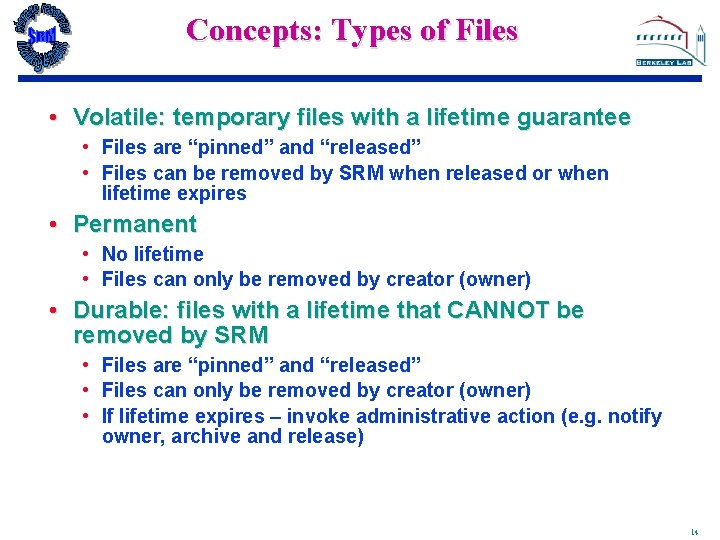
Concepts: Types of Files • Volatile: temporary files with a lifetime guarantee • Files are “pinned” and “released” • Files can be removed by SRM when released or when lifetime expires • Permanent • No lifetime • Files can only be removed by creator (owner) • Durable: files with a lifetime that CANNOT be removed by SRM • Files are “pinned” and “released” • Files can only be removed by creator (owner) • If lifetime expires – invoke administrative action (e. g. notify owner, archive and release) 14
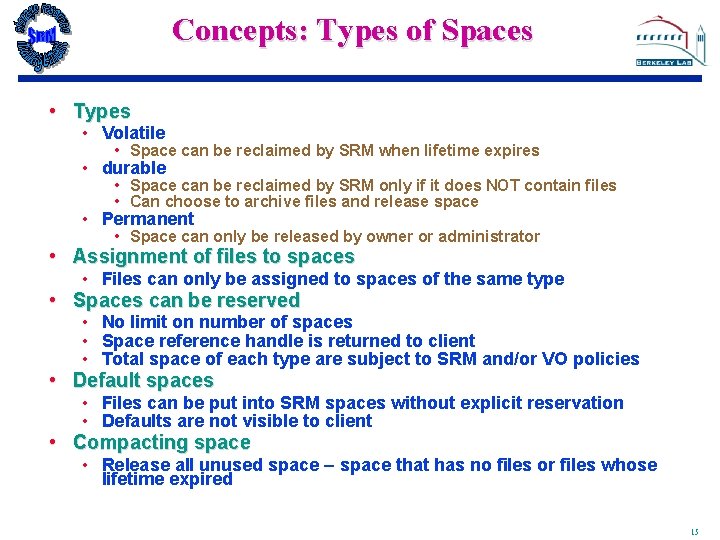
Concepts: Types of Spaces • Types • Volatile • Space can be reclaimed by SRM when lifetime expires • durable • Space can be reclaimed by SRM only if it does NOT contain files • Can choose to archive files and release space • Permanent • Space can only be released by owner or administrator • Assignment of files to spaces • Files can only be assigned to spaces of the same type • Spaces can be reserved • No limit on number of spaces • Space reference handle is returned to client • Total space of each type are subject to SRM and/or VO policies • Default spaces • Files can be put into SRM spaces without explicit reservation • Defaults are not visible to client • Compacting space • Release all unused space – space that has no files or files whose lifetime expired 15
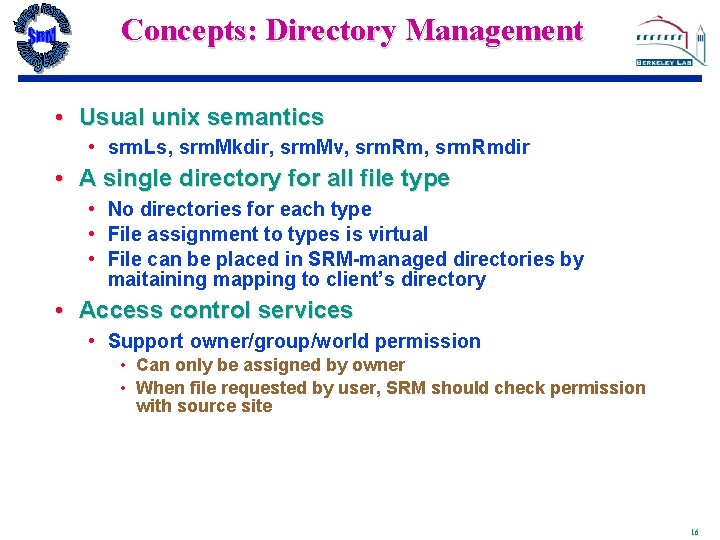
Concepts: Directory Management • Usual unix semantics • srm. Ls, srm. Mkdir, srm. Mv, srm. Rmdir • A single directory for all file type • No directories for each type • File assignment to types is virtual • File can be placed in SRM-managed directories by maitaining mapping to client’s directory • Access control services • Support owner/group/world permission • Can only be assigned by owner • When file requested by user, SRM should check permission with source site 16
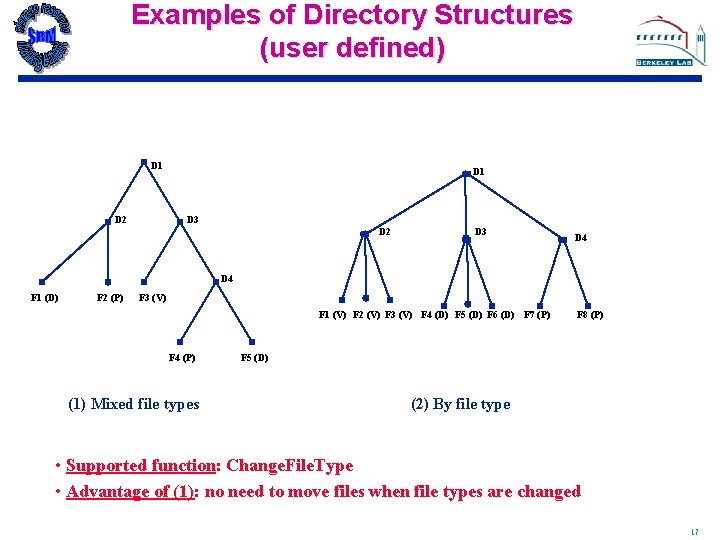
Examples of Directory Structures (user defined) D 1 D 2 D 1 D 3 D 2 D 3 D 4 F 1 (D) F 2 (P) F 3 (V) F 1 (V) F 2 (V) F 3 (V) F 4 (D) F 5 (D) F 6 (D) F 7 (P) F 4 (P) (1) Mixed file types F 8 (P) F 5 (D) (2) By file type • Supported function: Change. File. Type • Advantage of (1): no need to move files when file types are changed 17
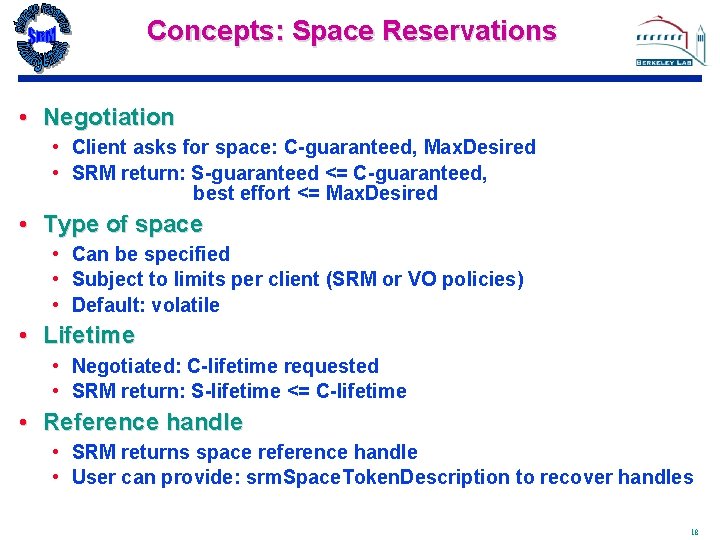
Concepts: Space Reservations • Negotiation • Client asks for space: C-guaranteed, Max. Desired • SRM return: S-guaranteed <= C-guaranteed, best effort <= Max. Desired • Type of space • Can be specified • Subject to limits per client (SRM or VO policies) • Default: volatile • Lifetime • Negotiated: C-lifetime requested • SRM return: S-lifetime <= C-lifetime • Reference handle • SRM returns space reference handle • User can provide: srm. Space. Token. Description to recover handles 18
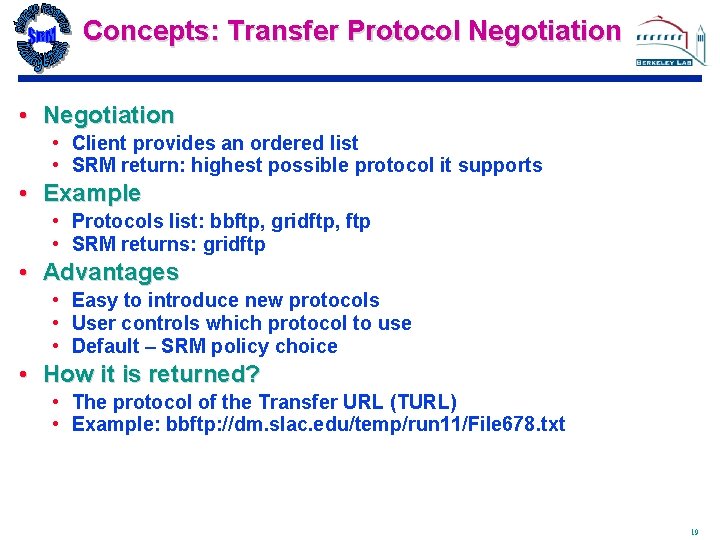
Concepts: Transfer Protocol Negotiation • Client provides an ordered list • SRM return: highest possible protocol it supports • Example • Protocols list: bbftp, gridftp, ftp • SRM returns: gridftp • Advantages • Easy to introduce new protocols • User controls which protocol to use • Default – SRM policy choice • How it is returned? • The protocol of the Transfer URL (TURL) • Example: bbftp: //dm. slac. edu/temp/run 11/File 678. txt 19
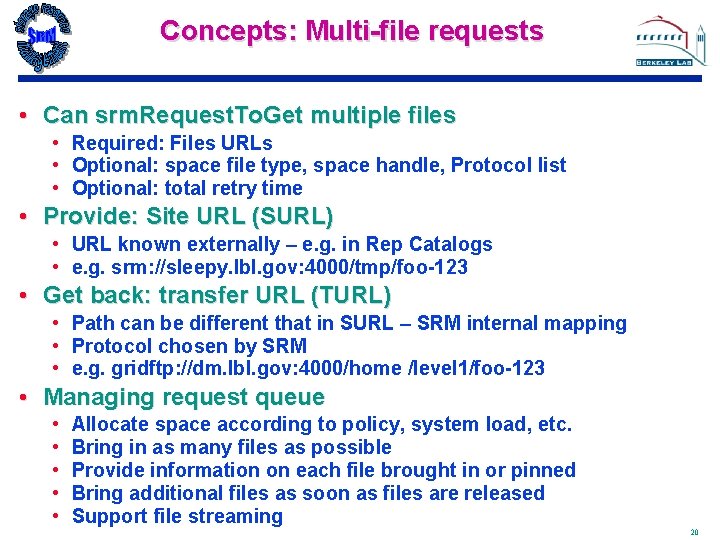
Concepts: Multi-file requests • Can srm. Request. To. Get multiple files • Required: Files URLs • Optional: space file type, space handle, Protocol list • Optional: total retry time • Provide: Site URL (SURL) • URL known externally – e. g. in Rep Catalogs • e. g. srm: //sleepy. lbl. gov: 4000/tmp/foo-123 • Get back: transfer URL (TURL) • Path can be different that in SURL – SRM internal mapping • Protocol chosen by SRM • e. g. gridftp: //dm. lbl. gov: 4000/home /level 1/foo-123 • Managing request queue • • • Allocate space according to policy, system load, etc. Bring in as many files as possible Provide information on each file brought in or pinned Bring additional files as soon as files are released Support file streaming 20
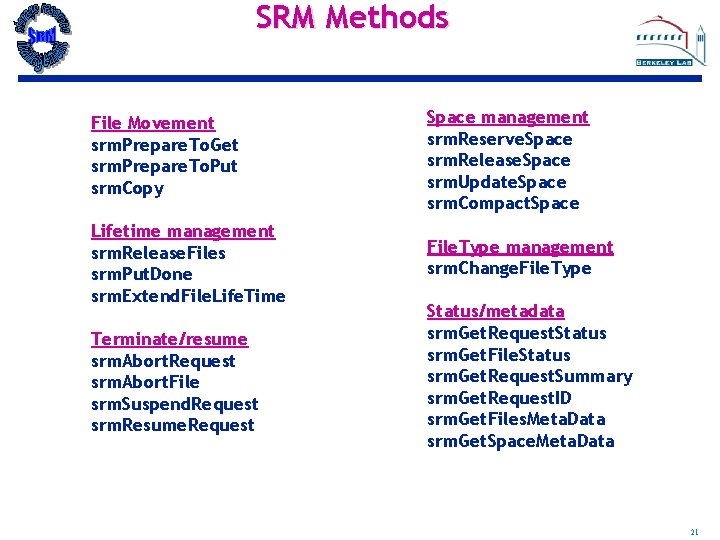
SRM Methods File Movement srm. Prepare. To. Get srm. Prepare. To. Put srm. Copy Space management srm. Reserve. Space srm. Release. Space srm. Update. Space srm. Compact. Space Lifetime management srm. Release. Files srm. Put. Done srm. Extend. File. Life. Time File. Type management srm. Change. File. Type Terminate/resume srm. Abort. Request srm. Abort. File srm. Suspend. Request srm. Resume. Request Status/metadata srm. Get. Request. Status srm. Get. File. Status srm. Get. Request. Summary srm. Get. Request. ID srm. Get. Files. Meta. Data srm. Get. Space. Meta. Data 21
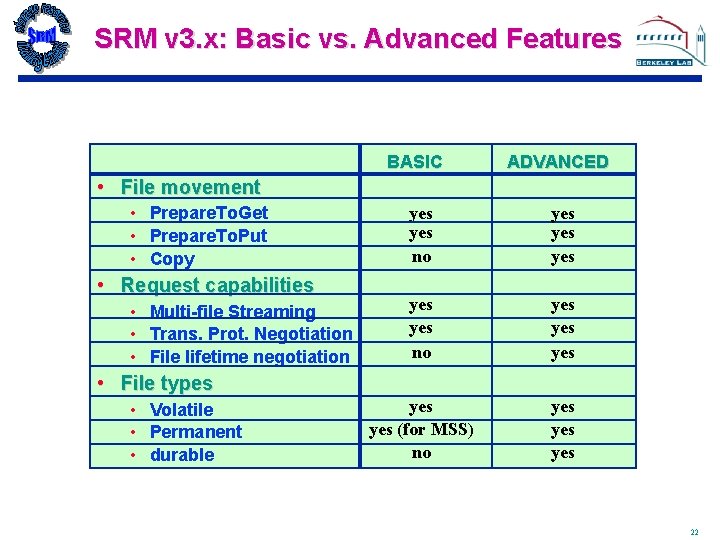
SRM v 3. x: Basic vs. Advanced Features BASIC ADVANCED • File movement • Prepare. To. Get • Prepare. To. Put • Copy • Request capabilities • Multi-file Streaming • Trans. Prot. Negotiation • File lifetime negotiation yes yes no yes yes (for MSS) no yes yes • File types • Volatile • Permanent • durable 22
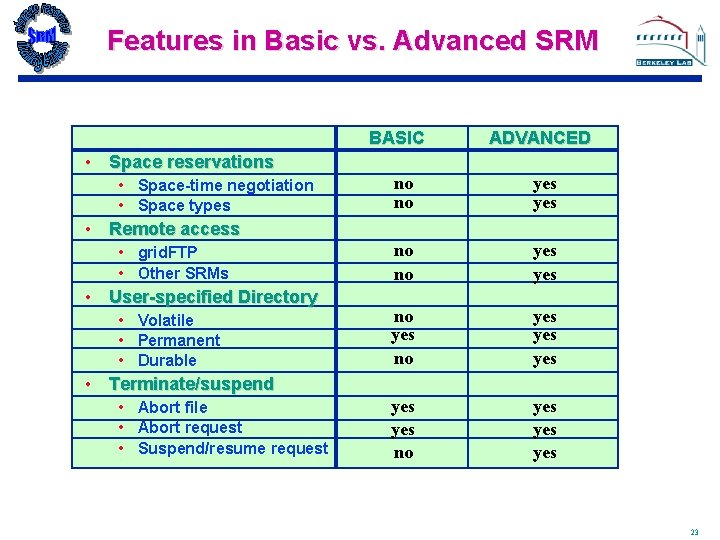
Features in Basic vs. Advanced SRM BASIC ADVANCED • Space reservations • Space-time negotiation • Space types • Remote access • grid. FTP • Other SRMs • User-specified Directory • Volatile • Permanent • Durable no no yes yes yes no yes yes • Terminate/suspend • Abort file • Abort request • Suspend/resume request 23
Use Case Use of SRMs for Robust directory-to-directory file replication 24
Massive Robust File Replication • Multi-File Replication – why is it a problem? • Tedious task – many files, repetitious • Lengthy task – long time, can take hours, even days • Error prone – need to monitor transfers • Error recovery – need to restart file transfers • Stage and archive from MSS – limited concurrency, down time, transient failures • Use of FTP – no large windows / multiple streams • Security – both for local MSS and the network • Firewalls – transfer from/to MSS must be internal to the site • Specialized MSS – HPSS at NERSC, ORNL, …, • Legacy MSS – MSS at NCAR 25
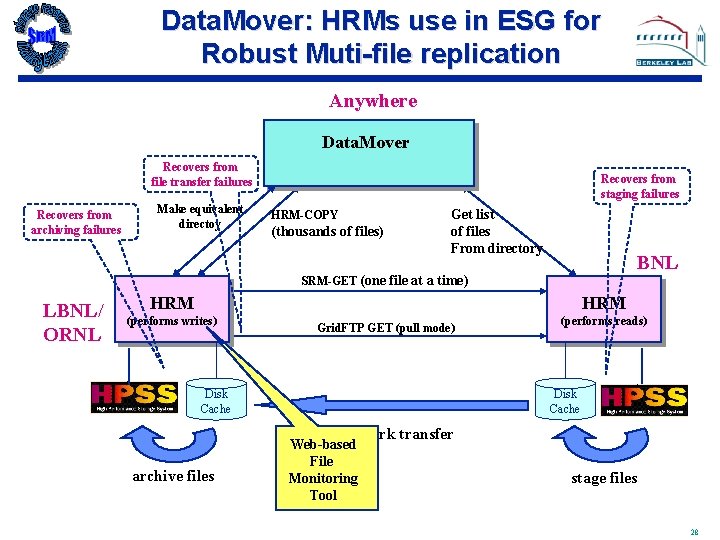
Main Idea • Leverage off Storage Resource Managers (SRMs) Technology • Supported by SRM middleware project • Leverage from experience with other Sci. DAC projects – PPDG • What do you get? • • • SRMs queue multi-file requests SRMs allocate space and release space automatically SRMs request files from remote SRMs Recover from network failures SRMs invoke Grid. FTP – use large windows & parallel streams 26
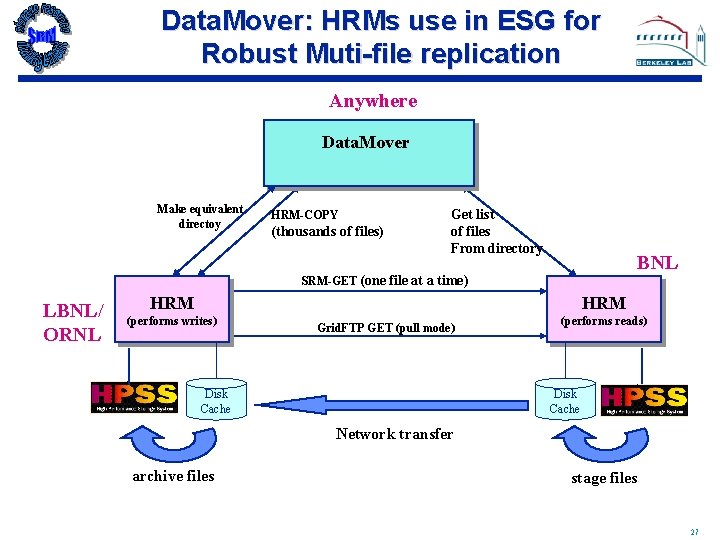
Data. Mover: HRMs use in ESG for Robust Muti-file replication Anywhere Data. Mover Make equivalent directoy HRM-COPY (thousands of files) Get list of files From directory BNL SRM-GET (one file at a time) LBNL/ ORNL HRM (performs writes) Grid. FTP GET (pull mode) Disk Cache (performs reads) Disk Cache Network transfer archive files stage files 27
Data. Mover: HRMs use in ESG for Robust Muti-file replication Anywhere Data. Mover Recovers from file transfer failures Recovers from archiving failures Make equivalent directoy Recovers from staging failures HRM-COPY (thousands of files) Get list of files From directory BNL SRM-GET (one file at a time) LBNL/ ORNL HRM (performs writes) Grid. FTP GET (pull mode) Disk Cache (performs reads) Disk Cache Network transfer archive files Web-based File Monitoring Tool stage files 28
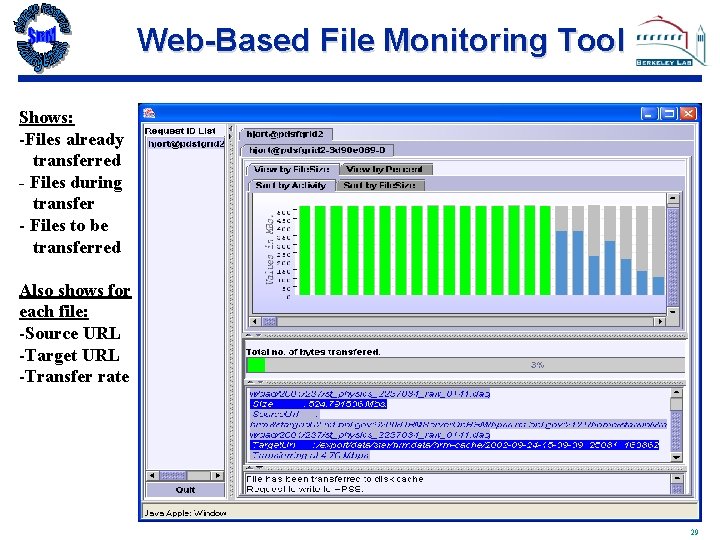
Web-Based File Monitoring Tool Shows: -Files already transferred - Files during transfer - Files to be transferred Also shows for each file: -Source URL -Target URL -Transfer rate 29
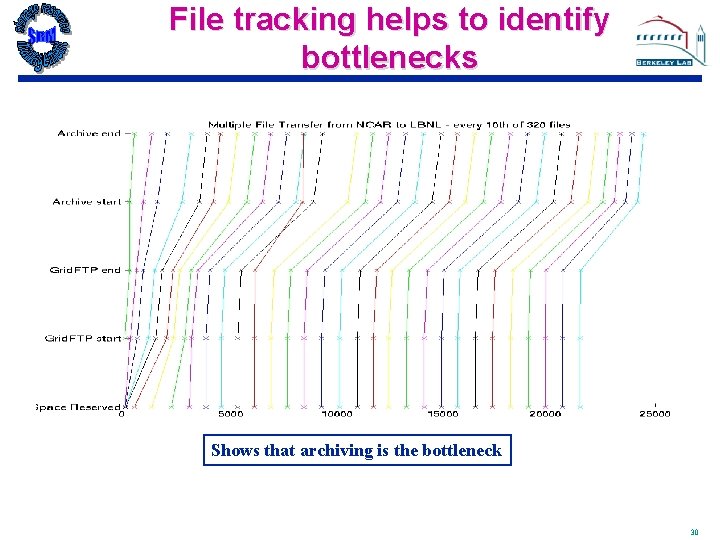
File tracking helps to identify bottlenecks Shows that archiving is the bottleneck 30
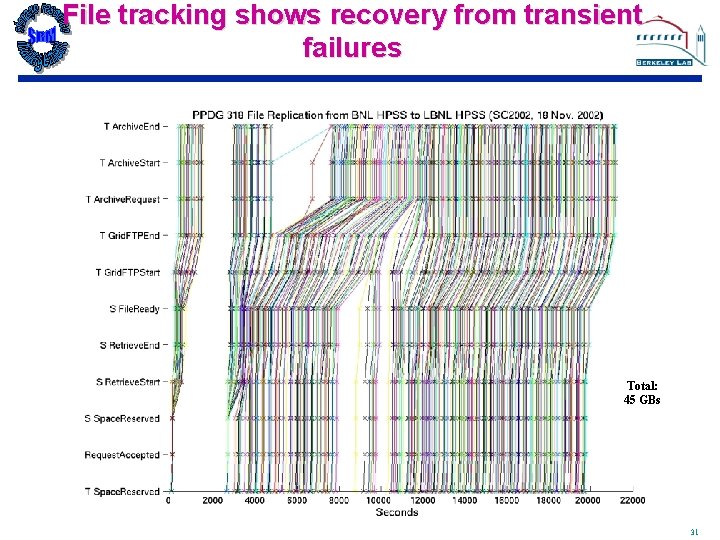
File tracking shows recovery from transient failures Total: 45 GBs 31
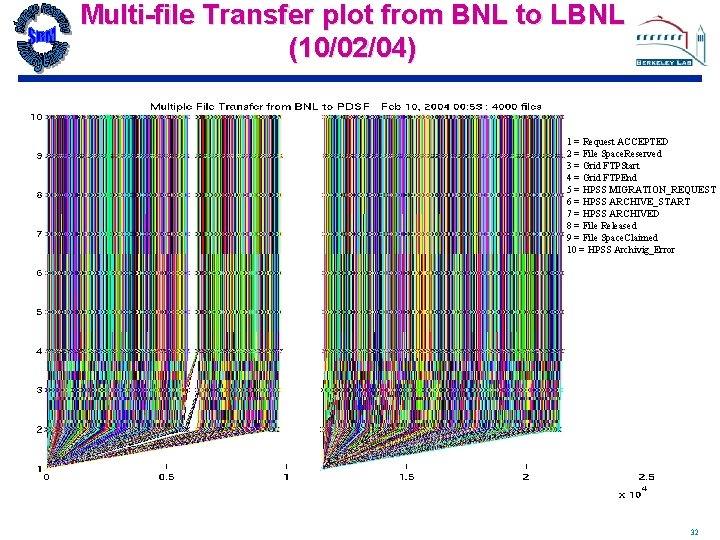
Multi-file Transfer plot from BNL to LBNL (10/02/04) 1 = Request ACCEPTED 2 = File Space. Reserved 3 = Grid FTPStart 4 = Grid FTPEnd 5 = HPSS MIGRATION_REQUEST 6 = HPSS ARCHIVE_START 7 = HPSS ARCHIVED 8 = File Released 9 = File Space. Claimed 10 = HPSS Archivig_Error 32
Summary • Storage Resource Management – essential for Grid • SRM is a functional definition • Adaptable to different frameworks (WS, OGSA, WSRF, …) • Multiple implementations interoperate • Permit special purpose implementations for unique products • Permits interchanging one SRM product by another • SRM implementations exist and some in production use • Particle Physics Data Grid • Earth System Grid • More coming … • Cumulative experience in GGF-WG • Specifications SRM v 3. 0 complete 33
Extra Slides 34
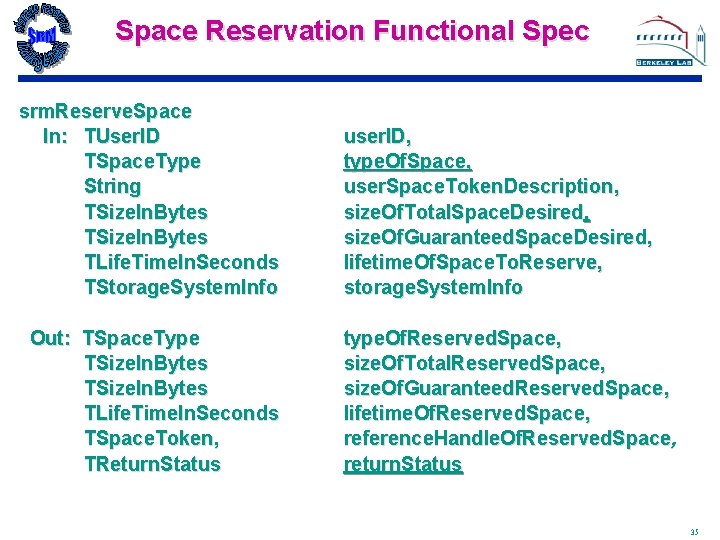
Space Reservation Functional Spec srm. Reserve. Space In: TUser. ID TSpace. Type String TSize. In. Bytes TLife. Time. In. Seconds TStorage. System. Info Out: TSpace. Type TSize. In. Bytes TLife. Time. In. Seconds TSpace. Token, TReturn. Status user. ID, type. Of. Space, user. Space. Token. Description, size. Of. Total. Space. Desired, size. Of. Guaranteed. Space. Desired, lifetime. Of. Space. To. Reserve, storage. System. Info type. Of. Reserved. Space, size. Of. Total. Reserved. Space, size. Of. Guaranteed. Reserved. Space, lifetime. Of. Reserved. Space, reference. Handle. Of. Reserved. Space, return. Status 35
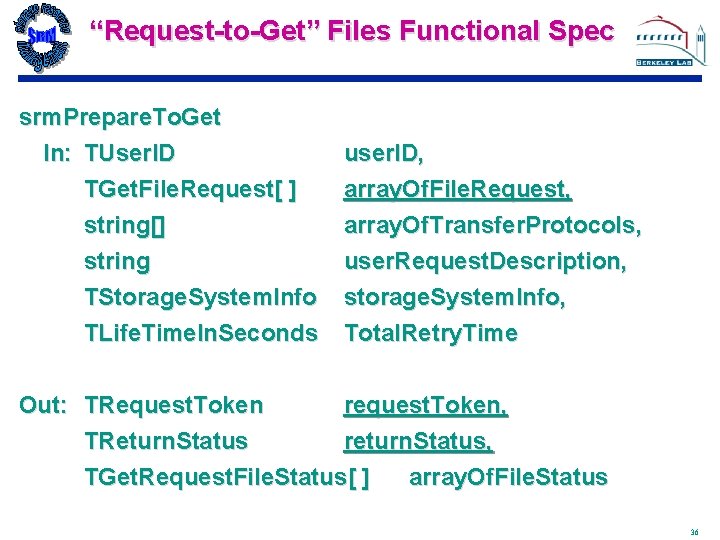
“Request-to-Get” Files Functional Spec srm. Prepare. To. Get In: TUser. ID TGet. File. Request[ ] string[] string TStorage. System. Info TLife. Time. In. Seconds user. ID, array. Of. File. Request, array. Of. Transfer. Protocols, user. Request. Description, storage. System. Info, Total. Retry. Time Out: TRequest. Token request. Token, TReturn. Status return. Status, TGet. Request. File. Status[ ] array. Of. File. Status 36
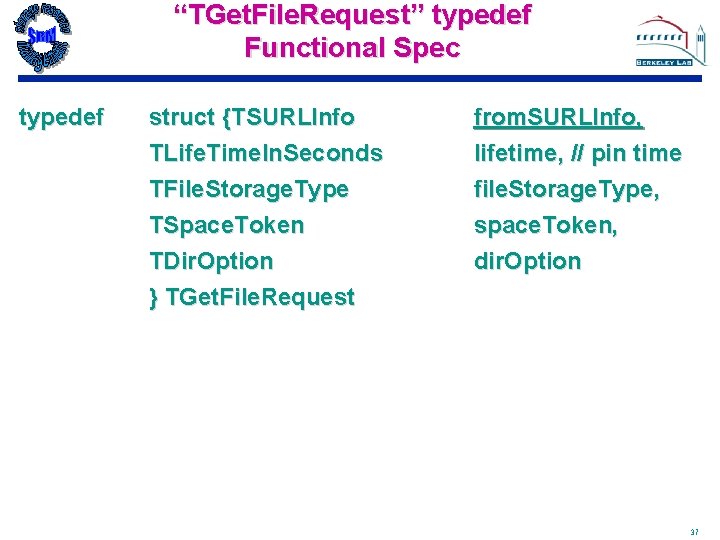
“TGet. File. Request” typedef Functional Spec typedef struct {TSURLInfo TLife. Time. In. Seconds TFile. Storage. Type TSpace. Token TDir. Option } TGet. File. Request from. SURLInfo, lifetime, // pin time file. Storage. Type, space. Token, dir. Option 37
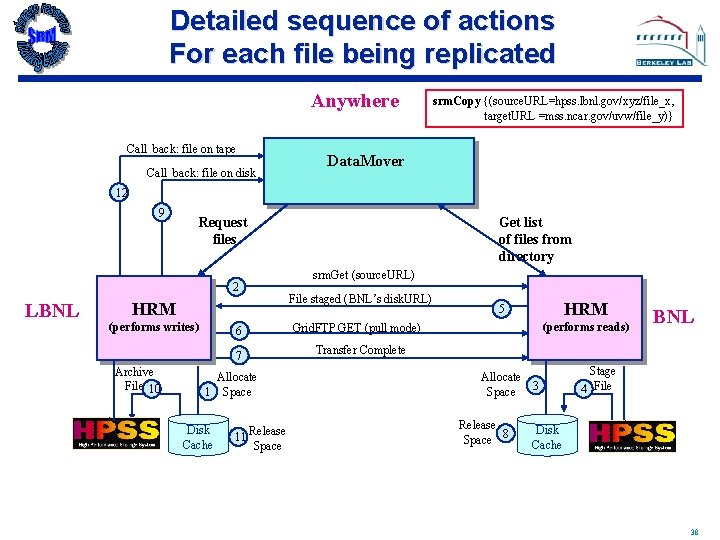
Detailed sequence of actions For each file being replicated Anywhere Call_back: file on tape Call_back: file on disk srm. Copy {(source. URL=hpss. lbnl. gov/xyz/file_x, target. URL =mss. ncar. gov/uvw/file_y)} Data. Mover 12 9 Request files 2 LBNL HRM (performs writes) 6 7 Archive File 10 Allocate 1 Space Disk Cache 11 Release Space Get list of files from directory srm. Get (source. URL) File staged (BNL’s disk. URL) HRM 5 (performs reads) Grid. FTP GET (pull mode) BNL Transfer Complete Allocate 3 Space Release 8 Space Stage 4 File Disk Cache 38