
Storage and Processing of Data Revision Mat Utility
- Slides: 2
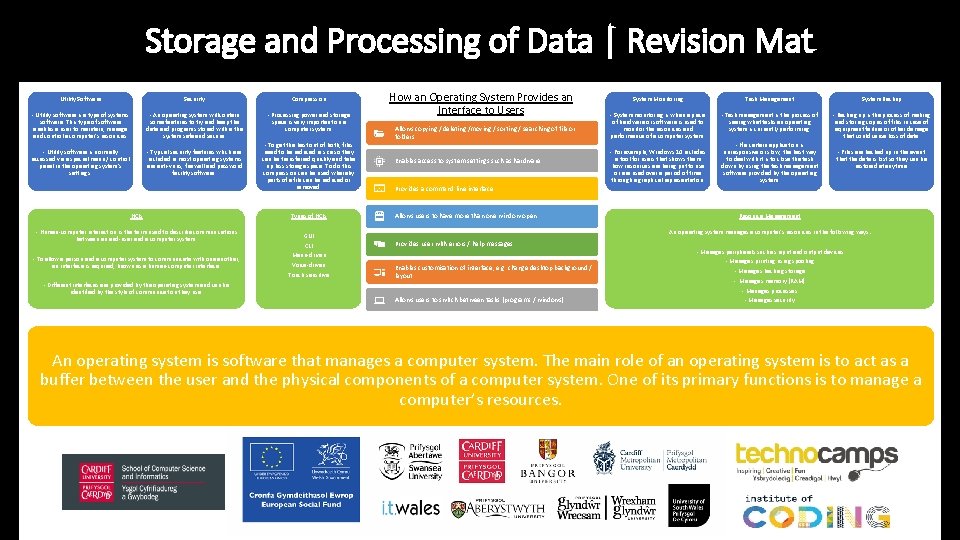
Storage and Processing of Data | Revision Mat Utility Software Security Compression - Utility software is a type of systems software. This type of software enables a user to maintain, manage and control a computer’s resources. - An operating system will contain some features to try and keep the data and programs stored within the system safe and secure. - Processing power and storage space is very important on a computer system. - Utility software is normally accessed via a special menu / control panel in the operating system’s settings. - Typical security features which are included in most operating systems are anti-virus, firewall and password facility software. HCIs - Human-computer interaction is the term used to describe communications between an end-user and a computer system. - To allow a person and a computer system to communicate with one another, an interface is required, known as a human-computer interface. - Different interfaces are provided by the operating system and can be identified by the style of communication they use. - To get the best out of both, files need to be reduced in size so they can be transferred quickly and take up less storage space. To do this compression can be used whereby parts of a file can be reduced or removed. Types of HCIs GUI CLI Menu-driven Voice-driven Touch sensitive How an Operating System Provides an Interface to Users Allows copying / deleting /moving / sorting / searching of file or folders Enables access to system settings such as hardware String Handling Methods of Identifying Allows users to have more than one window open Techniques Vulnerabilities in Computer Systems Provides a command line interface System Monitoring Task Management System Backup - System monitoring is when a piece of hardware or software is used to monitor the resources and performance of a computer system. - Task management is the process of seeing what tasks an operating system is currently performing. - Backing up is the process of making and storing copies of files in case of equipment failure or other damage that could cause loss of data. - For example, Windows 10 includes a tool for users that shows them how resources are being put to use or are used over a period of time through a graphical representation. - If a certain application is unresponsive or slow, the best way to deal with it is to close the task down by using the task management software provided by the operating system. - Files are backed up in the event that the data is lost so they can be restored at anytime. . Resource Management An operating system manages a computer’s resources in the following ways: Provides user with errors / help messages Enables customisation of interface, e. g. change desktop background / layout - Manages peripherals such as input and output devices - Manages printing using spooling - Manages backing storage - Manages memory (RAM) - Manages processes Allows users to switch between tasks (programs / windows) - Manages security An operating system is software that manages a computer system. The main role of an operating system is to act as a buffer between the user and the physical components of a computer system. One of its primary functions is to manage a computer’s resources.
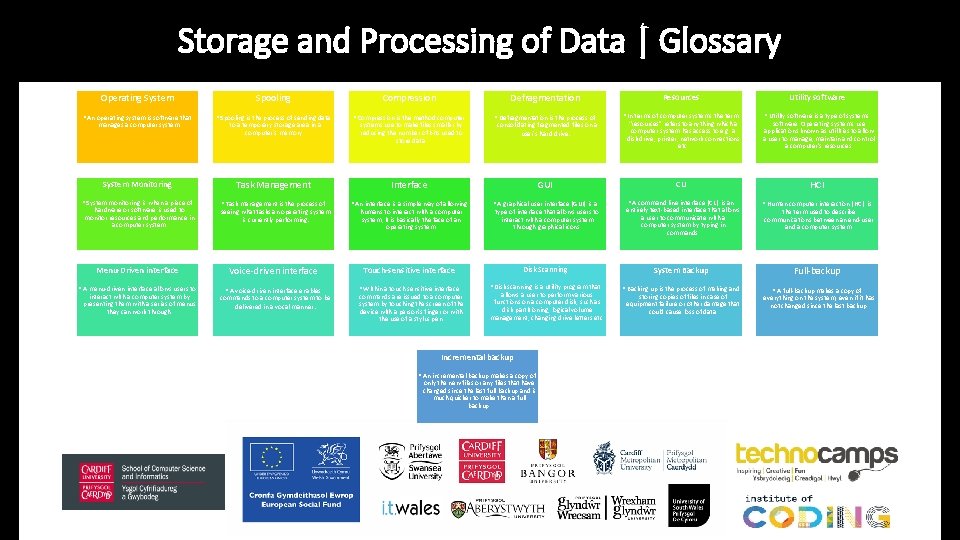
Storage and Processing of Data | Glossary Operating System Spooling Compression Defragmentation Resources Utility software • An operating system is software that • Spooling is the process of sending data • Compression is the method computer • Defragmentation is the process of • In terms of computer systems the term “resources” refers to anything which a computer system has access to e. g. a disk drive, printer, network connections etc. • Utility software is a type of systems consolidating fragmented files on a user's hard drive. software. Operating systems use applications known as utilities to allow a user to manage, maintain and control a computer’s resources. System Monitoring Task Management Interface GUI CLI HCI • System monitoring is when a piece of • Task management is the process of seeing what tasks an operating system is currently performing. • An interface is a simple way of allowing • A graphical user interface (GUI) is a type of interface that allows users to interact with a computer system through graphical icons. • A command line interface (CLI) is an entirely text-based interface that allows a user to communicate with a computer system by typing in commands. • Human-computer interaction (HCI) is Menu-Driven interface Voice-driven interface Touch-sensitive interface Disk Scanning System Backup Full-backup • A menu-driven interface allows users to • A voice-driven interface enables commands to a computer system to be delivered in a vocal manner. • Within a touch-sensitive interface • Disk scanning is a utility program that • Backing up is the process of making and • A full-backup makes a copy of everything on the system, even if it has not changed since the last backup. manages a computer system. hardware or software is used to monitor resources and performance in a computer system. interact with a computer system by presenting them with a series of menus they can work through. to a temporary storage area in a computer's memory. systems use to make files smaller by reducing the number of bits used to store data. humans to interact with a computer system, it is basically the face of an operating system. commands are issued to a computer system by touching the screen of the device with a person’s finger or with the use of a stylus pen. allows a user to perform various functions on a computer disk, such as disk partitioning, logical volume management, changing drive letters etc. Incremental backup • An incremental backup makes a copy of only the new files or any files that have changed since the last full backup and is much quicker to make than a full backup. storing copies of files in case of equipment failure or other damage that could cause loss of data. the term used to describe communications between an end-user and a computer system.