
Stor Simple 8000 Series Training Mike EmardSteven Goddard



- Slides: 61
Stor. Simple 8000 Series Training Mike Emard/Steven Goddard https: //twitter. com/storsimple February 22, 2016
Agenda • • Product Overview Deployment Planning Registration & Initial Configuration Volume Management Device Admin Console (CLI) Maintenance & Troubleshooting Stor. Simple Cloud Array Disaster Recovery & Data Mobility
Stor. Simple 8000 Series Training Stor. Simple Overview
Agenda • Storage challenges • Consolidating Storage Functions • Moving Inactive Data to the Cloud Tier • Integrating with the Cloud Seamlessly • Backup & DR • Physical and Virtual Appliance Comparison • Workloads
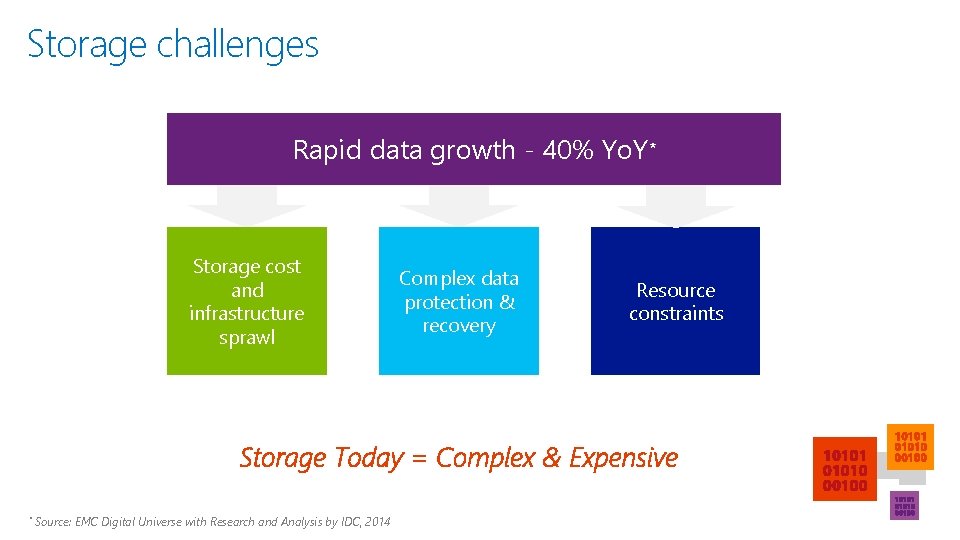
Storage challenges Rapid data growth - 40% Yo. Y* Storage cost and infrastructure sprawl Complex data protection & recovery Resource constraints Storage Today = Complex & Expensive * Source: EMC Digital Universe with Research and Analysis by IDC, 2014
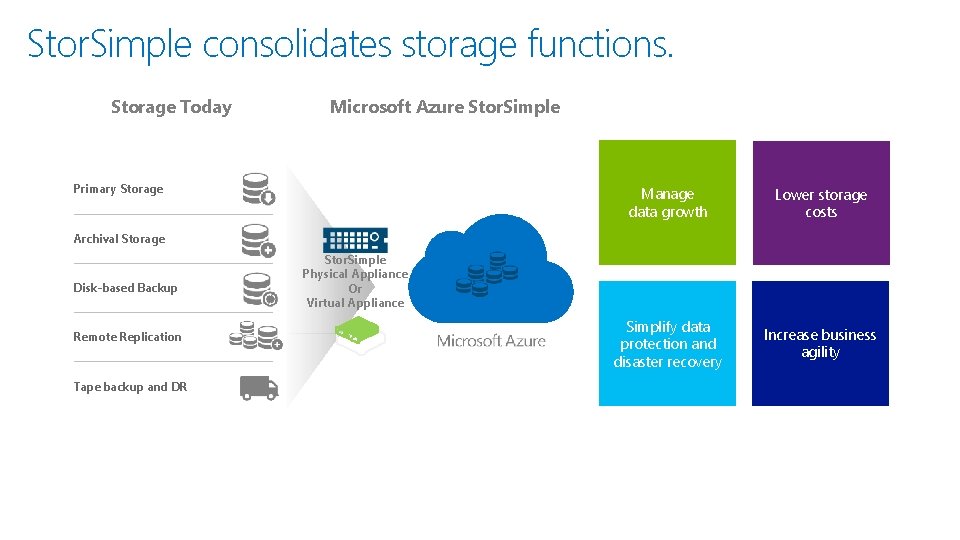
Stor. Simple consolidates storage functions. Storage Today Microsoft Azure Stor. Simple Primary Storage Manage data growth Lower storage costs Simplify data protection and disaster recovery Increase business agility Archival Storage Disk-based Backup Remote Replication Tape backup and DR Stor. Simple Physical Appliance Or Virtual Appliance
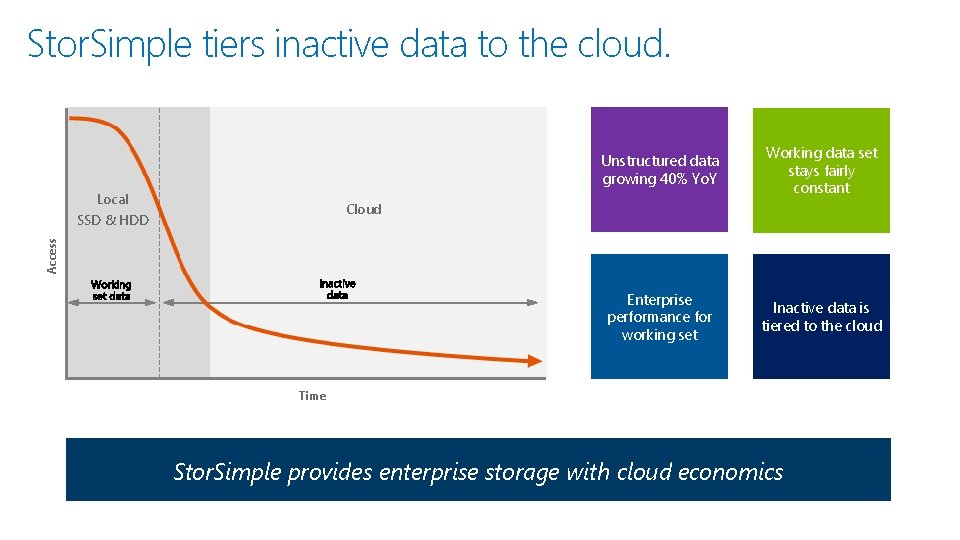
Stor. Simple tiers inactive data to the cloud. Local Unstructured data growing 40% Yo. Y Working data set stays fairly constant Enterprise performance for working set Inactive data is tiered to the cloud Cloud Access SSD & HDD Time Stor. Simple provides enterprise storage with cloud economics
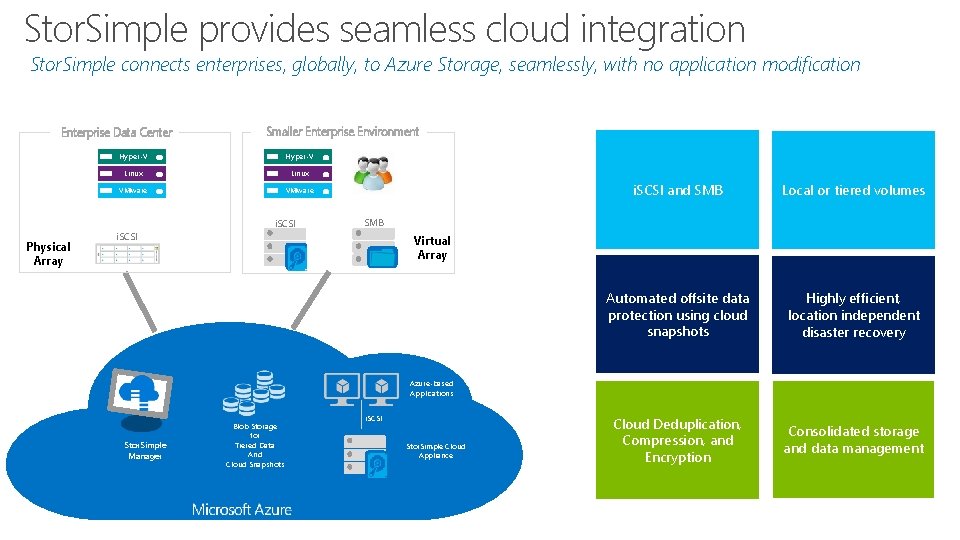
Stor. Simple provides seamless cloud integration Stor. Simple connects enterprises, globally, to Azure Storage, seamlessly, with no application modification Enterprise Data Center Smaller Enterprise Environment Hyper-V Linux VMware i. SCSI Physical Array i. SCSI and SMB Local or tiered volumes Automated offsite data protection using cloud snapshots Highly efficient, location independent disaster recovery Cloud Deduplication, Compression, and Encryption Consolidated storage and data management SMB i. SCSI Virtual Array Azure-based Applications Stor. Simple Manager Blob Storage for Tiered Data And Cloud Snapshots i. SCSI Stor. Simple Cloud Appliance
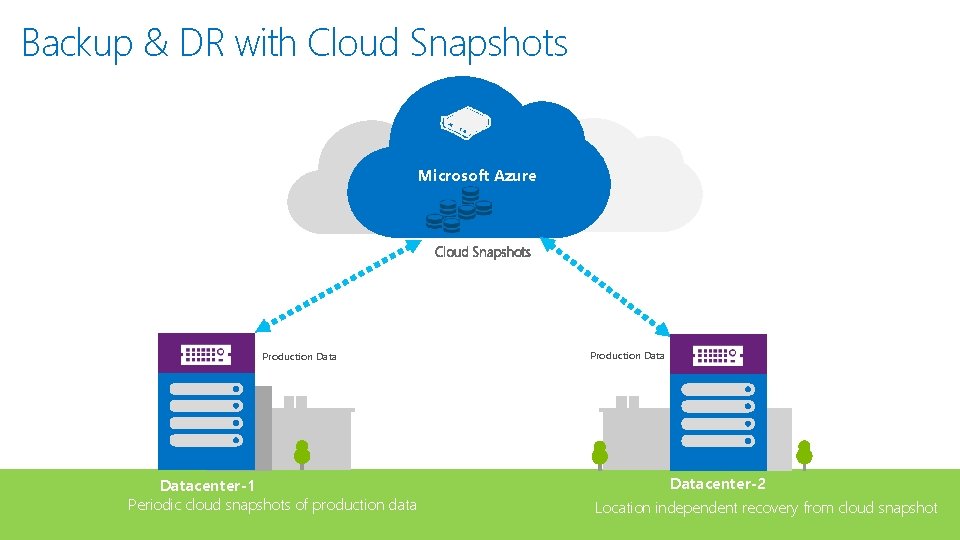
Backup & DR with Cloud Snapshots Microsoft Azure Cloud Snapshots Production Datacenter-1 Periodic cloud snapshots of production data Production Datacenter-2 Location independent recovery from cloud snapshot
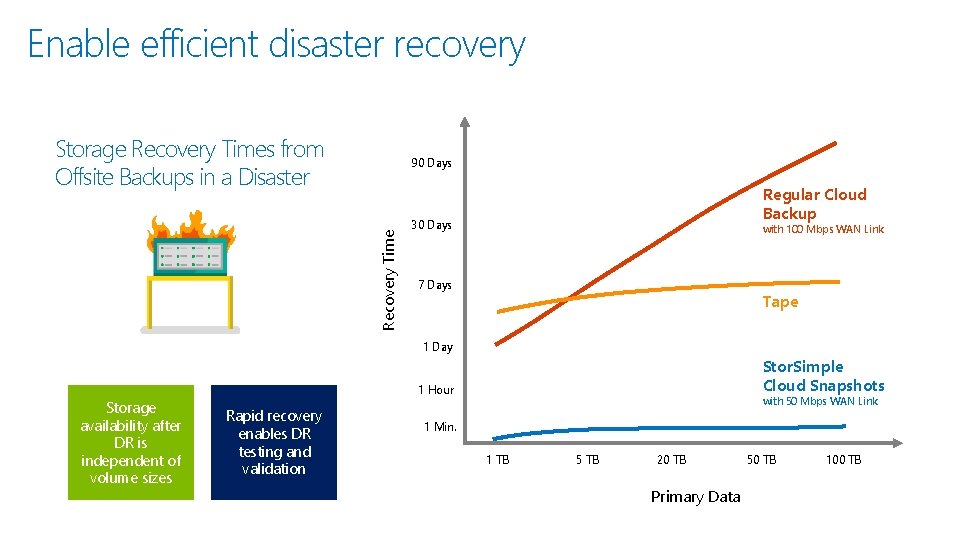
Enable efficient disaster recovery Storage Recovery Times from Offsite Backups in a Disaster Recovery Time 90 Days Regular Cloud Backup 30 Days with 100 Mbps WAN Link 7 Days Tape 1 Day Storage availability after DR is independent of volume sizes Stor. Simple Cloud Snapshots 1 Hour Rapid recovery enables DR testing and validation with 50 Mbps WAN Link 1 Min. 1 TB 5 TB 20 TB Primary Data 50 TB 100 TB
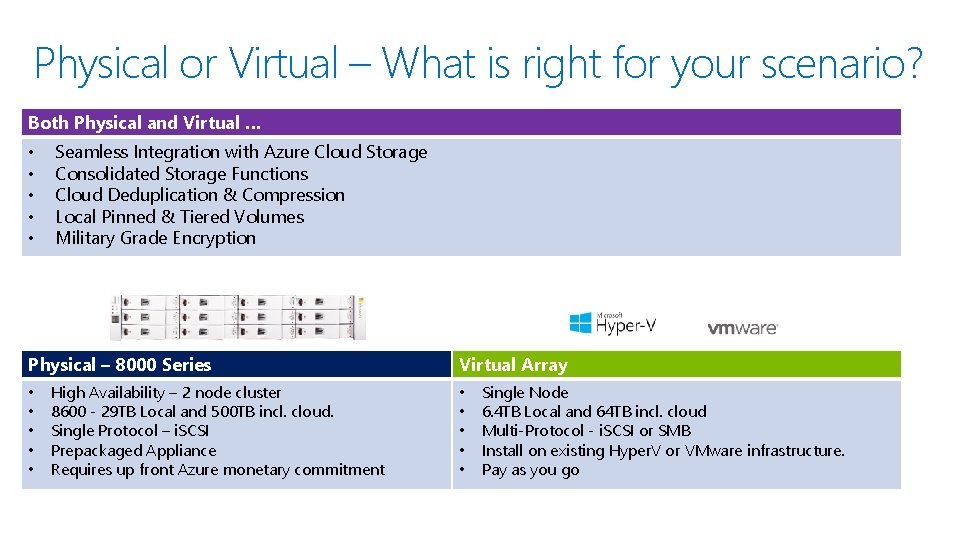
Physical or Virtual – What is right for your scenario? Both Physical and Virtual … • • • Seamless Integration with Azure Cloud Storage Consolidated Storage Functions Cloud Deduplication & Compression Local Pinned & Tiered Volumes Military Grade Encryption Physical – 8000 Series • • • High Availability – 2 node cluster 8600 - 29 TB Local and 500 TB incl. cloud. Single Protocol – i. SCSI Prepackaged Appliance Requires up front Azure monetary commitment Virtual Array • • • Single Node 6. 4 TB Local and 64 TB incl. cloud Multi-Protocol - i. SCSI or SMB Install on existing Hyper. V or VMware infrastructure. Pay as you go
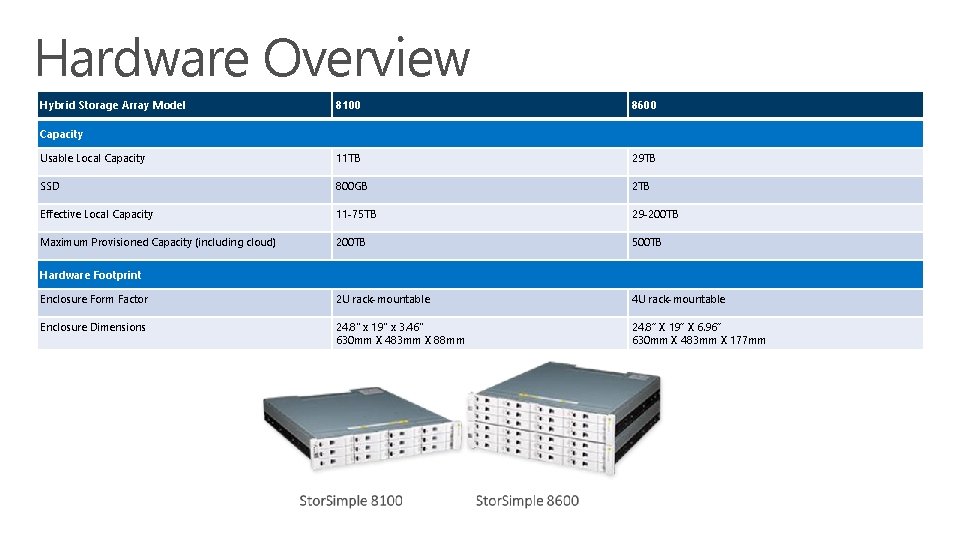
Hardware Overview Hybrid Storage Array Model 8100 8600 Usable Local Capacity 11 TB 29 TB SSD 800 GB 2 TB Effective Local Capacity 11 -75 TB 29 -200 TB Maximum Provisioned Capacity (including cloud) 200 TB 500 TB Enclosure Form Factor 2 U rack-mountable 4 U rack-mountable Enclosure Dimensions 24. 8" x 19" x 3. 46" 630 mm X 483 mm X 88 mm 24. 8” X 19” X 6. 96” 630 mm X 483 mm X 177 mm Capacity Hardware Footprint
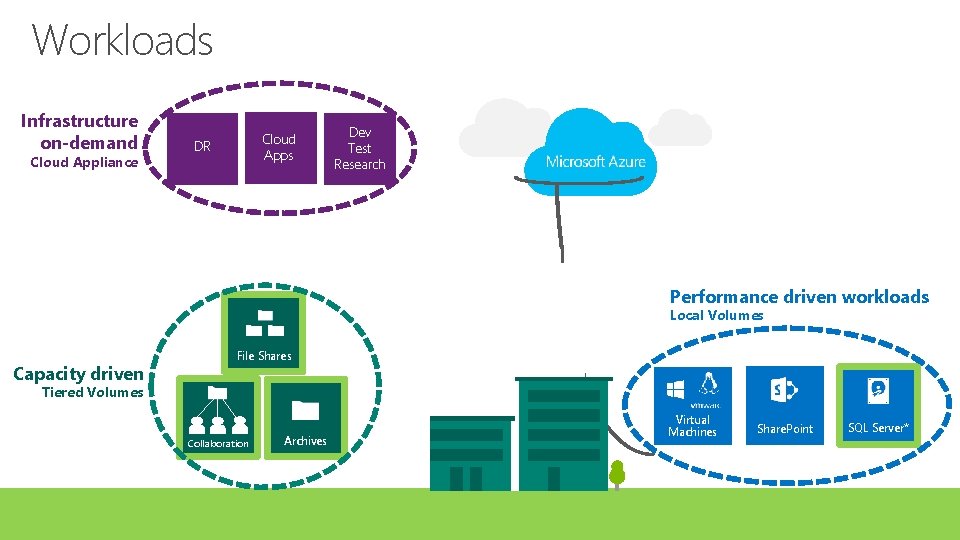
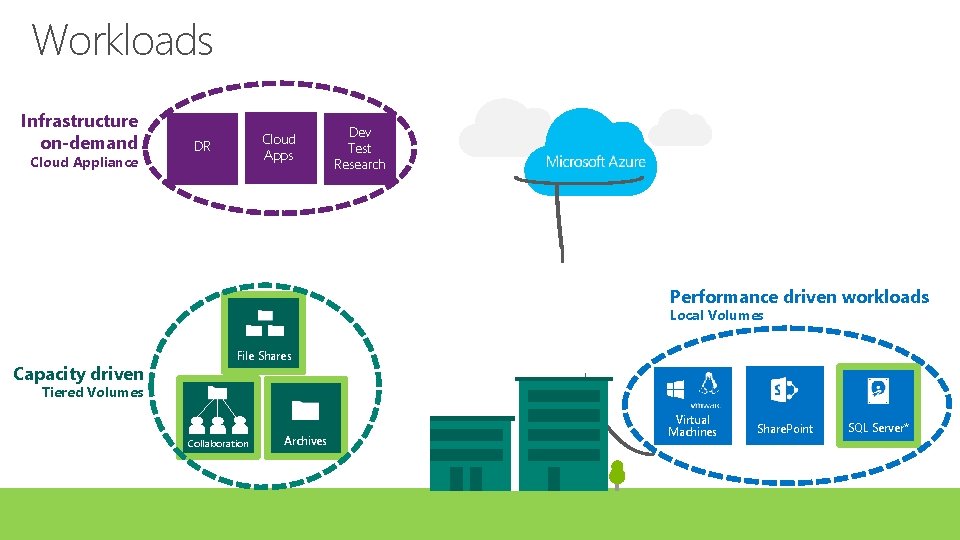
Workloads Infrastructure on-demand Cloud Appliance Cloud Apps DR Dev Test Research Performance driven workloads Local Volumes Capacity driven File Shares Tiered Volumes Collaboration Archives Virtual Machines Share. Point SQL Server*
Demo Stor. Simple 8100 Hardware Show & Tell
Stor. Simple 8000 Series Training Planning Prerequisites Planning for High Availability Network Planning
Planning Prerequisites Sales • Stor. Simple is available via Enterprise Agreement • Azure subscription Technical Knowledge • Networking • TCP/IP, DNS, NTP, Firewalls, Proxy Server • Storage • i. SCSI Initiator and Target, Disk Management
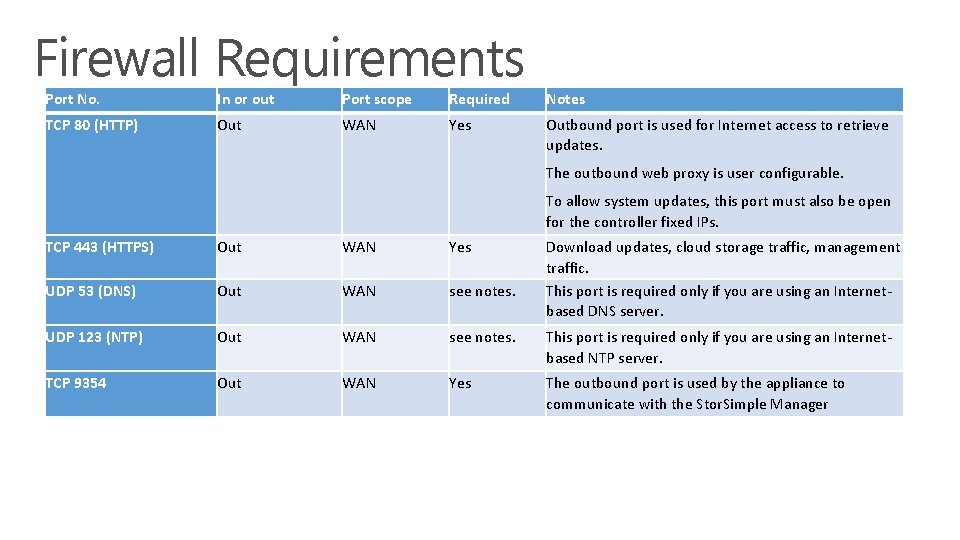
Firewall Requirements Port No. In or out Port scope Required Notes TCP 80 (HTTP) Out WAN Yes Outbound port is used for Internet access to retrieve updates. The outbound web proxy is user configurable. To allow system updates, this port must also be open for the controller fixed IPs. TCP 443 (HTTPS) Out WAN Yes Download updates, cloud storage traffic, management traffic. This port is required only if you are using an Internetbased DNS server. UDP 53 (DNS) Out WAN see notes. UDP 123 (NTP) Out WAN see notes. This port is required only if you are using an Internetbased NTP server. TCP 9354 Out WAN Yes The outbound port is used by the appliance to communicate with the Stor. Simple Manager
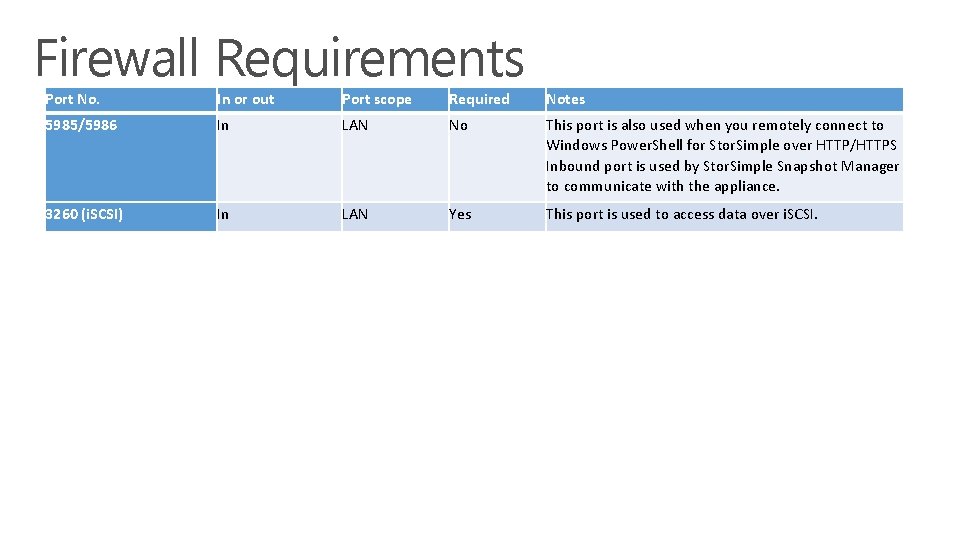
Firewall Requirements Port No. In or out Port scope Required Notes 5985/5986 In LAN No This port is also used when you remotely connect to Windows Power. Shell for Stor. Simple over HTTP/HTTPS Inbound port is used by Stor. Simple Snapshot Manager to communicate with the appliance. 3260 (i. SCSI) In LAN Yes This port is used to access data over i. SCSI.
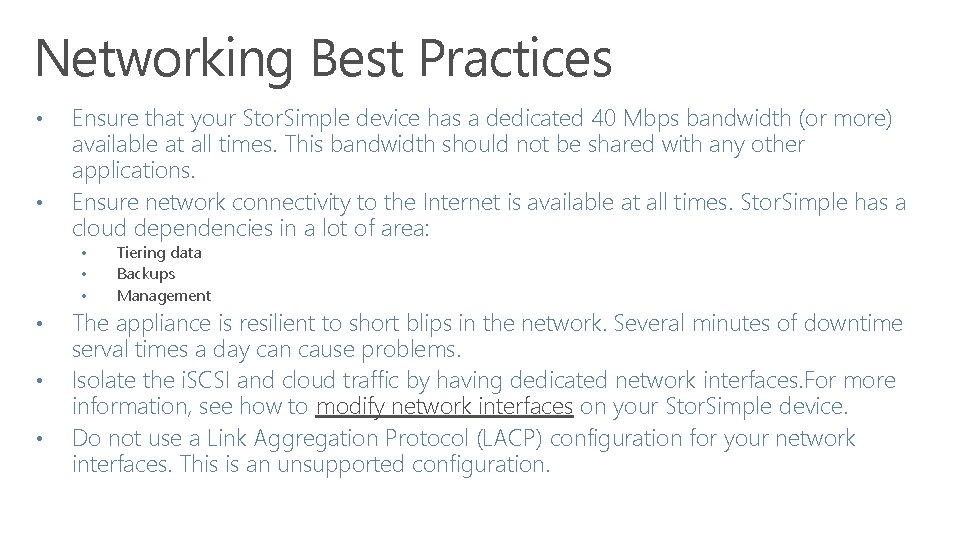
Networking Best Practices • • Ensure that your Stor. Simple device has a dedicated 40 Mbps bandwidth (or more) available at all times. This bandwidth should not be shared with any other applications. Ensure network connectivity to the Internet is available at all times. Stor. Simple has a cloud dependencies in a lot of area: • • • Tiering data Backups Management The appliance is resilient to short blips in the network. Several minutes of downtime serval times a day can cause problems. Isolate the i. SCSI and cloud traffic by having dedicated network interfaces. For more information, see how to modify network interfaces on your Stor. Simple device. Do not use a Link Aggregation Protocol (LACP) configuration for your network interfaces. This is an unsupported configuration.
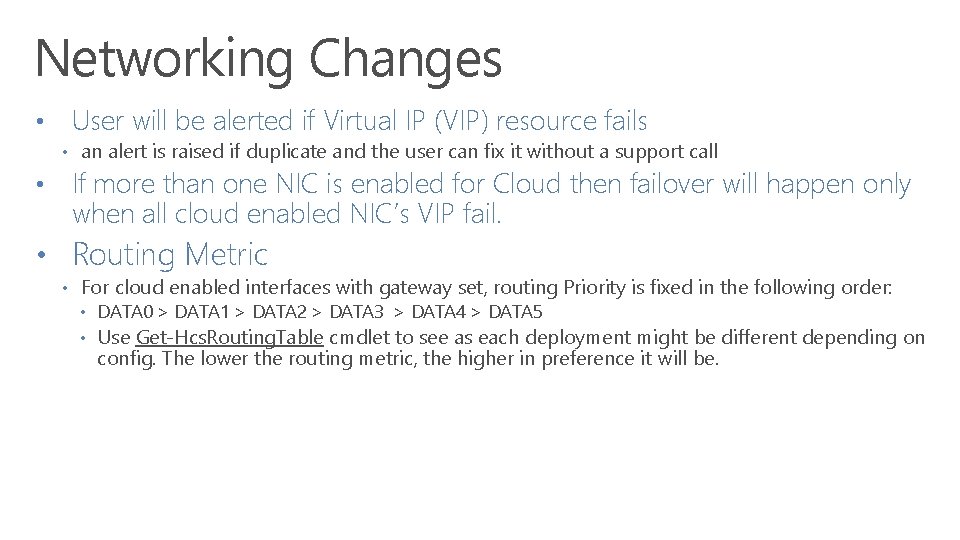
Networking Changes • User will be alerted if Virtual IP (VIP) resource fails • an alert is raised if duplicate and the user can fix it without a support call • If more than one NIC is enabled for Cloud then failover will happen only when all cloud enabled NIC’s VIP fail. • Routing Metric • For cloud enabled interfaces with gateway set, routing Priority is fixed in the following order: • DATA 0 > DATA 1 > DATA 2 > DATA 3 > DATA 4 > DATA 5 • Use Get-Hcs. Routing. Table cmdlet to see as each deployment might be different depending on config. The lower the routing metric, the higher in preference it will be.
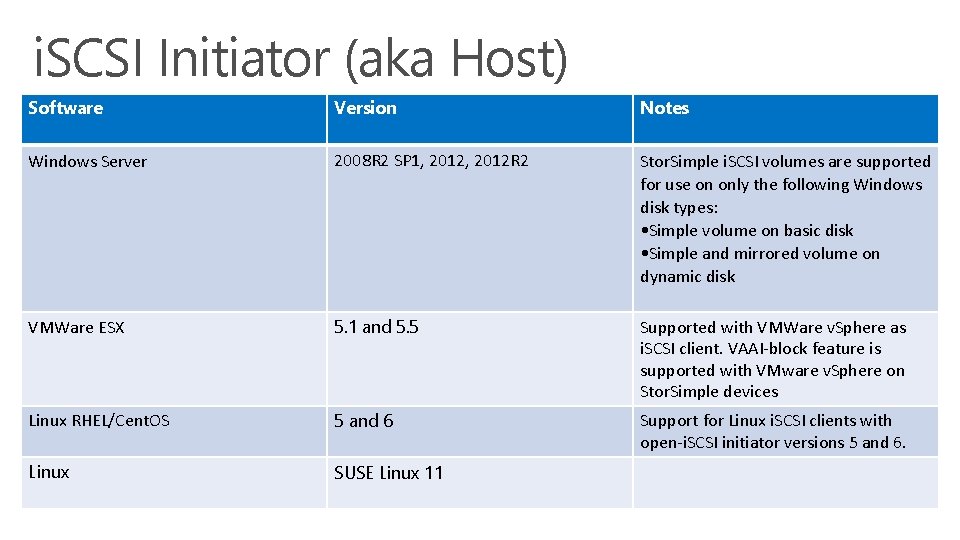
i. SCSI Initiator (aka Host) Software Version Notes Windows Server 2008 R 2 SP 1, 2012 R 2 Stor. Simple i. SCSI volumes are supported for use on only the following Windows disk types: • Simple volume on basic disk • Simple and mirrored volume on dynamic disk VMWare ESX 5. 1 and 5. 5 Supported with VMWare v. Sphere as i. SCSI client. VAAI-block feature is supported with VMware v. Sphere on Stor. Simple devices Linux RHEL/Cent. OS 5 and 6 Support for Linux i. SCSI clients with open-i. SCSI initiator versions 5 and 6. Linux SUSE Linux 11
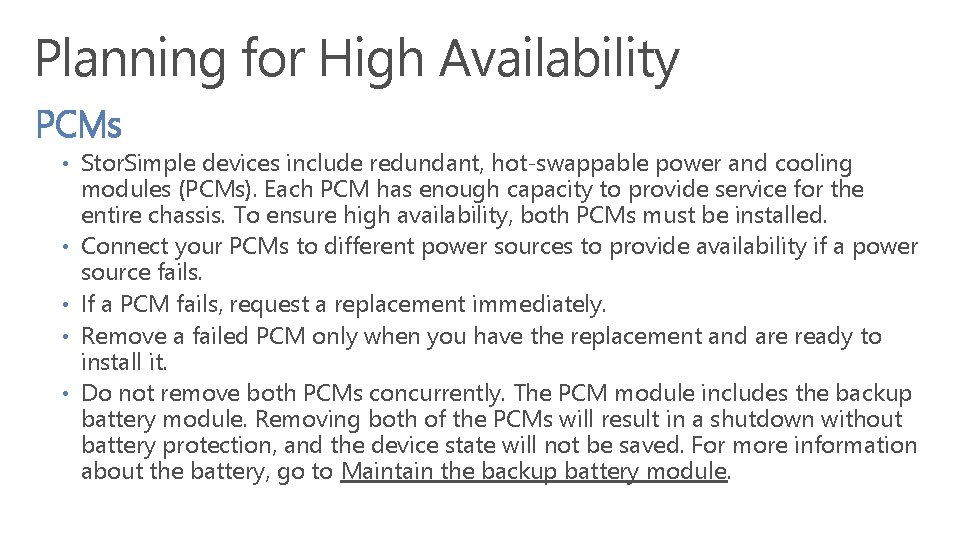
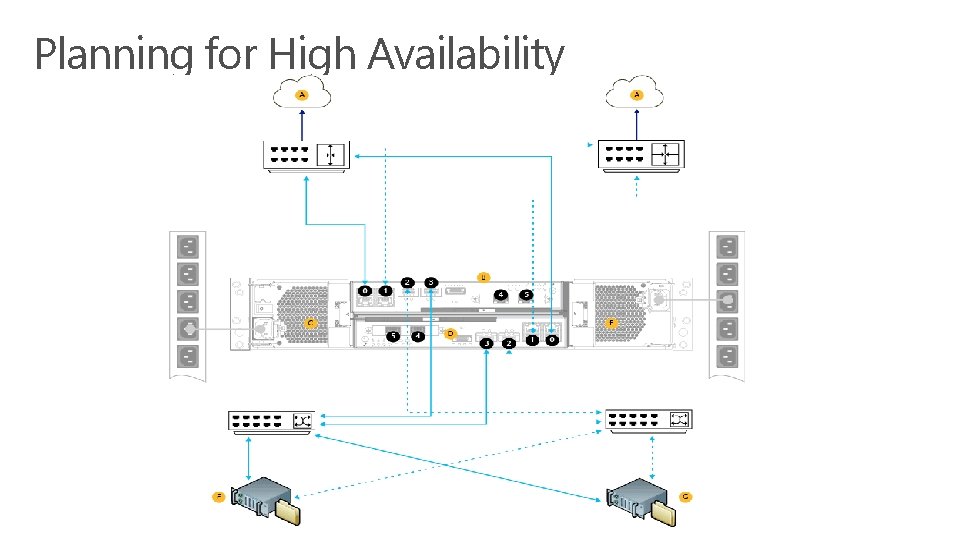
Planning for High Availability PCMs • Stor. Simple devices include redundant, hot-swappable power and cooling • • modules (PCMs). Each PCM has enough capacity to provide service for the entire chassis. To ensure high availability, both PCMs must be installed. Connect your PCMs to different power sources to provide availability if a power source fails. If a PCM fails, request a replacement immediately. Remove a failed PCM only when you have the replacement and are ready to install it. Do not remove both PCMs concurrently. The PCM module includes the backup battery module. Removing both of the PCMs will result in a shutdown without battery protection, and the device state will not be saved. For more information about the battery, go to Maintain the backup battery module.
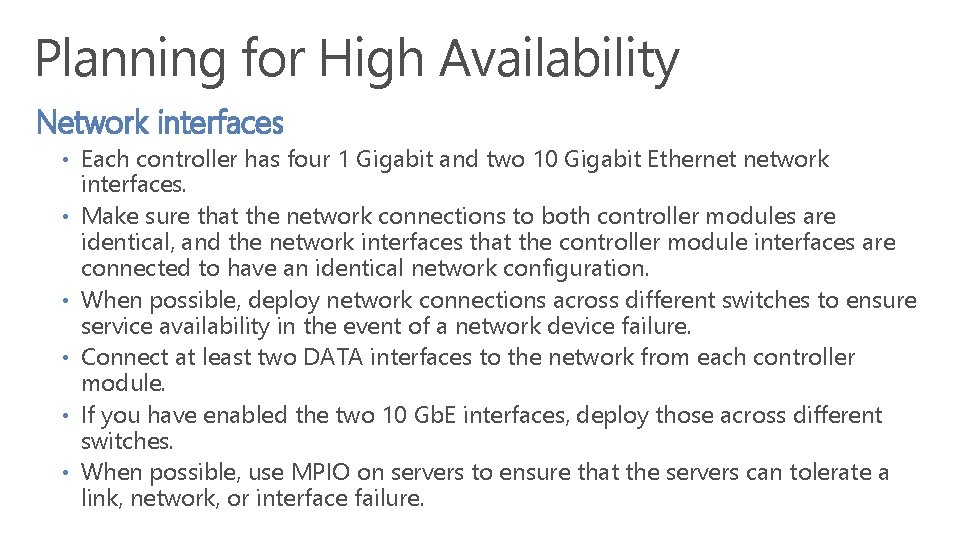
Planning for High Availability Network interfaces • Each controller has four 1 Gigabit and two 10 Gigabit Ethernet network • • • interfaces. Make sure that the network connections to both controller modules are identical, and the network interfaces that the controller module interfaces are connected to have an identical network configuration. When possible, deploy network connections across different switches to ensure service availability in the event of a network device failure. Connect at least two DATA interfaces to the network from each controller module. If you have enabled the two 10 Gb. E interfaces, deploy those across different switches. When possible, use MPIO on servers to ensure that the servers can tolerate a link, network, or interface failure.
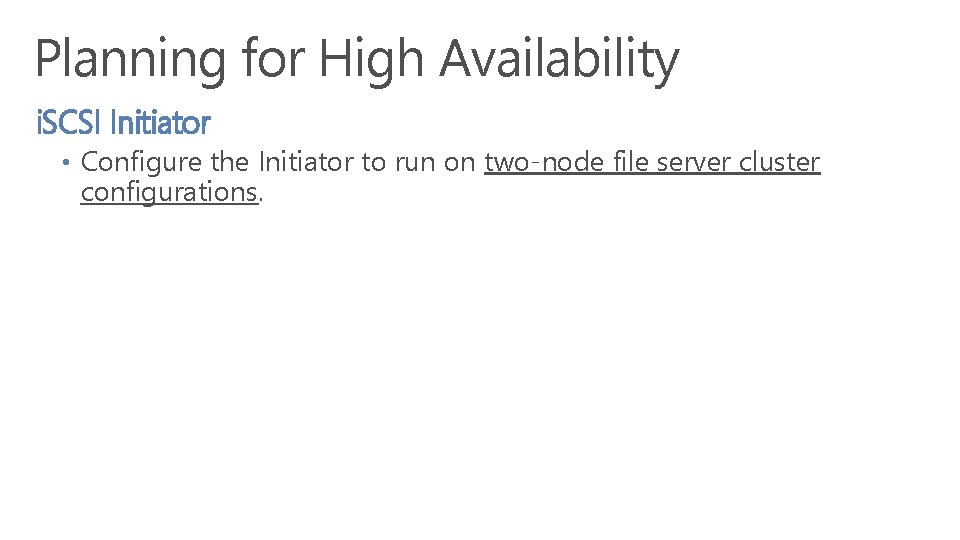
Planning for High Availability i. SCSI Initiator • Configure the Initiator to run on two-node file server cluster configurations.
Planning for High Availability
Planning for High Availability SSDs and HDDs • Stor. Simple devices include solid state disks (SSDs) and hard disk drives (HDDs) that are • • • protected using mirrored spaces. Mirrored spaces ensures that the device is able to tolerate the failure of one or more SSDs or HDDs. Make sure that all SSD and HDD modules are installed. If an SSD or HDD fails, request a replacement immediately. If an SSD or HDD fails or requires replacement, make sure that you remove only the SSD or HDD that requires replacement. Do not remove more than one SSD or HDD from the system at any point in time. A failure of 2 or more disks of certain type (HDD, SSD) or consecutive failure within a short time frame may result in system malfunction and potential data loss. During replacement, monitor the Hardware Status in the Maintenance page for the drives in the SSDs and HDDs. A green check status indicates that the disks are healthy or OK, whereas a red exclamation point indicates a failed SSD or HDD. We recommend that you configure cloud snapshots for all volumes that you need to protect in case of a system failure.
Stor. Simple 8000 Series Training Registration & Initial Software Configuration Security Best Practices
Registration & Setup Have the minimum network information ready. • • • Data 0 IP, Subnet, Gateway Primary DNS Time Server (if not using default) Registration Key Know what you will change the admin password to • 8 – 15 Characters • Combination of upper, lower, numeric and special characters • Secure Transport & Storage for SDEK Security • Physical serial connection is best. Many serial switches have zero or weak security • Consider enabling Remote Power. Shell after registration & changing of the default password. • SDEK – Save it in a secure place • Registration Key – Rotate it after registration
Completing Setup Networking • Backup DNS • Fixed IP for each controller (share subnet and gateway with Data 0) • Separate i. SCSI from management and cloud traffic i. SCSI Security • CHAP
Video Registration & Initial Software Configuration
Security Best Practices • • Secure Network for Data & Snapshot Manager traffic Use Strong Passwords & Keys Rotate passwords quarterly. We force annually. Storage key quarterly. No enforcement. Registration key after each use. No enforcement. SDEK annually. No enforcement. Be aware of the security considerations of using the cloud appliance Create separate service instances
Stor. Simple 8000 Series Training Storage Account Configuration Volume Containers Bandwidth Control Volumes Backup Policies
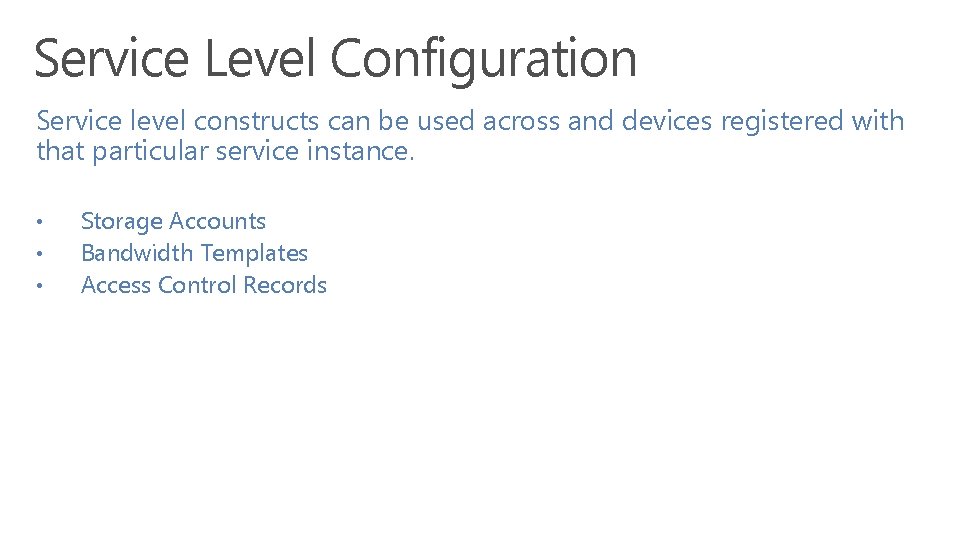
Service Level Configuration Service level constructs can be used across and devices registered with that particular service instance. • • • Storage Accounts Bandwidth Templates Access Control Records
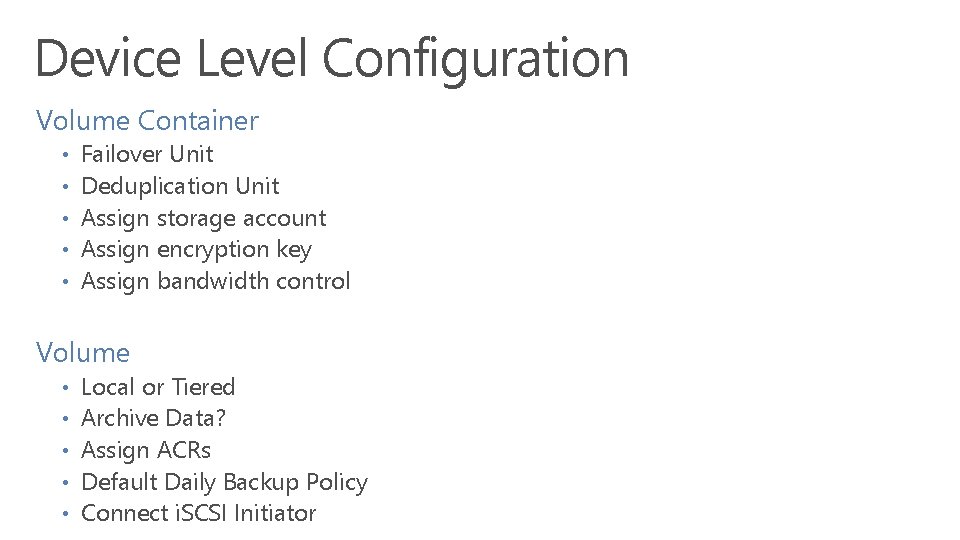
Device Level Configuration Volume Container • • • Failover Unit Deduplication Unit Assign storage account Assign encryption key Assign bandwidth control Volume • • • Local or Tiered Archive Data? Assign ACRs Default Daily Backup Policy Connect i. SCSI Initiator
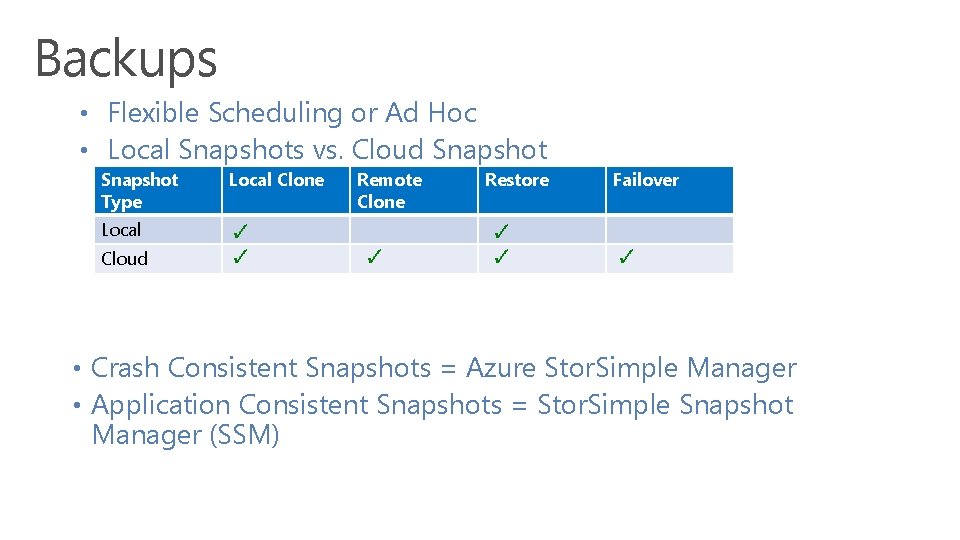
Backups • Flexible Scheduling or Ad Hoc • Local Snapshots vs. Cloud Snapshot Type Local Clone Remote Clone Restore Failover Local Cloud • Crash Consistent Snapshots = Azure Stor. Simple Manager • Application Consistent Snapshots = Stor. Simple Snapshot Manager (SSM)
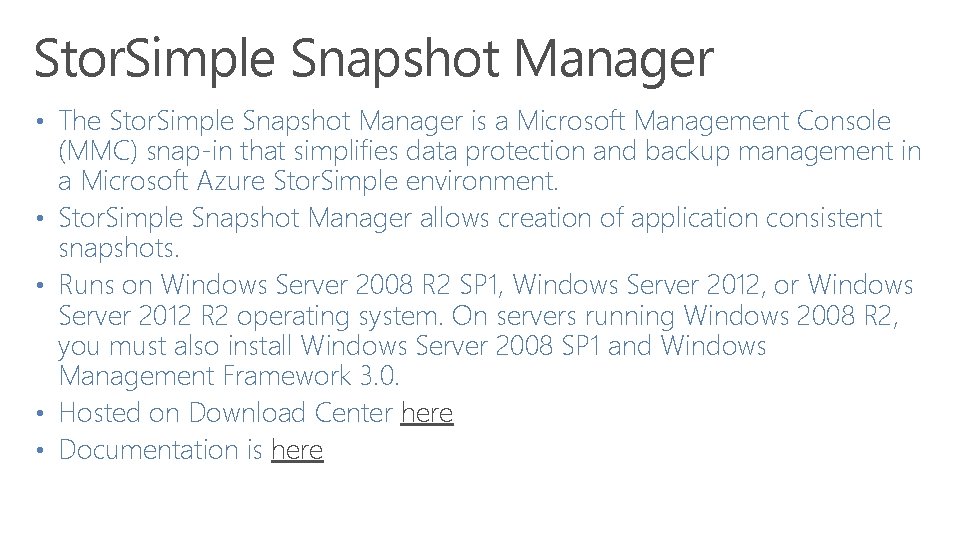
Stor. Simple Snapshot Manager • The Stor. Simple Snapshot Manager is a Microsoft Management Console • • (MMC) snap-in that simplifies data protection and backup management in a Microsoft Azure Stor. Simple environment. Stor. Simple Snapshot Manager allows creation of application consistent snapshots. Runs on Windows Server 2008 R 2 SP 1, Windows Server 2012, or Windows Server 2012 R 2 operating system. On servers running Windows 2008 R 2, you must also install Windows Server 2008 SP 1 and Windows Management Framework 3. 0. Hosted on Download Center here Documentation is here
Demo
Stor. Simple 8000 Series Training Device Command Line Interface
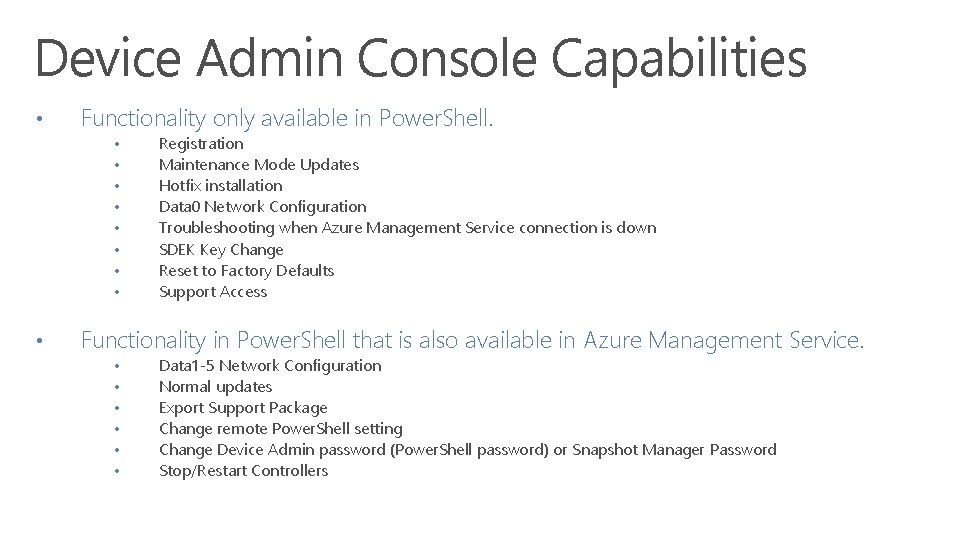
Device Admin Console Capabilities • Functionality only available in Power. Shell. • • • Registration Maintenance Mode Updates Hotfix installation Data 0 Network Configuration Troubleshooting when Azure Management Service connection is down SDEK Key Change Reset to Factory Defaults Support Access Functionality in Power. Shell that is also available in Azure Management Service. • • • Data 1 -5 Network Configuration Normal updates Export Support Package Change remote Power. Shell setting Change Device Admin password (Power. Shell password) or Snapshot Manager Password Stop/Restart Controllers
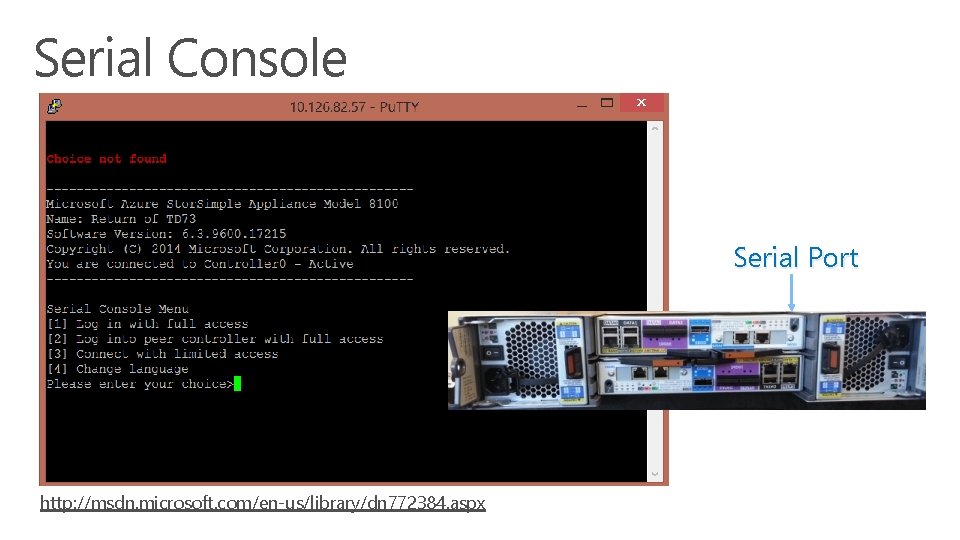
How to connect • Serial Console • Remote Power. Shell
Serial Console Serial Port http: //msdn. microsoft. com/en-us/library/dn 772384. aspx
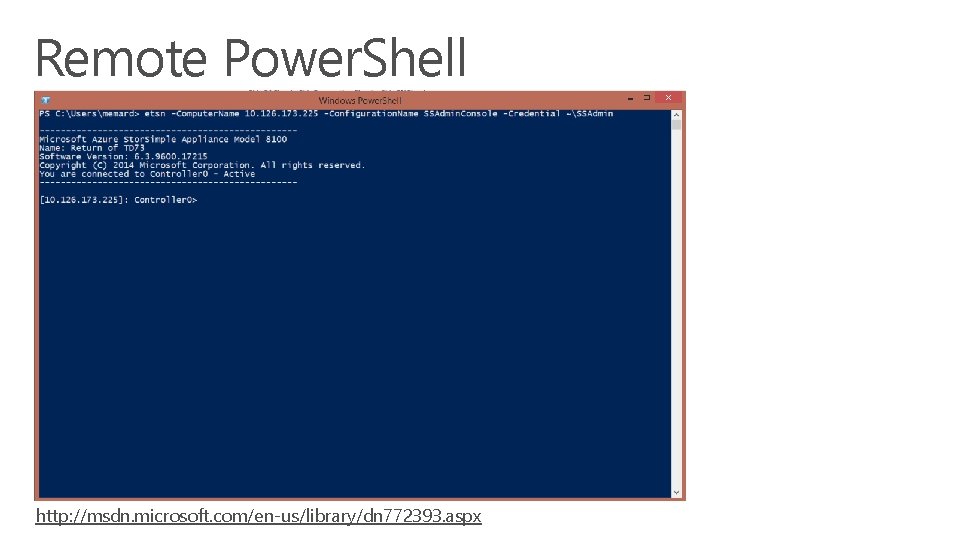
Remote Power. Shell http: //msdn. microsoft. com/en-us/library/dn 772393. aspx
Demo
Resources • • Power. Shell Guide: http: //msdn. microsoft. com/en-us/library/dn 772344. aspx Online Cmdlet Help: http: //technet. microsoft. com/en-us/library/dn 688168. aspx
Stor. Simple 8000 Series Training Software & Firmware Updates Job Monitoring Alerts Hardware Status Support Package
Software and Firmware Updates • Cluster Aware Update (CAU) is used to install updates. • • Passive node is fully upgraded Fail over initiated Previously active node is updated Stor. Simple ensures both nodes are fully patched and up to date • Two types of updates • Non Disruptive updates – no down time • Disruptive updates – i. e. disk firmware. Down time is involved here.
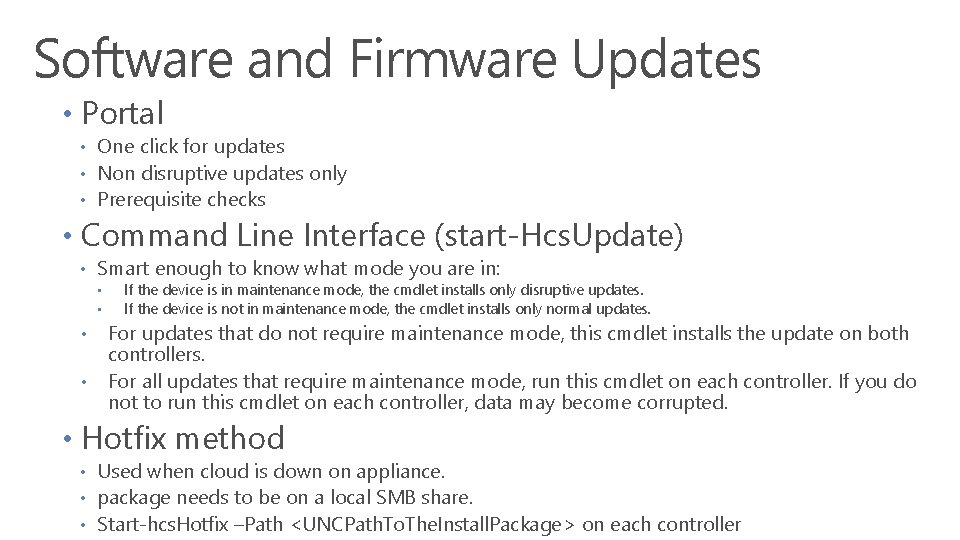
Software and Firmware Updates • Portal • One click for updates • Non disruptive updates only • Prerequisite checks • Command Line Interface (start-Hcs. Update) • Smart enough to know what mode you are in: • • If the device is in maintenance mode, the cmdlet installs only disruptive updates. If the device is not in maintenance mode, the cmdlet installs only normal updates. For updates that do not require maintenance mode, this cmdlet installs the update on both controllers. For all updates that require maintenance mode, run this cmdlet on each controller. If you do not to run this cmdlet on each controller, data may become corrupted. • Hotfix method • Used when cloud is down on appliance. • package needs to be on a local SMB share. • Start-hcs. Hotfix –Path <UNCPath. To. The. Install. Package> on each controller
Demo Updates, Jobs, Alerts, & Maintenance GUI
Stor. Simple 8000 Series Training Stor. Simple Cloud Appliance
Workloads Infrastructure on-demand Cloud Appliance Cloud Apps DR Dev Test Research Performance driven workloads Local Volumes Capacity driven File Shares Tiered Volumes Collaboration Archives Virtual Machines Share. Point SQL Server*
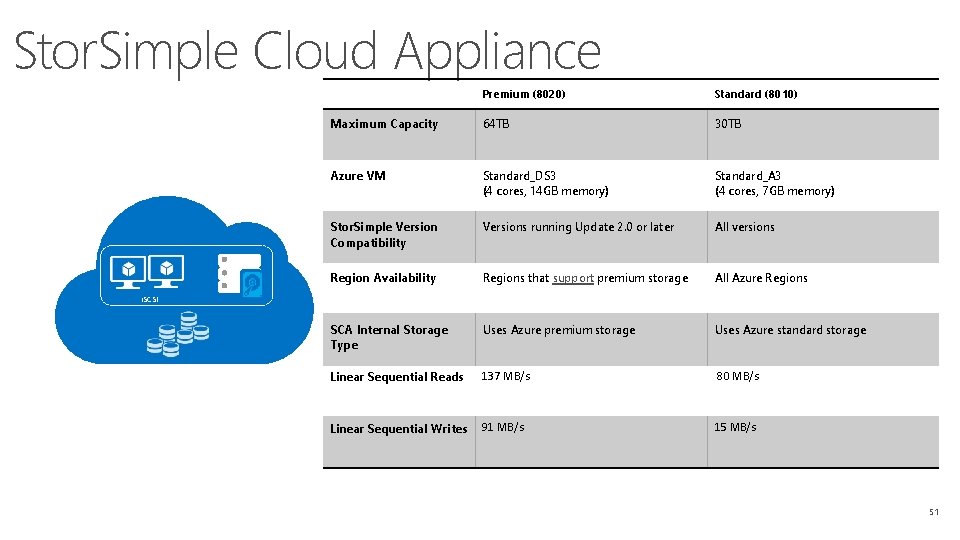
Stor. Simple Cloud Appliance Premium (8020) Standard (8010) Maximum Capacity 64 TB 30 TB Azure VM Standard_DS 3 (4 cores, 14 GB memory) Standard_A 3 (4 cores, 7 GB memory) Stor. Simple Version Compatibility Versions running Update 2. 0 or later All versions Region Availability Regions that support premium storage All Azure Regions SCA Internal Storage Type Uses Azure premium storage Uses Azure standard storage Linear Sequential Reads 137 MB/s 80 MB/s Linear Sequential Writes 91 MB/s 15 MB/s i. SCSI 51
Demo Stor. Simple Cloud Array
Stor. Simple 8000 Series Training Disaster Recovery Data Mobility Volume Type Conversion Deactivation & Deletion
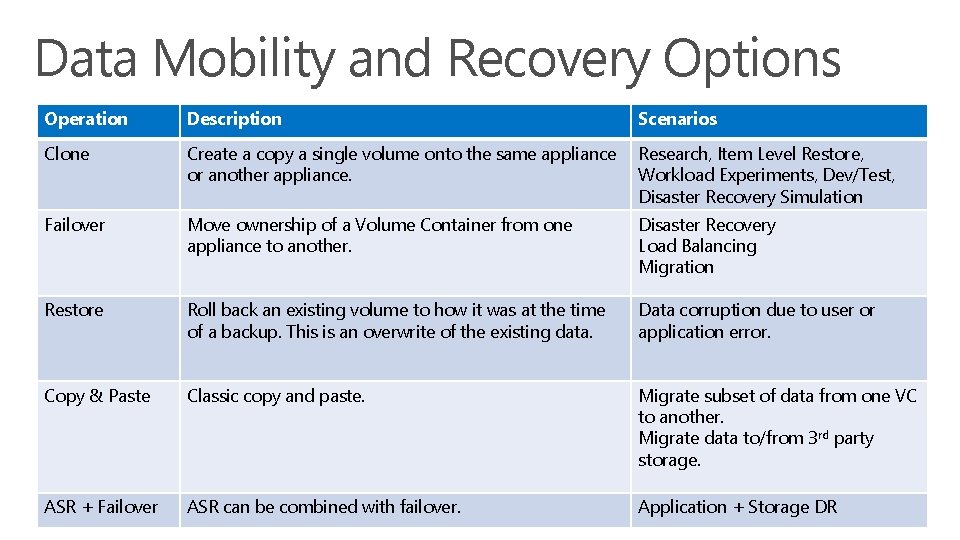
Data Mobility and Recovery Options Operation Description Scenarios Clone Create a copy a single volume onto the same appliance or another appliance. Research, Item Level Restore, Workload Experiments, Dev/Test, Disaster Recovery Simulation Failover Move ownership of a Volume Container from one appliance to another. Disaster Recovery Load Balancing Migration Restore Roll back an existing volume to how it was at the time of a backup. This is an overwrite of the existing data. Data corruption due to user or application error. Copy & Paste Classic copy and paste. Migrate subset of data from one VC to another. Migrate data to/from 3 rd party storage. ASR + Failover ASR can be combined with failover. Application + Storage DR
Demo
Volume Type Conversion • • •
Deactivate & Delete Deactivation • Appliances must be deactivated before they can be deleted. • Deactivated state leaves backup data so it can be failed over to another device. • Deactivated devices cannot be reactivated. Only deleted. Deletion • If you want to delete all the data for an appliance you should delete all the data and backups before deactivating the device. • Allow time for cloud data garbage collection to occur before removing the device. Storage Account or Container deletion is also an option.
Stor. Simple 8000 Series Training Resources
How to contact us Stor. Simple Forums Twitter - https: //twitter. com/storsimple
Resources Stor. Simple Product Info Main landing page on Azure Datasheets, Solutions overview Marketing blog
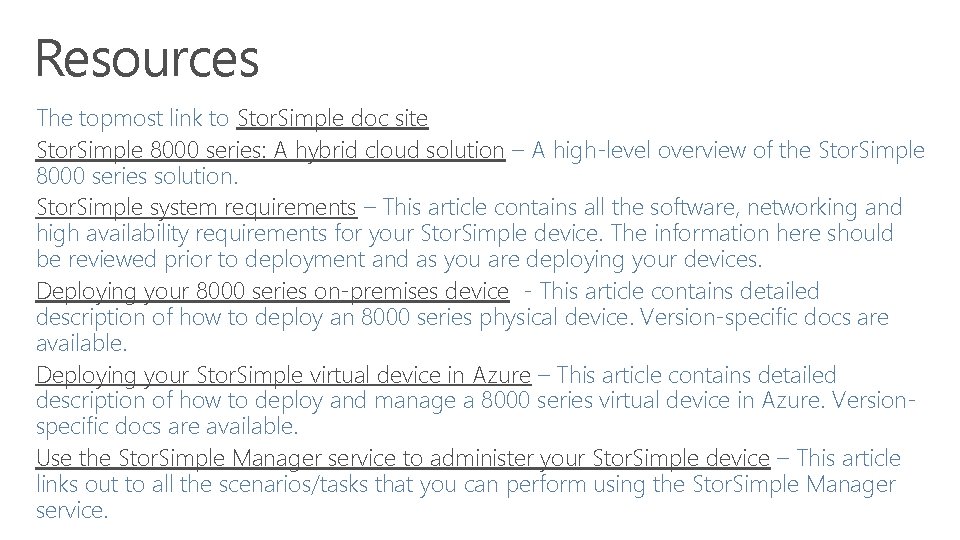
Resources The topmost link to Stor. Simple doc site Stor. Simple 8000 series: A hybrid cloud solution – A high-level overview of the Stor. Simple 8000 series solution. Stor. Simple system requirements – This article contains all the software, networking and high availability requirements for your Stor. Simple device. The information here should be reviewed prior to deployment and as you are deploying your devices. Deploying your 8000 series on-premises device - This article contains detailed description of how to deploy an 8000 series physical device. Version-specific docs are available. Deploying your Stor. Simple virtual device in Azure – This article contains detailed description of how to deploy and manage a 8000 series virtual device in Azure. Versionspecific docs are available. Use the Stor. Simple Manager service to administer your Stor. Simple device – This article links out to all the scenarios/tasks that you can perform using the Stor. Simple Manager service.