
Step by Step Instructions on how to complete

Step by Step Instructions on how to complete your 2020 -2021 course registration
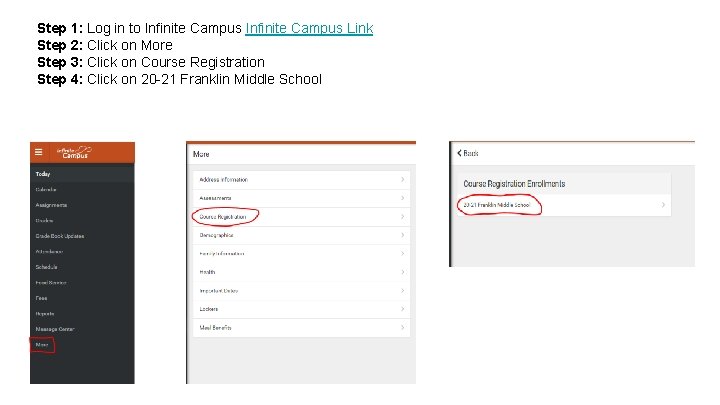
Step 1: Log in to Infinite Campus Link Step 2: Click on More Step 3: Click on Course Registration Step 4: Click on 20 -21 Franklin Middle School
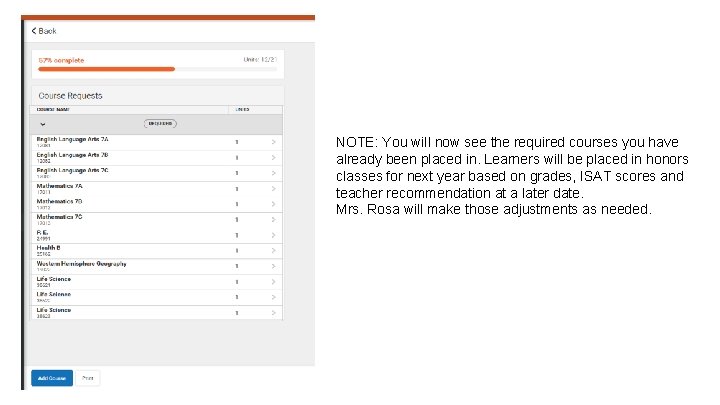
NOTE: You will now see the required courses you have already been placed in. Learners will be placed in honors classes for next year based on grades, ISAT scores and teacher recommendation at a later date. Mrs. Rosa will make those adjustments as needed.
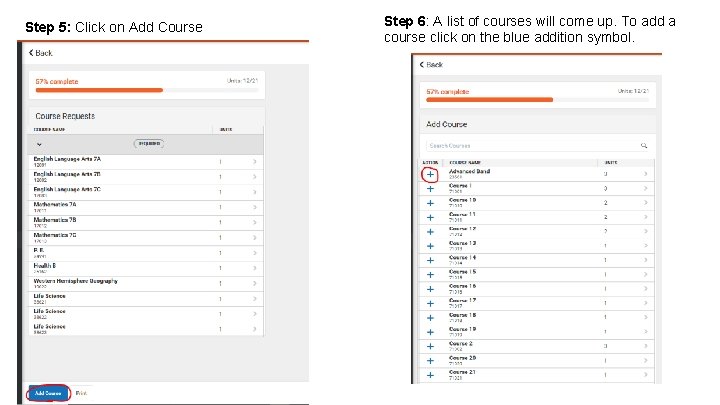
Step 5: Click on Add Course Step 6: A list of courses will come up. To add a course click on the blue addition symbol.
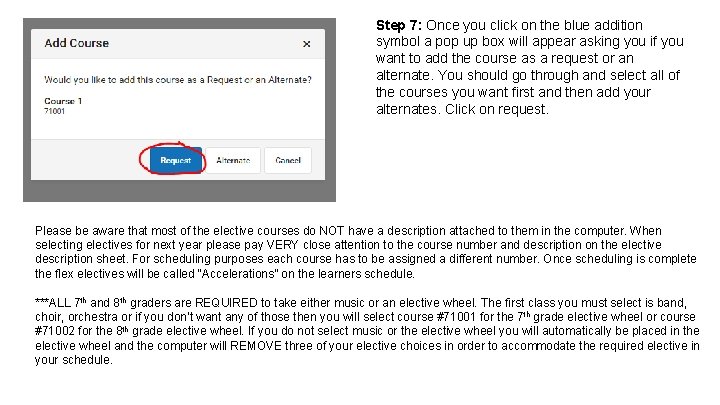
Step 7: Once you click on the blue addition symbol a pop up box will appear asking you if you want to add the course as a request or an alternate. You should go through and select all of the courses you want first and then add your alternates. Click on request. Please be aware that most of the elective courses do NOT have a description attached to them in the computer. When selecting electives for next year please pay VERY close attention to the course number and description on the elective description sheet. For scheduling purposes each course has to be assigned a different number. Once scheduling is complete the flex electives will be called “Accelerations” on the learners schedule. ***ALL 7 th and 8 th graders are REQUIRED to take either music or an elective wheel. The first class you must select is band, choir, orchestra or if you don’t want any of those then you will select course #71001 for the 7 th grade elective wheel or course #71002 for the 8 th grade elective wheel. If you do not select music or the elective wheel you will automatically be placed in the elective wheel and the computer will REMOVE three of your elective choices in order to accommodate the required elective in your schedule.
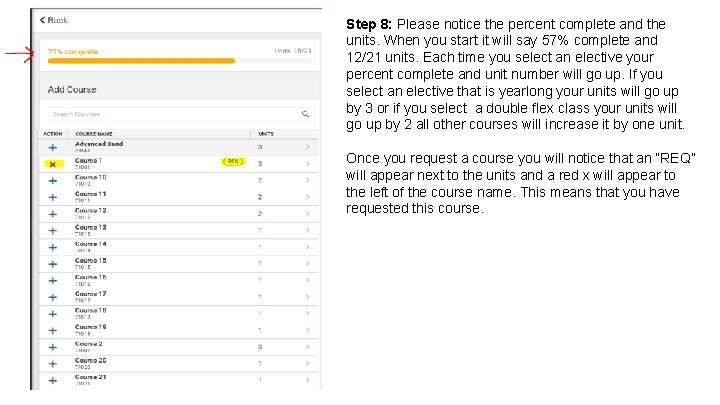
Step 8: Please notice the percent complete and the units. When you start it will say 57% complete and 12/21 units. Each time you select an elective your percent complete and unit number will go up. If you select an elective that is yearlong your units will go up by 3 or if you select a double flex class your units will go up by 2 all other courses will increase it by one unit. Once you request a course you will notice that an “REQ” will appear next to the units and a red x will appear to the left of the course name. This means that you have requested this course.
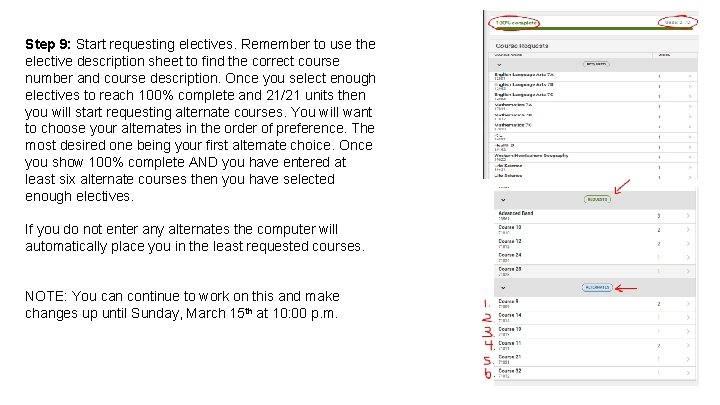
Step 9: Start requesting electives. Remember to use the elective description sheet to find the correct course number and course description. Once you select enough electives to reach 100% complete and 21/21 units then you will start requesting alternate courses. You will want to choose your alternates in the order of preference. The most desired one being your first alternate choice. Once you show 100% complete AND you have entered at least six alternate courses then you have selected enough electives. If you do not enter any alternates the computer will automatically place you in the least requested courses. NOTE: You can continue to work on this and make changes up until Sunday, March 15 th at 10: 00 p. m.
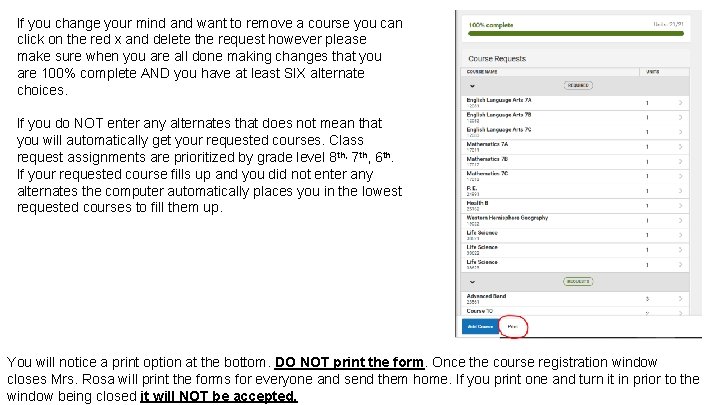
If you change your mind and want to remove a course you can click on the red x and delete the request however please make sure when you are all done making changes that you are 100% complete AND you have at least SIX alternate choices. If you do NOT enter any alternates that does not mean that you will automatically get your requested courses. Class request assignments are prioritized by grade level 8 th, 7 th, 6 th. If your requested course fills up and you did not enter any alternates the computer automatically places you in the lowest requested courses to fill them up. You will notice a print option at the bottom. DO NOT print the form. Once the course registration window closes Mrs. Rosa will print the forms for everyone and send them home. If you print one and turn it in prior to the window being closed it will NOT be accepted.
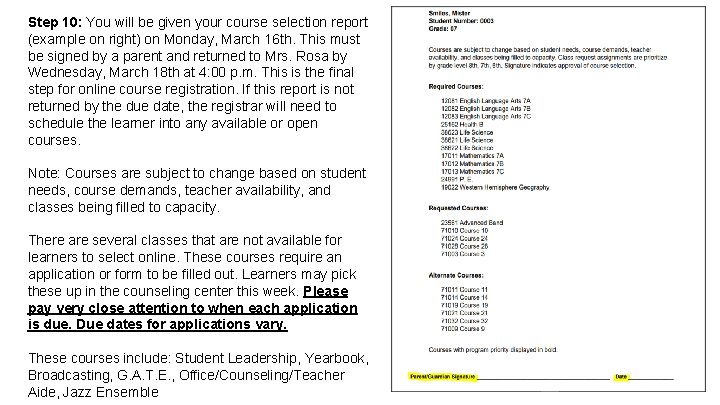
Step 10: You will be given your course selection report (example on right) on Monday, March 16 th. This must be signed by a parent and returned to Mrs. Rosa by Wednesday, March 18 th at 4: 00 p. m. This is the final step for online course registration. If this report is not returned by the due date, the registrar will need to schedule the learner into any available or open courses. Note: Courses are subject to change based on student needs, course demands, teacher availability, and classes being filled to capacity. There are several classes that are not available for learners to select online. These courses require an application or form to be filled out. Learners may pick these up in the counseling center this week. Please pay very close attention to when each application is due. Due dates for applications vary. These courses include: Student Leadership, Yearbook, Broadcasting, G. A. T. E. , Office/Counseling/Teacher Aide, Jazz Ensemble
- Slides: 9