
Starting a Router LAN Connections 2007 Cisco Systems
![Setup Initial Global Parameters Configuring global parameters: Enter host name [Router]: Router. X The](https://slidetodoc.com/presentation_image_h2/4f0a92866afa1c3d125da5ab68985554/image-6.jpg "Setup Initial Global Parameters Configuring global parameters: Enter host name [Router]: Router. X The")
![Setup Initial Protocol Configurations Configure IP? [yes]: Configure RIP routing? [yes]: no Configure CLNS?](https://slidetodoc.com/presentation_image_h2/4f0a92866afa1c3d125da5ab68985554/image-7.jpg "Setup Initial Protocol Configurations Configure IP? [yes]: Configure RIP routing? [yes]: no Configure CLNS?")
![Cisco Auto. Secure Would you like to go through Auto. Secure configuration? [yes]: no](https://slidetodoc.com/presentation_image_h2/4f0a92866afa1c3d125da5ab68985554/image-9.jpg "Cisco Auto. Secure Would you like to go through Auto. Secure configuration? [yes]: no")

- Slides: 16
Starting a Router LAN Connections © 2007 Cisco Systems, Inc. All rights reserved. ICND 1 v 1. 0— 4 -1
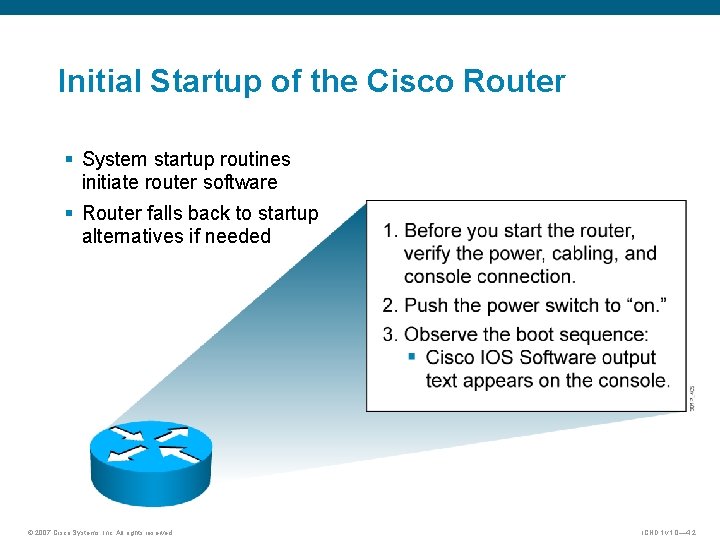
Initial Startup of the Cisco Router § System startup routines initiate router software § Router falls back to startup alternatives if needed © 2007 Cisco Systems, Inc. All rights reserved. ICND 1 v 1. 0— 4 -2
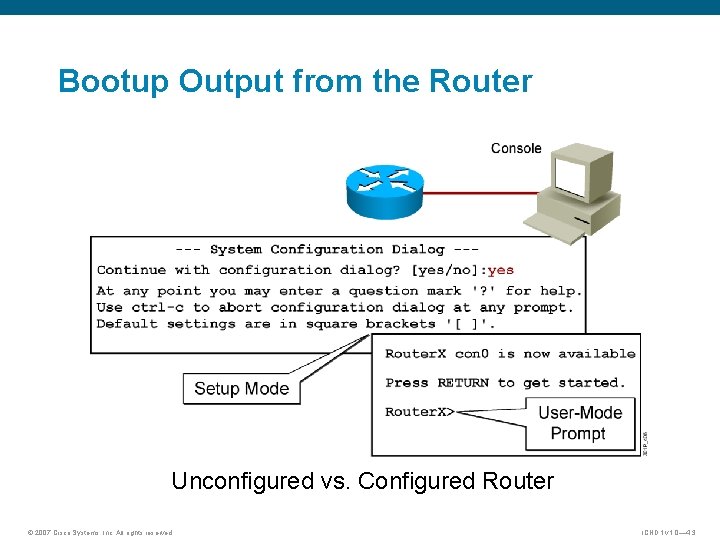
Bootup Output from the Router Unconfigured vs. Configured Router © 2007 Cisco Systems, Inc. All rights reserved. ICND 1 v 1. 0— 4 -3
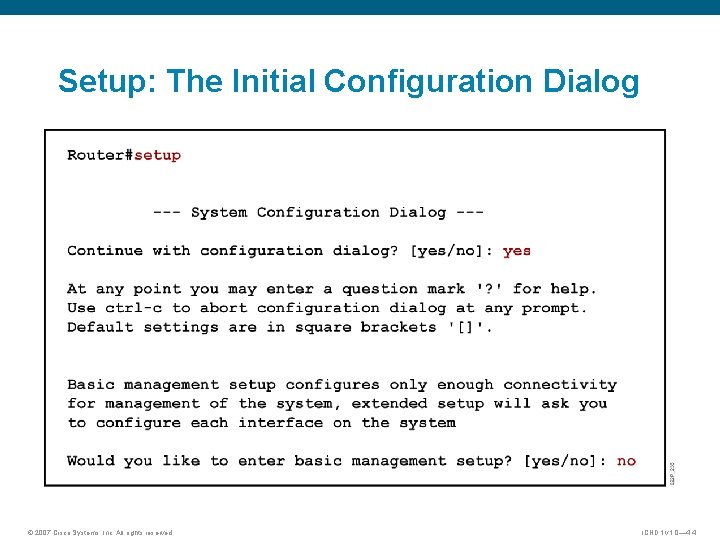
Setup: The Initial Configuration Dialog © 2007 Cisco Systems, Inc. All rights reserved. ICND 1 v 1. 0— 4 -4
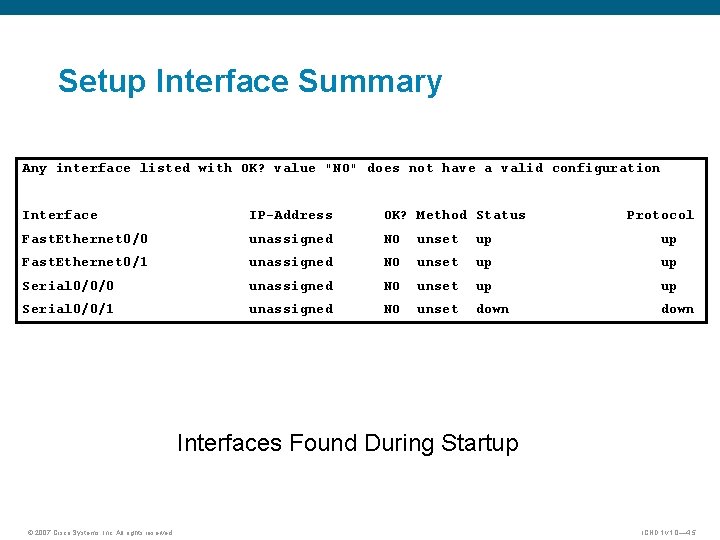
Setup Interface Summary Any interface listed with OK? value "NO" does not have a valid configuration Interface IP-Address OK? Method Status Protocol Fast. Ethernet 0/0 unassigned NO unset up up Fast. Ethernet 0/1 unassigned NO unset up up Serial 0/0/0 unassigned NO unset up up Serial 0/0/1 unassigned NO unset down Interfaces Found During Startup © 2007 Cisco Systems, Inc. All rights reserved. ICND 1 v 1. 0— 4 -5
Setup Initial Global Parameters Configuring global parameters: Enter host name [Router]: Router. X The enable secret is a password used to protect access to privileged EC and configuration modes. This password, after entered, becomes encrypted in the configuration. Enter enable secret: Cisco 1 The enable password is used when you do not specify an enable secret password, with some older software versions, and some boot images. Enter enable password: San. Fran 3 The virtual terminal password is used to protect access to the router over a network interface. Enter virtual terminal password: Sanj 0 se Configure SNMP Network Management? [no]: © 2007 Cisco Systems, Inc. All rights reserved. ICND 1 v 1. 0— 4 -6
Setup Initial Protocol Configurations Configure IP? [yes]: Configure RIP routing? [yes]: no Configure CLNS? [no]: Configure bridging? [no]: Depending on your software revision this text may appear. © 2007 Cisco Systems, Inc. All rights reserved. ICND 1 v 1. 0— 4 -7
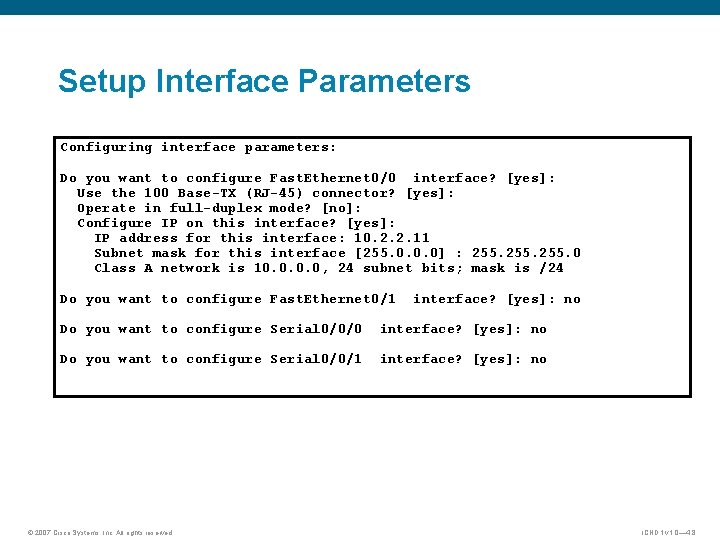
Setup Interface Parameters Configuring interface parameters: Do you want to configure Fast. Ethernet 0/0 interface? [yes]: Use the 100 Base-TX (RJ-45) connector? [yes]: Operate in full-duplex mode? [no]: Configure IP on this interface? [yes]: IP address for this interface: 10. 2. 2. 11 Subnet mask for this interface [255. 0. 0. 0] : 255. 0 Class A network is 10. 0, 24 subnet bits; mask is /24 Do you want to configure Fast. Ethernet 0/1 interface? [yes]: no Do you want to configure Serial 0/0/0 interface? [yes]: no Do you want to configure Serial 0/0/1 interface? [yes]: no © 2007 Cisco Systems, Inc. All rights reserved. ICND 1 v 1. 0— 4 -8
Cisco Auto. Secure Would you like to go through Auto. Secure configuration? [yes]: no Auto. Secure dialog can be started later using "auto secure" CLI Depending on your software revision, this text may appear. © 2007 Cisco Systems, Inc. All rights reserved. ICND 1 v 1. 0— 4 -9
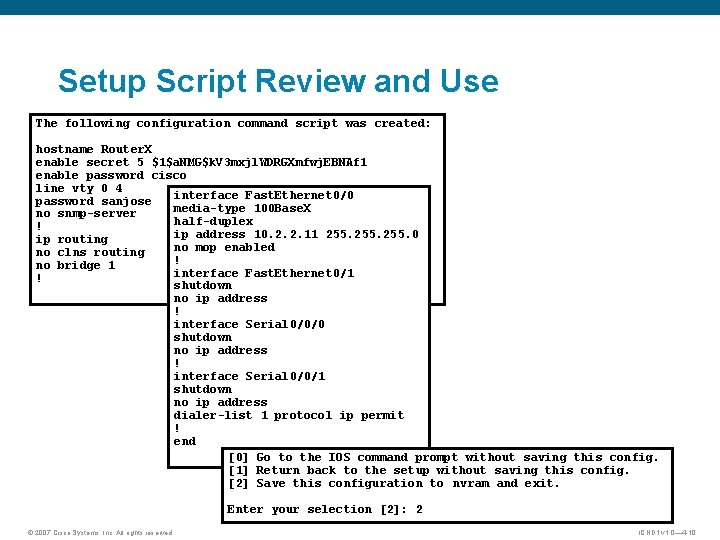
Setup Script Review and Use The following configuration command script was created: hostname Router. X enable secret 5 $1$a. NMG$k. V 3 mxjl. WDRGXmfwj. EBNAf 1 enable password cisco line vty 0 4 interface Fast. Ethernet 0/0 password sanjose media-type 100 Base. X no snmp-server half-duplex ! ip address 10. 2. 2. 11 255. 0 ip routing no mop enabled no clns routing ! no bridge 1 interface Fast. Ethernet 0/1 ! shutdown no ip address ! interface Serial 0/0/0 shutdown no ip address ! interface Serial 0/0/1 shutdown no ip address dialer-list 1 protocol ip permit ! end [0] Go to the IOS command prompt without saving this config. [1] Return back to the setup without saving this config. [2] Save this configuration to nvram and exit. Enter your selection [2]: 2 © 2007 Cisco Systems, Inc. All rights reserved. ICND 1 v 1. 0— 4 -10
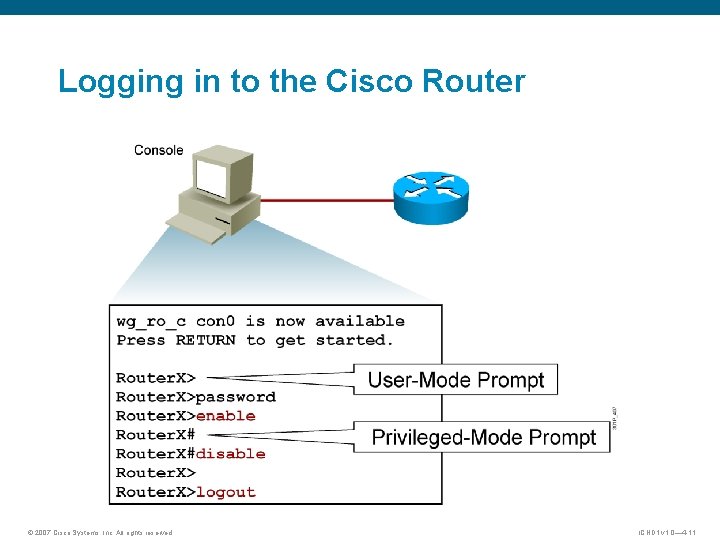
Logging in to the Cisco Router © 2007 Cisco Systems, Inc. All rights reserved. ICND 1 v 1. 0— 4 -11
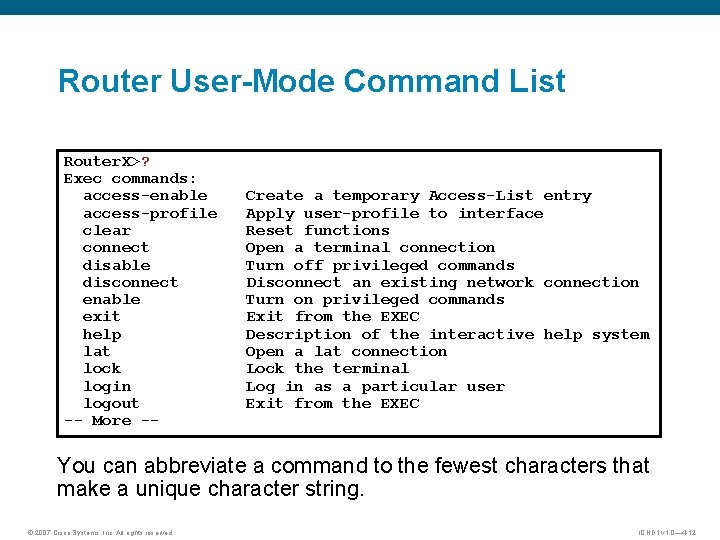
Router User-Mode Command List Router. X>? Exec commands: access-enable access-profile clear connect disable disconnect enable exit help lat lock login logout -- More -- Create a temporary Access-List entry Apply user-profile to interface Reset functions Open a terminal connection Turn off privileged commands Disconnect an existing network connection Turn on privileged commands Exit from the EXEC Description of the interactive help system Open a lat connection Lock the terminal Log in as a particular user Exit from the EXEC You can abbreviate a command to the fewest characters that make a unique character string. © 2007 Cisco Systems, Inc. All rights reserved. ICND 1 v 1. 0— 4 -12
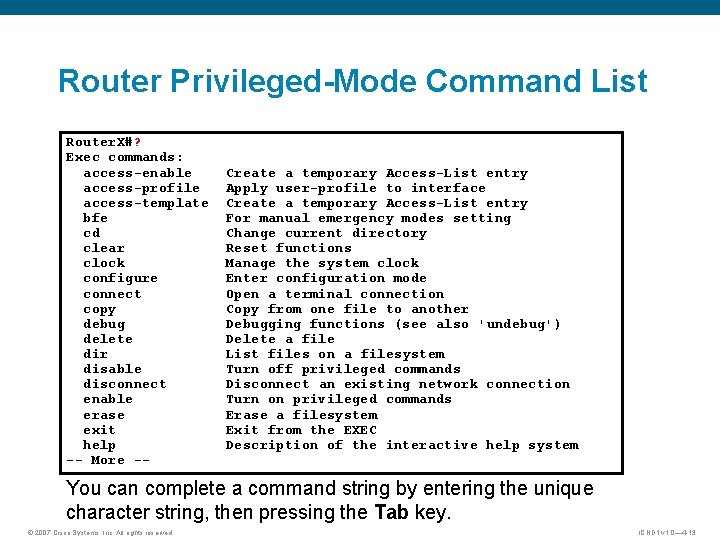
Router Privileged-Mode Command List Router. X#? Exec commands: access-enable access-profile access-template bfe cd clear clock configure connect copy debug delete dir disable disconnect enable erase exit help -- More -- Create a temporary Access-List entry Apply user-profile to interface Create a temporary Access-List entry For manual emergency modes setting Change current directory Reset functions Manage the system clock Enter configuration mode Open a terminal connection Copy from one file to another Debugging functions (see also 'undebug') Delete a file List files on a filesystem Turn off privileged commands Disconnect an existing network connection Turn on privileged commands Erase a filesystem Exit from the EXEC Description of the interactive help system You can complete a command string by entering the unique character string, then pressing the Tab key. © 2007 Cisco Systems, Inc. All rights reserved. ICND 1 v 1. 0— 4 -13
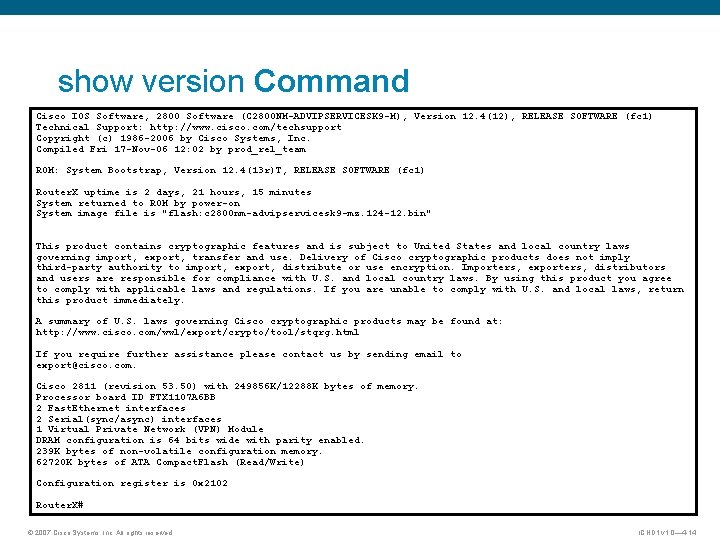
show version Command Cisco IOS Software, 2800 Software (C 2800 NM-ADVIPSERVICESK 9 -M), Version 12. 4(12), RELEASE SOFTWARE (fc 1) Technical Support: http: //www. cisco. com/techsupport Copyright (c) 1986 -2006 by Cisco Systems, Inc. Compiled Fri 17 -Nov-06 12: 02 by prod_rel_team ROM: System Bootstrap, Version 12. 4(13 r)T, RELEASE SOFTWARE (fc 1) Router. X uptime is 2 days, 21 hours, 15 minutes System returned to ROM by power-on System image file is "flash: c 2800 nm-advipservicesk 9 -mz. 124 -12. bin" This product contains cryptographic features and is subject to United States and local country laws governing import, export, transfer and use. Delivery of Cisco cryptographic products does not imply third-party authority to import, export, distribute or use encryption. Importers, exporters, distributors and users are responsible for compliance with U. S. and local country laws. By using this product you agree to comply with applicable laws and regulations. If you are unable to comply with U. S. and local laws, return this product immediately. A summary of U. S. laws governing Cisco cryptographic products may be found at: http: //www. cisco. com/wwl/export/crypto/tool/stqrg. html If you require further assistance please contact us by sending email to export@cisco. com. Cisco 2811 (revision 53. 50) with 249856 K/12288 K bytes of memory. Processor board ID FTX 1107 A 6 BB 2 Fast. Ethernet interfaces 2 Serial(sync/async) interfaces 1 Virtual Private Network (VPN) Module DRAM configuration is 64 bits wide with parity enabled. 239 K bytes of non-volatile configuration memory. 62720 K bytes of ATA Compact. Flash (Read/Write) Configuration register is 0 x 2102 Router. X# © 2007 Cisco Systems, Inc. All rights reserved. ICND 1 v 1. 0— 4 -14
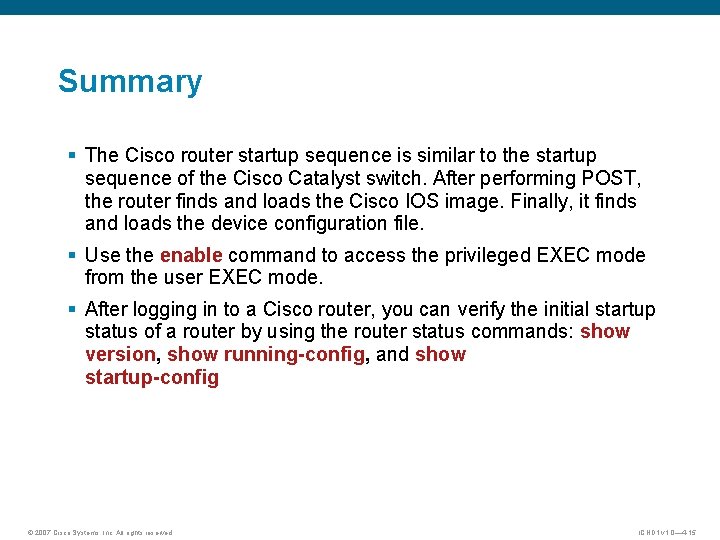
Summary § The Cisco router startup sequence is similar to the startup sequence of the Cisco Catalyst switch. After performing POST, the router finds and loads the Cisco IOS image. Finally, it finds and loads the device configuration file. § Use the enable command to access the privileged EXEC mode from the user EXEC mode. § After logging in to a Cisco router, you can verify the initial startup status of a router by using the router status commands: show version, show running-config, and show startup-config © 2007 Cisco Systems, Inc. All rights reserved. ICND 1 v 1. 0— 4 -15
© 2007 Cisco Systems, Inc. All rights reserved. ICND 1 v 1. 0— 4 -16