
Starter Activity log onto computer and open techsoft
- Slides: 5
Starter Activity log onto computer and open techsoft 2 d design. One person please hand out laminated help sheets. Sit at tables – explain to the person next to you, which design idea you shall develop and what tessellating pattern you are going to adopt.
Learning Objective Over the next two lessons you shall develop your C. A. D. skills and design a typographic word for your gift paper. making 4 5 You can work with C. A. D. quite accurately You can select and work with a range of tools. Your final design shows you have paid attention to the accuracy of tessellation. You have used the correct tools more precisely You have used your flow chart and tool bar notes to guide you You can make changes when problems occur
Objective • Today you shall develop your skill using C. A. D. • Follow the step by step instruction sheet and practice writing letters. • Use this new skill to draw your final typographic word.
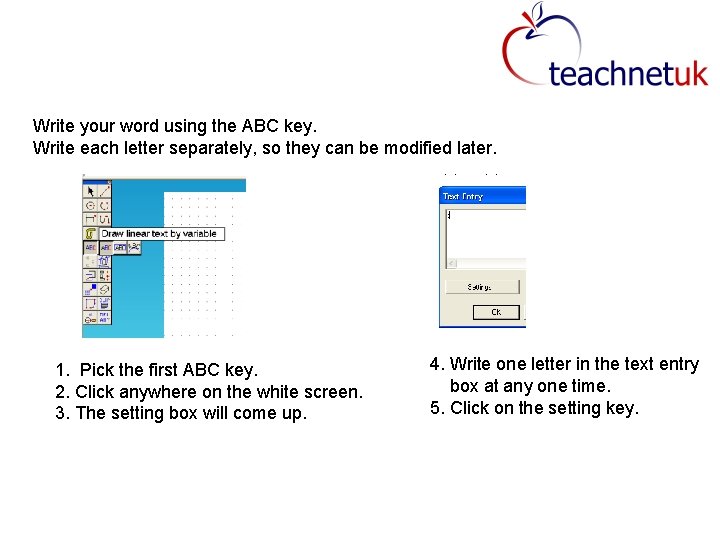
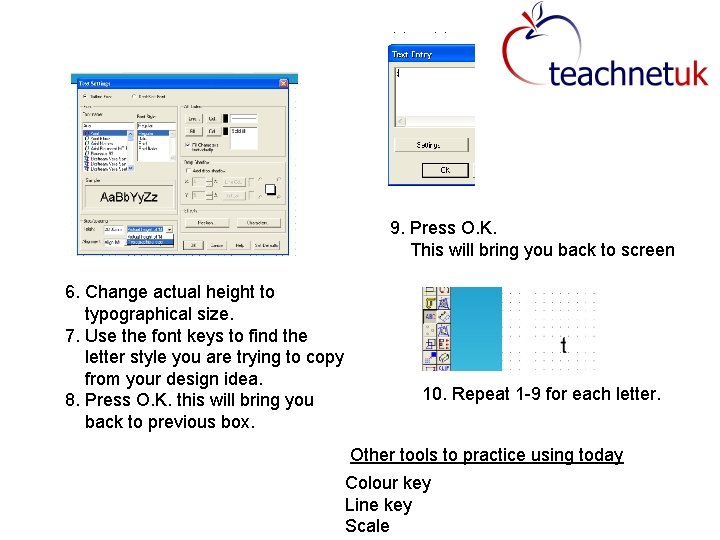
Write your word using the ABC key. Write each letter separately, so they can be modified later. 1. Pick the first ABC key. 2. Click anywhere on the white screen. 3. The setting box will come up. 4. Write one letter in the text entry box at any one time. 5. Click on the setting key.
9. Press O. K. This will bring you back to screen 6. Change actual height to typographical size. 7. Use the font keys to find the letter style you are trying to copy from your design idea. 8. Press O. K. this will bring you back to previous box. 10. Repeat 1 -9 for each letter. Other tools to practice using today Colour key Line key Scale