
STANDARD WORK INSTRUCTION Title Award BroadcastSpot Bid Process
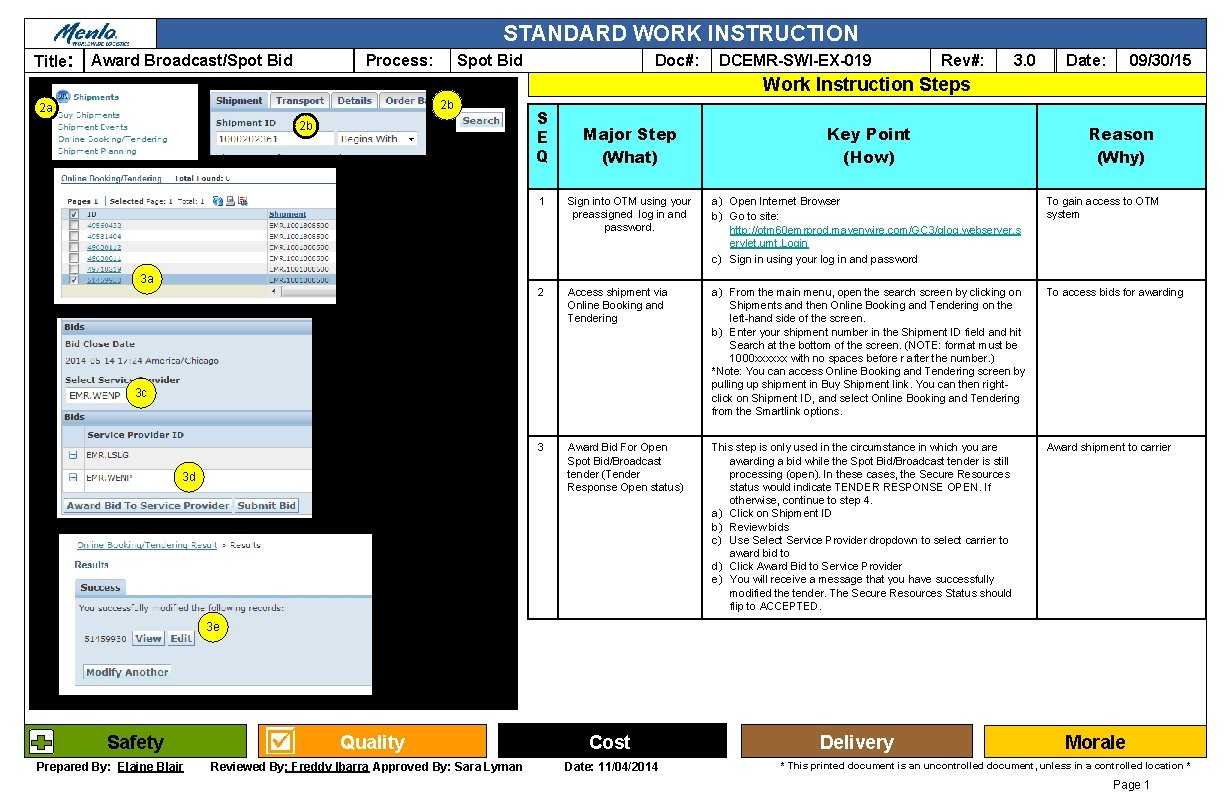
STANDARD WORK INSTRUCTION Title: Award Broadcast/Spot Bid Process: Doc#: DCEMR-SWI-EX-019 Rev#: 3. 0 09/30/15 Date: Work Instruction Steps 2 b 2 a 2 b 3 a S E Q Major Step (What) Key Point (How) 1 Sign into OTM using your preassigned log in and password. a) Open Internet Browser b) Go to site: http: //otm 60 emrprod. mavenwire. com/GC 3/glog. webserver. s ervlet. umt. Login c) Sign in using your log in and password To gain access to OTM system 2 Access shipment via Online Booking and Tendering a) From the main menu, open the search screen by clicking on Shipments and then Online Booking and Tendering on the left-hand side of the screen. b) Enter your shipment number in the Shipment ID field and hit Search at the bottom of the screen. (NOTE: format must be 1000 xxxxxx with no spaces before r after the number. ) *Note: You can access Online Booking and Tendering screen by pulling up shipment in Buy Shipment link. You can then rightclick on Shipment ID, and select Online Booking and Tendering from the Smartlink options. To access bids for awarding 3 Award Bid For Open Spot Bid/Broadcast tender (Tender Response Open status) This step is only used in the circumstance in which you are awarding a bid while the Spot Bid/Broadcast tender is still processing (open). In these cases, the Secure Resources status would indicate TENDER RESPONSE OPEN. If otherwise, continue to step 4. a) Click on Shipment ID b) Review bids c) Use Select Service Provider dropdown to select carrier to award bid to d) Click Award Bid to Service Provider e) You will receive a message that you have successfully modified the tender. The Secure Resources Status should flip to ACCEPTED. Award shipment to carrier 3 c 3 d Reason (Why) 3 e Safety Prepared By: Elaine Blair Quality Reviewed By: Freddy Ibarra Approved By: Sara Lyman Cost Date: 11/04/2014 Delivery Morale * This printed document is an uncontrolled document, unless in a controlled location * Page 1
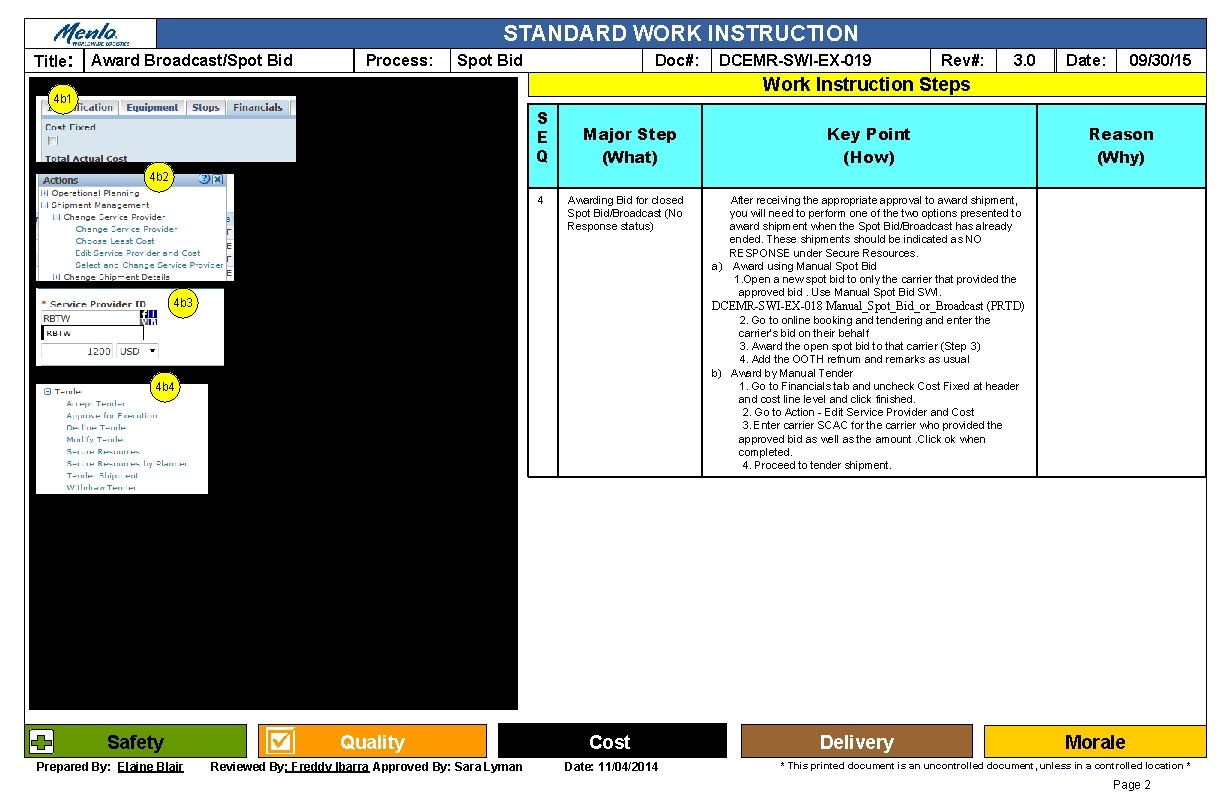
STANDARD WORK INSTRUCTION Title: Award Broadcast/Spot Bid Process: Spot Bid Doc#: DCEMR-SWI-EX-019 Rev#: 3. 0 09/30/15 Date: Work Instruction Steps 4 b 1 S E Q Major Step (What) Key Point (How) Reason (Why) 4 b 2 4 Awarding Bid for closed Spot Bid/Broadcast (No Response status) 4 b 3 DCEMR-SWI-EX-018 Manual_Spot_Bid_or_Broadcast (PRTD) 2. Go to online booking and tendering and enter the carrier’s bid on their behalf 3. Award the open spot bid to that carrier (Step 3) 4. Add the OOTH refnum and remarks as usual b) Award by Manual Tender 1. Go to Financials tab and uncheck Cost Fixed at header and cost line level and click finished. 2. Go to Action - Edit Service Provider and Cost 3. Enter carrier SCAC for the carrier who provided the approved bid as well as the amount. Click ok when completed. 4. Proceed to tender shipment. 4 b 4 Safety Prepared By: Elaine Blair After receiving the appropriate approval to award shipment, you will need to perform one of the two options presented to award shipment when the Spot Bid/Broadcast has already ended. These shipments should be indicated as NO RESPONSE under Secure Resources. a) Award using Manual Spot Bid 1. Open a new spot bid to only the carrier that provided the approved bid. Use Manual Spot Bid SWI. Quality Reviewed By: Freddy Ibarra Approved By: Sara Lyman Cost Date: 11/04/2014 Delivery Morale * This printed document is an uncontrolled document, unless in a controlled location * Page 2
- Slides: 2