
STANDARD WORK INSTRUCTION Title Approved Expedite Process Expedite

- Slides: 2
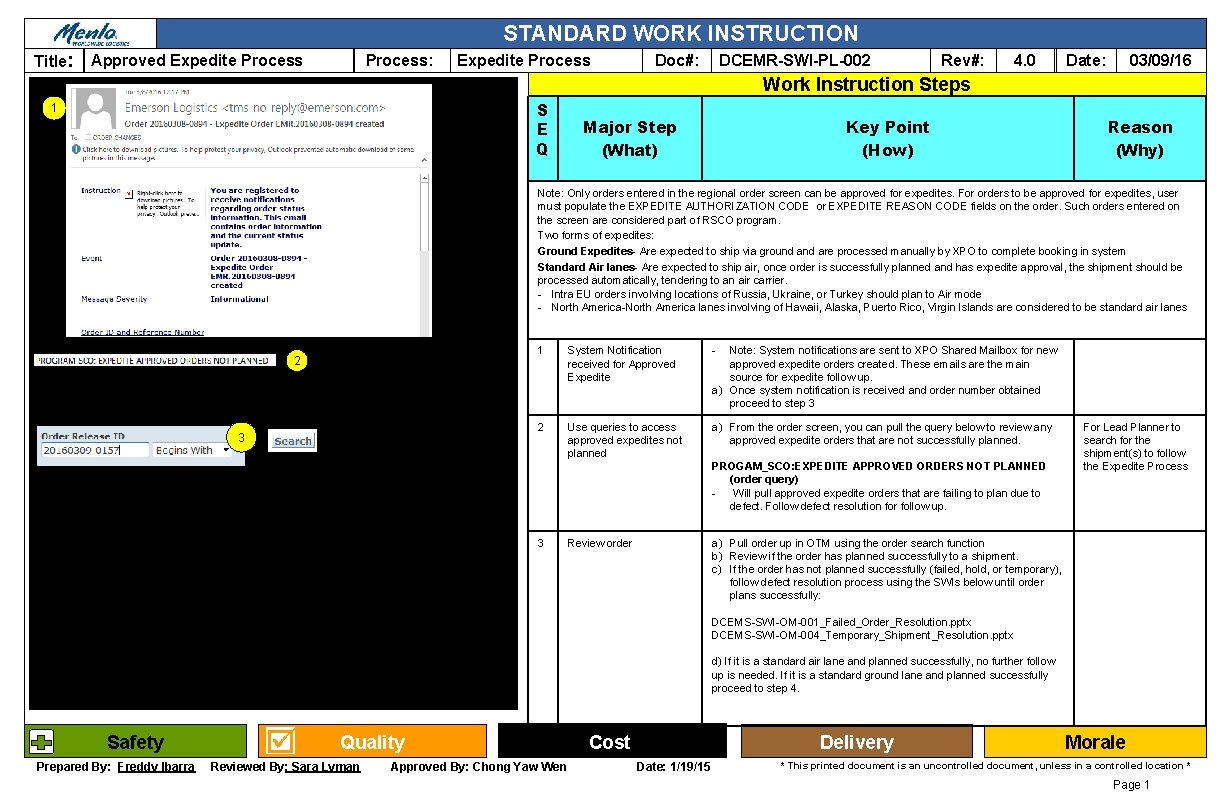
STANDARD WORK INSTRUCTION Title: Approved Expedite Process: Expedite Process DCEMR-SWI-PL-002 Doc#: Rev#: 4. 0 03/09/16 Date: Work Instruction Steps S E Q 1 Major Step (What) Key Point (How) Reason (Why) Note: Only orders entered in the regional order screen can be approved for expedites. For orders to be approved for expedites, user must populate the EXPEDITE AUTHORIZATION CODE or EXPEDITE REASON CODE fields on the order. Such orders entered on the screen are considered part of RSCO program. Two forms of expedites: Ground Expedites- Are expected to ship via ground are processed manually by XPO to complete booking in system Standard Air lanes- Are expected to ship air, once order is successfully planned and has expedite approval, the shipment should be processed automatically, tendering to an air carrier. - Intra EU orders involving locations of Russia, Ukraine, or Turkey should plan to Air mode - North America-North America lanes involving of Hawaii, Alaska, Puerto Rico, Virgin Islands are considered to be standard air lanes 2 3 1 System Notification received for Approved Expedite - 2 Use queries to access approved expedites not planned a) From the order screen, you can pull the query below to review any approved expedite orders that are not successfully planned. Note: System notifications are sent to XPO Shared Mailbox for new approved expedite orders created. These emails are the main source for expedite follow up. a) Once system notification is received and order number obtained proceed to step 3 PROGAM_SCO: EXPEDITE APPROVED ORDERS NOT PLANNED (order query) Will pull approved expedite orders that are failing to plan due to defect. Follow defect resolution for follow up. 3 For Lead Planner to search for the shipment(s) to follow the Expedite Process a) Pull order up in OTM using the order search function b) Review if the order has planned successfully to a shipment. c) If the order has not planned successfully (failed, hold, or temporary), follow defect resolution process using the SWIs below until order plans successfully: Review order DCEMS-SWI-OM-001_Failed_Order_Resolution. pptx DCEMS-SWI-OM-004_Temporary_Shipment_Resolution. pptx d) If it is a standard air lane and planned successfully, no further follow up is needed. If it is a standard ground lane and planned successfully proceed to step 4. Safety Prepared By: Freddy Ibarra Quality Reviewed By: Sara Lyman Approved By: Chong Yaw Wen Cost Delivery Date: 1/19/15 Morale * This printed document is an uncontrolled document, unless in a controlled location * Page 1
STANDARD WORK INSTRUCTION Title: Approved Expedite Process: Expedite Process Doc#: DCEMR-SWI-PL-002 Rev#: 4. 0 03/09/16 Date: Work Instruction Steps S E Q Major Step (What) Key Point (How) 4 Spot Bid to Expedite Carriers a) Follow DCEMR-SWI-EX-018 Manual_Spot_Bid to proceed to put the shipment out to bid to expedite carriers. 5 Follow PRTD Process Follow DCEMR-SWI-EX-001_Premium Tender Desk Review to follow up on bids and book shipment. Reason (Why) Execute the Premium Tendering Process To book and close out shipment PRTD/Expedite Coverage- PRTD queries are only to be monitored Monday-Friday 7 am-7 pm CST and on Saturday coverage. If an approved expedite notification is received during afterhours, the shipment may be processed normally and put out to bid. If it is not awarded, the shipment will not be followed up with until PRTD coverage hours. Safety Prepared By: Freddy Ibarra Quality Reviewed By: Sara Lyman Approved By: Chong Yaw Wen Cost Delivery Date: 1/19/15 Morale * This printed document is an uncontrolled document, unless in a controlled location * Page 2