
Standard Operating Procedures Short Term Case Management Last
- Slides: 14
Standard Operating Procedures Short Term Case Management Last updated January 2018 U. S. Department of the Interior | Office of Human Resources
Office of Human Resources Table of Contents − − − Page 3. Definitions Page 4. Initial Contact / Beginning of Short Term Process Page 5. Profile Page 6. Proxy Page 7. Workers Comp Claim Filed Page 8. Review and Process CA-1 Page 9. First Aid Only/No Medical (Place in Medical Folder) Page 10. Review and Process CA-2 Page 11. Organize Information and Set Up Case File Page 12. Manage CA-1 Page 13. Manage CA-2 Page 14. Case Management Cont. • # Boxes refer to Instructional Pages – see specific page 2
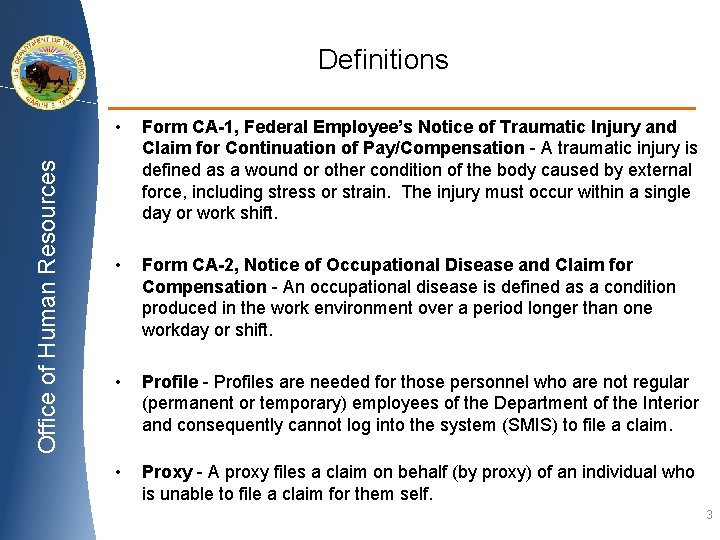
Office of Human Resources Definitions • Form CA-1, Federal Employee’s Notice of Traumatic Injury and Claim for Continuation of Pay/Compensation - A traumatic injury is defined as a wound or other condition of the body caused by external force, including stress or strain. The injury must occur within a single day or work shift. • Form CA-2, Notice of Occupational Disease and Claim for Compensation - An occupational disease is defined as a condition produced in the work environment over a period longer than one workday or shift. • Profile - Profiles are needed for those personnel who are not regular (permanent or temporary) employees of the Department of the Interior and consequently cannot log into the system (SMIS) to file a claim. • Proxy - A proxy files a claim on behalf (by proxy) of an individual who is unable to file a claim for them self. 3
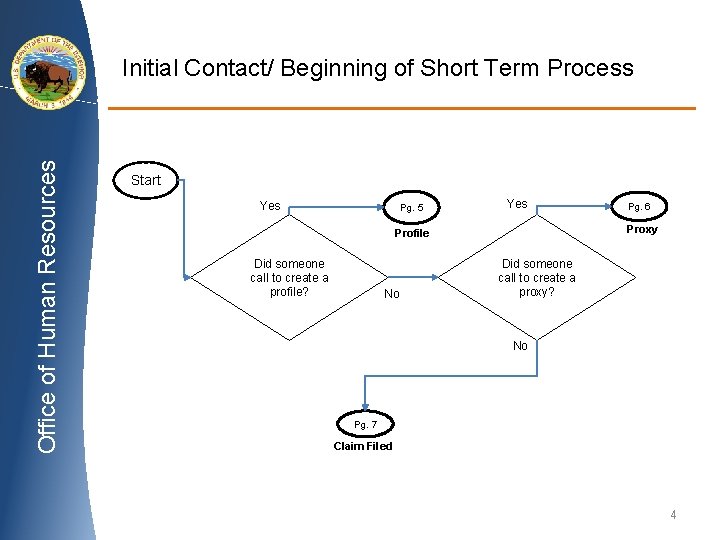
Office of Human Resources Initial Contact/ Beginning of Short Term Process Start Yes Pg. 5 Yes Proxy Profile Did someone call to create a profile? No Pg. 6 Did someone call to create a proxy? No Pg. 7 Claim Filed 4
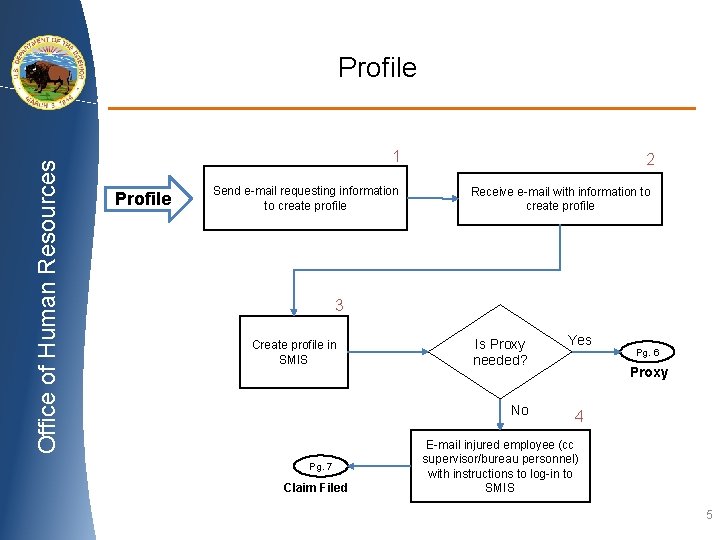
Office of Human Resources Profile 1 Profile Send e-mail requesting information to create profile 2 Receive e-mail with information to create profile 3 Create profile in SMIS Is Proxy needed? No Pg. 7 Claim Filed Yes Pg. 6 Proxy 4 E-mail injured employee (cc supervisor/bureau personnel) with instructions to log-in to SMIS 5
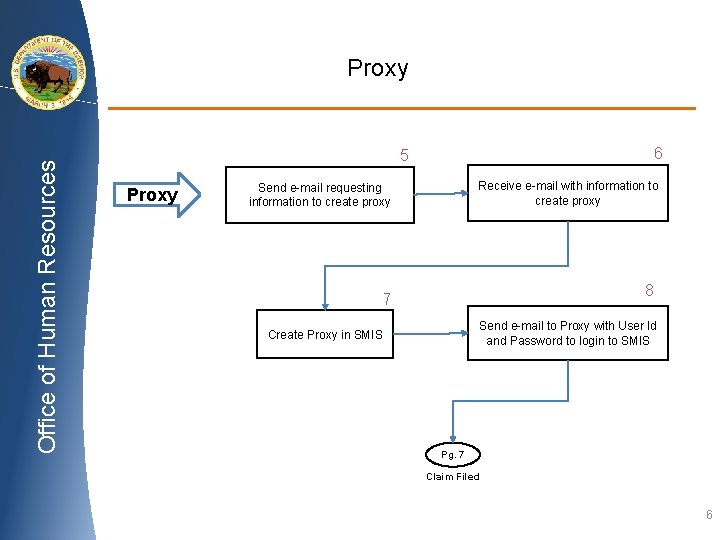
Office of Human Resources Proxy 6 5 Proxy Receive e-mail with information to create proxy Send e-mail requesting information to create proxy 8 7 Send e-mail to Proxy with User Id and Password to login to SMIS Create Proxy in SMIS Pg. 7 Claim Filed 6
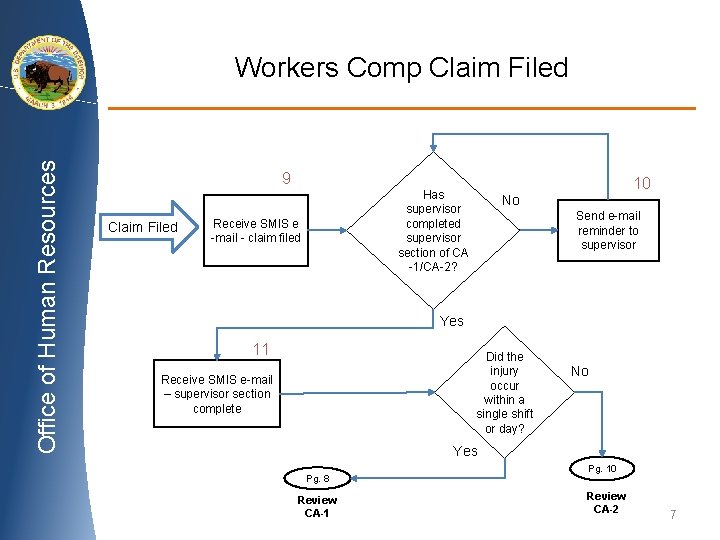
Office of Human Resources Workers Comp Claim Filed 9 Claim Filed 10 Has supervisor completed supervisor section of CA -1/CA-2? Receive SMIS e -mail - claim filed No Send e-mail reminder to supervisor Yes 11 Did the injury occur within a single shift or day? Receive SMIS e-mail – supervisor section complete No Yes Pg. 8 Review CA-1 Pg. 10 Review CA-2 7
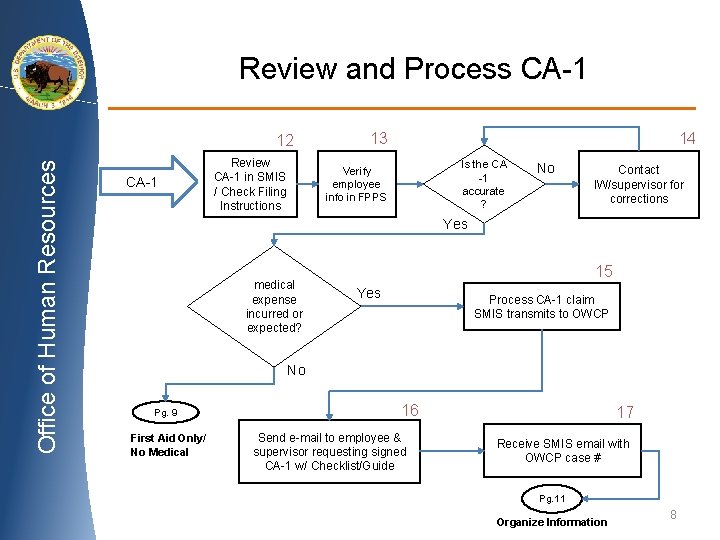
Review and Process CA-1 Office of Human Resources 12 CA-1 Review CA-1 in SMIS / Check Filing Instructions 14 13 Is the CA -1 accurate ? Verify employee info in FPPS No Contact IW/supervisor for corrections Yes medical expense incurred or expected? 15 Yes Process CA-1 claim SMIS transmits to OWCP No Pg. 9 First Aid Only/ No Medical 16 Send e-mail to employee & supervisor requesting signed CA-1 w/ Checklist/Guide 17 Receive SMIS email with OWCP case # Pg. 11 Organize Information 8
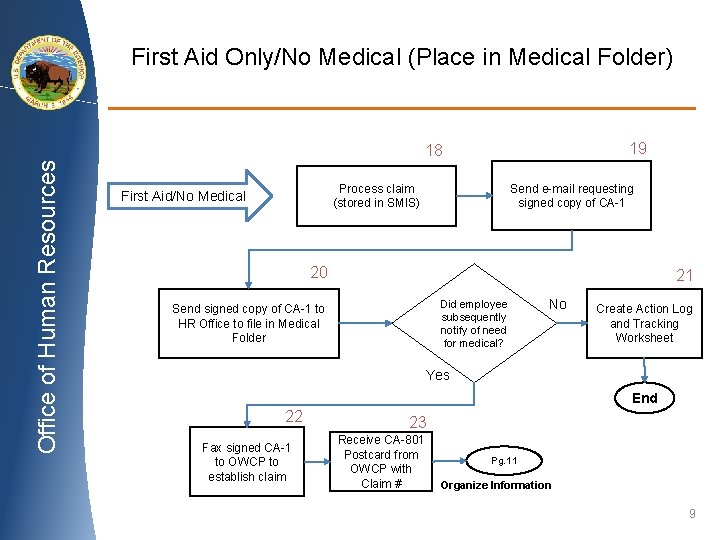
First Aid Only/No Medical (Place in Medical Folder) 19 Office of Human Resources 18 Send e-mail requesting signed copy of CA-1 Process claim (stored in SMIS) First Aid/No Medical 20 21 Did employee subsequently notify of need for medical? Send signed copy of CA-1 to HR Office to file in Medical Folder No Create Action Log and Tracking Worksheet Yes End 22 Fax signed CA-1 to OWCP to establish claim 23 Receive CA-801 Postcard from OWCP with Claim # Pg. 11 Organize Information 9
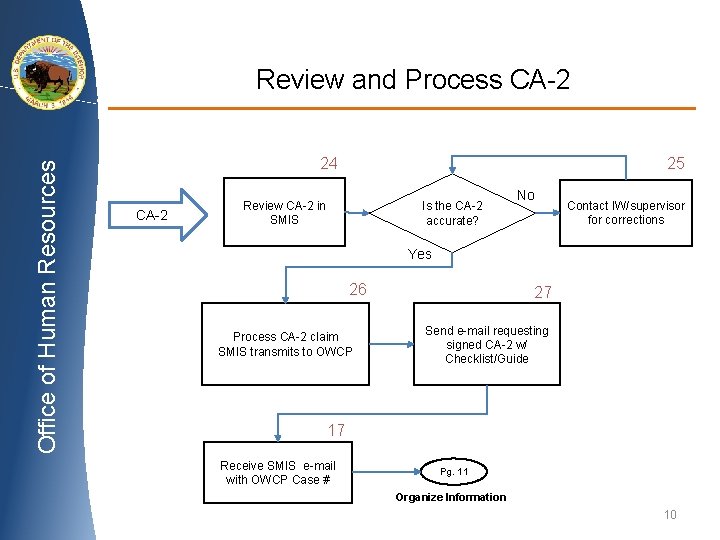
Office of Human Resources Review and Process CA-2 24 CA-2 25 Review CA-2 in SMIS Is the CA-2 accurate? No Contact IW/supervisor for corrections Yes 26 Process CA-2 claim SMIS transmits to OWCP 27 Send e-mail requesting signed CA-2 w/ Checklist/Guide 17 Receive SMIS e-mail with OWCP Case # Pg. 11 Organize Information 10
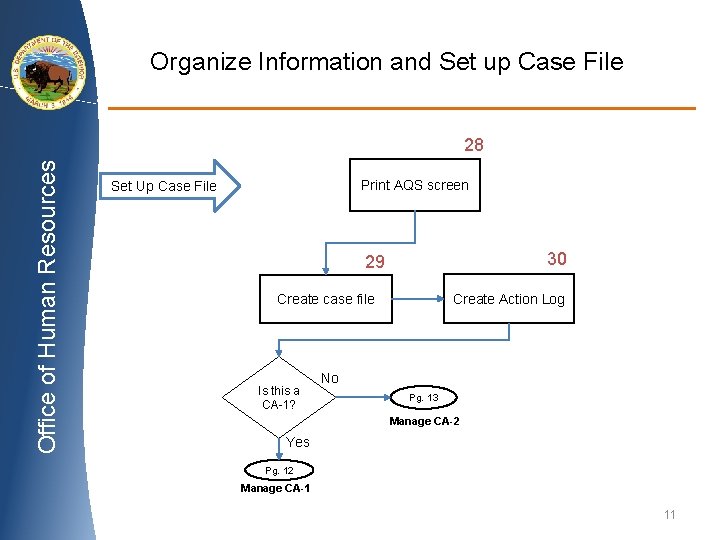
Organize Information and Set up Case File Office of Human Resources 28 Print AQS screen Set Up Case File 30 29 Create Action Log Create case file Is this a CA-1? No Pg. 13 Manage CA-2 Yes Pg. 12 Manage CA-1 11
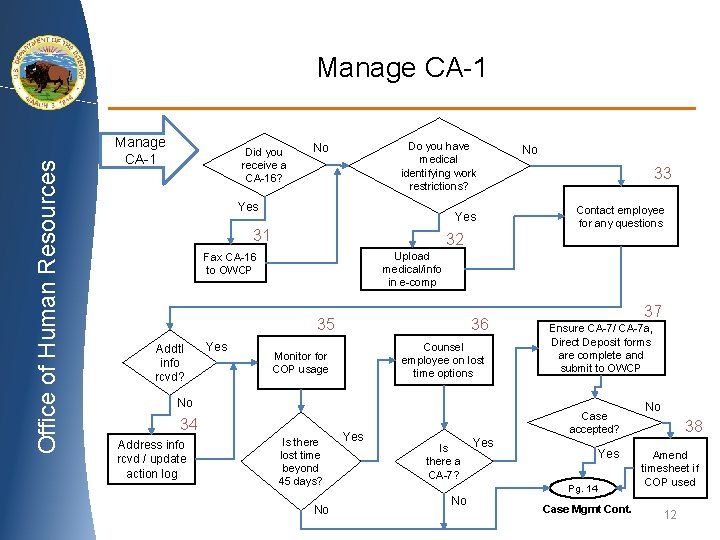
Office of Human Resources Manage CA-1 Did you receive a CA-16? Do you have medical identifying work restrictions? No Yes 31 Contact employee for any questions 32 35 Yes 33 Upload medical/info in e-comp Fax CA-16 to OWCP Addtl info rcvd? No 36 Counsel employee on lost time options Monitor for COP usage 37 Ensure CA-7/ CA-7 a, Direct Deposit forms are complete and submit to OWCP No 34 Address info rcvd / update action log Is there lost time beyond 45 days? No Yes Case accepted? Is there a CA-7? Yes Pg. 14 No Case Mgmt Cont. No 38 Amend timesheet if COP used 12
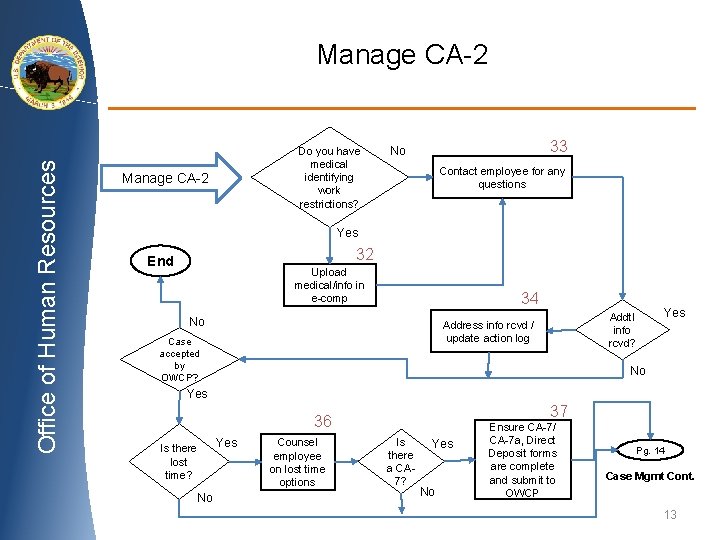
Office of Human Resources Manage CA-2 Do you have medical identifying work restrictions? Manage CA-2 33 No Contact employee for any questions Yes 32 End Upload medical/info in e-comp 34 No Case accepted by OWCP? Yes Addtl info rcvd? Address info rcvd / update action log No Yes 37 36 Is there lost time? No Yes Counsel employee on lost time options Is there a CA 7? Yes No Ensure CA-7/ CA-7 a, Direct Deposit forms are complete and submit to OWCP Pg. 14 Case Mgmt Cont. 13
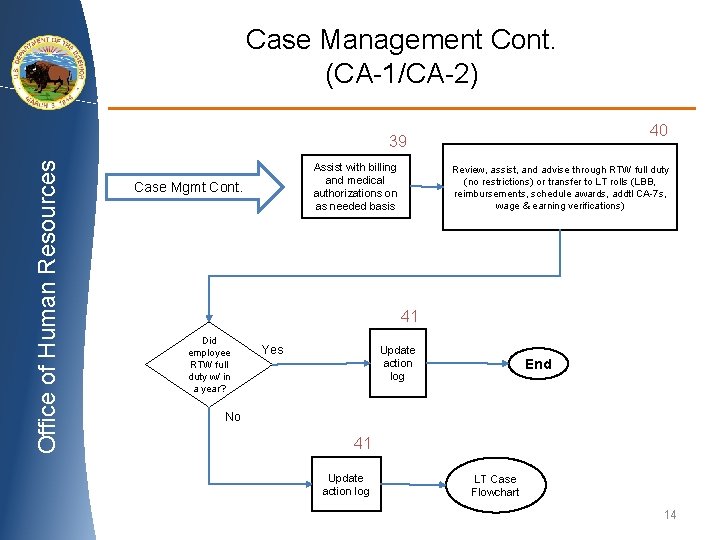
Case Management Cont. (CA-1/CA-2) 40 Office of Human Resources 39 Assist with billing and medical authorizations on as needed basis Case Mgmt Cont. Review, assist, and advise through RTW full duty (no restrictions) or transfer to LT rolls (LBB, reimbursements, schedule awards, addtl CA-7 s, wage & earning verifications) 41 Did employee RTW full duty w/ in a year? Yes Update action log End No 41 Update action log LT Case Flowchart 14