
SRM Technical Presentation Mornay Van Der Walt Sr
- Slides: 37
SRM Technical Presentation Mornay Van Der Walt Sr. Solutions Architect
Agenda 1. SRM Introduction and Concepts 2. SRM 1. 0 Prerequisites and SAN Integration 3. SRM Workflows 4. SRM Alarms and Site Status Monitoring 5. SRM Core benefits and Summary These features are representative of feature areas under development. Feature commitments must not be included in contracts, purchase orders, or sales agreements of any kind. Technical feasibility and market demand will affect final delivery.
Advantages of Virtual Disaster Recovery Virtual machines are portable Virtual hardware can be automatically configured Test and failover can be automated (minimizes human error) The need for idle hardware is reduced Costs are lowered, and the quality of service is raised These features are representative of feature areas under development. Feature commitments must not be included in contracts, purchase orders, or sales agreements of any kind. Technical feasibility and market demand will affect final delivery.
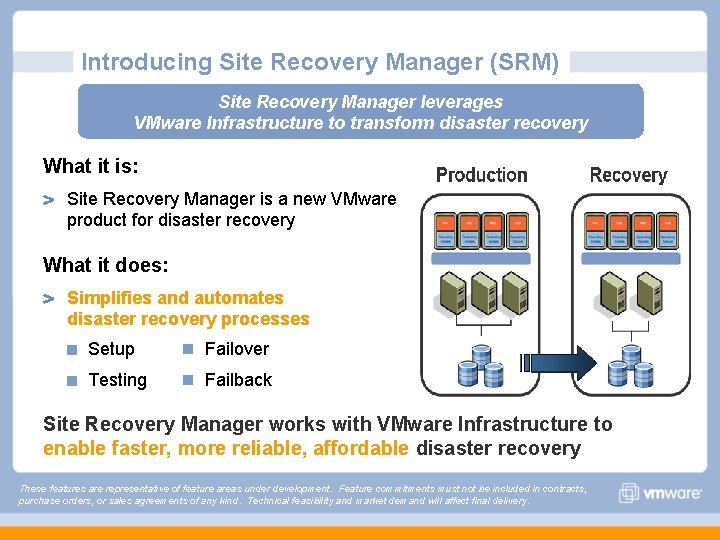
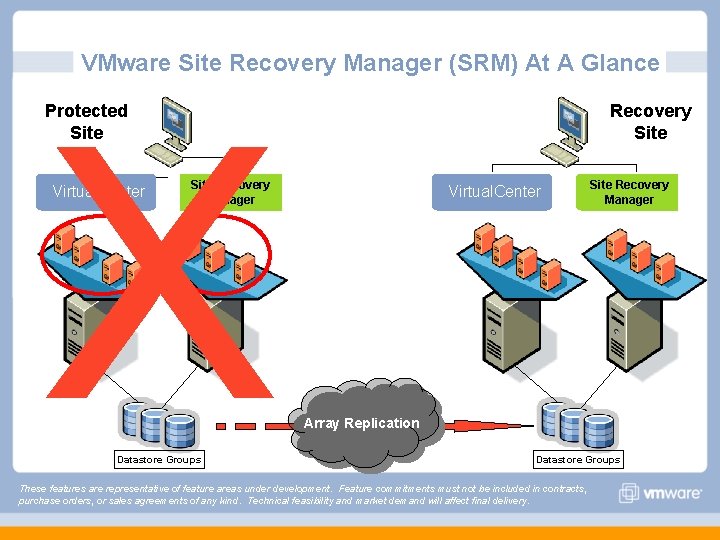
Introducing Site Recovery Manager (SRM) Site Recovery Manager leverages VMware Infrastructure to transform disaster recovery What it is: Site Recovery Manager is a new VMware product for disaster recovery What it does: Simplifies and automates disaster recovery processes Setup n Failover Testing n Failback Site Recovery Manager works with VMware Infrastructure to enable faster, more reliable, affordable disaster recovery These features are representative of feature areas under development. Feature commitments must not be included in contracts, purchase orders, or sales agreements of any kind. Technical feasibility and market demand will affect final delivery.
VMware Site Recovery Manager (SRM) At A Glance X Protected Site Virtual. Center Recovery Site Recovery Manager Datastore Groups Virtual. Center Site Recovery Manager Array Replication Datastore Groups These features are representative of feature areas under development. Feature commitments must not be included in contracts, purchase orders, or sales agreements of any kind. Technical feasibility and market demand will affect final delivery.
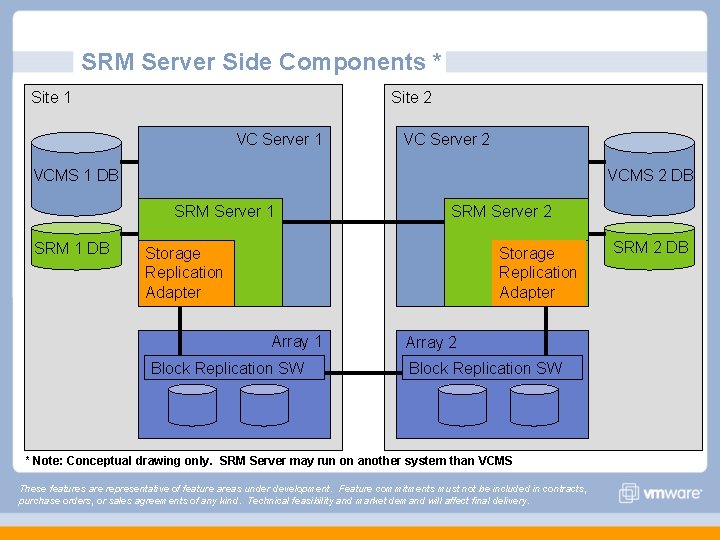
SRM Server Side Components * Site 1 Site 2 VC Server 1 VC Server 2 VCMS 1 DB VCMS 2 DB SRM Server 1 SRM 1 DB SRM Server 2 Storage Replication Adapter Array 1 Block Replication SW Array 2 Block Replication SW * Note: Conceptual drawing only. SRM Server may run on another system than VCMS These features are representative of feature areas under development. Feature commitments must not be included in contracts, purchase orders, or sales agreements of any kind. Technical feasibility and market demand will affect final delivery. SRM 2 DB
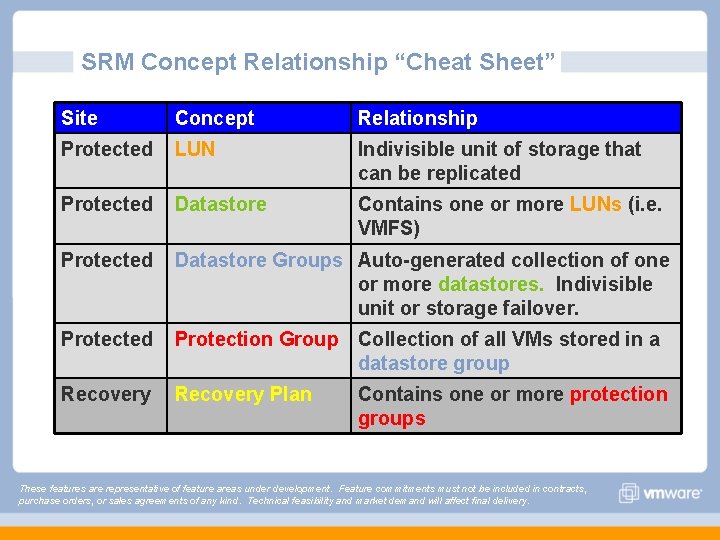
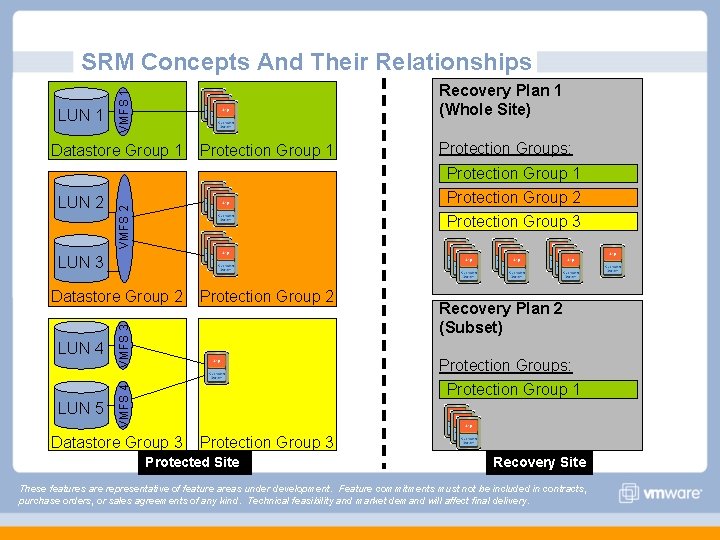
SRM Concept Relationship “Cheat Sheet” Site Concept Relationship Protected LUN Indivisible unit of storage that can be replicated Protected Datastore Contains one or more LUNs (i. e. VMFS) Protected Datastore Groups Auto-generated collection of one or more datastores. Indivisible unit or storage failover. Protected Protection Group Collection of all VMs stored in a datastore group Recovery Plan Contains one or more protection groups These features are representative of feature areas under development. Feature commitments must not be included in contracts, purchase orders, or sales agreements of any kind. Technical feasibility and market demand will affect final delivery.
SRM Concepts And Their Relationships VMFS 1 LUN 1 Recovery Plan 1 (Whole Site) Datastore Group 1 Protection Groups: Protection Group 1 Protection Group 2 Protection Group 3 VMFS 2 LUN 2 Protection Group 1 LUN 3 LUN 4 VMFS 3 LUN 5 VMFS 4 Datastore Group 2 Protection Group 2 Recovery Plan 2 (Subset) Protection Groups: Protection Group 1 Datastore Group 3 Protection Group 3 Protected Site Recovery Site These features are representative of feature areas under development. Feature commitments must not be included in contracts, purchase orders, or sales agreements of any kind. Technical feasibility and market demand will affect final delivery.
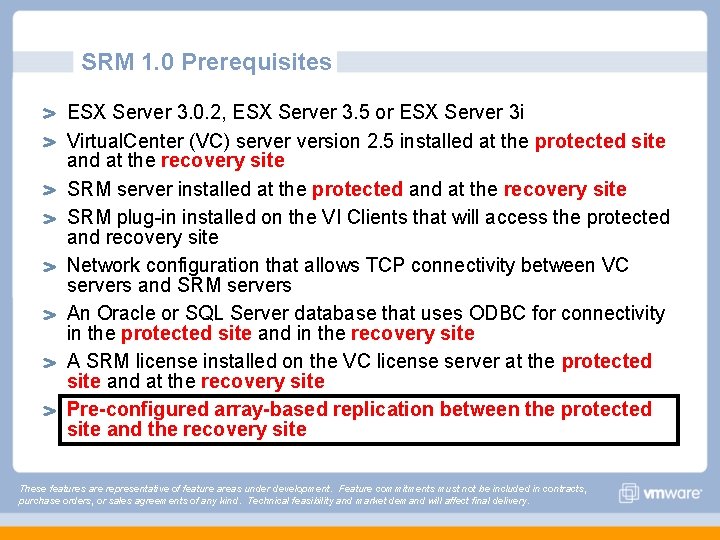
SRM 1. 0 Prerequisites ESX Server 3. 0. 2, ESX Server 3. 5 or ESX Server 3 i Virtual. Center (VC) server version 2. 5 installed at the protected site and at the recovery site SRM server installed at the protected and at the recovery site SRM plug-in installed on the VI Clients that will access the protected and recovery site Network configuration that allows TCP connectivity between VC servers and SRM servers An Oracle or SQL Server database that uses ODBC for connectivity in the protected site and in the recovery site A SRM license installed on the VC license server at the protected site and at the recovery site Pre-configured array-based replication between the protected site and the recovery site These features are representative of feature areas under development. Feature commitments must not be included in contracts, purchase orders, or sales agreements of any kind. Technical feasibility and market demand will affect final delivery.
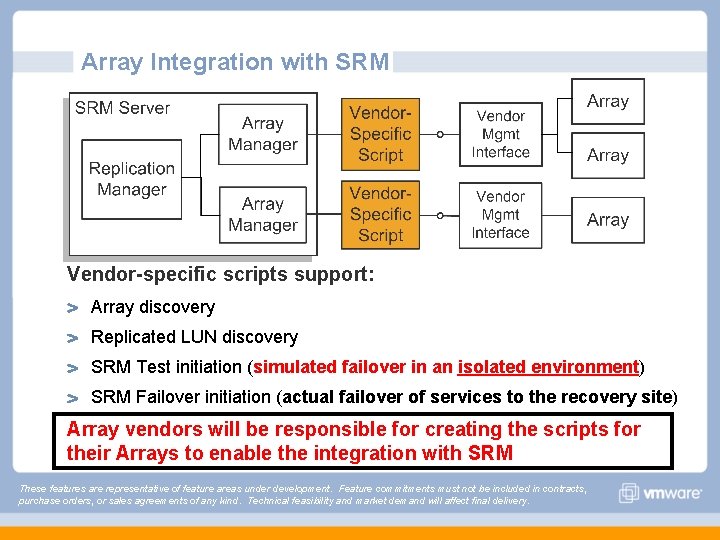
Array Integration with SRM Vendor-specific scripts support: Array discovery Replicated LUN discovery SRM Test initiation (simulated failover in an isolated environment) SRM Failover initiation (actual failover of services to the recovery site) Array vendors will be responsible for creating the scripts for their Arrays to enable the integration with SRM These features are representative of feature areas under development. Feature commitments must not be included in contracts, purchase orders, or sales agreements of any kind. Technical feasibility and market demand will affect final delivery.
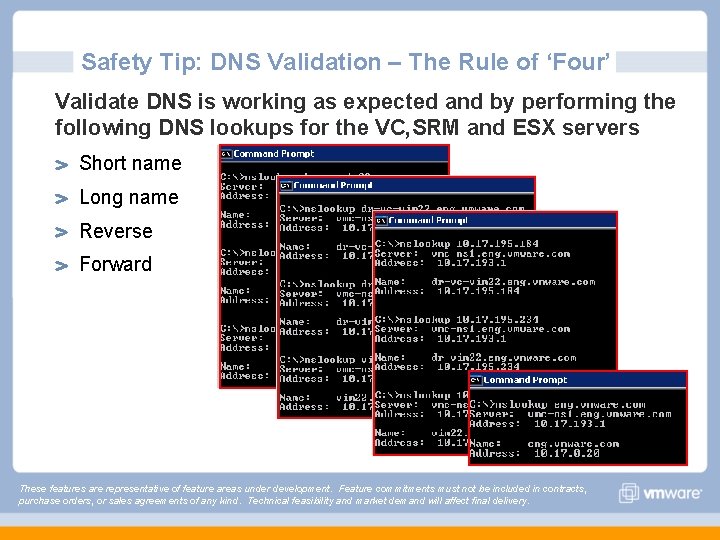
Safety Tip: DNS Validation – The Rule of ‘Four’ Validate DNS is working as expected and by performing the following DNS lookups for the VC, SRM and ESX servers Short name Long name Reverse Forward These features are representative of feature areas under development. Feature commitments must not be included in contracts, purchase orders, or sales agreements of any kind. Technical feasibility and market demand will affect final delivery.
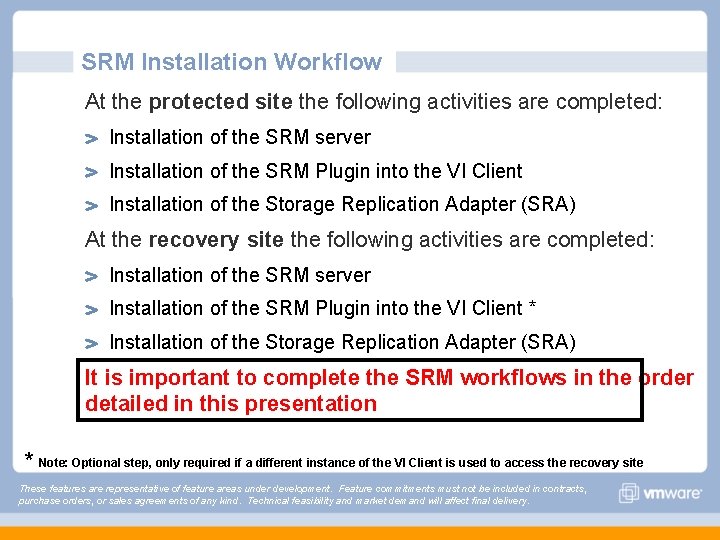
SRM Installation Workflow At the protected site the following activities are completed: Installation of the SRM server Installation of the SRM Plugin into the VI Client Installation of the Storage Replication Adapter (SRA) At the recovery site the following activities are completed: Installation of the SRM server Installation of the SRM Plugin into the VI Client * Installation of the Storage Replication Adapter (SRA) It is important to complete the SRM workflows in the order detailed in this presentation * Note: Optional step, only required if a different instance of the VI Client is used to access the recovery site These features are representative of feature areas under development. Feature commitments must not be included in contracts, purchase orders, or sales agreements of any kind. Technical feasibility and market demand will affect final delivery.
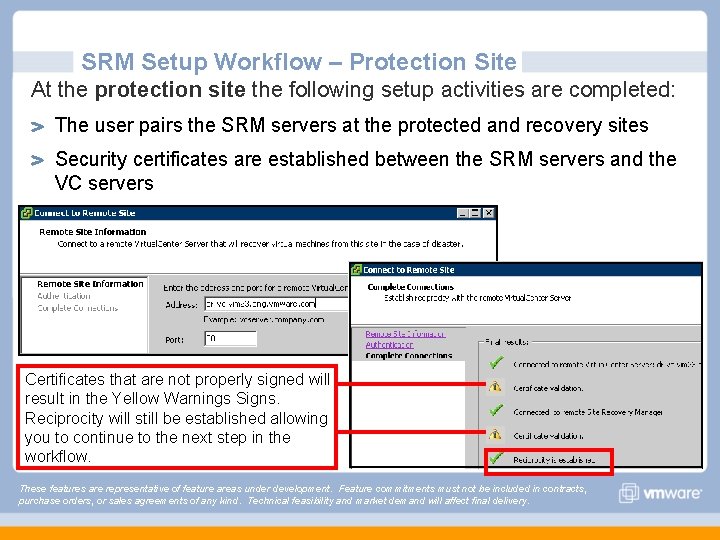
SRM Setup Workflow – Protection Site At the protection site the following setup activities are completed: The user pairs the SRM servers at the protected and recovery sites Security certificates are established between the SRM servers and the VC servers Certificates that are not properly signed will result in the Yellow Warnings Signs. Reciprocity will still be established allowing you to continue to the next step in the workflow. These features are representative of feature areas under development. Feature commitments must not be included in contracts, purchase orders, or sales agreements of any kind. Technical feasibility and market demand will affect final delivery.
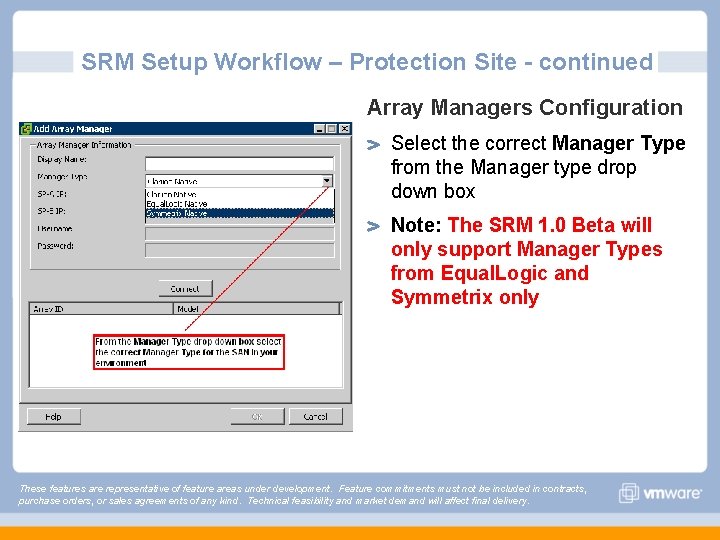
SRM Setup Workflow – Protection Site - continued Array Managers Configuration Select the correct Manager Type from the Manager type drop down box Note: The SRM 1. 0 Beta will only support Manager Types from Equal. Logic and Symmetrix only These features are representative of feature areas under development. Feature commitments must not be included in contracts, purchase orders, or sales agreements of any kind. Technical feasibility and market demand will affect final delivery.
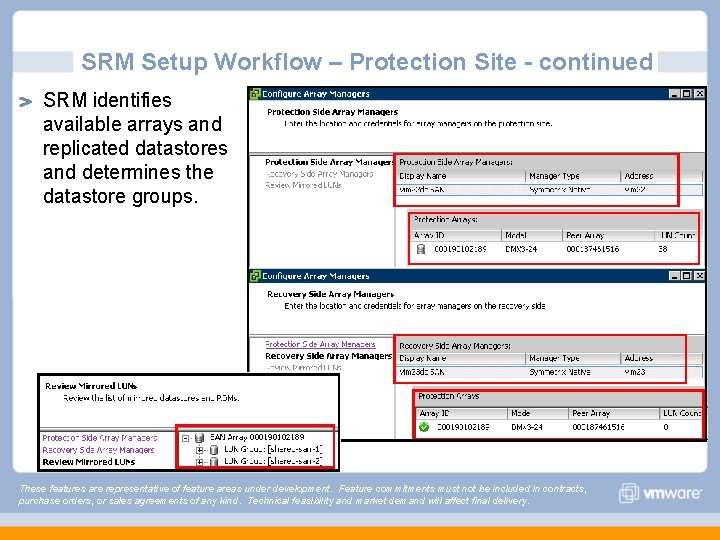
SRM Setup Workflow – Protection Site - continued SRM identifies available arrays and replicated datastores and determines the datastore groups. These features are representative of feature areas under development. Feature commitments must not be included in contracts, purchase orders, or sales agreements of any kind. Technical feasibility and market demand will affect final delivery.
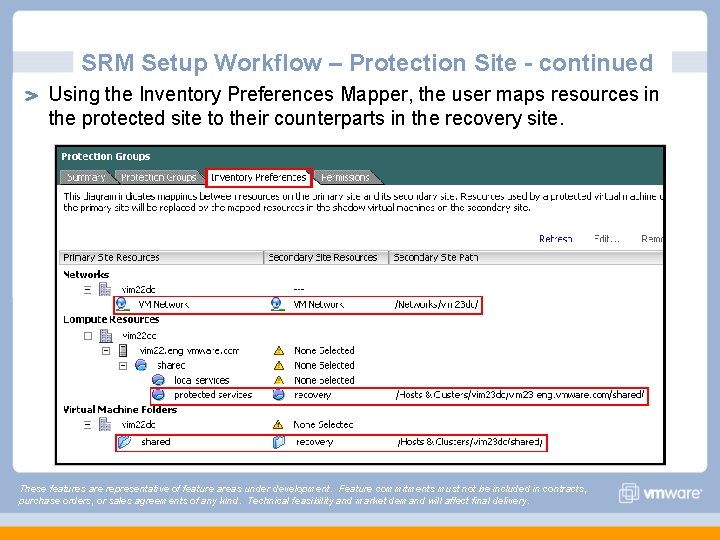
SRM Setup Workflow – Protection Site - continued Using the Inventory Preferences Mapper, the user maps resources in the protected site to their counterparts in the recovery site. These features are representative of feature areas under development. Feature commitments must not be included in contracts, purchase orders, or sales agreements of any kind. Technical feasibility and market demand will affect final delivery.
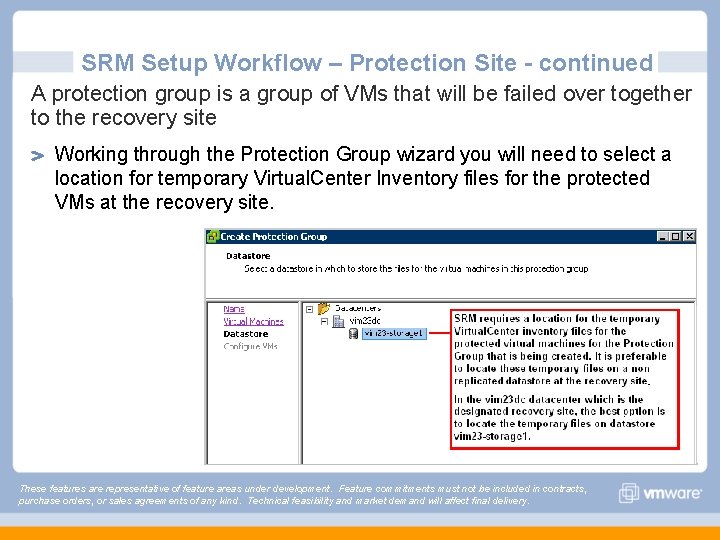
SRM Setup Workflow – Protection Site - continued A protection group is a group of VMs that will be failed over together to the recovery site Working through the Protection Group wizard you will need to select a location for temporary Virtual. Center Inventory files for the protected VMs at the recovery site. These features are representative of feature areas under development. Feature commitments must not be included in contracts, purchase orders, or sales agreements of any kind. Technical feasibility and market demand will affect final delivery.
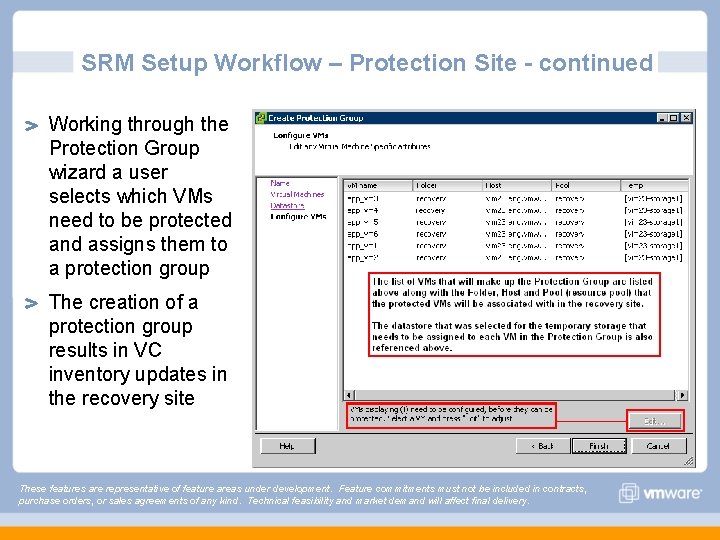
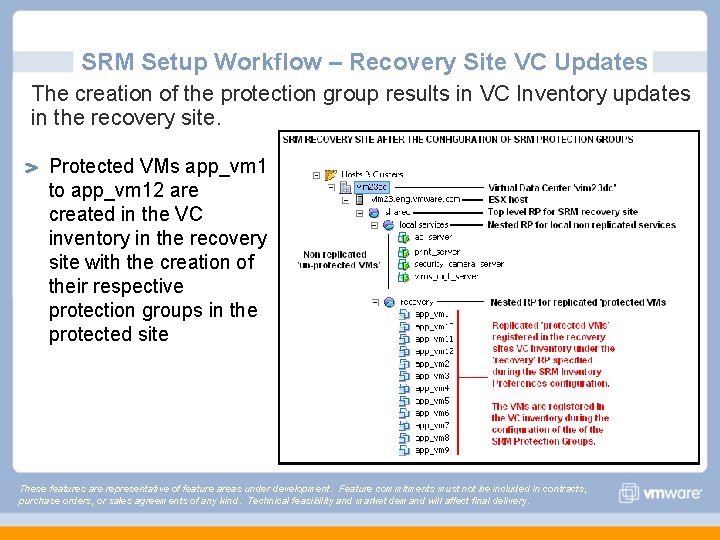
SRM Setup Workflow – Protection Site - continued Working through the Protection Group wizard a user selects which VMs need to be protected and assigns them to a protection group The creation of a protection group results in VC inventory updates in the recovery site These features are representative of feature areas under development. Feature commitments must not be included in contracts, purchase orders, or sales agreements of any kind. Technical feasibility and market demand will affect final delivery.
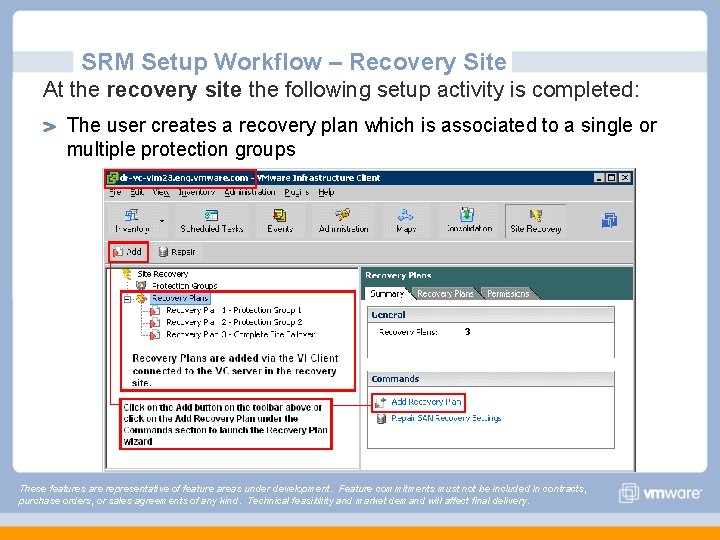
SRM Setup Workflow – Recovery Site At the recovery site the following setup activity is completed: The user creates a recovery plan which is associated to a single or multiple protection groups These features are representative of feature areas under development. Feature commitments must not be included in contracts, purchase orders, or sales agreements of any kind. Technical feasibility and market demand will affect final delivery.
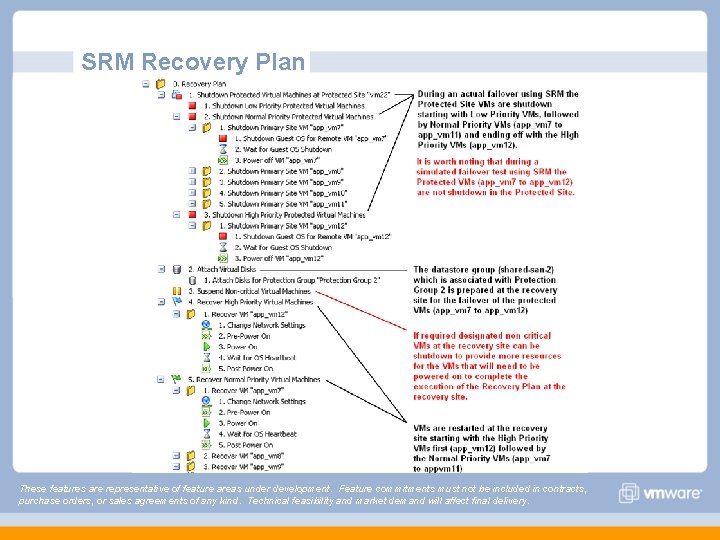
SRM Recovery Plan These features are representative of feature areas under development. Feature commitments must not be included in contracts, purchase orders, or sales agreements of any kind. Technical feasibility and market demand will affect final delivery.
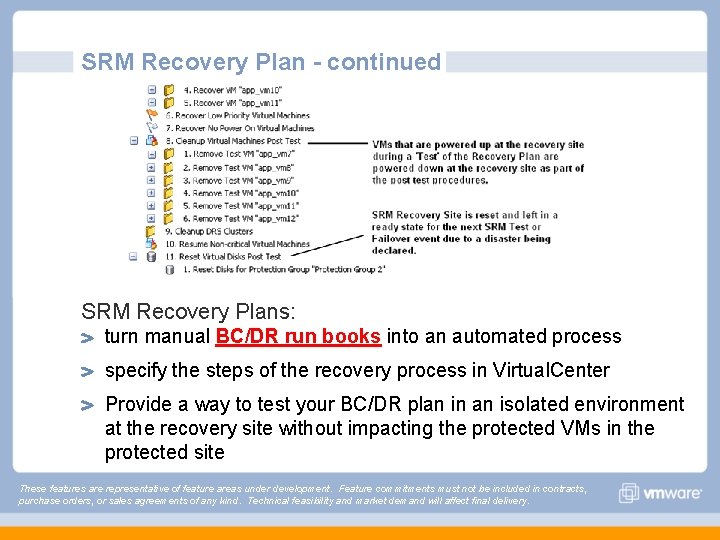
SRM Recovery Plan - continued SRM Recovery Plans: turn manual BC/DR run books into an automated process specify the steps of the recovery process in Virtual. Center Provide a way to test your BC/DR plan in an isolated environment at the recovery site without impacting the protected VMs in the protected site These features are representative of feature areas under development. Feature commitments must not be included in contracts, purchase orders, or sales agreements of any kind. Technical feasibility and market demand will affect final delivery.
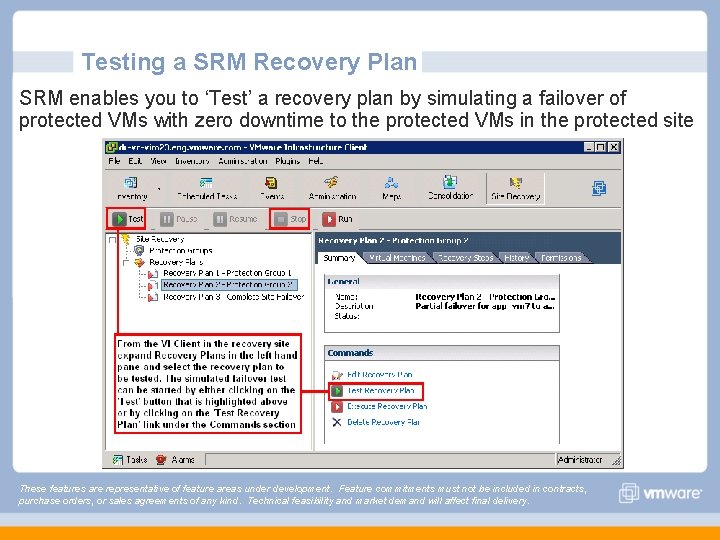
Testing a SRM Recovery Plan SRM enables you to ‘Test’ a recovery plan by simulating a failover of protected VMs with zero downtime to the protected VMs in the protected site These features are representative of feature areas under development. Feature commitments must not be included in contracts, purchase orders, or sales agreements of any kind. Technical feasibility and market demand will affect final delivery.
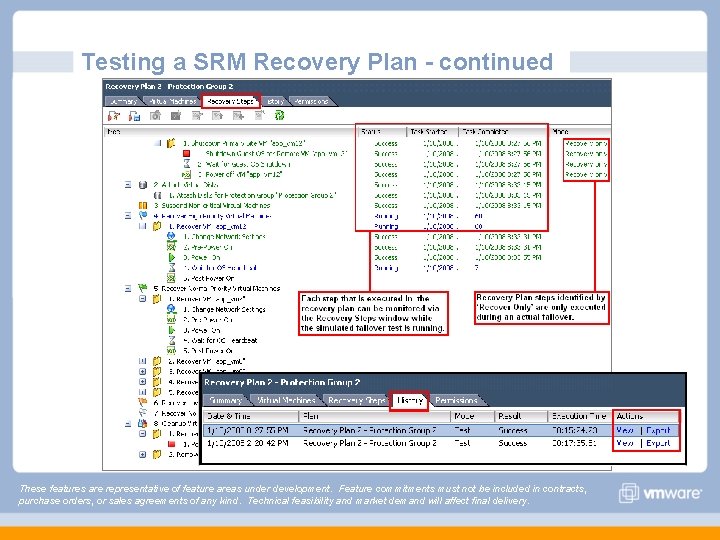
Testing a SRM Recovery Plan - continued These features are representative of feature areas under development. Feature commitments must not be included in contracts, purchase orders, or sales agreements of any kind. Technical feasibility and market demand will affect final delivery.
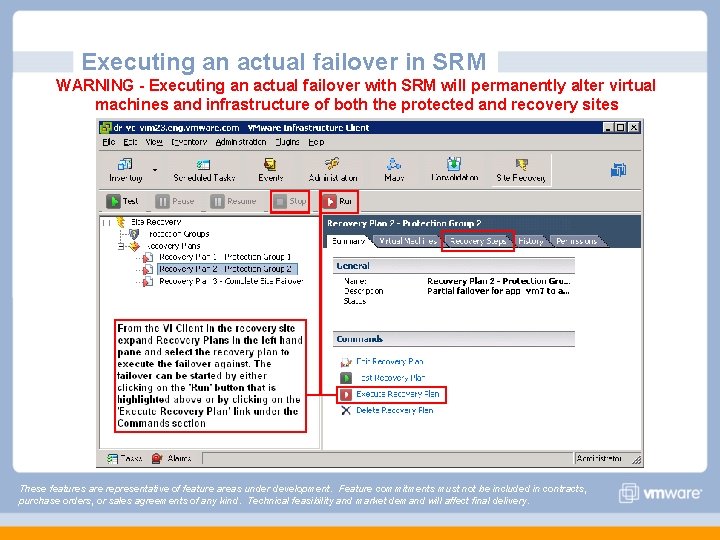
Executing an actual failover in SRM WARNING - Executing an actual failover with SRM will permanently alter virtual machines and infrastructure of both the protected and recovery sites These features are representative of feature areas under development. Feature commitments must not be included in contracts, purchase orders, or sales agreements of any kind. Technical feasibility and market demand will affect final delivery.
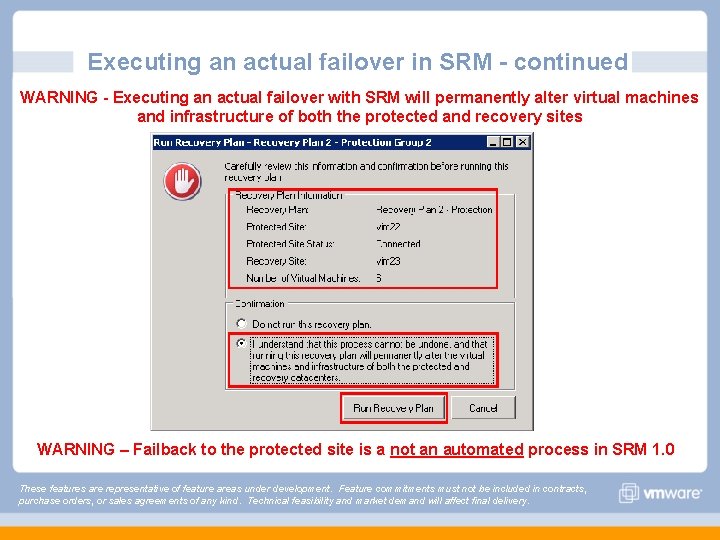
Executing an actual failover in SRM - continued WARNING - Executing an actual failover with SRM will permanently alter virtual machines and infrastructure of both the protected and recovery sites WARNING – Failback to the protected site is a not an automated process in SRM 1. 0 These features are representative of feature areas under development. Feature commitments must not be included in contracts, purchase orders, or sales agreements of any kind. Technical feasibility and market demand will affect final delivery.
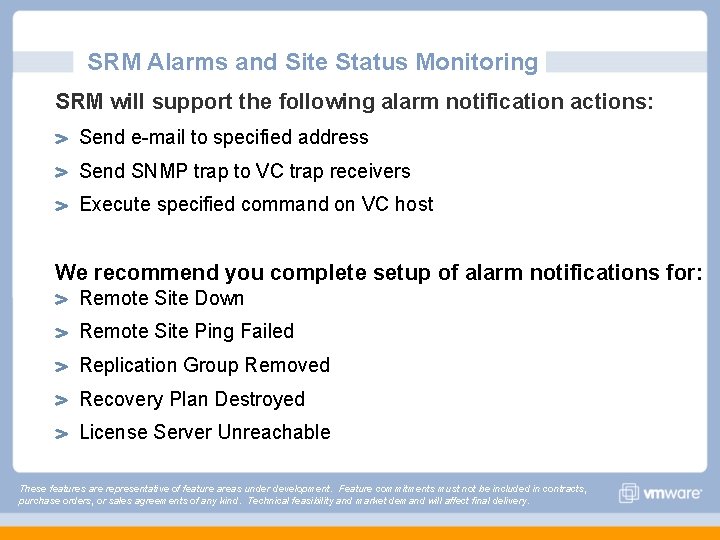
SRM Alarms and Site Status Monitoring SRM will support the following alarm notification actions: Send e-mail to specified address Send SNMP trap to VC trap receivers Execute specified command on VC host We recommend you complete setup of alarm notifications for: Remote Site Down Remote Site Ping Failed Replication Group Removed Recovery Plan Destroyed License Server Unreachable These features are representative of feature areas under development. Feature commitments must not be included in contracts, purchase orders, or sales agreements of any kind. Technical feasibility and market demand will affect final delivery.
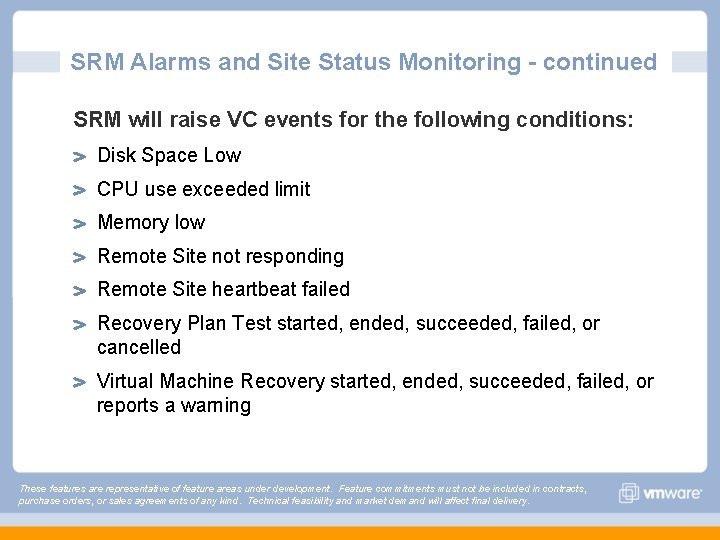
SRM Alarms and Site Status Monitoring - continued SRM will raise VC events for the following conditions: Disk Space Low CPU use exceeded limit Memory low Remote Site not responding Remote Site heartbeat failed Recovery Plan Test started, ended, succeeded, failed, or cancelled Virtual Machine Recovery started, ended, succeeded, failed, or reports a warning These features are representative of feature areas under development. Feature commitments must not be included in contracts, purchase orders, or sales agreements of any kind. Technical feasibility and market demand will affect final delivery.
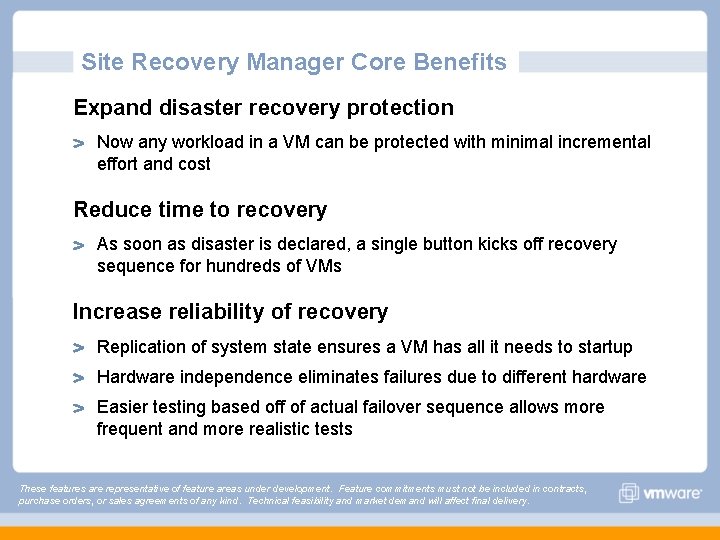
Site Recovery Manager Core Benefits Expand disaster recovery protection Now any workload in a VM can be protected with minimal incremental effort and cost Reduce time to recovery As soon as disaster is declared, a single button kicks off recovery sequence for hundreds of VMs Increase reliability of recovery Replication of system state ensures a VM has all it needs to startup Hardware independence eliminates failures due to different hardware Easier testing based off of actual failover sequence allows more frequent and more realistic tests These features are representative of feature areas under development. Feature commitments must not be included in contracts, purchase orders, or sales agreements of any kind. Technical feasibility and market demand will affect final delivery.
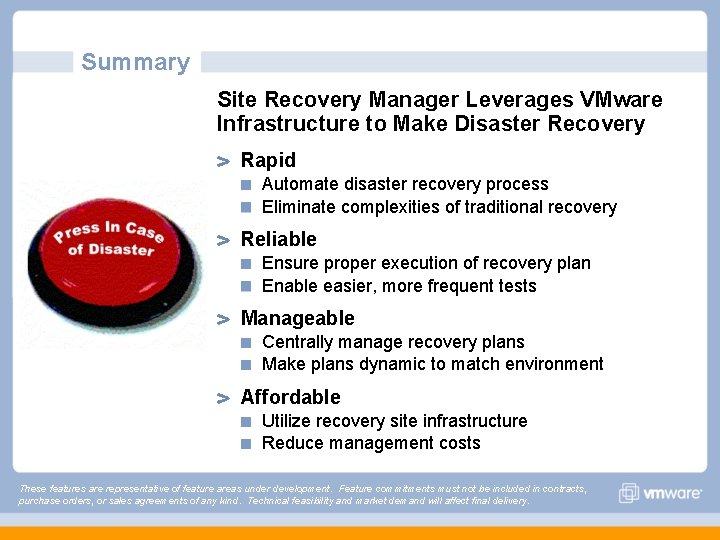
Summary Site Recovery Manager Leverages VMware Infrastructure to Make Disaster Recovery Rapid Automate disaster recovery process Eliminate complexities of traditional recovery Reliable Ensure proper execution of recovery plan Enable easier, more frequent tests Manageable Centrally manage recovery plans Make plans dynamic to match environment Affordable Utilize recovery site infrastructure Reduce management costs These features are representative of feature areas under development. Feature commitments must not be included in contracts, purchase orders, or sales agreements of any kind. Technical feasibility and market demand will affect final delivery.
Questions SRM Technical Presentation Mornay Van Der Walt Sr. Solutions Architect
SRM Technical Presentation Backup Slides
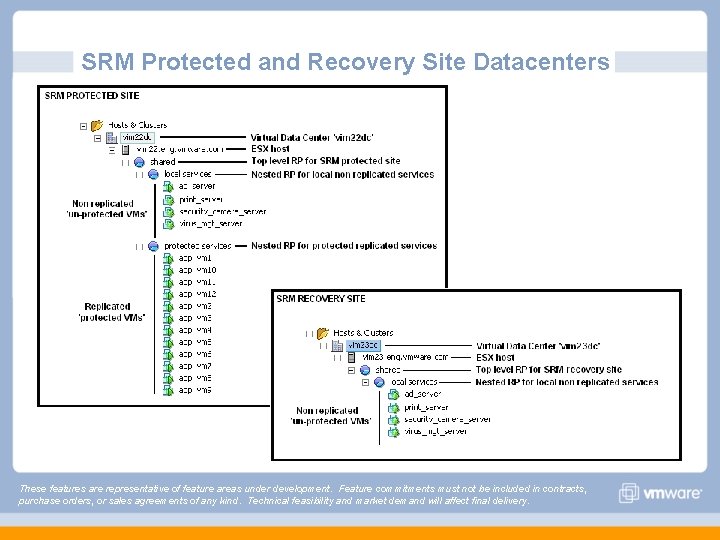
SRM Protected and Recovery Site Datacenters These features are representative of feature areas under development. Feature commitments must not be included in contracts, purchase orders, or sales agreements of any kind. Technical feasibility and market demand will affect final delivery.
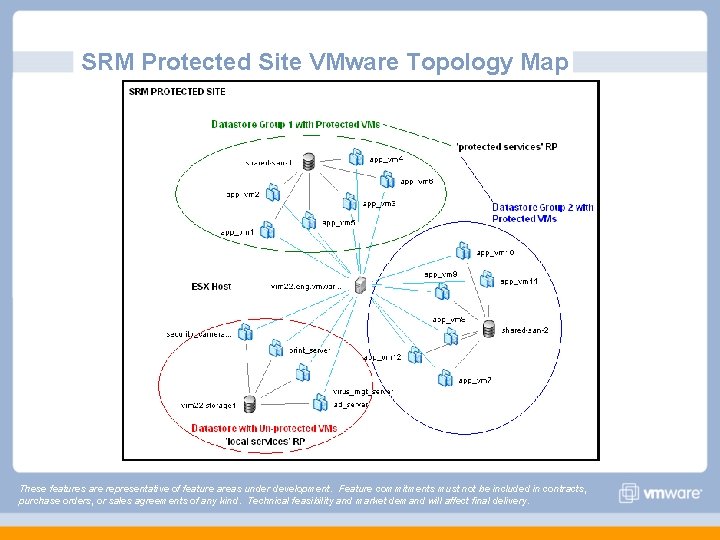
SRM Protected Site VMware Topology Map These features are representative of feature areas under development. Feature commitments must not be included in contracts, purchase orders, or sales agreements of any kind. Technical feasibility and market demand will affect final delivery.
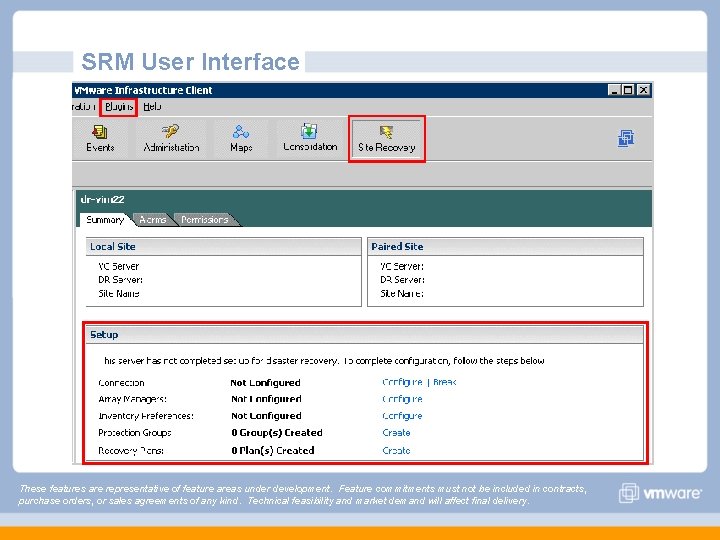
SRM User Interface These features are representative of feature areas under development. Feature commitments must not be included in contracts, purchase orders, or sales agreements of any kind. Technical feasibility and market demand will affect final delivery.
SRM Setup Workflow – Recovery Site VC Updates The creation of the protection group results in VC Inventory updates in the recovery site. Protected VMs app_vm 1 to app_vm 12 are created in the VC inventory in the recovery site with the creation of their respective protection groups in the protected site These features are representative of feature areas under development. Feature commitments must not be included in contracts, purchase orders, or sales agreements of any kind. Technical feasibility and market demand will affect final delivery.
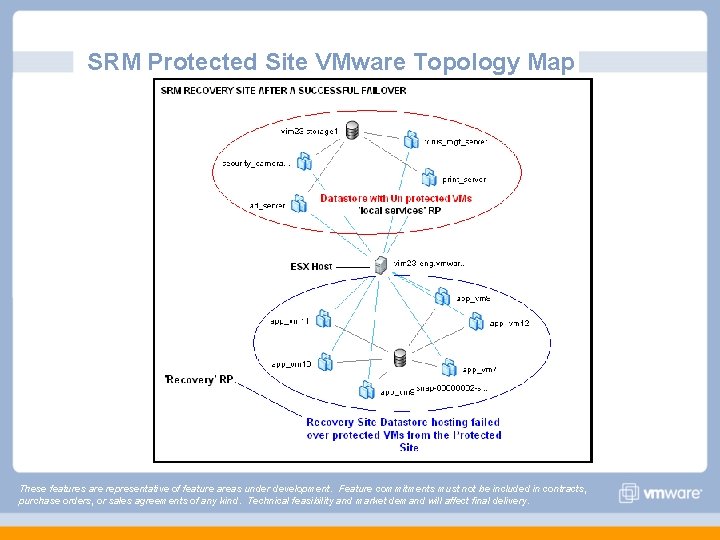
SRM Protected Site VMware Topology Map These features are representative of feature areas under development. Feature commitments must not be included in contracts, purchase orders, or sales agreements of any kind. Technical feasibility and market demand will affect final delivery.
SRM Technical Presentation Mornay Van Der Walt Sr. Solutions Architect