
SR 17 Fresh Install Path Database Server and
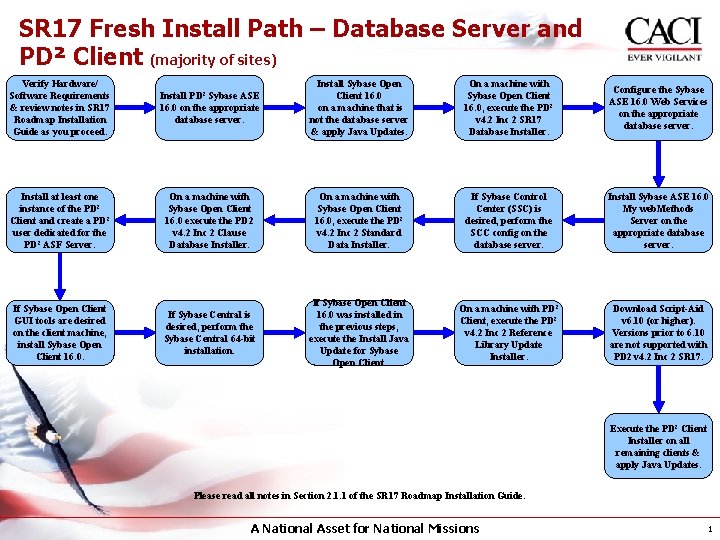
SR 17 Fresh Install Path – Database Server and PD² Client (majority of sites) Verify Hardware/ Software Requirements & review notes in SR 17 Roadmap Installation Guide as you proceed. Install PD² Sybase ASE 16. 0 on the appropriate database server. Install Sybase Open Client 16. 0 on a machine that is not the database server & apply Java Updates. On a machine with Sybase Open Client 16. 0, execute the PD² v 4. 2 Inc 2 SR 17 Database Installer. Configure the Sybase ASE 16. 0 Web Services on the appropriate database server. Install at least one instance of the PD² Client and create a PD² user dedicated for the PD² ASF Server. On a machine with Sybase Open Client 16. 0 execute the PD 2 v 4. 2 Inc 2 Clause Database Installer. On a machine with Sybase Open Client 16. 0, execute the PD² v 4. 2 Inc 2 Standard Data Installer. If Sybase Control Center (SSC) is desired, perform the SCC config on the database server. Install Sybase ASE 16. 0 My web. Methods Server on the appropriate database server. If Sybase Open Client GUI tools are desired on the client machine, install Sybase Open Client 16. 0. If Sybase Central is desired, perform the Sybase Central 64 -bit installation. If Sybase Open Client 16. 0 was installed in the previous steps, execute the Install Java Update for Sybase Open Client. On a machine with PD² Client, execute the PD² v 4. 2 Inc 2 Reference Library Update Installer. Download Script-Aid v 6. 10 (or higher). Versions prior to 6. 10 are not supported with PD 2 v 4. 2 Inc 2 SR 17. Execute the PD² Client Installer on all remaining clients & apply Java Updates. Please read all notes in Section 2. 1. 1 of the SR 17 Roadmap Installation Guide. A National Asset for National Missions 1
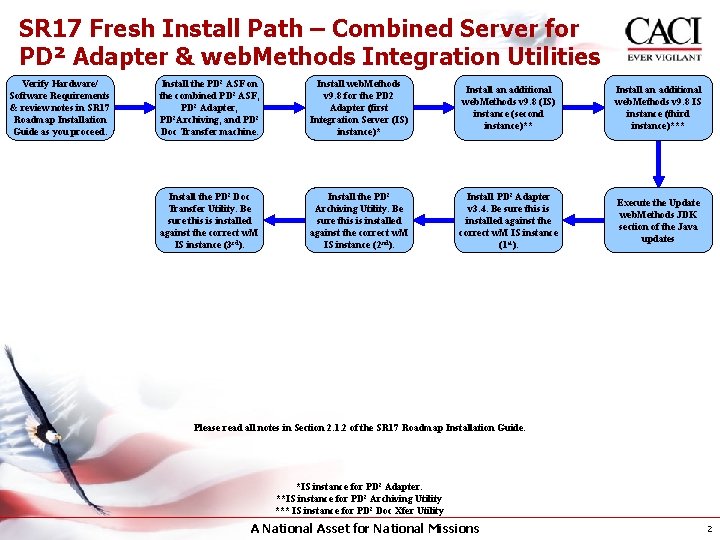
SR 17 Fresh Install Path – Combined Server for PD² Adapter & web. Methods Integration Utilities Verify Hardware/ Software Requirements & review notes in SR 17 Roadmap Installation Guide as you proceed. Install the PD² ASF on the combined PD² ASF, PD² Adapter, PD²Archiving, and PD² Doc Transfer machine. Install web. Methods v 9. 8 for the PD 2 Adapter (first Integration Server (IS) instance)* Install an additional web. Methods v 9. 8 (IS) instance (second instance)** Install an additional web. Methods v 9. 8 IS instance (third instance)*** Install the PD² Doc Transfer Utility. Be sure this is installed against the correct w. M IS instance (3 rd). Install the PD² Archiving Utility. Be sure this is installed against the correct w. M IS instance (2 nd). Install PD² Adapter v 3. 4. Be sure this is installed against the correct w. M IS instance (1 st). Execute the Update web. Methods JDK section of the Java updates Please read all notes in Section 2. 1. 2 of the SR 17 Roadmap Installation Guide. *IS instance for PD² Adapter. **IS instance for PD² Archiving Utility *** IS instance for PD² Doc Xfer Utility A National Asset for National Missions 2
- Slides: 2