
SQL SATURDAY 575 SPONSORS 1 SSAS TABULAR 2016
SQL SATURDAY 575 SPONSORS 1
SSAS TABULAR 2016 Frontline Analytics | Brett Powell 12/10/2016
ABOUT Owner, BI Consultant at Frontline Analytics Blogger: Frontline. Analytics. net Insights. Quest. com Community: Boston BI User Group New England SQL Server Power BI User Groups Brett. Powell@Frontline. Analytics. net @Brett. Powell 76 3
GOALS FOR THIS SESSION Maximize SSAS Tabular 2016 Information Delivery 45 minutes for concepts 15 minutes for examples See the larger picture of SSAS Tabular 2016 Compare to Multidimensional, New Features, Roadmap New Use Cases: Power BI, Direct Query, SSRS, Azure SSAS Hands On Practical Knowledge Upgrade Considerations: Servers, Models, Features Bi-Directional Relationships, New DAX Functions, Scripting Areas to Target for Max ROI; Latest SP 1 Features 4
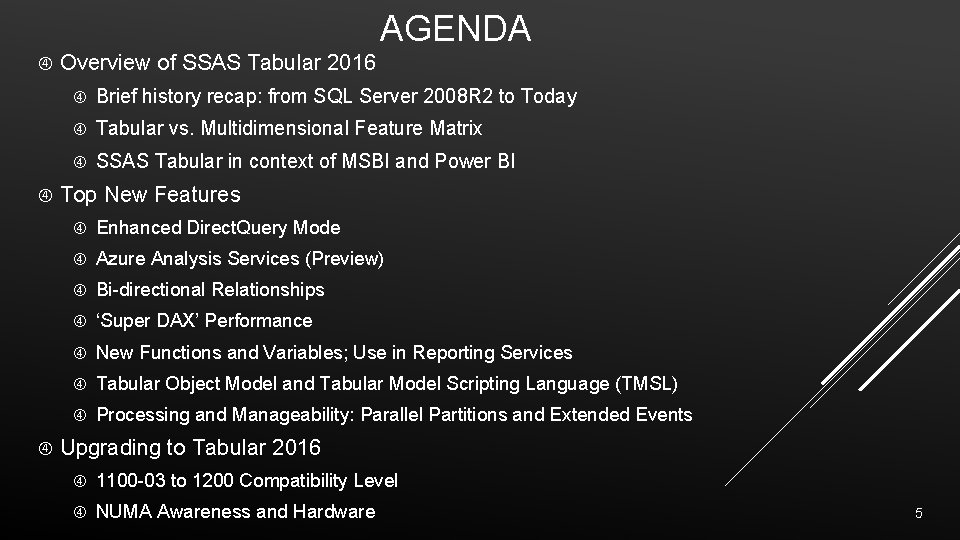
AGENDA Overview of SSAS Tabular 2016 Brief history recap: from SQL Server 2008 R 2 to Today Tabular vs. Multidimensional Feature Matrix SSAS Tabular in context of MSBI and Power BI Top New Features Enhanced Direct. Query Mode Azure Analysis Services (Preview) Bi-directional Relationships ‘Super DAX’ Performance New Functions and Variables; Use in Reporting Services Tabular Object Model and Tabular Model Scripting Language (TMSL) Processing and Manageability: Parallel Partitions and Extended Events Upgrading to Tabular 2016 1100 -03 to 1200 Compatibility Level NUMA Awareness and Hardware 5
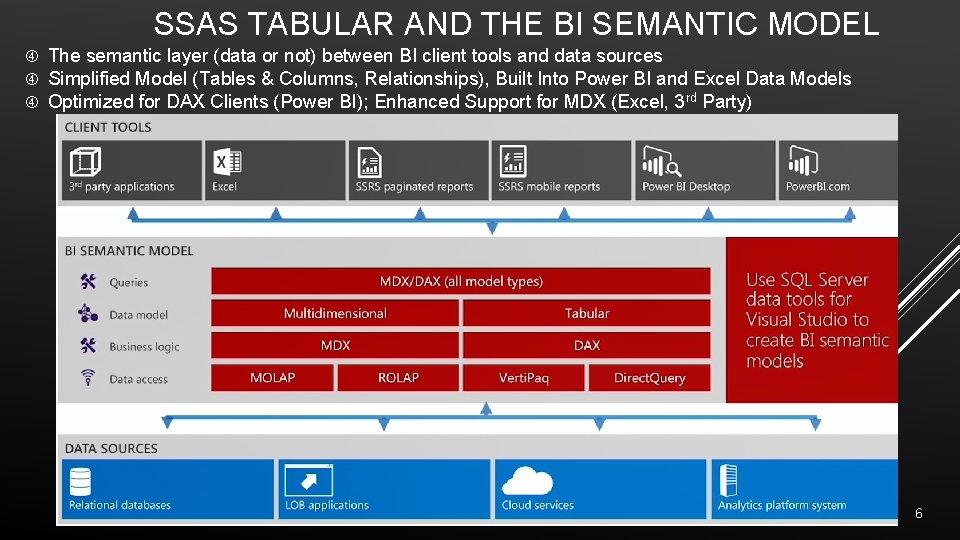
SSAS TABULAR AND THE BI SEMANTIC MODEL The semantic layer (data or not) between BI client tools and data sources Simplified Model (Tables & Columns, Relationships), Built Into Power BI and Excel Data Models Optimized for DAX Clients (Power BI); Enhanced Support for MDX (Excel, 3 rd Party) 6
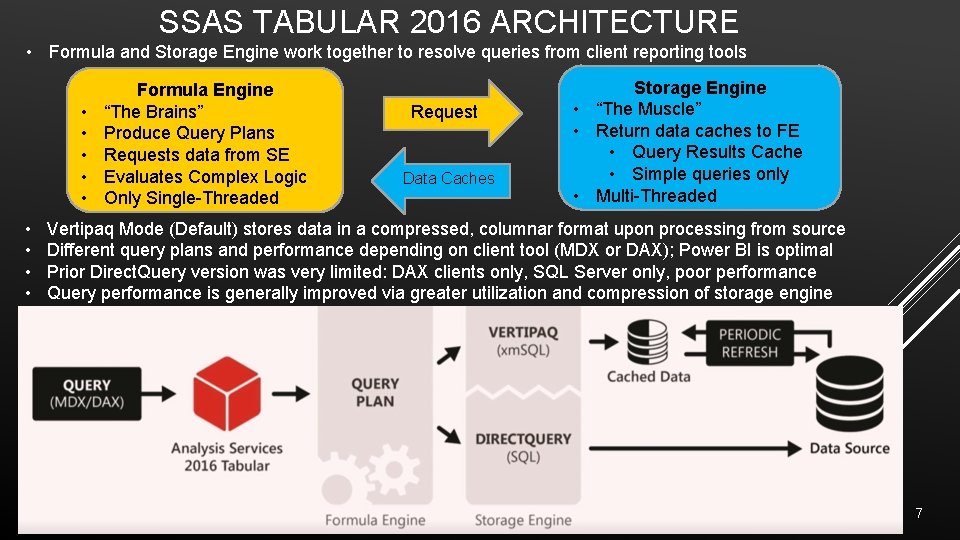
SSAS TABULAR 2016 ARCHITECTURE • Formula and Storage Engine work together to resolve queries from client reporting tools • • • Formula Engine “The Brains” Produce Query Plans Requests data from SE Evaluates Complex Logic Only Single-Threaded Request Data Caches Storage Engine • “The Muscle” • Return data caches to FE • Query Results Cache • Simple queries only • Multi-Threaded Vertipaq Mode (Default) stores data in a compressed, columnar format upon processing from source Different query plans and performance depending on client tool (MDX or DAX); Power BI is optimal Prior Direct. Query version was very limited: DAX clients only, SQL Server only, poor performance Query performance is generally improved via greater utilization and compression of storage engine 7
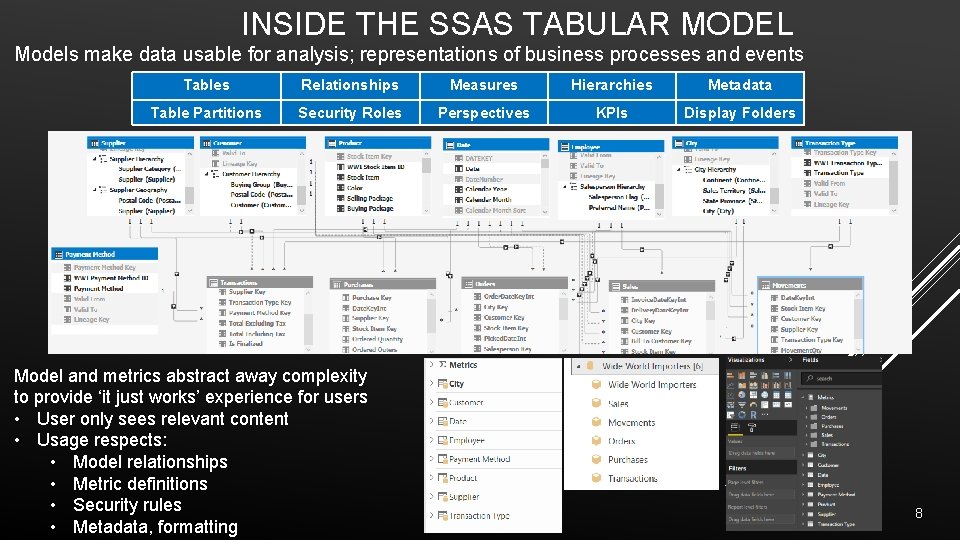
INSIDE THE SSAS TABULAR MODEL Models make data usable for analysis; representations of business processes and events Tables Relationships Measures Hierarchies Metadata Table Partitions Security Roles Perspectives KPIs Display Folders Model and metrics abstract away complexity to provide ‘it just works’ experience for users • User only sees relevant content • Usage respects: • Model relationships • Metric definitions • Security rules • Metadata, formatting 8
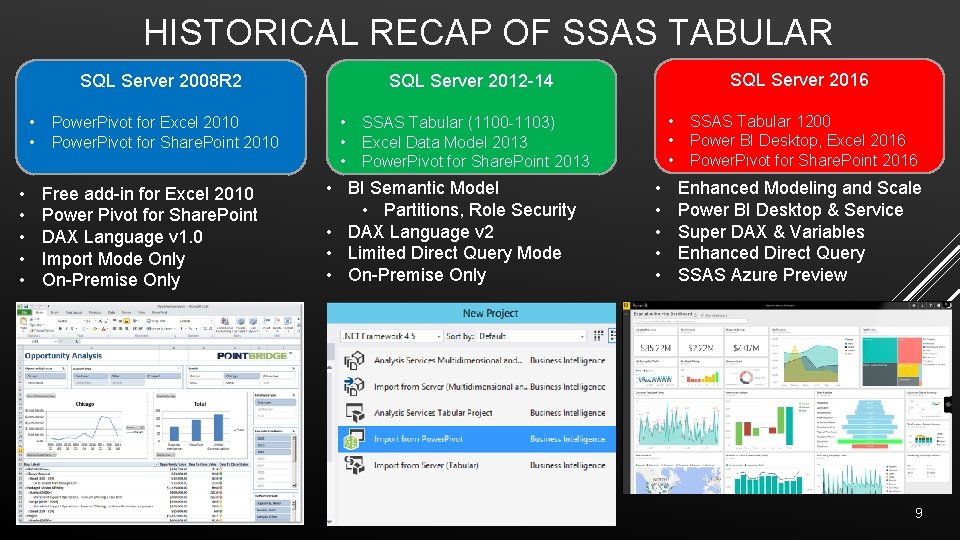
HISTORICAL RECAP OF SSAS TABULAR SQL Server 2008 R 2 • • Power. Pivot for Excel 2010 Power. Pivot for Share. Point 2010 Free add-in for Excel 2010 Power Pivot for Share. Point DAX Language v 1. 0 Import Mode Only On-Premise Only SQL Server 2016 SQL Server 2012 -14 • • • SSAS Tabular (1100 -1103) Excel Data Model 2013 Power. Pivot for Share. Point 2013 • BI Semantic Model • Partitions, Role Security • DAX Language v 2 • Limited Direct Query Mode • On-Premise Only • • • SSAS Tabular 1200 Power BI Desktop, Excel 2016 Power. Pivot for Share. Point 2016 Enhanced Modeling and Scale Power BI Desktop & Service Super DAX & Variables Enhanced Direct Query SSAS Azure Preview 9
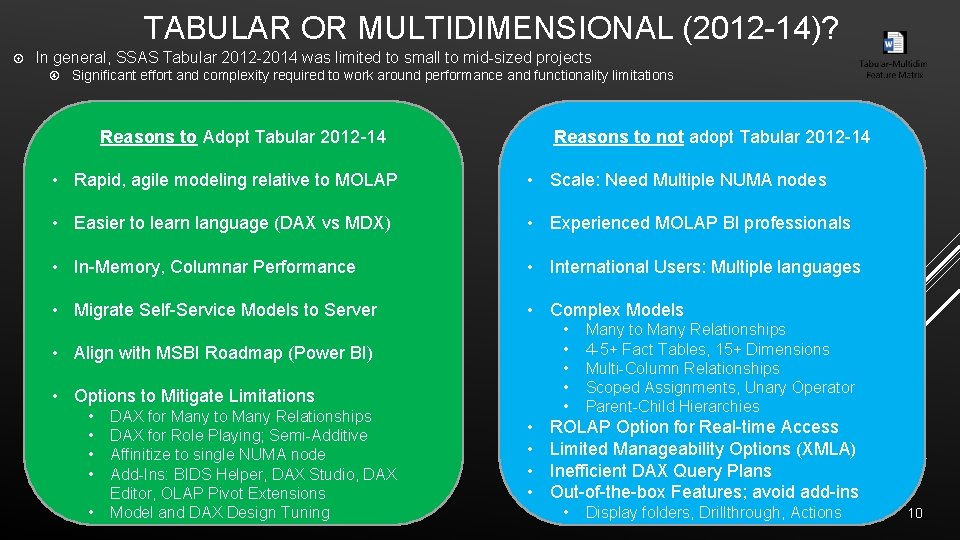
TABULAR OR MULTIDIMENSIONAL (2012 -14)? In general, SSAS Tabular 2012 -2014 was limited to small to mid-sized projects Significant effort and complexity required to work around performance and functionality limitations Reasons to not adopt Tabular 2012 -14 Reasons to Adopt Tabular 2012 -14 • Rapid, agile modeling relative to MOLAP • Scale: Need Multiple NUMA nodes • Easier to learn language (DAX vs MDX) • Experienced MOLAP BI professionals • In-Memory, Columnar Performance • International Users: Multiple languages • Migrate Self-Service Models to Server • Complex Models • • • Align with MSBI Roadmap (Power BI) • Options to Mitigate Limitations • • • DAX for Many to Many Relationships DAX for Role Playing; Semi-Additive Affinitize to single NUMA node Add-Ins: BIDS Helper, DAX Studio, DAX Editor, OLAP Pivot Extensions Model and DAX Design Tuning • • Many to Many Relationships 4 -5+ Fact Tables, 15+ Dimensions Multi-Column Relationships Scoped Assignments, Unary Operator Parent-Child Hierarchies ROLAP Option for Real-time Access Limited Manageability Options (XMLA) Inefficient DAX Query Plans Out-of-the-box Features; avoid add-ins • Display folders, Drillthrough, Actions 10
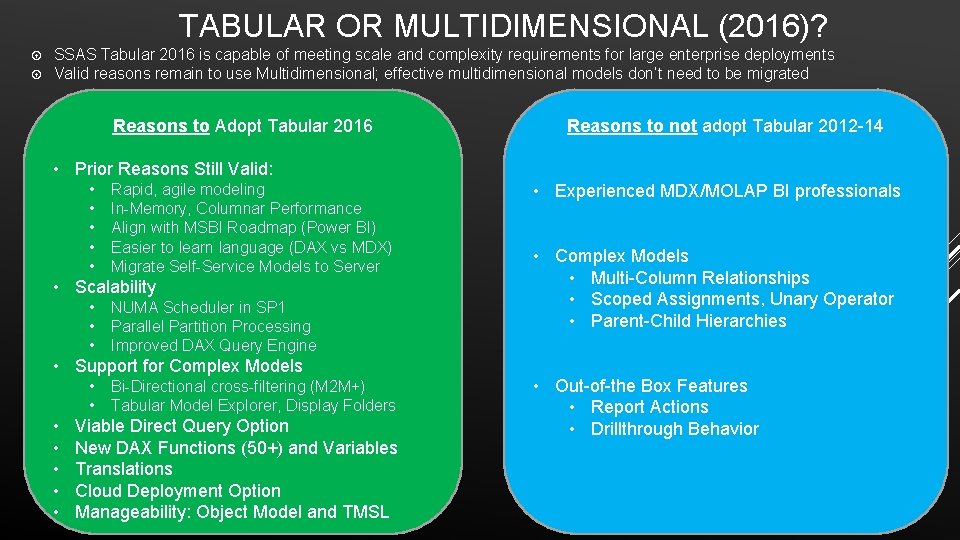
TABULAR OR MULTIDIMENSIONAL (2016)? SSAS Tabular 2016 is capable of meeting scale and complexity requirements for large enterprise deployments Valid reasons remain to use Multidimensional; effective multidimensional models don’t need to be migrated Reasons to Adopt Tabular 2016 Reasons to not adopt Tabular 2012 -14 • Prior Reasons Still Valid: • • • Rapid, agile modeling In-Memory, Columnar Performance Align with MSBI Roadmap (Power BI) Easier to learn language (DAX vs MDX) Migrate Self-Service Models to Server • Scalability • • • NUMA Scheduler in SP 1 Parallel Partition Processing Improved DAX Query Engine • Support for Complex Models • • Bi-Directional cross-filtering (M 2 M+) Tabular Model Explorer, Display Folders Viable Direct Query Option New DAX Functions (50+) and Variables Translations Cloud Deployment Option Manageability: Object Model and TMSL • Experienced MDX/MOLAP BI professionals • Complex Models • Multi-Column Relationships • Scoped Assignments, Unary Operator • Parent-Child Hierarchies • Out-of-the Box Features • Report Actions • Drillthrough Behavior 11
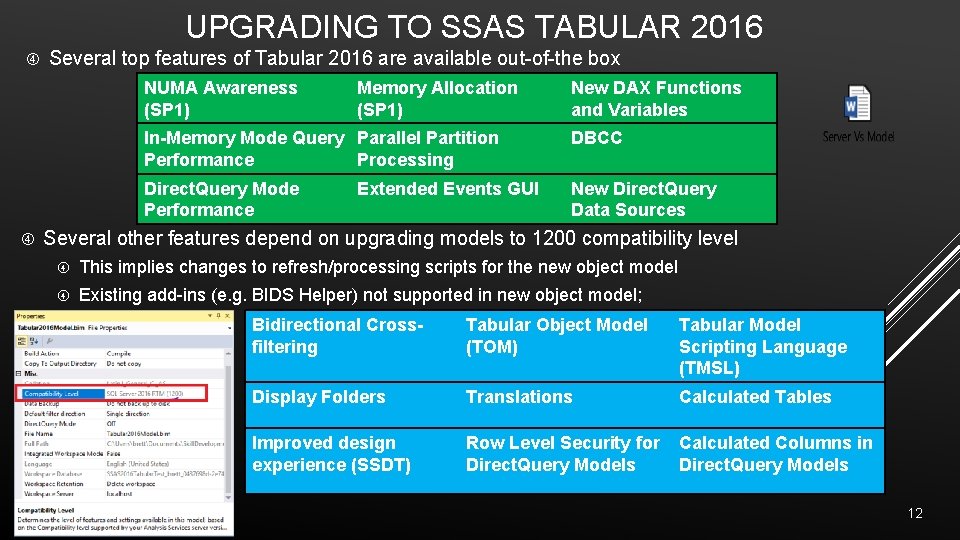
UPGRADING TO SSAS TABULAR 2016 Several top features of Tabular 2016 are available out-of-the box NUMA Awareness (SP 1) Memory Allocation (SP 1) New DAX Functions and Variables In-Memory Mode Query Parallel Partition Performance Processing DBCC Direct. Query Mode Performance New Direct. Query Data Sources Extended Events GUI Several other features depend on upgrading models to 1200 compatibility level This implies changes to refresh/processing scripts for the new object model Existing add-ins (e. g. BIDS Helper) not supported in new object model; Bidirectional Crossfiltering Tabular Object Model (TOM) Tabular Model Scripting Language (TMSL) Display Folders Translations Calculated Tables Improved design experience (SSDT) Row Level Security for Direct. Query Models Calculated Columns in Direct. Query Models 12
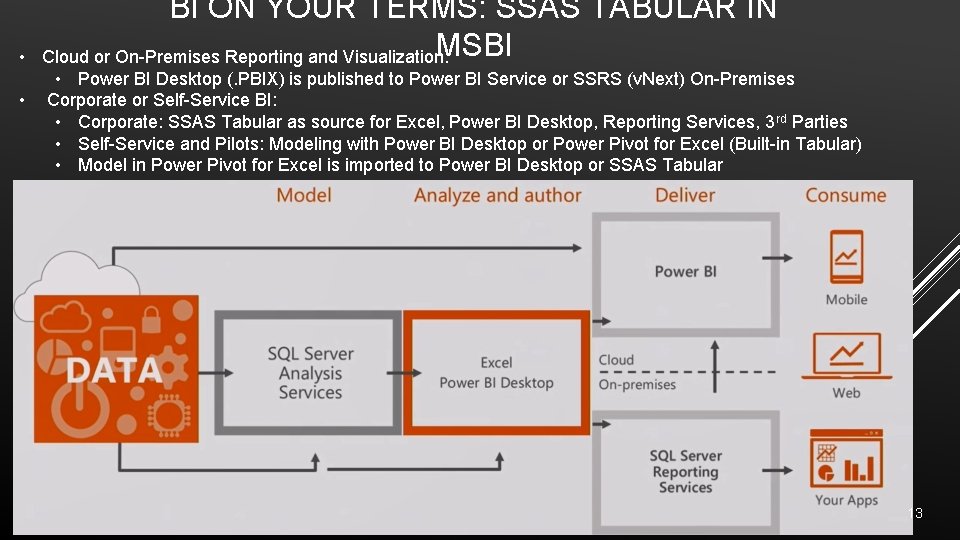
• • BI ON YOUR TERMS: SSAS TABULAR IN MSBI Cloud or On-Premises Reporting and Visualization: • Power BI Desktop (. PBIX) is published to Power BI Service or SSRS (v. Next) On-Premises Corporate or Self-Service BI: • Corporate: SSAS Tabular as source for Excel, Power BI Desktop, Reporting Services, 3 rd Parties • Self-Service and Pilots: Modeling with Power BI Desktop or Power Pivot for Excel (Built-in Tabular) • Model in Power Pivot for Excel is imported to Power BI Desktop or SSAS Tabular 13
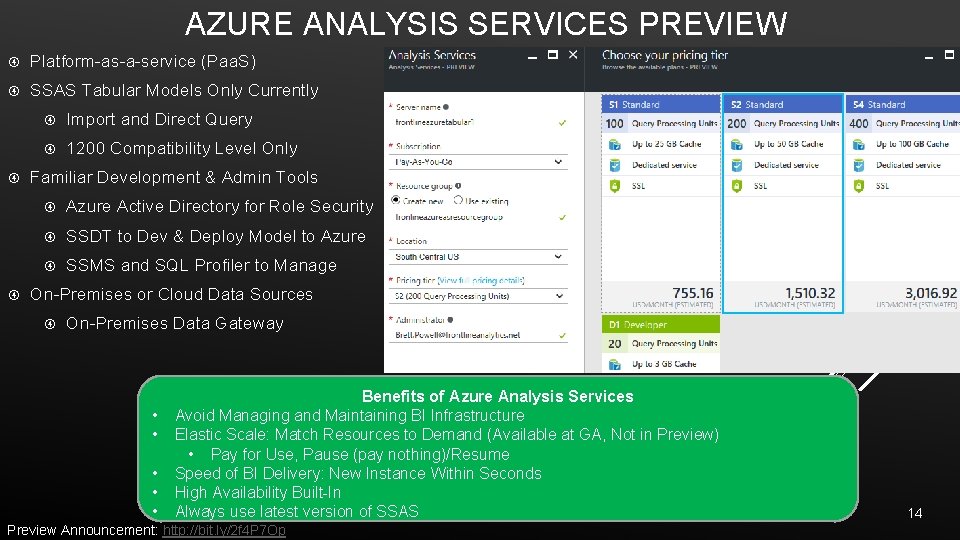
AZURE ANALYSIS SERVICES PREVIEW Platform-as-a-service (Paa. S) SSAS Tabular Models Only Currently Import and Direct Query 1200 Compatibility Level Only Familiar Development & Admin Tools Azure Active Directory for Role Security SSDT to Dev & Deploy Model to Azure SSMS and SQL Profiler to Manage On-Premises or Cloud Data Sources On-Premises Data Gateway • • • Benefits of Azure Analysis Services Avoid Managing and Maintaining BI Infrastructure Elastic Scale: Match Resources to Demand (Available at GA, Not in Preview) • Pay for Use, Pause (pay nothing)/Resume Speed of BI Delivery: New Instance Within Seconds High Availability Built-In Always use latest version of SSAS Preview Announcement: http: //bit. ly/2 f 4 P 7 Op 14
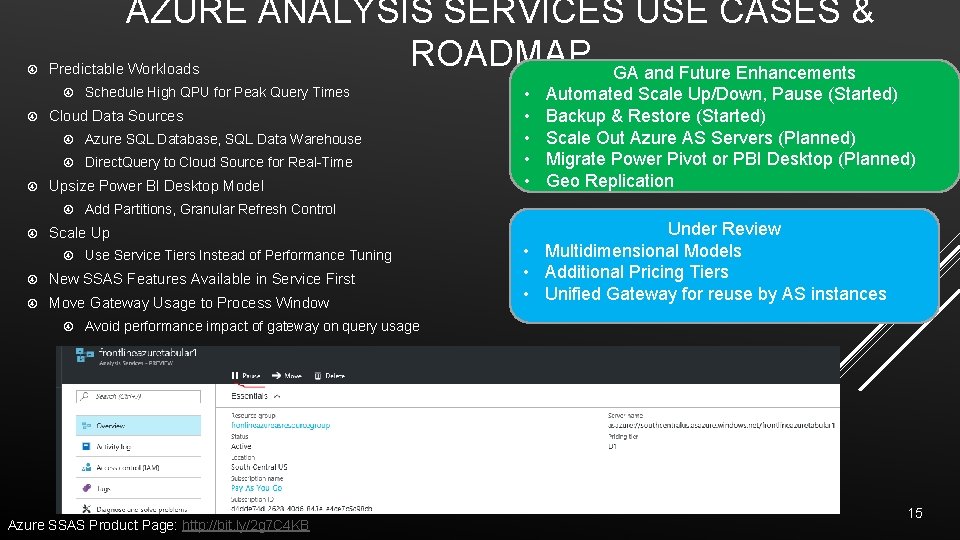
AZURE ANALYSIS SERVICES USE CASES & ROADMAP GA and Future Enhancements Predictable Workloads Cloud Data Sources Azure SQL Database, SQL Data Warehouse Direct. Query to Cloud Source for Real-Time Upsize Power BI Desktop Model Schedule High QPU for Peak Query Times Use Service Tiers Instead of Performance Tuning New SSAS Features Available in Service First Move Gateway Usage to Process Window Automated Scale Up/Down, Pause (Started) Backup & Restore (Started) Scale Out Azure AS Servers (Planned) Migrate Power Pivot or PBI Desktop (Planned) Geo Replication Add Partitions, Granular Refresh Control Scale Up • • • Under Review • Multidimensional Models • Additional Pricing Tiers • Unified Gateway for reuse by AS instances Avoid performance impact of gateway on query usage Azure SSAS Product Page: http: //bit. ly/2 g 7 C 4 KB 15
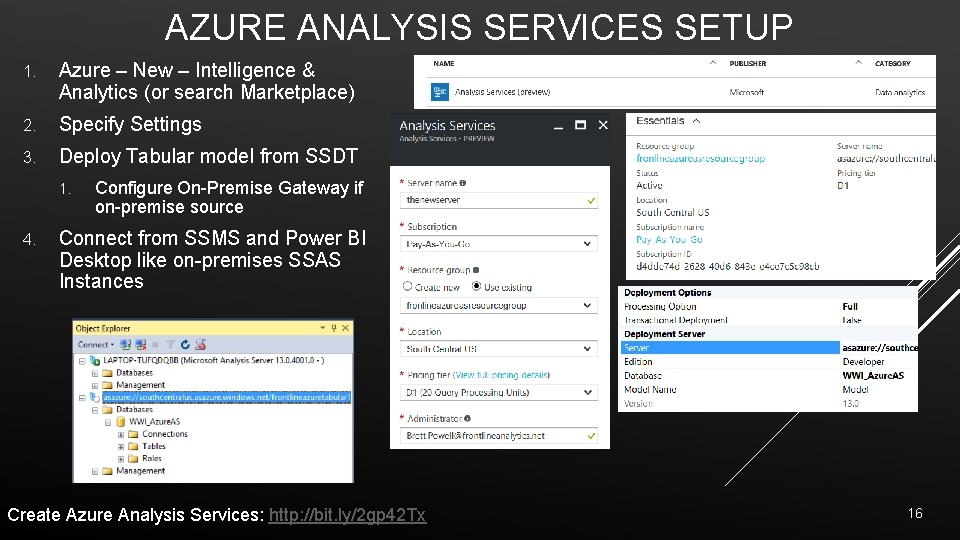
AZURE ANALYSIS SERVICES SETUP 1. Azure – New – Intelligence & Analytics (or search Marketplace) 2. Specify Settings 3. Deploy Tabular model from SSDT 1. 4. Configure On-Premise Gateway if on-premise source Connect from SSMS and Power BI Desktop like on-premises SSAS Instances Create Azure Analysis Services: http: //bit. ly/2 gp 42 Tx 16
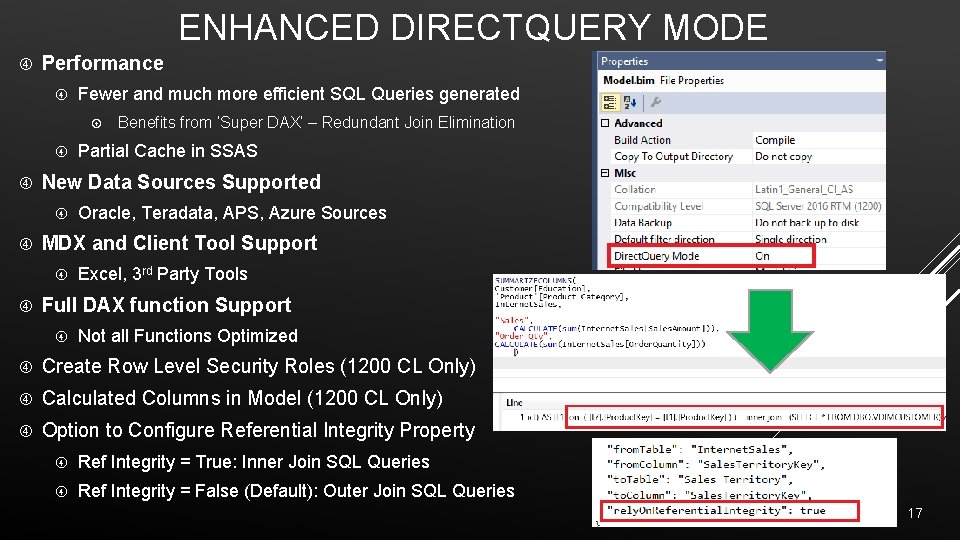
ENHANCED DIRECTQUERY MODE Performance Fewer and much more efficient SQL Queries generated Oracle, Teradata, APS, Azure Sources MDX and Client Tool Support Partial Cache in SSAS New Data Sources Supported Benefits from ‘Super DAX’ – Redundant Join Elimination Excel, 3 rd Party Tools Full DAX function Support Not all Functions Optimized Create Row Level Security Roles (1200 CL Only) Calculated Columns in Model (1200 CL Only) Option to Configure Referential Integrity Property Ref Integrity = True: Inner Join SQL Queries Ref Integrity = False (Default): Outer Join SQL Queries 17
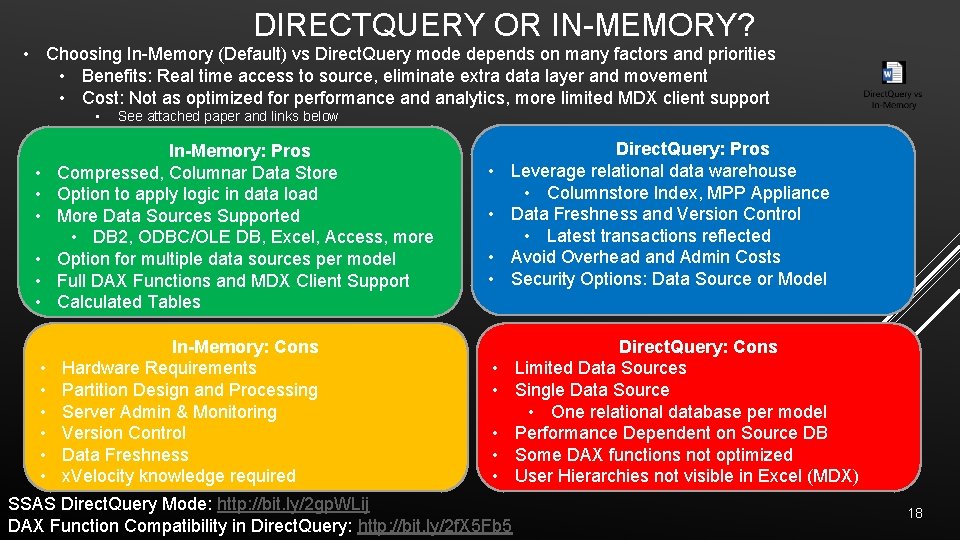
DIRECTQUERY OR IN-MEMORY? • Choosing In-Memory (Default) vs Direct. Query mode depends on many factors and priorities • Benefits: Real time access to source, eliminate extra data layer and movement • Cost: Not as optimized for performance and analytics, more limited MDX client support • See attached paper and links below • • • In-Memory: Pros Compressed, Columnar Data Store Option to apply logic in data load More Data Sources Supported • DB 2, ODBC/OLE DB, Excel, Access, more Option for multiple data sources per model Full DAX Functions and MDX Client Support Calculated Tables • • • In-Memory: Cons Hardware Requirements Partition Design and Processing Server Admin & Monitoring Version Control Data Freshness x. Velocity knowledge required • • Direct. Query: Pros Leverage relational data warehouse • Columnstore Index, MPP Appliance Data Freshness and Version Control • Latest transactions reflected Avoid Overhead and Admin Costs Security Options: Data Source or Model • • • SSAS Direct. Query Mode: http: //bit. ly/2 gp. WLij DAX Function Compatibility in Direct. Query: http: //bit. ly/2 f. X 5 Fb 5 Direct. Query: Cons Limited Data Sources Single Data Source • One relational database per model Performance Dependent on Source DB Some DAX functions not optimized User Hierarchies not visible in Excel (MDX) 18
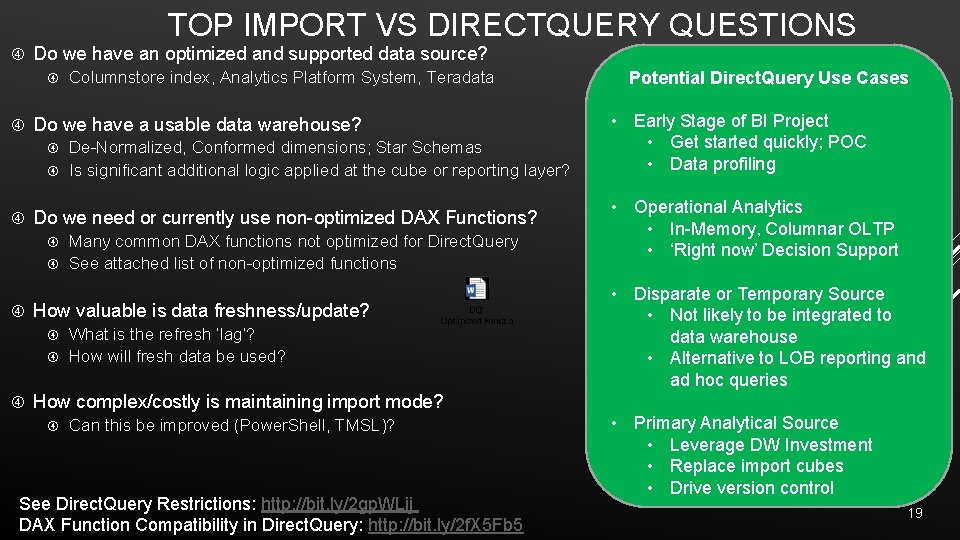
TOP IMPORT VS DIRECTQUERY QUESTIONS Do we have an optimized and supported data source? Columnstore index, Analytics Platform System, Teradata Do we have a usable data warehouse? De-Normalized, Conformed dimensions; Star Schemas Is significant additional logic applied at the cube or reporting layer? Do we need or currently use non-optimized DAX Functions? Many common DAX functions not optimized for Direct. Query See attached list of non-optimized functions How valuable is data freshness/update? What is the refresh ‘lag’? How will fresh data be used? Potential Direct. Query Use Cases • Early Stage of BI Project • Get started quickly; POC • Data profiling • Operational Analytics • In-Memory, Columnar OLTP • ‘Right now’ Decision Support • Disparate or Temporary Source • Not likely to be integrated to data warehouse • Alternative to LOB reporting and ad hoc queries How complex/costly is maintaining import mode? Can this be improved (Power. Shell, TMSL)? See Direct. Query Restrictions: http: //bit. ly/2 gp. WLij DAX Function Compatibility in Direct. Query: http: //bit. ly/2 f. X 5 Fb 5 • Primary Analytical Source • Leverage DW Investment • Replace import cubes • Drive version control 19
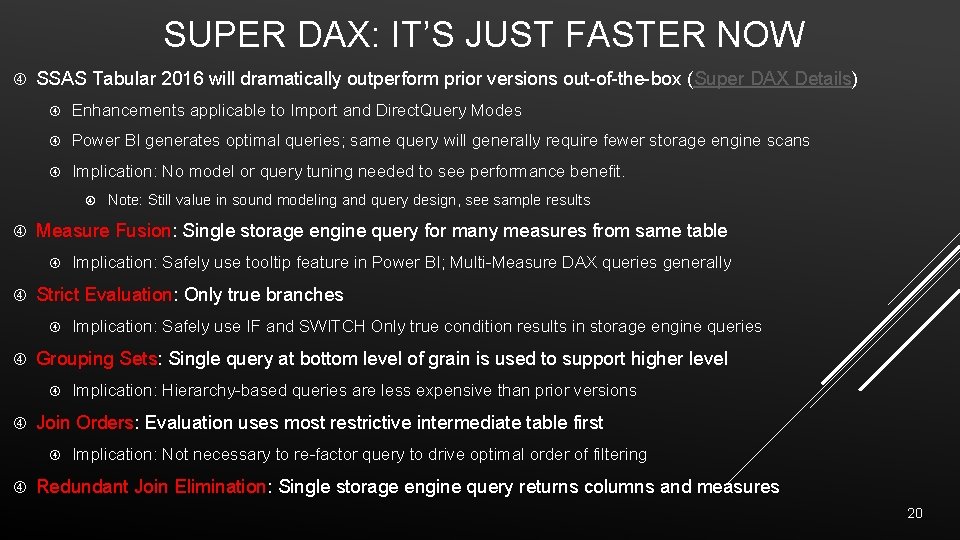
SUPER DAX: IT’S JUST FASTER NOW SSAS Tabular 2016 will dramatically outperform prior versions out-of-the-box (Super DAX Details) Enhancements applicable to Import and Direct. Query Modes Power BI generates optimal queries; same query will generally require fewer storage engine scans Implication: No model or query tuning needed to see performance benefit. Measure Fusion: Single storage engine query for many measures from same table Implication: Hierarchy-based queries are less expensive than prior versions Join Orders: Evaluation uses most restrictive intermediate table first Implication: Safely use IF and SWITCH Only true condition results in storage engine queries Grouping Sets: Single query at bottom level of grain is used to support higher level Implication: Safely use tooltip feature in Power BI; Multi-Measure DAX queries generally Strict Evaluation: Only true branches Note: Still value in sound modeling and query design, see sample results Implication: Not necessary to re-factor query to drive optimal order of filtering Redundant Join Elimination: Single storage engine query returns columns and measures 20
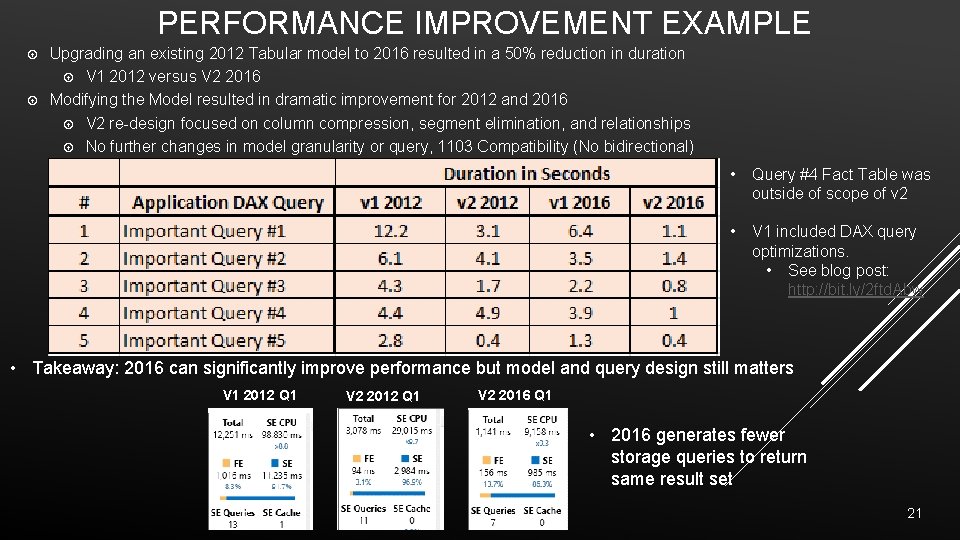
PERFORMANCE IMPROVEMENT EXAMPLE Upgrading an existing 2012 Tabular model to 2016 resulted in a 50% reduction in duration V 1 2012 versus V 2 2016 Modifying the Model resulted in dramatic improvement for 2012 and 2016 V 2 re-design focused on column compression, segment elimination, and relationships No further changes in model granularity or query, 1103 Compatibility (No bidirectional) • Query #4 Fact Table was outside of scope of v 2 • V 1 included DAX query optimizations. • See blog post: http: //bit. ly/2 ftd. Abw • Takeaway: 2016 can significantly improve performance but model and query design still matters V 1 2012 Q 1 V 2 2016 Q 1 • 2016 generates fewer storage queries to return same result set 21
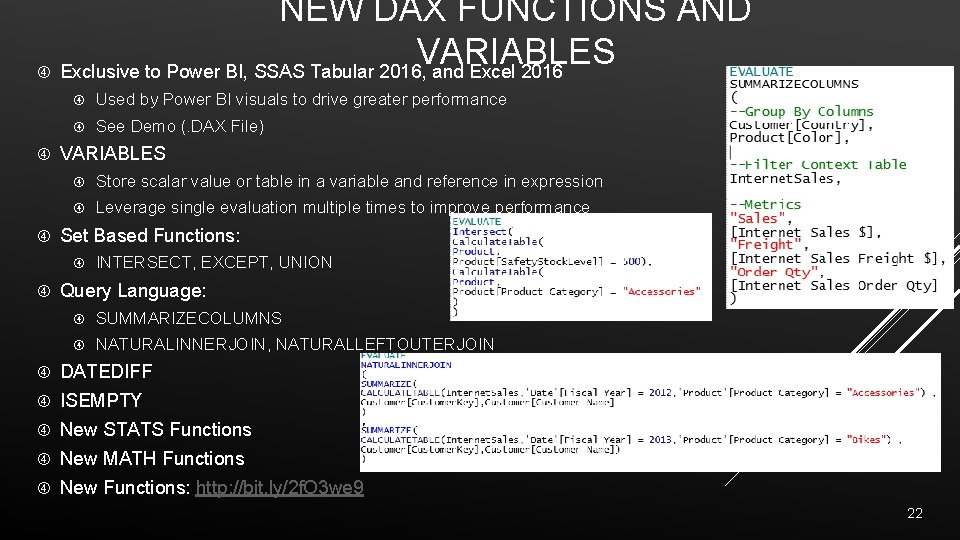
NEW DAX FUNCTIONS AND VARIABLES Exclusive to Power BI, SSAS Tabular 2016, and Excel 2016 Used by Power BI visuals to drive greater performance See Demo (. DAX File) VARIABLES Store scalar value or table in a variable and reference in expression Leverage single evaluation multiple times to improve performance Set Based Functions: INTERSECT, EXCEPT, UNION Query Language: SUMMARIZECOLUMNS NATURALINNERJOIN, NATURALLEFTOUTERJOIN DATEDIFF ISEMPTY New STATS Functions New MATH Functions New Functions: http: //bit. ly/2 f. O 3 we 9 22
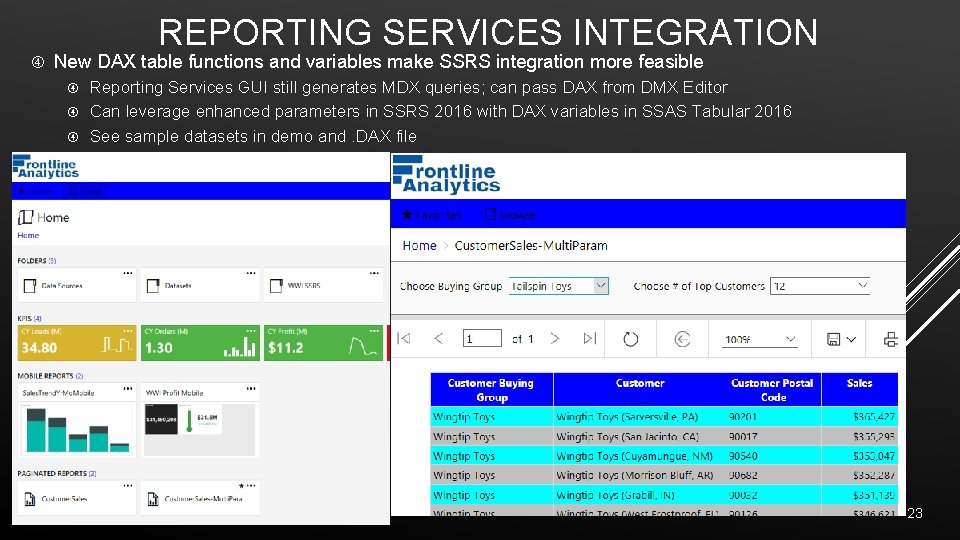
REPORTING SERVICES INTEGRATION New DAX table functions and variables make SSRS integration more feasible Reporting Services GUI still generates MDX queries; can pass DAX from DMX Editor Can leverage enhanced parameters in SSRS 2016 with DAX variables in SSAS Tabular 2016 See sample datasets in demo and. DAX file 23
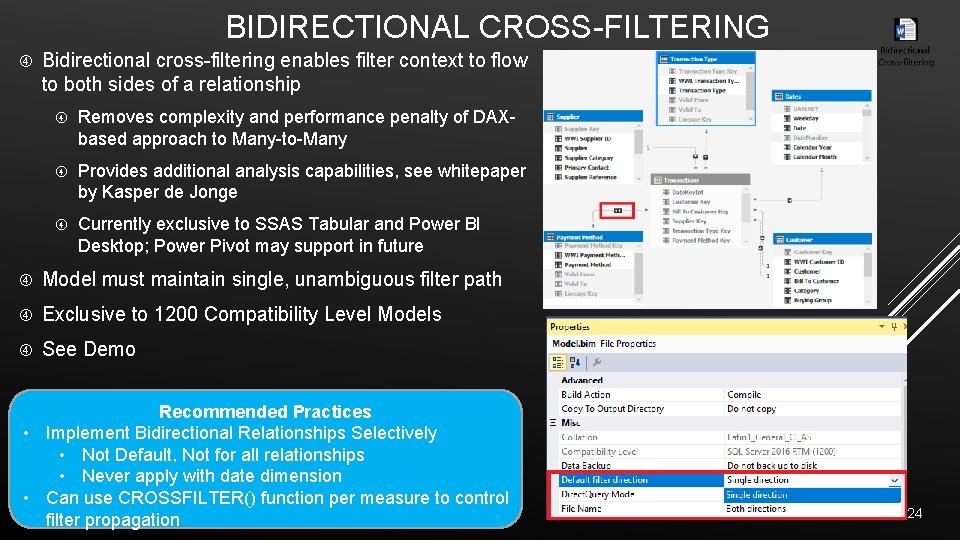
BIDIRECTIONAL CROSS-FILTERING Bidirectional cross-filtering enables filter context to flow to both sides of a relationship Removes complexity and performance penalty of DAXbased approach to Many-to-Many Provides additional analysis capabilities, see whitepaper by Kasper de Jonge Currently exclusive to SSAS Tabular and Power BI Desktop; Power Pivot may support in future Model must maintain single, unambiguous filter path Exclusive to 1200 Compatibility Level Models See Demo Recommended Practices • Implement Bidirectional Relationships Selectively • Not Default, Not for all relationships • Never apply with date dimension • Can use CROSSFILTER() function per measure to control filter propagation 24
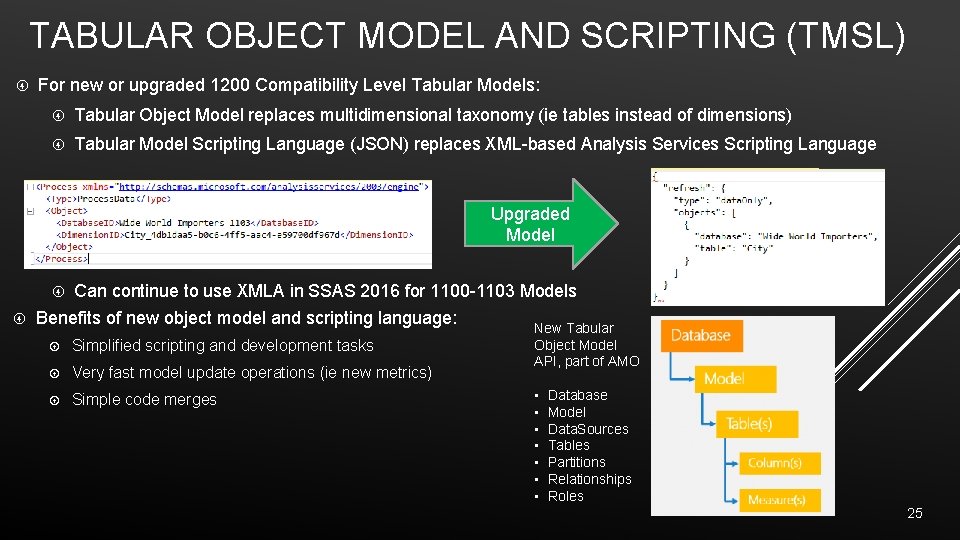
TABULAR OBJECT MODEL AND SCRIPTING (TMSL) For new or upgraded 1200 Compatibility Level Tabular Models: Tabular Object Model replaces multidimensional taxonomy (ie tables instead of dimensions) Tabular Model Scripting Language (JSON) replaces XML-based Analysis Services Scripting Language Upgraded Model Can continue to use XMLA in SSAS 2016 for 1100 -1103 Models Benefits of new object model and scripting language: Simplified scripting and development tasks Very fast model update operations (ie new metrics) Simple code merges New Tabular Object Model API, part of AMO • • Database Model Data. Sources Tables Partitions Relationships Roles 25
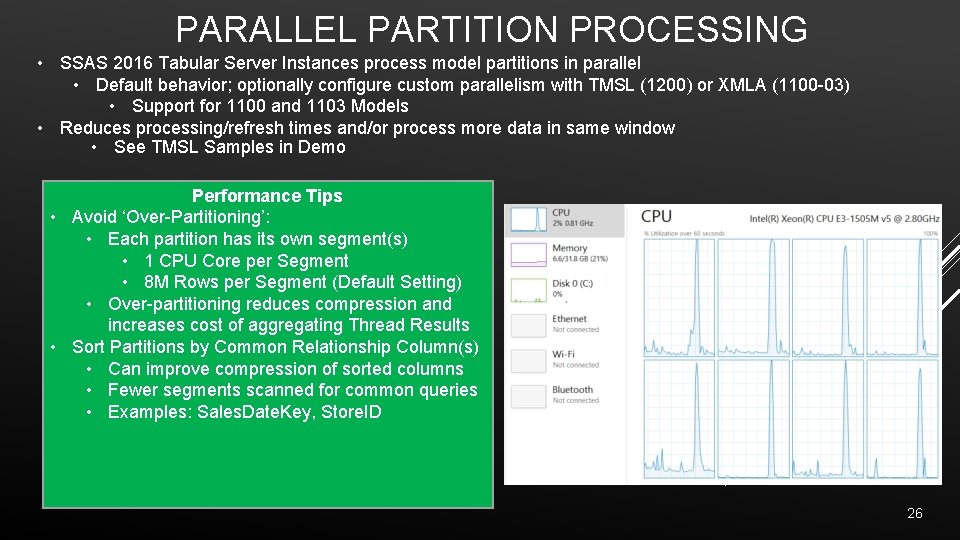
PARALLEL PARTITION PROCESSING • SSAS 2016 Tabular Server Instances process model partitions in parallel • Default behavior; optionally configure custom parallelism with TMSL (1200) or XMLA (1100 -03) • Support for 1100 and 1103 Models • Reduces processing/refresh times and/or process more data in same window • See TMSL Samples in Demo Performance Tips • Avoid ‘Over-Partitioning’: • Each partition has its own segment(s) • 1 CPU Core per Segment • 8 M Rows per Segment (Default Setting) • Over-partitioning reduces compression and increases cost of aggregating Thread Results • Sort Partitions by Common Relationship Column(s) • Can improve compression of sorted columns • Fewer segments scanned for common queries • Examples: Sales. Date. Key, Store. ID 26
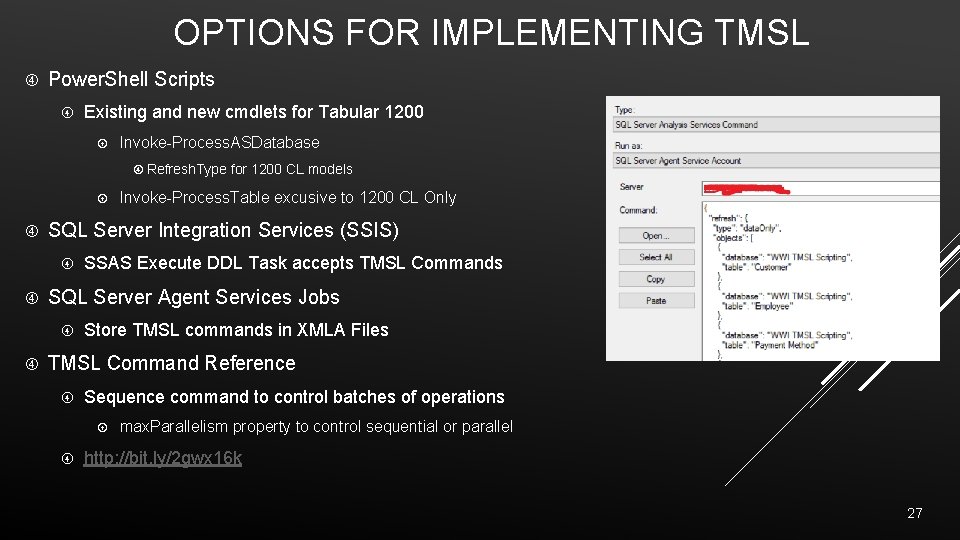
OPTIONS FOR IMPLEMENTING TMSL Power. Shell Scripts Existing and new cmdlets for Tabular 1200 Invoke-Process. ASDatabase Refresh. Type for 1200 CL models SQL Server Integration Services (SSIS) SSAS Execute DDL Task accepts TMSL Commands SQL Server Agent Services Jobs Invoke-Process. Table excusive to 1200 CL Only Store TMSL commands in XMLA Files TMSL Command Reference Sequence command to control batches of operations max. Parallelism property to control sequential or parallel http: //bit. ly/2 gwx 16 k 27
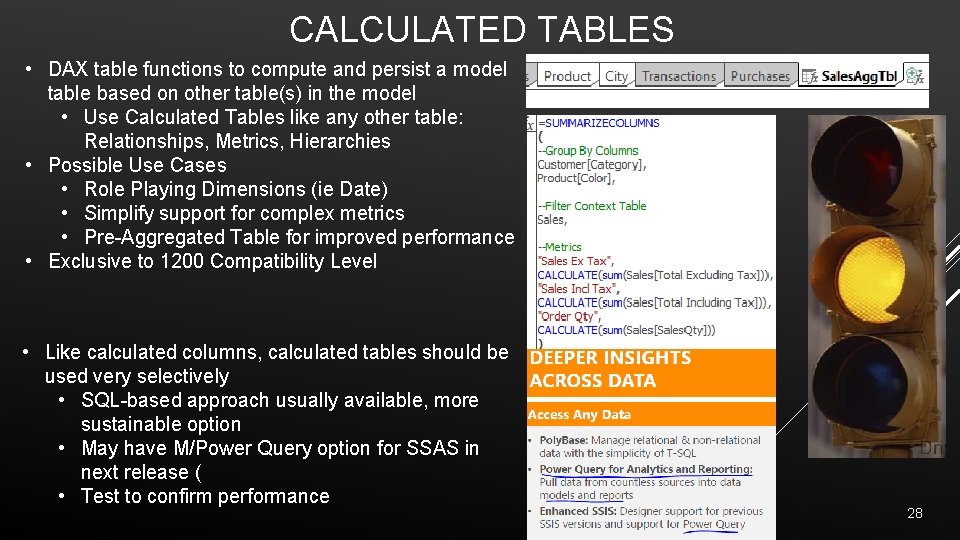
CALCULATED TABLES • DAX table functions to compute and persist a model table based on other table(s) in the model • Use Calculated Tables like any other table: Relationships, Metrics, Hierarchies • Possible Use Cases • Role Playing Dimensions (ie Date) • Simplify support for complex metrics • Pre-Aggregated Table for improved performance • Exclusive to 1200 Compatibility Level • Like calculated columns, calculated tables should be used very selectively • SQL-based approach usually available, more sustainable option • May have M/Power Query option for SSAS in next release ( • Test to confirm performance 28
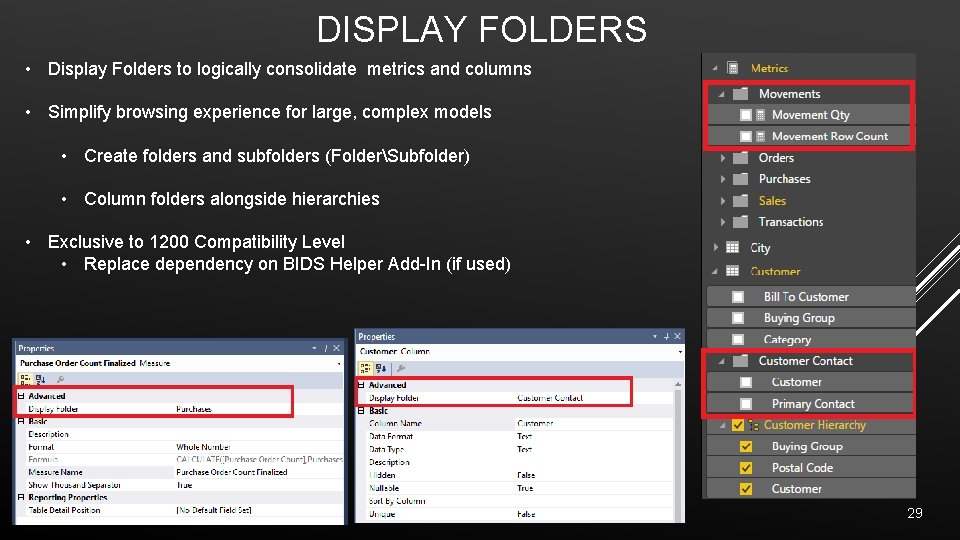
DISPLAY FOLDERS • Display Folders to logically consolidate metrics and columns • Simplify browsing experience for large, complex models • Create folders and subfolders (FolderSubfolder) • Column folders alongside hierarchies • Exclusive to 1200 Compatibility Level • Replace dependency on BIDS Helper Add-In (if used) 29
TOOLS FOR SSAS TABULAR 2016 30
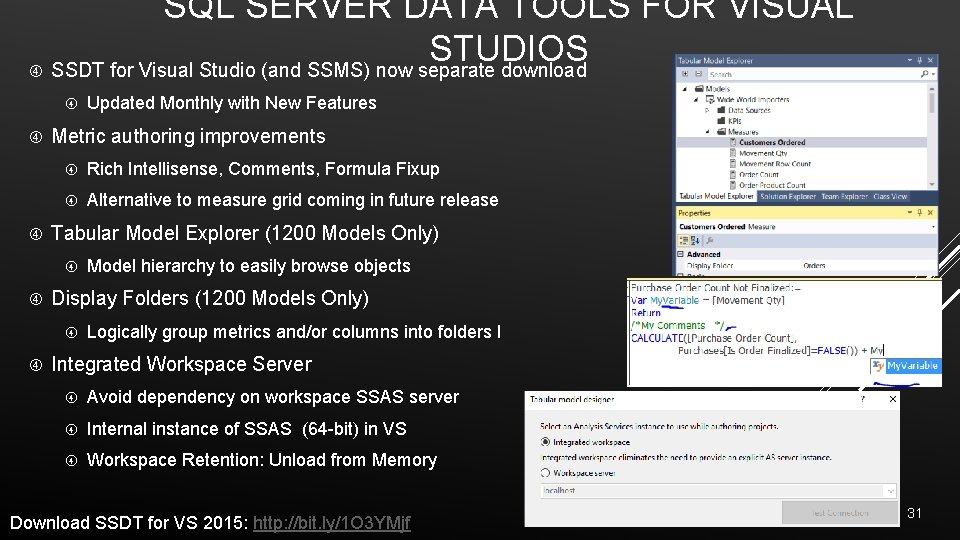
SQL SERVER DATA TOOLS FOR VISUAL STUDIOS SSDT for Visual Studio (and SSMS) now separate download Metric authoring improvements Rich Intellisense, Comments, Formula Fixup Alternative to measure grid coming in future release Tabular Model Explorer (1200 Models Only) Model hierarchy to easily browse objects Display Folders (1200 Models Only) Updated Monthly with New Features Logically group metrics and/or columns into folders l Integrated Workspace Server Avoid dependency on workspace SSAS server Internal instance of SSAS (64 -bit) in VS Workspace Retention: Unload from Memory Download SSDT for VS 2015: http: //bit. ly/1 O 3 YMjf 31
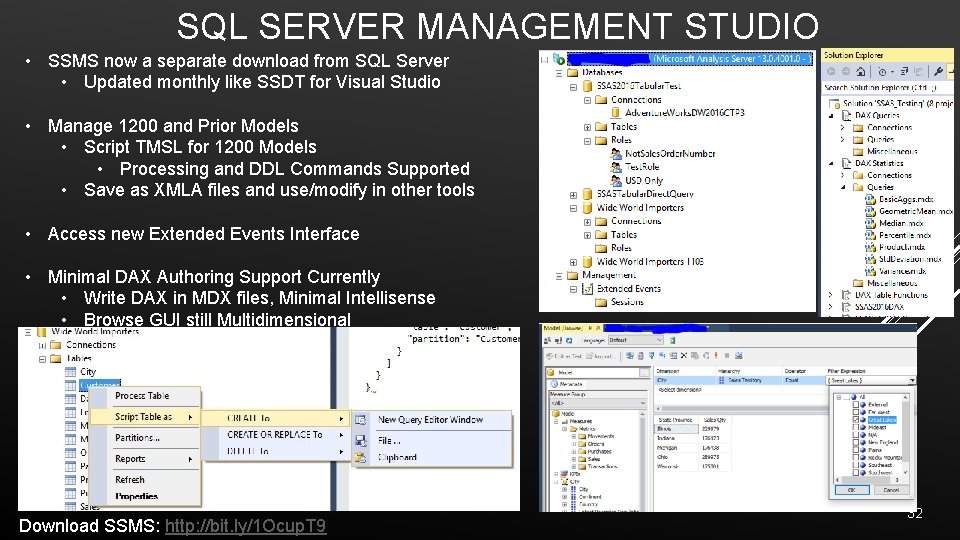
SQL SERVER MANAGEMENT STUDIO • SSMS now a separate download from SQL Server • Updated monthly like SSDT for Visual Studio • Manage 1200 and Prior Models • Script TMSL for 1200 Models • Processing and DDL Commands Supported • Save as XMLA files and use/modify in other tools • Access new Extended Events Interface • Minimal DAX Authoring Support Currently • Write DAX in MDX files, Minimal Intellisense • Browse GUI still Multidimensional Download SSMS: http: //bit. ly/1 Ocup. T 9 32
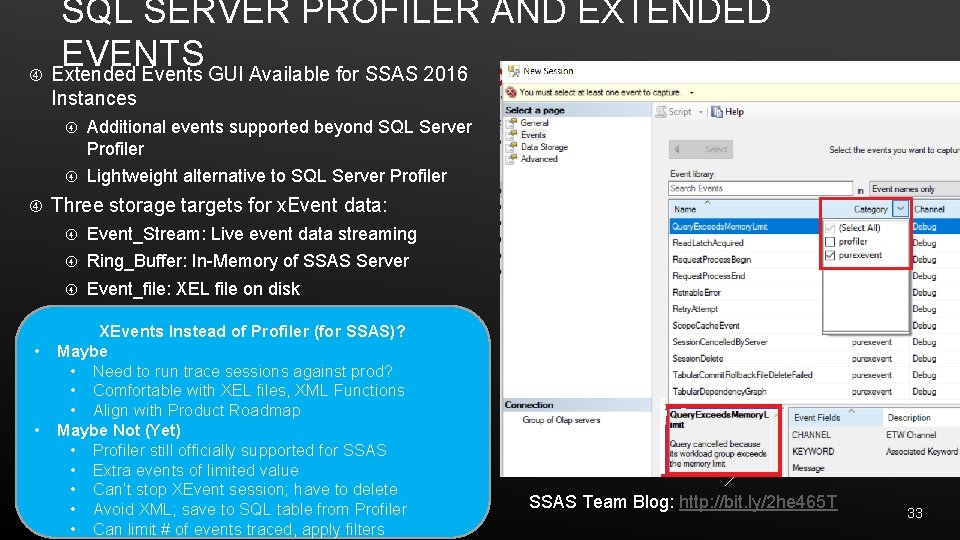
SQL SERVER PROFILER AND EXTENDED EVENTS Extended Events GUI Available for SSAS 2016 Instances • • Additional events supported beyond SQL Server Profiler Lightweight alternative to SQL Server Profiler Three storage targets for x. Event data: Event_Stream: Live event data streaming Ring_Buffer: In-Memory of SSAS Server Event_file: XEL file on disk XEvents Instead of Profiler (for SSAS)? Maybe • Need to run trace sessions against prod? • Comfortable with XEL files, XML Functions • Align with Product Roadmap Maybe Not (Yet) • Profiler still officially supported for SSAS • Extra events of limited value • Can’t stop XEvent session; have to delete • Avoid XML; save to SQL table from Profiler • Can limit # of events traced, apply filters SSAS Team Blog: http: //bit. ly/2 he 465 T 33
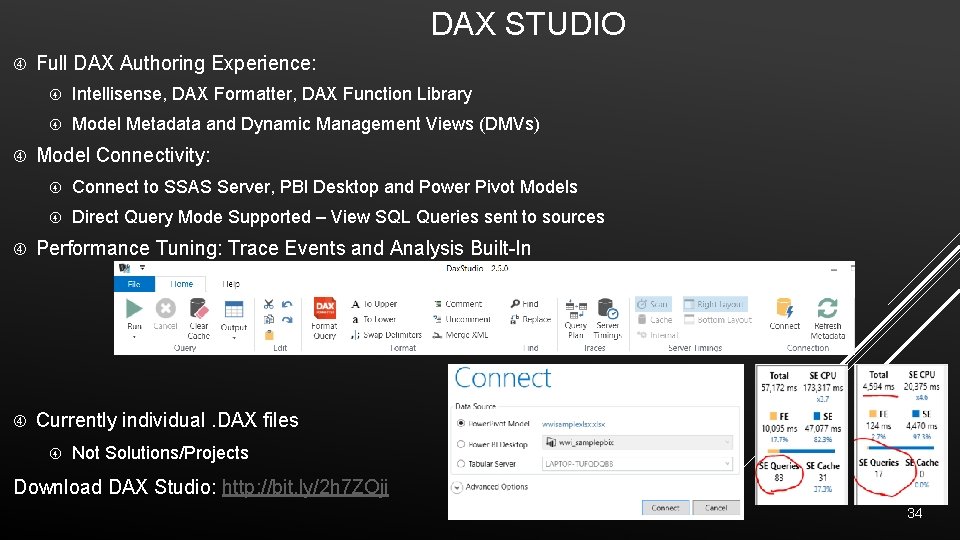
DAX STUDIO Full DAX Authoring Experience: Intellisense, DAX Formatter, DAX Function Library Model Metadata and Dynamic Management Views (DMVs) Model Connectivity: Connect to SSAS Server, PBI Desktop and Power Pivot Models Direct Query Mode Supported – View SQL Queries sent to sources Performance Tuning: Trace Events and Analysis Built-In Currently individual. DAX files Not Solutions/Projects Download DAX Studio: http: //bit. ly/2 h 7 ZOji 34
APPENDIX: SSAS TABULAR MODELING AND DAX 35
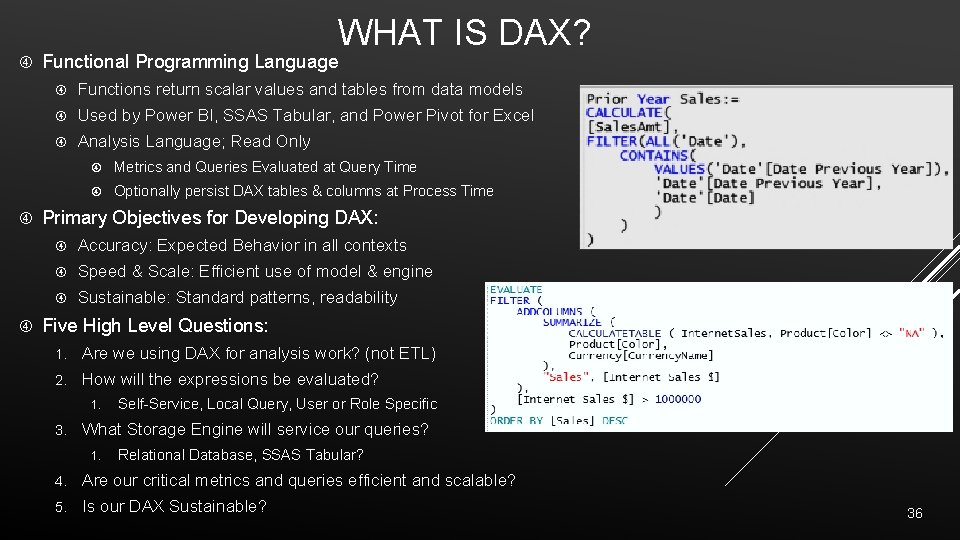
WHAT IS DAX? Functional Programming Language Functions return scalar values and tables from data models Used by Power BI, SSAS Tabular, and Power Pivot for Excel Analysis Language; Read Only Metrics and Queries Evaluated at Query Time Optionally persist DAX tables & columns at Process Time Primary Objectives for Developing DAX: Accuracy: Expected Behavior in all contexts Speed & Scale: Efficient use of model & engine Sustainable: Standard patterns, readability Five High Level Questions: 1. Are we using DAX for analysis work? (not ETL) 2. How will the expressions be evaluated? 1. 3. Self-Service, Local Query, User or Role Specific What Storage Engine will service our queries? 1. Relational Database, SSAS Tabular? 4. Are our critical metrics and queries efficient and scalable? 5. Is our DAX Sustainable? 36
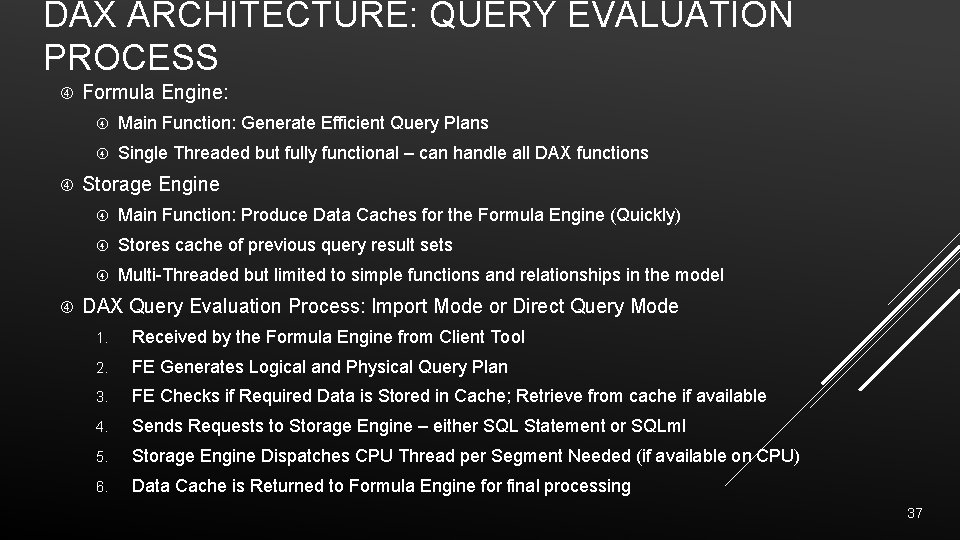
DAX ARCHITECTURE: QUERY EVALUATION PROCESS Formula Engine: Main Function: Generate Efficient Query Plans Single Threaded but fully functional – can handle all DAX functions Storage Engine Main Function: Produce Data Caches for the Formula Engine (Quickly) Stores cache of previous query result sets Multi-Threaded but limited to simple functions and relationships in the model DAX Query Evaluation Process: Import Mode or Direct Query Mode 1. Received by the Formula Engine from Client Tool 2. FE Generates Logical and Physical Query Plan 3. FE Checks if Required Data is Stored in Cache; Retrieve from cache if available 4. Sends Requests to Storage Engine – either SQL Statement or SQLml 5. Storage Engine Dispatches CPU Thread per Segment Needed (if available on CPU) 6. Data Cache is Returned to Formula Engine for final processing 37
BEFORE DAX: MODEL AND HARDWARE In-Memory Model Careful selection of row granularity and column cardinality Analysis of compression and partitioning (8 M row default) Analysis of memory settings and optimal sort order Direct Query Model Referential Integrity to Support Inner Join Queries Simple Views of Source Data for Query Plans High Performance Source: Massive Parallel Processing (MPP) Appliance: APS, Teradata, Oracle; SQL Server with Columnstore Index or optimized schema? Scaling Up and Out: Preferred In Memory Hardware: 3 Ghz+ Clock, 2133 Mhz+ RAM, large L 3 cache Scale Up: More memory and CPU cores to accommodate larger models with more segments Scale Out: Load balance multiple SSAS Query Servers to address concurrency 38
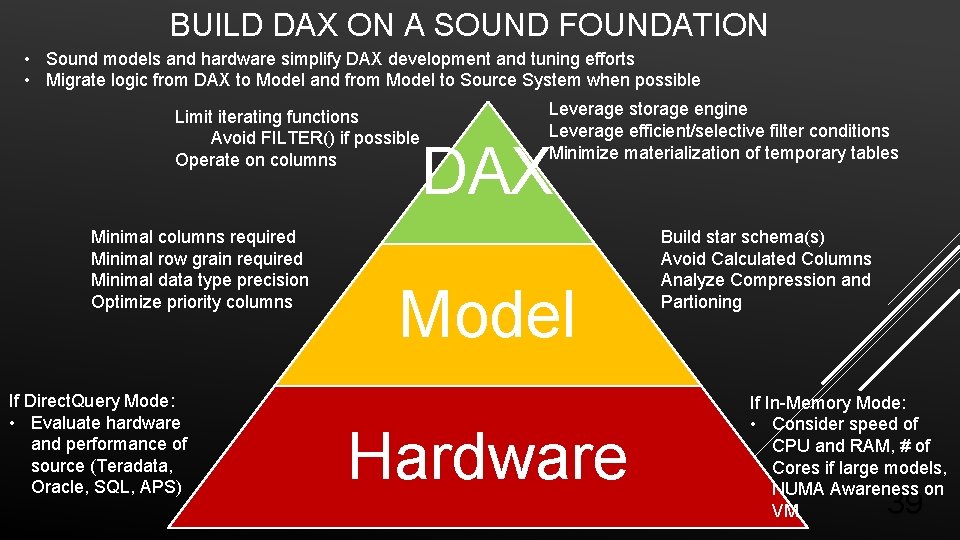
BUILD DAX ON A SOUND FOUNDATION • Sound models and hardware simplify DAX development and tuning efforts • Migrate logic from DAX to Model and from Model to Source System when possible Limit iterating functions Avoid FILTER() if possible Operate on columns Minimal columns required Minimal row grain required Minimal data type precision Optimize priority columns If Direct. Query Mode: • Evaluate hardware and performance of source (Teradata, Oracle, SQL, APS) Leverage storage engine Leverage efficient/selective filter conditions Minimize materialization of temporary tables DAX Model Hardware Build star schema(s) Avoid Calculated Columns Analyze Compression and Partioning If In-Memory Mode: • Consider speed of CPU and RAM, # of Cores if large models, NUMA Awareness on VM 39
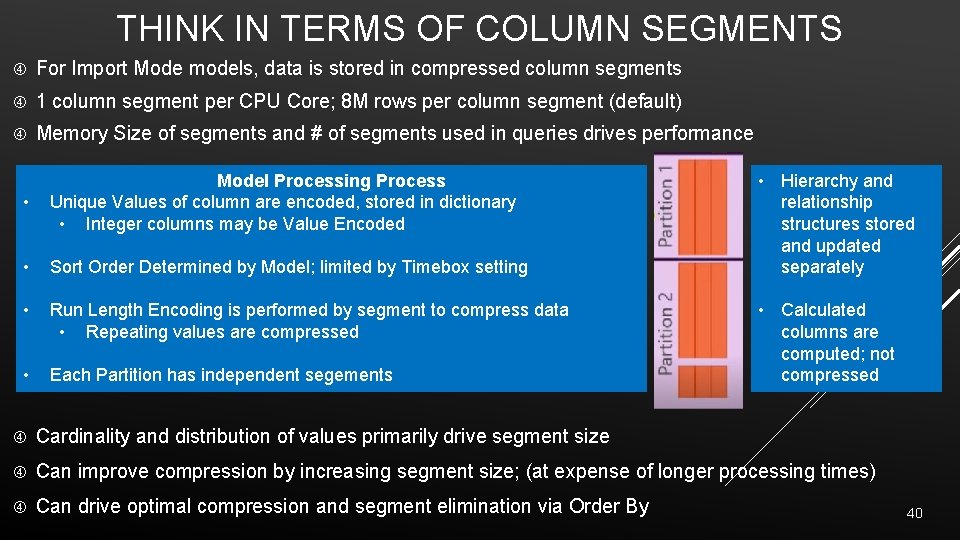
THINK IN TERMS OF COLUMN SEGMENTS For Import Mode models, data is stored in compressed column segments 1 column segment per CPU Core; 8 M rows per column segment (default) Memory Size of segments and # of segments used in queries drives performance • Model Processing Process Unique Values of column are encoded, stored in dictionary • Integer columns may be Value Encoded • Sort Order Determined by Model; limited by Timebox setting • Run Length Encoding is performed by segment to compress data • Repeating values are compressed • Each Partition has independent segements • Hierarchy and relationship structures stored and updated separately • Calculated columns are computed; not compressed Cardinality and distribution of values primarily drive segment size Can improve compression by increasing segment size; (at expense of longer processing times) Can drive optimal compression and segment elimination via Order By 40
SSAS TABULAR MODEL RED LIGHTS! Out of Memory Over Memory Limits Queries and processing paging to disk Model source queries pointed directly to source tables Disparate Data Types Used for Relationship Columns Processing will fail when source table changes Example: Text to Integer can cause failure, errors Dimension Tables with Duplicate Keys (or potential for dupes) Relationships require distinct values on one side NUMA Awareness: SSAS Tabular 2012 -2014 Not Numa Aware Mixed Granularity of Fact Table Rows Will significantly add to complexity of mode and DAX 41
SSAS TABULAR MODEL: YELLOW LIGHTS Calculated Columns on (large) Fact Tables Unnecessary columns loaded to model Decimal Data Type when Currency/Fixed Decimal suffices Model Table Source SQL used as ETL layer Layers of views on views, complex logic, CTEs, Unions, etc Snowflake Schema or Fact to Fact relationships Limited Tabular Experience, Hubris Accidental BI, Power User, MOLAP Pro “It’s in memory, it should be fast” No knowledge of top/critical queries and columns Inefficient Partition Sizes reducing compression Lack of Support for Early Arriving Facts Silo Model: Different definitions used in other models or reports FILTER() used inappropriately Wide ‘Extract Report’ Requirements 42
WHY LEARN DAX? DAX is now the primary analysis language of Microsoft BI Author in SSAS, Power BI Desktop and Power Pivot for Excel Enhanced SSAS Tabular 2016, New DAX Functions and Variables Azure Analysis Services (Preview, Currently Tabular Only) Models Are Needed, with or without the data Simplified Interface, Platform for Self-Service and BI Development Version Control, Security, Performance, Custom Requirements Direct Query Now a Viable Option; Leverage DW/Relational Sources Reasonable Learning Curve Simpler than MDX; Can benefit from SQL and Excel experience Target core concepts and functions for accelerated growth ‘Composable’ Functional Language becomes easier to author and understand 43
Write It: Free Dev Instance Development at work HOW TO LEARN DAX AND SSAS TABULAR? Experiment, Test Analyze It Explain results Explain performance Study It Start with Power. Pivot. Pro, then upgrade Read and write blogs Concepts to Focus on: • Evaluation Context: “Which rows are active to be evaluated? ” • Filter Context and Row Contenxt • Context Transition: Row Context to Filter Context • New DAX Functions and Variables 44
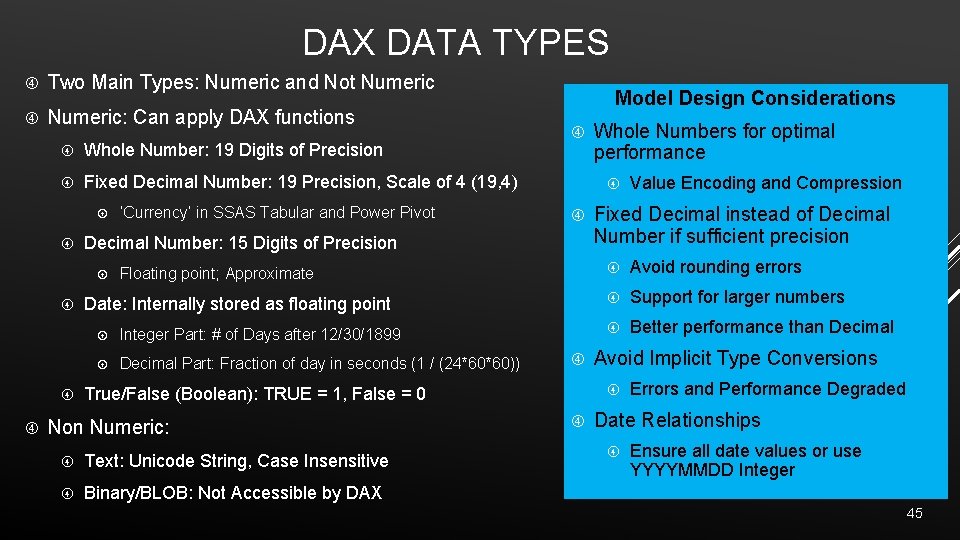
DAX DATA TYPES Two Main Types: Numeric and Not Numeric: Can apply DAX functions Whole Number: 19 Digits of Precision Fixed Decimal Number: 19 Precision, Scale of 4 (19, 4) Floating point; Approximate Date: Internally stored as floating point Integer Part: # of Days after 12/30/1899 Decimal Part: Fraction of day in seconds (1 / (24*60*60)) Text: Unicode String, Case Insensitive Binary/BLOB: Not Accessible by DAX Value Encoding and Compression Fixed Decimal instead of Decimal Number if sufficient precision Avoid rounding errors Support for larger numbers Better performance than Decimal Avoid Implicit Type Conversions True/False (Boolean): TRUE = 1, False = 0 Non Numeric: Whole Numbers for optimal performance Decimal Number: 15 Digits of Precision ‘Currency’ in SSAS Tabular and Power Pivot Model Design Considerations Errors and Performance Degraded Date Relationships Ensure all date values or use YYYYMMDD Integer 45
![DAX SYNTAX AND OPERATORS Table with spaces: ‘the table’[column] Table without spaces: thetable[column] Measure:](http://slidetodoc.com/presentation_image_h/90d499f453344f0252878f9823ac6991/image-46.jpg "DAX SYNTAX AND OPERATORS Table with spaces: ‘the table’[column] Table without spaces: thetable[column] Measure:")
DAX SYNTAX AND OPERATORS Table with spaces: ‘the table’[column] Table without spaces: thetable[column] Measure: [My Measure] Define Measure: Table. Name[My New Measure] Column from result set table: [The Column Name] Type Parenthesis Symbol () Use Precedence Order Grouping Arguments Arithmetic +, -, *, / Basic Arithmetic Logical &&, || And, Or conditions Text Concatenate Comparison & =, <>, >=, <, <=, > Concatenation of strings Equal, not equal, greater or less than 46
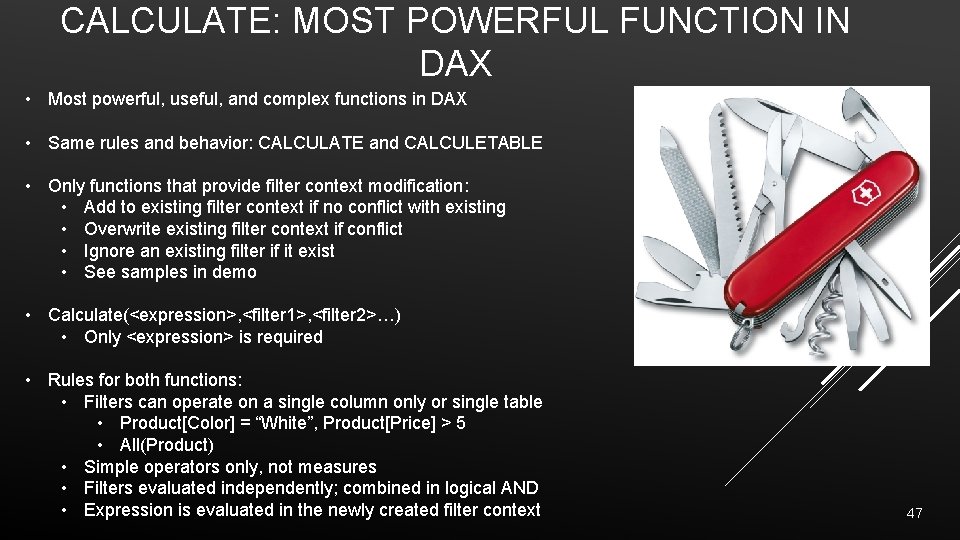
CALCULATE: MOST POWERFUL FUNCTION IN DAX • Most powerful, useful, and complex functions in DAX • Same rules and behavior: CALCULATE and CALCULETABLE • Only functions that provide filter context modification: • Add to existing filter context if no conflict with existing • Overwrite existing filter context if conflict • Ignore an existing filter if it exist • See samples in demo • Calculate(<expression>, <filter 1>, <filter 2>…) • Only <expression> is required • Rules for both functions: • Filters can operate on a single column only or single table • Product[Color] = “White”, Product[Price] > 5 • All(Product) • Simple operators only, not measures • Filters evaluated independently; combined in logical AND • Expression is evaluated in the newly created filter context 47
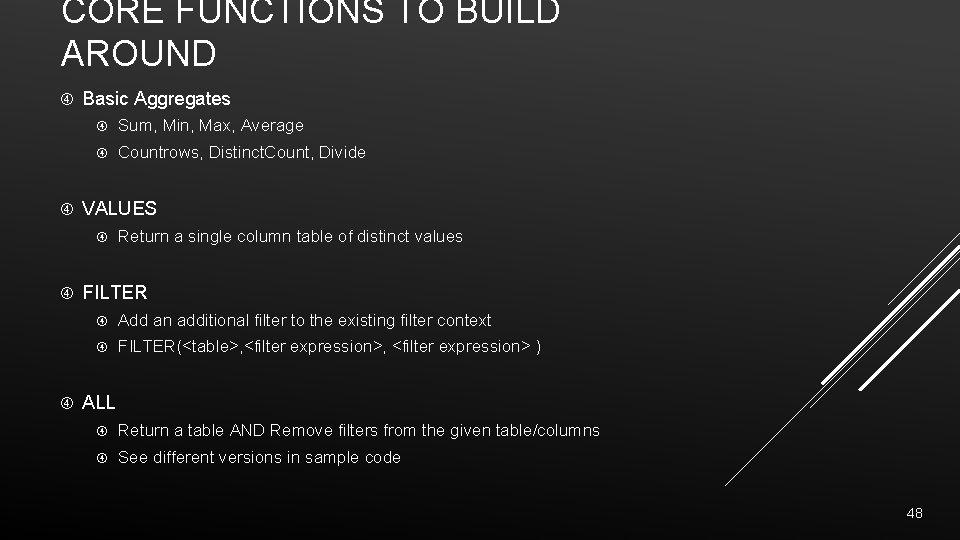
CORE FUNCTIONS TO BUILD AROUND Basic Aggregates Sum, Min, Max, Average Countrows, Distinct. Count, Divide VALUES Return a single column table of distinct values FILTER Add an additional filter to the existing filter context FILTER(<table>, <filter expression> ) ALL Return a table AND Remove filters from the given table/columns See different versions in sample code 48
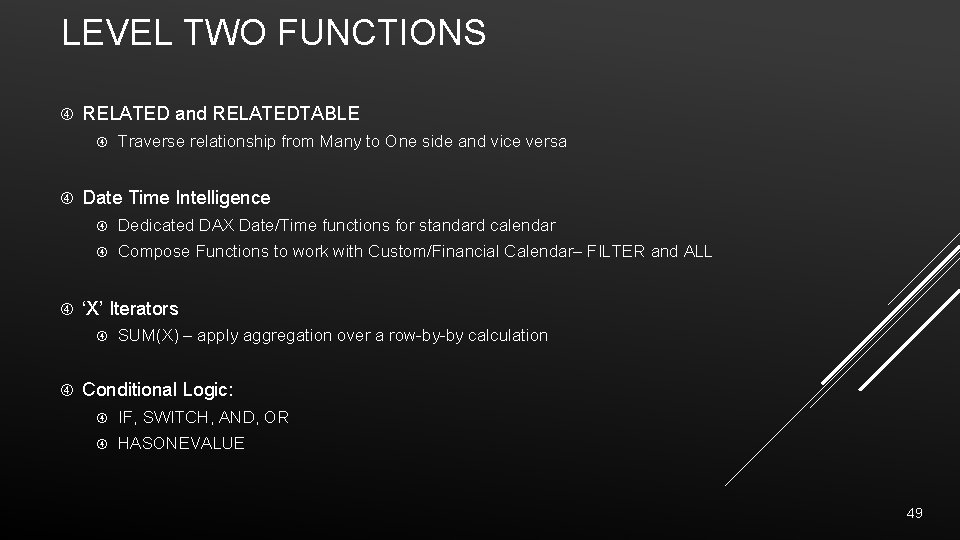
LEVEL TWO FUNCTIONS RELATED and RELATEDTABLE Date Time Intelligence Dedicated DAX Date/Time functions for standard calendar Compose Functions to work with Custom/Financial Calendar– FILTER and ALL ‘X’ Iterators Traverse relationship from Many to One side and vice versa SUM(X) – apply aggregation over a row-by-by calculation Conditional Logic: IF, SWITCH, AND, OR HASONEVALUE 49
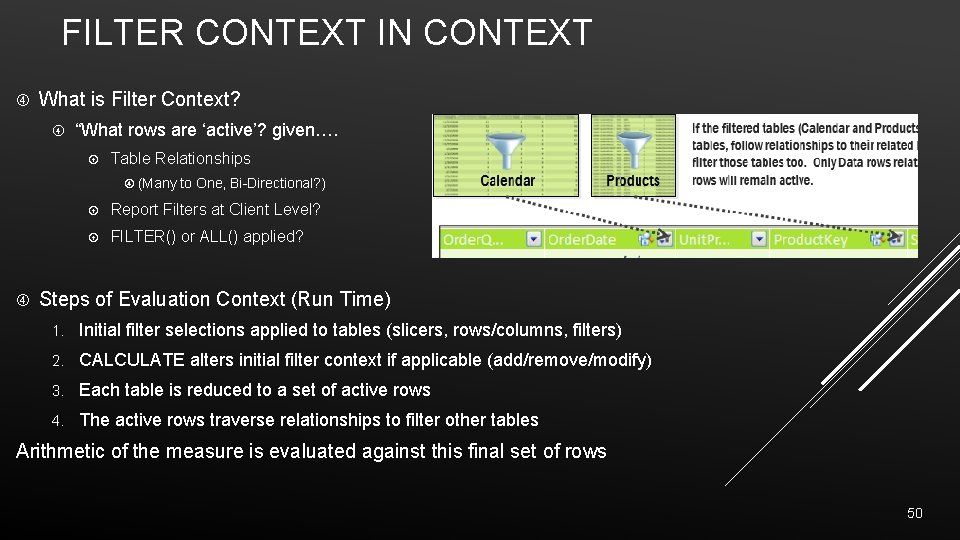
FILTER CONTEXT IN CONTEXT What is Filter Context? “What rows are ‘active’? given…. Table Relationships (Many to One, Bi-Directional? ) Report Filters at Client Level? FILTER() or ALL() applied? Steps of Evaluation Context (Run Time) 1. Initial filter selections applied to tables (slicers, rows/columns, filters) 2. CALCULATE alters initial filter context if applicable (add/remove/modify) 3. Each table is reduced to a set of active rows 4. The active rows traverse relationships to filter other tables Arithmetic of the measure is evaluated against this final set of rows 50
- Slides: 50