
SPORD October 2008 Page 1 Training Manual SPORD
SPORD October 2008 Page 1 Training Manual SPORD. Service Provider Trouble Report Database. Introduction & Handling of Trouble Report Application SPORD. Realtime server: www. spord. net Test server: www. spord-test. net
SPORD October 2008 Page 2 Training Manual SPORD. . Definition SPORD is a system to create, handle and control any problems concerning service and logistics between BMW and the Partners.
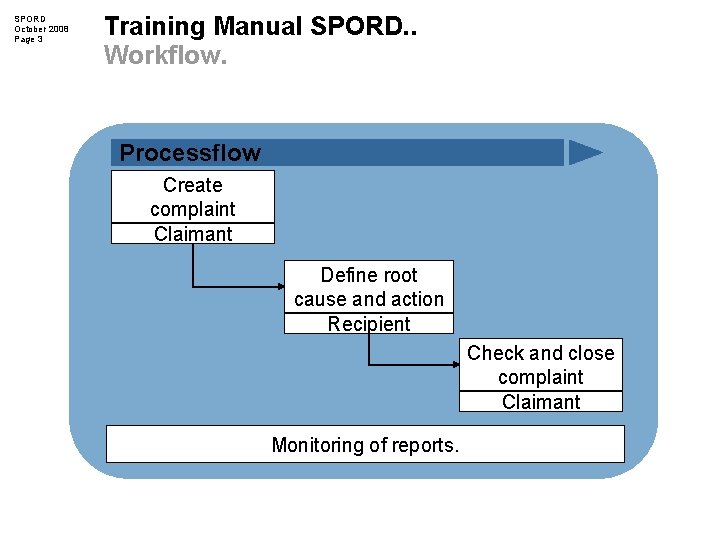
SPORD October 2008 Page 3 Training Manual SPORD. . Workflow. Processflow Create complaint Claimant Define root cause and action Recipient Check and close complaint Claimant Monitoring of reports.
SPORD October 2008 Page 4 Training Manual SPORD. . Testserver SPORD. Please use www. SPORD-test. net for testing SPORD. Username: testsupplier Password: test The SPORD test server is not 1: 1 to the real time server. There is one test user for all users.
SPORD October 2008 Page 5 Training Manual SPORD. . Content. – Log-in SPORD. – Mailbox Overview and Structure. – Create a Trouble Report. – Answer a Trouble Report. – Close a Trouble Report. – Analysis and List (Reporting) – FAQ.
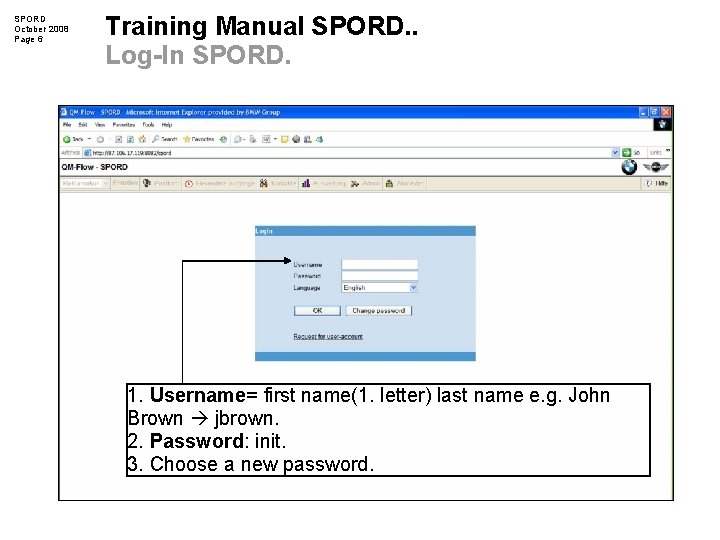
SPORD October 2008 Page 6 Training Manual SPORD. . Log-In SPORD. 1. Username= first name(1. letter) last name e. g. John Brown jbrown. 2. Password: init. 3. Choose a new password.
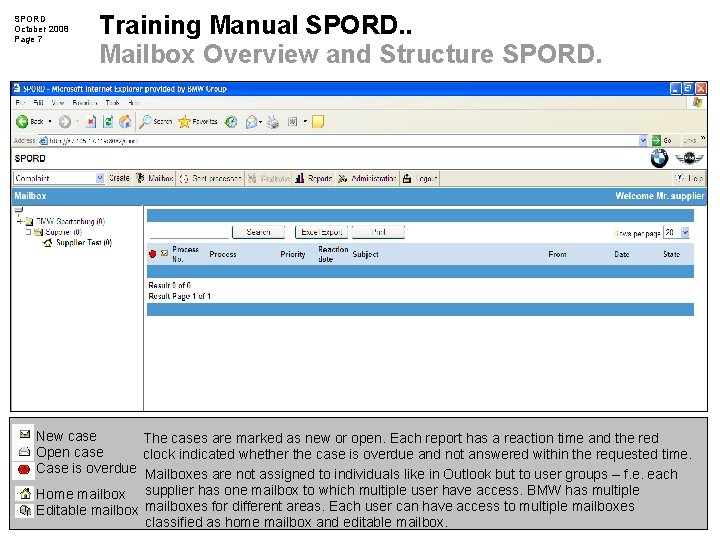
SPORD October 2008 Page 7 Training Manual SPORD. . Mailbox Overview and Structure SPORD. New case The cases are marked as new or open. Each report has a reaction time and the red Open case clock indicated whether the case is overdue and not answered within the requested time. Case is overdue Mailboxes are not assigned to individuals like in Outlook but to user groups – f. e. each Home mailbox supplier has one mailbox to which multiple user have access. BMW has multiple Editable mailboxes for different areas. Each user can have access to multiple mailboxes classified as home mailbox and editable mailbox.
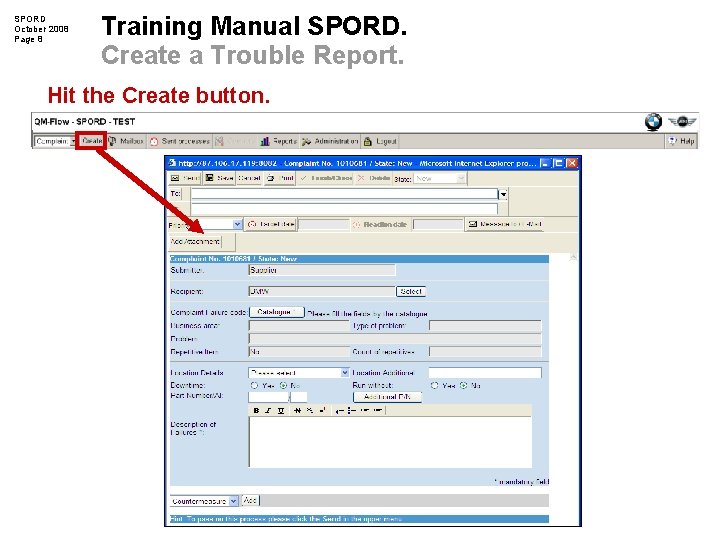
SPORD October 2008 Page 8 Training Manual SPORD. Create a Trouble Report. Hit the Create button.
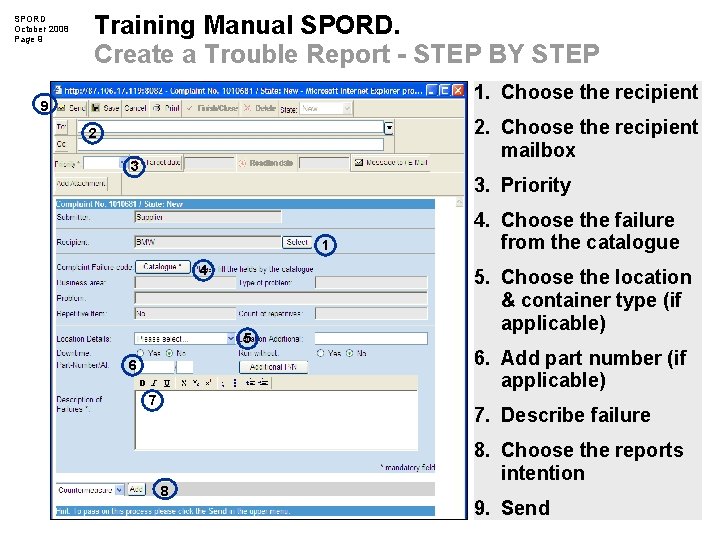
SPORD October 2008 Page 9 Training Manual SPORD. Create a Trouble Report - STEP BY STEP 1. Choose the recipient 9 2. Choose the recipient mailbox 2 3 3. Priority 1 4 5 6 7 4. Choose the failure from the catalogue 5. Choose the location & container type (if applicable) 6. Add part number (if applicable) 7. Describe failure 8 8. Choose the reports intention 9. Send
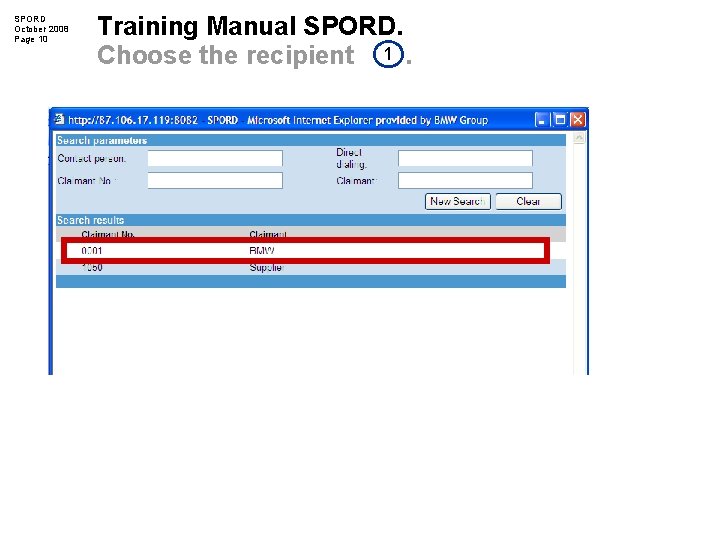
SPORD October 2008 Page 10 Training Manual SPORD. Choose the recipient 1.
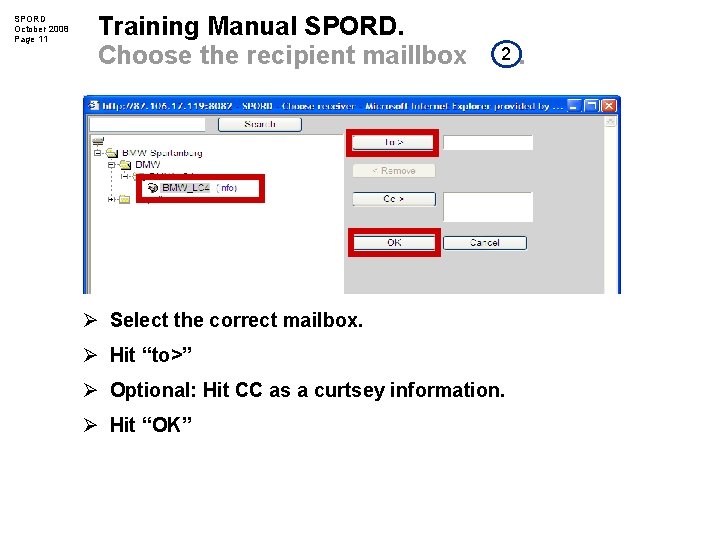
SPORD October 2008 Page 11 Training Manual SPORD. Choose the recipient maillbox 2 Ø Select the correct mailbox. Ø Hit “to>” Ø Optional: Hit CC as a curtsey information. Ø Hit “OK” .
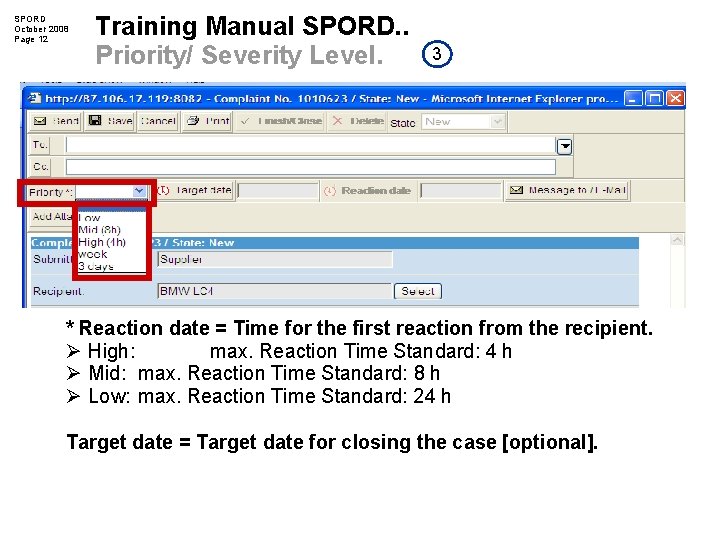
SPORD October 2008 Page 12 Training Manual SPORD. . Priority/ Severity Level. 3 * Reaction date = Time for the first reaction from the recipient. Ø High: max. Reaction Time Standard: 4 h Ø Mid: max. Reaction Time Standard: 8 h Ø Low: max. Reaction Time Standard: 24 h Target date = Target date for closing the case [optional].
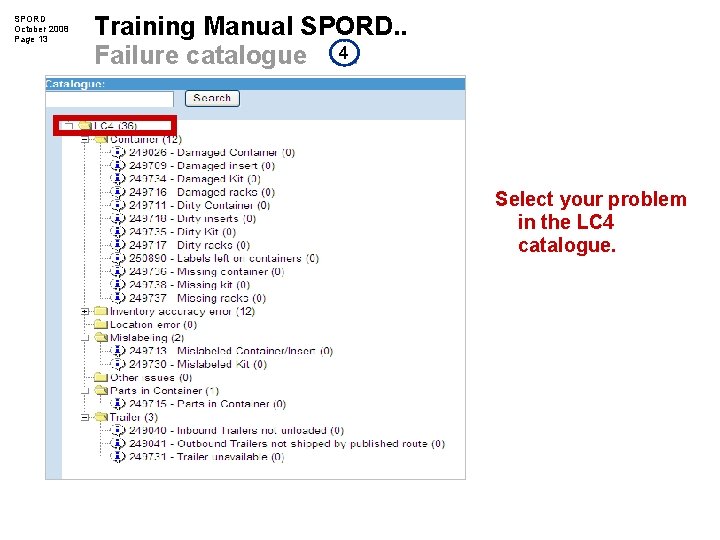
SPORD October 2008 Page 13 Training Manual SPORD. . Failure catalogue 4. Select your problem in the LC 4 catalogue.
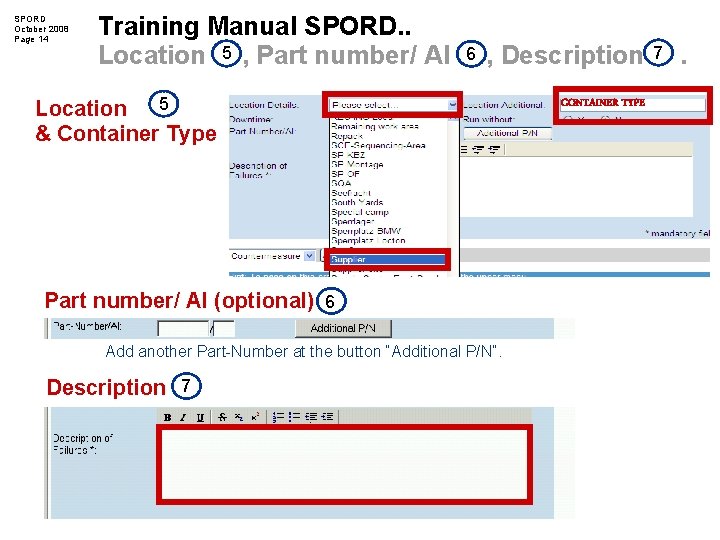
SPORD October 2008 Page 14 Training Manual SPORD. . Location 5 , Part number/ AI 6 , Description Location 5 & Container Type Part number/ Al (optional) 6 Add another Part-Number at the button “Additional P/N”. Description 7 CONTAINER TYPE 7 .
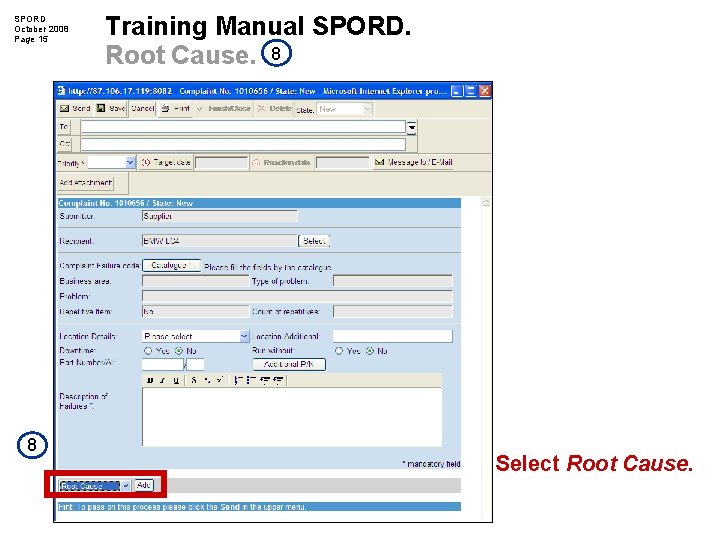
SPORD October 2008 Page 15 8 Training Manual SPORD. Root Cause. 8 Select Root Cause.
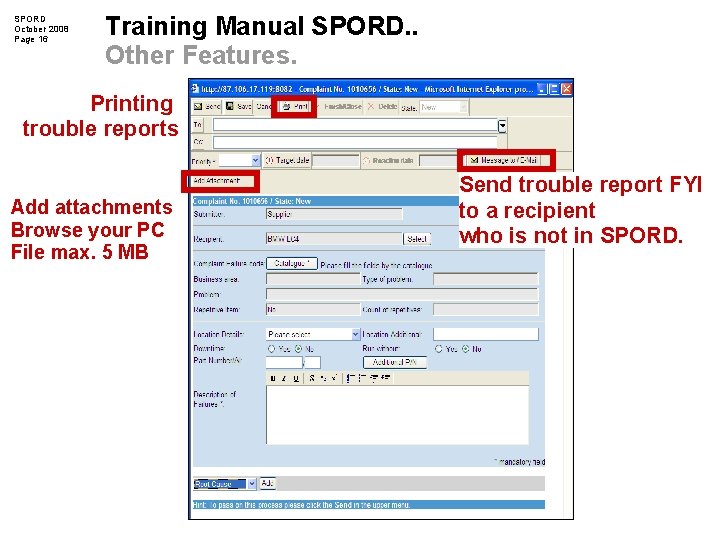
SPORD October 2008 Page 16 Training Manual SPORD. . Other Features. Printing trouble reports Add attachments Browse your PC File max. 5 MB Send trouble report FYI to a recipient who is not in SPORD.
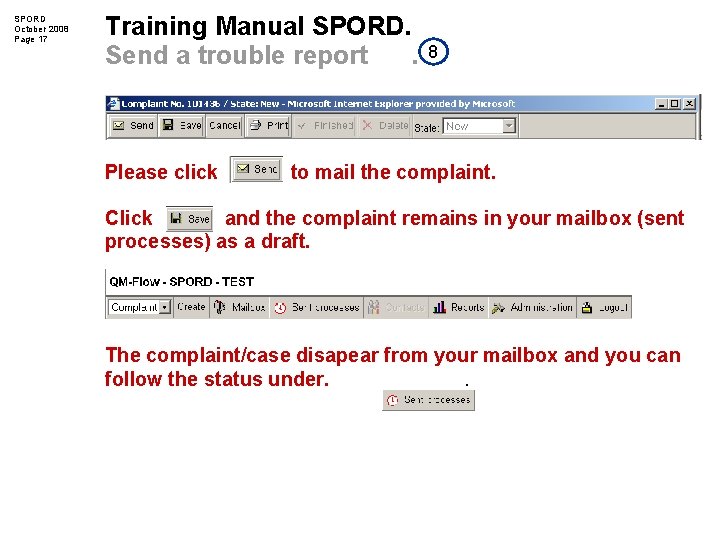
SPORD October 2008 Page 17 Training Manual SPORD. Send a trouble report. Please click 8 to mail the complaint. Click and the complaint remains in your mailbox (sent processes) as a draft. The complaint/case disapear from your mailbox and you can follow the status under. .
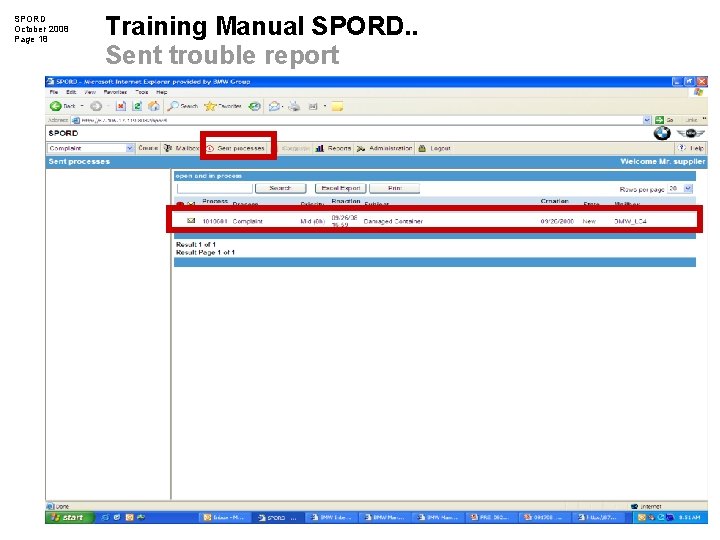
SPORD October 2008 Page 18 Training Manual SPORD. . Sent trouble report
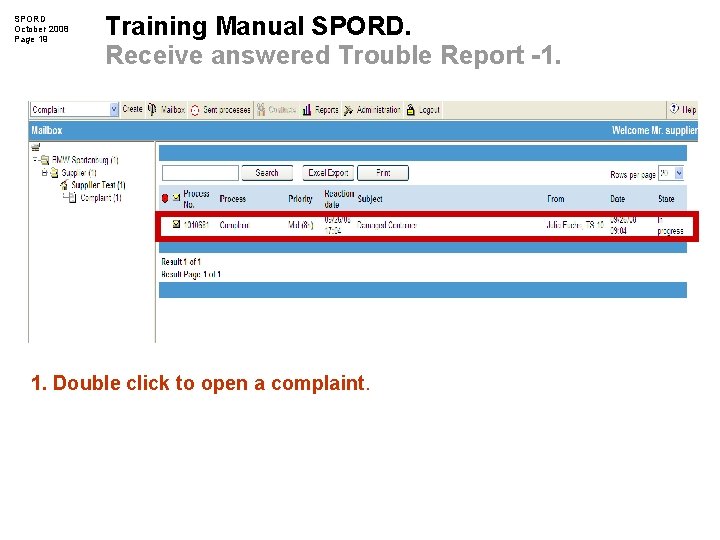
SPORD October 2008 Page 19 Training Manual SPORD. Receive answered Trouble Report -1. 1. Double click to open a complaint.
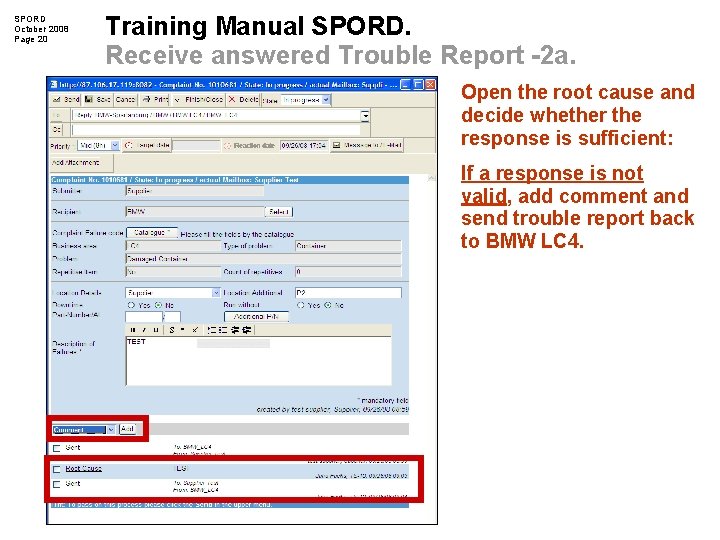
SPORD October 2008 Page 20 Training Manual SPORD. Receive answered Trouble Report -2 a. Open the root cause and decide whether the response is sufficient: If a response is not valid, add comment and send trouble report back to BMW LC 4.
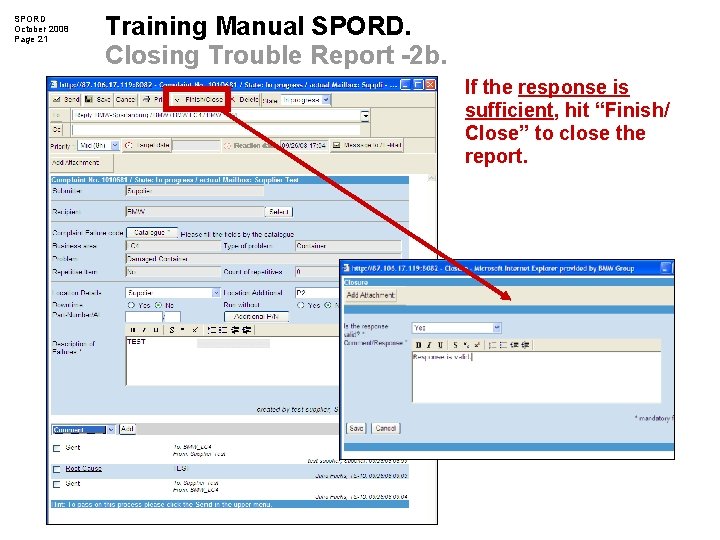
SPORD October 2008 Page 21 Training Manual SPORD. Closing Trouble Report -2 b. If the response is sufficient, hit “Finish/ Close” to close the report.
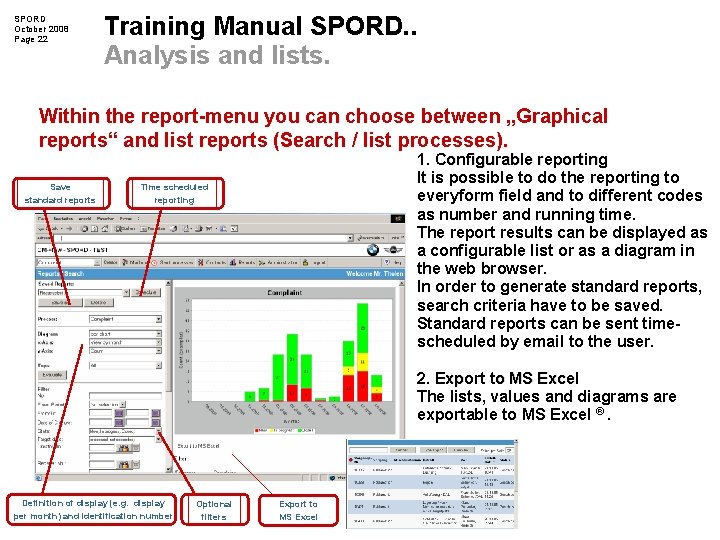
SPORD October 2008 Page 22 Training Manual SPORD. . Analysis and lists. Within the report-menu you can choose between „Graphical reports“ and list reports (Search / list processes). Save standard reports 1. Configurable reporting It is possible to do the reporting to everyform field and to different codes as number and running time. The report results can be displayed as a configurable list or as a diagram in the web browser. In order to generate standard reports, search criteria have to be saved. Standard reports can be sent timescheduled by email to the user. Time scheduled reporting 2. Export to MS Excel The lists, values and diagrams are exportable to MS Excel ®. Definition of display (e. g. display per month) and identification number Optional filters Export to MS Excel
SPORD October 2008 Page 23 Training Manual SPORD. FAQ Q: What should I do when my problem is not listed in the catalogue? A: Use the reason code “Others” for your report and send an email to Julia. Fuchs@bmwmcext. com to add the reason code to the catalogue. Q: What should I do when I forget my password? A: Send an email to Julia. Fuchs@bmwmcext. com and your password will be reset.
SPORD October 2008 Page 24 Training Manual SPORD. . SPORD Administration Contact. If you have any issues concerning SPORD, please contact: Julia Fuchs Email: Julia. Fuchs@bmwmcext. com Phone: +1 864. 989. 6813 or Darla Long Email: Darla. Long@bmwmcext. com Phone: +1 864. 989. 5747
- Slides: 24