
Specifying Software Requirements for Complex System New Techniques



- Slides: 44
Specifying Software Requirements for Complex System: New Techniques and Their Application Guanghui Weng
About this paper • Author: Kathryn L. Heninger • Published in IEEE Transactions on software Engineering VOL. SE-6 • January 1980
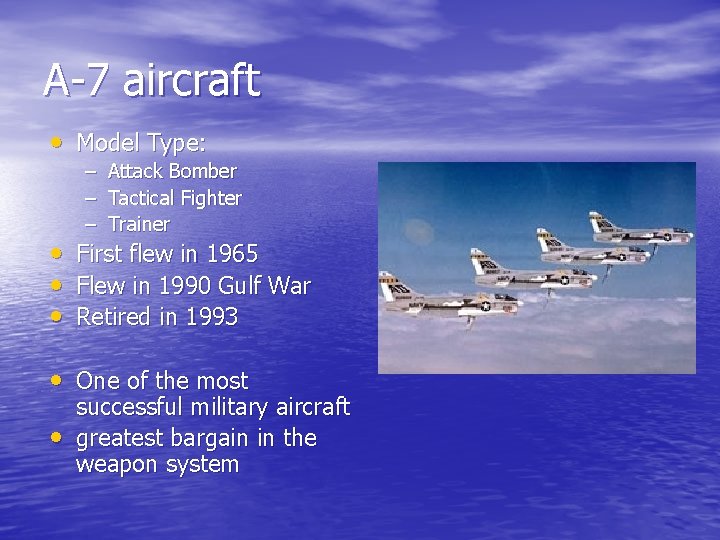
A-7 aircraft • Model Type: – Attack Bomber – Tactical Fighter – Trainer • First flew in 1965 • Flew in 1990 Gulf War • Retired in 1993 • One of the most • successful military aircraft greatest bargain in the weapon system
A-7 aircraft continued • New Techs used: – – – Head-up display Central navigation-weapon delivery software system Many other avionics innovations – – – Heavy weapon loads (up to 20, 000 pounds) Low maintenance requirements Superior weapon delivery accuracy Long range ( up to 4, 250 nautical miles) Low loss rate in combat (0. 04%) Very low accident rate • Capability
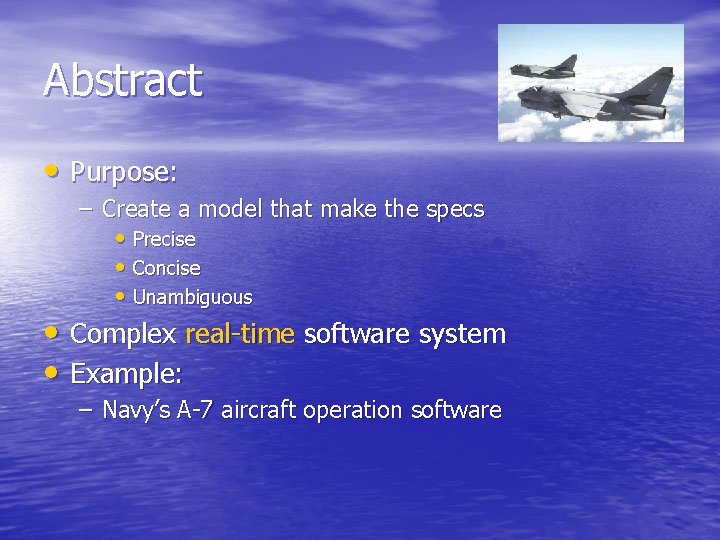
Abstract • Purpose: – Create a model that make the specs • Precise • Concise • Unambiguous • Complex real-time software system • Example: – Navy’s A-7 aircraft operation software
Outline • Introduction • A-7 Program Characteristics • Objectives • Design Principles • Techs for – Describing Hardware Interface – Describing Software Functions – Specifying Undesired Events – Characterizing Types of Change • Discussion and Conclusion
Introduction • Problem: – Software is difficult to understand, change and maintain • New techniques: – – – – Modularity Information hiding Abstract Interface Formal spec Cooperating sequential processes Process synchronization routines Resource monitors • Naval Research Lab and Naval Weapons Center tried to use above techs to redesign and rebuilt the A-7 aircraft operation software
Why redesign? • Identical to the existing program • Old program is hard to update • No spec! • Very common in the real world – Barclays
Outline • Introduction • A-7 Program Characteristics • Objectives • Design Principles • Techs for – Describing Hardware Interface – Describing Software Functions – Specifying Undesired Events – Characterizing Types of Change • Discussion and Conclusion
A-7 Program Characteristics • Tight memory(16 K) • Time constrains • 12, 000 assembler instructions • Part of the Navigation/Weapon Delivery System • Inputs – Sensors – Cockpits – Panel • It controls display devices and position sensors • 22 devices are connected to the computer
Outline • Introduction • A-7 Program Characteristics • Objectives • Design Principles • Techs for – Describing Hardware Interface – Describing Software Functions – Specifying Undesired Events – Characterizing Types of Change • Discussion and Conclusion
Requirements Document Objectives • Specify external behavior only – Without implying implementation • Specify constraints on the implementation • Be easy to change • Serve as a reference tool • Record forethought about the life cycle of the system • Characterize acceptable responses to undesired events
Outline • Introduction • A-7 Program Characteristics • Objectives • Design Principles • Techs for – Describing Hardware Interface – Describing Software Functions – Specifying Undesired Events – Characterizing Types of Change • Discussion and Conclusion
Requirements Document Design Principles • State questions before trying to answer them. – Timing constraints? – Accuracy constraints? – Changes expected? • Separate concerns – Divide and conquer • Be as formal as possible
Outline • • • Introduction A-7 Program Characteristics Objectives Design Principles Techs for – – Describing Hardware Interface Describing Software Functions Specifying Undesired Events Characterizing Types of Change • Discussion • Conclusion
Organization by data Item • Data item: for each input or output that changes value independently – Input Data Items: • Barometric altitude • Radar-measured distance to a ground point • Inertial platform ready signal – Output Data Items: • Coordinates • Rader antenna steering commands • Computer failed lights
Data Item • Designed a form to be completed for each data item • Start with the following question – How to read or write these data? – How to represent the value using bit? – Valid or not?
Symbolic Names • Two kinds of info about data items – Essential characteristics shared by similar device • Barometric altitude – Arbitrary details changes with device • Resolution • Representation • Accuracy • Timing
Symbolic names for data item and value • Essential info must be expressed without • referencing the arbitrary details Essential info is given a mnemonic names with different brackets – /input-data-item/ – //output-data-item/ – $nonnumeric-value$ • Fixed set of possible values – ON/OFF
Templates for value description • Blanks to be completed for specific data item • Advantage: – Easier to describe – Consistent – Apply to the same standard • Example: – Angle (? ) is measured from line (? ) to line (? ) in the (? ) direction, looking (? ).
Input data independent of software use • Refrain mentioning how the data is used by the software. • Avoid making any assumptions about the software function • Define numerical values in term of what they measure – /RADALT/ • Radar altimeter
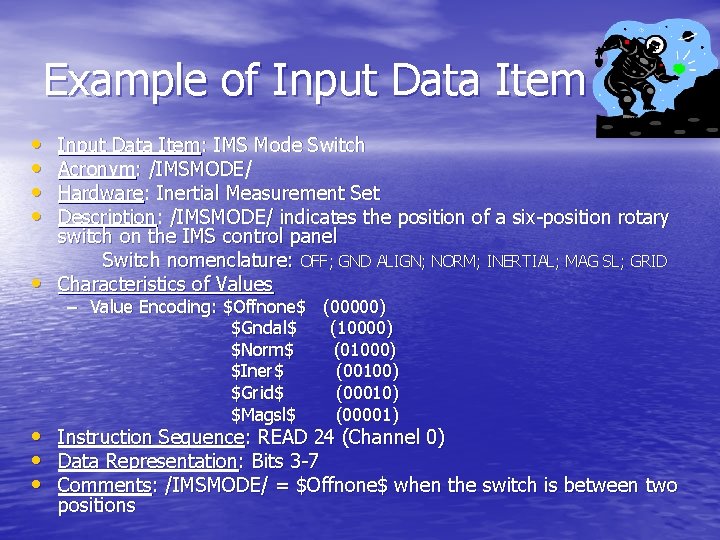
Example of Input Data Item • • • Input Data Item: IMS Mode Switch Acronym: /IMSMODE/ Hardware: Inertial Measurement Set Description: /IMSMODE/ indicates the position of a six-position rotary switch on the IMS control panel Switch nomenclature: OFF; GND ALIGN; NORM; INERTIAL; MAG SL; GRID Characteristics of Values – Value Encoding: $Offnone$ (00000) $Gndal$ (10000) $Norm$ (01000) $Iner$ (00100) $Grid$ (00010) $Magsl$ (00001) • Instruction Sequence: READ 24 (Channel 0) • Data Representation: Bits 3 -7 • Comments: /IMSMODE/ = $Offnone$ when the switch is between two positions
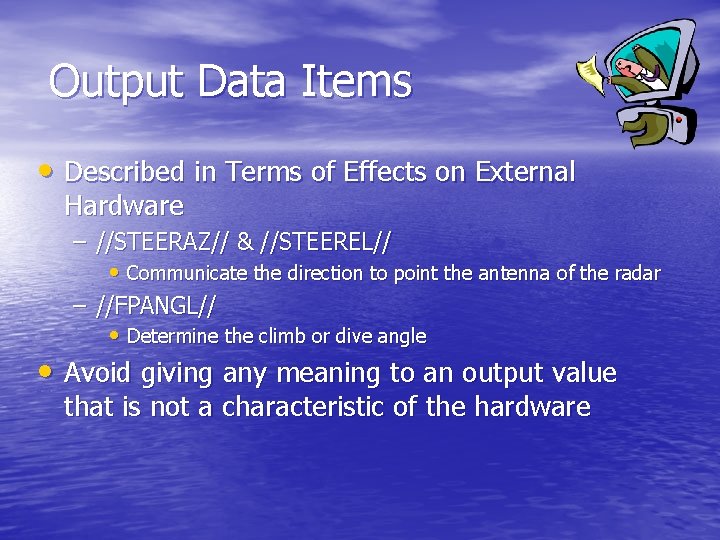
Output Data Items • Described in Terms of Effects on External Hardware – //STEERAZ// & //STEEREL// • Communicate the direction to point the antenna of the radar – //FPANGL// • Determine the climb or dive angle • Avoid giving any meaning to an output value that is not a characteristic of the hardware
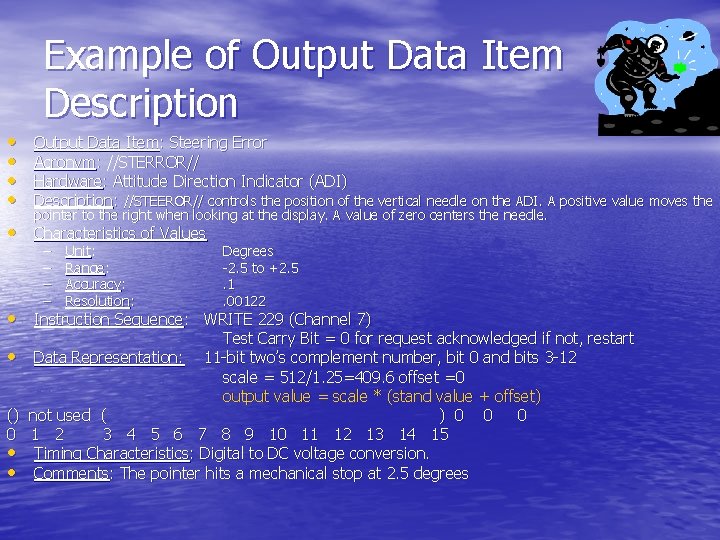
Example of Output Data Item Description • • Output Data Item: Steering Error Acronym: //STERROR// Hardware: Attitude Direction Indicator (ADI) Description: //STEEROR// controls the position of the vertical needle on the ADI. A positive value moves the pointer to the right when looking at the display. A value of zero centers the needle. • Characteristics of Values – – Unit: Range: Accuracy: Resolution: Degrees -2. 5 to +2. 5. 1. 00122 • Instruction Sequence: WRITE 229 (Channel 7) Test Carry Bit = 0 for request acknowledged if not, restart • Data Representation: 11 -bit two’s complement number, bit 0 and bits 3 -12 scale = 512/1. 25=409. 6 offset =0 output value = scale * (stand value + offset) () not used ( ) 0 0 1 2 3 4 5 6 7 8 9 10 11 12 13 14 15 • Timing Characteristics: Digital to DC voltage conversion. • Comments: The pointer hits a mechanical stop at 2. 5 degrees
Outline • Introduction • A-7 Program Characteristics • Objectives • Design Principles • Techs for – Describing Hardware Interface – Describing Software Functions – Specifying Undesired Events – Characterizing Types of Change • Discussion and Conclusion
Organization by Functions • Each function determines the values for one or more output data items • Each output data item is given values by exactly one functions • Every function can be described in terms of externally visible effects. • Not fit all the project • Most output data items are used for only as small set of purposes
Function type • Demand function – Request by the occurrence of some event – Computer failed light • Periodic function – Performed repeatedly without request – If a periodic function need not be performed all the time, it should be stopped by specific events – Maximum delay can be tolerated between request and action - required repetition rates.
Output values as functions of conditions and events • Express requirements by giving output values as • functions of aircraft operating conditions Condition is aspect of the system for a measurable period of time – /IMSMODE/ = $Gndal$ is a condition that is T when the switch is set to the GND ALIGN position • Event occurs when condition changes T to F or F to T – //LATGT 70// should change value when the aircraft crosses 70 degree latitude – Events start and stop periodic functions and trigger demand functions – how the program detects this event is left to the implementation
Text Macros • Bracketed in exclamation points • defined in an alphabetical dictionary • Abbreviations for compound conditions that are frequently used or very detailed • Only one place in the dictionary need to be changed if criteria change • Example: – !Desig! Condition that is T when the pilot perform a sequence of actions that designates a target to computer
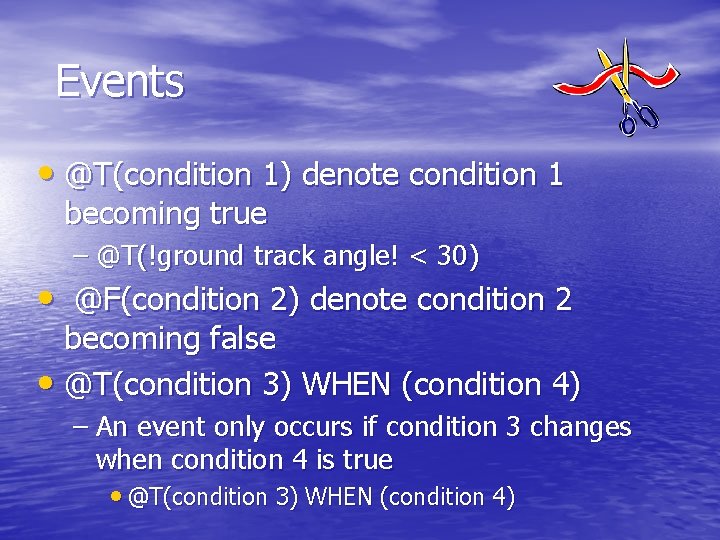
Events • @T(condition 1) denote condition 1 becoming true – @T(!ground track angle! < 30) • @F(condition 2) denote condition 2 becoming false • @T(condition 3) WHEN (condition 4) – An event only occurs if condition 3 changes when condition 4 is true • @T(condition 3) WHEN (condition 4)
Mode • Organize conditions into groups • Mnemonic name enclosed in asterisks • Advantage: – Keep the function descriptions simple – If something goes wrong during flight, remember the mode instead of conditions • Example: – *DIG*: Doppler-Inertial-Gyrocompassing
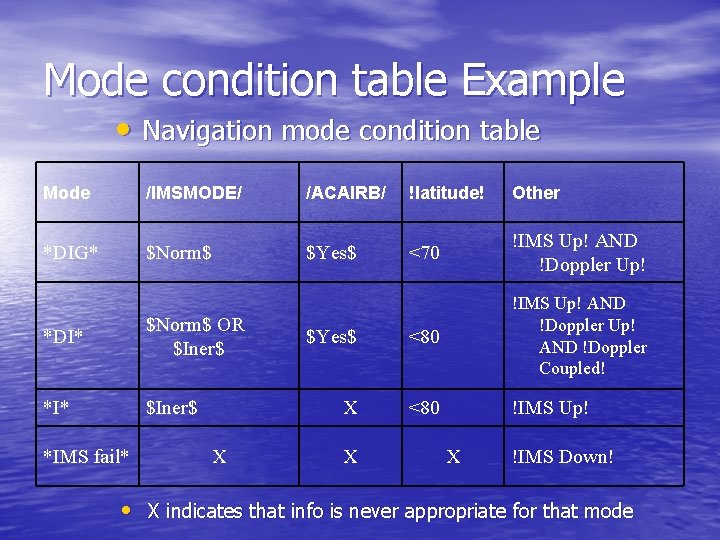
Mode condition table Example • Navigation mode condition table Mode /IMSMODE/ /ACAIRB/ !latitude! Other *DIG* $Norm$ $Yes$ <70 !IMS Up! AND !Doppler Up! $Yes$ <80 !IMS Up! AND !Doppler Coupled! X <80 !IMS Up! *DI* $Norm$ OR $Iner$ *I* $Iner$ *IMS fail* X X X !IMS Down! • X indicates that info is never appropriate for that mode
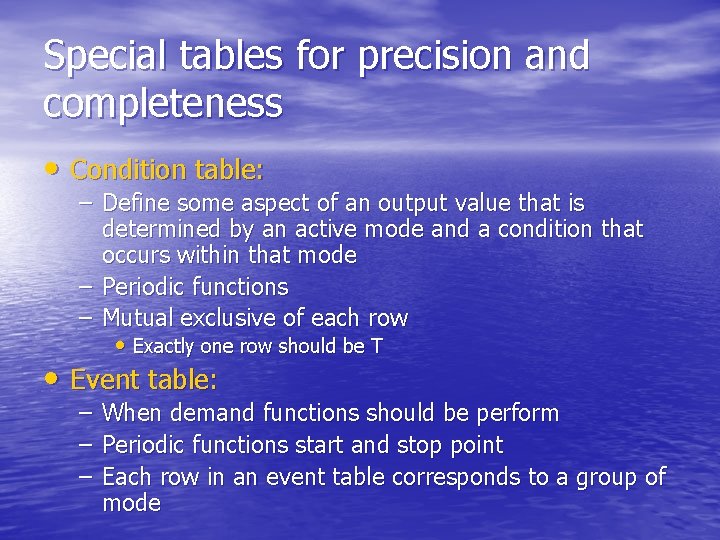
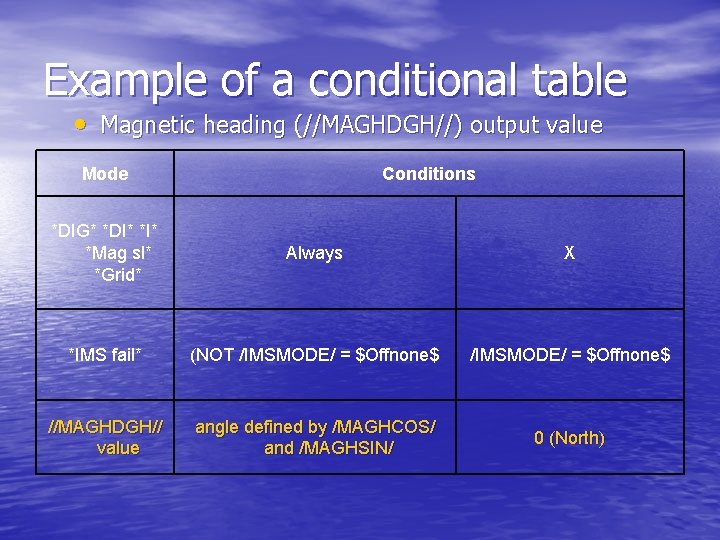
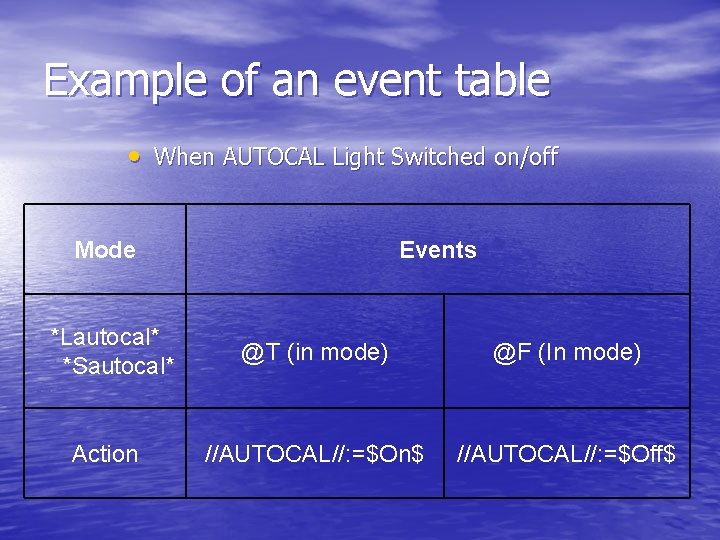
Special tables for precision and completeness • Condition table: – Define some aspect of an output value that is determined by an active mode and a condition that occurs within that mode – Periodic functions – Mutual exclusive of each row • Exactly one row should be T • Event table: – When demand functions should be perform – Periodic functions start and stop point – Each row in an event table corresponds to a group of mode
Example of a conditional table • Magnetic heading (//MAGHDGH//) output value Mode Conditions *DIG* *DI* *Mag sl* *Grid* Always X *IMS fail* (NOT /IMSMODE/ = $Offnone$ //MAGHDGH// value angle defined by /MAGHCOS/ and /MAGHSIN/ 0 (North)
Example of an event table • When AUTOCAL Light Switched on/off Mode *Lautocal* *Sautocal* Action Events @T (in mode) @F (In mode) //AUTOCAL//: =$On$ //AUTOCAL//: =$Off$
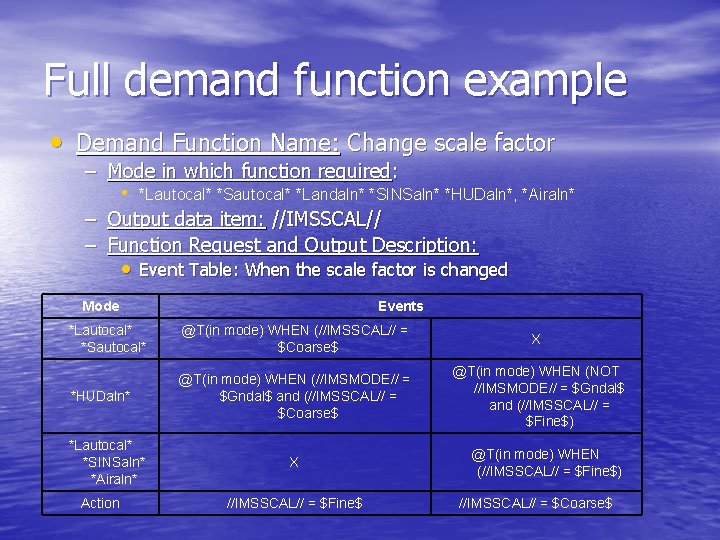
Full demand function example • Demand Function Name: Change scale factor – Mode in which function required: • *Lautocal* *Sautocal* *Landaln* *SINSaln* *HUDaln*, *Airaln* – Output data item: //IMSSCAL// – Function Request and Output Description: • Event Table: When the scale factor is changed Mode Events *Lautocal* *Sautocal* @T(in mode) WHEN (//IMSSCAL// = $Coarse$ X *HUDaln* @T(in mode) WHEN (//IMSMODE// = $Gndal$ and (//IMSSCAL// = $Coarse$ @T(in mode) WHEN (NOT //IMSMODE// = $Gndal$ and (//IMSSCAL// = $Fine$) *Lautocal* *SINSaln* *Airaln* Action X //IMSSCAL// = $Fine$ @T(in mode) WHEN (//IMSSCAL// = $Fine$) //IMSSCAL// = $Coarse$
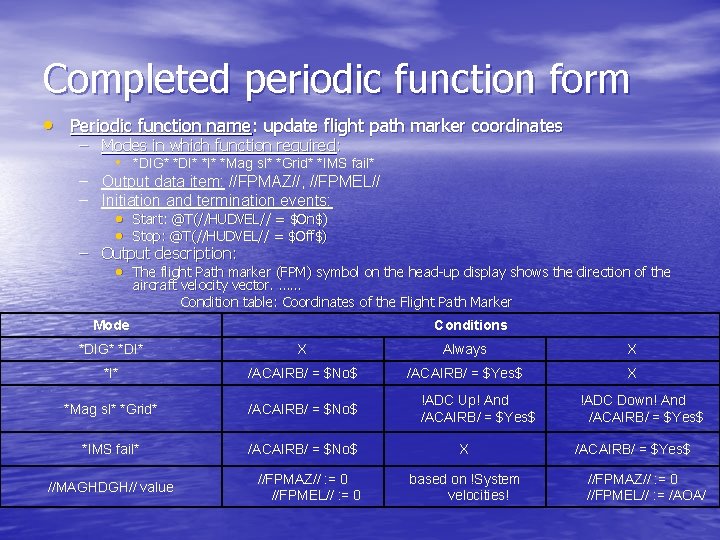
Completed periodic function form • Periodic function name: update flight path marker coordinates – Modes in which function required: • *DIG* *DI* *Mag sl* *Grid* *IMS fail* – Output data item: //FPMAZ//, //FPMEL// – Initiation and termination events: • Start: @T(//HUDVEL// = $On$) • Stop: @T(//HUDVEL// = $Off$) – Output description: • The flight Path marker (FPM) symbol on the head-up display shows the direction of the aircraft velocity vector. …… Condition table: Coordinates of the Flight Path Marker Mode Conditions *DIG* *DI* X Always X *I* /ACAIRB/ = $No$ /ACAIRB/ = $Yes$ X *Mag sl* *Grid* /ACAIRB/ = $No$ *IMS fail* /ACAIRB/ = $No$ //MAGHDGH// value //FPMAZ// : = 0 //FPMEL// : = 0 !ADC Up! And /ACAIRB/ = $Yes$ X based on !System velocities! !ADC Down! And /ACAIRB/ = $Yes$ //FPMAZ// : = 0 //FPMEL// : = /AOA/
Outline • Introduction • A-7 Program Characteristics • Objectives • Design Principles • Techs for – Describing Hardware Interface – Describing Software Functions – Specifying Undesired Events – Characterizing Types of Change • Discussion and Conclusion
List of undesired event • Classification scheme – Resource Failure • Temporary • Permanent – Incorrect input data • Detected by examining input only • Detected by comparison with internal data • Detected by user realizing he made a mistake • Detected by user from incorrect output – Incorrect internal data • Detected by internal inconsistency • Detected by comparison with input data • Detected by user from incorrect output
Outline • Introduction • A-7 Program Characteristics • Objectives • Design Principles • Techs for – Describing Hardware Interface – Describing Software Functions – Specifying Undesired Events – Characterizing Types of Change • Discussion and Conclusion
Techs for characterizing types of changes • Discover possible changes • Make a feasible changes list • Example: – Assignment of devices to channels – The rate of symbol movement on the display in response to joystick displacement – New sensors may be added – More weapons – Self test might be required in the air – Cease lower priority functions to free resources for higher
Outline • Introduction • A-7 Program Characteristics • Objectives • Design Principles • Techs for – Describing Hardware Interface – Describing Software Functions – Specifying Undesired Events – Characterizing Types of Change • Discussion and Conclusion
Discussion and Conclusion • These techs are not limited to this project • These techs helps: – Obtaining information – Controlling its complexity – Avoiding with implementation details • Plan for project systematically
Q&A