
Special Topics in Grid Enablement of Scientific Applications
Special Topics in Grid Enablement of Scientific Applications (CIS 6612) Performance/Profiling Presented by Javier Figueroa Instructor: S. Masoud Sadjadi http: //www. cs. fiu. edu/~sadjadi/Teaching/ sadjadi At cs Dot fiu Dot edu 1
Presentation Outline n Performance n n n Benchmarking Parallel Performance Profiling Dimemas Paraver Acknowledgements 2
Why Performance? n To do a time-consuming operation in less time n n I am an aircraft engineer I need to run a simulation to test the stability of the wings at high speed I’d rather have the result in 5 minutes than in 5 hours so that I can complete the aircraft final design sooner. To do an operation before a tighter deadline n n n I am a weather prediction agency I am getting input from weather stations/sensors I’d like to make the forecast for tomorrow before tomorrow 3
Why Performance? n To do a high number of operations per seconds n n n I am the CTO of Amazon. com My Web server gets 1, 000 hits per seconds I’d like my Web server and my databases to handle 1, 000 transactions per seconds so that customers do not experience delays Also called scalability Amazon does “process” several GBytes of data per seconds 4
Performance - Software n n “High Performance Code” Performance concerns n Correctness n n You will see that when trying to make code go fast one often breaks it Readability n n Fast code typically requires more lines! Modularity can hurt performance n n e. g. , Too many classes Portability n n Code that is fast on machine A can be slow on machine B At the extreme, highly optimized code is not portable at all, and in fact is done in hardware! 5
Performance - Time n Time between the start and the end of an operation n n Also called running time, elapsed time, wall-clock time, response time, latency, execution time, . . . Most straightforward measure: “my program takes 12. 5 s on a Pentium 3. 5 GHz” Can be normalized to some reference time Must be measured on a “dedicated” machine 6
Performance - Rate n Used often so that performance can be independent on the “size” of the application n n e. g. , compressing a 1 MB file takes 1 minute. compressing a 2 MB file takes 2 minutes. The performance is the same. Millions of instructions / sec (MIPS) n n MIPS = instruction count / (execution time * 106) = clock rate / (CPI * 106) But Instructions Set Architectures are not equivalent n n n 1 CISC instruction = many RISC instructions Programs use different instruction mixes May be ok for same program on same architectures 7

Performance – Rate cont. n Millions of floating point operations /sec (MFlops) n n n Application-specific: n n Very popular, but often misleading e. g. , A high MFlops rate in a badly designed algorithm could have poor application performance Millions of frames rendered per second Millions of amino-acid compared per second Millions of HTTP requests served per seconds Application-specific metrics are often preferable and others may be misleading n n MFlops can be application-specific thought For instance: n n n I want to add to n-element vectors This requires 2*n Floating Point Operations Therefore MFlops is a good measure 8
What is “Peak” Performance? n Resource vendors always talk about peak performance rate n n computed based on specifications of the machine For instance: n n n Problem: n n n I build a machine with 2 floating point units Each unit can do an operation in 2 cycles My CPU is at 1 GHz Therefore I have a 1*2/2 =1 GFlops Machine In real code you will never be able to use the two floating point units constantly Data needs to come from memory and cause the floating point units to be idle Typically, real code achieves only a (often small) fraction of the peak performance 9
Performance - Benchmarks n n Since many performance metrics turn out to be misleading, people have designed benchmarks Example: SPEC Benchmark n n Integer benchmark Floating point benchmark These benchmarks are typically a collection of several codes that come from “real-world software” The question “what is a good benchmark? ” is difficult n If the benchmarks do not correspond to what you’ll do with your computer, then the benchmark results are not relevant to you 10
Performance – A Program n Concerned with improving a program’s performance n n n For a given platform, take a given program Run it and measure its wall-clock time Enhance it, run it again an quantify the performance improvement n n i. e. , the reduction in wall-clock time For each version compute its performance n n preferably as a relevant performance rate so that you can say: the best implementation we have so far goes “this fast” (perhaps a % of the peak performance) 11
Performance – Program Speedup n n We need a metric to quantify the impact of your performance enhancement Speedup: ratio of “old” time to “new” time n n old time = 2 h new time = 1 h speedup = 2 h / 1 h = 2 h Sometimes one talks about a “slowdown” in case the “enhancement” is not beneficial n Happens more often than one thinks 12

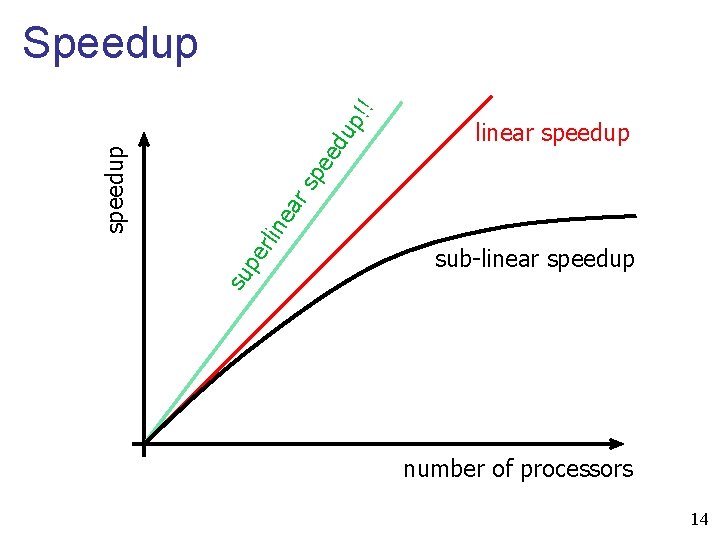
Parallel Performance n The notion of speedup is completely generic n n n By using a rice cooker I’ve achieved a 1. 20 speedup for rice cooking For parallel programs on defines the Parallel Speedup (we’ll just say “speedup”): n Parallel program takes time T 1 on 1 processor n Parallel program takes time Tp on p processors n Parallel Speedup(p) = T 1 / Tp In the ideal case, if my sequential program takes 2 hours on 1 processor, it will take 1 hour on 2 processors: called linear speedup 13
ed up pe rlin ea rs pe linear speedup sub-linear speedup su speedup !! Speedup number of processors 14
Superlinear Speedup? n n There are several possible causes Algorithm n n e. g. , with optimization problems, throwing many processors at it increases the chances that one will “get lucky” and find the optimum fast Hardware n e. g. , with many processors, it is possible that the entire application data resides in cache (vs. RAM) or in RAM (vs. Disk) 15
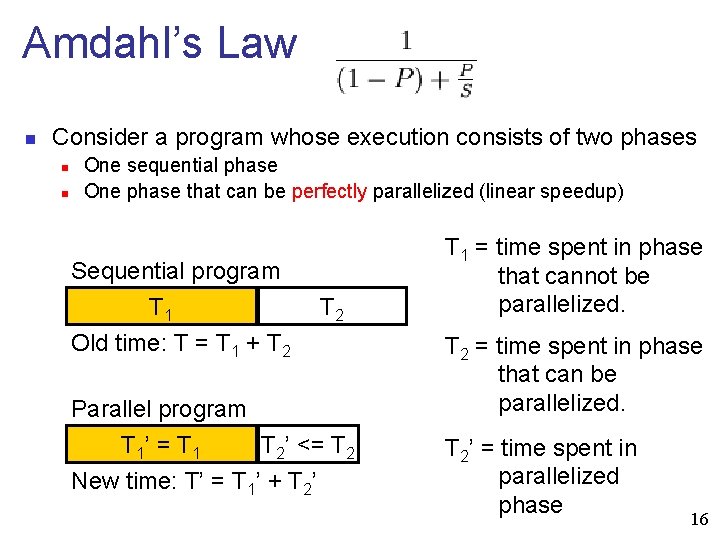
Amdahl’s Law n Consider a program whose execution consists of two phases n n One sequential phase One phase that can be perfectly parallelized (linear speedup) Sequential program T 1 T 2 Old time: T = T 1 + T 2 Parallel program T 1’ = T 1 T 2’ <= T 2 New time: T’ = T 1’ + T 2’ T 1 = time spent in phase that cannot be parallelized. T 2 = time spent in phase that can be parallelized. T 2’ = time spent in parallelized phase 16
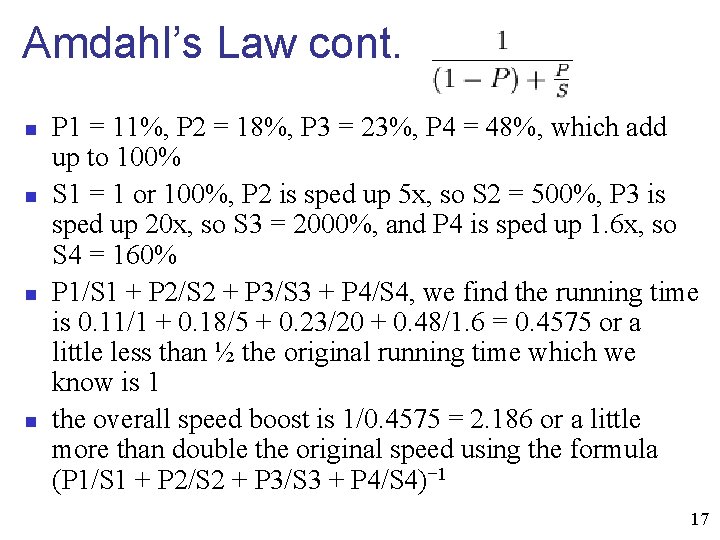
Amdahl’s Law cont. n n P 1 = 11%, P 2 = 18%, P 3 = 23%, P 4 = 48%, which add up to 100% S 1 = 1 or 100%, P 2 is sped up 5 x, so S 2 = 500%, P 3 is sped up 20 x, so S 3 = 2000%, and P 4 is sped up 1. 6 x, so S 4 = 160% P 1/S 1 + P 2/S 2 + P 3/S 3 + P 4/S 4, we find the running time is 0. 11/1 + 0. 18/5 + 0. 23/20 + 0. 48/1. 6 = 0. 4575 or a little less than ½ the original running time which we know is 1 the overall speed boost is 1/0. 4575 = 2. 186 or a little more than double the original speed using the formula (P 1/S 1 + P 2/S 2 + P 3/S 3 + P 4/S 4)− 1 17
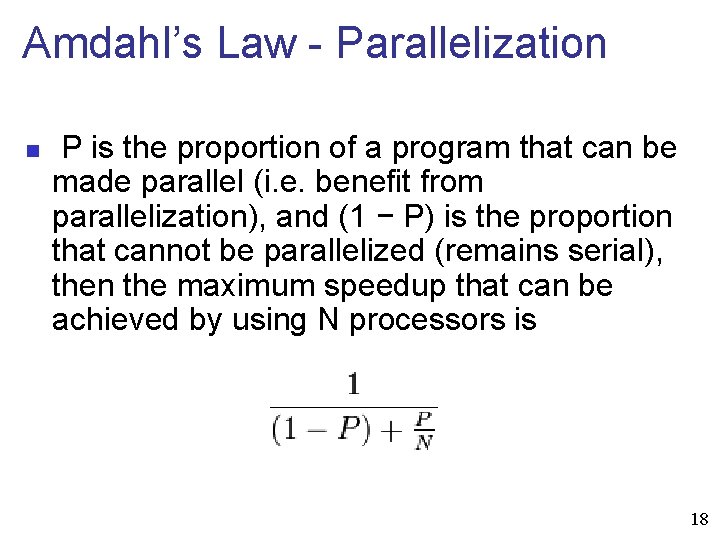
Amdahl’s Law - Parallelization n P is the proportion of a program that can be made parallel (i. e. benefit from parallelization), and (1 − P) is the proportion that cannot be parallelized (remains serial), then the maximum speedup that can be achieved by using N processors is 18
Parallel Efficiency n n n Definition: Eff(p) = S(p) / p Typically < 1, unless linear or superlinear speedup Used to measure how well the processors are utilized n n If increasing the number of processors by a factor 10 increases the speedup by a factor 2, perhaps it’s not worth it: efficiency drops by a factor 5 Important when purchasing a parallel machine for instance: if due to the application’s behavior efficiency is low, forget buying a large cluster 19
Scalability n n Measure of the “effort” needed to maintain efficiency while adding processors For a given problem size, plot Efd(p) for increasing values of p n n It should stay close to a flat line Isoefficiency: At which rate does the problem size need to be increase to maintain efficiency n n By making a problem ridiculously large, one can typically achieve good efficiency Problem: is it how the machine/code will be used? 20
Performance Measurement n n how does one measure the performance of a program in practice? Two issues: n Measuring wall-clock times n n We’ll see how it can be done shortly Measuring performance rates n n Measure wall clock time (see above) “Count” number of “operations” (frames, flops, amino-acids: whatever makes sense for the application) n n n Either by actively counting (count++) Or by looking at the code and figure out how many operations are performed Divide the count by the wall-clock time 21
Why is Performance Poor? n n Performance is poor because the code suffers from a performance bottleneck Definition n An application runs on a platform that has many components n n n CPU, Memory, Operating System, Network, Hard Drive, Video Card, etc. Pick a component and make it faster If the application performance increases, that component was the bottleneck! 22
Removing a Bottleneck n Hardware Upgrade n n Is sometimes necessary But can only get you so far and may be very costly n n e. g. , memory technology Code Modification n n The bottleneck is there because the code uses a “resource” heavily or in non-intelligent manner We will learn techniques to alleviate bottlenecks at the software level 23
Identifying a Bottleneck n It can be difficult n n n You’re not going to change the memory bus just to see what happens to the application But you can run the code on a different machine and see what happens One Approach n n n Know/discover the characteristics of the machine Observe the application execution on the machine Tinker with the code Run the application again Repeat Reason about what the bottleneck is 24
Memory Latency and Bandwidth n n The performance of memory is typically defined by Latency and Bandwidth (or Rate) Latency: time to read one byte from memory n n Bandwidth: how many bytes can be read per seconds n n measured in GB/sec Note that you don’t have bandwidth = 1 / latency! n n measured in nanoseconds these days Reading 2 bytes in sequence may be cheaper than reading one byte only Let’s see why. . . 25
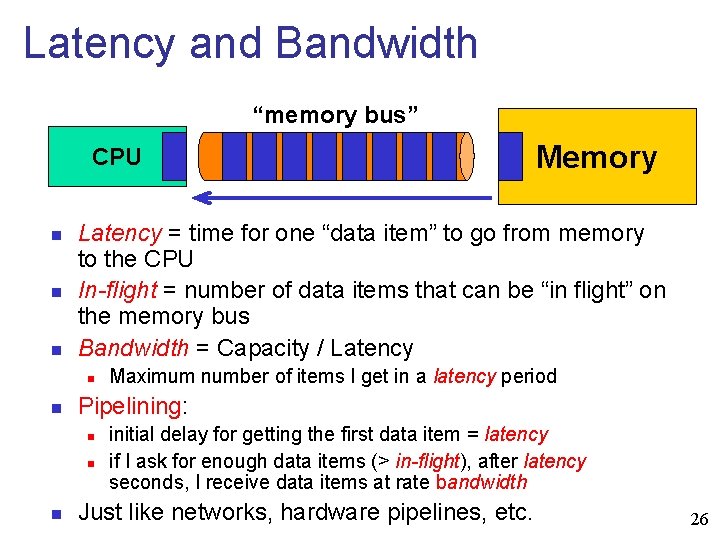
Latency and Bandwidth “memory bus” CPU n n n Latency = time for one “data item” to go from memory to the CPU In-flight = number of data items that can be “in flight” on the memory bus Bandwidth = Capacity / Latency n n Maximum number of items I get in a latency period Pipelining: n n n Memory initial delay for getting the first data item = latency if I ask for enough data items (> in-flight), after latency seconds, I receive data items at rate bandwidth Just like networks, hardware pipelines, etc. 26
Latency and Bandwidth n Why is memory bandwidth important? n n Because it gives us an upper bound on how fast one could feed data to the CPU Why is memory latency important? n n Because typically one cannot feed the CPU data constantly and one gets impacted by the latency Latency numbers must be put in perspective with the clock rate, i. e. , measured in cycles 27
![Memory Bottleneck: Example n Fragment of code: a[i] = b[j] + c[k] n n](http://slidetodoc.com/presentation_image_h2/ed44538f5c657dbfb3adfeb30c76aca0/image-28.jpg "Memory Bottleneck: Example n Fragment of code: a[i] = b[j] + c[k] n n")
Memory Bottleneck: Example n Fragment of code: a[i] = b[j] + c[k] n n n n Three memory references: 2 reads, 1 write One addition: can be done in one cycle If the memory bandwidth is 12. 8 GB/sec, then the rate at which the processor can access integers (4 bytes) is: 12. 8*1024*1024 / 4 = 3. 4 GHz The above code needs to access 3 integers Therefore, the rate at which the code gets its data is ~ 1. 1 GHz But the CPU could perform additions at 4 GHz! Therefore: The memory is the bottleneck n n n And we assumed memory worked at the peak!!! We ignored other possible overheads on the bus In practice the gap can be around a factor 15 or higher 28
A realistic approach: Profiling n n n A profiler is a tool that monitors the execution of a program and reports the computational characteristics used in different parts of the code i. e. dynamic program analysis Useful to identify “expensive” functions Profiling cycle n n Compile the code with the profiler Run the code Identify the most expensive function Optimize that function n n call it less often if possible, make it faster, etc. Repeat 29
Profiler Types based on Output n Flat profiler n n Flat profiler's compute the average call times, from the calls, and do not breakdown the call times based on the callee or the context. Call-Graph profiler n Call Graph profilers show the call times, and frequencies of the functions, and also the call-chains involved based on the callee. However context is not preserved. 30
Methods of data gathering n Event based profilers n In Programming languages listed, all of them have event-based profilers n n Java: JVM-Profiler Interface JVM API provides hooks to profiler, for trapping events like calls, class-load, unload, thread enter leave. Python: Python profilers are profile module, hotspot which are call-graph based, and use the 'sys. set_profile()' module to trap events like c_{call, return, exception}, python_{call, return, exception}. 31
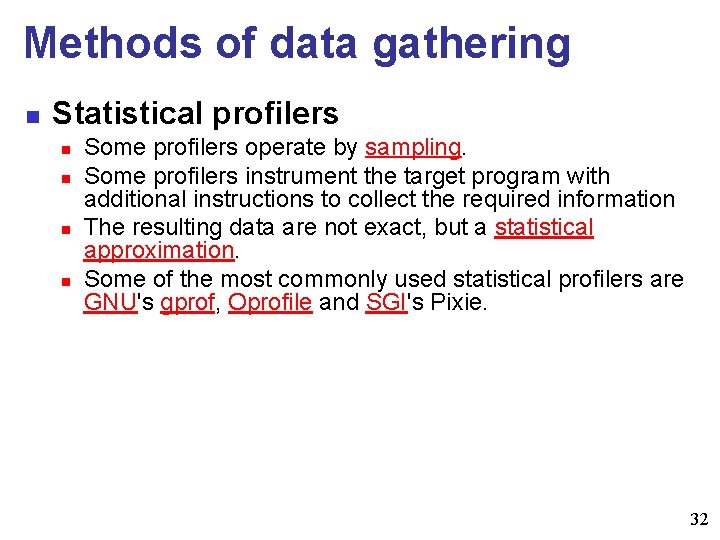
Methods of data gathering n Statistical profilers n n Some profilers operate by sampling. Some profilers instrument the target program with additional instructions to collect the required information The resulting data are not exact, but a statistical approximation. Some of the most commonly used statistical profilers are GNU's gprof, Oprofile and SGI's Pixie. 32
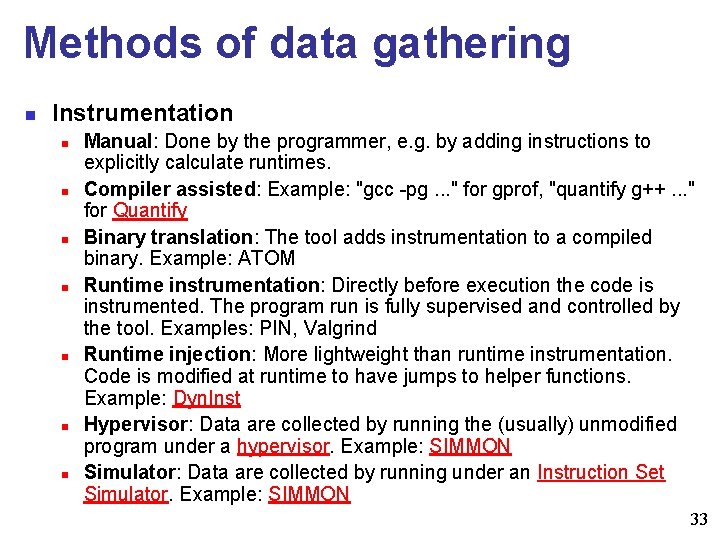
Methods of data gathering n Instrumentation n n n Manual: Done by the programmer, e. g. by adding instructions to explicitly calculate runtimes. Compiler assisted: Example: "gcc -pg. . . " for gprof, "quantify g++. . . " for Quantify Binary translation: The tool adds instrumentation to a compiled binary. Example: ATOM Runtime instrumentation: Directly before execution the code is instrumented. The program run is fully supervised and controlled by the tool. Examples: PIN, Valgrind Runtime injection: More lightweight than runtime instrumentation. Code is modified at runtime to have jumps to helper functions. Example: Dyn. Inst Hypervisor: Data are collected by running the (usually) unmodified program under a hypervisor. Example: SIMMON Simulator: Data are collected by running under an Instruction Set Simulator. Example: SIMMON 33
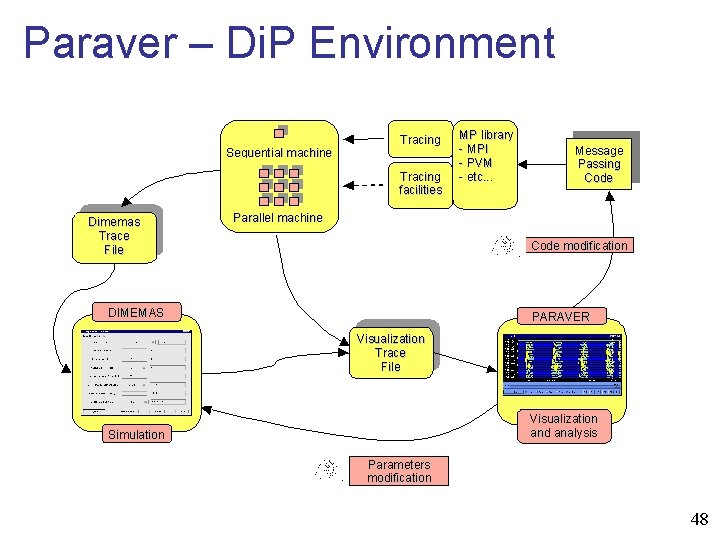
UPC – BSC Profiling Tools n Dimemas n n Simulation tool for the parametric analysis of the behavior of message-passing applications on a configurable parallel platform. Paraver n A very powerful performance visualization and analysis tool based on traces that can be used to analyze any information that is expressed on its input trace format. 34
Dimemas Utilization n n Development Tuning Benchmarking Training Features n n n Predict behavior of target architecture Forecast effects of code optimization What if analysis 35
Dimemas cont. Usage n n n Integrated with visualization tool Extensive application characterization Squeezing the information that a single instrumented run can provide 36
Dimemas cont. n n n enables the user to develop and tune parallel applications on a workstation providing an accurate prediction of their performance on the parallel target machine The Dimemas simulator reconstructs the time behavior of a parallel application on a machine modeled by a set of performance parameters 37
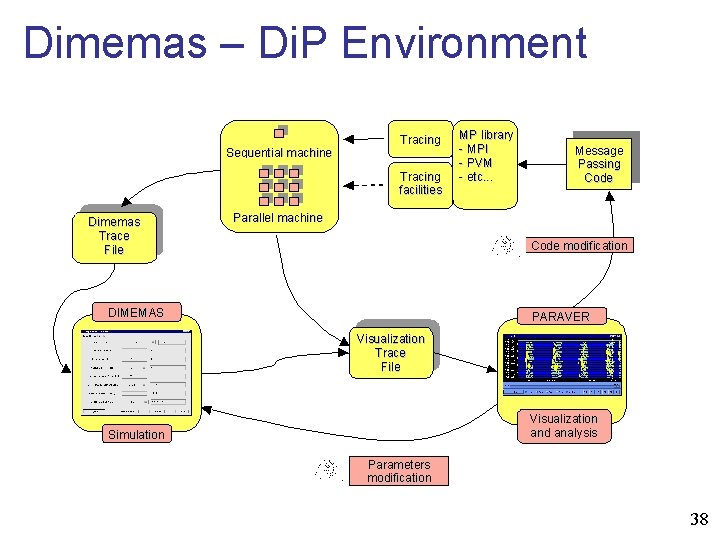
Dimemas – Di. P Environment 38
Dimemas - Benefits n n the possibility of not using a parallel machine to run the application to get the traces the possibility to analyze different application choices without changing neither rerunning the application itself 39
Dimemas – Benefits cont. n The loop involving Dimemas and Paraver, the simulator and the visualization tool. n The user has the chance to analyze the application behavior when some parameters are changed, for example, what will happen to application execution time is the execution time of a given function is reduced in 50%? 40
Dimemas - Prediction n n A tracefile can be either obtained in a dedicated parallel machine or in a shared sequential machine. Using the instrumentation records, Dimemas will rebuild the application behavior, using the tracefile and the architectural parameters defined using a GUI. Per process CPU time is used as opposed to elapsed time. 41
Dimemas – Prediction Advantages and Disadvantages n Cost reduction n Analysis of non-existent machines n Quality of performance prediction n Performance 42
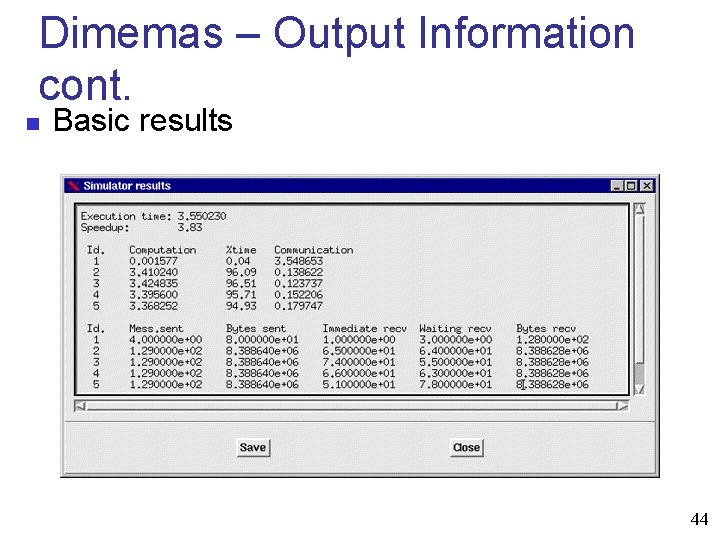
Dimemas – Output Information n Basic results n n execution time and speedup For each task n n n computation time blocking time information related to messages: number of sends, number of received (divided in number of receives that produces a block because a message is not local to the task, and number of messages that promotes no block). 43
Dimemas – Output Information cont. n Basic results 44
Dimemas – Output Information cont. n Application Analysis n n Is my application well balanced? Are there any dependencies? Can we improve the application grouping messages? Does latency influence application time? Are we planning to run our application in a low bandwidth network? Does bandwidth have influence in application time? Do resources limit application time? 45
Dimemas – Output Information cont. n Additional Analysis n n n What is analysis Critical path Synthetic perturbation analysis 46
Paraver n Paraver is a flexible performance visualization and analysis tool that can be used to analyze n n n MPI Open. MP MPI+Open. MP Java Hardware counters profile Operating system activity. . . and many other things you may think of 47
Paraver – Di. P Environment 48
Paraver – Features n n Motif based GUI Detailed quantitative analysis of program performance Concurrent comparative analysis of several traces Fast analysis of very large traces 49
Paraver – Features cont. n n n Support for mixed message passing and shared memory (networks of SMPs) Customizable semantics of the visualized information Cooperative work, sharing views of the tracefile Building of derived metrics 50
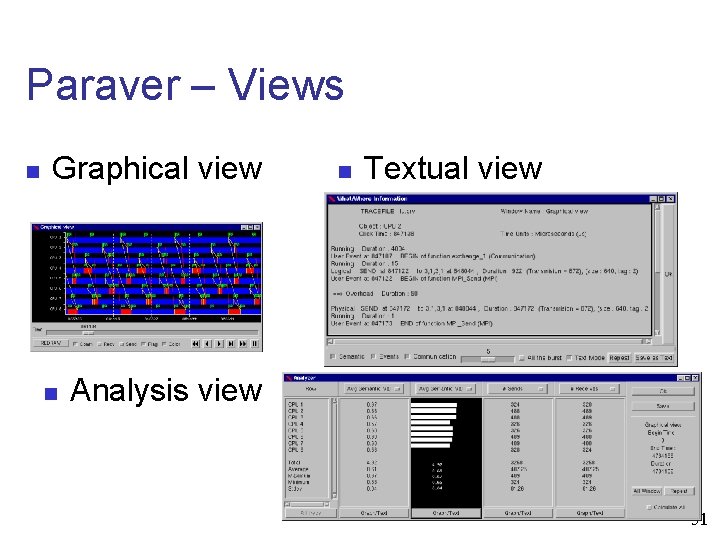
Paraver – Views n Graphical view n n Textual view Analysis view 51
Paraver – Views cont. n Paraver displayed information consists of three elements: n n n a time dependent value (called semantic value) for each represented object flags that correspond to punctual events within a represented object communication lines that relate the displayed objects. 52
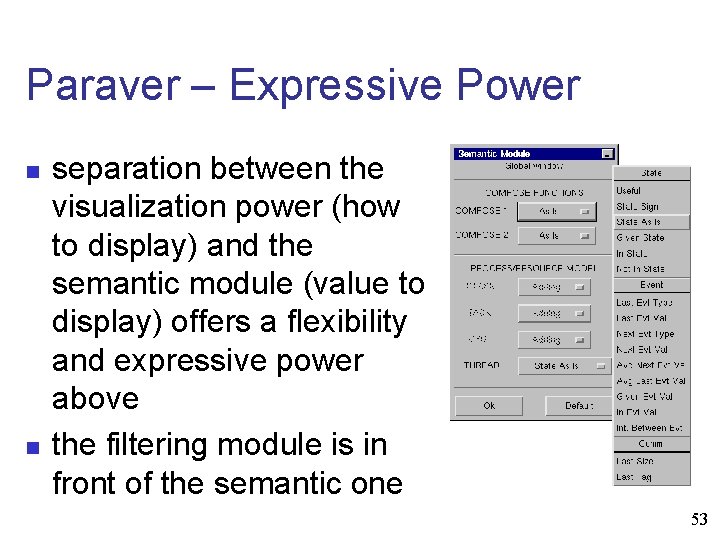
Paraver – Expressive Power n n separation between the visualization power (how to display) and the semantic module (value to display) offers a flexibility and expressive power above the filtering module is in front of the semantic one 53
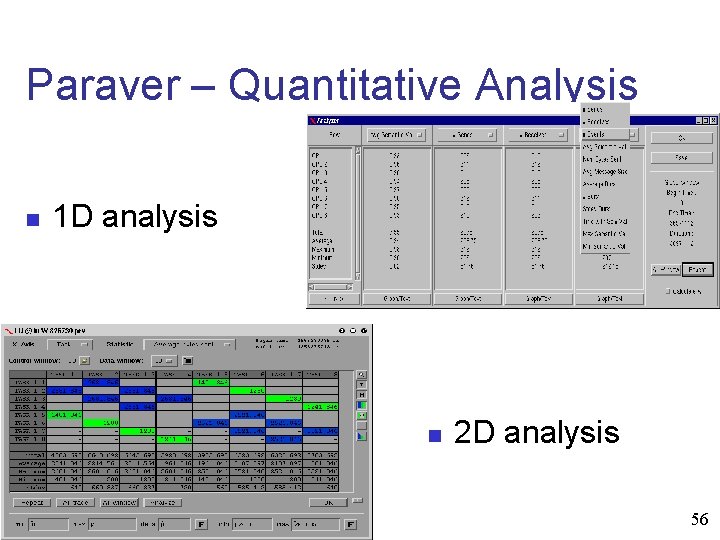
Paraver – Quantitative Analysis n 1 D analysis n n Number of messages sent in the selected interval Average CPU utilization Number of events of a given type on each processor Average CPU time between two communications. 54
Paraver – Quantitative Analysis n 2 D analysis n n Number of bytes sent between each pair of tasks Average number of L 2 cache misses per thread on each parallel region Number of TLB misses per thread on each application routine Average number of IPC (instructions per cycle) per thread on each iteration 55
Paraver – Quantitative Analysis n 1 D analysis n 2 D analysis 56
Paraver – Other functionality n n n Multiple traces Large traces Cooperative analysis Derived Metrics Batch processing 57
Acknowledgments n n n GCB FIU SCIS NSF UPC – BSC Dr. Masoud Sadjadi Javier Muñoz and Diego Lopez 58
- Slides: 58