
Space Management Rick Jooss SANi SAN Business Unit
Space Management Rick Jooss SANi. SAN Business Unit
Agenda 4 What is Flexible or Thin Provisioning 4 Types of Thin Provisioning 4 How a LUN fills 4 ONTAP Variables 4 Space Usage in a volume 4 Configurations – – – Default Configuration Snapshot - Snapshot Auto delete Snapshot - Volume Auto grow Snapshot - Volume guarantee none LUN - LUN reservation disabled Restricted to Net. App Employees & NDA Channel Partners. Copyright (c) 2006 Network Appliance, Inc. All rights reserved. 2
What is Thin Provisioning? 4 Presenting more space to the servers than the storage systems actually contains 4 Classic examples from other industries – – Banks Water Companies Electric Companies Insurance Companies 4 Large systems are needed Restricted to Net. App Employees & NDA Channel Partners. Copyright (c) 2006 Network Appliance, Inc. All rights reserved. 3
Types of Thin Provisioning 4 Snapshot Space – Creating, mapping and snapshotting 100 x 100 GB LUNs with less than 20+ TB (< 2 X + Δ) – In the NAS world snapshot space is always thin provisioned 4 LUN Space – Creating and mapping 10 TB (100 x 100 GB) LUNs when the storage system only has 8 TB – Only makes sense when one is not creating snapshots because having less than 10 TB with snapshots is not reasonable Restricted to Net. App Employees & NDA Channel Partners. Copyright (c) 2006 Network Appliance, Inc. All rights reserved. 4
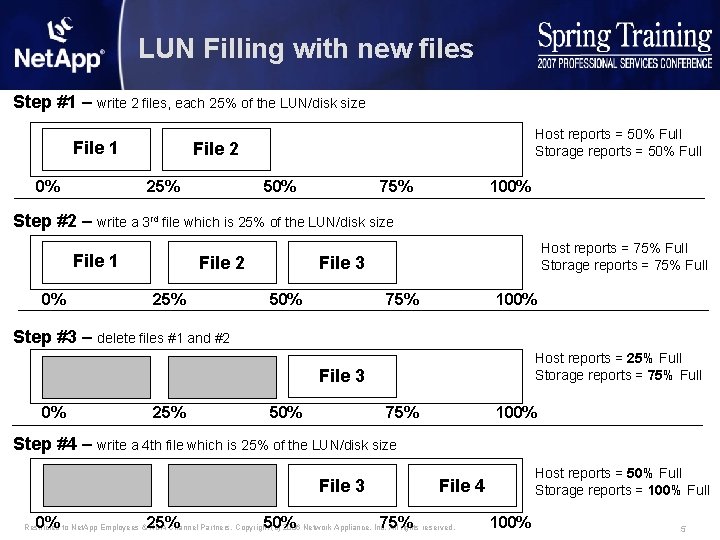
LUN Filling with new files Step #1 – write 2 files, each 25% of the LUN/disk size File 1 0% Host reports = 50% Full Storage reports = 50% Full File 2 25% 50% 75% 100% Step #2 – write a 3 rd file which is 25% of the LUN/disk size File 1 0% File 2 Host reports = 75% Full Storage reports = 75% Full File 3 25% 50% 75% 100% Step #3 – delete files #1 and #2 Host reports = 25% Full Storage reports = 75% Full File 3 0% 25% 50% 75% 100% Step #4 – write a 4 th file which is 25% of the LUN/disk size File 3 0% 25% 50% 75% File 4 Restricted to Net. App Employees & NDA Channel Partners. Copyright (c) 2006 Network Appliance, Inc. All rights reserved. 100% Host reports = 50% Full Storage reports = 100% Full 5
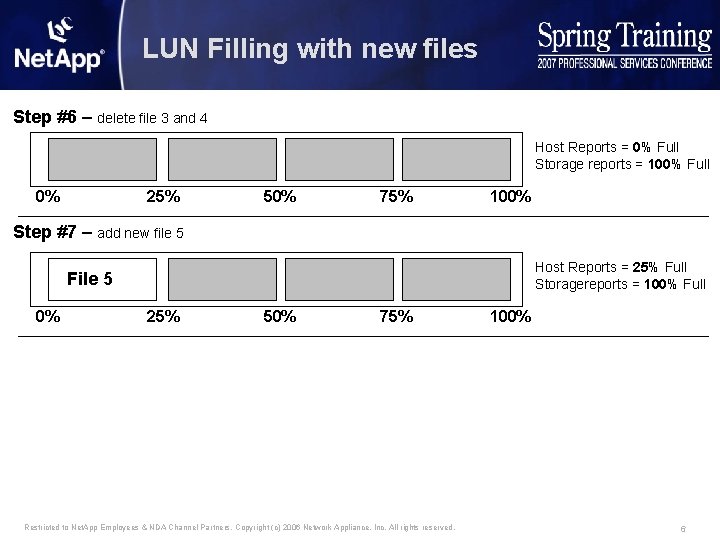
LUN Filling with new files Step #6 – delete file 3 and 4 Host Reports = 0% Full Storage reports = 100% Full 0% 25% 50% 75% 100% Step #7 – add new file 5 Host Reports = 25% Full Storagereports = 100% Full File 5 0% 25% 50% 75% Restricted to Net. App Employees & NDA Channel Partners. Copyright (c) 2006 Network Appliance, Inc. All rights reserved. 100% 6
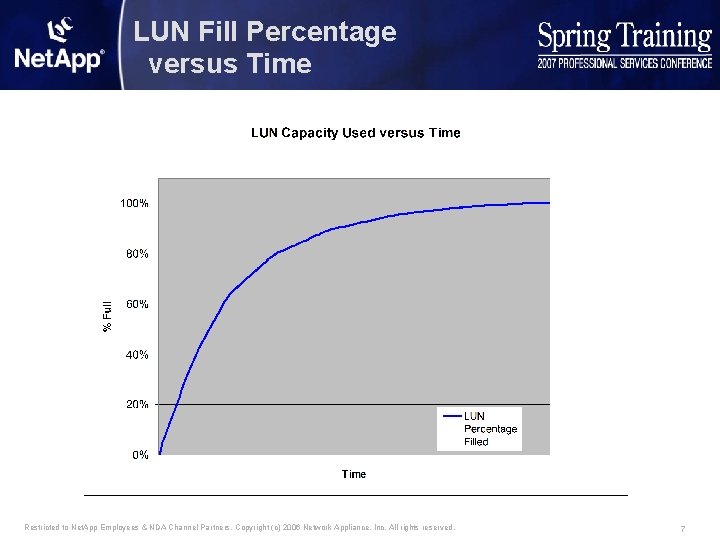
LUN Fill Percentage versus Time Restricted to Net. App Employees & NDA Channel Partners. Copyright (c) 2006 Network Appliance, Inc. All rights reserved. 7
Agenda 4 What is Flexible or Thin Provisioning 4 Types of Thin Provisioning 4 ONTAP Variables 4 Space usage in a volume 4 Configurations – – – Default Configuration Snapshot - Snapshot Auto delete Snapshot - Volume Auto grow Snapshot - Volume guarantee none LUN - LUN reservation disabled Restricted to Net. App Employees & NDA Channel Partners. Copyright (c) 2006 Network Appliance, Inc. All rights reserved. 8
ONTAP variables affecting space usage 4 ONTAP Variables – – – – Guarantee LUN reservation Fractional (space) Reservation Snap Reserve Auto Delete Auto grow Try first Restricted to Net. App Employees & NDA Channel Partners. Copyright (c) 2006 Network Appliance, Inc. All rights reserved. 9
Guarantees 4 Set on a per volume basis 4 Determines when space is allocated from the aggregate 4 Possible settings – Volume (default) • Space is reserved from the aggregate at volume creation time • This space is not available to other volumes regardless of how much is really used – None • No space is reserved from the aggregate at volume creation time • Space is taken from the aggregate as data is written • Allows thin provisioning of volumes • Any individual volume still is not allowed to take more space than its size – File • The same as none but allows individual LUNs (or files) to set space reservations to ensure they have adequate space Restricted to Net. App Employees & NDA Channel Partners. Copyright (c) 2006 Network Appliance, Inc. All rights reserved. 10
LUN Reservation 4 Set on per LUN basis 4 Determines when space is allocated from the volume 4 Possible settings – enabled (default) • Space is reserved from the volume at LUN creation time • This space is not available to other LUNs or files regardless of how much is really used – Disabled • No space is reserved from the volume at volume LUN time • Space is taken from the volume as data is written Restricted to Net. App Employees & NDA Channel Partners. Copyright (c) 2006 Network Appliance, Inc. All rights reserved. 11
Fractional (space) Reservation 4 Set on a per volume basis 4 Determines if space is reserved from the volume at first snapshot creation 4 Possible settings – 100% (default) • An amount of space equal to the amount of space used with in the LUNs is reserved from the volume • This space is not available to other LUNs or files regardless of how much is really used – 0 to 99% • An amount of space equal to the amount of space used with in the LUNs times fractional_reserve is reserved from the volume reserved = LUN_SPACE * fractional_reserve Restricted to Net. App Employees & NDA Channel Partners. Copyright (c) 2006 Network Appliance, Inc. All rights reserved. 12
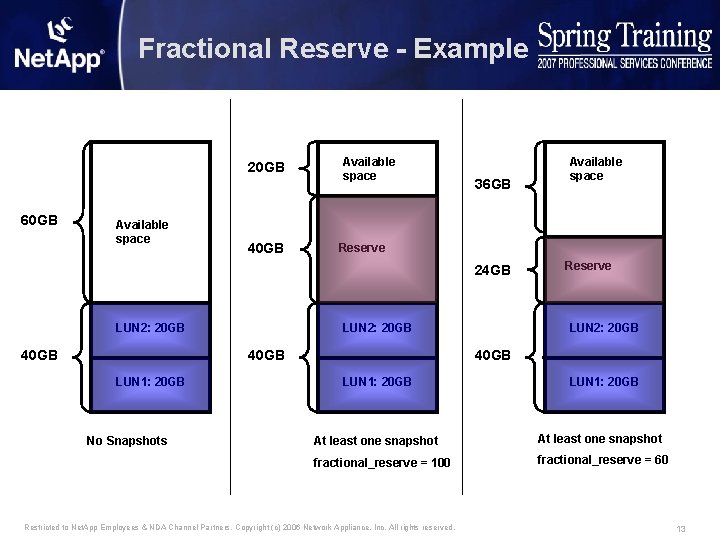
Fractional Reserve - Example 20 GB 60 GB Available space 40 GB Available space 36 GB Reserve 24 GB LUN 2: 20 GB 40 GB LUN 1: 20 GB No Snapshots Available space Reserve LUN 2: 20 GB 40 GB LUN 1: 20 GB At least one snapshot fractional_reserve = 100 fractional_reserve = 60 Restricted to Net. App Employees & NDA Channel Partners. Copyright (c) 2006 Network Appliance, Inc. All rights reserved. 13
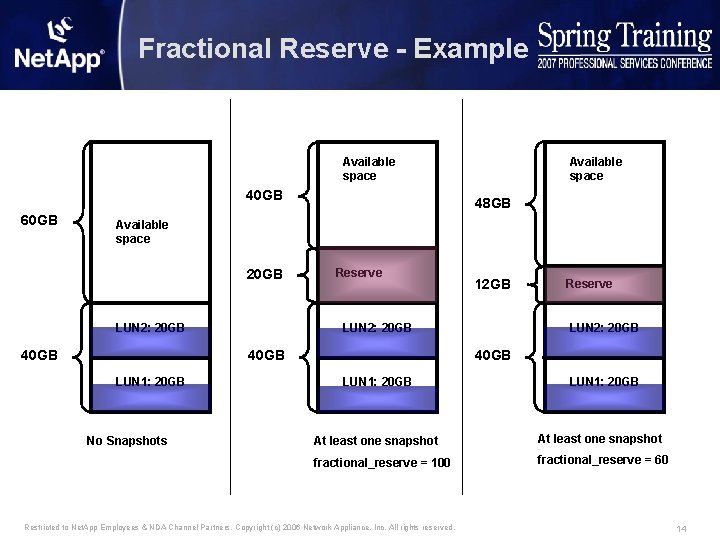
Fractional Reserve - Example Available space 40 GB 60 GB Available space 48 GB Available space 20 GB LUN 2: 20 GB 40 GB Reserve LUN 2: 20 GB 40 GB LUN 1: 20 GB No Snapshots 12 GB Reserve LUN 2: 20 GB 40 GB LUN 1: 20 GB At least one snapshot fractional_reserve = 100 fractional_reserve = 60 Restricted to Net. App Employees & NDA Channel Partners. Copyright (c) 2006 Network Appliance, Inc. All rights reserved. 14
Snap Reserve 4 Set on a per volume basis 4 Determines if space is allocated from the volume for Snapshot data at volume creation time 4 Possible settings – 20% (default for NAS) – 0% (current default for SAN) – 0% to 100% Restricted to Net. App Employees & NDA Channel Partners. Copyright (c) 2006 Network Appliance, Inc. All rights reserved. 15
Snapshot Auto Delete 4 Set on a per volume basis 4 Determines when (if) snapshots will be automatically deleted 4 Makes Net. App like competition but better 4 Possible settings – Triggers • Volume • Snap Reserve • Space Reserve – Order • delete_order – oldest, newest • defer_delete – scheduled, user created, prefix, none • snapmirror/dump – try, disrupt 4 Snapshots locked by clones, cifs or restores will not be deleted – change planned for 7. 3 Restricted to Net. App Employees & NDA Channel Partners. Copyright (c) 2006 Network Appliance, Inc. All rights reserved. 16
Volume Auto Grow 4 Set on a per volume basis 4 Determines if a volume should grow when it nearly full 4 Possible settings – ON - Maximum growth - Increment size – OFF 4 Try_first option determines whether auto_grow or auto_delete is attempted first Restricted to Net. App Employees & NDA Channel Partners. Copyright (c) 2006 Network Appliance, Inc. All rights reserved. 17
Agenda 4 What is Flexible or Thin Provisioning 4 Types of Thin Provisioning 4 ONTAP Variables 4 Space usage in a volume 4 Configurations – – – Default Configuration Snapshot - Snapshot Auto delete Snapshot - Volume Auto grow Snapshot - Volume guarantee none LUN - LUN reservation disabled Restricted to Net. App Employees & NDA Channel Partners. Copyright (c) 2006 Network Appliance, Inc. All rights reserved. 18
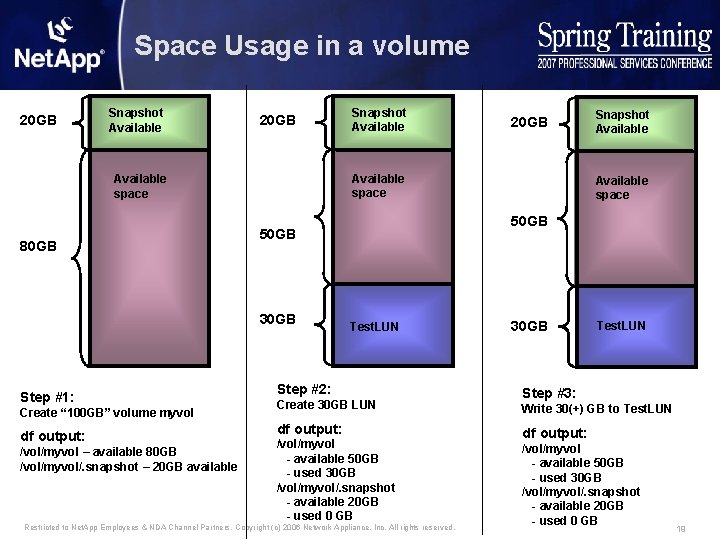
Space Usage in a volume 20 GB Snapshot Available 20 GB Create “ 100 GB” volume myvol df output: /vol/myvol – available 80 GB /vol/myvol/. snapshot – 20 GB available Snapshot Available space 50 GB 30 GB Step #1: 20 GB Available space 80 GB Snapshot Available Test. LUN Step #2: Create 30 GB LUN df output: /vol/myvol - available 50 GB - used 30 GB /vol/myvol/. snapshot - available 20 GB - used 0 GB Restricted to Net. App Employees & NDA Channel Partners. Copyright (c) 2006 Network Appliance, Inc. All rights reserved. 30 GB Test. LUN Step #3: Write 30(+) GB to Test. LUN df output: /vol/myvol - available 50 GB - used 30 GB /vol/myvol/. snapshot - available 20 GB - used 0 GB 19
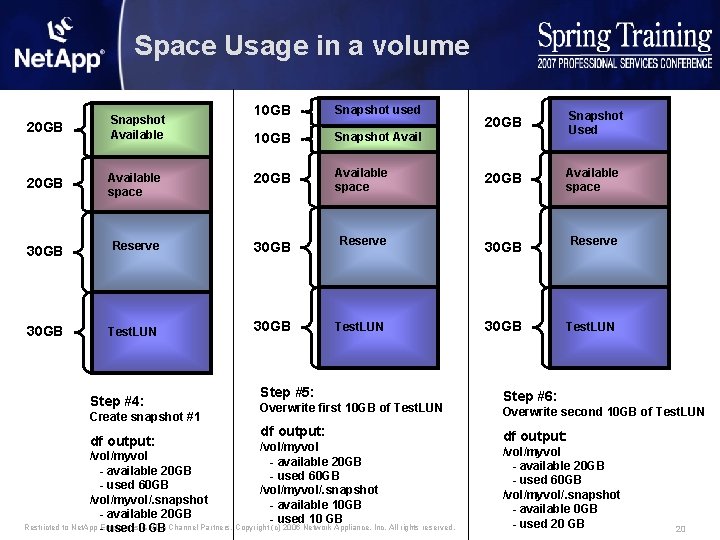
Space Usage in a volume 10 GB Snapshot used 10 GB Snapshot Avail 20 GB Snapshot Used 20 GB Snapshot Available 20 GB Available space 30 GB Reserve 30 GB Test. LUN Step #4: Create snapshot #1 df output: Step #5: Overwrite first 10 GB of Test. LUN df output: /vol/myvol - available 20 GB - used 60 GB /vol/myvol/. snapshot - available 10 GB - used 10 GB /vol/myvol - available 20 GB - used 60 GB /vol/myvol/. snapshot - available 20 GB Restricted to Net. App Employees & NDA Channel Partners. Copyright (c) 2006 Network Appliance, Inc. All rights reserved. - used 0 GB Step #6: Overwrite second 10 GB of Test. LUN df output: /vol/myvol - available 20 GB - used 60 GB /vol/myvol/. snapshot - available 0 GB - used 20 GB 20
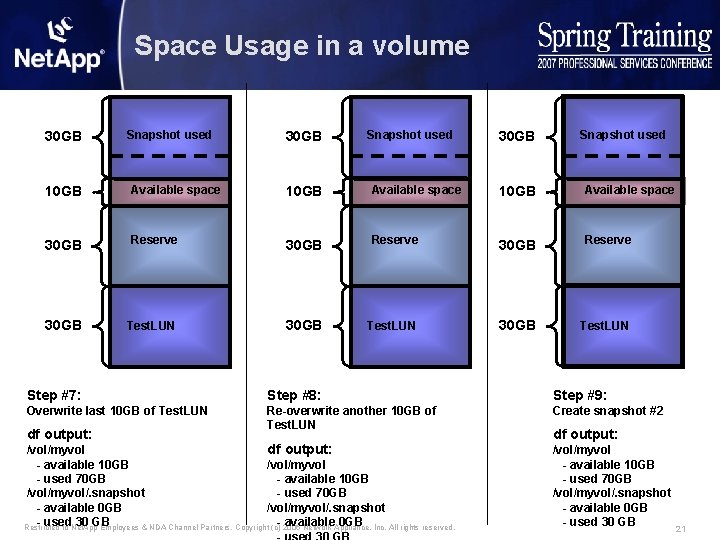
Space Usage in a volume 30 GB Snapshot used 10 GB Available space 30 GB Reserve 30 GB Test. LUN Step #7: Step #8: Step #9: Overwrite last 10 GB of Test. LUN Re-overwrite another 10 GB of Test. LUN Create snapshot #2 df output: /vol/myvol - available 10 GB /vol/myvol - used 70 GB - available 10 GB /vol/myvol/. snapshot - used 70 GB - available 0 GB /vol/myvol/. snapshot - used 30 GB Restricted to Net. App Employees & NDA Channel Partners. Copyright - available 0 GB (c) 2006 Network Appliance, Inc. All rights reserved. df output: /vol/myvol - available 10 GB - used 70 GB /vol/myvol/. snapshot - available 0 GB - used 30 GB 21
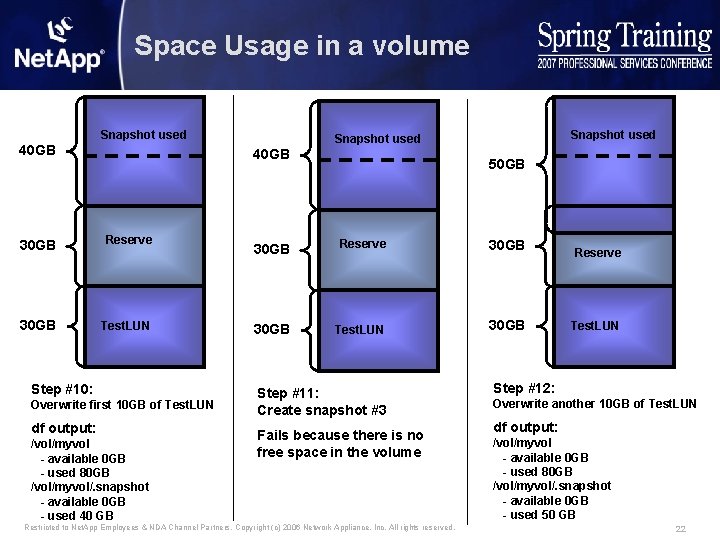
Space Usage in a volume Snapshot used 40 GB 30 GB Reserve 30 GB Test. LUN Step #10: Overwrite first 10 GB of Test. LUN df output: /vol/myvol - available 0 GB - used 80 GB /vol/myvol/. snapshot - available 0 GB - used 40 GB Snapshot used 50 GB 30 GB Reserve 30 GB Test. LUN 30 GB Step #11: Create snapshot #3 Fails because there is no free space in the volume Restricted to Net. App Employees & NDA Channel Partners. Copyright (c) 2006 Network Appliance, Inc. All rights reserved. Reserve Test. LUN Step #12: Overwrite another 10 GB of Test. LUN df output: /vol/myvol - available 0 GB - used 80 GB /vol/myvol/. snapshot - available 0 GB - used 50 GB 22
Agenda 4 What is Flexible or Thin Provisioning 4 Types of Thin Provisioning 4 ONTAP Variables 4 Space usage in a volume 4 Configurations – – – Default Configuration Snapshot - Snapshot Auto delete Snapshot - Volume Auto grow Snapshot - Volume guarantee none LUN - LUN reservation disabled Restricted to Net. App Employees & NDA Channel Partners. Copyright (c) 2006 Network Appliance, Inc. All rights reserved. 23
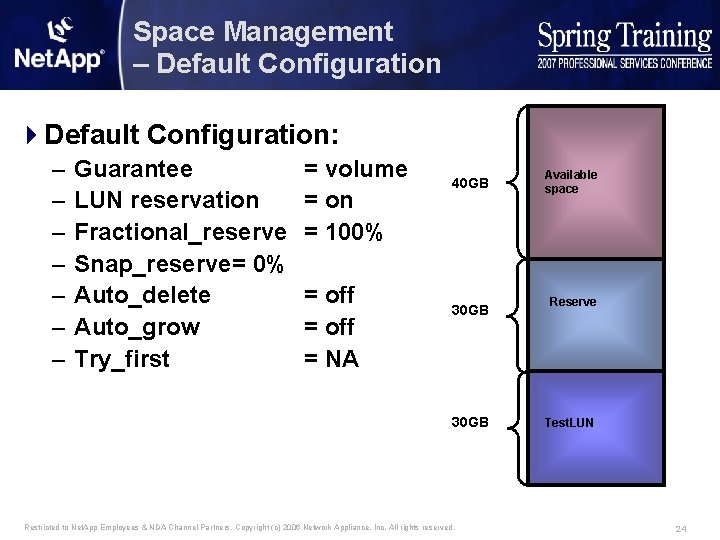
Space Management – Default Configuration 4 Default Configuration: – – – – Guarantee LUN reservation Fractional_reserve Snap_reserve= 0% Auto_delete Auto_grow Try_first = volume = on = 100% = off = NA 40 GB 30 GB Restricted to Net. App Employees & NDA Channel Partners. Copyright (c) 2006 Network Appliance, Inc. All rights reserved. Available space Reserve Test. LUN 24
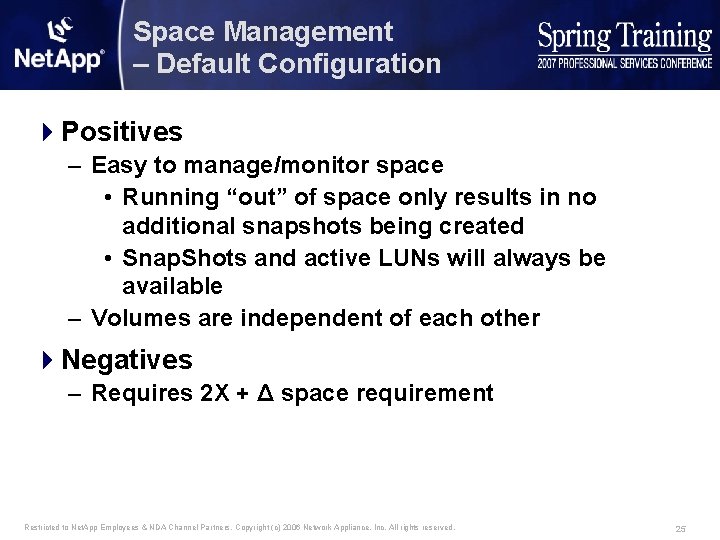
Space Management – Default Configuration 4 Positives – Easy to manage/monitor space • Running “out” of space only results in no additional snapshots being created • Snap. Shots and active LUNs will always be available – Volumes are independent of each other 4 Negatives – Requires 2 X + Δ space requirement Restricted to Net. App Employees & NDA Channel Partners. Copyright (c) 2006 Network Appliance, Inc. All rights reserved. 25
Agenda 4 What is Flexible or Thin Provisioning 4 Types of Thin Provisioning 4 ONTAP Variables 4 Space usage in a volume 4 Configurations – – – Default Configuration Snapshot - Snapshot Auto delete Snapshot - Volume Auto grow Snapshot - Volume guarantee none LUN - LUN reservation disabled Restricted to Net. App Employees & NDA Channel Partners. Copyright (c) 2006 Network Appliance, Inc. All rights reserved. 26
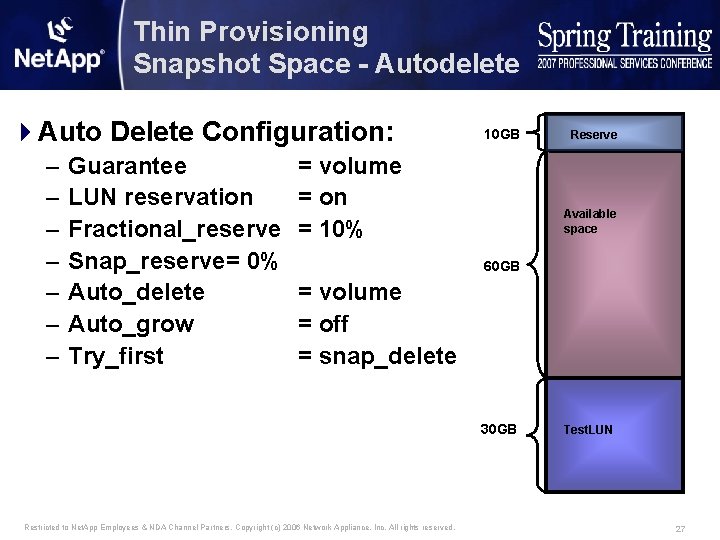
Thin Provisioning Snapshot Space - Autodelete 4 Auto Delete Configuration: – – – – Guarantee LUN reservation Fractional_reserve Snap_reserve= 0% Auto_delete Auto_grow Try_first 10 GB = volume = on = 10% Reserve Available space 60 GB = volume = off = snap_delete 30 GB Restricted to Net. App Employees & NDA Channel Partners. Copyright (c) 2006 Network Appliance, Inc. All rights reserved. Test. LUN 27
Thin Provisioning Snapshot Space - Autodelete 4 Positives – Easy to monitor/understand space just volume – Sacrifices snapshots before active LUNs – Volumes are independent of each other – Looks like the competition 4 Negatives – Doesn’t use shared space from the aggregate – Until ONTAP 7. 3 have to be cautious with using Flex. Clones Restricted to Net. App Employees & NDA Channel Partners. Copyright (c) 2006 Network Appliance, Inc. All rights reserved. 28
Agenda 4 What is Flexible or Thin Provisioning 4 Types of Thin Provisioning 4 ONTAP Variables 4 Configurations – – – Default Configuration Snapshot - Snapshot Auto delete Snapshot - Volume Auto grow Snapshot - Volume guarantee none LUN - LUN reservation disabled Restricted to Net. App Employees & NDA Channel Partners. Copyright (c) 2006 Network Appliance, Inc. All rights reserved. 29
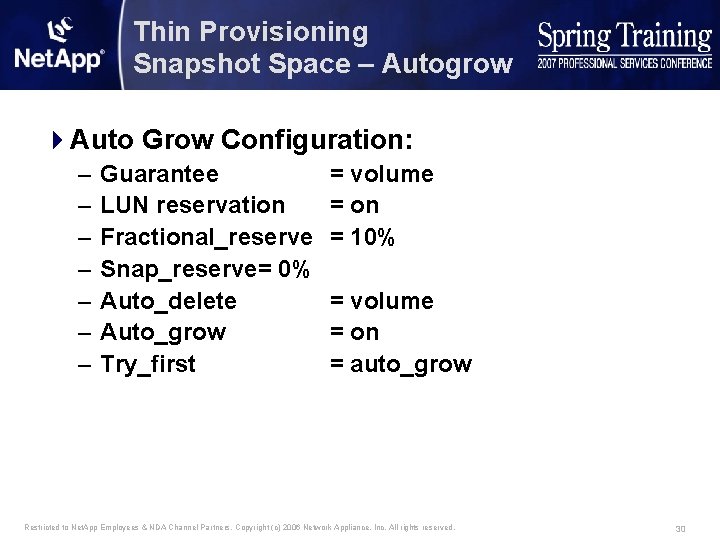
Thin Provisioning Snapshot Space – Autogrow 4 Auto Grow Configuration: – – – – Guarantee LUN reservation Fractional_reserve Snap_reserve= 0% Auto_delete Auto_grow Try_first = volume = on = 10% = volume = on = auto_grow Restricted to Net. App Employees & NDA Channel Partners. Copyright (c) 2006 Network Appliance, Inc. All rights reserved. 30
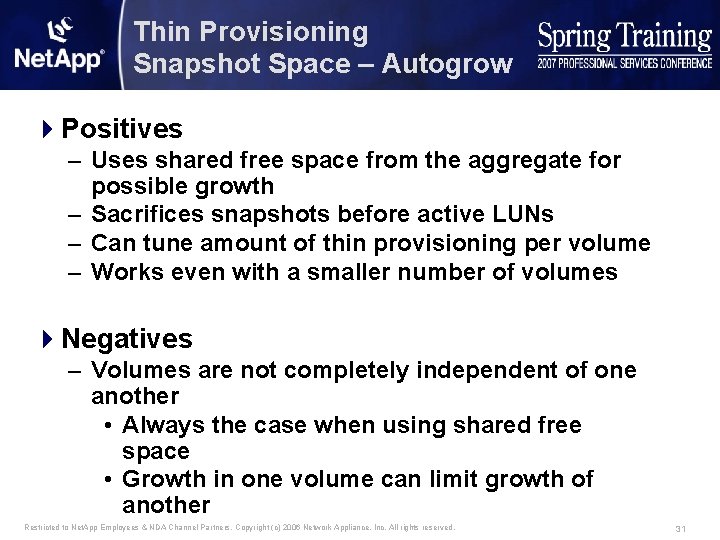
Thin Provisioning Snapshot Space – Autogrow 4 Positives – Uses shared free space from the aggregate for possible growth – Sacrifices snapshots before active LUNs – Can tune amount of thin provisioning per volume – Works even with a smaller number of volumes 4 Negatives – Volumes are not completely independent of one another • Always the case when using shared free space • Growth in one volume can limit growth of another Restricted to Net. App Employees & NDA Channel Partners. Copyright (c) 2006 Network Appliance, Inc. All rights reserved. 31
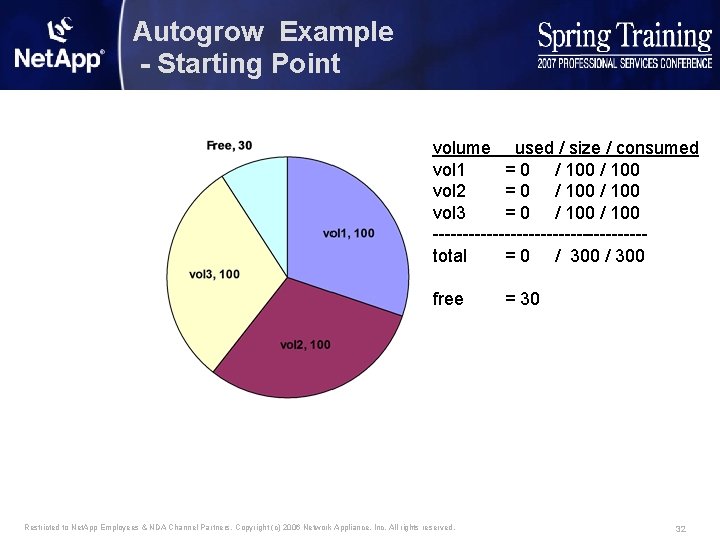
Autogrow Example - Starting Point volume used / size / consumed vol 1 = 0 / 100 vol 2 = 0 / 100 vol 3 = 0 / 100 ------------------total = 0 / 300 free Restricted to Net. App Employees & NDA Channel Partners. Copyright (c) 2006 Network Appliance, Inc. All rights reserved. = 30 32
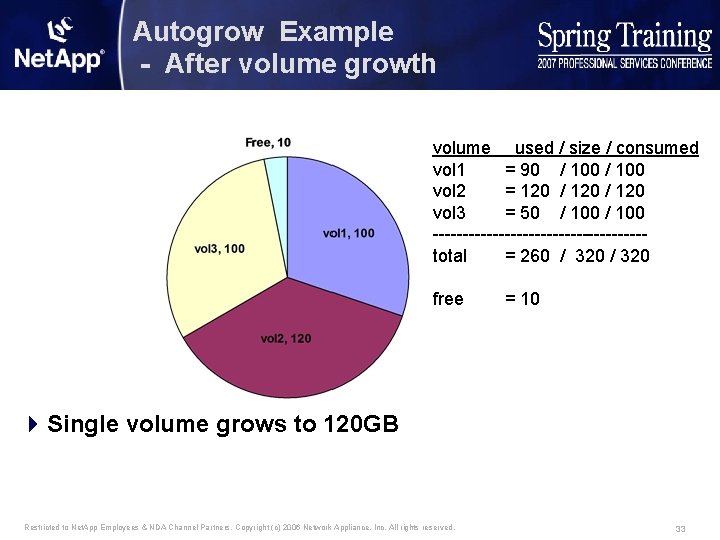
Autogrow Example - After volume growth volume used / size / consumed vol 1 = 90 / 100 vol 2 = 120 / 120 vol 3 = 50 / 100 ------------------total = 260 / 320 free = 10 4 Single volume grows to 120 GB Restricted to Net. App Employees & NDA Channel Partners. Copyright (c) 2006 Network Appliance, Inc. All rights reserved. 33
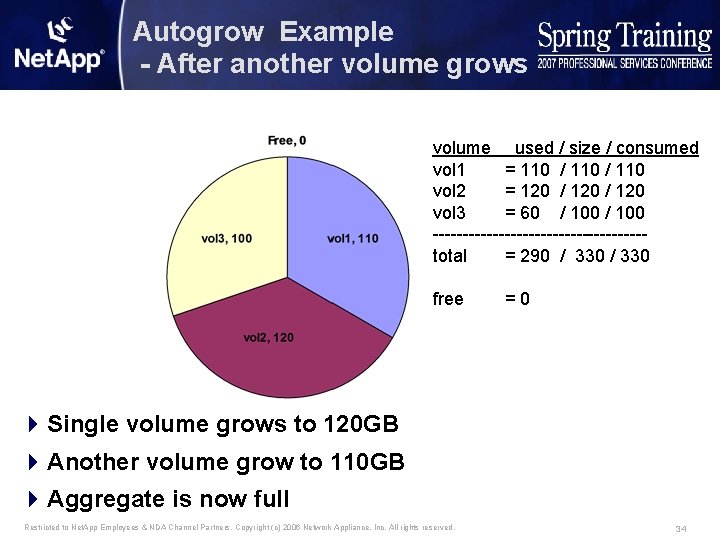
Autogrow Example - After another volume grows volume used / size / consumed vol 1 = 110 / 110 vol 2 = 120 / 120 vol 3 = 60 / 100 ------------------total = 290 / 330 free =0 4 Single volume grows to 120 GB 4 Another volume grow to 110 GB 4 Aggregate is now full Restricted to Net. App Employees & NDA Channel Partners. Copyright (c) 2006 Network Appliance, Inc. All rights reserved. 34
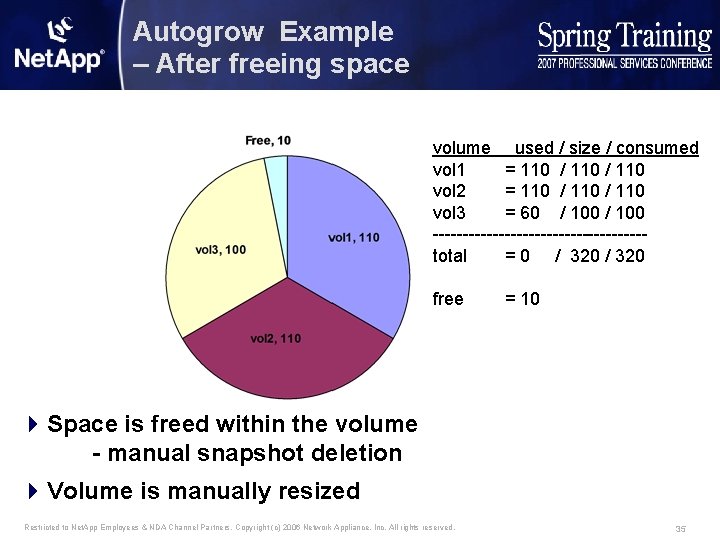
Autogrow Example – After freeing space volume used / size / consumed vol 1 = 110 / 110 vol 2 = 110 / 110 vol 3 = 60 / 100 ------------------total = 0 / 320 free = 10 4 Space is freed within the volume - manual snapshot deletion 4 Volume is manually resized Restricted to Net. App Employees & NDA Channel Partners. Copyright (c) 2006 Network Appliance, Inc. All rights reserved. 35
Agenda 4 What is Flexible or Thin Provisioning 4 Types of Thin Provisioning 4 ONTAP Variables 4 Space usage in a volume 4 Configurations – – – Default Configuration Snapshot - Snapshot Auto delete Snapshot - Volume Auto grow Snapshot - Volume guarantee none LUN - LUN reservation disabled Restricted to Net. App Employees & NDA Channel Partners. Copyright (c) 2006 Network Appliance, Inc. All rights reserved. 36
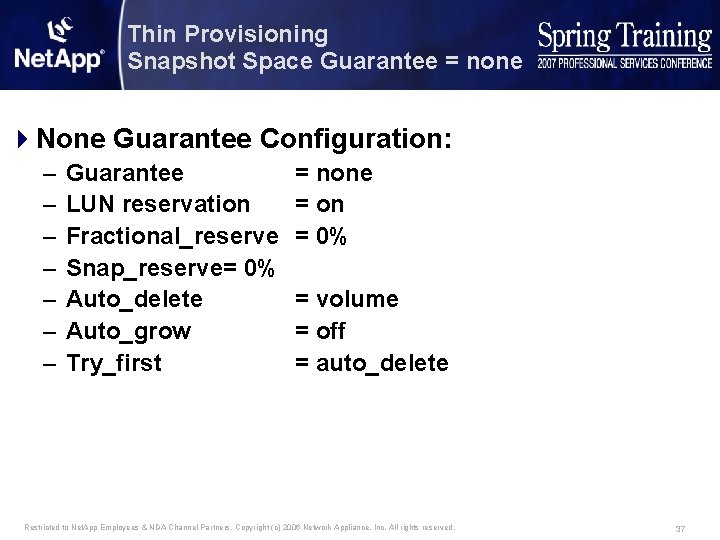
Thin Provisioning Snapshot Space Guarantee = none 4 None Guarantee Configuration: – – – – Guarantee LUN reservation Fractional_reserve Snap_reserve= 0% Auto_delete Auto_grow Try_first = none = on = 0% = volume = off = auto_delete Restricted to Net. App Employees & NDA Channel Partners. Copyright (c) 2006 Network Appliance, Inc. All rights reserved. 37
Thin Provisioning Snapshot Space Guarantee = none 4 Positives – Uses shared space from the aggregate 4 Negatives – Volumes are not independent of one another – Activity in some volumes can cause all volumes with a none guarantee to go offline – Generally only makes sense with a large number of volumes Restricted to Net. App Employees & NDA Channel Partners. Copyright (c) 2006 Network Appliance, Inc. All rights reserved. 38
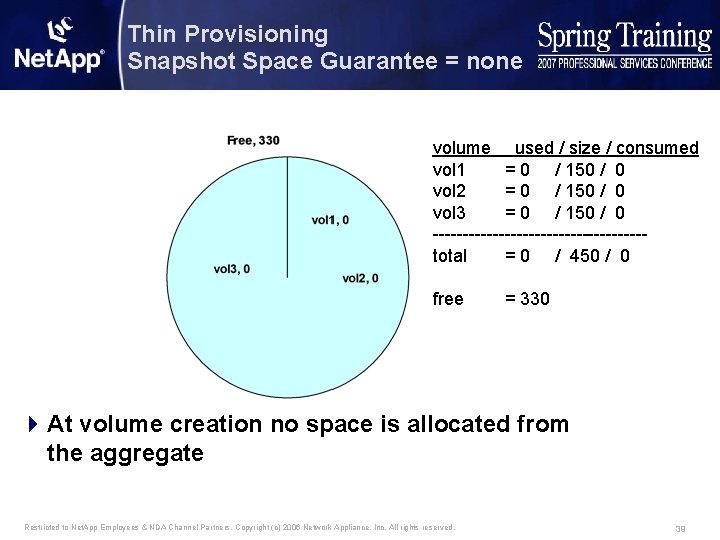
Thin Provisioning Snapshot Space Guarantee = none volume used / size / consumed vol 1 = 0 / 150 / 0 vol 2 = 0 / 150 / 0 vol 3 = 0 / 150 / 0 ------------------total = 0 / 450 / 0 free = 330 4 At volume creation no space is allocated from the aggregate Restricted to Net. App Employees & NDA Channel Partners. Copyright (c) 2006 Network Appliance, Inc. All rights reserved. 39
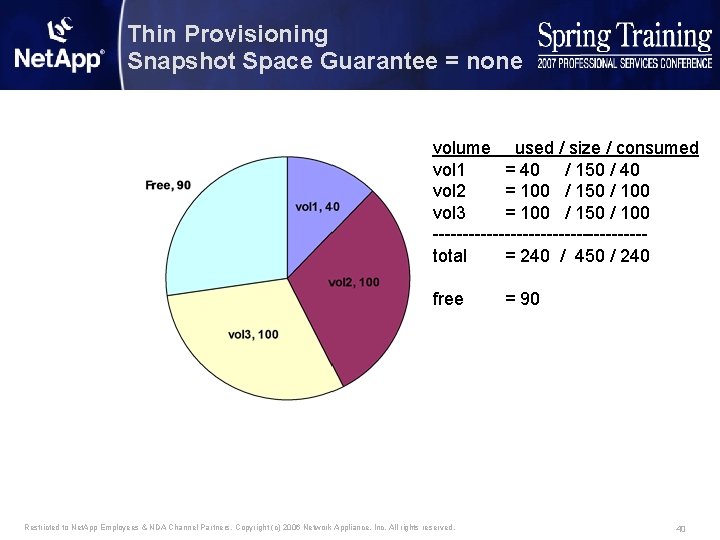
Thin Provisioning Snapshot Space Guarantee = none volume used / size / consumed vol 1 = 40 / 150 / 40 vol 2 = 100 / 150 / 100 vol 3 = 100 / 150 / 100 ------------------total = 240 / 450 / 240 free Restricted to Net. App Employees & NDA Channel Partners. Copyright (c) 2006 Network Appliance, Inc. All rights reserved. = 90 40
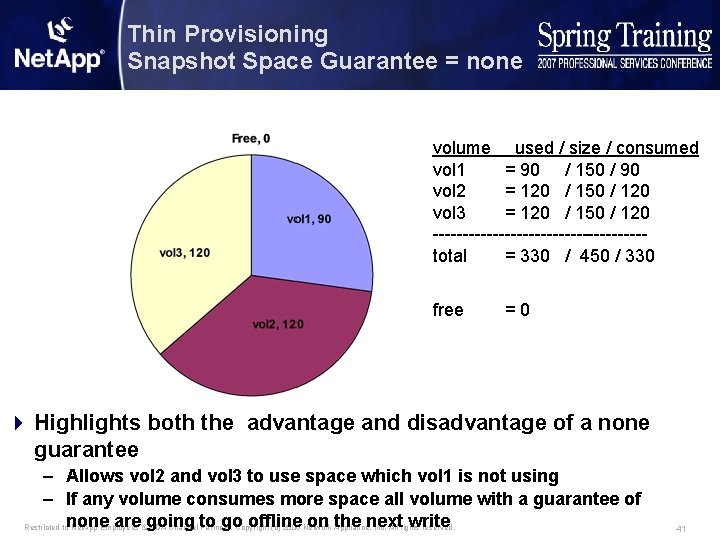
Thin Provisioning Snapshot Space Guarantee = none volume used / size / consumed vol 1 = 90 / 150 / 90 vol 2 = 120 / 150 / 120 vol 3 = 120 / 150 / 120 ------------------total = 330 / 450 / 330 free =0 4 Highlights both the advantage and disadvantage of a none guarantee – Allows vol 2 and vol 3 to use space which vol 1 is not using – If any volume consumes more space all volume with a guarantee of Restricted tonone are going to go offline on the next write Net. App Employees & NDA Channel Partners. Copyright (c) 2006 Network Appliance, Inc. All rights reserved. 41
Agenda 4 What is Flexible or Thin Provisioning 4 Types of Thin Provisioning 4 ONTAP Variables 4 Space usage in a volume 4 Configurations – – – Default Configuration Snapshot - Snapshot Auto delete Snapshot - Volume Auto grow Snapshot - Volume guarantee none LUN - LUN reservation disabled Restricted to Net. App Employees & NDA Channel Partners. Copyright (c) 2006 Network Appliance, Inc. All rights reserved. 42
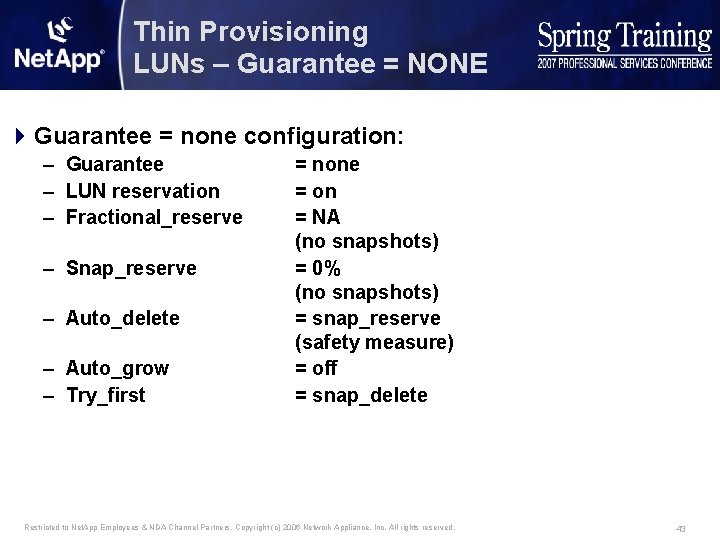
Thin Provisioning LUNs – Guarantee = NONE 4 Guarantee = none configuration: – Guarantee – LUN reservation – Fractional_reserve – Snap_reserve – Auto_delete – Auto_grow – Try_first = none = on = NA (no snapshots) = 0% (no snapshots) = snap_reserve (safety measure) = off = snap_delete Restricted to Net. App Employees & NDA Channel Partners. Copyright (c) 2006 Network Appliance, Inc. All rights reserved. 43
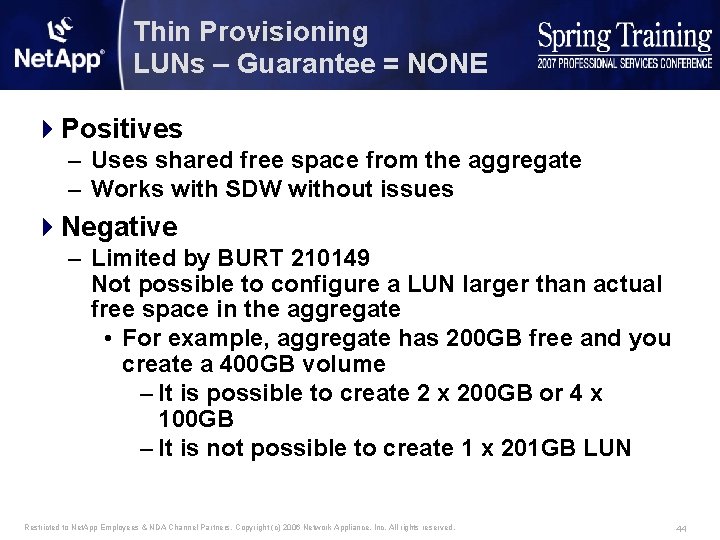
Thin Provisioning LUNs – Guarantee = NONE 4 Positives – Uses shared free space from the aggregate – Works with SDW without issues 4 Negative – Limited by BURT 210149 Not possible to configure a LUN larger than actual free space in the aggregate • For example, aggregate has 200 GB free and you create a 400 GB volume – It is possible to create 2 x 200 GB or 4 x 100 GB – It is not possible to create 1 x 201 GB LUN Restricted to Net. App Employees & NDA Channel Partners. Copyright (c) 2006 Network Appliance, Inc. All rights reserved. 44
Agenda 4 What is Flexible or Thin Provisioning 4 Types of Thin Provisioning 4 ONTAP Variables 4 Space usage in a volume 4 Configurations – – – Default Configuration Snapshot - Snapshot Auto delete Snapshot - Volume Auto grow Snapshot - Volume guarantee none LUN - LUN reservation disabled Restricted to Net. App Employees & NDA Channel Partners. Copyright (c) 2006 Network Appliance, Inc. All rights reserved. 45
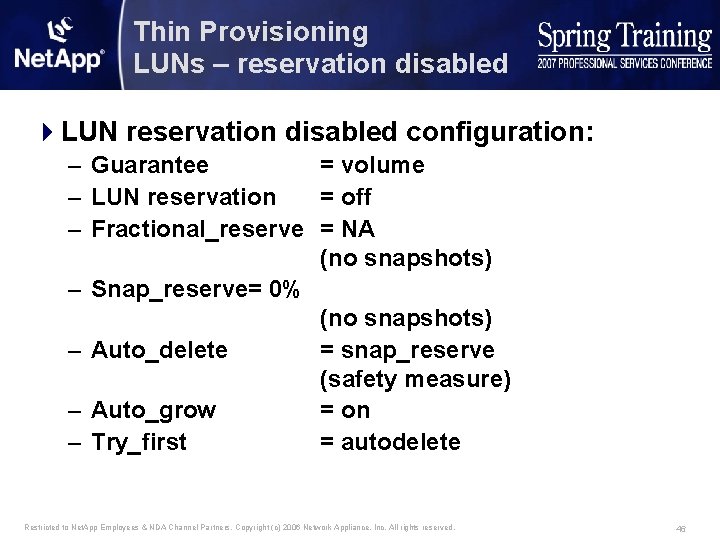
Thin Provisioning LUNs – reservation disabled 4 LUN reservation disabled configuration: – Guarantee = volume – LUN reservation = off – Fractional_reserve = NA (no snapshots) – Snap_reserve= 0% (no snapshots) – Auto_delete = snap_reserve (safety measure) – Auto_grow = on – Try_first = autodelete Restricted to Net. App Employees & NDA Channel Partners. Copyright (c) 2006 Network Appliance, Inc. All rights reserved. 46
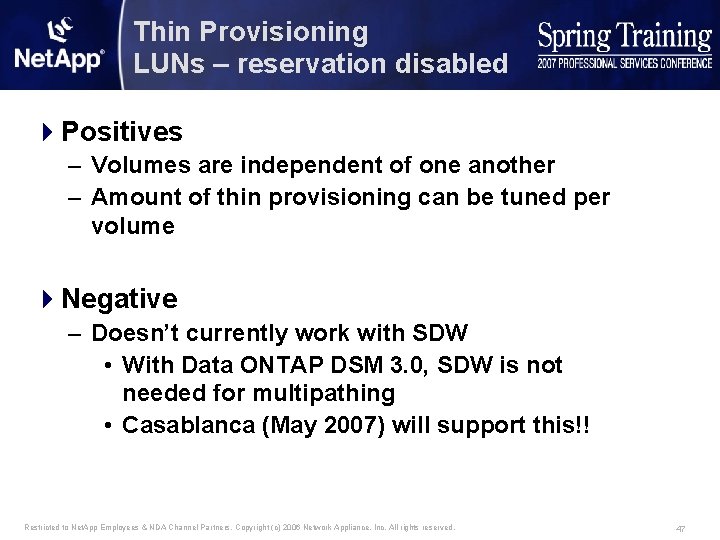
Thin Provisioning LUNs – reservation disabled 4 Positives – Volumes are independent of one another – Amount of thin provisioning can be tuned per volume 4 Negative – Doesn’t currently work with SDW • With Data ONTAP DSM 3. 0, SDW is not needed for multipathing • Casablanca (May 2007) will support this!! Restricted to Net. App Employees & NDA Channel Partners. Copyright (c) 2006 Network Appliance, Inc. All rights reserved. 47
Agenda - Summary 4 Configurations – – – Default Configuration Snapshot - Snapshot Auto delete Snapshot - Volume Auto grow Snapshot - Volume guarantee none LUN - LUN reservation disabled Restricted to Net. App Employees & NDA Channel Partners. Copyright (c) 2006 Network Appliance, Inc. All rights reserved. 48
- Slides: 48