
Sound Localization Activities for Introductory Acoustics Eric Hill
- Slides: 1
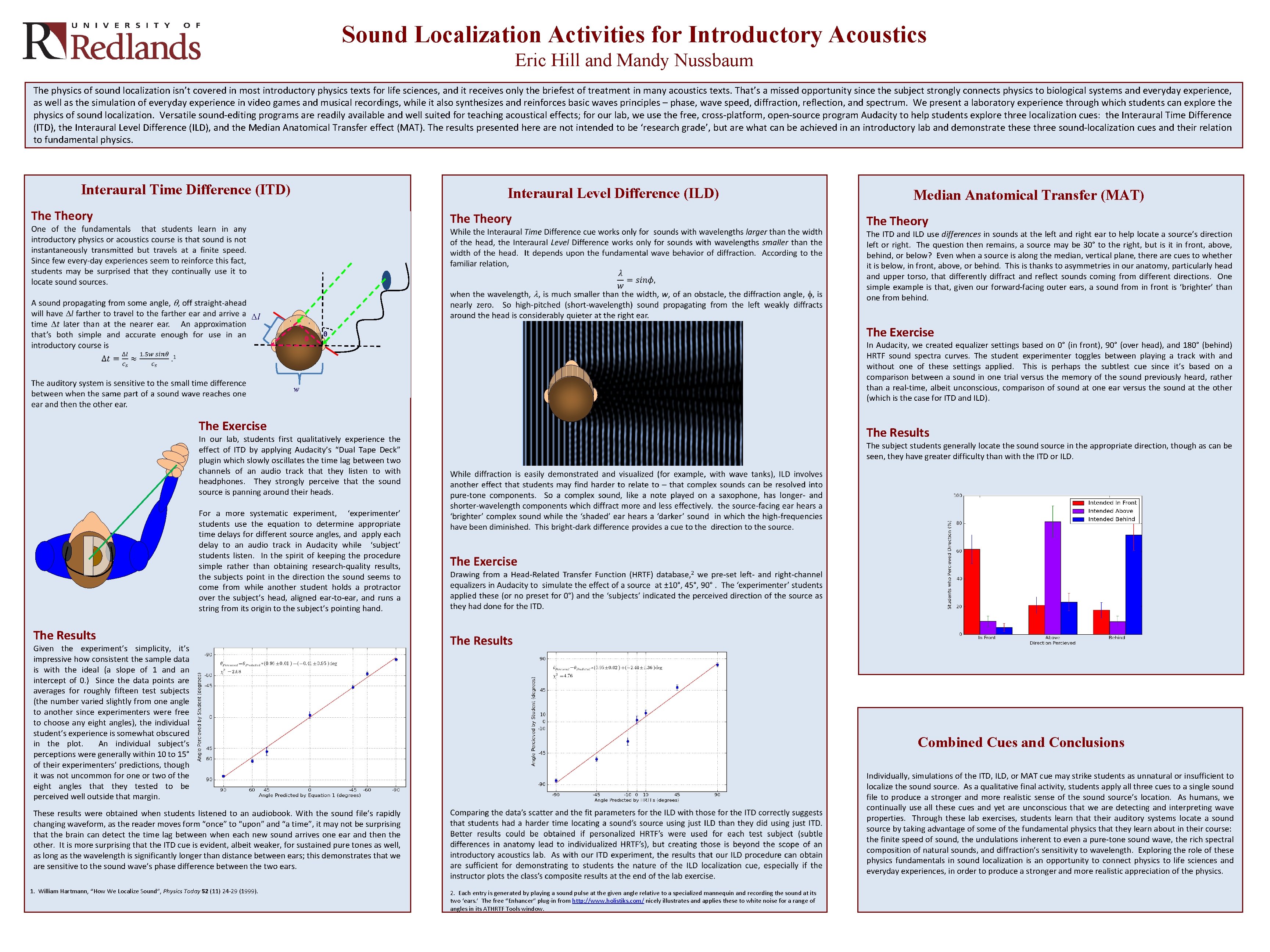
Sound Localization Activities for Introductory Acoustics Eric Hill and Mandy Nussbaum The physics of sound localization isn’t covered in most introductory physics texts for life sciences, and it receives only the briefest of treatment in many acoustics texts. That’s a missed opportunity since the subject strongly connects physics to biological systems and everyday experience, as well as the simulation of everyday experience in video games and musical recordings, while it also synthesizes and reinforces basic waves principles – phase, wave speed, diffraction, reflection, and spectrum. We present a laboratory experience through which students can explore the physics of sound localization. Versatile sound-editing programs are readily available and well suited for teaching acoustical effects; for our lab, we use the free, cross-platform, open-source program Audacity to help students explore three localization cues: the Interaural Time Difference (ITD), the Interaural Level Difference (ILD), and the Median Anatomical Transfer effect (MAT). The results presented here are not intended to be ‘research grade’, but are what can be achieved in an introductory lab and demonstrate these three sound-localization cues and their relation to fundamental physics. Interaural Time Difference (ITD) Interaural Level Difference (ILD) Median Anatomical Transfer (MAT) Theory The ITD and ILD use differences in sounds at the left and right ear to help locate a source’s direction left or right. The question then remains, a source may be 30° to the right, but is it in front, above, behind, or below? Even when a source is along the median, vertical plane, there are cues to whether it is below, in front, above, or behind. This is thanks to asymmetries in our anatomy, particularly head and upper torso, that differently diffract and reflect sounds coming from different directions. One simple example is that, given our forward-facing outer ears, a sound from in front is ‘brighter’ than one from behind. Δl θθ The Exercise θ In Audacity, we created equalizer settings based on 0° (in front), 90° (over head), and 180° (behind) HRTF sound spectra curves. The student experimenter toggles between playing a track with and without one of these settings applied. This is perhaps the subtlest cue since it’s based on a comparison between a sound in one trial versus the memory of the sound previously heard, rather than a real-time, albeit unconscious, comparison of sound at one ear versus the sound at the other (which is the case for ITD and ILD). w The Exercise The Results In our lab, students first qualitatively experience the effect of ITD by applying Audacity’s “Dual Tape Deck” plugin which slowly oscillates the time lag between two channels of an audio track that they listen to with headphones. They strongly perceive that the sound source is panning around their heads. The subject students generally locate the sound source in the appropriate direction, though as can be seen, they have greater difficulty than with the ITD or ILD. For a more systematic experiment, ‘experimenter’ students use the equation to determine appropriate time delays for different source angles, and apply each delay to an audio track in Audacity while ‘subject’ students listen. In the spirit of keeping the procedure simple rather than obtaining research-quality results, the subjects point in the direction the sound seems to come from while another student holds a protractor over the subject’s head, aligned ear-to-ear, and runs a string from its origin to the subject’s pointing hand. The Results Given the experiment’s simplicity, it’s impressive how consistent the sample data is with the ideal (a slope of 1 and an intercept of 0. ) Since the data points are averages for roughly fifteen test subjects (the number varied slightly from one angle to another since experimenters were free to choose any eight angles), the individual student’s experience is somewhat obscured in the plot. An individual subject’s perceptions were generally within 10 to 15° of their experimenters’ predictions, though it was not uncommon for one or two of the eight angles that they tested to be perceived well outside that margin. Combined Cues and Conclusions Individually, simulations of the ITD, ILD, or MAT cue may strike students as unnatural or insufficient to localize the sound source. As a qualitative final activity, students apply all three cues to a single sound file to produce a stronger and more realistic sense of the sound source’s location. As humans, we continually use all these cues and yet are unconscious that we are detecting and interpreting wave properties. Through these lab exercises, students learn that their auditory systems locate a sound source by taking advantage of some of the fundamental physics that they learn about in their course: the finite speed of sound, the undulations inherent to even a pure-tone sound wave, the rich spectral composition of natural sounds, and diffraction’s sensitivity to wavelength. Exploring the role of these physics fundamentals in sound localization is an opportunity to connect physics to life sciences and everyday experiences, in order to produce a stronger and more realistic appreciation of the physics. These results were obtained when students listened to an audiobook. With the sound file’s rapidly changing waveform, as the reader moves form “once” to “upon” and “a time”, it may not be surprising that the brain can detect the time lag between when each new sound arrives one ear and then the other. It is more surprising that the ITD cue is evident, albeit weaker, for sustained pure tones as well, as long as the wavelength is significantly longer than distance between ears; this demonstrates that we are sensitive to the sound wave’s phase difference between the two ears. 1. William Hartmann, “How We Localize Sound”, Physics Today 52 (11) 24 -29 (1999). 2. Each entry is generated by playing a sound pulse at the given angle relative to a specialized mannequin and recording the sound at its two ‘ears. ’ The free “Enhancer” plug-in from http: //www. holistiks. com/ nicely illustrates and applies these to white noise for a range of angles in its ATHRTF Tools window.