
Software Verification and Validation Lecture No 14 Software

- Slides: 50
Software Verification and Validation Lecture No. 14
Software Verification and Validation Agenda 1. System Testing
Module 85: Test Planning
Test Planning § While doing software testing through QA team in a software house, we need to do planning to: § determine effort needed to validate quality of SUT § Engage key stakeholders such as developers, business managers, customers etc. § Output of test planning is Test Plan document
Test Planning § Test planning is essential to: § ensure testing is a traceable process § Make efficient use of resources delivering quantifiable results § Steps involved: § Analyze product and design test strategy § Define test objectives § Define test criteria (suspension/exit criteria) § Resource planning § Plan test environment § Determine test deliverables
Test Planning § Product analysis: § Product family i. e, website, web service, client-server application, component etc. § Strategy ingredients: § Test management plan § Test plan § Scope(in and out), key risks, key issues, logistics (when, who, how)
Test Planning § Test Criteria § Suspension criteria: e. g. , § more than X number of crashes, § Y number of test cases reported to have failed § Exit Criteria denotes successful completion of a test phase e. g. , § Run rate: number test cases executed/total test cases, has to be 100% § Pass rate: numbers test cases passed / test cases executed
Module 86: Test Plan Document
Test Plan Document § According to IEEE Std 8291983: § A document describing the scope, approach, resources, and schedule of intended testing activities. § It identifies test items, the features to be tested, the testing tasks, who will be doing each task, and any risks requiring contingency planning.
Test Plan Document § Kaner et al 1999: § A test plan is a valuable tool to the extent that it helps you manage your testing project and find bugs. Beyond that, it is a diversion of resources.
Test Plan Document § IEEE Standard for Software Documentation § Test Plan Identifier § Introduction § Test Items § Features to be tested § Features not to be tested § Approach § Item pass / fail criteria
Test Plan Document § IEEE Standard for Software Documentation § Suspension criteria and resumption criteria § Test deliverables § Testing tasks § Environmental needs § Responsibilities § Staffing and training needs § Schedule § Risks and contingencies § Approvals
Test Plan Document § Test Items identify items that are to be tested within the scope of this test plan: § Functions of the software § Requirements stated in the Design stage § This is important while reporting test results, outputs etc. § Specifications § Test Design Specification § Test conditions, test items, high level test cases § Test Case Specification
Test Plan Document § Test Case Ingredients § For different aspects of the test plan, we have different test case ingredients § ID – unique identifier of a test case; § steps / input values § Expected result / output values § Actual result – what you really get from application; § Pass / Fail
Test Plan Document § Verbal description indicative of test case objective; § Goal / objective – primary verification point of the test case; § Functional area § Bug numbers for Failed test cases § Positive / Negative class – for test execution planning; § Manual / Automatable / Automated parameter etc – for planning purposes; §…
Test Plan Document § Test approach § This section identifies strategy for test plan, differing depending on the level of test plan (Unit, Integration, Acceptance) § The level of detail of this section differs depending on the level of test plan. For example, a Unit test plan will go into much detail on individual unit tests and test data.
Test Plan Document § Risks § All risks associated with the software and its testing need to be identified in this section. Why? ? § Plan for risks and contingencies § This could include complex functions, new versions of cooperating software, etc. . . § Test planners should be aware of: § Vague, unclear or untestable requirements § Misunderstanding of requirements
Test Plan Document § Features to be tested § identifies the features to be tested from a particular development phase point of view. § Example: § Imagine we are working on an enhancement in our product ABC, where only H/R module is added and finance module is updated. We only test § H/R Module § Finance module
Test Plan Document § Features not to be tested lists the features not to be included in the testing process, § We also identify reasons behind its exclusion. § Has no effect from newly developed part of the system § No intention of releasing with software? § Example, considering our previous example: § Sales and Spares system
Module 87: Test Plan Objectives and Motivation
Test Plan Objectives and Motivation § Test objectives and success criteria should be developed based on § client's business and technical goals § SLAs associated with applications or services. § Test objectives should simply be to measure the outcome of the test case § This helps test plan developer define relevant test cases with clearly identifiable success or failure metrics that can be agreed upon by tester / client.
Test Plan Objectives and Motivation § Test Plan Motivation § Testers motivation is to find faults or defects § Test plan motivation is to provide § A mechanism to identify all aspects of testing that are essential to test SUT considering § Application domain § SRS document
Test Plan Objectives and Motivation § A matrix containing test cases segregated according to their type, nature § Example: we need separate sections containing test cases pertaining to functionality, load, stress, admin pages, user pages, content managers etc. § A test result reporting mechanism to satisfy key stakeholders e. g. , financer, management, development teams etc.
Module 88: Test Case Lifecycle
Test Case Lifecycle § A test case undergoes a series of steps from its creation to being deleted or deprecated. § A test case is a process rather than a single activity i. e. designing a scenario, preparing for execution and evaluating status till the test closure. § A test case activity can be divided into fundamental test process with following steps:
Test Case Lifecycle § Planning and Control step determine scope and risks and identify objectives of testing. § Analysis and Design step is used to review the information we need in order to start the test analysis and create our own test cases. § Implementation and Execution represent set of conditions under which a tester will determine whether an application is working correctly or not and test case is pass or fail
Test Case Lifecycle § Evaluating exit criteria and Reporting is set the criteria for each test level against which we will measure the “enough testing”. § Test Closure activities are done when software is delivered to qa testing companies. The testing can be closed when all the information has been gathered which are needed for the testing.
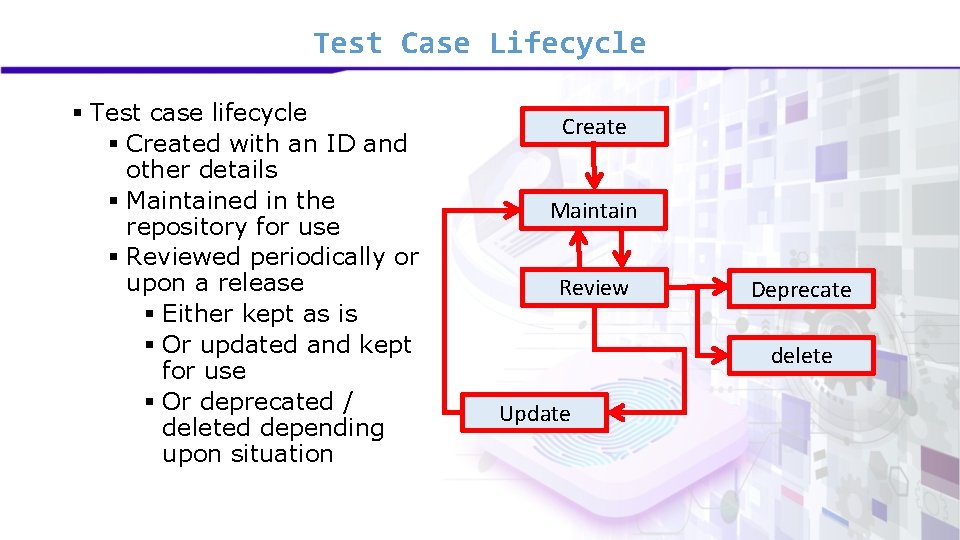
Test Case Lifecycle § Test case lifecycle § Created with an ID and other details § Maintained in the repository for use § Reviewed periodically or upon a release § Either kept as is § Or updated and kept for use § Or deprecated / deleted depending upon situation Create Maintain Review Deprecate delete Update
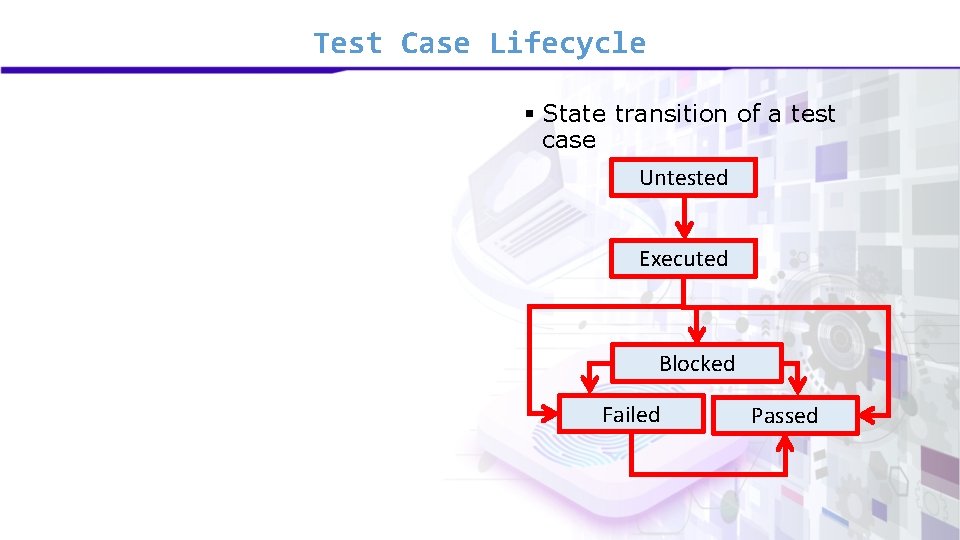
Test Case Lifecycle § State transition of a test case Untested Executed Blocked Failed Passed
Module 89: Test Suite Structure
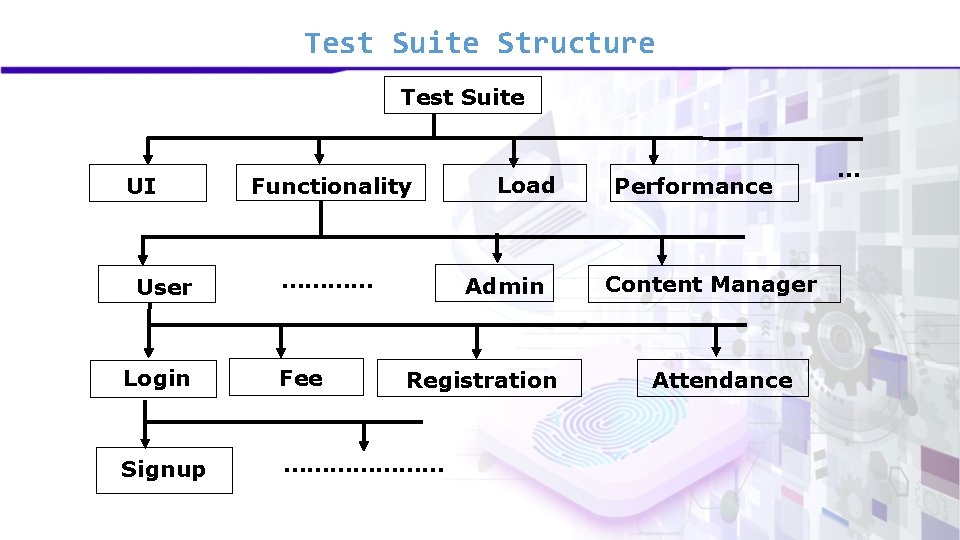
Test Suite Structure § Test suite: this is a set of test cases organized in a hierarchal manner for a certain software release. § There are two important characteristics of a test suite: § Test cases in a test suite relate to a certain release of the system. § Test cases are organized in a hierarchal manner for three reasons:
Test Suite Structure Test Suite UI User Functionality ………… Load Admin Login Fee Signup ………………… Registration Performance Content Manager Attendance …
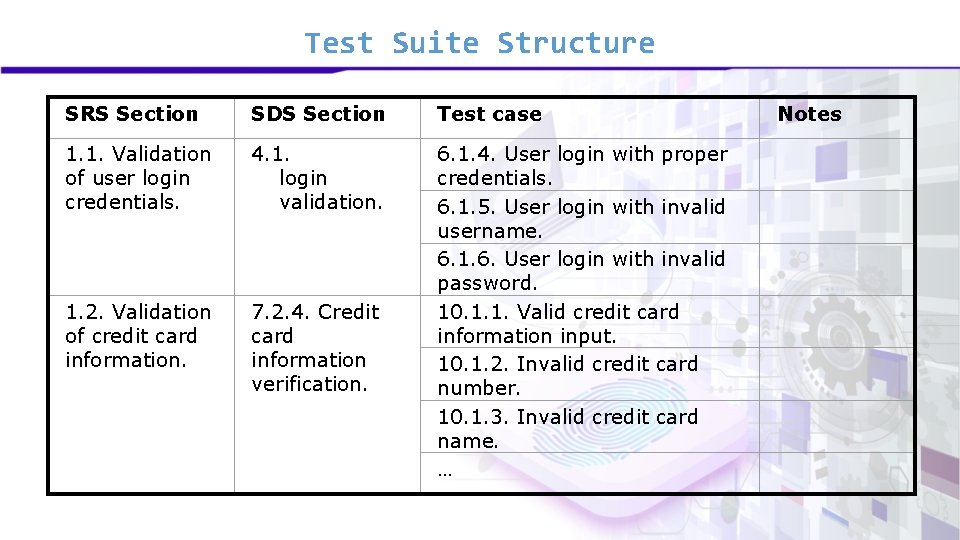
Test Suite Structure § Traceability § We need to have a mechanism for tracking each software feature from SRS to Test docs (Test cases, Test suites); § We need to make sure each requirement is covered in FS and Test cases; § This helps in establishing a measure of completeness; § Make sure each feature is represented; § Highlight gaps.
Test Suite Structure SRS Section SDS Section Test case 1. 1. Validation of user login credentials. 4. 1. login validation. 1. 2. Validation of credit card information. 7. 2. 4. Credit card information verification. 6. 1. 4. User login with proper credentials. 6. 1. 5. User login with invalid username. 6. 1. 6. User login with invalid password. 10. 1. 1. Valid credit card information input. 10. 1. 2. Invalid credit card number. 10. 1. 3. Invalid credit card name. … Notes
Module 90: Software Testing Lifecycle Phases
Software Testing Lifecycle Phases § Software Testing Life Cycle (STLC) is defined as a sequence of activities conducted to perform Software Testing. § Contrary to popular belief, Software Testing is not a just a single activity. § It consists of a series of activities carried out methodologically to help certify a particular software product.
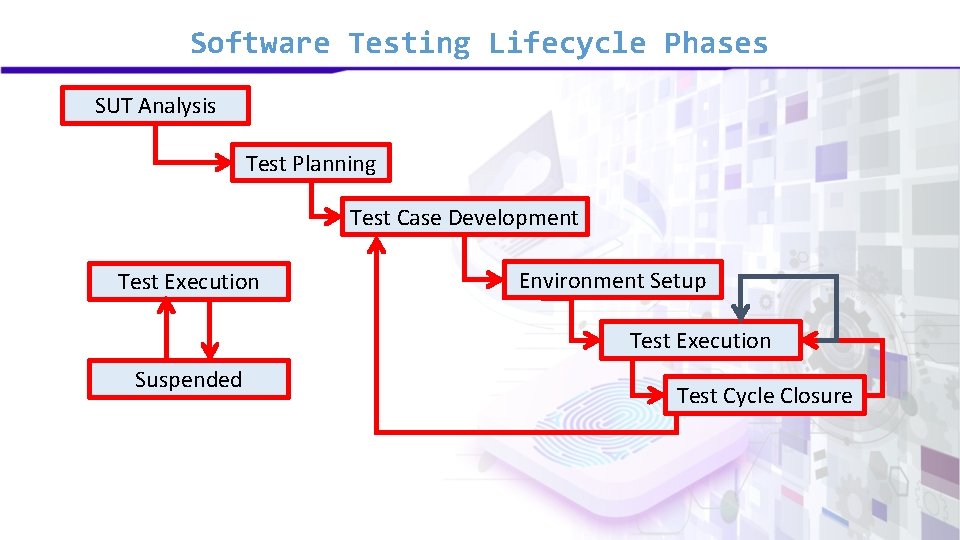
Software Testing Lifecycle Phases SUT Analysis Test Planning Test Case Development Test Execution Environment Setup Test Execution Suspended Test Cycle Closure
Software Testing Lifecycle Phases § STLC phases § System under test (SUT) Analysis § Test Planning § Test case development § Test Environment setup § Test Execution § Test Cycle closure
Module 91: Test Result Reporting
Test Result Reporting § Once testing activity (cycle) is compete, we need to share the results. Inputs are: § Test Plan Document § Test Design Specification § Test Case Specification § Test Input Data and Output Data, Test Procedure Specification § Test Incident Report § Test Log, Test Summary Report, Test Metrics, Coverage Analysis § Program Quality Estimate
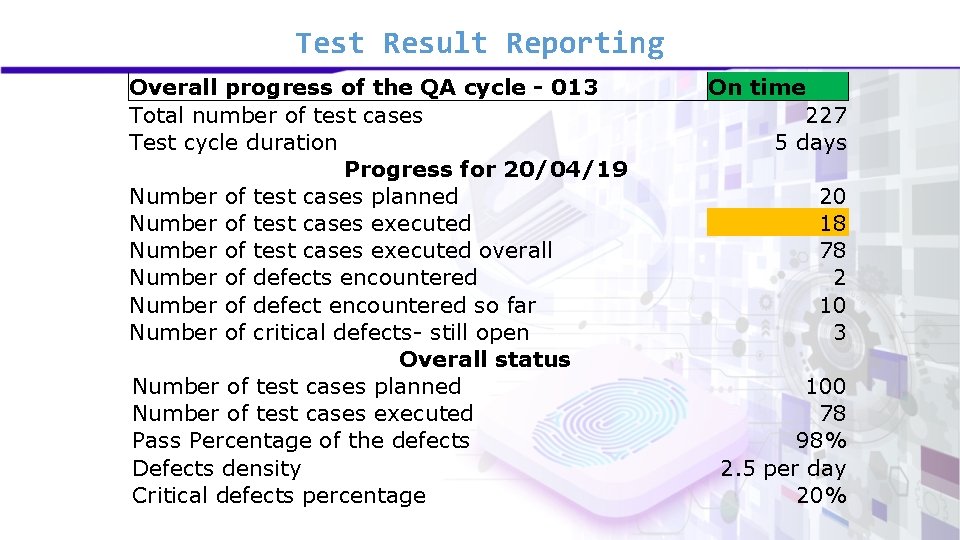
Test Result Reporting Overall progress of the QA cycle - 013 Total number of test cases Test cycle duration Progress for 20/04/19 Number of test cases planned Number of test cases executed overall Number of defects encountered Number of defect encountered so far Number of critical defects- still open Overall status Number of test cases planned Number of test cases executed Pass Percentage of the defects Defects density Critical defects percentage On time 227 5 days 20 18 78 2 10 3 100 78 98% 2. 5 per day 20%
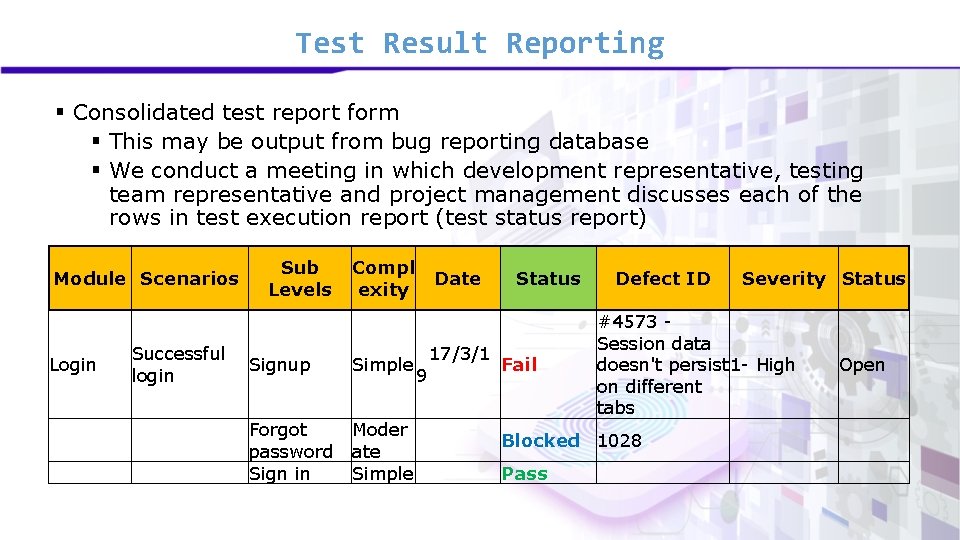
Test Result Reporting § Consolidated test report form § This may be output from bug reporting database § We conduct a meeting in which development representative, testing team representative and project management discusses each of the rows in test execution report (test status report) Module Scenarios Login Successful login Sub Levels Compl exity Signup Simple Forgot password Sign in Moder ate Simple Date 9 17/3/1 Status Fail Defect ID #4573 Session data doesn't persist 1 - High on different tabs Blocked 1028 Pass Severity Status Open
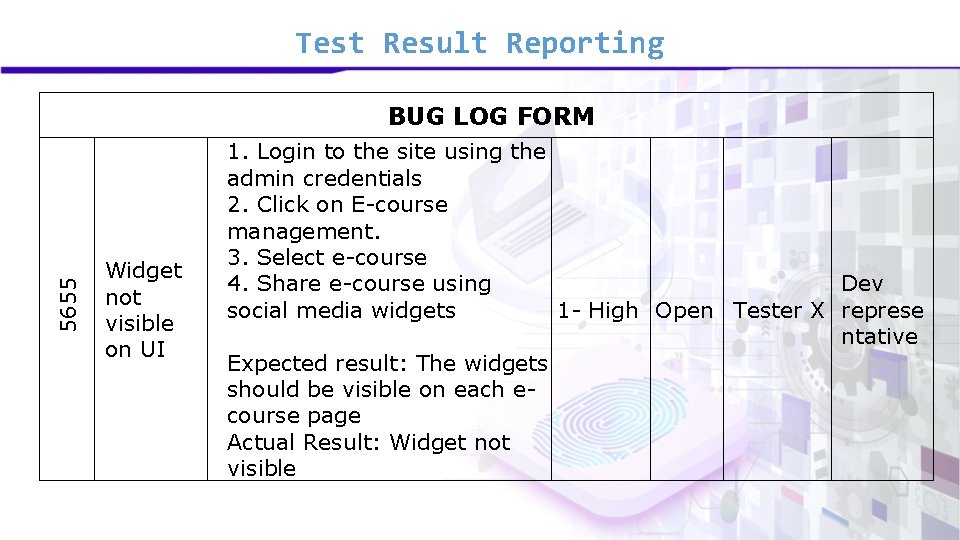
Test Result Reporting 5655 BUG LOG FORM Widget not visible on UI 1. Login to the site using the admin credentials 2. Click on E-course management. 3. Select e-course 4. Share e-course using Dev social media widgets 1 - High Open Tester X represe ntative Expected result: The widgets should be visible on each ecourse page Actual Result: Widget not visible
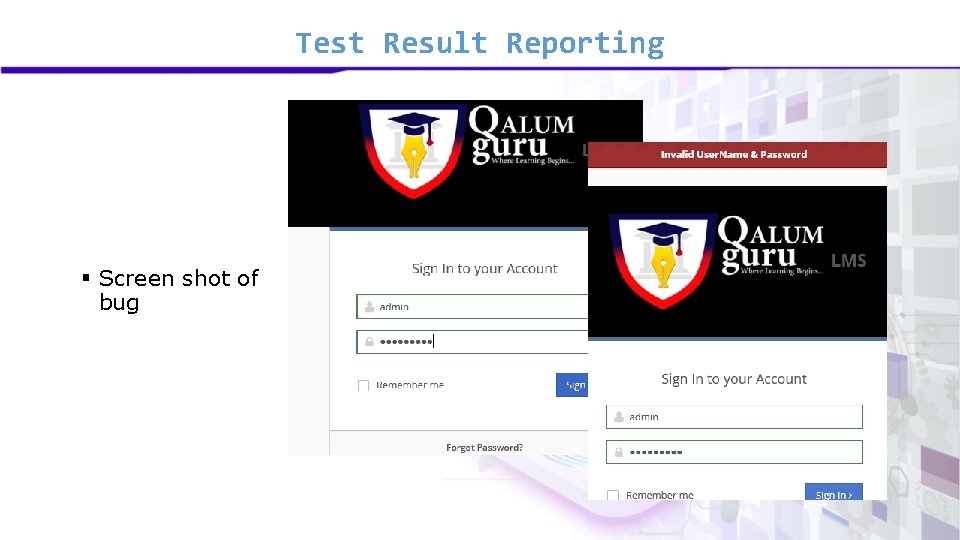
Test Result Reporting § Screen shot of bug
Module 92: Bug Tracking Databases
Bug Tracking Databases § We cannot use documents or spreadsheets for recording the test execution results § At the simplest, we have small scale bug tracking, open source, software having a backend in some DBMS. § On the professional side, we have test management software e. g. , § Microsoft Test Manager (MTM) § JIRA § IBM Rational Test Manager
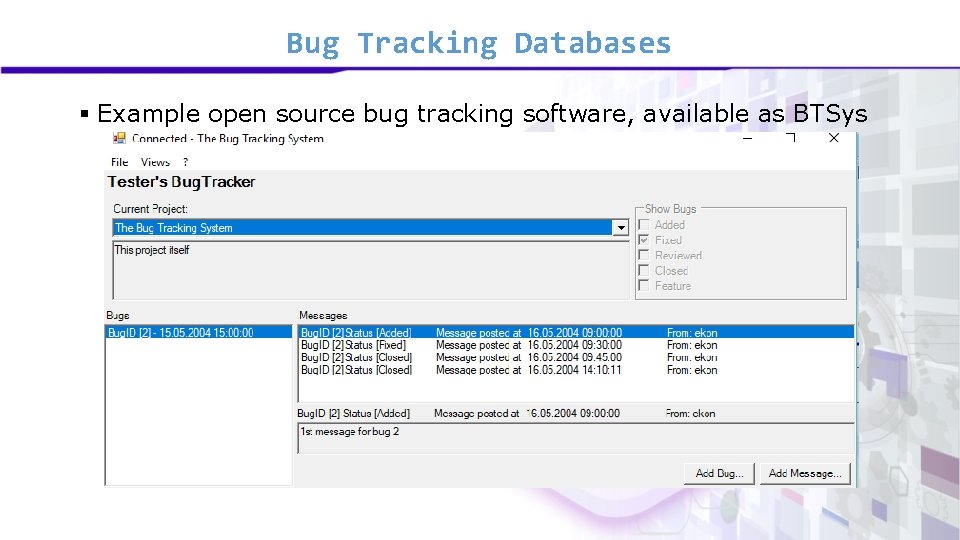
Bug Tracking Databases § Example open source bug tracking software, available as BTSys
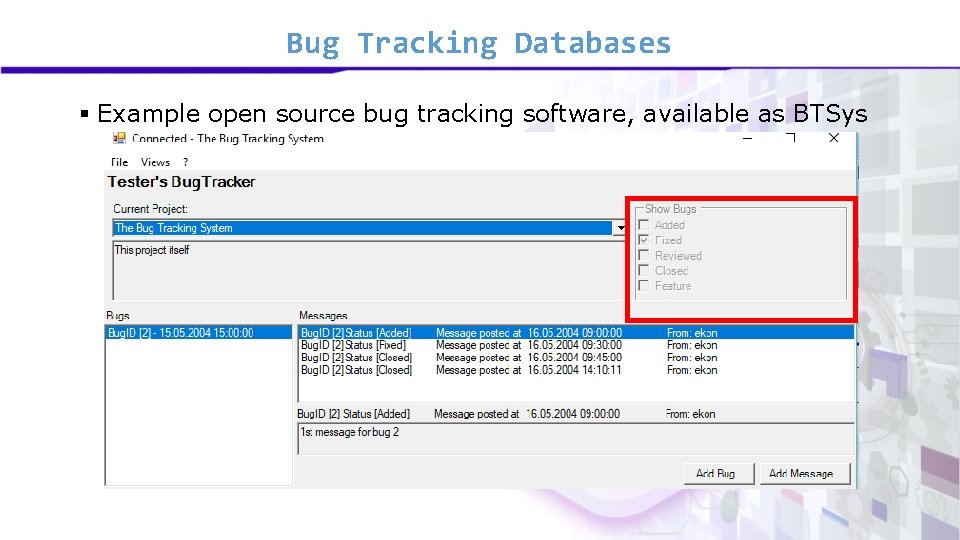
Bug Tracking Databases § Example open source bug tracking software, available as BTSys
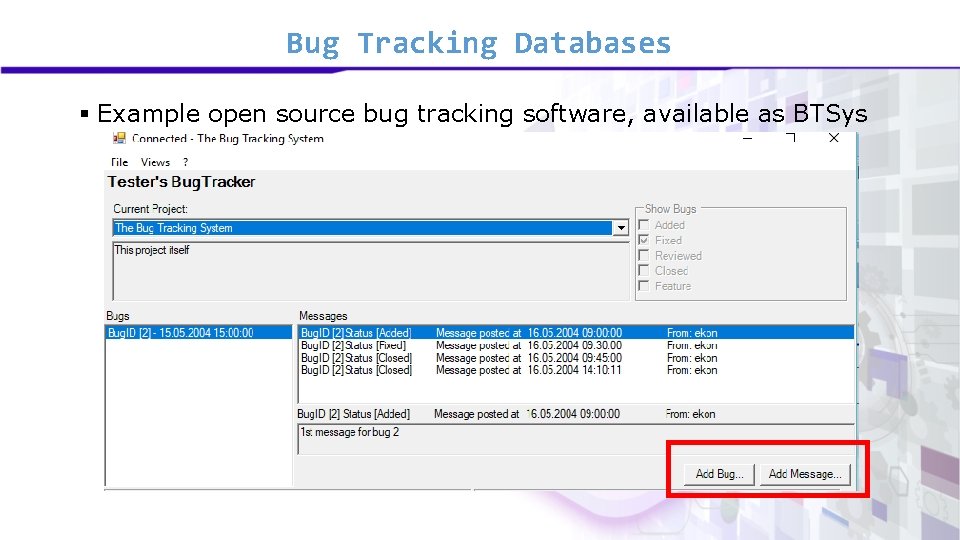
Bug Tracking Databases § Example open source bug tracking software, available as BTSys
Bug Tracking Databases § These systems allow testers to report § Faults § Issues § Allow developers to view these faults § Fix these faults § Allow management to review the progress. § Allow analysis