
Software Usability Course notes for CSI 5122 University
Software Usability Course notes for CSI 5122 - University of Ottawa 2019 Deck G: Usability Testing with End-Users: Ethics, Think-Aloud, Surveys, Measuring Timothy C. Lethbridge < Timothy. Lethbridge@uottawa. ca > http: //www. eecs. uottawa. ca/~tcl/csi 5122
ETHICS OF USABILITY STUDIES INVOLVING PEOPLE Lethbridge - CSI 5122 2019 Deck G: Usability Testing with Users 2
Ethical Issues in usability work involving users The important ethical concern is: • Do no harm to the users. —But what harm can be done? Mostly psychological Users feel • Pressure to conform —Sometimes, highly specialized experts feel particularly stressed • Inadequate or stupid when they make errors • Worried about what might happen to information being gathered about them • Concerned that information falling into the wrong hands can influence managerial decision-making: —Avoid management involvement in usability sessions Lethbridge - CSI 5122 2019 Deck G: Usability Testing with Users 3
What must you as a usability engineer do when working with users? These points apply to when measuring or merely observing (whether recording or not) 1. Have your planned study approved by an Ethics Review Board if • It is research (it may be published), or • There are reasonably foreseeable risks • User involvement will be extensive • In the university, courses involving usability testing have been approved —but coursework involving humans cannot be published unless the student has pre-obtained ethics approval Lethbridge - CSI 5122 2019 Deck G: Usability Testing with Users 4
What must you do for ethics reasons continued 2. Tell users about the work in advance. • Explain (orally and in writing): —The nature and goals - in particular that they are not being evaluated as individuals —Time commitment needed —What recording or measurement is being done —What will happen to the data Lethbridge - CSI 5122 2019 Deck G: Usability Testing with Users 5
Things to explain to users - continued —The fact that there are no known risks to them (presumably) —If in a company: That their manager has given them permission to participate, but won't see individual results. —That they are free to participate or not, and to withdraw at any time —Any other rights (e. g. the right to see the results) —Who they can complain to 3. Have them sign informed consent forms (next page) Lethbridge - CSI 5122 2019 Deck G: Usability Testing with Users 6

Informed Consent Example - part 1 Click here for Word document to edit/print http: //www. site. uottawa. ca/~tcl/csi 5122/Text. For. Informed. Consent 5122. doc Lethbridge - CSI 5122 2019 Deck G: Usability Testing with Users 7
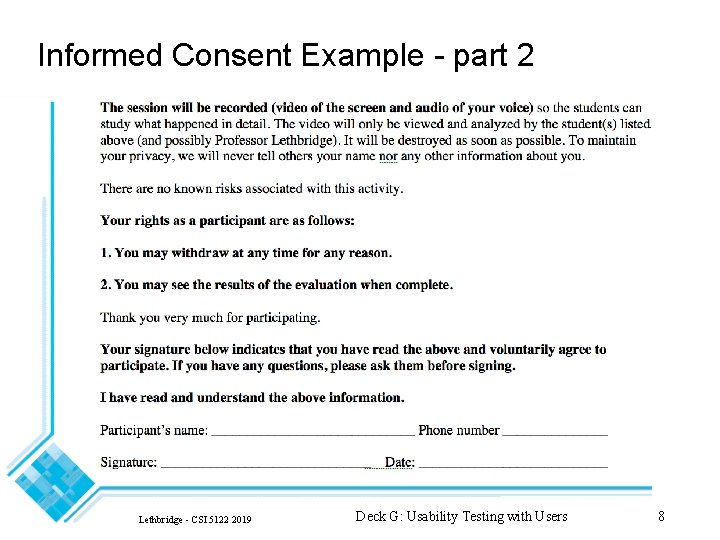
Informed Consent Example - part 2 Lethbridge - CSI 5122 2019 Deck G: Usability Testing with Users 8
What must you do for ethics reasons continued 4. Refrain from doing any of the following: • Laughing or making negative comments about what the user is doing • Using the terms 'guinea-pig' or 'subject' —- Say 'participant' or 'test user' 5. Keep the environment relaxed: • Leave plenty of free time 6. Make sure the test software and recording equipment actually works • So as not to frustrate the user, let alone yourself • A pilot study with another software engineer is critical Lethbridge - CSI 5122 2019 Deck G: Usability Testing with Users 9
What must you do for ethics reasons continued 7. Make sure the tasks are carefully designed so as to be understandable and doable • Pilot testing is again essential 8. Give the users an 'easy' task to do first, to boost confidence 9. Hand the user test tasks one at a time, so they don't feel overwhelmed about having too many things to do • It is not their fault if they are slow 10. Ensure there are no disturbances, and no 'audience'. Lethbridge - CSI 5122 2019 Deck G: Usability Testing with Users 10
What must you do for ethics reasons continued 11. Provide coffee etc. for sessions longer than an hour. 12. Limit sessions to 1. 5 hours or less • with a ten minute break in the middle • And don't use the same participant more than once in a day 13. Avoid coaching the user, or letting him or her struggle endlessly • Strike a balance • Either extreme can make the user feel inadequate 14. Terminate the session if the user becomes overly frustrated. Lethbridge - CSI 5122 2019 Deck G: Usability Testing with Users 11
What must you do for ethics reasons continued 15. Following the session: • Debrief the user: —Let them tell you anything they want —Ask them specific questions about difficulties they had • Tell them that they helped you find problems and that their assistance is appreciated • Tell them also that it may not be possible to fix all the problems, but you will try. • Remind them that the results will be confidential • Consider giving them a token of appreciation (pin, thank -you note etc. ) Lethbridge - CSI 5122 2019 Deck G: Usability Testing with Users 12
What must you do for ethics reasons continued 16. Keep the data confidential • Disclose data in the aggregate • You can refer to 'User 1', 'User 2' etc. as long as nobody can 'read between the lines' and infer who is who • You can ask users for permission to publish specific video clips, but be very careful to ensure the user in freely agreeing. Lethbridge - CSI 5122 2019 Deck G: Usability Testing with Users 13
THINK-ALOUD USABILITY TESTING WITH REAL USERS (AND WITH VIDEO RECORDING) Lethbridge - CSI 5122 2019 Deck G: Usability Testing with Users 14
Think-Aloud Usability Studies An essential step in proper evaluation of a user interface • http: //www. useit. com/alertbox/thinking-aloud-tests. html Expert evaluation is not enough Video recording is key to ensure you don’t miss details Lethbridge - CSI 5122 2019 Deck G: Usability Testing with Users 15
Activities of the observing software engineer See also the 'Ethics' section for further essential points that help the user feel at ease Prior to the session: • Learn the software yourself • Have a moderate ability with most features —So as to - better understand what users are doing - prepare tasks - help users if they are stuck • Decide on general aspects of the system to be evaluated Lethbridge - CSI 5122 2019 Deck G: Usability Testing with Users 16
Activities before the session 2 • Conduct high level task analysis (discussed later) —Based on importance and time/money available • Decide on —Whether you will be measuring time (e. g. to gather metrics) or just observing to find problems —Whether to focus on learnability or efficiency of use - Effects choice of participants —Whether to have longer tasks or a series of very short tasks —Level of interaction with participants during sessions - Minimize interaction if you are timing the tasks, otherwise thinkaloud interaction is best • Select participants (well in advance) Lethbridge - CSI 5122 2019 Deck G: Usability Testing with Users 17
Activities before the session 3 • Talk to potential participants —So you can understand the variety of backgrounds —Assess their expertise level in the system and the domain • Plan for more participants than you really need in case one or more backs out —(not necessary for this course) — 3 -5 participants per set of tasks is reasonable Lethbridge - CSI 5122 2019 Deck G: Usability Testing with Users 18
Activities before the session 4 • Prepare tasks —Remember to give some simple tasks first —Have extra tasks ready - you do not know how long users will take —Good to write each task on a recipe card —State the task as an objective to be achieved —Sometimes, show a diagram of the final result to be achieved —Only give step-by-step guidance for the first few tasks - or to assess learnability of the entire system Lethbridge - CSI 5122 2019 Deck G: Usability Testing with Users 19
Activities before the session 5 • Preparing tasks continued —Consider giving different tasks to different users - but each task should be done by at least 2 people —Consider sequencing the tasks so that each one builds on the one before - But be prepared with a contingency plan in case a user fails and cannot continue the particular sequence —Good to ask users to write down the answers (e. g. the result of achieving the goal) - Helps to pace the study Lethbridge - CSI 5122 2019 Deck G: Usability Testing with Users 20
Activities before the session 6 • Book rooms, cameras etc. • You can use video-capture software on a computer —E. g. Camtasia on a Mac: http: //www. techsmith. com/camtasia. html —E. g. Morae Recorder http: //www. techsmith. com/moraefeatures. html —Make sure it supports sound and you have tested this aspect • If you use a camera —A-V services in Morriset will lend a camera to grad students for this work —The professor must sign a form. —Coordinate borrowing times with others in the class —You can be camera-operators for each other - The evaluator should normally have an assistant for this task Lethbridge - CSI 5122 2019 Deck G: Usability Testing with Users 21
Activities before the session 7 • Set up the system (e. g. with any required initial database, installations etc. ) • If using a camera —Buy your own media (check what the camera requires). - Tapes still work better than mini-DVDs due to the ability to rewind quickly - One tape per user is most convenient, but you can use one long tape if you need to Lethbridge - CSI 5122 2019 Deck G: Usability Testing with Users 22
Perform pilot studies Use different participants from those you use for real studies Expect significant difficulties with the process, especially with the users interpretation of tasks. Do a run-through of tasks (perhaps without recording) at least four days before actual evaluation date • so tasks can be revised Lethbridge - CSI 5122 2019 Deck G: Usability Testing with Users 23
Perform pilot studies Two full pilot studies with tasks are sometimes needed • Final pilot study can be done a short while before actual sessions. —to test camera operation, with only one task Modify tasks as necessary following feedback from pilot studies. Lethbridge - CSI 5122 2019 Deck G: Usability Testing with Users 24
During the session See also the 'Ethics' section for further essential points that help the user feel at ease. 1. Ask assistant to start camera / screen recorder 2. Introduce user to the session Lethbridge - CSI 5122 2019 Deck G: Usability Testing with Users 25
During the session 3. Normally, ask the user to speak out loud, explaining what they are doing and why • Not all users are good at this, so be patient 5. For each task: • Read it to the user • Hand it to the user so they can re-read when necessary Lethbridge - CSI 5122 2019 Deck G: Usability Testing with Users 26
During the session continued Take a few notes • Helps supplement the later analysis • You can have a second assistant take notes —although 3 people in with the user can bother them Remind user to keep talking Periodically, pose questions like on the next slide to stimulate the user to give useful information Lethbridge - CSI 5122 2019 Deck G: Usability Testing with Users 27
Questions to stimulate the user Question Problem if. . . • What do you want to do? —They do not know; the system cannot do what they want. • What do you think would happen if. . . ? —They do not know; they give wrong answer. • What do you think the system has done? —They do not know; they give wrong answer. • What do you think is this information telling you? —They do not know; they give wrong answer • Why did the system do that? —They do not know; they give wrong answer. • What were you expecting to happen? —They had no expectation; they were expecting something else. Lethbridge - CSI 5122 2019 Deck G: Usability Testing with Users 28
At the end of the session Stop the session after anticipated time • Sessions can last from 15 minutes to 1. 5 hours • In this course plan on short sessions • Remember to leave time in the schedule before and after the actual work with the system —i. e. total time with each user might be 45 minutes to 2 hours. Debrief the user after the session • What were the most significant problems? • What was most difficult to learn? —Etc. Lethbridge - CSI 5122 2019 Deck G: Usability Testing with Users 29
The importance of video: 1. Without it, 'you see what you want to see' • You interpret what you see based on your mental model 2. In the 'heat of the moment' you miss many things 3. Minor details (e. g. body language) captured 4. You can repeatedly analyze, looking for different problems Lethbridge - CSI 5122 2019 Deck G: Usability Testing with Users 30
Tips for using video in a corporate environment (usability lab) Several cameras are useful • need to synchronize playback You can take a recording directly from the computer's A-V ports Evaluation can be time consuming so plan it carefully Lethbridge - CSI 5122 2019 Deck G: Usability Testing with Users 31
Analyzing the video Best to transfer the media (disk/tape) to a digital file on a computer. For a tape • Remove the erase tab, so you don't accidentally record over your tapes • Make sure each tape/DVD is labeled. Beware that analysis commonly can take 3 -5 times as long as the original recording. Lethbridge - CSI 5122 2019 Deck G: Usability Testing with Users 32
First pass of analysis Run through the recording • Not stopping if possible • Not rewinding • Just writing down potential problems to look at in more detail —Augment the notes you made during the live recording Organize your detailed notes one page per problem • If a problem occurs over and over again, it counts as one recurring problem Record the clock-time of the start of each problem occurrence so you can go back to it. Lethbridge - CSI 5122 2019 Deck G: Usability Testing with Users 33
Second pass of analysis Re-play, stopping at each problem, writing down • Description of problem • Categories (see heuristic evaluation) • Suggested solution (if you can think of one) You may need to rewind a bit to study a problem over and over if it is complex You will often see completely new problems you had not thought about in the first pass Lethbridge - CSI 5122 2019 Deck G: Usability Testing with Users 34
MEASURING USABILITY IN USER STUDIES AND FORMAL EXPERIMENTS Lethbridge - CSI 5122 2019 Deck G: Usability Testing with Users 35
Measuring aspects of usability When measuring, take the mean or median of the metric for a set of users within each class Proficiency • This is the most fundamental thing to measure • Relative to the set of tasks chosen —Hence tasks must be chosen well • Two ways to measure it: —Time to complete a set of tasks —Percentage of work completed in unit time Learnability (for a novice) • Time to reach a certain level of proficiency • Level of proficiency reached after a certain time Lethbridge - CSI 5122 2019 Deck G: Usability Testing with Users 36
Measuring aspects of usability 2 Efficiency • Proficiency of an expert Memorability • Proficiency after a period of non-use Error handling • Number of deviations from the ideal way to approach a task • Total amount of time spent away from the ideal way to perform a task Satisfaction • Subjective scores on a scale of 1 to 5 Lethbridge - CSI 5122 2019 Deck G: Usability Testing with Users 37
Some practical considerations about measuring usability Always test your methodology first using a pilot study • This applies for —Experiments —Observation sessions —Questionnaires • It is actually quite hard to do a good job until you have experience • Remember: You always need to get informed consent (more on that later) Lethbridge - CSI 5122 2019 Deck G: Usability Testing with Users 38
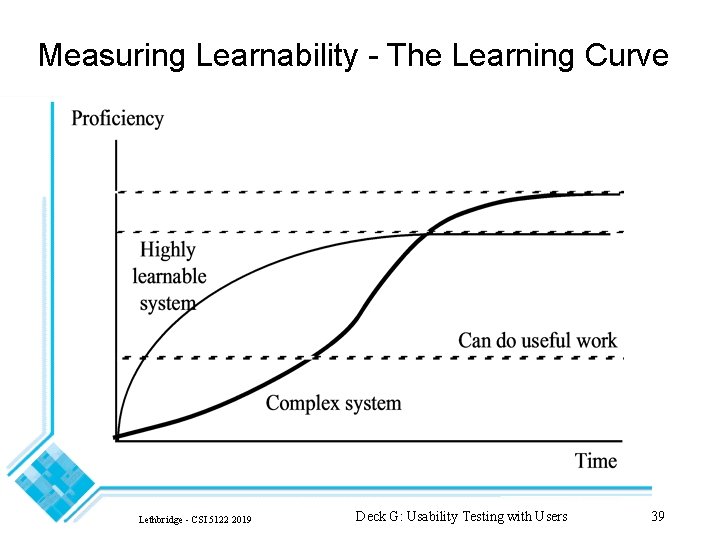
Measuring Learnability - The Learning Curve Lethbridge - CSI 5122 2019 Deck G: Usability Testing with Users 39
Three major aspects of a learning curve to observe: 1. Initial level: Can the novice user transfer skills? 2. Slope of early usage: Is the system quick to learn? 3. Eventual level achieved: Do experts use the system efficiently? Lethbridge - CSI 5122 2019 Deck G: Usability Testing with Users 40
Three common categories of system with respect to learning curves Walk-up and Use • High initial level • Relatively little learning to do • Normally implies little functionality Highly Learnable • Steep (rapid) initial learning curve • Initial level may be high or low Complex • Gentle (slow) initial learning curve • Only acceptable if it is the only way to allow for a higher eventual level Lethbridge - CSI 5122 2019 Deck G: Usability Testing with Users 41
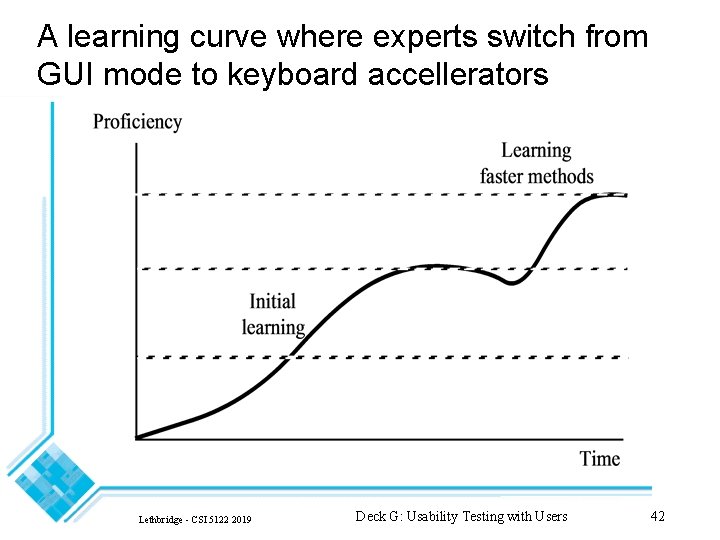
A learning curve where experts switch from GUI mode to keyboard accellerators Lethbridge - CSI 5122 2019 Deck G: Usability Testing with Users 42
Measuring Learnability Novice user's experience with the initial part of the learning curve By 'Novice' we are referring to knowledge of this system • Not software or computers in general We can try to evaluate how well the following mportant design objective for learnability has been met • Allow users to transfer skills from existing knowledge —Standard windows manipulation —Standard ways to fill in forms, use menus etc. —Arrange information the way it is arranged in the real world —Design interfaces to work like existing systems - Similar products on the market - Previous versions of your product Lethbridge - CSI 5122 2019 Deck G: Usability Testing with Users 43
Efficiency Measured as the steady-state level of proficiency when the learning curve levels out • i. e. for 'expert' users For some users the learning curve never gets completely level • but it usually does The steady-state level may not be optimal: • If the user were to bother to learn a few additional features, he or she may save far more time than the time spent learning • The system should lead the user to learn these additional features — e. g. by customized daily tips Lethbridge - CSI 5122 2019 Deck G: Usability Testing with Users 44
Efficiency problems can be caused by: - Slow response time - Too much text to read or enter -Too many menu items, dialog boxes etc. to navigate -Too much mouse movement - Lack of an easy step-by-step route to perform the task - Cognitive load: - User has to think too much - Repeated errors where even experts remain confused Lethbridge - CSI 5122 2019 Deck G: Usability Testing with Users 45
How do you choose a set of 'expert users'? 1. Let users tell you that they are experts • Cheapest, and usually good enough 2. Define that users are experts after a finite amount of system use • More reliable, but not it is not always easy to get an accurate measure of amount of use 3. Continually measure proficiency until it levels out • Can be expensive, but the most reliable way Lethbridge - CSI 5122 2019 Deck G: Usability Testing with Users 46
What if you can't get expert users? Can you still measure efficiency? Yes, you can measure people 3 or 4 times as they gain proficiency • Plot the learning curve • Not fully reliable, but better than nothing One more point: • In systems such as games or entertainment, efficiency might be less important than user satisfaction Lethbridge - CSI 5122 2019 Deck G: Usability Testing with Users 47
Measuring Memorability Best measured as proficiency after a period of non-use • The non-use period can be: —Minutes for details like the meaning of icons —Hours for a small but complex function —Days or weeks for a full system Lethbridge - CSI 5122 2019 Deck G: Usability Testing with Users 48
Measuring Memorability - 2 It is most important to measure memorability for: • Parts of your system that are important, but not used every day —Year-end reporting functions —Emergency-handling functions • Parts of the system that take a lot of work to learn but which are used intermitently • Parts of the system that intrinsically involve memory whenever they are used —Meaning of icons Memorability of details like icons can be tested using a simple questionnaire Lethbridge - CSI 5122 2019 Deck G: Usability Testing with Users 49
Measuring Error Handling We can define an error as: • Any time the user deviates from the optimal or intended path for performing a task • Although we must not count time when the user just went off the path for fun or curiosity Two classes of errors according to origin: • User accidents (typographical errors etc. ) —The system cannot be blamed for most of these, but it should help the user recover • Errors caused by confusion —The system should be designed to prevent this Lethbridge - CSI 5122 2019 Deck G: Usability Testing with Users 50
Classes of errors according to time of discovery: Discovered by the user immediately Discovered by the user after some delay Discovered by the system and pointed out to the user Not discovered by or made known to the user Discovered but then forgotten due to distraction or overload Lethbridge - CSI 5122 2019 Deck G: Usability Testing with Users 51
Measuring error proneness: Requires videotaping so that subtle errors are not missed Number of errors per unit time • (in different categories) Total amount of time spent dealing with errors • (vs. total time) Total time spent recovering from errors after detection • (vs. total error time or total time) Lethbridge - CSI 5122 2019 Deck G: Usability Testing with Users 52
Measuring Subjective Satisfaction Note that this is distinct from 'social acceptability' • The latter accounts for factors such as whether the software is putting you out of a job etc. ! Some attempts have been made to measure satisfaction objectively: • Measuring stress and comfort levels using — EEG's - Pupil dilation —Heart Rate - Skin Conductivity —Blood Pressure - Adrenaline level These techniques are normally suitable for every-day work Most approaches rely on Surveys … discussed in the next section Lethbridge - CSI 5122 2019 Deck G: Usability Testing with Users 53
SURVEYS Lethbridge - CSI 5122 2019 Deck G: Usability Testing with Users 54
Survey vs. Questionnaire A survey is a process of asking users or potential users a set of questions A questionnaire is the document or e-document with the questions Lethbridge - CSI 5122 2019 Deck G: Usability Testing with Users 55
Questionnaires Normal approach: ask users to rate satisfaction on a scale of 1 to 5 • If enough users are asked, much subjectivity is removed Ask users after they have done real and varied work • Experiments on small tasks can give inaccurate results —users may blame the specific task for their lack of satisfaction. Don't put too many questions on a questionnaire!! • 10 -15 questions; 10 minutes to complete Consider using a standard questionnaire • Used repeatedly for different studies Lethbridge - CSI 5122 2019 Deck G: Usability Testing with Users 56
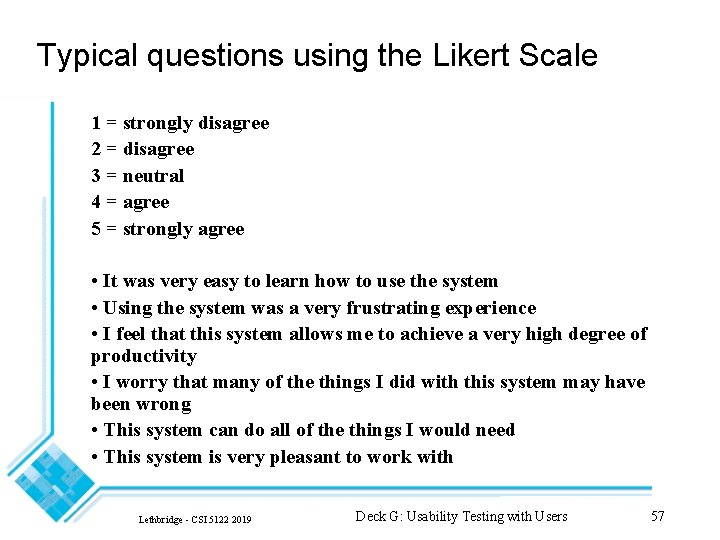
Typical questions using the Likert Scale 1 = strongly disagree 2 = disagree 3 = neutral 4 = agree 5 = strongly agree • It was very easy to learn how to use the system • Using the system was a very frustrating experience • I feel that this system allows me to achieve a very high degree of productivity • I worry that many of the things I did with this system may have been wrong • This system can do all of the things I would need • This system is very pleasant to work with Lethbridge - CSI 5122 2019 Deck G: Usability Testing with Users 57
Likert Scale questions - continued Each question is a strong statement • Either positive or negative For some questions good is lower, while for others good is higher. • Prevents users blindly checking the same column If you have many participants, have different versions of the questionnaire • with questions in different orders • inverted good/bad Lethbridge - CSI 5122 2019 Deck G: Usability Testing with Users 58
Typical questions using a Semantic Differential Scale Learning the system was • Very easy • Easy • Neutral • Difficult • Very difficult Lethbridge - CSI 5122 2019 Deck G: Usability Testing with Users 59
Standard Surveys Questionnaire for User Interface Satisfaction http: //garyperlman. com/quest. cgi? form=QUIS Computer System Usability Questionnaire https: //garyperlman. com/quest. cgi Others https: //garyperlman. com/quest/index. html Lethbridge - CSI 5122 2019 Deck G: Usability Testing with Users 60
Other thoughts about measuring subjective satisfaction and surveys Subjective satisfaction scores are most useful when you compare several different systems or versions Watch out for statistical significance in the difference between means when comparing two systems Users may just remember their worst experiences • If they were happy for 2 hours, but had 5 minutes of hell when the network went down, they may give a low ranking Users may also primarily remember the last step • Especially if it was notable in some way If you make up your own questions, be very careful to ensure that there is only one way to interpret the question • Always seek reviews from others and run pilot studies Always include at least one open-ended question Lethbridge - CSI 5122 2019 Deck G: Usability Testing with Users 61
MORE DETAILS ABOUT MEASURING Lethbridge - CSI 5122 2019 Deck G: Usability Testing with Users 62
A thought about conducting measuring sessions: When measuring task performance, let the user ‘warm up’ • Get them to do 5 minutes worth of tasks where you are not counting errors or measuring proficiency • Results in more accurate measurements Lethbridge - CSI 5122 2019 Deck G: Usability Testing with Users 63
Measuring differences among classes of users - 1 Important so we can determine whether we need to create different interfaces Three semi-orthogonal dimensions of user experience: • With Computers —Learning curve very slow —Some people may have an active fear which makes their learning curve even more gentle • With Application domain —Learning curve may be slow if the domain is complex —The same user may have completely different experience levels in different parts of the domain • With This System —All users are novices in little-used functions Lethbridge - CSI 5122 2019 Deck G: Usability Testing with Users 64
Measuring differences among classes of users 2 Categorize users and measure separately if necessary Different maximum proficiency levels • People naturally differ in their abilities • Maximum level of proficiency achieved on learning curves Lethbridge - CSI 5122 2019 Deck G: Usability Testing with Users 65
Several ways of measuring proficiency differences: Best-to-Worst Ratio • Requires a large sample • Typically 4 to 10 for most tasks • 20 for computer programming • People who are 10 times more productive are often 'super-users' or 'gurus' Q 3/Q 1 ratio • Q 3 is the third quartile (25% of users are better) • Q 1 is the first quartile (75% are better) • Value is near 2 for most tasks • Provides a more reasonable value (eliminates outliers) Standard deviation Lethbridge - CSI 5122 2019 Deck G: Usability Testing with Users 66
Why are some people so much more proficient on the same tool? Even though total learning time is equal? • • High self-confidence They aren't nervous about exploring and trying new features Usability problems don't bother them as much Ability to multi-task well Ability to plan well Higher general IQ Higher typing speed Way of thinking matches the application —Some people can't think graphically —Some people have trouble remembering and organizing details Lethbridge - CSI 5122 2019 Deck G: Usability Testing with Users 67
- Slides: 67