
Software Testing continued Lecture 11 b Dr R
Software Testing (continued) Lecture 11 b Dr. R. Mall 1
Organization of this Lecture: z. Review of last lecture. z. Data flow testing z. Mutation testing z. Cause effect graphing z. Performance testing. z. Test summary report z. Summary 2
Review of last lecture z. White box testing: yrequires knowledge about internals of the software. ydesign and code is required. yalso called structural testing. 3
Review of last lecture z. We discussed a few white-box test strategies. ystatement coverage ybranch coverage ycondition coverage ypath coverage 4
Data Flow-Based Testing z. Selects test paths of a program: yaccording to the locations of xdefinitions and uses of different variables in a program. 5
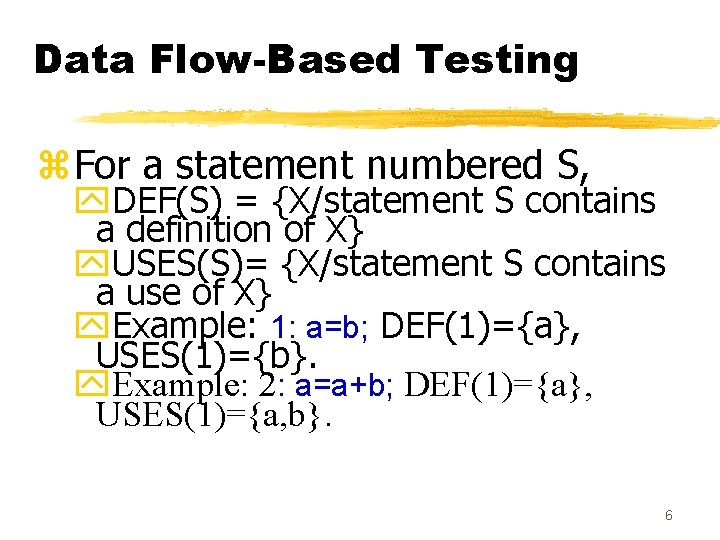
Data Flow-Based Testing z. For a statement numbered S, y. DEF(S) = {X/statement S contains a definition of X} y. USES(S)= {X/statement S contains a use of X} y. Example: 1: a=b; DEF(1)={a}, USES(1)={b}. y. Example: 2: a=a+b; DEF(1)={a}, USES(1)={a, b}. 6
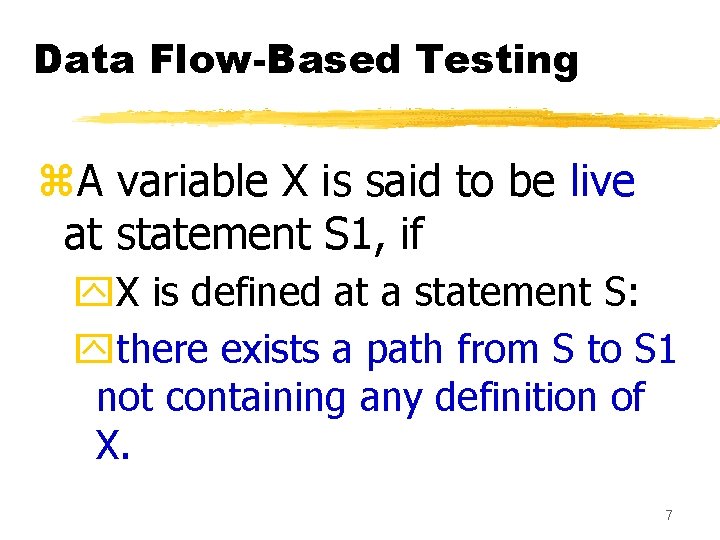
Data Flow-Based Testing z. A variable X is said to be live at statement S 1, if y. X is defined at a statement S: ythere exists a path from S to S 1 not containing any definition of X. 7
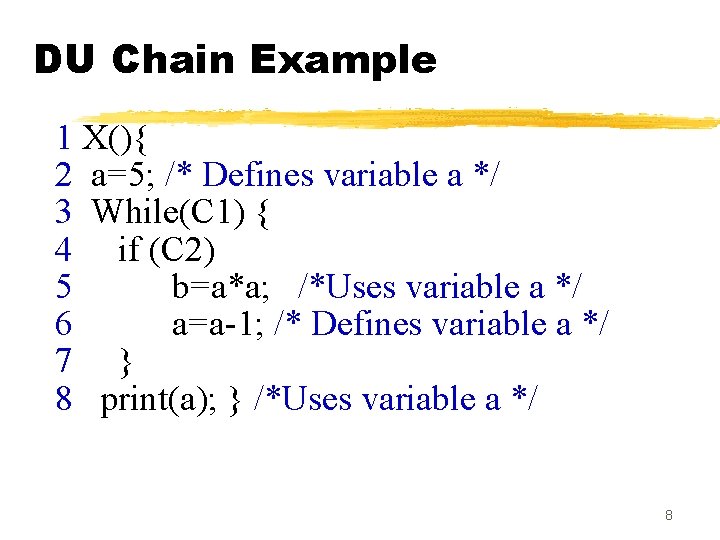
DU Chain Example 1 X(){ 2 a=5; /* Defines variable a */ 3 While(C 1) { 4 if (C 2) 5 b=a*a; /*Uses variable a */ 6 a=a-1; /* Defines variable a */ 7 } 8 print(a); } /*Uses variable a */ 8
![Definition-use chain (DU chain) z[X, S, S 1], y. S and S 1 are](http://slidetodoc.com/presentation_image_h2/e3a935e66845d259274bcc231ed857f6/image-9.jpg "Definition-use chain (DU chain) z[X, S, S 1], y. S and S 1 are")
Definition-use chain (DU chain) z[X, S, S 1], y. S and S 1 are statement numbers, y. X in DEF(S) y. X in USES(S 1), and ythe definition of X in the statement S is live at statement S 1. 9
Data Flow-Based Testing z. One simple data flow testing strategy: yevery DU chain in a program be covered at least once. 10
Data Flow-Based Testing z. Data flow testing strategies: yuseful for selecting test paths of a program containing nested if and loop statements 11
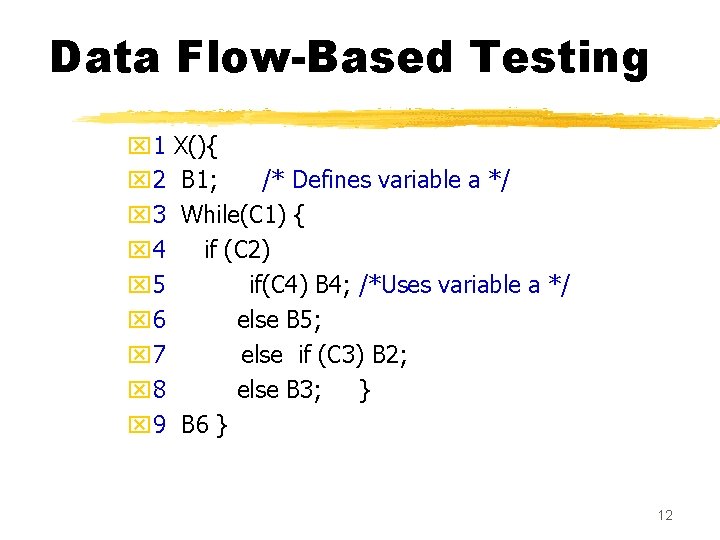
Data Flow-Based Testing x 1 x 2 x 3 x 4 x 5 x 6 x 7 x 8 x 9 X(){ B 1; /* Defines variable a */ While(C 1) { if (C 2) if(C 4) B 4; /*Uses variable a */ else B 5; else if (C 3) B 2; else B 3; } B 6 } 12
![Data Flow-Based Testing z[a, 1, 5]: a DU chain. z. Assume: y. DEF(X) =](http://slidetodoc.com/presentation_image_h2/e3a935e66845d259274bcc231ed857f6/image-13.jpg "Data Flow-Based Testing z[a, 1, 5]: a DU chain. z. Assume: y. DEF(X) =")
Data Flow-Based Testing z[a, 1, 5]: a DU chain. z. Assume: y. DEF(X) = {B 1, B 2, B 3, B 4, B 5} y. USED(X) = {B 2, B 3, B 4, B 5, B 6} y. There are 25 DU chains. z. However only 5 paths are needed to cover these chains. 13
Mutation Testing z. The software is first tested: yusing an initial testing method based on white -box strategies we already discussed. z. After the initial testing is complete, ymutation testing is taken up. z. The idea behind mutation testing: ymake a few arbitrary small changes to a program at a time. 14
Mutation Testing z. Each time the program is changed, yit is called a mutated program ythe change is called a mutant. 15
Mutation Testing z. A mutated program: ytested against the full test suite of the program. z. If there exists at least one test case in the test suite for which: ya mutant gives an incorrect result, ythen the mutant is said to be dead. 16
Mutation Testing z. If a mutant remains alive: yeven after all test cases have been exhausted, ythe test suite is enhanced to kill the mutant. z. The process of generation and killing of mutants: ycan be automated by predefining a set of primitive changes that can be applied to the program. 17
Mutation Testing z. The primitive changes can be: yaltering an arithmetic operator, ychanging the value of a constant, ychanging a data type, etc. 18
Mutation Testing z. A major disadvantage of mutation testing: ycomputationally very expensive, ya large number of possible mutants can be generated. 19
Cause and Effect Graphs z. Testing would be a lot easier: yif we could automatically generate test cases from requirements. z. Work done at IBM: y. Can requirements specifications be systematically used to design functional test cases? 20
Cause and Effect Graphs z. Examine the requirements: yrestate them as logical relation between inputs and outputs. y. The result is a Boolean graph representing the relationships xcalled a cause-effect graph. 21
Cause and Effect Graphs z. Convert the graph to a decision table: yeach column of the decision table corresponds to a test case for functional testing. 22
Steps to create causeeffect graph z. Study the functional requirements. z. Mark and number all causes and effects. z. Numbered causes and effects: ybecome nodes of the graph. 23
Steps to create causeeffect graph z. Draw causes on the LHS z. Draw effects on the RHS z. Draw logical relationship between causes and effects yas edges in the graph. z. Extra nodes can be added yto simplify the graph 24
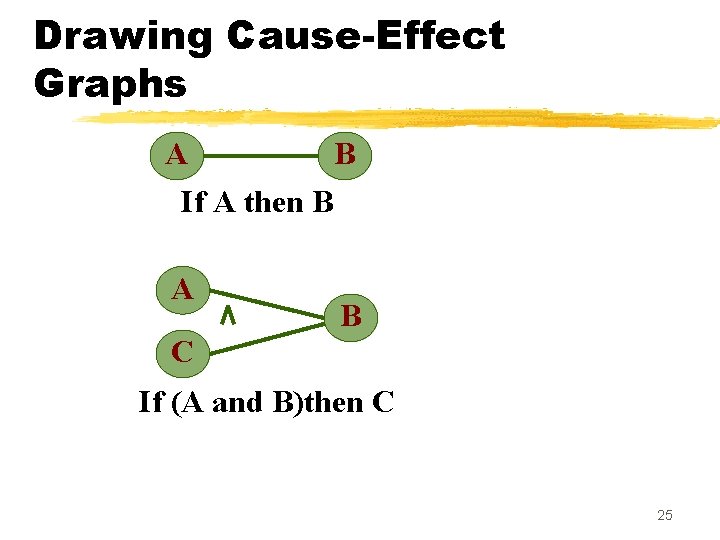
Drawing Cause-Effect Graphs A B If A then B A B C If (A and B)then C 25
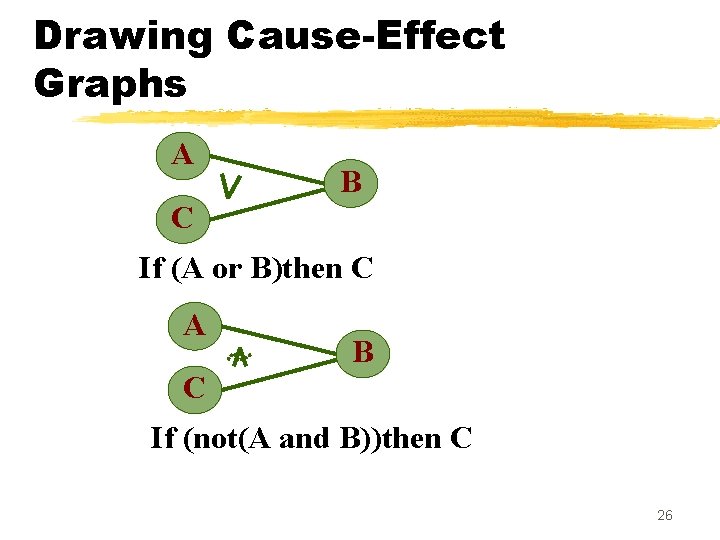
Drawing Cause-Effect Graphs A B C If (A or B)then C A B C If (not(A and B))then C 26
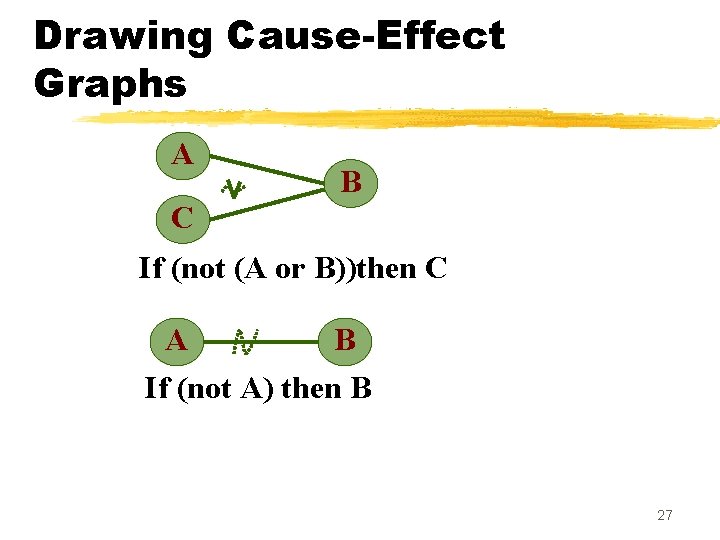
Drawing Cause-Effect Graphs A B C If (not (A or B))then C A B If (not A) then B 27
Cause effect graph. Example z. A water level monitoring system yused by an agency involved in flood control. y. Input: level(a, b) xa is the height of water in dam in meters xb is the rainfall in the last 24 hours in cms 28
Cause effect graph. Example z. Processing y. The function calculates whether the level is safe, too high, or too low. z. Output ymessage on screen xlevel=safe xlevel=high xinvalid syntax 29
Cause effect graph. Example z. We can separate the requirements into 5 clauses: yfirst five letters of the command is “level” ycommand contains exactly two parameters xseparated by comma and enclosed in parentheses 30
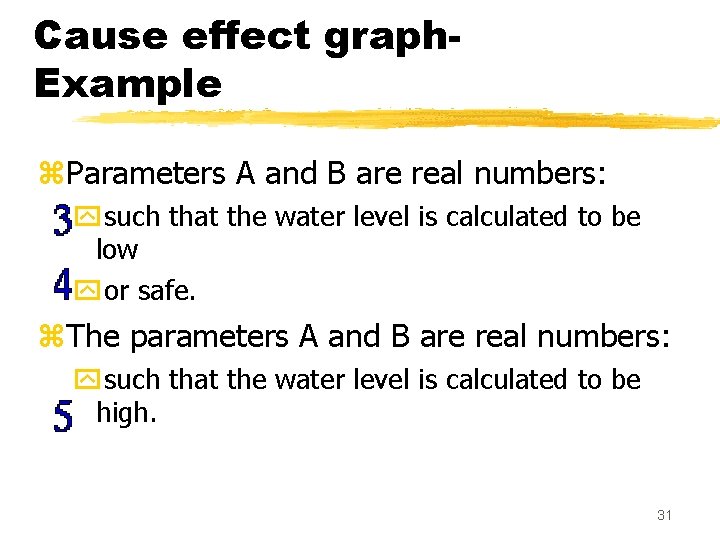
Cause effect graph. Example z. Parameters A and B are real numbers: ysuch that the water level is calculated to be low yor safe. z. The parameters A and B are real numbers: ysuch that the water level is calculated to be high. 31
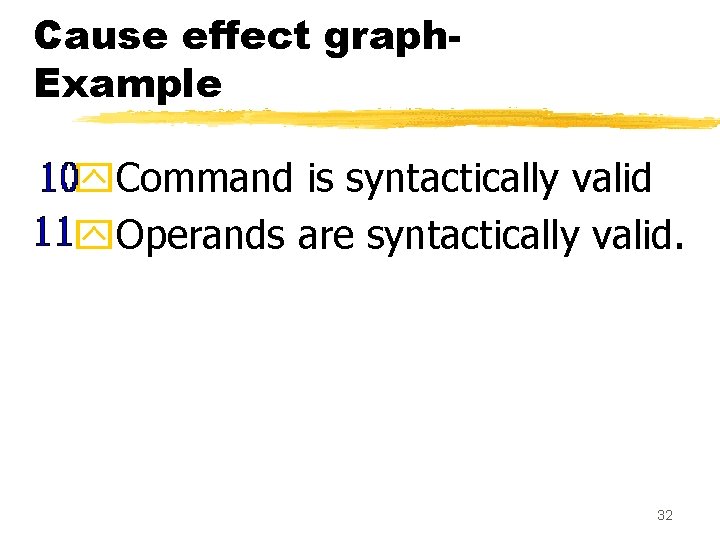
Cause effect graph. Example y. Command is syntactically valid y. Operands are syntactically valid. 32
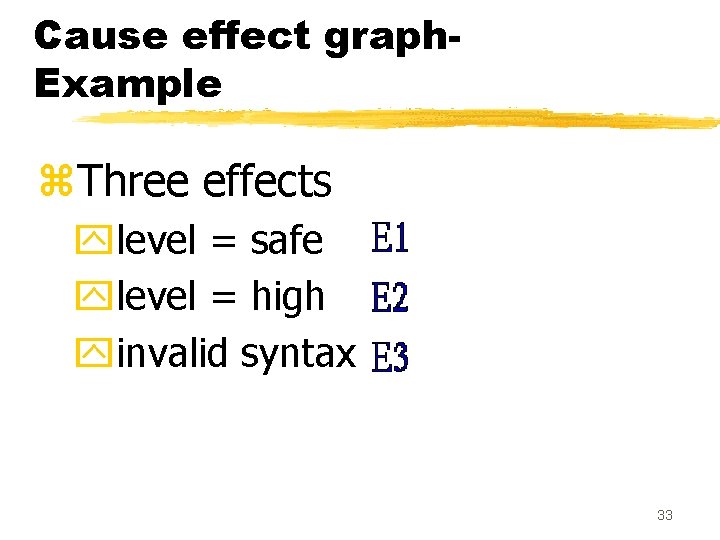
Cause effect graph. Example z. Three effects ylevel = safe ylevel = high yinvalid syntax 33
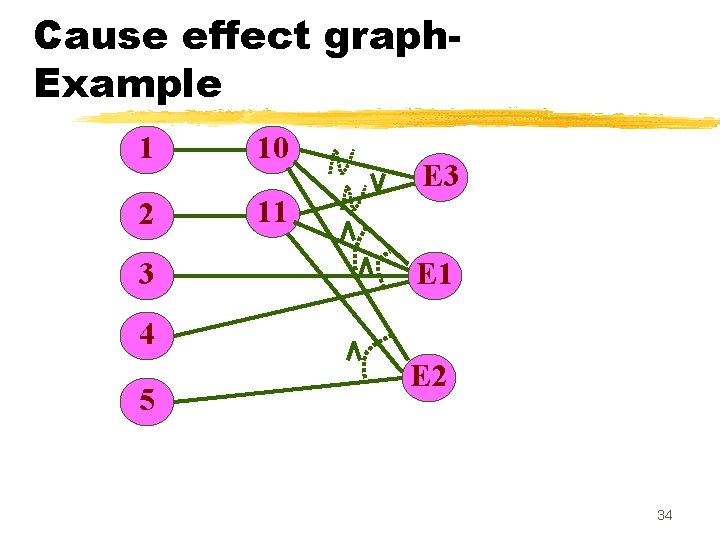
Cause effect graph. Example 1 10 2 11 3 E 1 4 5 E 2 34
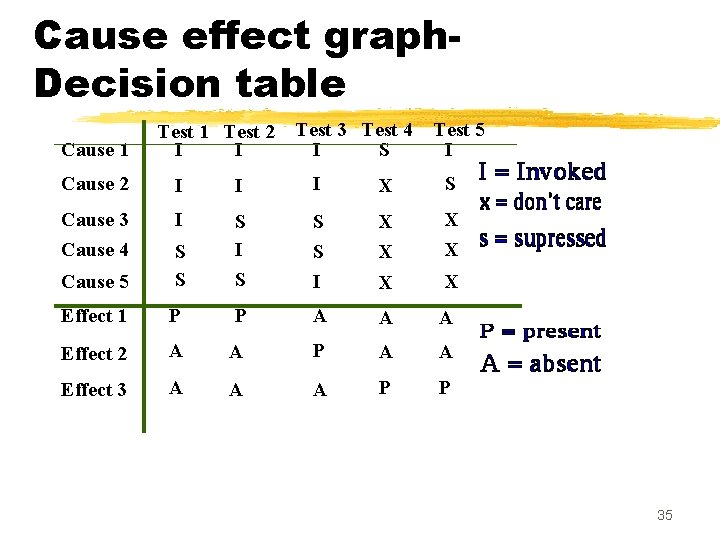
Cause effect graph. Decision table Cause 1 Test 2 I I Test 3 Test 4 I S Test 5 I Cause 2 I I I X S Cause 3 Cause 4 I S S I X X Cause 5 S S S I S X X Effect 1 P P A A A Effect 2 A A P A A Effect 3 A A A P P 35
Cause effect graph. Example z. Put a row in the decision table for each cause or effect: yin the example, there are five rows for causes and three for effects. 36
Cause effect graph. Example z. The columns of the decision table correspond to test cases. z. Define the columns by examining each effect: ylist each combination of causes that can lead to that effect. 37
Cause effect graph. Example z. We can determine the number of columns of the decision table yby examining the lines flowing into the effect nodes of the graph. 38
Cause effect graph. Example z. Theoretically we could have generated 25=32 test cases. y. Using cause effect graphing technique reduces that number to 5. 39
Cause effect graph z. Not practical for systems which: yinclude timing aspects yfeedback from processes is used for some other processes. 40
Testing z. Unit testing: ytest the functionalities of a single module or function. z. Integration testing: ytest the interfaces among the modules. z. System testing: ytest the fully integrated system against its functional and non-functional requirements. 41
Integration testing z. After different modules of a system have been coded and unit tested: ymodules are integrated in steps according to an integration plan ypartially integrated system is tested at each integration step. 42
System Testing z. System testing: yvalidate a fully developed system against its requirements. 43
Integration Testing z. Develop the integration plan by examining the structure chart : ybig bang approach ytop-down approach ybottom-up approach ymixed approach 44
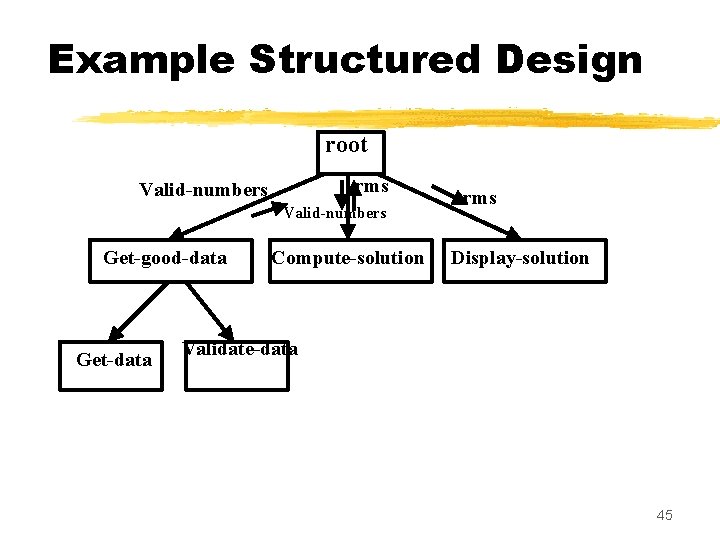
Example Structured Design root rms Valid-numbers Get-good-data Get-data Compute-solution rms Display-solution Validate-data 45
Big bang Integration Testing z. Big bang approach is the simplest integration testing approach: yall the modules are simply put together and tested. ythis technique is used only for very small systems. 46
Big bang Integration Testing z. Main problems with this approach: yif an error is found: xit is very difficult to localize the error xthe error may potentially belong to any of the modules being integrated. ydebugging errors found during big bang integration testing are very expensive to fix. 47
Bottom-up Integration Testing z. Integrate and test the bottom level modules first. z. A disadvantage of bottom-up testing: ywhen the system is made up of a large number of small subsystems. x. This extreme case corresponds to the big bang approach. 48
Top-down integration testing z. Top-down integration testing starts with the main routine: yand one or two subordinate routines in the system. z. After the top-level 'skeleton’ has been tested: yimmediate subordinate modules of the 'skeleton’ are combined with it and tested. 49
Mixed integration testing z. Mixed (or sandwiched) integration testing: yuses both top-down and bottom-up testing approaches. y. Most common approach 50
Integration Testing z. In top-down approach: ytesting waits till all top-level modules are coded and unit tested. z. In bottom-up approach: ytesting can start only after bottom level modules are ready. 51
Phased versus Incremental Integration Testing z. Integration can be incremental or phased. z. In incremental integration testing, yonly one new module is added to the partial system each time. 52
Phased versus Incremental Integration Testing z. In phased integration, ya group of related modules are added to the partially integrated system each time. z. Big-bang testing: ya degenerate case of the phased integration testing. 53
Phased versus Incremental Integration Testing z. Phased integration requires less number of integration steps: y compared to the incremental integration approach. z. However, when failures are detected, yit is easier to debug if using incremental testing xsince errors are very likely to be in the newly integrated module. 54
System Testing z. System tests are designed to validate a fully developed system: yto assure that it meets its requirements. 55
System Testing z. There are essentially three main kinds of system testing: y. Alpha Testing y. Beta Testing y. Acceptance Testing 56
Alpha testing z. System testing is carried out yby the test team within the developing organization. 57
Beta Testing z. Beta testing is the system testing: yperformed by a select group of friendly customers. 58
Acceptance Testing z. Acceptance testing is the system testing performed by the customer yto determine whether he should accept the delivery of the system. 59
System Testing z. During system testing, in addition to functional tests: yperformance tests are performed. 60
Performance Testing z. Addresses non-functional requirements. y. May sometimes involve testing hardware and software together. y. There are several categories of performance testing. 61
Stress testing z. Evaluates system performance ywhen stressed for short periods of time. z. Stress testing yalso known as endurance testing. 62
Stress testing z. Stress tests are black box tests: ydesigned to impose a range of abnormal and even illegal input conditions yso as to stress the capabilities of the software. 63
Stress Testing z. If the requirements is to handle a specified number of users, or devices: ystress testing evaluates system performance when all users or devices are busy simultaneously. 64
Stress Testing z. If an operating system is supposed to support 15 multiprogrammed jobs, ythe system is stressed by attempting to run 15 or more jobs simultaneously. z. A real-time system might be tested yto determine the effect of simultaneous arrival of several high-priority interrupts. 65
Stress Testing z. Stress testing usually involves an element of time or size, ysuch as the number of records transferred per unit time, ythe maximum number of users active at any time, input data size, etc. z. Therefore stress testing may not be applicable to many types of systems. 66
Volume Testing z. Addresses handling large amounts of data in the system: ywhether data structures (e. g. queues, stacks, arrays, etc. ) are large enough to handle all possible situations y. Fields, records, and files are stressed to check if their size can accommodate all possible data volumes. 67
Configuration Testing z. Analyze system behavior: yin various hardware and software configurations specified in the requirements ysometimes systems are built in various configurations for different users yfor instance, a minimal system may serve a single user, xother configurations for additional users. 68
Compatibility Testing z. These tests are needed when the system interfaces with other systems: ycheck whether the interface functions as required. 69
Compatibility testing Example z. If a system is to communicate with a large database system to retrieve information: ya compatibility test examines speed and accuracy of retrieval. 70
Recovery Testing z. These tests check response to: ypresence of faults or to the loss of data, power, devices, or services ysubject system to loss of resources xcheck if the system recovers properly. 71
Maintenance Testing z. Diagnostic tools and procedures: yhelp find source of problems. y. It may be required to supply xmemory maps xdiagnostic programs xtraces of transactions, xcircuit diagrams, etc. 72
Maintenance Testing z. Verify that: yall required artifacts for maintenance exist ythey function properly 73
Documentation tests z. Check that required documents exist and are consistent: yuser guides, ymaintenance guides, ytechnical documents 74
Documentation tests z. Sometimes requirements specify: yformat and audience of specific documents ydocuments are evaluated for compliance 75
Usability tests z. All aspects of user interfaces are tested: y. Display screens ymessages yreport formats ynavigation and selection problems 76
Environmental test z These tests check the system’s ability to perform at the installation site. z Requirements might include tolerance for yheat yhumidity ychemical presence yportability yelectrical or magnetic fields ydisruption of power, etc. 77
Test Summary Report z. Generated towards the end of testing phase. z. Covers each subsystem: ya summary of tests which have been applied to the subsystem. 78
Test Summary Report z. Specifies: yhow many tests have been applied to a subsystem, yhow many tests have been successful, yhow many have been unsuccessful, and the degree to which they have been unsuccessful, xe. g. whether a test was an outright failure xor whether some expected results of the test were actually observed. 79
Regression Testing z. Does not belong to either unit test, integration test, or system test. y. In stead, it is a separate dimension to these three forms of testing. 80
Regression testing z. Regression testing is the running of test suite: yafter each change to the system or after each bug fix yensures that no new bug has been introduced due to the change or the bug fix. 81
Regression testing z. Regression tests assure: ythe new system’s performance is at least as good as the old system yalways used during phased system development. 82
Summary z. We discussed two additional white box testing methodologies: ydata flow testing ymutation testing 83
Summary z. Data flow testing: yderive test cases based on definition and use of data z. Mutation testing: ymake arbitrary small changes ysee if the existing test suite detect these yif not, augment test suite 84
Summary z. Cause-effect graphing: ycan be used to automatically derive test cases from the SRS document. y. Decision table derived from cause-effect graph yeach column of the decision table forms a test case 85
Summary z. Integration testing: y. Develop integration plan by examining the structure chart: xbig bang approach xtop-down approach xbottom-up approach xmixed approach 86
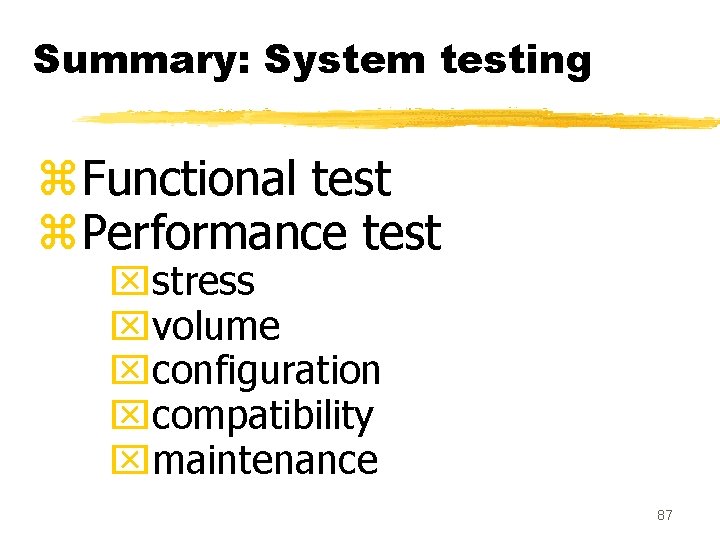
Summary: System testing z. Functional test z. Performance test xstress xvolume xconfiguration xcompatibility xmaintenance 87
- Slides: 87