
Software Security Building Security In IT 814 Software
Software Security Building Security In IT 814: Software Quality Assurance Special Project Workshop Thomas Kane July 2, 2018
Organization • • Resources About the Author Introduction to Software Security The Three Pillars of Software Security Risk Management Framework (RMF) Seven Touchpoints Conclusion 2
Resources • Mcgraw, Gary. “Software Security: Building Security In. ” 2006 17 th International Symposium on Software Reliability Engineering, 2006, doi: 10. 1109/issre. 2006. 43. 3
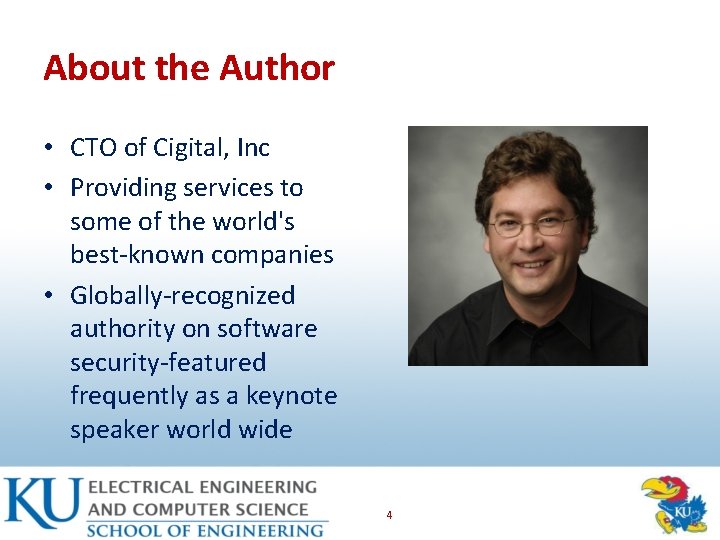
About the Author • CTO of Cigital, Inc • Providing services to some of the world's best-known companies • Globally-recognized authority on software security-featured frequently as a keynote speaker world wide 4
![Software Security Problem [1/3] • Engineering software so that it continues to function correctly](http://slidetodoc.com/presentation_image_h/b523f7fd211e2616f2dbe8a200d5d155/image-5.jpg "Software Security Problem [1/3] • Engineering software so that it continues to function correctly")
Software Security Problem [1/3] • Engineering software so that it continues to function correctly under malicious attack • Renewed interest – Existing software is riddled with design flaws and implementation bugs – Any program, no matter how innocuous it seems, can harbor security holes 5
![Software Security Problem [2/3] • More than half of the vulnerabilities are due to](http://slidetodoc.com/presentation_image_h/b523f7fd211e2616f2dbe8a200d5d155/image-6.jpg "Software Security Problem [2/3] • More than half of the vulnerabilities are due to")
Software Security Problem [2/3] • More than half of the vulnerabilities are due to buffer overruns • Others such as race conditions, design flaws are equally prevalent # vulnerabilities Reported by CERT/CC 6
![Software Security Problem [3/3] • Software security is about – Understanding software-induced security risks](http://slidetodoc.com/presentation_image_h/b523f7fd211e2616f2dbe8a200d5d155/image-7.jpg "Software Security Problem [3/3] • Software security is about – Understanding software-induced security risks")
Software Security Problem [3/3] • Software security is about – Understanding software-induced security risks and how to manage them – Leveraging software engineering practice – Thinking security early in the software lifecycle – Knowing and understanding common problems – Designing for security 7
Trinity of Trouble • Three Trends – Connectivity – Extensibility – Complexity 8
Trinity of Trouble: Connectivity • Inter networked – Include SCADA (supervisory control and data acquisition systems) – Automated attacks, botnets 9
Trinity of Trouble: Extensibility • Mobile code – functionality evolves incrementally • Web/OS extensibility 10
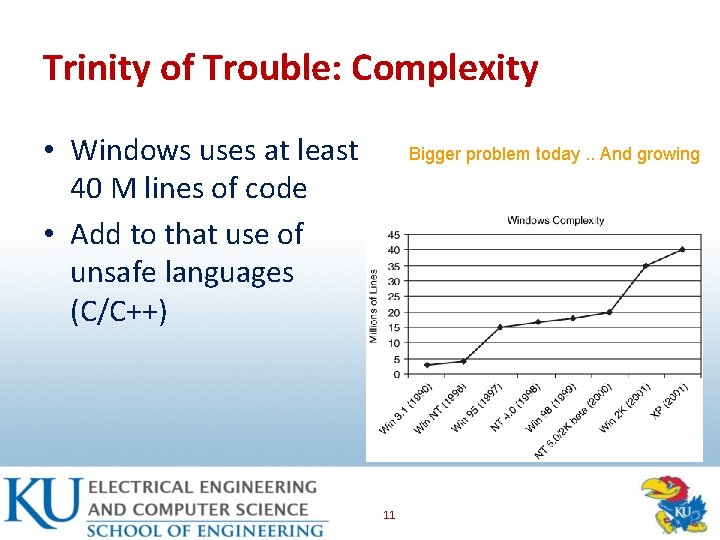
Trinity of Trouble: Complexity • Windows uses at least 40 M lines of code • Add to that use of unsafe languages (C/C++) Bigger problem today. . And growing 11
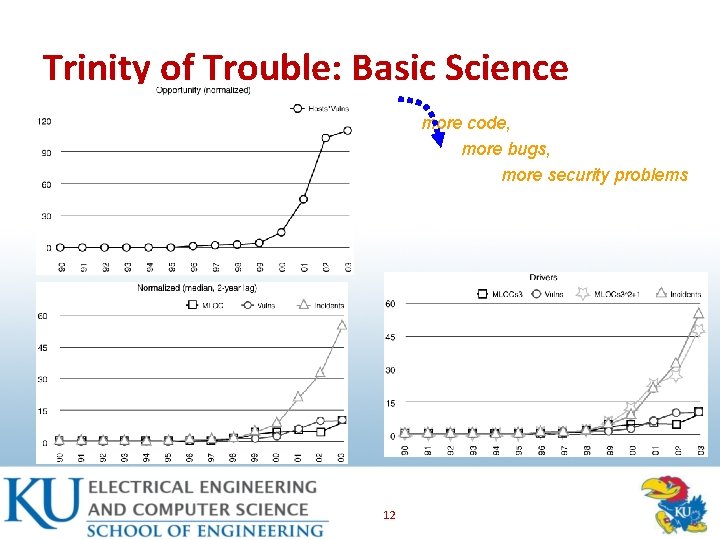
Trinity of Trouble: Basic Science more code, more bugs, more security problems 12
![Security Problems in Software [1/2] • Defect • Flaw – Implementation and design vulnerabilities](http://slidetodoc.com/presentation_image_h/b523f7fd211e2616f2dbe8a200d5d155/image-13.jpg "Security Problems in Software [1/2] • Defect • Flaw – Implementation and design vulnerabilities")
Security Problems in Software [1/2] • Defect • Flaw – Implementation and design vulnerabilities – Can remain dormant • Bug – An implementation level software problem – A problem at a deeper level • Bugs + Flaws – Leads to Risk 13
![Security Problems in Software [2/2] Bug Flaw Buffer overflow: stack smashing Buffer overflow: one-stage](http://slidetodoc.com/presentation_image_h/b523f7fd211e2616f2dbe8a200d5d155/image-14.jpg "Security Problems in Software [2/2] Bug Flaw Buffer overflow: stack smashing Buffer overflow: one-stage")
Security Problems in Software [2/2] Bug Flaw Buffer overflow: stack smashing Buffer overflow: one-stage attacks Buffer overflow: string format attacks Race conditions: TOCTOU Unsafe environment variables Unsafe system calls (fork(), exec(), system()) Incorrect input validation (black list vs. white list Method over-riding problems (subclass issues) Compartmentalization problems in design Privileged block protection failure (Do. Privilege()) Error-handling problems (fails open) Type safety confusion error Insecure audit log design Broken or illogical access control (role -based access control [RBAC] over tiers) Signing too much code 14
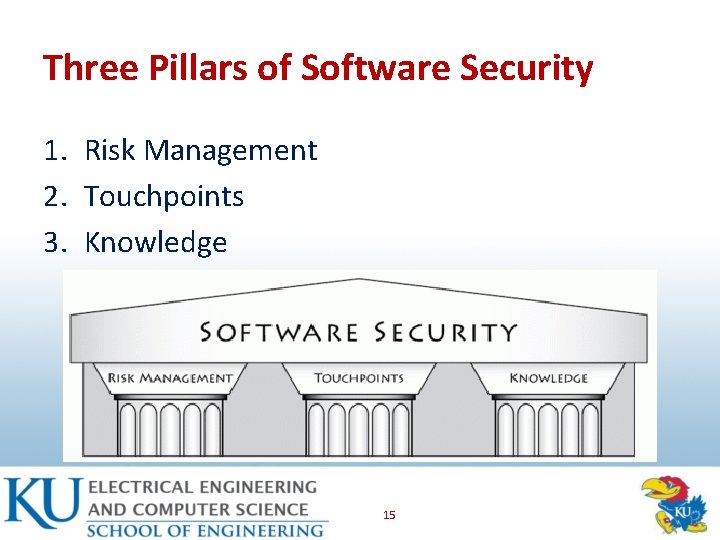
Three Pillars of Software Security 1. Risk Management 2. Touchpoints 3. Knowledge 15
Pillar I: Applied Risk Management • Architectural risk analysis – Sometimes called threat modeling or security design analysis – Is a best practice and is a touchpoint • Risk management framework – Considers risk analysis and mitigation as a full life cycle activity 16
![Pillar II: Software Security Touchpoints [1/3] • “Software security is not security software” –](http://slidetodoc.com/presentation_image_h/b523f7fd211e2616f2dbe8a200d5d155/image-17.jpg "Pillar II: Software Security Touchpoints [1/3] • “Software security is not security software” –")
Pillar II: Software Security Touchpoints [1/3] • “Software security is not security software” – Software security • System-wide issues (security mechanisms and design security) • Emergent property – Security operations 17
![Pillar II: Software Security Touchpoints [2/3] • Touchpoints in order of effectiveness – Code](http://slidetodoc.com/presentation_image_h/b523f7fd211e2616f2dbe8a200d5d155/image-18.jpg "Pillar II: Software Security Touchpoints [2/3] • Touchpoints in order of effectiveness – Code")
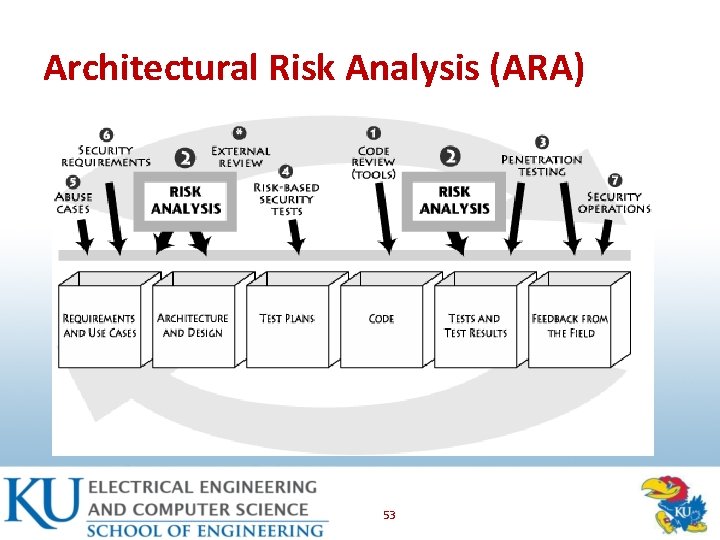
Pillar II: Software Security Touchpoints [2/3] • Touchpoints in order of effectiveness – Code Review (bugs) – Architectural risk analysis (flaws) – Penetration testing – Risk-based security tests – Abuse cases – Security requirements – Security operations 18
![Pillar II: Software Security Touchpoints [3/3] 19](http://slidetodoc.com/presentation_image_h/b523f7fd211e2616f2dbe8a200d5d155/image-19.jpg "Pillar II: Software Security Touchpoints [3/3] 19")
Pillar II: Software Security Touchpoints [3/3] 19
Pillar III: Knowledge • Involves – Gathering, encapsulating, and sharing security knowledge • Software security knowledge catalogs – Principles – Guidelines – Rules – Vulnerabilities 20
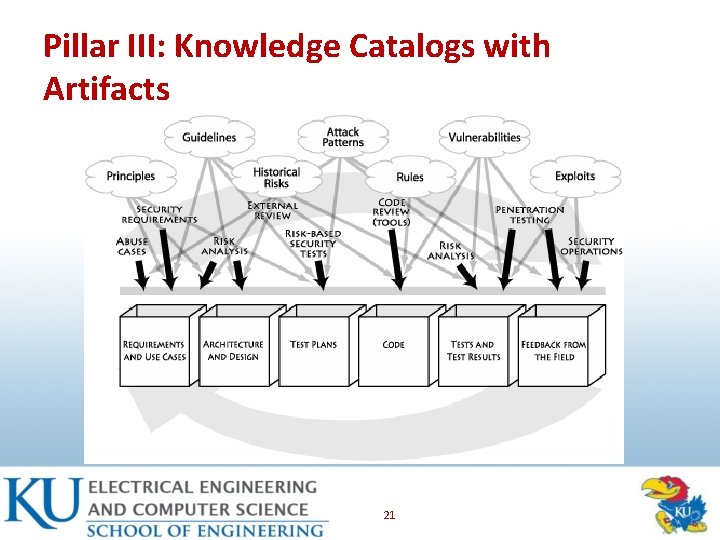
Pillar III: Knowledge Catalogs with Artifacts 21
Risk Management Framework (RMF) • Continuous risk management process • Identify and keep track of risks overtime and a software project unfolds • High-level approach to iterative risk management that is deeply integrated throughout the SDLC • Identify, rank, track, and understand software security risks as it changes over time 22
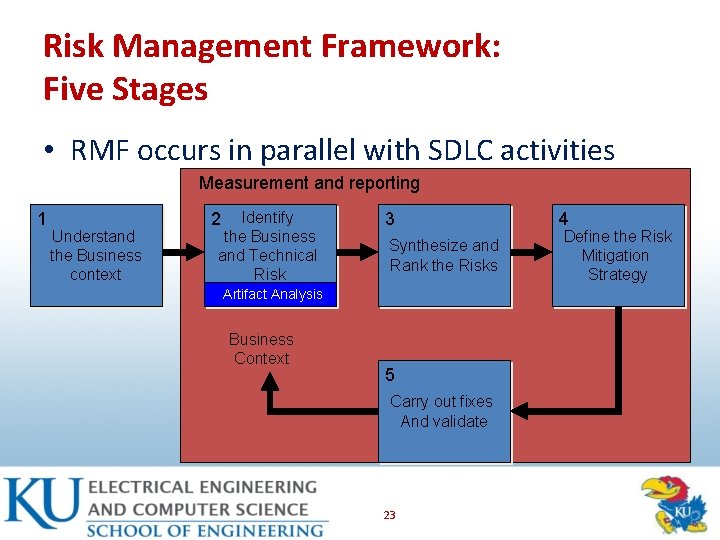
Risk Management Framework: Five Stages • RMF occurs in parallel with SDLC activities Measurement and reporting 1 Understand the Business context Identify the Business and Technical Risk 2 3 Synthesize and Rank the Risks Artifact Analysis Business Context 5 Carry out fixes And validate 23 4 Define the Risk Mitigation Strategy
Stage 1: Understand Business Context • Risk management – Occurs in a business context – Affected by business motivation • Key activity of an analyst – Extract and describe business goals – clearly • Increasing revenue; reducing dev cost; meeting SLAs; generating high return on investment (ROI) – Set priorities 24
Stage 2: Identify the Business & Technical Risks • Business risks have impact – Direct financial loss; loss of reputation; violation of customer or regulatory requirements; increase in development cost • Severity of risks – Should be capture in financial or project management terms • Key is to tie technical risks to business context 25
Stage 3: Synthesize and Rank the Risks • Prioritize the risks alongside the business goals • Assign risks appropriate weights for resolution • Risk metrics – Risk likelihood – Risk impact – Number of risks mitigated over time 26
Stage 4: Risk Mitigation Strategy • Develop a coherent strategy – For mitigating risks – In cost effective manner; account for – Cost – Completeness – Likelihood of success Implementation time Impact • A mitigation strategy should – Be developed within the business context – Must directly identify validation techniques 27
Stage 5: Carry out Fixes and Validate • Execute the chosen mitigation strategy • Rectify the artifacts – Measure completeness – Estimate • Validate that risks have been mitigated – Testing can be used to demonstrate – Develop confidence that unacceptable risk does not remain 28
RMF - A Multi-loop • Risk management is a continuous process – Five stages may need to be applied many times – Ordering may be interleaved in different ways • Risk can emerge at any time in SDLC – One way – apply in each phase of SDLC • Risk can be found between stages • Level of application – Primary – project level • Each stage must capture complete project 29
![Seven Touchpoints [1/2] 1. 2. 3. 4. 5. 6. 7. Code Review (Tools) Architectural](http://slidetodoc.com/presentation_image_h/b523f7fd211e2616f2dbe8a200d5d155/image-30.jpg "Seven Touchpoints [1/2] 1. 2. 3. 4. 5. 6. 7. Code Review (Tools) Architectural")
Seven Touchpoints [1/2] 1. 2. 3. 4. 5. 6. 7. Code Review (Tools) Architectural Risk Analysis Penetration Testing Risk-Based Security Testing Abuse Cases Security Requirements Security Operations 30
![Seven Touchpoints [2/2] 31](http://slidetodoc.com/presentation_image_h/b523f7fd211e2616f2dbe8a200d5d155/image-31.jpg "Seven Touchpoints [2/2] 31")
Seven Touchpoints [2/2] 31
Touchpoints: Black and White Hat • Mix black and white hat approaches • Black hat (defense) • Both Hats – Risk-based security Testing – Abuse cases – Penetration testing • White hat (offense) – – Code review Architectural risk analysis Security requirement Security operations 32
Touchpoints: Push Left Rule • More economical to find software defects early in the lifecycle • Penetration testing at the end of lifecycles creates reactive strategy – Penetrate and patch approach • “Push Left” rule gets us to the top two touchpoints very early in the SDLC 33
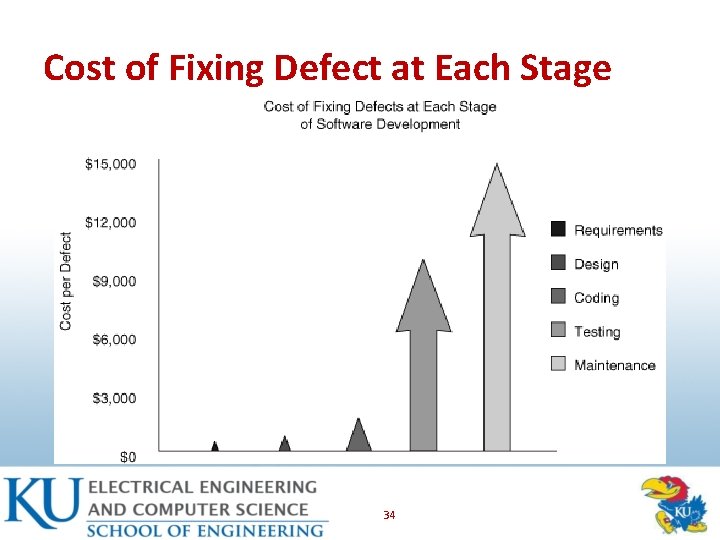
Cost of Fixing Defect at Each Stage 34
Touchpoint as Best Practice • Touchpoints are a maturity map for organizations – The more you adopt, the better – Every little bit helps 35
Who Should Do Software Security • Start with software people, not with security people • Normal security practitioners don’t know enough about software – Compilers – Language frameworks – Software architecture • More software security people are needed 36
![Code Review: Introduction [1/3] • All software project have code • Center software assurance](http://slidetodoc.com/presentation_image_h/b523f7fd211e2616f2dbe8a200d5d155/image-37.jpg "Code Review: Introduction [1/3] • All software project have code • Center software assurance")
Code Review: Introduction [1/3] • All software project have code • Center software assurance activities around the code • Large amount of security problems are cause by simple bugs that can be spotted in code – Buffer overflow – strcpy() in C 37
![Code Review: Introduction [2/3] • Code review is boring, difficult, and tedious • Analysis](http://slidetodoc.com/presentation_image_h/b523f7fd211e2616f2dbe8a200d5d155/image-38.jpg "Code Review: Introduction [2/3] • Code review is boring, difficult, and tedious • Analysis")
Code Review: Introduction [2/3] • Code review is boring, difficult, and tedious • Analysis that practice code review often are familiar with “get done, go home” • Reviewer start out motivated and diligent but eventually lose focus 38
![Code Review: Introduction [3/3] 39](http://slidetodoc.com/presentation_image_h/b523f7fd211e2616f2dbe8a200d5d155/image-39.jpg "Code Review: Introduction [3/3] 39")
Code Review: Introduction [3/3] 39
Code Review with Tools • Focus is on implementation bugs – Essentially those that static analysis can find – Security bugs are real problems – but architectural flaws are just as big a problem • Code Review can capture only half of the problems • E. g. : Buffer overflow bug in a particular line of code – Architectural problems are very difficult to find by looking at the code • Specially true for today’s large software 40
Code Review with Tools • Static analysis tools examine the text of a program without executing it – Favorable to manual audits (faster) – Evaluate programs more frequently – Reach hard-to-reach states and dark corners of code 41
Key Characteristics of a Tool • Source code analysis tool must have six key characteristics 1. 2. 3. 4. 5. 6. Must be designed for security Support multiple tiers Be extensible Be useful for security analysts and developers Support existing development process Make sense to multiple stakeholders 42
Be Designed for Security • Software security requires the ability to think like a bad guy • Exploiting software is not an exercise in standard-issue QA • The knowledge base built into a tool is an essential deciding factor 43
Support Multiple Tiers • Modern software applications are rarely written in a single language or platform – Most business critical systems are highly distributed • Automated security analysis software must support each of these languages and platforms • A tool that can only analyze one or two is unsatisfactory 44
Be Extensible • Security problems evolve, grow, and mutate – No one technique or set of rules will ever perfectly detect all security vulnerabilities • Good tools need a modular architecture that supports multiple kinds of techniques • “One size fits all” approach to security is doomed to fail 45
Be Useful for Security Analysts and Developers • The best analysis tools cannot automatically fix security problems • Best automated tools – Assist analysis and developers to focus on their role – Find and fix security problems efficiently – Educate users about good programming practices 46
Support Existing Development Process • Requires seamless integration with build processes and IDEs – The tool must properly inter operate with existing compilers on various platforms • Good tools both integrate into existing build process and also coexist with and support analysis in familiar development tools 47
Make Sense to Multiple Stakeholders • Security analysis software tool also needs to support business – Views for release managers – Views for development managers – Allow executive to compare using metrics and support release decisions 48
Three Characteristics to Avoid • Too many false positives – False positive rate under 40% is okay • Spotty integration with IDEs – Developers should not have to switch to do a security analysis • Single-minded support of C 49
Code Review Summary • Code review is boring so using an analysis tool will help reduce a large amount of security problems • Good analysis tool must be: – Easy to use (even for non-security people) – Understandable for normal developers – Educate users about good programming practices 50
Architectural Risk Analysis (ARA) • Architectural risk analysis is a risk management process that identifies flaws in a software architecture and determines risks to business information assets that result from those flaws. 51
Architectural Risk Analysis (ARA) • Design flaws – Account for 50% of security problem – Can’t be found by looking at code • Risk analysis – Track risk over time – Quantify impact – Link system-level concerns to probability and impact measures 52
Architectural Risk Analysis (ARA) 53
Risk Analysis Approaches • Risk Analysis – refer to the activity of identifying and ranking risks at some particular stage in the SDLC • Risk Management – the activity of performing a number of discrete risk analysis exercises tracking risk throughout development and strategically mitigating risk 54
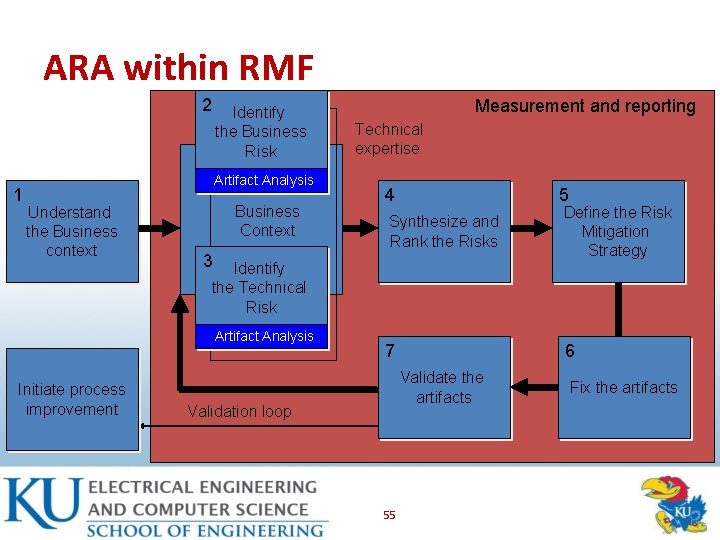
ARA within RMF 2 1 Identify the Business Risk Artifact Analysis Understand the Business context Business Context Measurement and reporting Technical expertise 4 5 Synthesize and Rank the Risks Define the Risk Mitigation Strategy 7 6 3 Identify the Technical Risk Artifact Analysis Initiate process improvement Validate the artifacts Validation loop 55 Fix the artifacts
The Knowledge Requirement • The necessity of a “forest-level” view – Whiteboard view of boxes and arrows describing interactions of various critical component – Attempt to see the forest and not get lost in the trees – One-page overview , or forest level view makes it easier for everyone to get involved • Building a forest-level overview should be the first artifact in any ARA 56
Risk Analysis Steps • Attack resistance analysis • Ambiguity analysis • Weakness analysis 57
ARA Process: Attack Resistance Analysis • Attack resistance analysis – Steps • Identify general flaws using secure design literature and checklists – Knowledge base of historical risks useful • Map attack patterns using either the results of abuse case or a list of attack patterns • Identify risk-based on checklist • Understand demonstrate the viability of these known attacks 58
ARA Process: Ambiguity Analysis • Ambiguity analysis – Discover new risks – creativity required – A group of analyst and experience helps – use multiple points of view • Unify understanding after independent analysis – Uncover ambiguity and inconsistencies 59
ARA Process: Weakness Analysis • Weakness analysis – Assess the impact of external software dependencies – Modern software • Built on top of middleware such as. NET and J 2 EE • Use DLLs or common libraries – Need to consider • COTS • Framework 60
ARA Summary • Around 50% of security problems are result of design flaws • Performing a risk analysis at the design level is an important part of solid software security program • Applying risk analysis methods at the design level of any application often yields valuable results 61
![Penetration Testing: Introduction [1/2] • Software penetration testing is the practice of testing a](http://slidetodoc.com/presentation_image_h/b523f7fd211e2616f2dbe8a200d5d155/image-62.jpg "Penetration Testing: Introduction [1/2] • Software penetration testing is the practice of testing a")
Penetration Testing: Introduction [1/2] • Software penetration testing is the practice of testing a computer system, network or web application to find vulnerabilities that an attacker could exploit 62
![Penetration Testing: Introduction [1/2] 63](http://slidetodoc.com/presentation_image_h/b523f7fd211e2616f2dbe8a200d5d155/image-63.jpg "Penetration Testing: Introduction [1/2] 63")
Penetration Testing: Introduction [1/2] 63
Penetration Testing Usual Approach • Most commonly used today • Currently – Outside->in approach – Better to do after code review and ARA – As part of final preparation acceptance regiment – One major limitation • Almost always a too-little-too-late attempt at the end of a development cycle 64
![Penetration Testing Problem [1/2] • Security testing needs to make use of both white](http://slidetodoc.com/presentation_image_h/b523f7fd211e2616f2dbe8a200d5d155/image-65.jpg "Penetration Testing Problem [1/2] • Security testing needs to make use of both white")
Penetration Testing Problem [1/2] • Security testing needs to make use of both white hat and black hat concepts and approaches • Most all penetration testing relies on black hat methods – Thinking like a bad guy • Difficult to prove if system is secure enough under attack 65
![Penetration Testing Problem [2/2] • Penetration testing only identifies a small sample of all](http://slidetodoc.com/presentation_image_h/b523f7fd211e2616f2dbe8a200d5d155/image-66.jpg "Penetration Testing Problem [2/2] • Penetration testing only identifies a small sample of all")
Penetration Testing Problem [2/2] • Penetration testing only identifies a small sample of all possible security risks • Focus on a small list of issues will only mitigate a subset of security risks • Greater security risks may still be in the system 66
Penetration Testing: A Better Approach • Testing should be an approach based testing – Use the findings discovered and tracked at the beginning of the SDLC • Penetration testing is about testing a system in its final production environment • Drive test that concentrate on these factors with some knowledge of risk analysis – most effective approach 67
Penetration Testing: Use Tools • Tools should be used for penetration testing – Static analysis tool – vet software code – Dynamic analysis tool – observer system as it executes • Faults are reported back to tester for analysis • Tools should be guided by risk analysis and attack patterns 68
Penetration Testing: Tools Benefits • Two major benefits: – Tools carry about the majority of the grunt work • Shouldn’t replace review of skilled security analyst – Tools output lends itself readily for metrics • Teams can use metrics to track progress over time • Clean bill of heath from analysis tool does not mean that a system is defect free 69
Penetration Testing: Test More Than Once • Automated review is best suited for identifying the most basic of implementation defects • Human review is necessary to reveal flaws in the design or complex implementation level vulnerabilities – Expert review 70
Incorporating Findings into Development • Results of penetration test should propagate back into the organization • Mitigation strategy is a critical aspect of any penetration test – Root cause analysis • Use test result information to measure progress against a goal 71
Using Penetration Tests to Assess the Application Landscape • Penetration test can help with software already created – Create basic risk analysis to pin down business context – Run uniform, fixed-length, standardized penetration test – Rank them according to their results 72
Penetration Testing Summary • Penetration test should be driven by perceived risk • Best suited for finding configuration problems and other environmental factors • Make use of tools – Takes care of majority of grunt work 73
![Risk-Based Security Testing [1/2] • Risk-based testing (RBT) is a type of software testing](http://slidetodoc.com/presentation_image_h/b523f7fd211e2616f2dbe8a200d5d155/image-74.jpg "Risk-Based Security Testing [1/2] • Risk-based testing (RBT) is a type of software testing")
Risk-Based Security Testing [1/2] • Risk-based testing (RBT) is a type of software testing that functions as an organizational principle used to prioritize the tests of features and functions in software, based on the risk of failure, the function of their importance and likelihood or impact of failure 74
![Risk-Based Security Testing [2/2] • Risk-based testing (RBT) is a type of software testing](http://slidetodoc.com/presentation_image_h/b523f7fd211e2616f2dbe8a200d5d155/image-75.jpg "Risk-Based Security Testing [2/2] • Risk-based testing (RBT) is a type of software testing")
Risk-Based Security Testing [2/2] • Risk-based testing (RBT) is a type of software testing that functions as an organizational principle used to prioritize the tests of features and functions in software, based on the risk of failure, the function of their importance and likelihood or impact of failure. 75

RBT vs Penetration Testing • RBT has similarities with penetration testing • Differences in level of approach and timing – Penetration testing • Occurs when software is complete and installed in production environment • Focus on outside in – RBT • Applied before software is complete at unit level • Testing environment with stubs (pre integration) 76
Risk Management and Security Testing • Two diverse approaches – Functional Security Testing – testing security mechanism to ensure that their functionality is properly implemented – Adversarial Security Testing – understanding and simulating the attackers approach 77
![How to Approach Security Testing [1/2] • Who should perform testing? • Functional security](http://slidetodoc.com/presentation_image_h/b523f7fd211e2616f2dbe8a200d5d155/image-78.jpg "How to Approach Security Testing [1/2] • Who should perform testing? • Functional security")
How to Approach Security Testing [1/2] • Who should perform testing? • Functional security testing – Standard testing organizations using traditional approach • e. g. access control • Adversarial security testing – Highly experienced security professional 78
![How to Approach Security Testing [2/2] • How should testing be performed? • Make](http://slidetodoc.com/presentation_image_h/b523f7fd211e2616f2dbe8a200d5d155/image-79.jpg "How to Approach Security Testing [2/2] • How should testing be performed? • Make")
How to Approach Security Testing [2/2] • How should testing be performed? • Make use of good tools – Static analyzer • Drawbacks: – False positives – QA organizations spend little time probing • Time and budget constraints 79
Security Testing: Malicious Input • Biggest problem is that software takes input – Register settings – Environment variables – Network configuration • Attackers toolkits focus on input using – Fault injection tools – Grammar generators – Re-players 80
Security Testing: Malicious Input • Solutions to handing malicious input • Use white-list approach – Draconian white list approach • Avoid black-list approach will not work 81
Risk-Based Security Summary • Security testing – Should start at feature or component/unit level testing – Must involve two diverse approaches • Functional security testing – Testing security mechanisms to ensure that their functionality is properly implemented • Adversarial security testing – Performing risk-based security testing motivated by understanding and simulating the attacker’s approach 82
![Abuse Cases Introduction [1/3] • Abuse case defines an interaction between an actor and](http://slidetodoc.com/presentation_image_h/b523f7fd211e2616f2dbe8a200d5d155/image-83.jpg "Abuse Cases Introduction [1/3] • Abuse case defines an interaction between an actor and")
Abuse Cases Introduction [1/3] • Abuse case defines an interaction between an actor and the system that results in harm to a resource associated with one of the actors, one of the stakeholders, or the system itself • Also called misuse cases 83
![Abuse Cases Introduction [2/3] • Think like an attacker • What motivates an attacker?](http://slidetodoc.com/presentation_image_h/b523f7fd211e2616f2dbe8a200d5d155/image-84.jpg "Abuse Cases Introduction [2/3] • Think like an attacker • What motivates an attacker?")
Abuse Cases Introduction [2/3] • Think like an attacker • What motivates an attacker? – Stealing money – Obtaining greater access level – Create general havoc – Spy on spouse • How can the attacker accomplish its goal? 84
![Abuse Cases Introduction [3/3] 85](http://slidetodoc.com/presentation_image_h/b523f7fd211e2616f2dbe8a200d5d155/image-85.jpg "Abuse Cases Introduction [3/3] 85")
Abuse Cases Introduction [3/3] 85
Creating Useful Abuse Cases • Brainstorming is the most practical method of creating abuse case – Combine security and reliability experts with system designers (relies heavily on experience) – Experts ask questions to identify possible weakness • Often, formal methods are unnecessary in the real world 86
![Touchpoint Process: Abuse Case Development [1/3] • Start with requirements, standards uses cases, and](http://slidetodoc.com/presentation_image_h/b523f7fd211e2616f2dbe8a200d5d155/image-87.jpg "Touchpoint Process: Abuse Case Development [1/3] • Start with requirements, standards uses cases, and")
Touchpoint Process: Abuse Case Development [1/3] • Start with requirements, standards uses cases, and list of attack patterns • Identify your threat or actor • Knowing the enemy that is likely to attack is a prerequisite • Use information gathered to create abuse case 87
![Touchpoint Process: Abuse Case Development [2/3] • Creating anti-requirements – Important to think about](http://slidetodoc.com/presentation_image_h/b523f7fd211e2616f2dbe8a200d5d155/image-88.jpg "Touchpoint Process: Abuse Case Development [2/3] • Creating anti-requirements – Important to think about")
Touchpoint Process: Abuse Case Development [2/3] • Creating anti-requirements – Important to think about • Things that you don’t want your software to do • Requires: security analysis + requirement analysis – Anti-requirements • Provide insight into how a malicious user, attacker, thrill seeker, competitor can abuse your system • Considered throughout the SDLC – indicate what happens when a required security function is not included 88
![Touchpoint Process: Abuse Case Development [3/3] • Creating attack model – Cycle through known](http://slidetodoc.com/presentation_image_h/b523f7fd211e2616f2dbe8a200d5d155/image-89.jpg "Touchpoint Process: Abuse Case Development [3/3] • Creating attack model – Cycle through known")
Touchpoint Process: Abuse Case Development [3/3] • Creating attack model – Cycle through known attacks and determine if same attack applies to your system – Select those attack patterns and build cases around those patterns – Include anyone who can gain access to system • Process is in Microsoft’s STRIDE model 89
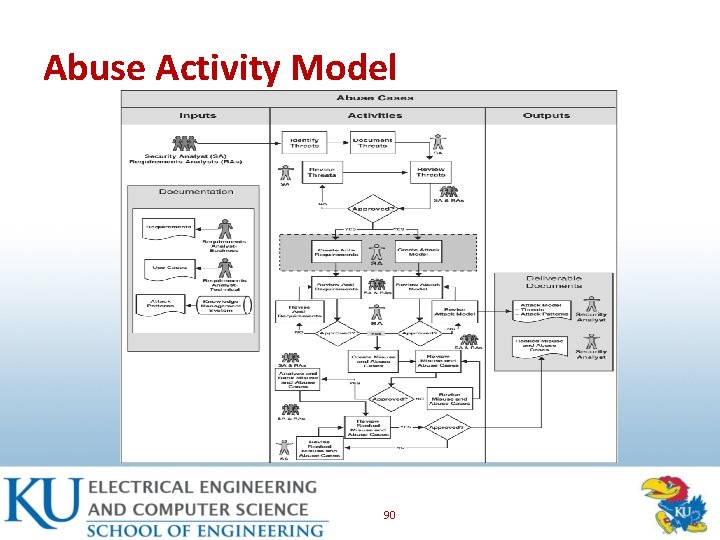
Abuse Activity Model 90
Abuse Case Summary • Creating an attack model – Based on known attack types – Select attack patterns relevant to your system build abuse case around the attack patterns – Include anyone who can gain access to the system because threats must encompass all potential sources – Also need to model attacker 91
![Security Requirements and Operations: Introduction [1/2] • Software security meets security operations – Traditionally,](http://slidetodoc.com/presentation_image_h/b523f7fd211e2616f2dbe8a200d5d155/image-92.jpg "Security Requirements and Operations: Introduction [1/2] • Software security meets security operations – Traditionally,")
Security Requirements and Operations: Introduction [1/2] • Software security meets security operations – Traditionally, software development is far removed from information security – Disconnect between security and development results in software development efforts that lack any sort of contemporary understanding of technical security risks 92
![Security Requirements and Operations: Introduction [2/2] • Software security meets security operations – Traditionally,](http://slidetodoc.com/presentation_image_h/b523f7fd211e2616f2dbe8a200d5d155/image-93.jpg "Security Requirements and Operations: Introduction [2/2] • Software security meets security operations – Traditionally,")
Security Requirements and Operations: Introduction [2/2] • Software security meets security operations – Traditionally, software development is far removed from information security – Disconnect between security and development results in software development efforts that lack any sort of contemporary understanding of technical security risks 93
![Software Security Best Practice [1/3] • Developers best efforts on applying touchpoints may fail](http://slidetodoc.com/presentation_image_h/b523f7fd211e2616f2dbe8a200d5d155/image-94.jpg "Software Security Best Practice [1/3] • Developers best efforts on applying touchpoints may fail")
Software Security Best Practice [1/3] • Developers best efforts on applying touchpoints may fail – Lack of security domain knowledge – Unfamiliar with real world attacks – Knowledge is acquired from years of experience in the field 94
![Software Security Best Practice [2/3] • Information security staff have years of responding to](http://slidetodoc.com/presentation_image_h/b523f7fd211e2616f2dbe8a200d5d155/image-95.jpg "Software Security Best Practice [2/3] • Information security staff have years of responding to")
Software Security Best Practice [2/3] • Information security staff have years of responding to attacks – Have studied application vulnerabilities and their resulting attacks profiles in minute detail • Few information security professionals are developers – Rare to find information security professionals directly involved in development projects 95
![Software Security Best Practice [3/3] • Touchpoints are designed to be carried out by](http://slidetodoc.com/presentation_image_h/b523f7fd211e2616f2dbe8a200d5d155/image-96.jpg "Software Security Best Practice [3/3] • Touchpoints are designed to be carried out by")
Software Security Best Practice [3/3] • Touchpoints are designed to be carried out by software security specialist in tandem with development teams • Software security is a team effort 96
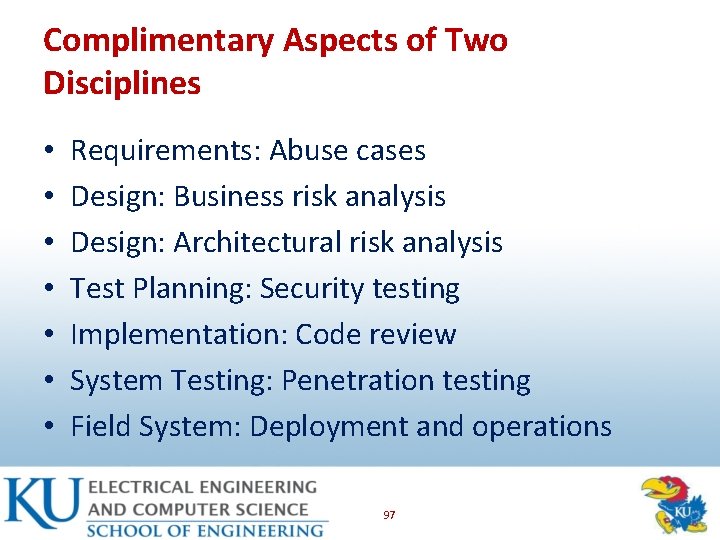
Complimentary Aspects of Two Disciplines • • Requirements: Abuse cases Design: Business risk analysis Design: Architectural risk analysis Test Planning: Security testing Implementation: Code review System Testing: Penetration testing Field System: Deployment and operations 97
Security Requirements and Operations: Summary • Security requirements – Difficult tasks – Should cover both overt functional security and emergent characteristics • Use requirements engineering approach • Security operations – Integrate security operations • E. g. , software security should be integrated with network security 98
Software Security: Takeaways • Software security is everyone responsibility • Critical touchpoint to implement first – Code review (bugs) – Architectural risk analysis (flaws) • Account for 50% of security problem • Utilize continuous risk management process 99
Questions 100
- Slides: 100