
Software for Testing the New Injector BLM Electronics
Software for Testing the New Injector BLM Electronics Emmanouil Angelogiannopoulos (BE-BI-SW) Acknowledgements: • Maciej Kwiatkowski (BE-BI-BL) • Stephen Jackson (BE-BI-SW) • Christos Zamantzas (BE-BI-BL) December 6 BI Day 2012 1/16
Outline u Motivation for this project u Technical details with examples u Results u Conclusions December 6 BI Day 2012 2/16

Final System Implementation • Final architecture of the new BLM system: • Detectors in tunnel • Acquisition crate (BLEDP) • VME crate • Processing electronics (BLEPT) • FESA server on Linux CPU providing data to clients and dealing with settings and interlocks December 6 BI Day 2012 3/16
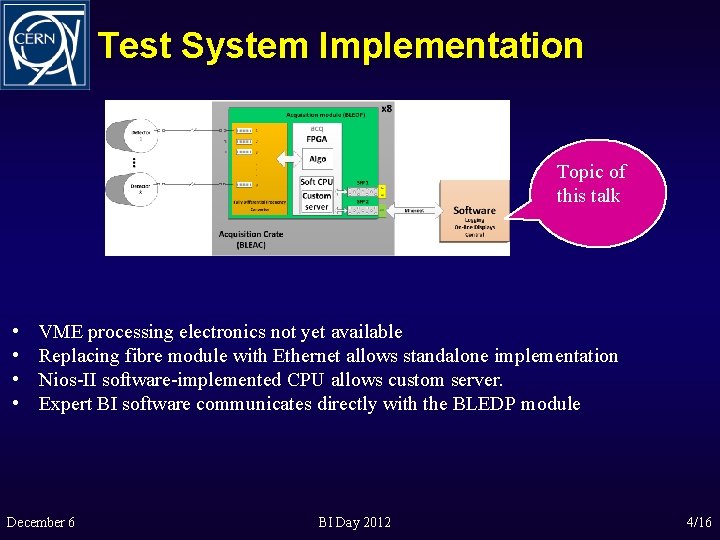
Test System Implementation Topic of this talk • • VME processing electronics not yet available Replacing fibre module with Ethernet allows standalone implementation Nios-II software-implemented CPU allows custom server. Expert BI software communicates directly with the BLEDP module December 6 BI Day 2012 4/16
Objectives for the Expert Software u Debug and verify the hardware u Further develop the analogue circuits and the final firmware u Assist in the development of the FPGA algorithms to merge the acquired data u User-friendly environment u Real-time data-viewing and parallel logging to files December 6 BI Day 2012 5/16
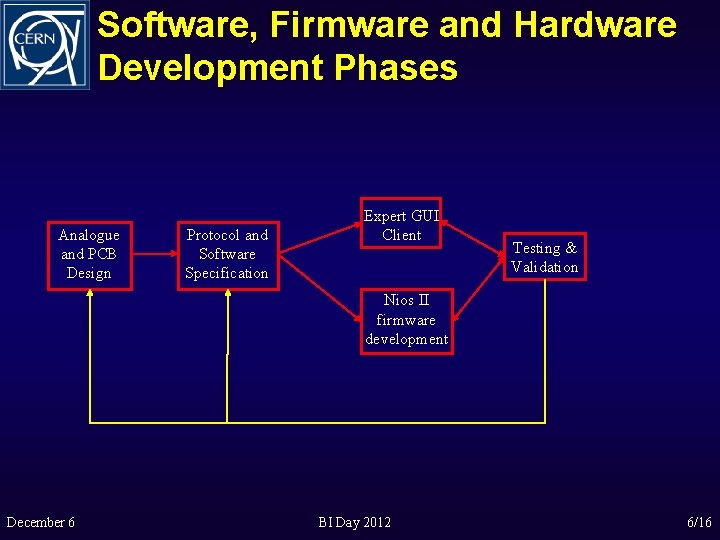
Software, Firmware and Hardware Development Phases Analogue and PCB Design Protocol and Software Specification Expert GUI Client Testing & Validation Nios II firmware development December 6 BI Day 2012 6/16
Two Types of Data Provided • Acquisition data • 8 channels per BLEDP module • 2 measurement methods: • Low current measurement (in p. A) • High current measurement (in m. A) • Status data • Number of sensors and parameters to be monitored • Data rate 1 s December 6 BI Day 2012 7/16
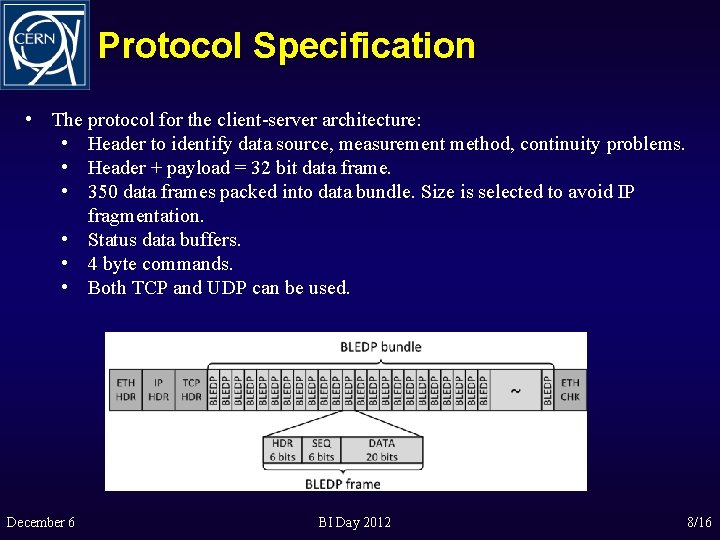
Protocol Specification • The protocol for the client-server architecture: • Header to identify data source, measurement method, continuity problems. • Header + payload = 32 bit data frame. • 350 data frames packed into data bundle. Size is selected to avoid IP fragmentation. • Status data buffers. • 4 byte commands. • Both TCP and UDP can be used. December 6 BI Day 2012 8/16
Development Phases 1. Type of acquisition data supported by the module: • Processed data from one channel Ø 16 Mbit/s Ø TCP protocol • Processed data from all eight channels Ø 128 Mbit/s Ø UDP protocol • Raw ADC data from one channel Ø 320 Mbit/s Ø UDP protocol 2. Status Data with 1 Hz frequency interleaving with all the above types. December 6 BI Day 2012 9/16
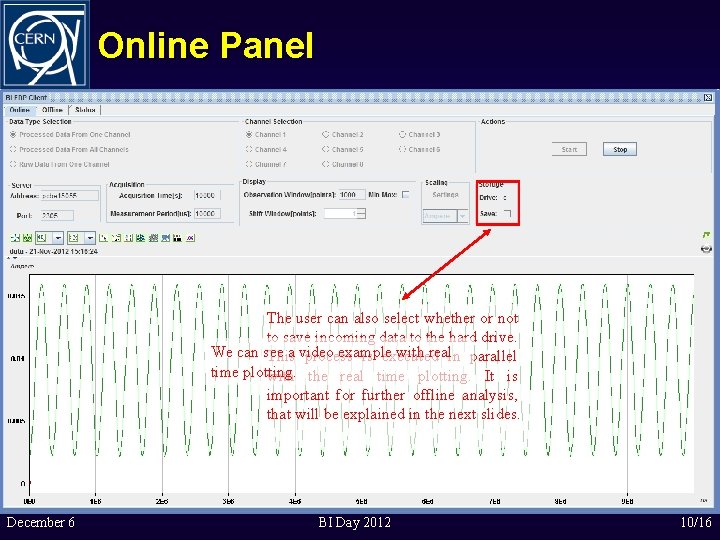
Online Panel After these steps the acquisition can start and real-time data from The user can also select whether or notthe module are plotted in the graph. to save incoming data to the hard drive. It is possible to stop the We should can see a video example with realin parallel This process is executed The user set different parameters Acquisition parameters likedefine Data type mode, User can also Units acquisition at any time. It is time plotting. the time plotting. beforenumber starting communication withshould the channel and acquisition time andwith Scale in thereal Y Axis. forsaved further offline analysis, module. always Mostimportant of are from be them set manually. thatonwill explained in the previous sessions thebe same computer or next slides. have default values. December 6 BI Day 2012 10/16

Online Panel Video December 6 BI Day 2012 11/16

Offline Panel The picked second is marked in the upper graph and the data are mined A zooming from the corresponding file and thenvideo example follows. plotted with the desired accuracy in the Open a file search window to select an lower graph. acquisition folder from a previous online session. Mac address of a module. Different acquisition sessions for this module to select. Upper graph is the picker. It is plotted from statistics files inside the selected session folder and contains minimum, maximum and average values of the data for each second. The user has to pick a second with the mouse. December 6 BI Day 2012 11/16

Offline Panel Video December 6 BI Day 2012 13/16
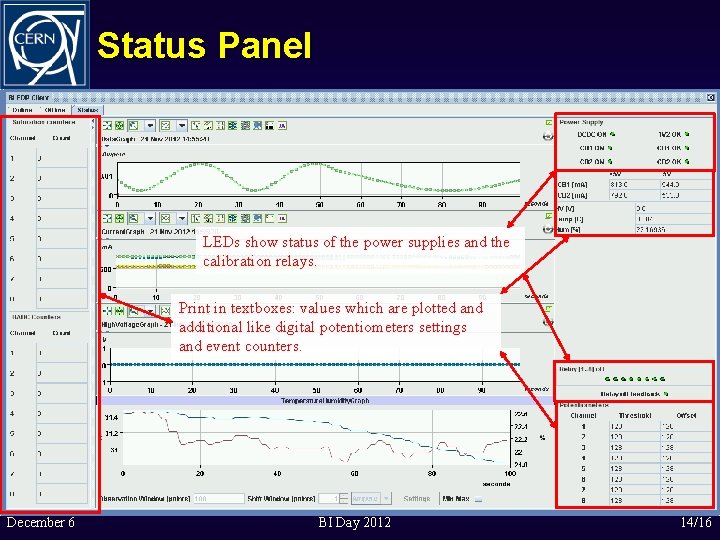
Status Panel Plot selected status packets in these three graphs with 1 Hz update rate: current consumption, high voltage monitoring, temperature and humidity. LEDs show status of the power supplies and the calibration relays. acquisition data from the In the first graph are plotted selected channel with 1 Hz update rate also. The plots of the four graphs are aligned. Print in textboxes: values which are plotted and additional like digital potentiometers settings and counters. E. g. event Influence of a power supply problem on the measurements can be seen here. December 6 BI Day 2012 14/16
Conclusion u u December 6 Direct Ethernet communication allowed a standalone implementation Collaboration between BL (hardware, firmware) and SW (Expert GUI) sections Software and the firmware development was split: u Processed Data from one channel u Processed data from all 8 channels u Raw Data from one channel Expert GUI allowed developing of both firmware and hardware u Offline data storage allowed detailed analysis of the RT algorithm implemented in the FPGA BI Day 2012 15/16
Thank you for your attention! People involved in the Project: Christos Zamantzas (BE-BI-BL) Stephen Jackson (BE-BI-SW) Analog design: William Viganό (BE-BI-BL) Firmware design: Marcel Alsdorf, Maciej Kwiatkowski (BE-BI-BL) Software design: Emmanouil Angelogiannopoulos (BE-BI-SW) December 6 BI Day 2012 16/16
- Slides: 16