
SMARTPHONE SECURITY Prepared by Archita Pathak 1 Acknowledgement
SMARTPHONE SECURITY Prepared by: Archita Pathak 1
Acknowledgement I would like to thank Professor Shambhu for giving me platform to talk about the topic I like and interested in. I would also like to thank my group partner, Meghana Gad, for helping me out in the preparation of this topic and lending support wherever necessary. Thanks for your inputs. 2
Content ■ ■ ■ ■ What are smartphones? Imminent threats Major venues of attack Smartphone attacks against cellular network Types of attacks Questionnaire (Know your enemy) Survey Types of (insider) threats Objectives of adversaries Major Reason Major Concern Defenses Reference Questions 3
What are smartphones? ■ “A smartphone is a mobile phone (also known as cell phones or cell mobiles) with an advanced mobile operating system that combines features of a personal computer operating system with other features useful for mobile or handheld use” - Wikipedia ■ As per recent statistics, 2. 32 billion smartphone users around the world. 4
What are smartphones? ■ Why smartphones are so popular? – Ease of use – Low cost – Its own PC-like OS. ■ All smartphone OS provides these functions: – Access to cellular network (GSM/CDMA) – Access to internet (TCP/IP, GPRS, 802. 11) – Ability to run multiple applications together – Data synchronization with PC 5
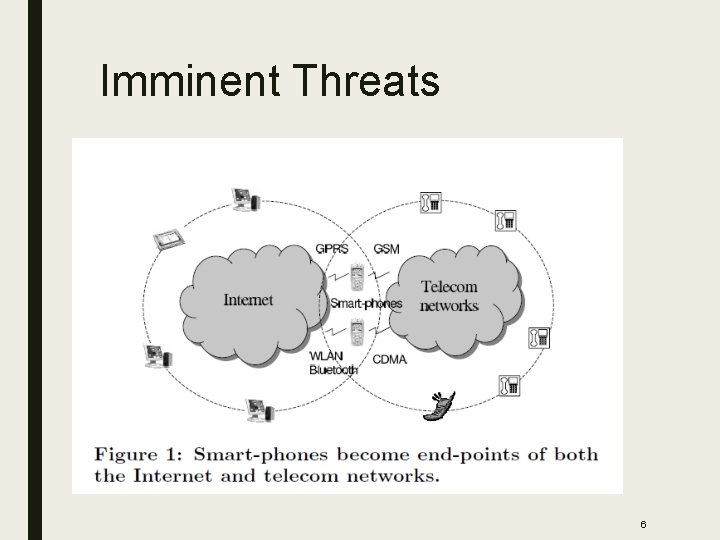
Imminent Threats 6
Major Venues of Attack ■ Internet – Easiest medium of infecting mobile. ■ PC synchronization – Sync Now button cause major damage. ■ Peer smartphone attack or infection: – First smartphone worm: Cabir ■ What about telecom network? – Limited access 7
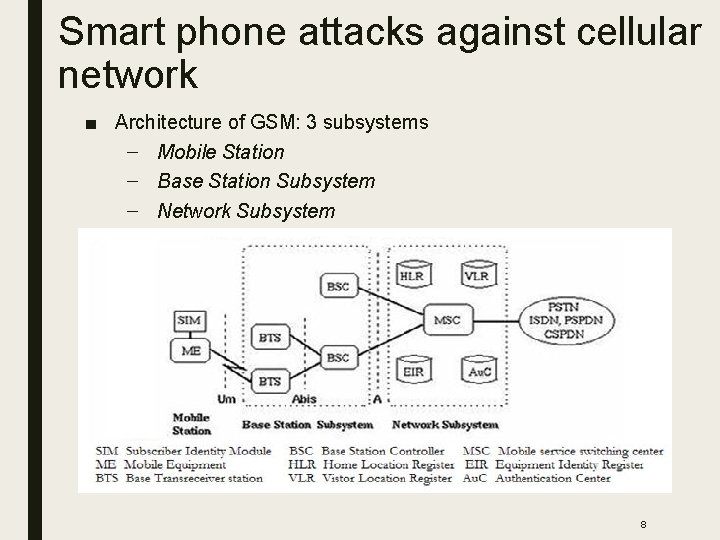
Smart phone attacks against cellular network ■ Architecture of GSM: 3 subsystems – Mobile Station – Base Station Subsystem – Network Subsystem 8
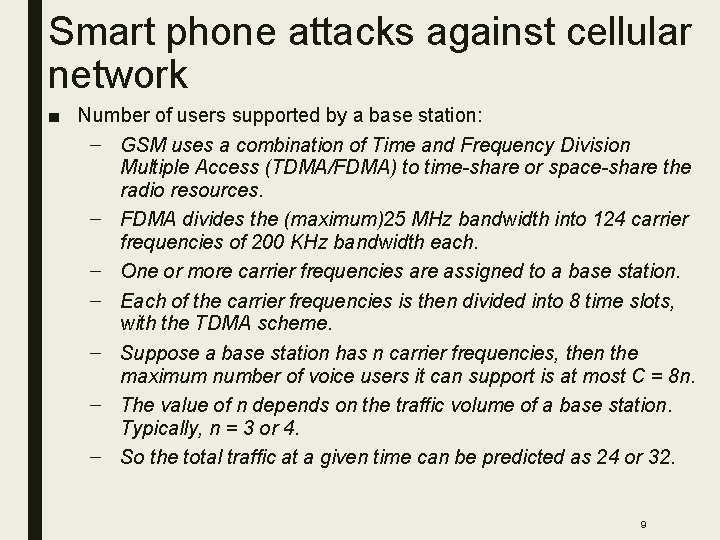
Smart phone attacks against cellular network ■ Number of users supported by a base station: – GSM uses a combination of Time and Frequency Division Multiple Access (TDMA/FDMA) to time-share or space-share the radio resources. – FDMA divides the (maximum)25 MHz bandwidth into 124 carrier frequencies of 200 KHz bandwidth each. – One or more carrier frequencies are assigned to a base station. – Each of the carrier frequencies is then divided into 8 time slots, with the TDMA scheme. – Suppose a base station has n carrier frequencies, then the maximum number of voice users it can support is at most C = 8 n. – The value of n depends on the traffic volume of a base station. Typically, n = 3 or 4. – So the total traffic at a given time can be predicted as 24 or 32. 9
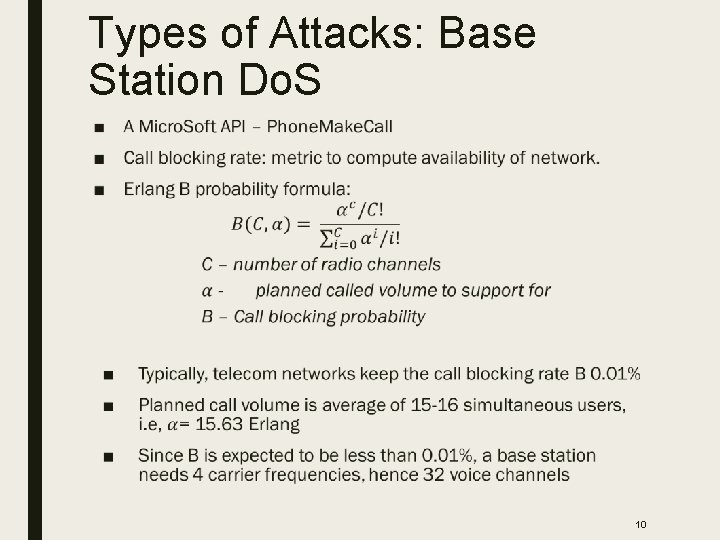
Types of Attacks: Base Station Do. S ■ 10
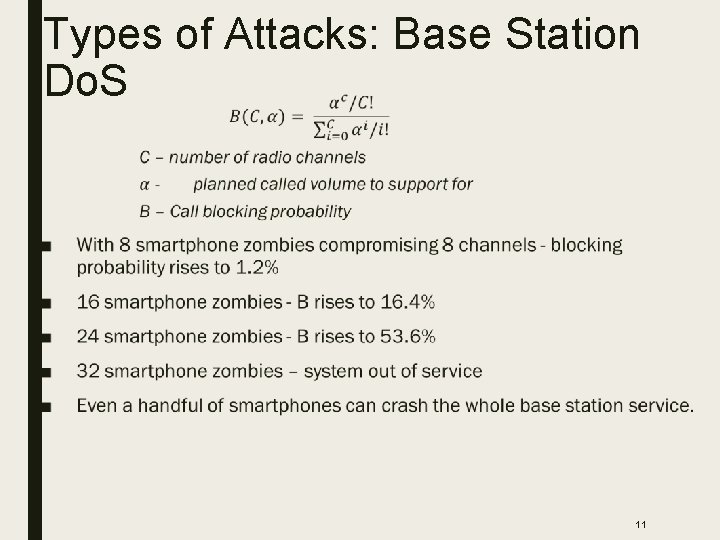
Types of Attacks: Base Station Do. S ■ 11
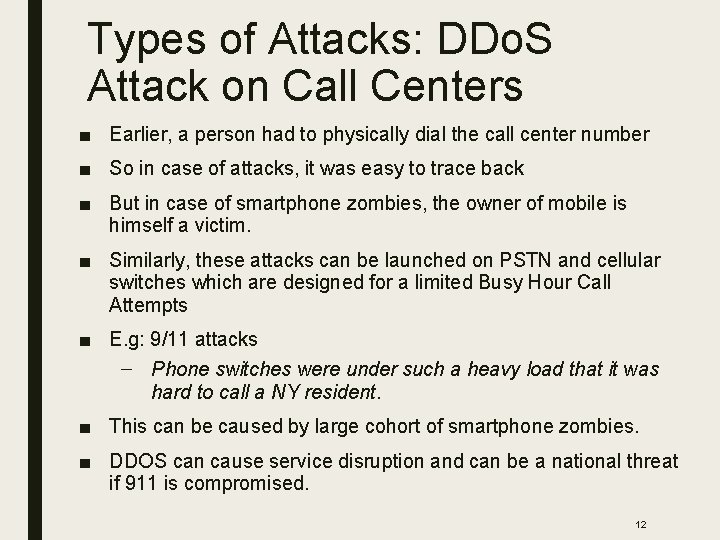
Types of Attacks: DDo. S Attack on Call Centers ■ Earlier, a person had to physically dial the call center number ■ So in case of attacks, it was easy to trace back ■ But in case of smartphone zombies, the owner of mobile is himself a victim. ■ Similarly, these attacks can be launched on PSTN and cellular switches which are designed for a limited Busy Hour Call Attempts ■ E. g: 9/11 attacks – Phone switches were under such a heavy load that it was hard to call a NY resident. ■ This can be caused by large cohort of smartphone zombies. ■ DDOS can cause service disruption and can be a national threat if 911 is compromised. 12
Types of Attacks: Identity Theft and Spoofing ■ The telecom networks enforces security such that SIM information and customer identity is not revealed. ■ In the past, researchers were able to compromise SIM information, but the procedure involved physical access to sim and 150, 000 queries to the card. ■ But in case of smartphone, identity theft is trivial because once a smartphone is compromised, the attacker gets an access to all the data and can impersonate the owner for both incoming or outgoing calls. ■ Alarming as in many countries one's sim card serves as their identity for voting, ordering goods, or accessing finance. 13

Types of Attacks: Remote Wiretapping ■ A smartphone zombie can record the conversation and reveal the details wither publicly or to some spies. ■ These kind of attacks are hard to detect 14
QUESTIONNAIRE! 15
Survey ■ 12% of users have experienced unauthorized access while most of the users think that insider attack is worst ■ To protect data from insider, users who cared used authentication system. ■ It was also found that some of the users stopped using authentication system for following 3 reasons: – inability to disable a locking system temporarily for a short period of time (e. g. , 10 -20 min), without the necessity to setup it again afterwards; – social discomfort of using a lock in front of their friends, where they believed trust was implied; – too frequent authentication prompts. 16
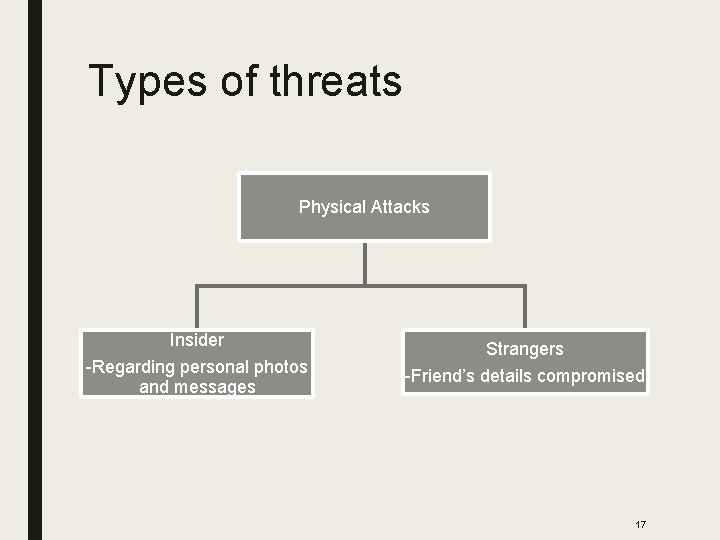
Types of threats Physical Attacks Insider -Regarding personal photos and messages Strangers -Friend’s details compromised 17
Objectives of adversaries ■ Resale/ransom value of smartphone ■ Keep the phone for personal use ■ Read sensitive data ■ Use sensitive data -identity theft ■ Hide traces of unauthorized access 18

Major Reason – Weak Authentication ■ PIN or Draw a Secret methods won't work if not changed regularly. ■ Short pins or passwords ■ Recent work: in recently launched smartphones, they have provided fingerprint feature for authentication ■ But still not secure against insider attack 19
Major Concern – No Trace of Attacker ■ "It's impossible to move, to live, to operate at any level without leaving traces, bits, seemingly meaningless fragments of personal information. ” - William Gibson ■ Not true with insider attacks. ■ Attacker can read or steal data without leaving any trace. ■ Extremely tight security to find traces can also be problematic. 20
Defenses – Smartphone Hardening ■ Attack surface reduction – Most of the smartphone features are not always on – Eg, while making a call, OS features can be turned off unless instructed otherwise – Can be effective for smart phones ■ OS hardening – OS can enforce features like displaying callee’s number and lighting up display when dialing number – Can avert user-level code attacks. ■ Hardware hardening – Enhancing security of SIM – Enabling loading applications securely in SIM rather in GSM handset. 21
Defenses – Internet Side Protection ■ Malware defense system can be applied to smartphone ■ Base station or Internet Service Providers can enforce that devices are properly patched and shielded. ■ However, faces challenge if 802. 11 is used to access internet – Access points are already deployed, difficult to upgrade and enforce patch ■ Weakest link – users who download a piece of malicious code which takes advantage of interoperability feature. 22
Defenses – Telecommunication Side Protection ■ Should introduce misbehavior detection and reaction mechanisms ■ Easier to detect abnormal behavior as compared to internet which is very vast – Abnormal blocking rate – a sudden rise can identify malicious activity – Call center load information – sudden surge of calls and abnormal behavior of callers can help identifying attacks. – Abnormal end user behavior – call initiation followed by abortion, no voice traffic, non interactive bi-directional traffic, prolonged data transmission etc. 23
Defenses – Cooperation between Internet and Telecom Networks ■ Effective coordination between internet and telecom networks is required. ■ Known vulnerability and attack information can be shared between both the domains. ■ Black listed zombies at call center can be successfully rejected by internet Access Points(AP) – SIM –IDs authentication should be in place at Aps – Difficult for 802. 11 as they allow all types of connection – Aps cannot recognize which devices are smart phones and which are not 24
Defenses – Cooperation between Internet and Telecom Networks ■ Solution 1: assigning unique IDs to APs and perform SIM and Internet wireless IDs mapping. – Faces compatibility issues with existing devices and 802. 11 infrastructure ■ Solution 2: smartphone OSes submitting SIM IDs to Aps for authentication – Can be designed as part of OS hardening 25
Take Away ■ Smartphone is one of the greatest innovation in recent decades. ■ Accessing internet and telecom network from a single device while listening to music – revolutionary idea. ■ But, might have ignored security aspects of this innovation. ■ Be conscious of what links you are clicking while surfing ■ Don’t trust any app completely ■ Know your enemy! 26
References ■ Ildar Muslukhov, Yazan Boshmaf, Cynthia Kuo, Jonathan Lester, and Konstantin Beznosov, “Know your enemy: the risk of unauthorized access in smartphones by insiders”, In Proceedings of the 15 th international conference on Human-computer interaction with mobile devices and services (Mobile. HCI '13), 2013. ■ Guo, Chuanxiong, Helen J. Wang, and Wenwu Zhu. "Smart-phone attacks and defenses. " hotnets III. 2004. 27
Questions? 28
- Slides: 28