
Smart Vulnerability Assessment for OSVM Git Hub Io
Smart Vulnerability Assessment for OS/VM, Git. Hub, Io. T: An Overview Steven Ullman, Ben Lazarine, Izhar Sajid, Sagar Samtani, and Mark Patton University of Arizona, Indiana University 1
Agenda • Introduction and Motivation • Previous AI Lab Vulnerability Assessment/Io. T Work • Current AI Lab Vulnerability Assessment/Io. T Work • Module 1: OS/VM Image Vulnerability Assessment • Module 2: Git. Hub Vulnerability Assessment • Module 3: Io. T Device Vulnerability Assessment • Summary • Future Directions • Question and Answer 2
Introduction • The internet enables efficient and effective communication between devices worldwide. • Approximately 7 billion Io. T devices are connected as of 2018 • However, many devices are vulnerable to devastating cyber-attacks. • Assessing the vulnerabilities of all internet connected devices in an automated, scalable manner can help prevent future cyber-attacks. • The vast amounts of various data sources and types show promise in applying AIbased techniques to enhance these assessments. 3
Motivation – Relevance in AI Lab • Research in the AI Lab is heavily oriented around data and information. • We can collect a variety of host and device specific information in a variety of data types: • Host/VM OS, Application Dependencies, File Systems, Kernel Version, Author, etc. • Git. Hub Repository Owner, Branches, Commits, Username, Forks, etc. • Io. T Device Netflow Data (IP Header, Protocol, Source & Dest. Address, etc. ) • Traditional vulnerability assessments are rule-based and detect services on open ports or through analysis of network traffic. • Using additional data features and analytics extend the capacity of current scanning tools • Given our strengths, we apply machine and deep learning techniques using this data to provide targeted security analytics for systems and devices. • We present previous vulnerability assessment work within the AI Lab in Table 1. 4
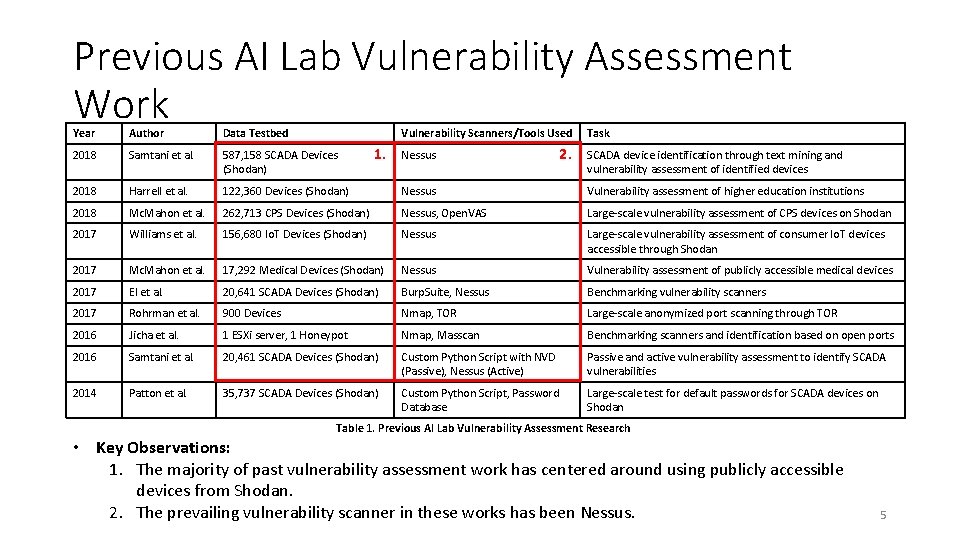
Previous AI Lab Vulnerability Assessment Work Year Author Data Testbed Vulnerability Scanners/Tools Used 2018 Samtani et al. 587, 158 SCADA Devices (Shodan) 2018 Harrell et al. 122, 360 Devices (Shodan) Nessus Vulnerability assessment of higher education institutions 2018 Mc. Mahon et al. 262, 713 CPS Devices (Shodan) Nessus, Open. VAS Large-scale vulnerability assessment of CPS devices on Shodan 2017 Williams et al. 156, 680 Io. T Devices (Shodan) Nessus Large-scale vulnerability assessment of consumer Io. T devices accessible through Shodan 2017 Mc. Mahon et al. 17, 292 Medical Devices (Shodan) Nessus Vulnerability assessment of publicly accessible medical devices 2017 El et al. 20, 641 SCADA Devices (Shodan) Burp. Suite, Nessus Benchmarking vulnerability scanners 2017 Rohrman et al. 900 Devices Nmap, TOR Large-scale anonymized port scanning through TOR 2016 Jicha et al. 1 ESXi server, 1 Honeypot Nmap, Masscan Benchmarking scanners and identification based on open ports 2016 Samtani et al. 20, 461 SCADA Devices (Shodan) Custom Python Script with NVD (Passive), Nessus (Active) Passive and active vulnerability assessment to identify SCADA vulnerabilities 2014 Patton et al. 35, 737 SCADA Devices (Shodan) Custom Python Script, Password Database Large-scale test for default passwords for SCADA devices on Shodan 1. Nessus 2. Task SCADA device identification through text mining and vulnerability assessment of identified devices Table 1. Previous AI Lab Vulnerability Assessment Research • Key Observations: 1. The majority of past vulnerability assessment work has centered around using publicly accessible devices from Shodan. 2. The prevailing vulnerability scanner in these works has been Nessus. 5
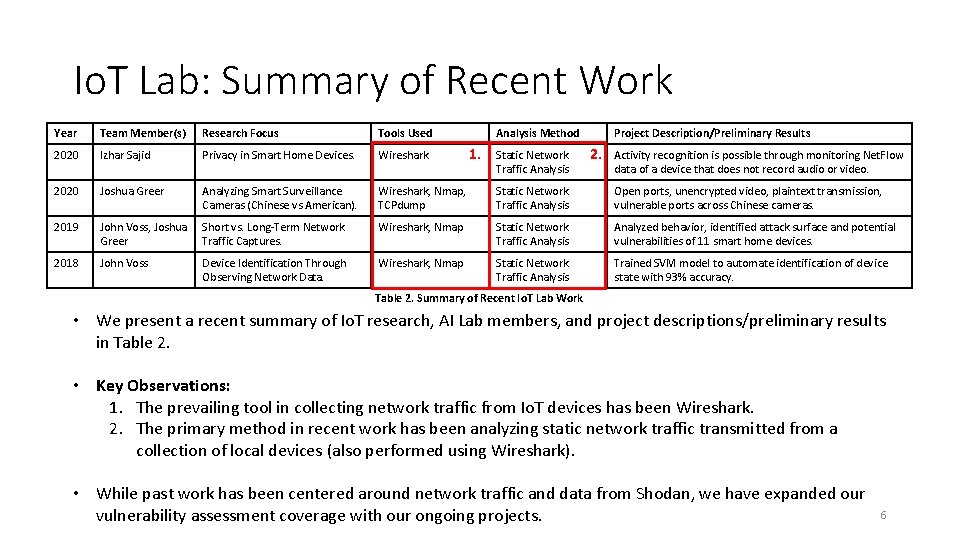
Io. T Lab: Summary of Recent Work Year Team Member(s) Research Focus Tools Used Analysis Method 2020 Izhar Sajid Privacy in Smart Home Devices. Wireshark 2020 Joshua Greer Analyzing Smart Surveillance Cameras (Chinese vs American). Wireshark, Nmap, TCPdump Static Network Traffic Analysis Open ports, unencrypted video, plaintext transmission, vulnerable ports across Chinese cameras. 2019 John Voss, Joshua Greer Short vs. Long-Term Network Traffic Captures. Wireshark, Nmap Static Network Traffic Analysis Analyzed behavior, identified attack surface and potential vulnerabilities of 11 smart home devices. 2018 John Voss Device Identification Through Observing Network Data. Wireshark, Nmap Static Network Traffic Analysis Trained SVM model to automate identification of device state with 93% accuracy. 1. Static Network Traffic Analysis Project Description/Preliminary Results 2. Activity recognition is possible through monitoring Net. Flow data of a device that does not record audio or video. Table 2. Summary of Recent Io. T Lab Work • We present a recent summary of Io. T research, AI Lab members, and project descriptions/preliminary results in Table 2. • Key Observations: 1. The prevailing tool in collecting network traffic from Io. T devices has been Wireshark. 2. The primary method in recent work has been analyzing static network traffic transmitted from a collection of local devices (also performed using Wireshark). • While past work has been centered around network traffic and data from Shodan, we have expanded our vulnerability assessment coverage with our ongoing projects. 6
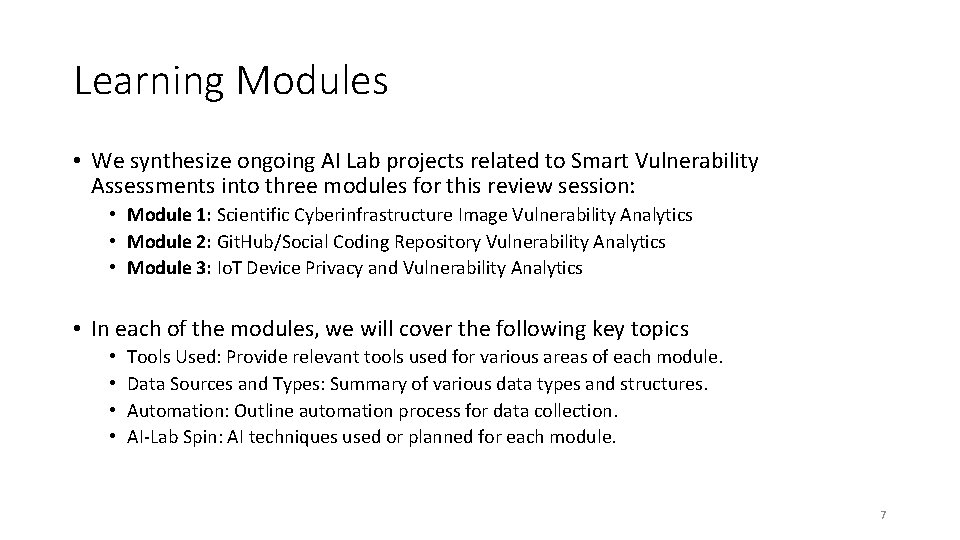
Learning Modules • We synthesize ongoing AI Lab projects related to Smart Vulnerability Assessments into three modules for this review session: • Module 1: Scientific Cyberinfrastructure Image Vulnerability Analytics • Module 2: Git. Hub/Social Coding Repository Vulnerability Analytics • Module 3: Io. T Device Privacy and Vulnerability Analytics • In each of the modules, we will cover the following key topics • • Tools Used: Provide relevant tools used for various areas of each module. Data Sources and Types: Summary of various data types and structures. Automation: Outline automation process for data collection. AI-Lab Spin: AI techniques used or planned for each module. 7
Module 1: OS/VM Image Vulnerability Assessment By Steven Ullman 8
OS/VM Image: Agenda and Learning Goals 1. We introduce scientific cyberinfrastructure platforms and the general userworkflow. • Cy. Verse Atmosphere, custom VM image templates • Learning outcome: Students will understand the environment and landscape for conducting scientific research. 2. We outline the data collection methodology and various system-related information and data that is available. • Learning outcome: Students see a template for a systematic collection process and selection of identifiable and host-relevant information. 3. We provide a systematic process for automating data collection. • Learning outcome: Students will understand the procedure for developing an automated data collection process. 9
Introduction and Motivation • Scientific cyberinfrastructure enables users to launch virtual machines (i. e. , images) to execute various scientific processes (e. g. , black hole imaging). • Users often install open source (e. g. , Git. Hub) apps and manipulate file systems (e. g. , write) to help support their desired analytics. • Often introduces vulnerabilities undetectable by conventional scanners (e. g. , Nessus). • Exploiting these vulnerabilities can potentially disrupt high-impact scientific workflows. Therefore, this research aims to identify: • Apps, their relationships (i. e. , dependencies), and vulnerabilities within images • File system structure changes within images • How changes to the apps, vulnerabilities, and file systems vary across images 10
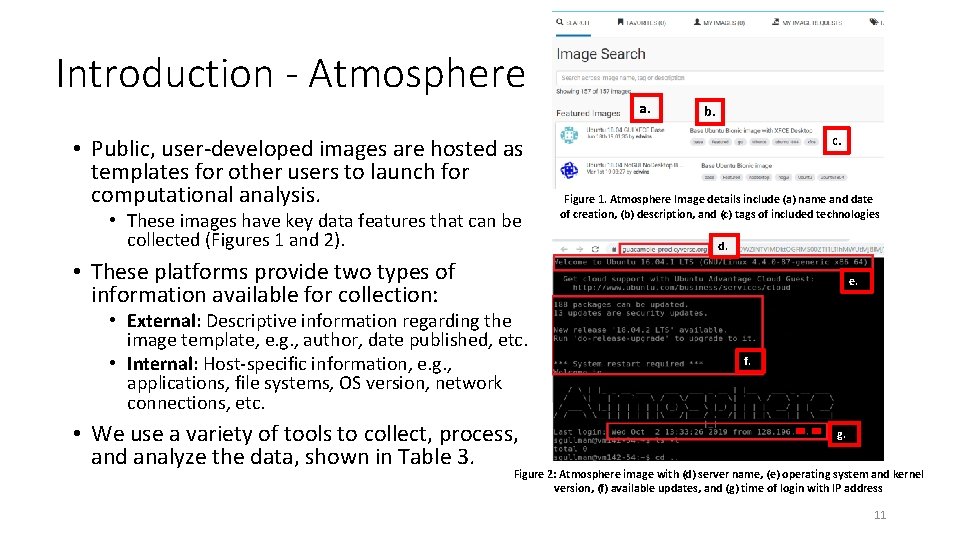
Introduction - Atmosphere • Public, user-developed images are hosted as templates for other users to launch for computational analysis. • These images have key data features that can be collected (Figures 1 and 2). a. b. c. Figure 1. Atmosphere Image details include (a) name and date of creation, (b) description, and (c) tags of included technologies d. • These platforms provide two types of information available for collection: e. • External: Descriptive information regarding the image template, e. g. , author, date published, etc. • Internal: Host-specific information, e. g. , applications, file systems, OS version, network connections, etc. • We use a variety of tools to collect, process, and analyze the data, shown in Table 3. f. g. Figure 2: Atmosphere image with (d) server name, (e) operating system and kernel version, (f) available updates, and (g) time of login with IP address 11
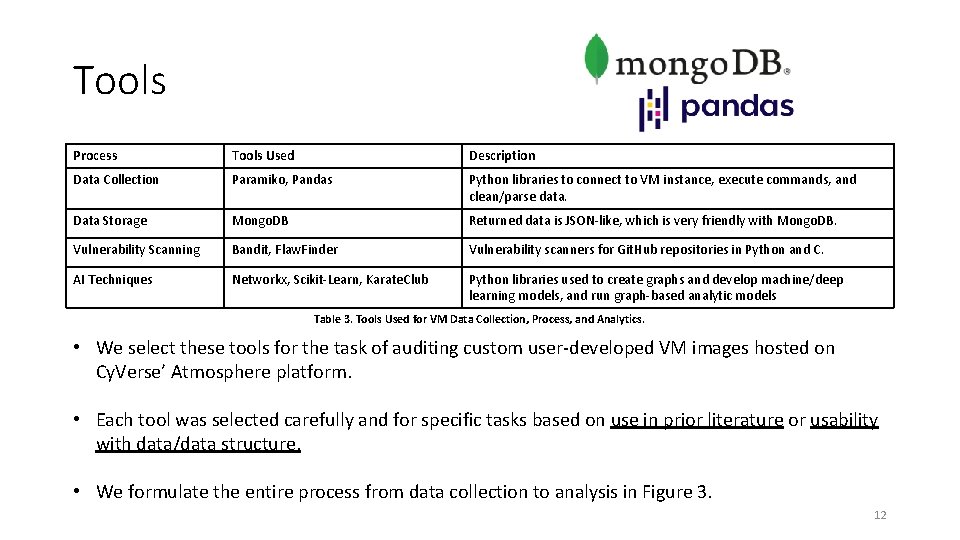
Tools Process Tools Used Description Data Collection Paramiko, Pandas Python libraries to connect to VM instance, execute commands, and clean/parse data. Data Storage Mongo. DB Returned data is JSON-like, which is very friendly with Mongo. DB. Vulnerability Scanning Bandit, Flaw. Finder Vulnerability scanners for Git. Hub repositories in Python and C. AI Techniques Networkx, Scikit-Learn, Karate. Club Python libraries used to create graphs and develop machine/deep learning models, and run graph-based analytic models Table 3. Tools Used for VM Data Collection, Process, and Analytics. • We select these tools for the task of auditing custom user-developed VM images hosted on Cy. Verse’ Atmosphere platform. • Each tool was selected carefully and for specific tasks based on use in prior literature or usability with data/data structure. • We formulate the entire process from data collection to analysis in Figure 3. 12
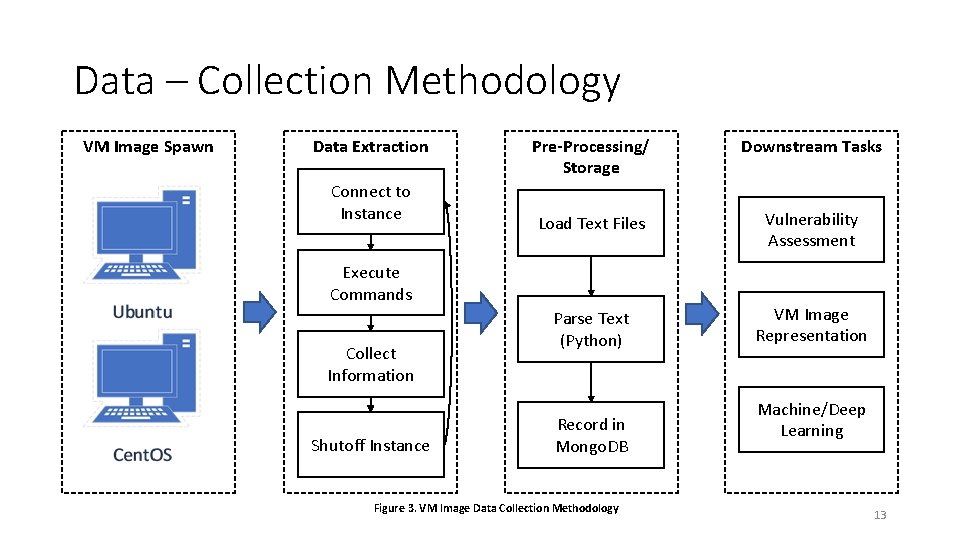
Data – Collection Methodology VM Image Spawn Data Extraction Connect to Instance Pre-Processing/ Storage Downstream Tasks Load Text Files Vulnerability Assessment Parse Text (Python) VM Image Representation Execute Commands Collect Information Shutoff Instance Record in Mongo. DB Figure 3. VM Image Data Collection Methodology Machine/Deep Learning 13
Data – Features from VM Images • For each of the launchable VM images, we devised a custom script that automatically extracts five categories of features: • • • External: Public facing details about what the image contains Application/Packages: Programs installed on the image Operating System: Details about OS the image is running Network Connection: What ports are open and connections the image has File System: The location, permissions, and structure of how files are stored • 200+ total features were extracted. Table 4 provides the data types, descriptions, and examples for selected key features in each category. 14
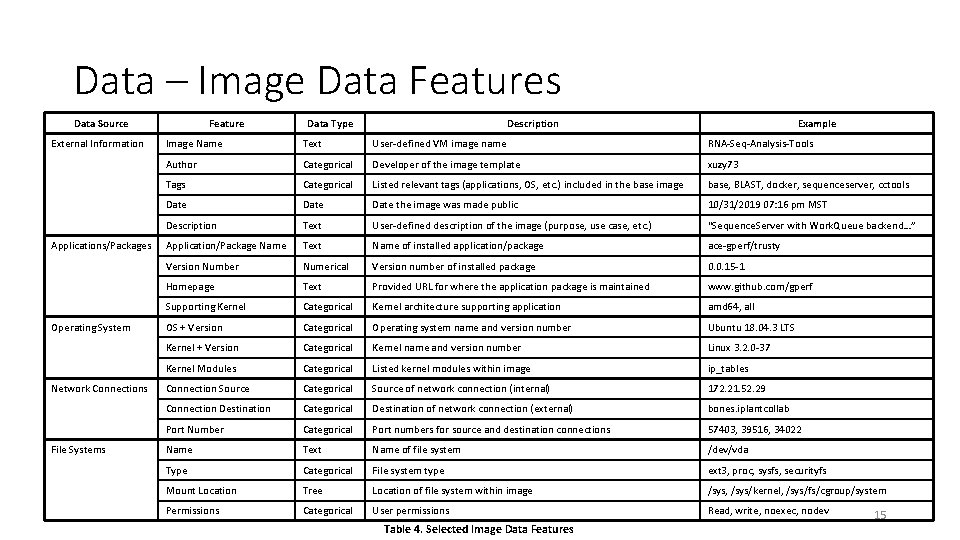
Data – Image Data Features Data Source External Information Applications/Packages Operating System Network Connections File Systems Feature Data Type Description Example Image Name Text User-defined VM image name RNA-Seq-Analysis-Tools Author Categorical Developer of the image template xuzy 73 Tags Categorical Listed relevant tags (applications, OS, etc. ) included in the base image base, BLAST, docker, sequenceserver, cctools Date the image was made public 10/31/2019 07: 16 pm MST Description Text User-defined description of the image (purpose, use case, etc. ) “Sequence. Server with Work. Queue backend…” Application/Package Name Text Name of installed application/package ace-gperf/trusty Version Number Numerical Version number of installed package 0. 0. 15 -1 Homepage Text Provided URL for where the application package is maintained www. github. com/gperf Supporting Kernel Categorical Kernel architecture supporting application amd 64, all OS + Version Categorical Operating system name and version number Ubuntu 18. 04. 3 LTS Kernel + Version Categorical Kernel name and version number Linux 3. 2. 0 -37 Kernel Modules Categorical Listed kernel modules within image ip_tables Connection Source Categorical Source of network connection (internal) 172. 21. 52. 29 Connection Destination Categorical Destination of network connection (external) bones. iplantcollab Port Number Categorical Port numbers for source and destination connections 57403, 39516, 34022 Name Text Name of file system /dev/vda Type Categorical File system type ext 3, proc, sysfs, securityfs Mount Location Tree Location of file system within image /sys, /sys/kernel, /sys/fs/cgroup/system Permissions Categorical User permissions Read, write, noexec, nodev Table 4. Selected Image Data Features 15
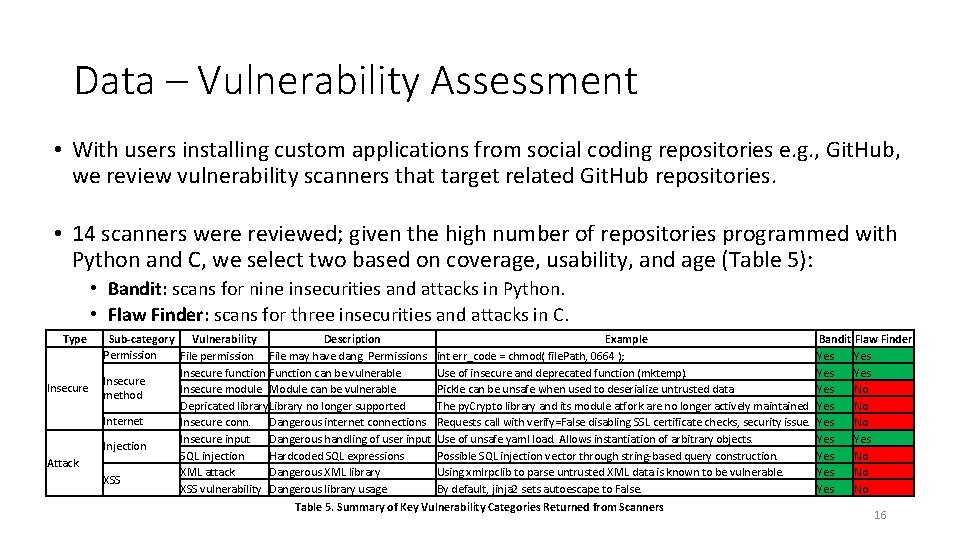
Data – Vulnerability Assessment • With users installing custom applications from social coding repositories e. g. , Git. Hub, we review vulnerability scanners that target related Git. Hub repositories. • 14 scanners were reviewed; given the high number of repositories programmed with Python and C, we select two based on coverage, usability, and age (Table 5): • Bandit: scans for nine insecurities and attacks in Python. • Flaw Finder: scans for three insecurities and attacks in C. Type Insecure Attack Sub-category Vulnerability Description Permission File permission File may have dang. Permissions Insecure function Function can be vulnerable Insecure module Module can be vulnerable method Depricated library. Library no longer supported Internet Insecure conn. Dangerous internet connections Insecure input Dangerous handling of user input Injection SQL injection Hardcoded SQL expressions XML attack Dangerous XML library XSS vulnerability Dangerous library usage Example int err_code = chmod( file. Path, 0664 ); Use of insecure and deprecated function (mktemp). Pickle can be unsafe when used to deserialize untrusted data The py. Crypto library and its module atfork are no longer actively maintained Requests call with verify=False disabling SSL certificate checks, security issue. Use of unsafe yaml load. Allows instantiation of arbitrary objects. Possible SQL injection vector through string-based query construction. Using xmlrpclib to parse untrusted XML data is known to be vulnerable. By default, jinja 2 sets autoescape to False. Table 5. Summary of Key Vulnerability Categories Returned from Scanners Bandit Flaw Finder Yes Yes Yes No Yes No 16
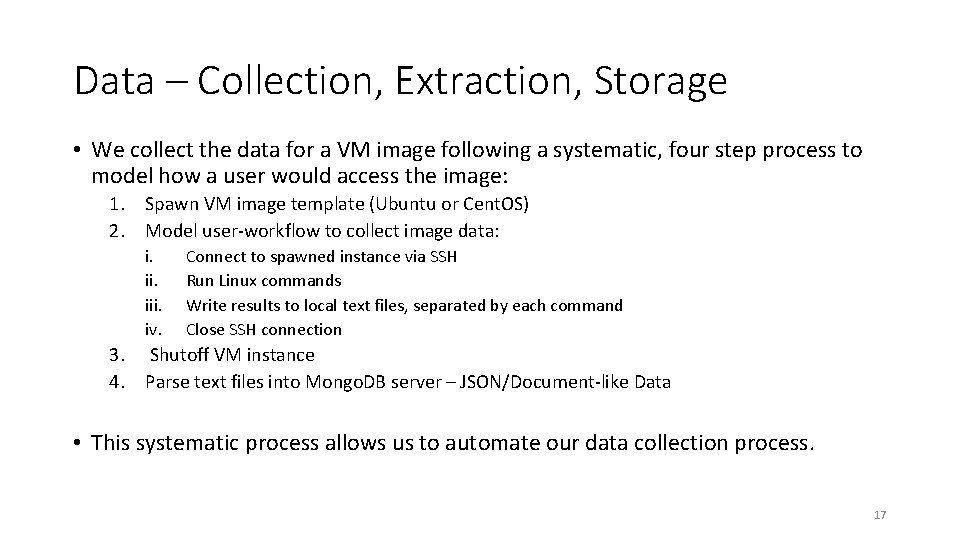
Data – Collection, Extraction, Storage • We collect the data for a VM image following a systematic, four step process to model how a user would access the image: 1. Spawn VM image template (Ubuntu or Cent. OS) 2. Model user-workflow to collect image data: i. iii. iv. Connect to spawned instance via SSH Run Linux commands Write results to local text files, separated by each command Close SSH connection 3. Shutoff VM instance 4. Parse text files into Mongo. DB server – JSON/Document-like Data • This systematic process allows us to automate our data collection process. 17
Automation • To automate our data collection process, we follow the identified user-workflow: 1. 2. 3. 4. Identify key data features (OS, host, network, file system) Model user-workflow (connect to instance, execute commands, print results) Execute each step of user-workflow in Python (use libraries and custom code) Combine each step to create end-to-end automated process • We use specific packages in Python and develop custom scripts to extract the data we need for one instance. • When we can successfully automate data extraction for one instance, we scale up and iterate over all instances. 18
AI-Spin – Unsupervised Graph Embedding Approach (Whole-Graph Level) • Our analysis methods are determined by our task and data structure, in our case, we develop a graph of applications with the task of assessing their vulnerabilities. • We choose a graph to capture the relations between applications based on shared dependencies. • The data are formally defined as G=(A, E, F), where: • • G is an undirected graph A is the node set, {u 1, u 2, u 3, … un}, of all applications in an image E is the edge set, {e 1, e 2, e 3, … en}, of directed edges between apps based on dependencies F is the feature matrix of each node; number of vulnerabilities of each application • Graph 2 vec is selected as it operates in an unsupervised fashion that creates an embedding from an entire graph, suitable for downstream tasks such as clustering or classification. • This unsupervised approach is required as no prior knowledge is available • We cluster the final graph embeddings and provide select vulnerability results in Figure 4. 19
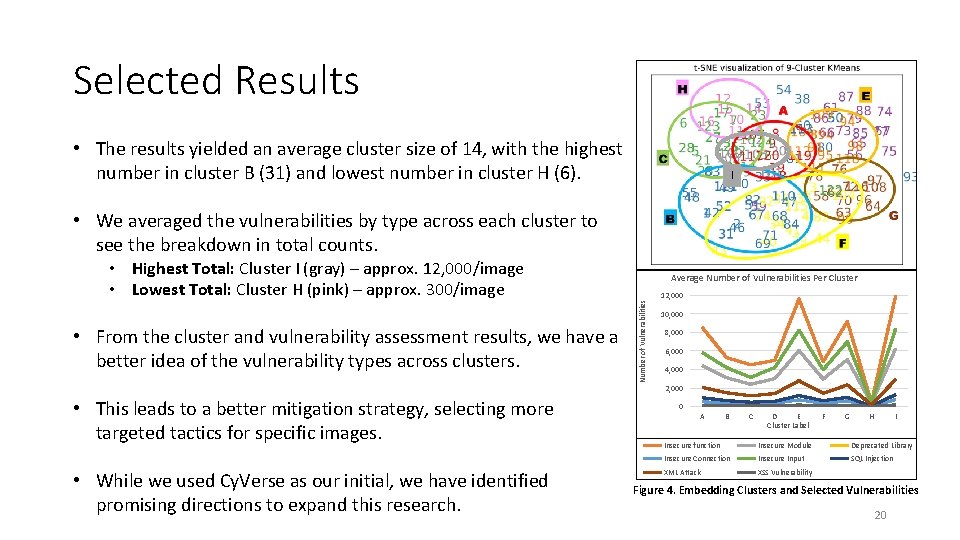
Selected Results • The results yielded an average cluster size of 14, with the highest number in cluster B (31) and lowest number in cluster H (6). I • We averaged the vulnerabilities by type across each cluster to see the breakdown in total counts. • From the cluster and vulnerability assessment results, we have a better idea of the vulnerability types across clusters. • This leads to a better mitigation strategy, selecting more targeted tactics for specific images. • While we used Cy. Verse as our initial, we have identified promising directions to expand this research. Average Number of Vulnerabilities Per Cluster Number of Vulnerabilities • Highest Total: Cluster I (gray) – approx. 12, 000/image • Lowest Total: Cluster H (pink) – approx. 300/image 12, 000 10, 000 8, 000 6, 000 4, 000 2, 000 0 A B C D E Cluster Label F G H I Insecure function Insecure Module Deprecated Library Insecure Connection Insecure Input SQL Injection XML Attack XSS Vulnerability Figure 4. Embedding Clusters and Selected Vulnerabilities 20
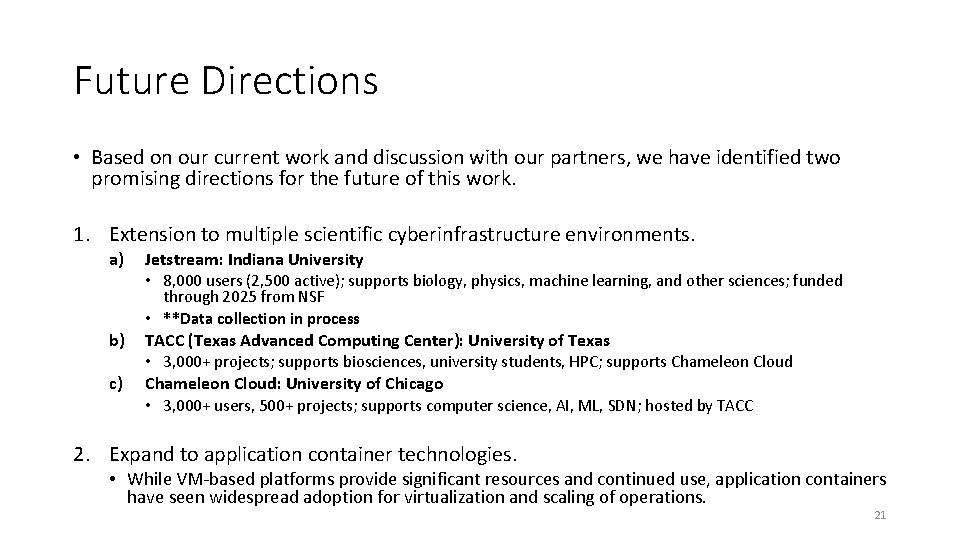
Future Directions • Based on our current work and discussion with our partners, we have identified two promising directions for the future of this work. 1. Extension to multiple scientific cyberinfrastructure environments. a) b) c) Jetstream: Indiana University • 8, 000 users (2, 500 active); supports biology, physics, machine learning, and other sciences; funded through 2025 from NSF • **Data collection in process TACC (Texas Advanced Computing Center): University of Texas • 3, 000+ projects; supports biosciences, university students, HPC; supports Chameleon Cloud: University of Chicago • 3, 000+ users, 500+ projects; supports computer science, AI, ML, SDN; hosted by TACC 2. Expand to application container technologies. • While VM-based platforms provide significant resources and continued use, application containers have seen widespread adoption for virtualization and scaling of operations. 21
Module 2: Git. Hub Vulnerability Assessment By Ben Lazarine 22
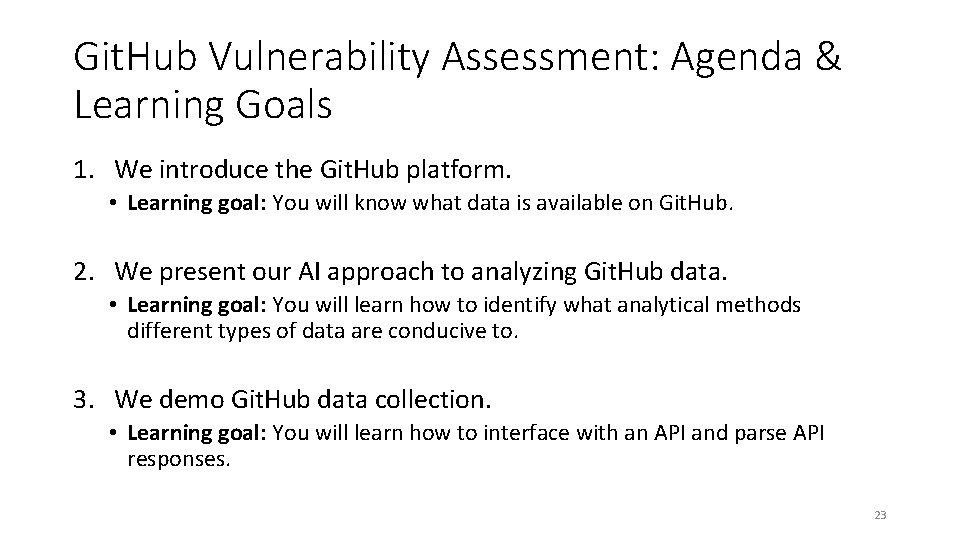
Git. Hub Vulnerability Assessment: Agenda & Learning Goals 1. We introduce the Git. Hub platform. • Learning goal: You will know what data is available on Git. Hub. 2. We present our AI approach to analyzing Git. Hub data. • Learning goal: You will learn how to identify what analytical methods different types of data are conducive to. 3. We demo Git. Hub data collection. • Learning goal: You will learn how to interface with an API and parse API responses. 23
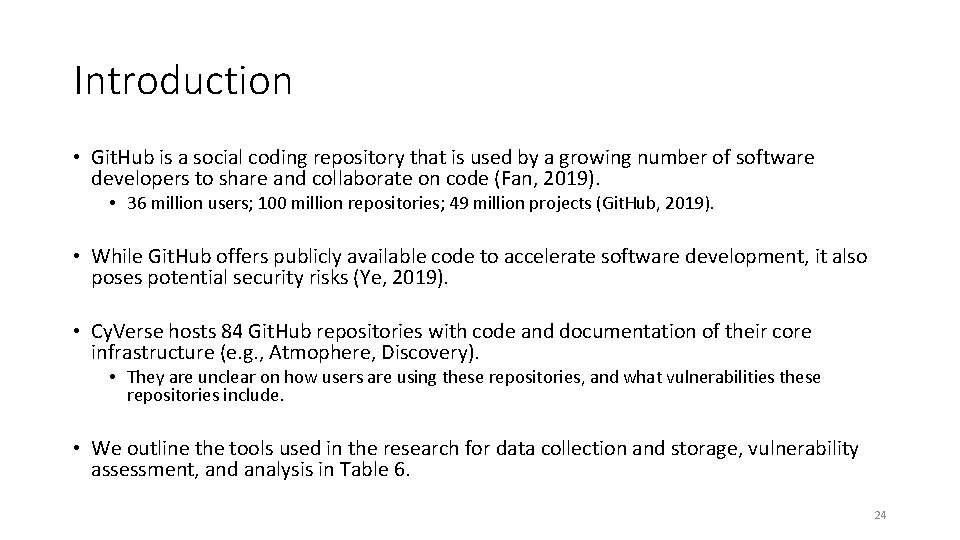
Introduction • Git. Hub is a social coding repository that is used by a growing number of software developers to share and collaborate on code (Fan, 2019). • 36 million users; 100 million repositories; 49 million projects (Git. Hub, 2019). • While Git. Hub offers publicly available code to accelerate software development, it also poses potential security risks (Ye, 2019). • Cy. Verse hosts 84 Git. Hub repositories with code and documentation of their core infrastructure (e. g. , Atmophere, Discovery). • They are unclear on how users are using these repositories, and what vulnerabilities these repositories include. • We outline the tools used in the research for data collection and storage, vulnerability assessment, and analysis in Table 6. 24
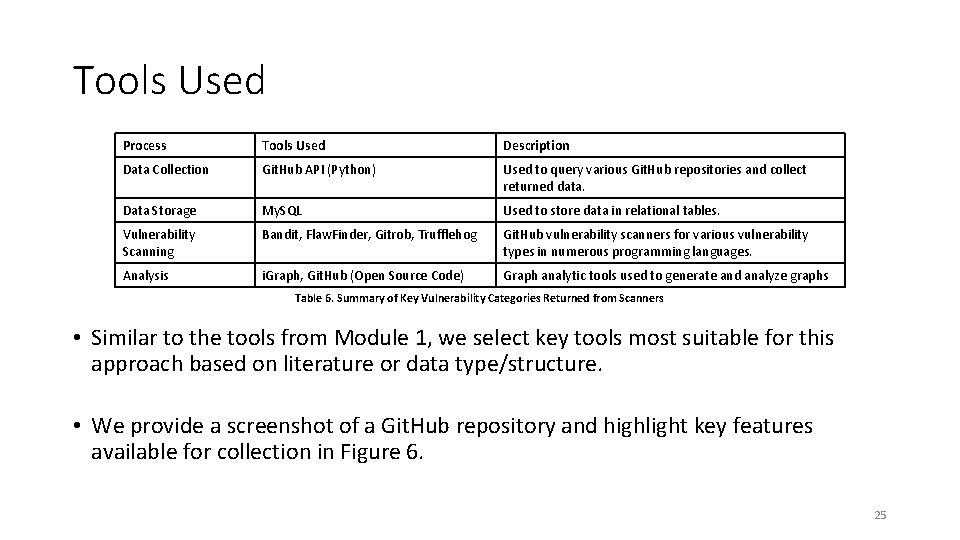
Tools Used Process Tools Used Description Data Collection Git. Hub API (Python) Used to query various Git. Hub repositories and collect returned data. Data Storage My. SQL Used to store data in relational tables. Vulnerability Scanning Bandit, Flaw. Finder, Gitrob, Trufflehog Git. Hub vulnerability scanners for various vulnerability types in numerous programming languages. Analysis i. Graph, Git. Hub (Open Source Code) Graph analytic tools used to generate and analyze graphs Table 6. Summary of Key Vulnerability Categories Returned from Scanners • Similar to the tools from Module 1, we select key tools most suitable for this approach based on literature or data type/structure. • We provide a screenshot of a Git. Hub repository and highlight key features available for collection in Figure 6. 25
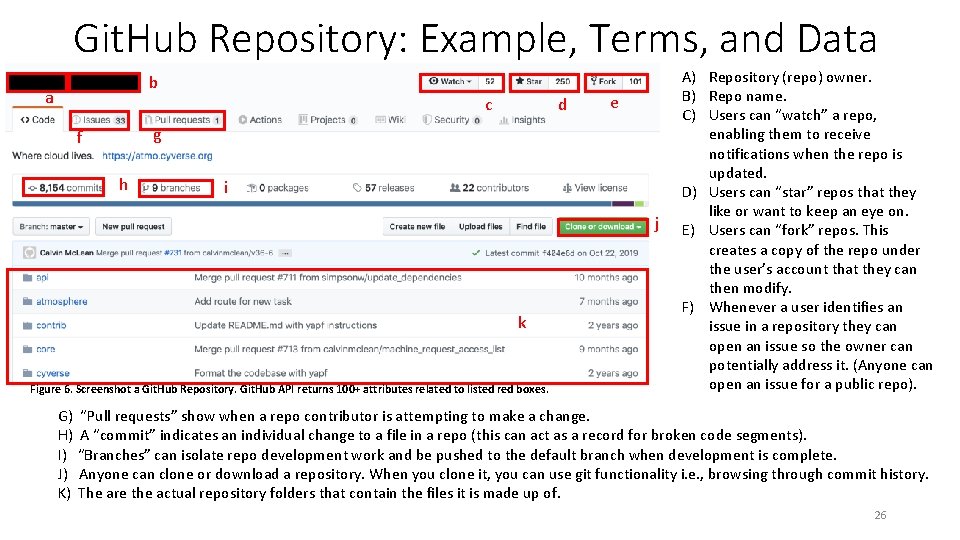
Git. Hub Repository: Example, Terms, and Data b a c d e g f h i j k Figure 6. Screenshot a Git. Hub Repository. Git. Hub API returns 100+ attributes related to listed red boxes. A) Repository (repo) owner. B) Repo name. C) Users can “watch” a repo, enabling them to receive notifications when the repo is updated. D) Users can “star” repos that they like or want to keep an eye on. E) Users can “fork” repos. This creates a copy of the repo under the user’s account that they can then modify. F) Whenever a user identifies an issue in a repository they can open an issue so the owner can potentially address it. (Anyone can open an issue for a public repo). G) “Pull requests” show when a repo contributor is attempting to make a change. H) A “commit” indicates an individual change to a file in a repo (this can act as a record for broken code segments). I) “Branches” can isolate repo development work and be pushed to the default branch when development is complete. J) Anyone can clone or download a repository. When you clone it, you can use git functionality i. e. , browsing through commit history. K) The are the actual repository folders that contain the files it is made up of. 26
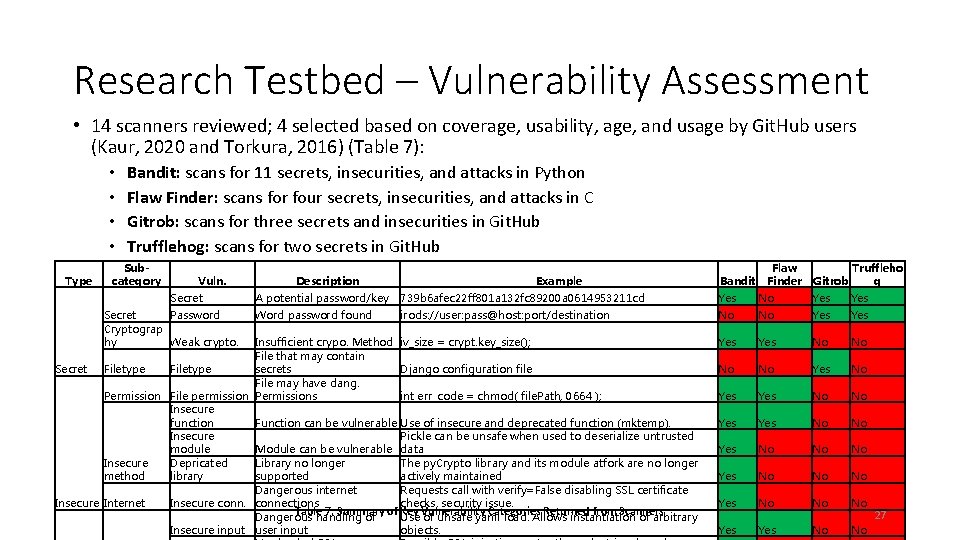
Research Testbed – Vulnerability Assessment • 14 scanners reviewed; 4 selected based on coverage, usability, age, and usage by Git. Hub users (Kaur, 2020 and Torkura, 2016) (Table 7): • • Type Bandit: scans for 11 secrets, insecurities, and attacks in Python Flaw Finder: scans for four secrets, insecurities, and attacks in C Gitrob: scans for three secrets and insecurities in Git. Hub Trufflehog: scans for two secrets in Git. Hub Subcategory Vuln. Secret Password Cryptograp hy Weak crypto. Description Example Bandit Flaw Finder Truffleho Gitrob g A potential password/key 739 b 6 afec 22 ff 801 a 132 fc 89200 a 0614953211 cd Yes No Yes Word password found irods: //user: pass@host: port/destination No No Yes Yes No No Yes No No No Yes No No Insufficient crypo. Method iv_size = crypt. key_size(); File that may contain Secret Filetype secrets Django configuration file File may have dang. Permission File permission Permissions int err_code = chmod( file. Path, 0664 ); Insecure function Function can be vulnerable Use of insecure and deprecated function (mktemp). Insecure Pickle can be unsafe when used to deserialize untrusted module Module can be vulnerable data Depricated Library no longer The py. Crypto library and its module atfork are no longer Insecure library supported actively maintained method Dangerous internet Requests call with verify=False disabling SSL certificate Insecure Internet Insecure connections checks, security issue. Table 7. Summary of Key Categories Returned from Scanners Dangerous handling of Use Vulnerability of unsafe yaml load. Allows instantiation of arbitrary Insecure input user input objects. 27
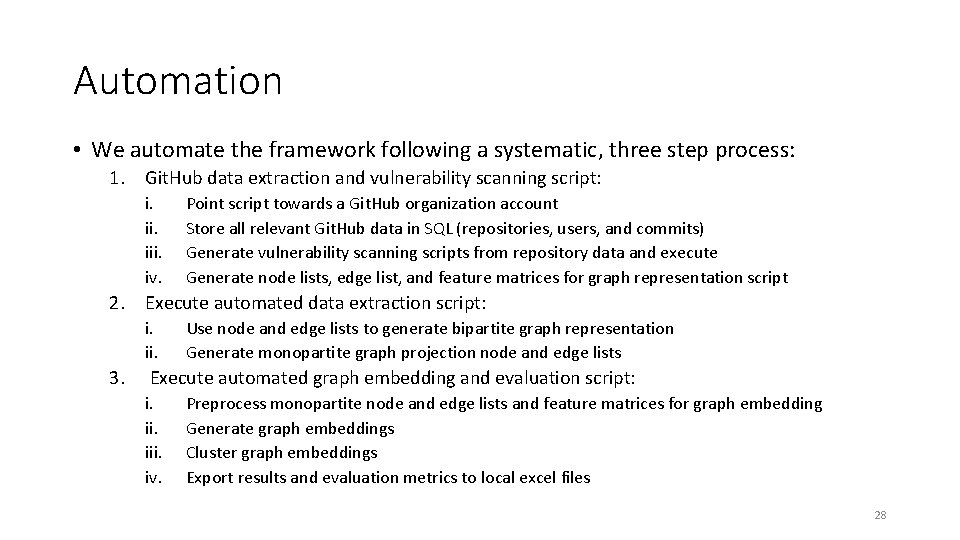
Automation • We automate the framework following a systematic, three step process: 1. Git. Hub data extraction and vulnerability scanning script: i. iii. iv. Point script towards a Git. Hub organization account Store all relevant Git. Hub data in SQL (repositories, users, and commits) Generate vulnerability scanning scripts from repository data and execute Generate node lists, edge list, and feature matrices for graph representation script 2. Execute automated data extraction script: i. ii. 3. Use node and edge lists to generate bipartite graph representation Generate monopartite graph projection node and edge lists Execute automated graph embedding and evaluation script: i. iii. iv. Preprocess monopartite node and edge lists and feature matrices for graph embedding Generate graph embeddings Cluster graph embeddings Export results and evaluation metrics to local excel files 28
AI-spin – Unsupervised Graph Embedding Approach (Node Level) • To analyze our data, we can structure the relationship between users and repositories into a bipartite network. • Vulnerabilities can be linked to users and repositories as features. • We denote the bipartite network as G=(U, R, E, F), where: • • • G is a directed graph U is the node set, {u 1, u 2, u 3, … un}, of all users that have contributed to a repo R is the node set, {r 1, r 2, r 3, … rn}, of all repos E is the edge set, {e 1, e 2, e 3, … en}, of directed edges from a user committing to a repo F is the feature matrix of each node; number of vulnerabilities from each user or repo • Unsupervised graph embedding is used to create graph embedding that store user/repository network and feature data in a 2 k-dimensional vertex. • This allows for grouping users and repositories based on their relationships and vulnerabilities without prior knowledge. • We cluster the embedding and provide selected vulnerability results in Figures 7 and 8. 29
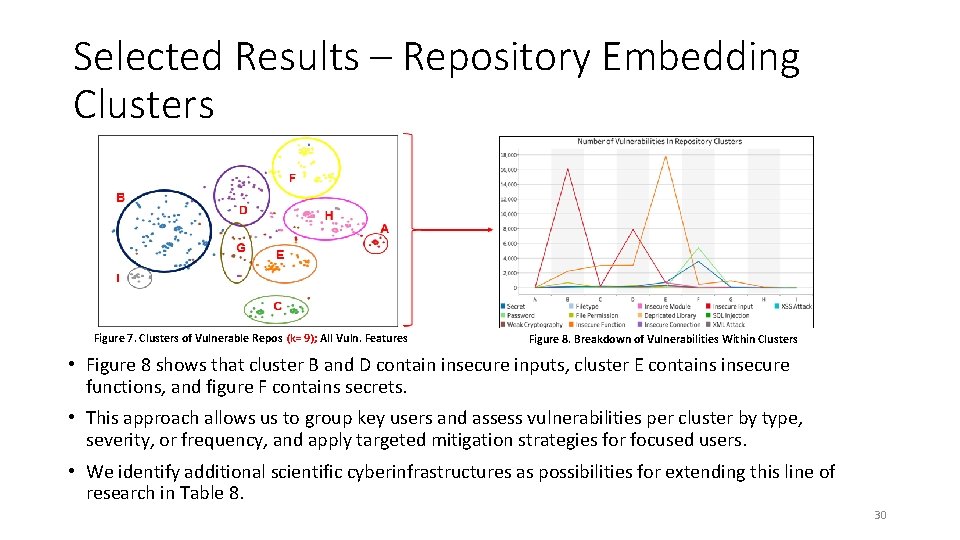
Selected Results – Repository Embedding Clusters Figure 7. Clusters of Vulnerable Repos (k= 9); All Vuln. Features Figure 8. Breakdown of Vulnerabilities Within Clusters • Figure 8 shows that cluster B and D contain insecure inputs, cluster E contains insecure functions, and figure F contains secrets. • This approach allows us to group key users and assess vulnerabilities per cluster by type, severity, or frequency, and apply targeted mitigation strategies for focused users. • We identify additional scientific cyberinfrastructures as possibilities for extending this line of research in Table 8. 30
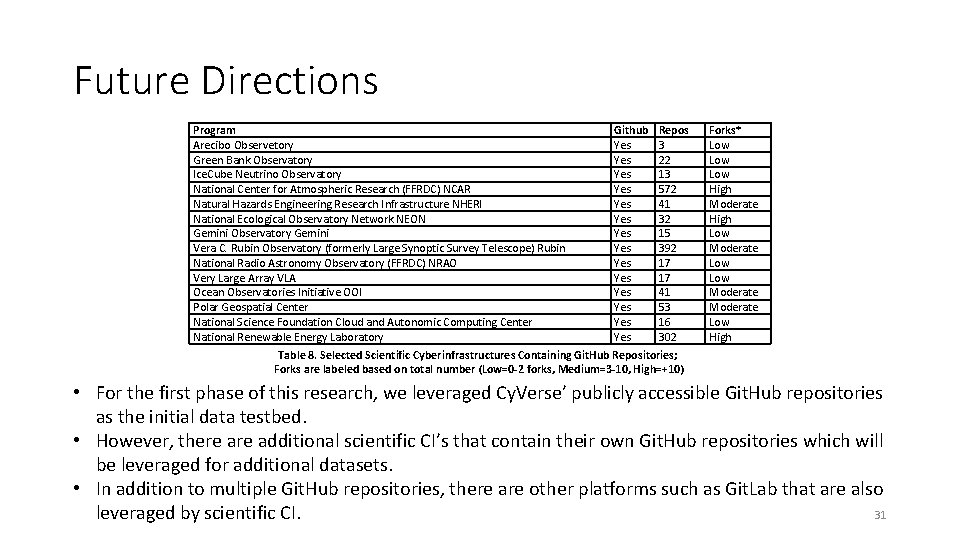
Future Directions Program Arecibo Observetory Green Bank Observatory Ice. Cube Neutrino Observatory National Center for Atmospheric Research (FFRDC) NCAR Natural Hazards Engineering Research Infrastructure NHERI National Ecological Observatory Network NEON Gemini Observatory Gemini Vera C. Rubin Observatory (formerly Large Synoptic Survey Telescope) Rubin National Radio Astronomy Observatory (FFRDC) NRAO Very Large Array VLA Ocean Observatories Initiative OOI Polar Geospatial Center National Science Foundation Cloud and Autonomic Computing Center National Renewable Energy Laboratory Github Yes Yes Yes Yes Repos 3 22 13 572 41 32 15 392 17 17 41 53 16 302 Forks* Low Low High Moderate High Low Moderate Low High Table 8. Selected Scientific Cyberinfrastructures Containing Git. Hub Repositories; Forks are labeled based on total number (Low=0 -2 forks, Medium=3 -10, High=+10) • For the first phase of this research, we leveraged Cy. Verse’ publicly accessible Git. Hub repositories as the initial data testbed. • However, there additional scientific CI’s that contain their own Git. Hub repositories which will be leveraged for additional datasets. • In addition to multiple Git. Hub repositories, there are other platforms such as Git. Lab that are also leveraged by scientific CI. 31
Module 3: Internet of Things (Io. T) By Izhar Sajid 32
Internet of Things: Agenda and Learning Goals 1. We introduce the Internet of Things as an area of research. • Data Types within Io. T (Net. Flow and Fingerprinting), Io. T Search Engines. • Learning goal: You will know what types of data are available. 2. We introduce the current Io. T Lab infrastructure. • Current Devices, Available Data Captures and Io. T Tools. • Learning goal: You will know the scope of the Io. T Lab and resources available to you. 3. We demo Shodan and Nessus to illustrate how vulnerabilities can be identified across Io. T Devices. • Learning goal: You will see an example of collecting data from Shodan and how this data can be leveraged through a vulnerability assessment platform to identify threats. 33
The Internet of Things (Io. T) • The Internet of things (Io. T) is the inter-networking of physical devices embedded with electronics, software, sensors, actuators, and network connectivity which enable these objects to collect and exchange data. • Io. T is prevalent across several sectors providing personalized services. Examples include: Industrial, Healthcare, Fin-Tech, Retail, Smart Cities, and Smart Homes. • Although Io. T enhances the quality of our lives, it also poses serious security and privacy challenges. • We present the various tools, their purpose, and description in Table 9. 34
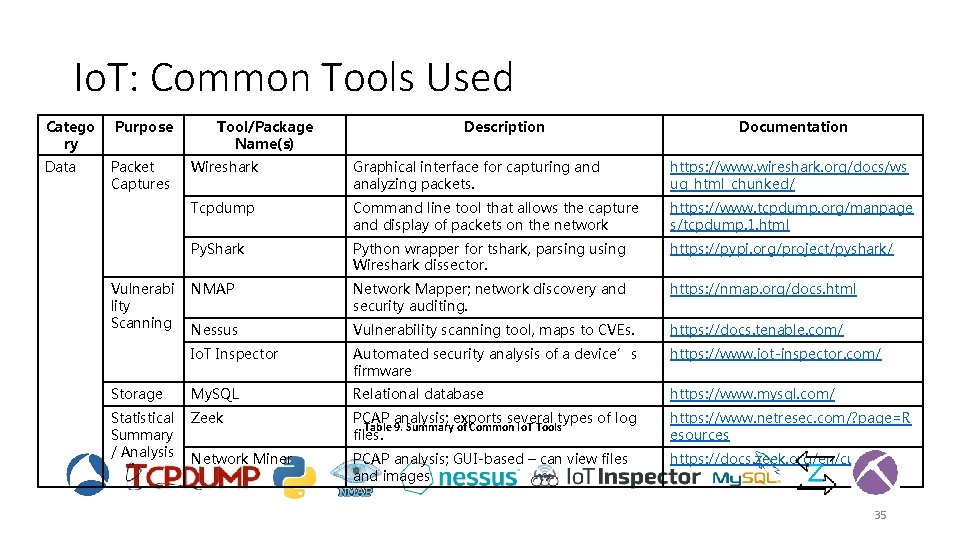
Io. T: Common Tools Used Catego ry Data Purpose Packet Captures Tool/Package Name(s) Description Documentation Wireshark Graphical interface for capturing and analyzing packets. https: //www. wireshark. org/docs/ws ug_html_chunked/ Tcpdump Command line tool that allows the capture and display of packets on the network https: //www. tcpdump. org/manpage s/tcpdump. 1. html Py. Shark Python wrapper for tshark, parsing using Wireshark dissector. https: //pypi. org/project/pyshark/ NMAP Network Mapper; network discovery and security auditing. https: //nmap. org/docs. html Nessus Vulnerability scanning tool, maps to CVEs. https: //docs. tenable. com/ Io. T Inspector Automated security analysis of a device’s firmware https: //www. iot-inspector. com/ Storage My. SQL Relational database https: //www. mysql. com/ Statistical Summary / Analysis Zeek PCAP analysis; exports several types of log Table 9. Summary of Common Io. T Tools files. https: //www. netresec. com/? page=R esources Network Miner PCAP analysis; GUI-based – can view files and images https: //docs. zeek. org/en/current/ Vulnerabi lity Scanning 35
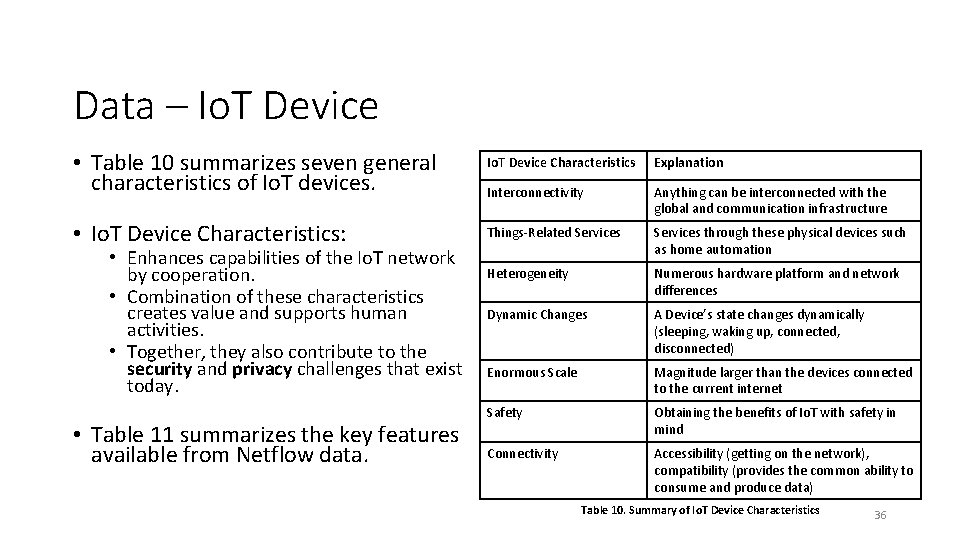
Data – Io. T Device • Table 10 summarizes seven general characteristics of Io. T devices. Io. T Device Characteristics Explanation Interconnectivity Anything can be interconnected with the global and communication infrastructure • Io. T Device Characteristics: Things-Related Services through these physical devices such as home automation Heterogeneity Numerous hardware platform and network differences Dynamic Changes A Device’s state changes dynamically (sleeping, waking up, connected, disconnected) Enormous Scale Magnitude larger than the devices connected to the current internet Safety Obtaining the benefits of Io. T with safety in mind Connectivity Accessibility (getting on the network), compatibility (provides the common ability to consume and produce data) • Enhances capabilities of the Io. T network by cooperation. • Combination of these characteristics creates value and supports human activities. • Together, they also contribute to the security and privacy challenges that exist today. • Table 11 summarizes the key features available from Netflow data. Table 10. Summary of Io. T Device Characteristics 36
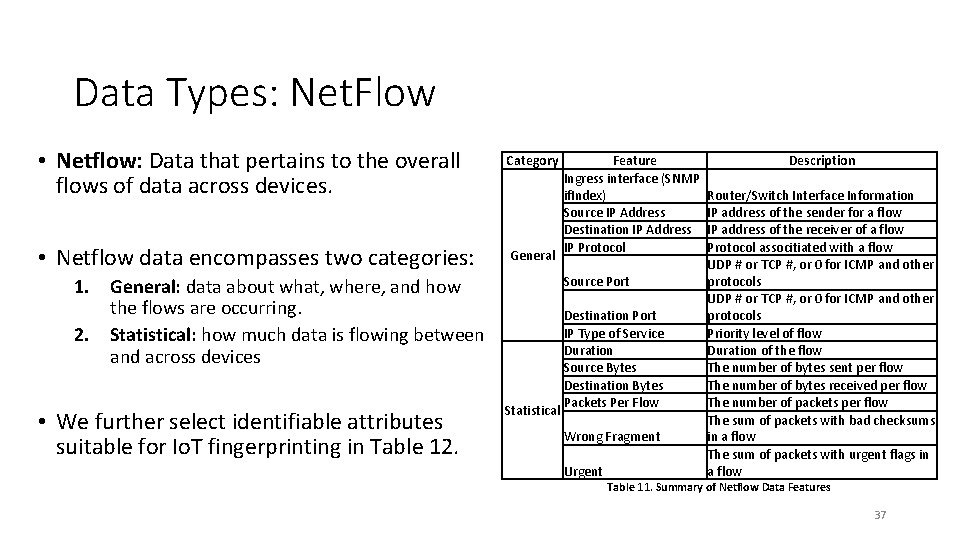
Data Types: Net. Flow • Netflow: Data that pertains to the overall flows of data across devices. • Netflow data encompasses two categories: Category General Source Port 1. General: data about what, where, and how the flows are occurring. 2. Statistical: how much data is flowing between and across devices • We further select identifiable attributes suitable for Io. T fingerprinting in Table 12. Feature Ingress interface (SNMP if. Index) Source IP Address Destination IP Address IP Protocol Statistical Destination Port IP Type of Service Duration Source Bytes Destination Bytes Packets Per Flow Wrong Fragment Urgent Description Router/Switch Interface Information IP address of the sender for a flow IP address of the receiver of a flow Protocol associtiated with a flow UDP # or TCP #, or 0 for ICMP and other protocols Priority level of flow Duration of the flow The number of bytes sent per flow The number of bytes received per flow The number of packets per flow The sum of packets with bad checksums in a flow The sum of packets with urgent flags in a flow Table 11. Summary of Netflow Data Features 37
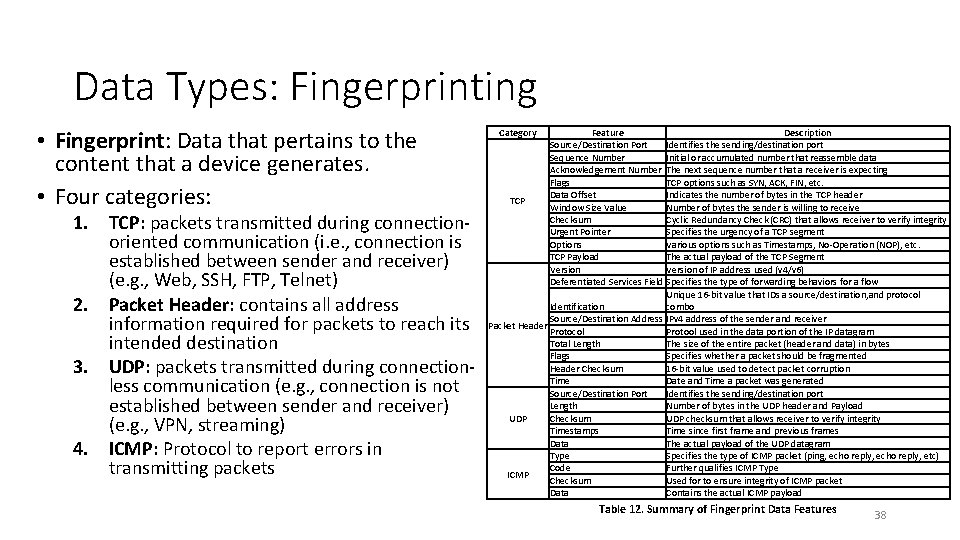
Data Types: Fingerprinting • Fingerprint: Data that pertains to the content that a device generates. • Four categories: 1. TCP: packets transmitted during connectionoriented communication (i. e. , connection is established between sender and receiver) (e. g. , Web, SSH, FTP, Telnet) 2. Packet Header: contains all address information required for packets to reach its intended destination 3. UDP: packets transmitted during connectionless communication (e. g. , connection is not established between sender and receiver) (e. g. , VPN, streaming) 4. ICMP: Protocol to report errors in transmitting packets Category Feature Description Source/Destination Port Identifies the sending/destination port Sequence Number Initial or accumulated number that reassemble data Acknowledgement Number The next sequence number that a receiver is expecting Flags TCP options such as SYN, ACK, FIN, etc. Data Offset Indicates the number of bytes in the TCP header TCP Window Size Value Number of bytes the sender is willing to receive Checksum Cyclic Redundancy Check (CRC) that allows receiver to verify integrity Urgent Pointer Specifies the urgency of a TCP segment Options Various options such as Timestamps, No-Operation (NOP), etc. TCP Payload The actual payload of the TCP Segment Version of IP address used (v 4/v 6) Deferentiated Services Field Specifies the type of forwarding behaviors for a flow Unique 16 -bit value that IDs a source/destination, and protocol Identification combo Source/Destination Address IPv 4 address of the sender and receiver Packet Header Protocol Protool used in the data portion of the IP datagram Total Length The size of the entire packet (header and data) in bytes Flags Specifies whether a packet should be fragmented Header Checksum 16 -bit value used to detect packet corruption Time Date and Time a packet was generated Source/Destination Port Identifies the sending/destination port Length Number of bytes in the UDP header and Payload UDP Checksum UDP checksum that allows receiver to verify integrity Timestamps Time since first frame and previous frames Data The actual payload of the UDP datagram Type Specifies the type of ICMP packet (ping, echo reply, etc) Code Further qualifies ICMP Type ICMP Checksum Used for to ensure integrity of ICMP packet Data Contains the actual ICMP payload Table 12. Summary of Fingerprint Data Features 38
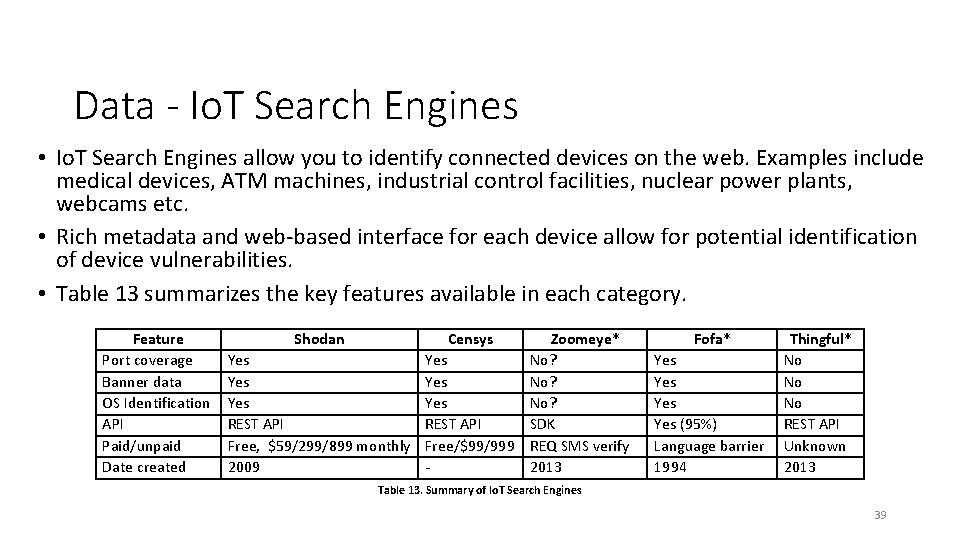
Data - Io. T Search Engines • Io. T Search Engines allow you to identify connected devices on the web. Examples include medical devices, ATM machines, industrial control facilities, nuclear power plants, webcams etc. • Rich metadata and web-based interface for each device allow for potential identification of device vulnerabilities. • Table 13 summarizes the key features available in each category. Feature Port coverage Banner data OS Identification API Paid/unpaid Date created Shodan Censys Zoomeye* Yes Yes No? REST API SDK Free, $59/299/899 monthly Free/$99/999 REQ SMS verify 2009 2013 Fofa* Yes Yes (95%) Language barrier 1994 Thingful* No No No REST API Unknown 2013 Table 13. Summary of Io. T Search Engines 39
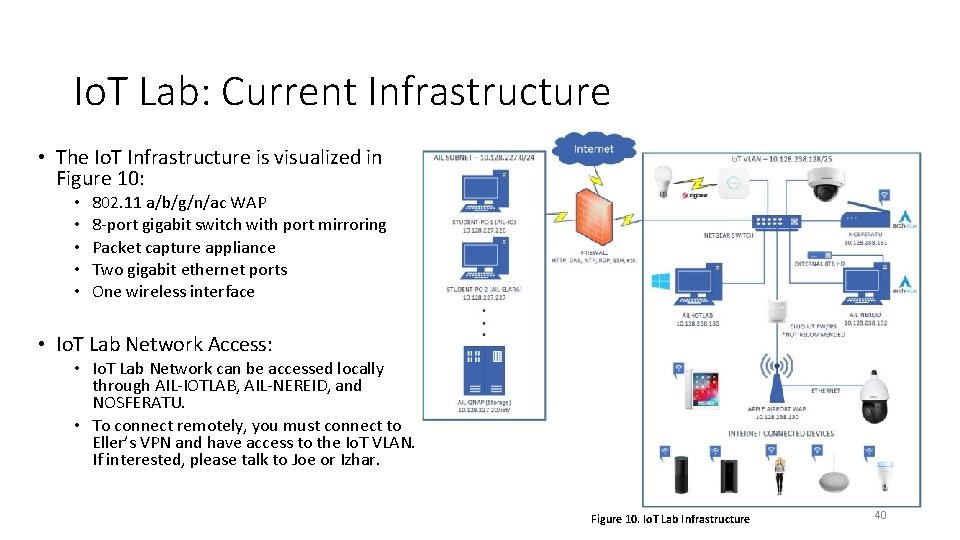
Io. T Lab: Current Infrastructure • The Io. T Infrastructure is visualized in Figure 10: • • • 802. 11 a/b/g/n/ac WAP 8 -port gigabit switch with port mirroring Packet capture appliance Two gigabit ethernet ports One wireless interface • Io. T Lab Network Access: • Io. T Lab Network can be accessed locally through AIL-IOTLAB, AIL-NEREID, and NOSFERATU. • To connect remotely, you must connect to Eller’s VPN and have access to the Io. T VLAN. If interested, please talk to Joe or Izhar. Figure 10. Io. T Lab Infrastructure 40
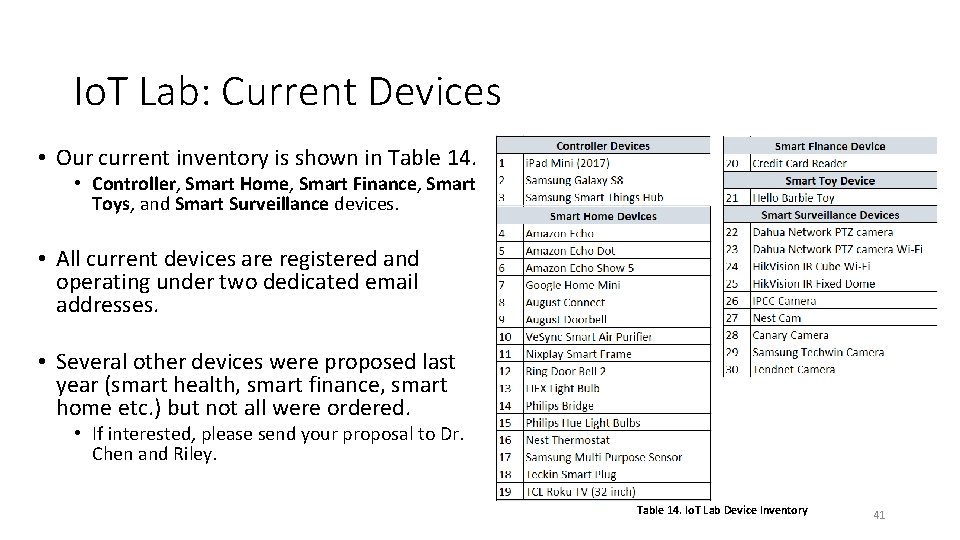
Io. T Lab: Current Devices • Our current inventory is shown in Table 14. • Controller, Smart Home, Smart Finance, Smart Toys, and Smart Surveillance devices. • All current devices are registered and operating under two dedicated email addresses. • Several other devices were proposed last year (smart health, smart finance, smart home etc. ) but not all were ordered. • If interested, please send your proposal to Dr. Chen and Riley. Table 14. Io. T Lab Device Inventory 41
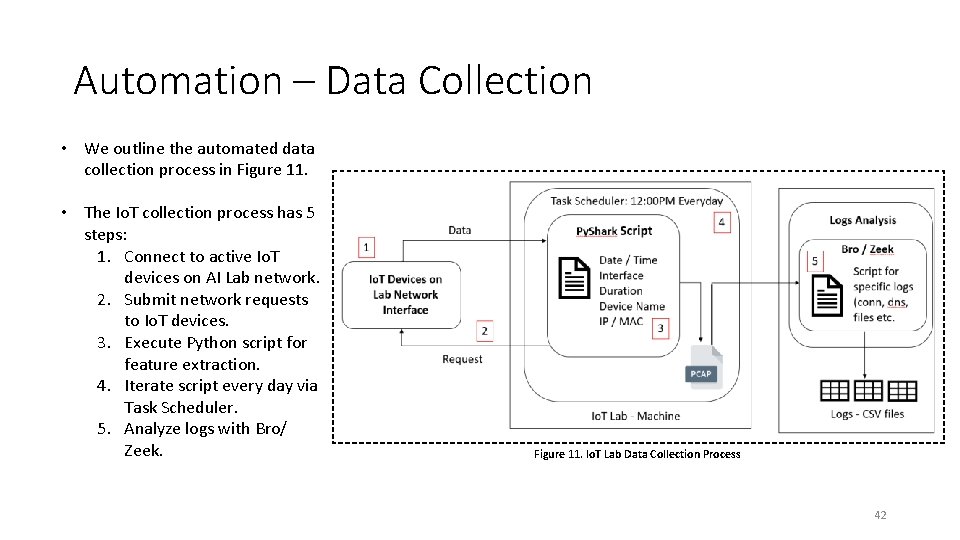
Automation – Data Collection • We outline the automated data collection process in Figure 11. • The Io. T collection process has 5 steps: 1. Connect to active Io. T devices on AI Lab network. 2. Submit network requests to Io. T devices. 3. Execute Python script for feature extraction. 4. Iterate script every day via Task Scheduler. 5. Analyze logs with Bro/ Zeek. Figure 11. Io. T Lab Data Collection Process 42
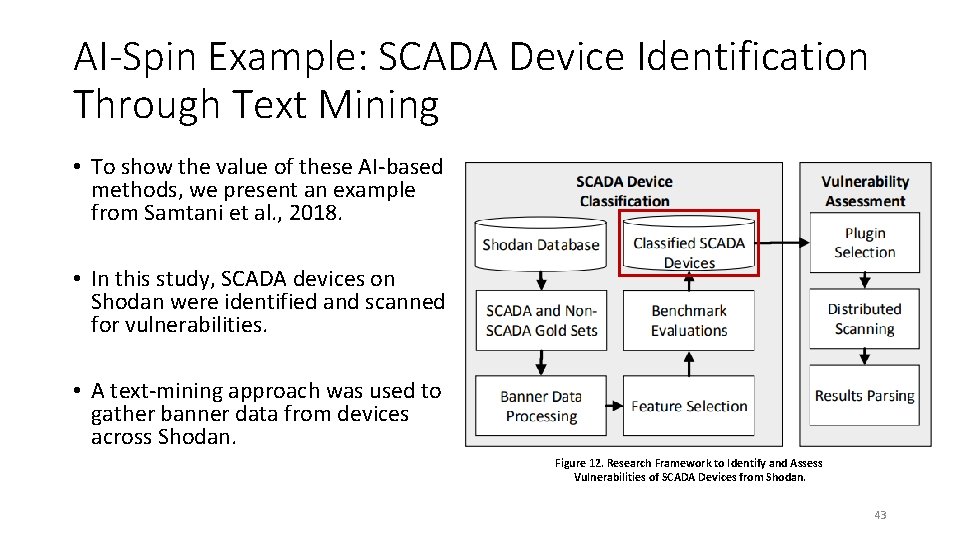
AI-Spin Example: SCADA Device Identification Through Text Mining • To show the value of these AI-based methods, we present an example from Samtani et al. , 2018. • In this study, SCADA devices on Shodan were identified and scanned for vulnerabilities. • A text-mining approach was used to gather banner data from devices across Shodan. Figure 12. Research Framework to Identify and Assess Vulnerabilities of SCADA Devices from Shodan. 43
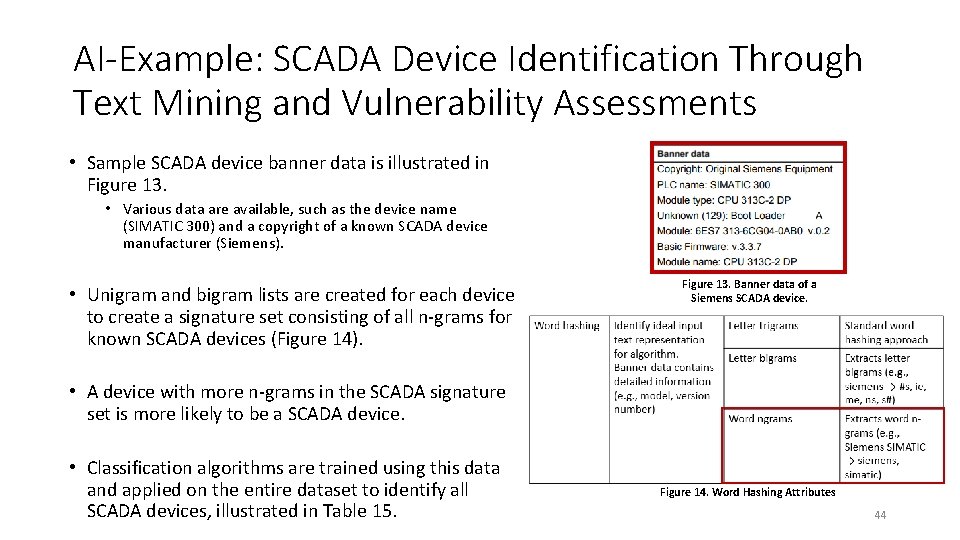
AI-Example: SCADA Device Identification Through Text Mining and Vulnerability Assessments • Sample SCADA device banner data is illustrated in Figure 13. • Various data are available, such as the device name (SIMATIC 300) and a copyright of a known SCADA device manufacturer (Siemens). • Unigram and bigram lists are created for each device to create a signature set consisting of all n-grams for known SCADA devices (Figure 14). Figure 13. Banner data of a Siemens SCADA device. • A device with more n-grams in the SCADA signature set is more likely to be a SCADA device. • Classification algorithms are trained using this data and applied on the entire dataset to identify all SCADA devices, illustrated in Table 15. Figure 14. Word Hashing Attributes 44
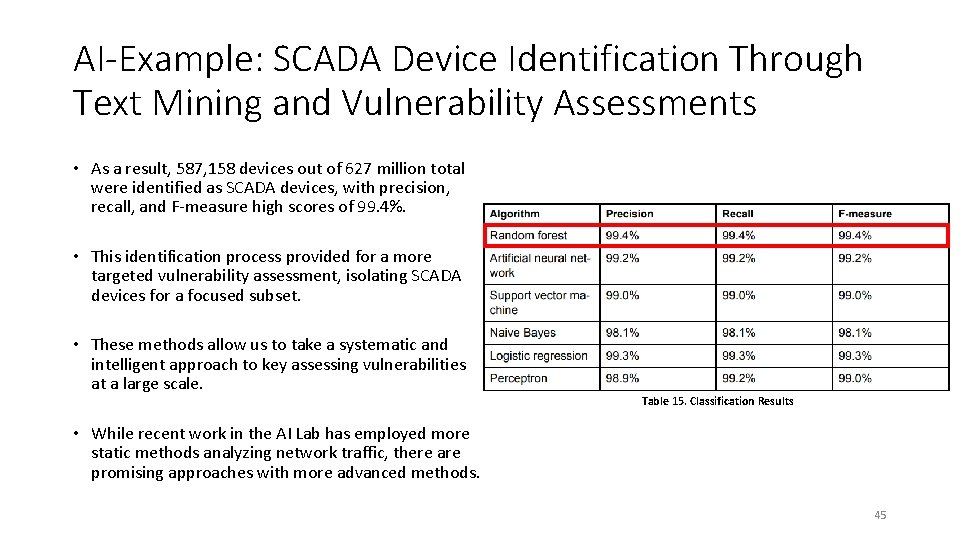
AI-Example: SCADA Device Identification Through Text Mining and Vulnerability Assessments • As a result, 587, 158 devices out of 627 million total were identified as SCADA devices, with precision, recall, and F-measure high scores of 99. 4%. • This identification process provided for a more targeted vulnerability assessment, isolating SCADA devices for a focused subset. • These methods allow us to take a systematic and intelligent approach to key assessing vulnerabilities at a large scale. Table 15. Classification Results • While recent work in the AI Lab has employed more static methods analyzing network traffic, there are promising approaches with more advanced methods. 45
Future Directions • Potential directions for Io. T research leveraging AI methods: • Multi-View Learning: fusion of Net. Flow, Fingerprint and OSINT data. • Auto-Encoder: industrial sensor-based data. • GPT-3: Home privacy (text to voice – i. e. Io. T scripts) • We have primarily leveraged single data sources (e. g. , network traffic) and one Io. T Search Engine (Io. TSE). • Fusing multiple sources and types of data using multiple Io. TSE’s can provide more holistic device representations. • Potential for incorporating multiple, unconventional vulnerability features for devices. 46
Summary • Smart Vulnerability Assessment (SVA) applies AI techniques to system/device information to better assess inherent vulnerabilities. • We presented several key areas of work that the AI Lab is focused on for SVA: • VM Images in Scientific Cyberinfrastructure • Public Social Coding Repositories (Git. Hub) • Io. T Devices • For work in the AI Lab, it is critical to identify the available data, sources and types, and relevant security/vulnerability features. • These determine the specific types of analytics that can be used within the research • Finally, an automated and scalable approach is critical for collecting data and assessing vulnerabilities/security concerns within each area. 47
Questions 48
- Slides: 48